BIBLIOTECAS DIGITAIS METADADOS FORMAÇÃO BAD 2008 – Paulo Leitão
1. Metadados: conceitos básicos Dados sobre dados / informação sobre informação Informação legível por máquina Objecto: um recurso identificado por um URI  (Uniform Resource Identifier) Afirmações sobre um recurso: “declarações” e ligações
1. Metadados: conceitos básicos Metadados como linguagens: Vocabulário Semântica Sintaxe
1. Metadados: conceitos básicos Diversos níveis de complexidade descritiva Âmbito diversificado: linguagens generalistas / linguagens específicas
2. Metadados: objectivos Descrição e Recuperação da informação     Metadados descritivos Acesso e preservação     Metadados técnicos Administração do recurso     Metadados administrativos
3. Classificação de metadados Método de criação : metadados gerados automaticamente VS metadados gerados manualmente Criadores : especializados VS não especializados
3. Classificação de metadados Controlo semântico : metadados controlados VS metadados não controlados Forma de armazenamento : metadados embebidos no próprio documento VS metadados separados do documento
3. Classificação de metadados Nível de estruturação : metadados não estruturados VS metadados altamente estruturados Nível de descrição : metadados para a descrição de conjuntos VS metadados para a descrição de recursos individuais
3. Classificação de metadados Fonte e momento de criação : metadados internos VS metadados externos
4. Metadados VS Descrição Bibliográfica Objectos nascidos digitais Objectos do universo analógico Minimalismo VS Maximalismo
4. Metadados VS Descrição Bibliográfica 3 Abordagens : “ On their one – uniquely” Instead of/in the place of a “traditional” bibliographic record In addition to an “traditional” bibliographic record (complementary) (segundo Guidance on…)
4. Metadados VS Descrição Bibliográfica Contexto: “ O contexto de utilização é tudo, e só quando falamos de contextos de utilização é que podemos falar de metadados de forma informada e com sentido.”  Lynch
5. Linguagens de metadados 5.1. Linguagens generalistas: Dublin Core Linguagem mais utilizada ISO 15836:2003  Conceitos básicos: Recurso, Propriedade, Atributo    Elemento
5. Linguagens de metadados Elementos e Qualificadores Esquemas de codificação próprios Todos os elementos são repetíveis (-  www.dublincore.org - DCMI metadata terms -  http://www.dublincore.org/documents/dcmi-terms/ )
5. Linguagens de metadados Não existem elementos obrigatórios Regra de 1:1 (-  www.dublincore.org - DCMI metadata terms -  http://www.dublincore.org/documents/dcmi-terms/ )
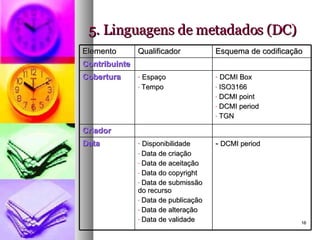
5. Linguagens de metadados (DC) Elemento Qualificador Esquema de codificação Contribuinte Cobertura Espaço Tempo DCMI Box ISO3166 DCMI point DCMI period TGN Criador Data Disponibilidade Data de criação Data de aceitação Data do copyright Data de submissão do recurso Data de publicação Data de alteração Data de validade -  DCMI period
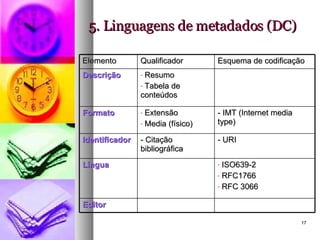
5. Linguagens de metadados (DC) Elemento Qualificador Esquema de codificação Descrição Resumo Tabela de conteúdos Formato Extensão Media (físico) - IMT (Internet media type) Identificador - Citação bibliográfica - URI Língua ISO639-2 RFC1766 RFC 3066 Editor
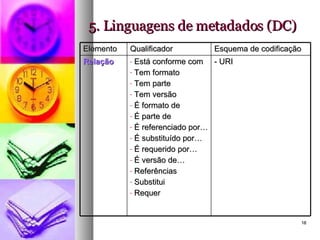
5. Linguagens de metadados (DC) Elemento Qualificador Esquema de codificação Relação Está conforme com Tem formato Tem parte Tem versão É formato de É parte de É referenciado por… É substituído por… É requerido por… É versão de… Referências Substitui Requer - URI
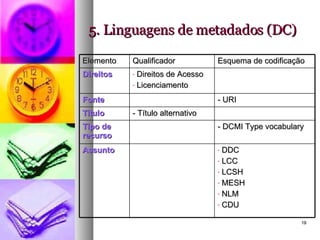
5. Linguagens de metadados (DC) Elemento Qualificador Esquema de codificação Direitos Direitos de Acesso Licenciamento  Fonte - URI Título - Título alternativo Tipo de recurso - DCMI Type vocabulary Assunto DDC LCC LCSH MESH NLM CDU
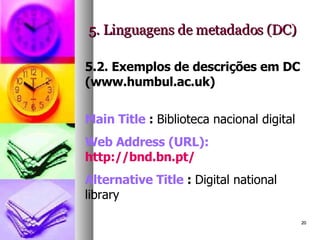
5. Linguagens de metadados (DC) 5.2. Exemplos de descrições em DC (www.humbul.ac.uk) Main Title  :  Biblioteca nacional digital  Web Address (URL): http://bnd.bn.pt/   Alternative Title  :  Digital national library  
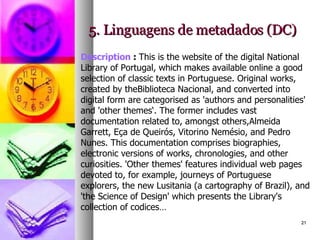
5. Linguagens de metadados (DC) Description  :  This is the website of the digital National Library of Portugal, which makes available online a good selection of classic texts in Portuguese. Original works, created by theBiblioteca Nacional, and converted into digital form are categorised as 'authors and personalities' and 'other themes‘. The former includes vast documentation related to, amongst others,Almeida Garrett, Eça de Queirós, Vitorino Nemésio, and Pedro Nunes. This documentation comprises biographies, electronic versions of works, chronologies, and other curiosities. 'Other themes' features individual web pages devoted to, for example, journeys of Portuguese explorers, the new Lusitania (a cartography of Brazil), and 'the Science of Design' which presents the Library's collection of codices…
5. Linguagens de metadados (DC) Language  :  Portuguese Intended Audience  : Further Education Undergraduate Postgraduate/Faculty Responsibility   : Author : Biblioteca Nacional Digital  Publisher   : Biblioteca Nacional Digital Copyright  :  http://bnd.bn.pt/direito-autor.html
5. Linguagens de metadados (DC) Type of Resource  : Collection Primary source Secondary source Research-related Text Document Image Is Part of   : Biblioteca Nacional.  http://www.biblioteca-nacional.pt/ Humbul Subjects  :  Portuguese Studies       
5. Linguagens de metadados (DC)    Catalogued By  :  Dr Shoshannah Holdom   on 2004-05-26 Record Last Modified :2004-05-26   Cite this record  :  http://www.humbul.ac.uk/output/full2.php?id=12207
5. Linguagens de metadados 5.3. Exercícios práticos: Descreva os seguintes documentos utilizando Dublin Core: http://www.ifla.org/documents/libraries/cataloging/tilb1.htm http://www.dlib.org/dlib/may07/weig/05weig.html   http://www.loc.gov/standards/sru/   http://www.artafrica.info/
5. Linguagens de metadados 5.4. Uma proposta de nível mínimo: Assunto Data Condições de utilização Editor Nome atribuído ao recurso Língua Identificador Tipo Autor/Criador Versão IFLA – Guidance on the structure, content, and application of metadata records for digital resources and collections.
5. Linguagens de metadados 5.5. Linguagens específicas 5.5.1. LOM: Standard for Information technology – Education and Training Systems – Learning objects and metadata This standard will specify the  syntax  and  semantics  of Learning Object Metadata, defined as the  attributes  required to fully/adequately describe a Learning Object. Learning Objects are defined here as any entity, digital or non-digital, which can be used, re-used or referenced during technology supported learning.
5. Linguagens de metadados Examples of technology supported learning include  computer-based training systems , interactive learning environments, intelligent computer-aided instruction systems,  distance learning systems , and collaborative learning environments. Examples of Learning Objects include  multimedia content ,instructional content, learning objectives,  instructional software  and software tools, and persons, organizations, or events referenced during technology supported learning.
5. Linguagens de metadados The Learning Object Metadata standards will focus on the  minimal set of attributes  needed to allow these Learning Objects to be managed, located, and evaluated. The standards will accommodate the ability for locally extending the basic fields and entity types, and the fields can have a status of obligatory (must be present) or optional (maybe absent).
5. Linguagens de metadados Relevant attributes of Learning Objects to be described include  type of object ,  author ,  owner ,  terms of distribution , and  format . Where applicable, Learning Object Metadata may also include  pedagogical attributes  such as:  teaching or interaction style ,  grade level ,  mastery level , and  prerequisites . It is possible for any given Learning Object to have more than one set of Learning Object Metadata.   (IEEE -  http://ltsc.ieee.org/wg12/)
5. Linguagens de metadados 5.5.2. Gateway to Educational Materials (GEM) Application profiles for GEM 2.0 including GEM (in general), Gateway Lite and Gateway Full -  http://64.119.44.148/about/documentation/ApplicationProfiles-9-8-04/
5. Linguagens de metadados 5.5.3. ONIX Onix for Books: product information message: overview and data elements: release 2.1., version 0.3, January 2006 http://www.editeur.org/onixfiles2.1/prodinf%202.1rev3.html 5.5.4. Content Standard for digital geospatial metadata  (Federal Geographic Data Committee) -  http://www.fgdc.gov/metadata/csdgm/
5. Linguagens de metadados 5.5.5. VRA core categories , (Visual Resources Association Core Categories) The  VRA Core Categories, Version 3.0  (actualmente versão 4.0)  consist of a single element set that can be applied as many times as necessary to create records to describe  works  of visual culture as well as the  images  that document them. http://www.vraweb.org/projects/vracore4/index.html   Exemplos:  http://gort.ucsd.edu/escowles/vracore4/
5. Linguagens de metadados 5.6. Metadados Técnicos METS (Metadata Encoding and Transmission Standard) – Library of Congress “ Sem metadados estruturais, os ficheiros com imagens ou texto que compõem a obra digital serão de pouca utilidade, e sem metadados técnicos sobre o processo de digitalização, os investigadores poderão ter dúvidas sobre a  exactidão  da reflexão do original que a versão digital oferece.
5. Linguagens de metadados Por questões de gestão interna, a biblioteca deve ter acesso a metadados técnicos apropriados para lhe permitir  refrescar  e  migrar  os dados, garantindo a  durabilidade  de recursos valiosos.”   METS: introdução e tutorial  (http://www.loc.gov/standards/mets/METSOverview.v2_port.html)
5. Linguagens de metadados 5.6.1. Estrutura de METS Cabeçalho METS Metadados descritivos Metadados administrativos - Mapa estrutural - Ligações estruturais  - Comportamento
5. Linguagens de metadados -  Cabeçalho METS metsHdr  CREATEDATE =&quot;2003-07-04T15:00:00&quot;  RECORDSTATUS =&quot;Complete&quot;> <agent  ROLE=&quot;CREATOR&quot;  TYPE=&quot;INDIVIDUAL&quot;> <name>Jerome McDonough</name> </agent> <agent ROLE=&quot;ARCHIVIST&quot; TYPE=&quot;INDIVIDUAL&quot;> <name>Ann Butler</name> </agent> </metsHdr>
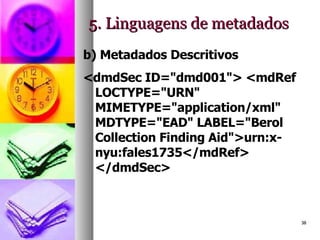
5. Linguagens de metadados b) Metadados Descritivos <dmdSec ID=&quot;dmd001&quot;> <mdRef LOCTYPE=&quot;URN&quot; MIMETYPE=&quot;application/xml&quot; MDTYPE=&quot;EAD&quot; LABEL=&quot;Berol Collection Finding Aid&quot;>urn:x-nyu:fales1735</mdRef> </dmdSec>
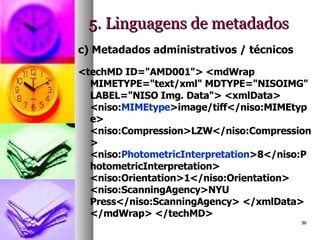
5. Linguagens de metadados c) Metadados administrativos / técnicos <techMD ID=&quot;AMD001&quot;> <mdWrap MIMETYPE=&quot;text/xml&quot; MDTYPE=&quot;NISOIMG&quot; LABEL=&quot;NISO Img. Data&quot;> <xmlData> <niso: MIMEtype >image/tiff</niso:MIMEtype> <niso:Compression>LZW</niso:Compression> <niso: PhotometricInterpretation >8</niso:PhotometricInterpretation> <niso:Orientation>1</niso:Orientation> <niso:ScanningAgency>NYU Press</niso:ScanningAgency> </xmlData> </mdWrap> </techMD>
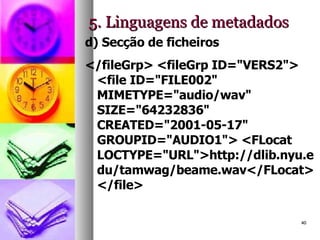
5. Linguagens de metadados d) Secção de ficheiros </fileGrp> <fileGrp ID=&quot;VERS2&quot;> <file ID=&quot;FILE002&quot; MIMETYPE=&quot;audio/wav&quot; SIZE=&quot;64232836&quot; CREATED=&quot;2001-05-17&quot; GROUPID=&quot;AUDIO1&quot;> <FLocat LOCTYPE=&quot;URL&quot;>http://dlib.nyu.edu/tamwag/beame.wav</FLocat> </file>
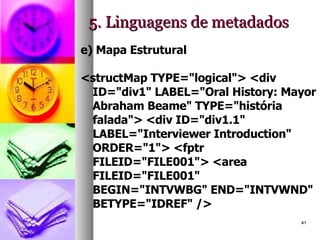
5. Linguagens de metadados e) Mapa Estrutural <structMap TYPE=&quot;logical&quot;> <div ID=&quot;div1&quot; LABEL=&quot;Oral History: Mayor Abraham Beame&quot; TYPE=&quot;história falada&quot;> <div ID=&quot;div1.1&quot; LABEL=&quot;Interviewer Introduction&quot; ORDER=&quot;1&quot;> <fptr FILEID=&quot;FILE001&quot;> <area FILEID=&quot;FILE001&quot; BEGIN=&quot;INTVWBG&quot; END=&quot;INTVWND&quot; BETYPE=&quot;IDREF&quot; />
5. Linguagens de metadados f) Ligações estruturais <div ID=&quot;P1&quot; TYPE=&quot;page&quot; LABEL=&quot;Page 1&quot;> <fptr FILEID=&quot;HTMLF1&quot;/> <div ID=&quot;IMG1&quot; TYPE=&quot;image&quot; LABEL=&quot;Imagem com hiperligação para a página 2&quot;> <fptr FILEID=&quot;JPGF1&quot;/> </div> <div ID=&quot;P2&quot; TYPE=&quot;page&quot; LABEL=&quot;Page 2&quot;> <fptr FILEID=&quot;HTMLF2&quot;/> </div>
5. Linguagens de metadados g) Comportamento <METS:behavior ID=&quot;DISS1.1&quot; STRUCTID=&quot;S1.1&quot; BTYPE=&quot;uva-bdef:stdImage&quot; CREATED=&quot;2002-05-25T08:32:00&quot; LABEL=&quot;UVA Std Image Disseminator&quot; GROUPID=&quot;DISS1&quot; ADMID=&quot;AUDREC1&quot;> <METS:interfaceDef LABEL=&quot;UVA Standard Image Behavior Definition&quot; LOCTYPE=&quot;URN&quot; xlink:href=&quot;uva-bdef:stdImage&quot;/> <METS:mechanism LABEL=&quot;A NEW AND IMPROVED Image Mechanism&quot; LOCTYPE=&quot;URN&quot; xlink:href=&quot;uva-bmech:BETTER-imageMech&quot;/> </METS:behavior>
5.2. Metadados técnicos a partir do formato TIFF – tagged image file format Etiqueta Designação Conteúdo 256 ImageWidth (N.º de pixels na horizontal) 257 ImageLenght (N.º de pixels na vertical) 258 BitsPerSample 1  (p&b) 8  (escala cinza) 16  (negativos) 24  (cor) 259 Compression 1  (sem compressão) 262 PhotometricInterpretation 0  (p/p&b, whiteIsZero, default) 1  (black is zero) 2  (cor, default para RGB) 266 FillOrder 1  (default) 2 269 DocumentName Cota e código de barras, quando houver, separados por vírgula 270 ImageDescription [a definir para cada colecção] 271 Make (fabricante do equipamento de captura) 272 Model (modelo do equipamento de captura) 273 StripOffsets (o byte offset de cada strip) 277 SamplesPerPixel 1  (default para p&b e escala cinza) 3  (default para RGB) 278 RowsPerStrip (N.º de linhas por strip) 279 StripByteCount Não preenche, não há compressão 282 Xresolution (N.º de pixels/unidade de resolução na horizontal) 283 Yresolution (N.º de pixels/unidade de resolução na vertical) 296 ResolutionUnit 2  (polegadas) 305 Software (programa de captura usado) 306 DateTime (data e hora de captura, formato YYYY:MM:DD HH:MM:SS) 315 Artist [a definir para cada colecção] 316 HostComputer (computador e sistema operativo em que se digitaliza) 33432 Copyright FCG Biblioteca de Arte
5.2. Metadados técnicos a partir do formato TIFF – tagged image file format Visualização de etiquetas TIFF numa imagem digitalizada -  exemplo
5. Linguagens de metadados 5.3. Perfis aplicacionais 5.3.1. Espaços normativos e perfis aplicacionais Conceito de Espaço Normativo 5.3.2. Perfis aplicacionais “ Application profiles consist of data elements drawn from one or more namespace schemas combined together by implementors and optimised for a particular local application”
5. Linguagens de metadados Exemplos: Library application profile (DC) -  http://www.dublincore.org/documents/2002/09/24/library-application-profile/   Elementos retirados do “name space” DC: Título - Data Criador - Tipo Contribuinte - Formato Editor - Identificador Assunto - Fonte Descrição - Língua Relação - Cobertura Direitos - Audiência
5. Linguagens de metadados Elementos retirados do “name space” MODS (Metadata Object Description Schema – Library of Congress): Edição Localização
5. Linguagens de metadados 5.4. Mapeamentos entre linguagens Exemplo 1: Acesso URN à PORBASE http://urn.porbase.org/acesso.urn Exemplo 2: Dublin Core to UNIMARC –  www.ukoln.ac.uk/metadata/interoperability/dc_unimarc.htm
6. Formatos XML    RDF RDF= RESOURCE DESCRIPTION FRAMEWORK Especificação de XML para formatar metadados.
RDF: uma sintaxe para metadados Proporciona uma sintaxe para descrever recursos Utiliza XML Facilita pesquisa, indexação e troca de informação Adaptável a várias semânticas, através da possibilidade de utilizar diversos “NAME SPACES” Linguagem sem preocupação com a visualização da informação
RDF: definição Objecto da descrição: o recurso RECURSO = qualquer objecto com um URI O recurso tem determinadas características PROPRIEDADE = qualquer atributo do recurso. Ex: “título” A propriedade do recurso tem um valor Ex: título – “International collaboration on internet subject gateways”
RDF: exemplo Considere-se: Debra Hiom é a autora da página  http://www.desire.org/results/discovery/  com o título Revised methods and tools for resource description and indexing “ EM RDF”: Recurso:  http://www.desire.org/results/discovery/   Propriedade: Autor, Título Valor: Debra Hiom, Revised methods and tools for resource description and indexing
RDF: escrita Inicia-se pelo elemento RAIZ = indicação da sintaxe em uso < rdf:RDF xmlns:rdf=“http://www.w3.org/19990222-rdf-syntax-ns#”> </ rdf:RDF > 1º elemento da descrição = identifica-se, através de URI, qual o recurso a descrever < rdf:RDF xmlns:rdf=“http://www.w3.org/19990222-rdf-syntax-ns#”> <rdf:Description about=“http://www.desire.org/results/discovery/”> </rdf:description> </rdf:RDF>
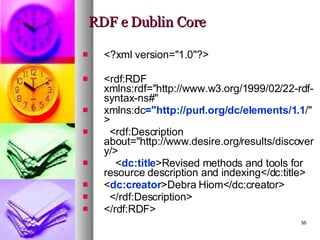
RDF e Dublin Core <?xml version=&quot;1.0&quot;?> <rdf:RDF xmlns:rdf=&quot;http://www.w3.org/1999/02/22-rdf-syntax-ns#&quot; xmlns:dc =&quot;http://purl.org/dc/elements/1.1 /&quot;> <rdf:Description about=&quot;http://www.desire.org/results/discovery/> < dc:title >Revised methods and tools for resource description and indexing</dc:title> < dc:creator >Debra Hiom</dc:creator>  </rdf:Description> </rdf:RDF>
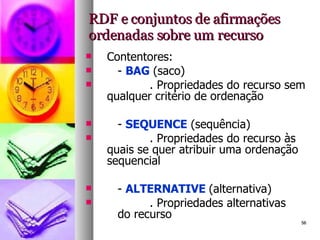
RDF e conjuntos de afirmações ordenadas sobre um recurso Contentores: -  BAG  (saco) . Propriedades do recurso sem qualquer critério de ordenação -  SEQUENCE  (sequência) . Propriedades do recurso às quais se quer atribuir uma ordenação sequencial -  ALTERNATIVE  (alternativa) . Propriedades alternativas  do recurso
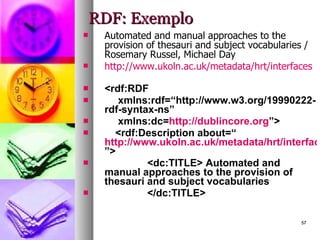
RDF: Exemplo Automated and manual approaches to the provision of thesauri and subject vocabularies / Rosemary Russel, Michael Day http://www.ukoln.ac.uk/metadata/hrt/interfaces <rdf:RDF   xmlns:rdf=“http://www.w3.org/19990222-rdf-syntax-ns”   xmlns:dc= http://dublincore.org ”> <rdf:Description about=“ http://www.ukoln.ac.uk/metadata/hrt/interfaces ”> <dc:TITLE> Automated and manual approaches to the provision of thesauri and subject vocabularies </dc:TITLE>
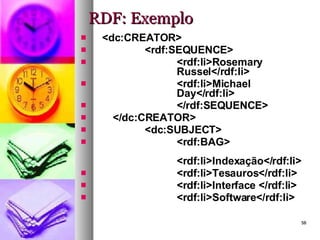
RDF: Exemplo <dc:CREATOR> <rdf:SEQUENCE> <rdf:li>Rosemary  Russel</rdf:li> <rdf:li>Michael  Day</rdf:li> </rdf:SEQUENCE> </dc:CREATOR> <dc:SUBJECT> <rdf:BAG> <rdf:li>Indexação</rdf:li> <rdf:li>Tesauros</rdf:li> <rdf:li>Interface </rdf:li> <rdf:li>Software</rdf:li>
RDF: Exemplo <rdf:li>Z39.50</rdf:li> </rdf:bag> </dc:SUBJECT> <dc:DATE>2001</dc:DATE> <dc:LANGUAGE>Inglês</dc:LANGUAGE> </rdf:Description> </rdf:RDF>
RDF: Exemplo Descreva, utilizando RDF, os recursos que já descreveu com Dublin Core. Verifique a sua descrição em: www.w3.org/RDF/Validator
7. Geração automática de metadados “ Metadata extraction” “ Metadata harvesting” “ Fully-automatic metadata generation”
7. Geração automática de metadados “ Semi-automatic metadata generation”  Editor de DC:  DC-dot  (http://www.ukoln.ac.uk/metadata/dcdot)
8. Seleccionar um esquema de metadados Discussão do texto: “Selecting a metadata schema or schemas”, in Guidance on……
9. Partilhar e disponibilizar Metadados O Problema There is a growing need to make resources, not only descriptive metadata,  harvestable  in an  interoperable  manner. There are two major use cases that motivate this need: I  Preservation :  The need to periodically transfer digital content from a data repository to one or more trusted digital repositories charged with storing and preserving safety copies of the content. The trusted digital repositories need a mechanism to automatically synchronize with the originating data repository.
9. Partilhar e disponibilizar Metadados II  Discovery : The need to  use content itself in the creation of services .  Examples include search engines that make full-text from multiple data repositories searchable, and citation indexing systems that extract references from the full-text content. Another scenario is the provision of thumbnail versions of high quality images from cultural heritage collections to external services that build browsing interfaces that include the thumbnail’s” In “Resource harvesting with the OAI-PMH Framework” (disponível em:  http://www.dlib.org/dlib/december04/vandesompel/12vandesompel.html )  Paulo Leitão
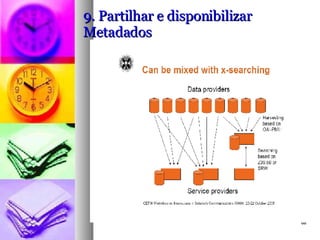
9. Partilhar e disponibilizar Metadados b)  Uma solução possível: OAI-PMH  (Open Archives Initiative and Protocol for Metadata Harvesting) A mechanism for harvesting Data providers make metadata available for  harvesting Service Providers harvest metadata Metadata can be centrally collected or  “aggregated” That’s all it is: a way to bring metadata together in  one place!  (Philip Hunter)
9. Partilhar e disponibilizar Metadados

Metadados

  • 1.
    BIBLIOTECAS DIGITAIS METADADOSFORMAÇÃO BAD 2008 – Paulo Leitão
  • 2.
    1. Metadados: conceitosbásicos Dados sobre dados / informação sobre informação Informação legível por máquina Objecto: um recurso identificado por um URI (Uniform Resource Identifier) Afirmações sobre um recurso: “declarações” e ligações
  • 3.
    1. Metadados: conceitosbásicos Metadados como linguagens: Vocabulário Semântica Sintaxe
  • 4.
    1. Metadados: conceitosbásicos Diversos níveis de complexidade descritiva Âmbito diversificado: linguagens generalistas / linguagens específicas
  • 5.
    2. Metadados: objectivosDescrição e Recuperação da informação  Metadados descritivos Acesso e preservação  Metadados técnicos Administração do recurso  Metadados administrativos
  • 6.
    3. Classificação demetadados Método de criação : metadados gerados automaticamente VS metadados gerados manualmente Criadores : especializados VS não especializados
  • 7.
    3. Classificação demetadados Controlo semântico : metadados controlados VS metadados não controlados Forma de armazenamento : metadados embebidos no próprio documento VS metadados separados do documento
  • 8.
    3. Classificação demetadados Nível de estruturação : metadados não estruturados VS metadados altamente estruturados Nível de descrição : metadados para a descrição de conjuntos VS metadados para a descrição de recursos individuais
  • 9.
    3. Classificação demetadados Fonte e momento de criação : metadados internos VS metadados externos
  • 10.
    4. Metadados VSDescrição Bibliográfica Objectos nascidos digitais Objectos do universo analógico Minimalismo VS Maximalismo
  • 11.
    4. Metadados VSDescrição Bibliográfica 3 Abordagens : “ On their one – uniquely” Instead of/in the place of a “traditional” bibliographic record In addition to an “traditional” bibliographic record (complementary) (segundo Guidance on…)
  • 12.
    4. Metadados VSDescrição Bibliográfica Contexto: “ O contexto de utilização é tudo, e só quando falamos de contextos de utilização é que podemos falar de metadados de forma informada e com sentido.” Lynch
  • 13.
    5. Linguagens demetadados 5.1. Linguagens generalistas: Dublin Core Linguagem mais utilizada ISO 15836:2003 Conceitos básicos: Recurso, Propriedade, Atributo  Elemento
  • 14.
    5. Linguagens demetadados Elementos e Qualificadores Esquemas de codificação próprios Todos os elementos são repetíveis (- www.dublincore.org - DCMI metadata terms - http://www.dublincore.org/documents/dcmi-terms/ )
  • 15.
    5. Linguagens demetadados Não existem elementos obrigatórios Regra de 1:1 (- www.dublincore.org - DCMI metadata terms - http://www.dublincore.org/documents/dcmi-terms/ )
  • 16.
    5. Linguagens demetadados (DC) Elemento Qualificador Esquema de codificação Contribuinte Cobertura Espaço Tempo DCMI Box ISO3166 DCMI point DCMI period TGN Criador Data Disponibilidade Data de criação Data de aceitação Data do copyright Data de submissão do recurso Data de publicação Data de alteração Data de validade - DCMI period
  • 17.
    5. Linguagens demetadados (DC) Elemento Qualificador Esquema de codificação Descrição Resumo Tabela de conteúdos Formato Extensão Media (físico) - IMT (Internet media type) Identificador - Citação bibliográfica - URI Língua ISO639-2 RFC1766 RFC 3066 Editor
  • 18.
    5. Linguagens demetadados (DC) Elemento Qualificador Esquema de codificação Relação Está conforme com Tem formato Tem parte Tem versão É formato de É parte de É referenciado por… É substituído por… É requerido por… É versão de… Referências Substitui Requer - URI
  • 19.
    5. Linguagens demetadados (DC) Elemento Qualificador Esquema de codificação Direitos Direitos de Acesso Licenciamento Fonte - URI Título - Título alternativo Tipo de recurso - DCMI Type vocabulary Assunto DDC LCC LCSH MESH NLM CDU
  • 20.
    5. Linguagens demetadados (DC) 5.2. Exemplos de descrições em DC (www.humbul.ac.uk) Main Title : Biblioteca nacional digital  Web Address (URL): http://bnd.bn.pt/   Alternative Title : Digital national library  
  • 21.
    5. Linguagens demetadados (DC) Description : This is the website of the digital National Library of Portugal, which makes available online a good selection of classic texts in Portuguese. Original works, created by theBiblioteca Nacional, and converted into digital form are categorised as 'authors and personalities' and 'other themes‘. The former includes vast documentation related to, amongst others,Almeida Garrett, Eça de Queirós, Vitorino Nemésio, and Pedro Nunes. This documentation comprises biographies, electronic versions of works, chronologies, and other curiosities. 'Other themes' features individual web pages devoted to, for example, journeys of Portuguese explorers, the new Lusitania (a cartography of Brazil), and 'the Science of Design' which presents the Library's collection of codices…
  • 22.
    5. Linguagens demetadados (DC) Language : Portuguese Intended Audience : Further Education Undergraduate Postgraduate/Faculty Responsibility : Author : Biblioteca Nacional Digital Publisher : Biblioteca Nacional Digital Copyright : http://bnd.bn.pt/direito-autor.html
  • 23.
    5. Linguagens demetadados (DC) Type of Resource : Collection Primary source Secondary source Research-related Text Document Image Is Part of : Biblioteca Nacional. http://www.biblioteca-nacional.pt/ Humbul Subjects : Portuguese Studies       
  • 24.
    5. Linguagens demetadados (DC)   Catalogued By : Dr Shoshannah Holdom on 2004-05-26 Record Last Modified :2004-05-26 Cite this record : http://www.humbul.ac.uk/output/full2.php?id=12207
  • 25.
    5. Linguagens demetadados 5.3. Exercícios práticos: Descreva os seguintes documentos utilizando Dublin Core: http://www.ifla.org/documents/libraries/cataloging/tilb1.htm http://www.dlib.org/dlib/may07/weig/05weig.html http://www.loc.gov/standards/sru/ http://www.artafrica.info/
  • 26.
    5. Linguagens demetadados 5.4. Uma proposta de nível mínimo: Assunto Data Condições de utilização Editor Nome atribuído ao recurso Língua Identificador Tipo Autor/Criador Versão IFLA – Guidance on the structure, content, and application of metadata records for digital resources and collections.
  • 27.
    5. Linguagens demetadados 5.5. Linguagens específicas 5.5.1. LOM: Standard for Information technology – Education and Training Systems – Learning objects and metadata This standard will specify the syntax and semantics of Learning Object Metadata, defined as the attributes required to fully/adequately describe a Learning Object. Learning Objects are defined here as any entity, digital or non-digital, which can be used, re-used or referenced during technology supported learning.
  • 28.
    5. Linguagens demetadados Examples of technology supported learning include computer-based training systems , interactive learning environments, intelligent computer-aided instruction systems, distance learning systems , and collaborative learning environments. Examples of Learning Objects include multimedia content ,instructional content, learning objectives, instructional software and software tools, and persons, organizations, or events referenced during technology supported learning.
  • 29.
    5. Linguagens demetadados The Learning Object Metadata standards will focus on the minimal set of attributes needed to allow these Learning Objects to be managed, located, and evaluated. The standards will accommodate the ability for locally extending the basic fields and entity types, and the fields can have a status of obligatory (must be present) or optional (maybe absent).
  • 30.
    5. Linguagens demetadados Relevant attributes of Learning Objects to be described include type of object , author , owner , terms of distribution , and format . Where applicable, Learning Object Metadata may also include pedagogical attributes such as: teaching or interaction style , grade level , mastery level , and prerequisites . It is possible for any given Learning Object to have more than one set of Learning Object Metadata. (IEEE - http://ltsc.ieee.org/wg12/)
  • 31.
    5. Linguagens demetadados 5.5.2. Gateway to Educational Materials (GEM) Application profiles for GEM 2.0 including GEM (in general), Gateway Lite and Gateway Full - http://64.119.44.148/about/documentation/ApplicationProfiles-9-8-04/
  • 32.
    5. Linguagens demetadados 5.5.3. ONIX Onix for Books: product information message: overview and data elements: release 2.1., version 0.3, January 2006 http://www.editeur.org/onixfiles2.1/prodinf%202.1rev3.html 5.5.4. Content Standard for digital geospatial metadata (Federal Geographic Data Committee) - http://www.fgdc.gov/metadata/csdgm/
  • 33.
    5. Linguagens demetadados 5.5.5. VRA core categories , (Visual Resources Association Core Categories) The VRA Core Categories, Version 3.0 (actualmente versão 4.0) consist of a single element set that can be applied as many times as necessary to create records to describe works of visual culture as well as the images that document them. http://www.vraweb.org/projects/vracore4/index.html Exemplos: http://gort.ucsd.edu/escowles/vracore4/
  • 34.
    5. Linguagens demetadados 5.6. Metadados Técnicos METS (Metadata Encoding and Transmission Standard) – Library of Congress “ Sem metadados estruturais, os ficheiros com imagens ou texto que compõem a obra digital serão de pouca utilidade, e sem metadados técnicos sobre o processo de digitalização, os investigadores poderão ter dúvidas sobre a exactidão da reflexão do original que a versão digital oferece.
  • 35.
    5. Linguagens demetadados Por questões de gestão interna, a biblioteca deve ter acesso a metadados técnicos apropriados para lhe permitir refrescar e migrar os dados, garantindo a durabilidade de recursos valiosos.” METS: introdução e tutorial (http://www.loc.gov/standards/mets/METSOverview.v2_port.html)
  • 36.
    5. Linguagens demetadados 5.6.1. Estrutura de METS Cabeçalho METS Metadados descritivos Metadados administrativos - Mapa estrutural - Ligações estruturais - Comportamento
  • 37.
    5. Linguagens demetadados - Cabeçalho METS metsHdr CREATEDATE =&quot;2003-07-04T15:00:00&quot; RECORDSTATUS =&quot;Complete&quot;> <agent ROLE=&quot;CREATOR&quot; TYPE=&quot;INDIVIDUAL&quot;> <name>Jerome McDonough</name> </agent> <agent ROLE=&quot;ARCHIVIST&quot; TYPE=&quot;INDIVIDUAL&quot;> <name>Ann Butler</name> </agent> </metsHdr>
  • 38.
    5. Linguagens demetadados b) Metadados Descritivos <dmdSec ID=&quot;dmd001&quot;> <mdRef LOCTYPE=&quot;URN&quot; MIMETYPE=&quot;application/xml&quot; MDTYPE=&quot;EAD&quot; LABEL=&quot;Berol Collection Finding Aid&quot;>urn:x-nyu:fales1735</mdRef> </dmdSec>
  • 39.
    5. Linguagens demetadados c) Metadados administrativos / técnicos <techMD ID=&quot;AMD001&quot;> <mdWrap MIMETYPE=&quot;text/xml&quot; MDTYPE=&quot;NISOIMG&quot; LABEL=&quot;NISO Img. Data&quot;> <xmlData> <niso: MIMEtype >image/tiff</niso:MIMEtype> <niso:Compression>LZW</niso:Compression> <niso: PhotometricInterpretation >8</niso:PhotometricInterpretation> <niso:Orientation>1</niso:Orientation> <niso:ScanningAgency>NYU Press</niso:ScanningAgency> </xmlData> </mdWrap> </techMD>
  • 40.
    5. Linguagens demetadados d) Secção de ficheiros </fileGrp> <fileGrp ID=&quot;VERS2&quot;> <file ID=&quot;FILE002&quot; MIMETYPE=&quot;audio/wav&quot; SIZE=&quot;64232836&quot; CREATED=&quot;2001-05-17&quot; GROUPID=&quot;AUDIO1&quot;> <FLocat LOCTYPE=&quot;URL&quot;>http://dlib.nyu.edu/tamwag/beame.wav</FLocat> </file>
  • 41.
    5. Linguagens demetadados e) Mapa Estrutural <structMap TYPE=&quot;logical&quot;> <div ID=&quot;div1&quot; LABEL=&quot;Oral History: Mayor Abraham Beame&quot; TYPE=&quot;história falada&quot;> <div ID=&quot;div1.1&quot; LABEL=&quot;Interviewer Introduction&quot; ORDER=&quot;1&quot;> <fptr FILEID=&quot;FILE001&quot;> <area FILEID=&quot;FILE001&quot; BEGIN=&quot;INTVWBG&quot; END=&quot;INTVWND&quot; BETYPE=&quot;IDREF&quot; />
  • 42.
    5. Linguagens demetadados f) Ligações estruturais <div ID=&quot;P1&quot; TYPE=&quot;page&quot; LABEL=&quot;Page 1&quot;> <fptr FILEID=&quot;HTMLF1&quot;/> <div ID=&quot;IMG1&quot; TYPE=&quot;image&quot; LABEL=&quot;Imagem com hiperligação para a página 2&quot;> <fptr FILEID=&quot;JPGF1&quot;/> </div> <div ID=&quot;P2&quot; TYPE=&quot;page&quot; LABEL=&quot;Page 2&quot;> <fptr FILEID=&quot;HTMLF2&quot;/> </div>
  • 43.
    5. Linguagens demetadados g) Comportamento <METS:behavior ID=&quot;DISS1.1&quot; STRUCTID=&quot;S1.1&quot; BTYPE=&quot;uva-bdef:stdImage&quot; CREATED=&quot;2002-05-25T08:32:00&quot; LABEL=&quot;UVA Std Image Disseminator&quot; GROUPID=&quot;DISS1&quot; ADMID=&quot;AUDREC1&quot;> <METS:interfaceDef LABEL=&quot;UVA Standard Image Behavior Definition&quot; LOCTYPE=&quot;URN&quot; xlink:href=&quot;uva-bdef:stdImage&quot;/> <METS:mechanism LABEL=&quot;A NEW AND IMPROVED Image Mechanism&quot; LOCTYPE=&quot;URN&quot; xlink:href=&quot;uva-bmech:BETTER-imageMech&quot;/> </METS:behavior>
  • 44.
    5.2. Metadados técnicosa partir do formato TIFF – tagged image file format Etiqueta Designação Conteúdo 256 ImageWidth (N.º de pixels na horizontal) 257 ImageLenght (N.º de pixels na vertical) 258 BitsPerSample 1 (p&b) 8 (escala cinza) 16 (negativos) 24 (cor) 259 Compression 1 (sem compressão) 262 PhotometricInterpretation 0 (p/p&b, whiteIsZero, default) 1 (black is zero) 2 (cor, default para RGB) 266 FillOrder 1 (default) 2 269 DocumentName Cota e código de barras, quando houver, separados por vírgula 270 ImageDescription [a definir para cada colecção] 271 Make (fabricante do equipamento de captura) 272 Model (modelo do equipamento de captura) 273 StripOffsets (o byte offset de cada strip) 277 SamplesPerPixel 1 (default para p&b e escala cinza) 3 (default para RGB) 278 RowsPerStrip (N.º de linhas por strip) 279 StripByteCount Não preenche, não há compressão 282 Xresolution (N.º de pixels/unidade de resolução na horizontal) 283 Yresolution (N.º de pixels/unidade de resolução na vertical) 296 ResolutionUnit 2 (polegadas) 305 Software (programa de captura usado) 306 DateTime (data e hora de captura, formato YYYY:MM:DD HH:MM:SS) 315 Artist [a definir para cada colecção] 316 HostComputer (computador e sistema operativo em que se digitaliza) 33432 Copyright FCG Biblioteca de Arte
  • 45.
    5.2. Metadados técnicosa partir do formato TIFF – tagged image file format Visualização de etiquetas TIFF numa imagem digitalizada - exemplo
  • 46.
    5. Linguagens demetadados 5.3. Perfis aplicacionais 5.3.1. Espaços normativos e perfis aplicacionais Conceito de Espaço Normativo 5.3.2. Perfis aplicacionais “ Application profiles consist of data elements drawn from one or more namespace schemas combined together by implementors and optimised for a particular local application”
  • 47.
    5. Linguagens demetadados Exemplos: Library application profile (DC) - http://www.dublincore.org/documents/2002/09/24/library-application-profile/ Elementos retirados do “name space” DC: Título - Data Criador - Tipo Contribuinte - Formato Editor - Identificador Assunto - Fonte Descrição - Língua Relação - Cobertura Direitos - Audiência
  • 48.
    5. Linguagens demetadados Elementos retirados do “name space” MODS (Metadata Object Description Schema – Library of Congress): Edição Localização
  • 49.
    5. Linguagens demetadados 5.4. Mapeamentos entre linguagens Exemplo 1: Acesso URN à PORBASE http://urn.porbase.org/acesso.urn Exemplo 2: Dublin Core to UNIMARC – www.ukoln.ac.uk/metadata/interoperability/dc_unimarc.htm
  • 50.
    6. Formatos XML  RDF RDF= RESOURCE DESCRIPTION FRAMEWORK Especificação de XML para formatar metadados.
  • 51.
    RDF: uma sintaxepara metadados Proporciona uma sintaxe para descrever recursos Utiliza XML Facilita pesquisa, indexação e troca de informação Adaptável a várias semânticas, através da possibilidade de utilizar diversos “NAME SPACES” Linguagem sem preocupação com a visualização da informação
  • 52.
    RDF: definição Objectoda descrição: o recurso RECURSO = qualquer objecto com um URI O recurso tem determinadas características PROPRIEDADE = qualquer atributo do recurso. Ex: “título” A propriedade do recurso tem um valor Ex: título – “International collaboration on internet subject gateways”
  • 53.
    RDF: exemplo Considere-se:Debra Hiom é a autora da página http://www.desire.org/results/discovery/ com o título Revised methods and tools for resource description and indexing “ EM RDF”: Recurso: http://www.desire.org/results/discovery/ Propriedade: Autor, Título Valor: Debra Hiom, Revised methods and tools for resource description and indexing
  • 54.
    RDF: escrita Inicia-sepelo elemento RAIZ = indicação da sintaxe em uso < rdf:RDF xmlns:rdf=“http://www.w3.org/19990222-rdf-syntax-ns#”> </ rdf:RDF > 1º elemento da descrição = identifica-se, através de URI, qual o recurso a descrever < rdf:RDF xmlns:rdf=“http://www.w3.org/19990222-rdf-syntax-ns#”> <rdf:Description about=“http://www.desire.org/results/discovery/”> </rdf:description> </rdf:RDF>
  • 55.
    RDF e DublinCore <?xml version=&quot;1.0&quot;?> <rdf:RDF xmlns:rdf=&quot;http://www.w3.org/1999/02/22-rdf-syntax-ns#&quot; xmlns:dc =&quot;http://purl.org/dc/elements/1.1 /&quot;> <rdf:Description about=&quot;http://www.desire.org/results/discovery/> < dc:title >Revised methods and tools for resource description and indexing</dc:title> < dc:creator >Debra Hiom</dc:creator> </rdf:Description> </rdf:RDF>
  • 56.
    RDF e conjuntosde afirmações ordenadas sobre um recurso Contentores: - BAG (saco) . Propriedades do recurso sem qualquer critério de ordenação - SEQUENCE (sequência) . Propriedades do recurso às quais se quer atribuir uma ordenação sequencial - ALTERNATIVE (alternativa) . Propriedades alternativas do recurso
  • 57.
    RDF: Exemplo Automatedand manual approaches to the provision of thesauri and subject vocabularies / Rosemary Russel, Michael Day http://www.ukoln.ac.uk/metadata/hrt/interfaces <rdf:RDF xmlns:rdf=“http://www.w3.org/19990222-rdf-syntax-ns” xmlns:dc= http://dublincore.org ”> <rdf:Description about=“ http://www.ukoln.ac.uk/metadata/hrt/interfaces ”> <dc:TITLE> Automated and manual approaches to the provision of thesauri and subject vocabularies </dc:TITLE>
  • 58.
    RDF: Exemplo <dc:CREATOR><rdf:SEQUENCE> <rdf:li>Rosemary Russel</rdf:li> <rdf:li>Michael Day</rdf:li> </rdf:SEQUENCE> </dc:CREATOR> <dc:SUBJECT> <rdf:BAG> <rdf:li>Indexação</rdf:li> <rdf:li>Tesauros</rdf:li> <rdf:li>Interface </rdf:li> <rdf:li>Software</rdf:li>
  • 59.
    RDF: Exemplo <rdf:li>Z39.50</rdf:li></rdf:bag> </dc:SUBJECT> <dc:DATE>2001</dc:DATE> <dc:LANGUAGE>Inglês</dc:LANGUAGE> </rdf:Description> </rdf:RDF>
  • 60.
    RDF: Exemplo Descreva,utilizando RDF, os recursos que já descreveu com Dublin Core. Verifique a sua descrição em: www.w3.org/RDF/Validator
  • 61.
    7. Geração automáticade metadados “ Metadata extraction” “ Metadata harvesting” “ Fully-automatic metadata generation”
  • 62.
    7. Geração automáticade metadados “ Semi-automatic metadata generation” Editor de DC: DC-dot (http://www.ukoln.ac.uk/metadata/dcdot)
  • 63.
    8. Seleccionar umesquema de metadados Discussão do texto: “Selecting a metadata schema or schemas”, in Guidance on……
  • 64.
    8. Seleccionar umesquema de metadados Discussão do texto: “Selecting a metadata schema or schemas”, in Guidance on……
  • 65.
    9. Partilhar edisponibilizar Metadados O Problema There is a growing need to make resources, not only descriptive metadata, harvestable in an interoperable manner. There are two major use cases that motivate this need: I Preservation : The need to periodically transfer digital content from a data repository to one or more trusted digital repositories charged with storing and preserving safety copies of the content. The trusted digital repositories need a mechanism to automatically synchronize with the originating data repository.
  • 66.
    9. Partilhar edisponibilizar Metadados II Discovery : The need to use content itself in the creation of services . Examples include search engines that make full-text from multiple data repositories searchable, and citation indexing systems that extract references from the full-text content. Another scenario is the provision of thumbnail versions of high quality images from cultural heritage collections to external services that build browsing interfaces that include the thumbnail’s” In “Resource harvesting with the OAI-PMH Framework” (disponível em: http://www.dlib.org/dlib/december04/vandesompel/12vandesompel.html ) Paulo Leitão
  • 67.
    9. Partilhar edisponibilizar Metadados b) Uma solução possível: OAI-PMH (Open Archives Initiative and Protocol for Metadata Harvesting) A mechanism for harvesting Data providers make metadata available for harvesting Service Providers harvest metadata Metadata can be centrally collected or “aggregated” That’s all it is: a way to bring metadata together in one place! (Philip Hunter)
  • 68.
    9. Partilhar edisponibilizar Metadados