




















Metodologia para Avaliação de Acessibilidade em Sites 1ª Conferência Web W3C Brasil Lêda Lucia Spelta e Horácio Soares Novembro 2009
Acessibilidade?
  “ Acessibilidade na web é tornar todos os serviços, assuntos e publicações tão fáceis de serem utilizados por todas as pessoas, que até esqueceremos que há diferenças.”      (Carla Nascimento – frase vencedora do concurso “Jornadas de Conhecimento - Acessibilidade na Web”)
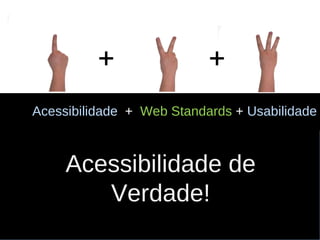
Acessibilidade  +   Web Standards   +  Usabilidade Acessibilidade de  Verdade! + +
Acessi bilidade  para  quem?
Juca, sem visão.
Mandy, sem visão e braços.
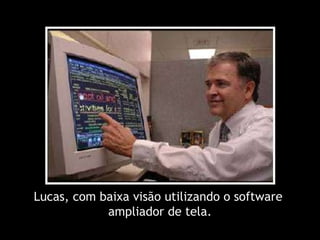
Lucas, com baixa visão utilizando o software  ampliador de tela.
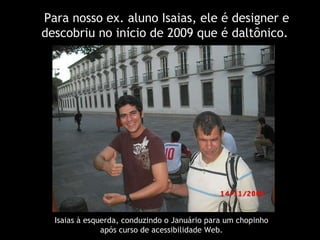
Para nosso ex. aluno Isaias,  ele é designer e descobriu no início de 2009 que é daltônico.  Isaias à esquerda, conduzindo o Januário para um chopinho  após curso de acessibilidade Web.
Ok!  Acessibilidade  então é para  pessoas com deficiência  visual, certo?
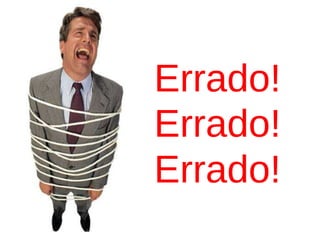
Errado! Errado! Errado!
João Henriques   deficiente motor  utiliza o mouse com dificuldade.  (  www.euroacessibilidade.com  )
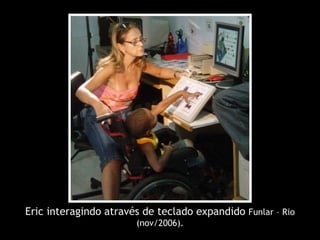
Eric interagindo através de teclado expandido  Funlar – Rio (nov/2006).
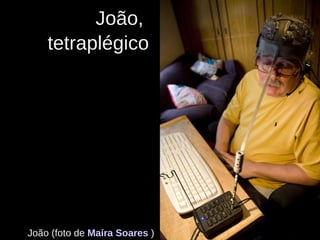
João,  tetraplégico João (foto de  Maíra Soares   )
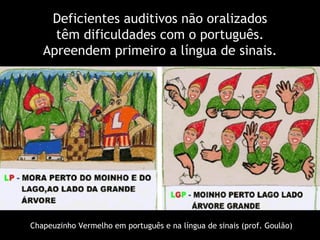
Deficientes auditivos não oralizados têm dificuldades com o português. Apreendem primeiro a língua de sinais. Chapeuzinho Vermelho em português e na língua de sinais (prof. Goulão)
Então acessibilidade é somente para pessoas com deficiências, certo?
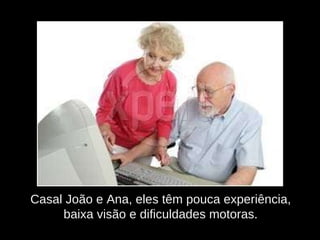
Casal João e Ana, eles têm pouca experiência, baixa visão e dificuldades motoras.
Pedro e Laura com dispositivos móveis com acesso a Internet. Pedro olhando para seu smartphone e Laura com uma cara desesperada para seu celular.
Gabriel, linguagem em desenvolvimento...  Gabriel compenetrado, olhando para o  monitor e clicando com o mouse.  Agora ele está olhando e  brincando com o teclado.
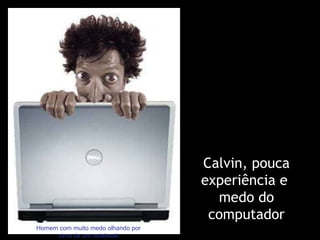
Calvin, pouca experiência e  medo do computador Homem com muito medo olhando por  cima de um notebook.
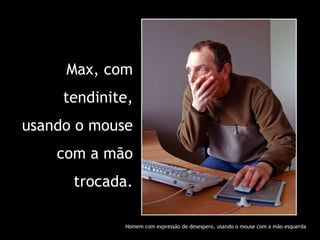
Max, com tendinite, usando o mouse com a mão trocada. Homem com expressão de desespero, usando o mouse com a mão esquerda
E todos nós, primeira experiência. Um criança em frente a um notebook
E finalmente,  o bilionário cego!!! Cifrão desenhado com  moedas douradas
Google, o bilionário cego!!! É apenas um robô que só indexa conteúdo em texto. Dilbert fazendo parte do logotipo do Google e falando “eu não posso ver”.
Acessibilidade, quais são os custos?
Curva de aprendizagem Alto custo no redesign Baixo em novos projetos Diminui com tempo Validação e manutenção Melhoria contínua Mudança de cultura
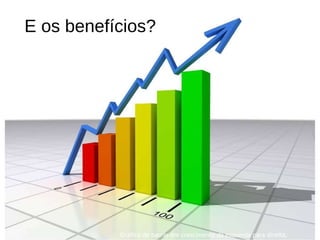
E os benefícios? Gráfico de barras em crescimento da esquerda para direita.
Possibilidade de atingir 100% do público alvo; Homem com arma mirando um possível alvo
Atender melhor todas as pessoas
Mas normalmente o tratamento que recebemos é... Avião cheio com passageiro exprimido e impossibilitado fazer seu lanche.
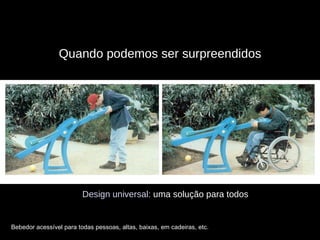
Quando podemos ser surpreendidos Design universal:  uma solução para todos Bebedor acessível para todas pessoas, altas, baixas, em cadeiras, etc.
Homem de terno comemorando Fidelizar clientes
Dardo Atender com qualidade novos clientes que surgem com a inclusão digital e o sistema de cotas.
Mais fácil de usar e aprender Casal  decepcionado ao utilizar as orientações do fabricante e não conseguir montar uma estante.
Uma mão com laço  no dedo indicador Conformidade com o decreto de lei 5296 (dez/04) e com a convenção da ONU que ganhou força de lei (ago/08) ;
Uma senhora acessando um computador. Crescimento do consumidor acima dos 65 anos...
Visualizar os benefícios  da acessibilidade Manutenção mais rápida e barata, com melhor performance e diminuição dos custos com banda;
Valorização da  Diversidade e Responsabilidade  Social; Mãos entrelaçadas
Proteção contra processos pela falta da acessibilidade; Mão com sinal de ok.
Maior visibilidade pelos  sistemas de busca; Um grande e bonito olho azul.
Mulher com notebook  em sinal de ok Diferencial competitivo Cachorrinho caregando um enorme osso.
Diferencial competitivo e melhoria da qualidade. Mãe e filha felizes na praia dando uma estrela
Navegação as escuras
Validação de      Acessibilidade Globo em ambiente futurista.
Validação de Acessibilidade Validações automáticas e  semi-automáticas de páginas web
Validação de Acessibilidade Web Standards
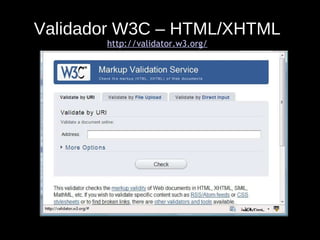
Validador W3C – HTML/XHTML http://validator.w3.org/
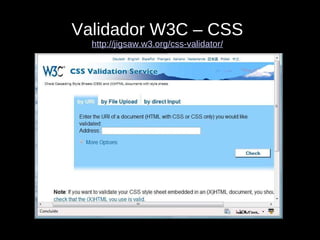
Validador W3C – CSS http://jigsaw.w3.org/css-validator/
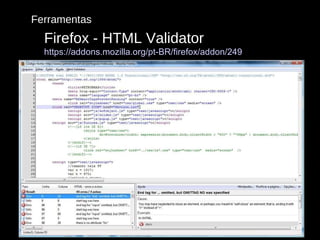
Ferramentas Firefox - HTML Validator https://addons.mozilla.org/pt-BR/firefox/addon/249
Validação de Acessibilidade Validação automática e semi-automática de acessibilidade.
Validação de Acessibilidade Validadores automáticas, quem tem um, não tem nenhum...
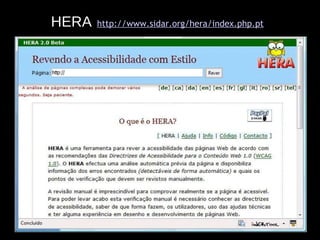
HERA   http://www.sidar.org/hera/index.php.pt
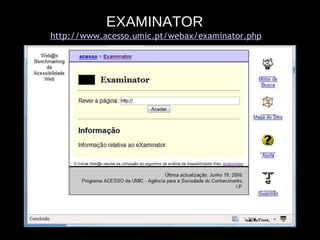
EXAMINATOR   http://www.acesso.umic.pt/webax/examinator.php
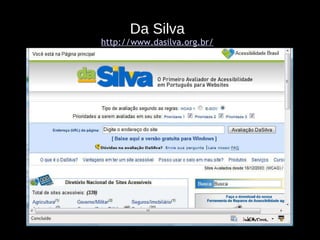
Da Silva http://www.dasilva.org.br/
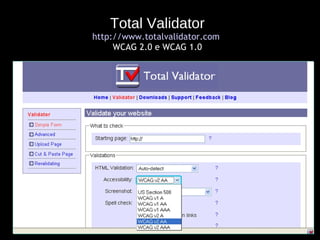
Total Validator http://www.totalvalidator.com   WCAG 2.0 e WCAG 1.0
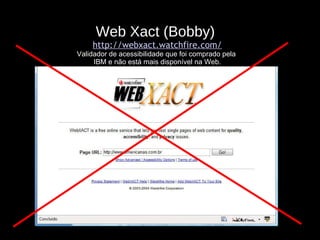
Web Xact (Bobby)  http://webxact.watchfire.com/ Validador de acessibilidade que foi comprado pela  IBM e não está mais disponível na Web.
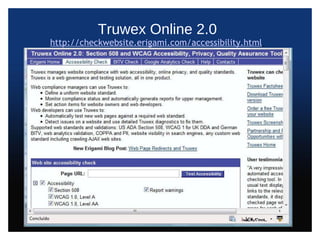
Truwex Online 2.0 http://checkwebsite.erigami.com/accessibility.html
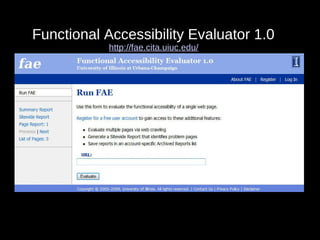
Functional Accessibility Evaluator 1.0  http://fae.cita.uiuc.edu/
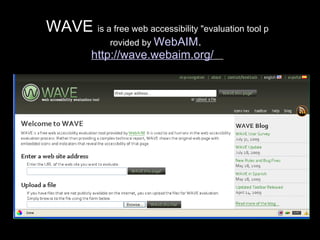
WAVE  is a free web accessibility "evaluation tool p rovided by  WebAIM .  http://wave.webaim.org/
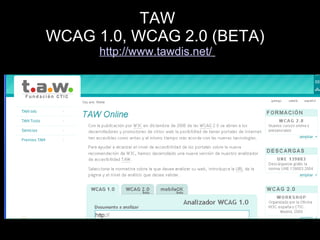
TAW WCAG 1.0, WCAG 2.0 (BETA)  http://www.tawdis.net/
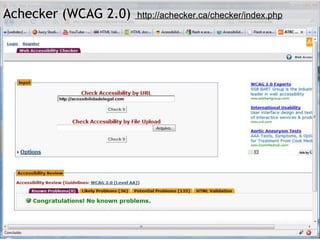
Functional Accessibility Evaluator 1.0  http://fae.cita.uiuc.edu/   Achecker (WCAG 2.0)  http://achecker.ca/checker/index.php
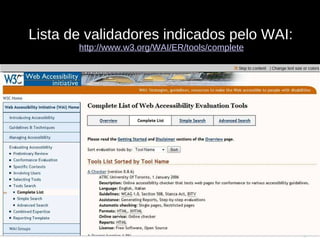
Lista de validadores indicados pelo WAI:  http://www.w3.org/WAI/ER/tools/complete
Validação de Acessibilidade Avaliação de contraste.
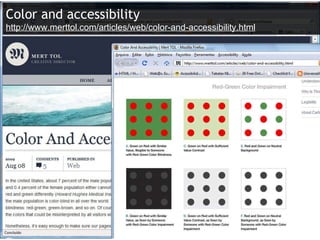
Color and accessibility http://www.merttol.com/articles/web/color-and-accessibility.html
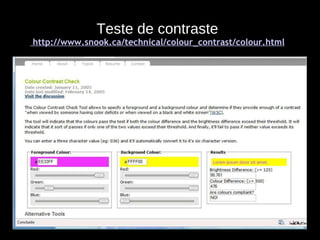
Teste de contraste  http://www.snook.ca/technical/colour_contrast/colour.html
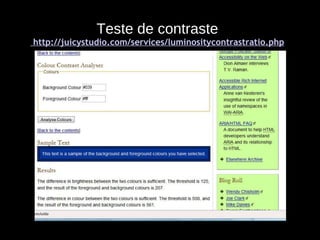
Teste de contraste  http://juicystudio.com/services/luminositycontrastratio.php
Teste de contraste http://www.stainlessvision.com/projects/colour-contrast-visualiser
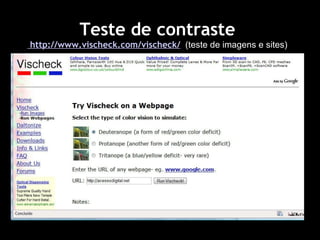
Teste de contraste  http://www.vischeck.com/vischeck/   (teste de imagens e sites)
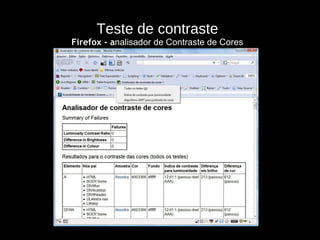
Teste de contraste Firefox - a nalisador de Contraste de Cores
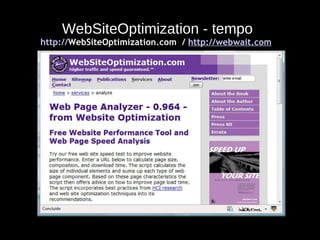
Validação de Acessibilidade Avaliação do tempo de download das páginas.
WebSiteOptimization - tempo http:// WebSiteOptimization.com   /  http://webwait.com
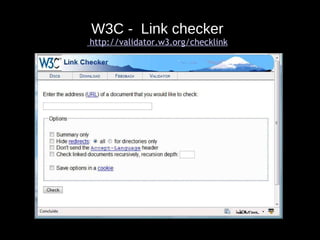
Validação de Acessibilidade Teste de links quebrados e página de erro.
W3C -  Link checker  http://validator.w3.org/checklink
Validação de Acessibilidade Avaliação humana por especialistas.
Validação de Acessibilidade Avaliação humana por especialistas: Aplicação de lista de verificação do WCAG por especialista.
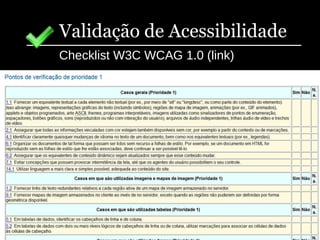
Validação de Acessibilidade Checklist W3C WCAG 1.0 (link)
Validação de Acessibilidade WCAG 2.0 Appendix B: Checklist (Non-Normative) Web Content Accessibility Guidelines 2.0 Checklist http://www.w3.org/TR/2006/WD-WCAG20-20060427/appendixB.html
Validação de Acessibilidade Avaliação humana por especialistas em acessibilidade simulando o acesso por pessoas com deficiência.
Validação de Acessibilidade Sem mouse – navegar pelo site em análise utilizando apenas o teclado e monitor, com mouse desligado..
Validação de Acessibilidade Sem mouse e com software leitor de telas -  navegar pelo site com o teclado, um software leitor de telas e com monitor.
Validação de Acessibilidade Sem mouse e sem monitor - navegar pelo seu site utilizando apenas o teclado com orientação do leitor de telas.
Validação de Acessibilidade Testes de acesso em diferentes plataformas e navegadores.
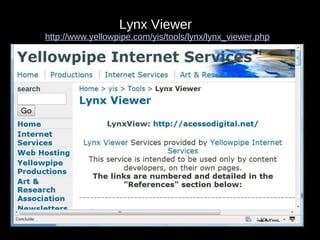
Lynx Viewer   http://www.yellowpipe.com/yis/tools/lynx/lynx_viewer.php
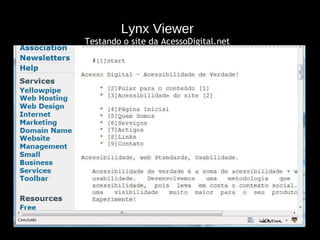
Lynx Viewer Testando o site da AcessoDigital.net
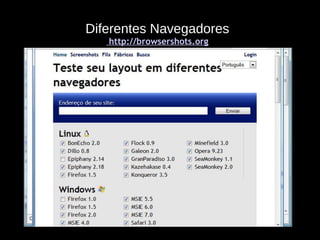
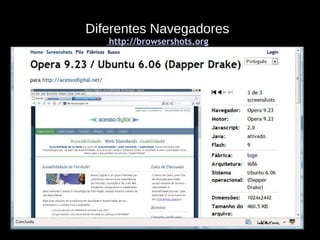
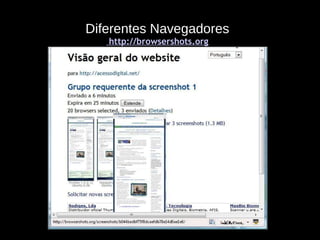
Diferentes Navegadores  http://browsershots.org
Validação de Acessibilidade Testes de acesso com diferentes configurações.
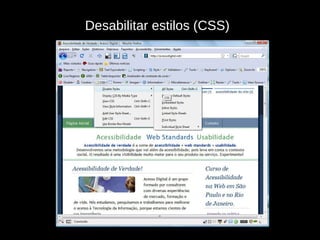
Desabilitar estilos (CSS)
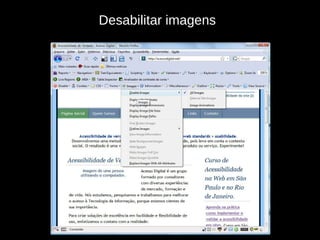
Desabilitar imagens
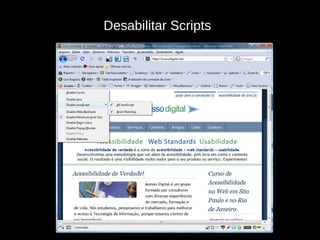
Desabilitar Scripts
Validação de Acessibilidade Testes de impressão e com dispositivos móveis
Validação de Acessibilidade Canal para reportar problemas de acessibilidade. Melhoria contínua da acessibilidade @
Firefox  Firefox 3.0.7 http://br.mozdev.org/firefox/download.html   Complementos para o Firefox (são instalados a partir de seus respectivos links) : Firebug:  https://addons.mozilla.org/pt-BR/firefox/addon/1843   HTML Validator  https://addons.mozilla.org/pt-BR/firefox/addon/249   Web Developer  https://addons.mozilla.org/pt-BR/firefox/addon/60   Check My Colors! 1.0  https://addons.mozilla.org/pt-BR/firefox/addon/8819   Firefox Accessibility Extension 1.4.5.0  https://addons.mozilla.org/pt-BR/firefox/addon/5809
Firefox  Complementos para o Firefox (são instalados a partir de seus respectivos links) : TAW3 with a click 0.9.6  https://addons.mozilla.org/pt-BR/firefox/addon/1158   Juicy Studio Accessibility Toolbar 1.45  https://addons.mozilla.org/pt-BR/firefox/addon/9108   Obtrusive JavaScript Checker 0.81  https://addons.mozilla.org/en-US/firefox/addon/9505
Obrigado! Lêda Lucia Spelta [email_address] Horácio Soares  [email_address] Uma mão segurando um cartão de visita da acesso digital.

W3C Acessibilidade

Notas do Editor

  • #2 É garantir que a informação esteja disponível e acessível a qualquer hora, local, ambiente, dispositivo de acesso e por qualquer tipo de visitante/usuário, independente de sua capacidade motora, visual, auditiva, mental, computacional, cultural ou social.
  • #6 É garantir que a informação esteja disponível e acessível a qualquer hora, local, ambiente, dispositivo de acesso e por qualquer tipo de visitante/usuário, independente de sua capacidade motora, visual, auditiva, mental, computacional, cultural ou social.
  • #36 É garantir que a informação esteja disponível e acessível a qualquer hora, local, ambiente, dispositivo de acesso e por qualquer tipo de visitante/usuário, independente de sua capacidade motora, visual, auditiva, mental, computacional, cultural ou social.
  • #48 AJAX creates a new paradigm for the web and many people are not accustomed to it yet. Thus it is important to inform the user if the page is being incrementally updated. Some users may not notice that data on the page is changed. This is especially true for users of assistive technology such as screen readers and magnifiers. Due to assistive technology, cognitive, or other reasons, some users may be focused on only a single area of the page. These uses may not be able to easily locate new information on the page. Unexpected changes of focus can be very distracting for some users. It can be very time consuming and difficult for some users to return to the previous location on the page. Thus, changing focus to the updated content should be avoided unless the user has explicitly requested that mechanism of update notification. Also, note that WCAG 2.0 Success Criterion 3.2.5 states, “ Changes of context are initiated only by user request.” Loss of back button functionality and URIs that can not be bookmarked are also issues associated with AJAX but they will not be discussed in this presentation since they do not directly affect accessibity.
  • #49 AJAX creates a new paradigm for the web and many people are not accustomed to it yet. Thus it is important to inform the user if the page is being incrementally updated. Some users may not notice that data on the page is changed. This is especially true for users of assistive technology such as screen readers and magnifiers. Due to assistive technology, cognitive, or other reasons, some users may be focused on only a single area of the page. These uses may not be able to easily locate new information on the page. Unexpected changes of focus can be very distracting for some users. It can be very time consuming and difficult for some users to return to the previous location on the page. Thus, changing focus to the updated content should be avoided unless the user has explicitly requested that mechanism of update notification. Also, note that WCAG 2.0 Success Criterion 3.2.5 states, “ Changes of context are initiated only by user request.” Loss of back button functionality and URIs that can not be bookmarked are also issues associated with AJAX but they will not be discussed in this presentation since they do not directly affect accessibity.
  • #50 AJAX creates a new paradigm for the web and many people are not accustomed to it yet. Thus it is important to inform the user if the page is being incrementally updated. Some users may not notice that data on the page is changed. This is especially true for users of assistive technology such as screen readers and magnifiers. Due to assistive technology, cognitive, or other reasons, some users may be focused on only a single area of the page. These uses may not be able to easily locate new information on the page. Unexpected changes of focus can be very distracting for some users. It can be very time consuming and difficult for some users to return to the previous location on the page. Thus, changing focus to the updated content should be avoided unless the user has explicitly requested that mechanism of update notification. Also, note that WCAG 2.0 Success Criterion 3.2.5 states, “ Changes of context are initiated only by user request.” Loss of back button functionality and URIs that can not be bookmarked are also issues associated with AJAX but they will not be discussed in this presentation since they do not directly affect accessibity.
  • #66 AJAX creates a new paradigm for the web and many people are not accustomed to it yet. Thus it is important to inform the user if the page is being incrementally updated. Some users may not notice that data on the page is changed. This is especially true for users of assistive technology such as screen readers and magnifiers. Due to assistive technology, cognitive, or other reasons, some users may be focused on only a single area of the page. These uses may not be able to easily locate new information on the page. Unexpected changes of focus can be very distracting for some users. It can be very time consuming and difficult for some users to return to the previous location on the page. Thus, changing focus to the updated content should be avoided unless the user has explicitly requested that mechanism of update notification. Also, note that WCAG 2.0 Success Criterion 3.2.5 states, “ Changes of context are initiated only by user request.” Loss of back button functionality and URIs that can not be bookmarked are also issues associated with AJAX but they will not be discussed in this presentation since they do not directly affect accessibity.
  • #67 AJAX creates a new paradigm for the web and many people are not accustomed to it yet. Thus it is important to inform the user if the page is being incrementally updated. Some users may not notice that data on the page is changed. This is especially true for users of assistive technology such as screen readers and magnifiers. Due to assistive technology, cognitive, or other reasons, some users may be focused on only a single area of the page. These uses may not be able to easily locate new information on the page. Unexpected changes of focus can be very distracting for some users. It can be very time consuming and difficult for some users to return to the previous location on the page. Thus, changing focus to the updated content should be avoided unless the user has explicitly requested that mechanism of update notification. Also, note that WCAG 2.0 Success Criterion 3.2.5 states, “ Changes of context are initiated only by user request.” Loss of back button functionality and URIs that can not be bookmarked are also issues associated with AJAX but they will not be discussed in this presentation since they do not directly affect accessibity.
  • #68 AJAX creates a new paradigm for the web and many people are not accustomed to it yet. Thus it is important to inform the user if the page is being incrementally updated. Some users may not notice that data on the page is changed. This is especially true for users of assistive technology such as screen readers and magnifiers. Due to assistive technology, cognitive, or other reasons, some users may be focused on only a single area of the page. These uses may not be able to easily locate new information on the page. Unexpected changes of focus can be very distracting for some users. It can be very time consuming and difficult for some users to return to the previous location on the page. Thus, changing focus to the updated content should be avoided unless the user has explicitly requested that mechanism of update notification. Also, note that WCAG 2.0 Success Criterion 3.2.5 states, “ Changes of context are initiated only by user request.” Loss of back button functionality and URIs that can not be bookmarked are also issues associated with AJAX but they will not be discussed in this presentation since they do not directly affect accessibity.
  • #69 AJAX creates a new paradigm for the web and many people are not accustomed to it yet. Thus it is important to inform the user if the page is being incrementally updated. Some users may not notice that data on the page is changed. This is especially true for users of assistive technology such as screen readers and magnifiers. Due to assistive technology, cognitive, or other reasons, some users may be focused on only a single area of the page. These uses may not be able to easily locate new information on the page. Unexpected changes of focus can be very distracting for some users. It can be very time consuming and difficult for some users to return to the previous location on the page. Thus, changing focus to the updated content should be avoided unless the user has explicitly requested that mechanism of update notification. Also, note that WCAG 2.0 Success Criterion 3.2.5 states, “ Changes of context are initiated only by user request.” Loss of back button functionality and URIs that can not be bookmarked are also issues associated with AJAX but they will not be discussed in this presentation since they do not directly affect accessibity.
  • #70 AJAX creates a new paradigm for the web and many people are not accustomed to it yet. Thus it is important to inform the user if the page is being incrementally updated. Some users may not notice that data on the page is changed. This is especially true for users of assistive technology such as screen readers and magnifiers. Due to assistive technology, cognitive, or other reasons, some users may be focused on only a single area of the page. These uses may not be able to easily locate new information on the page. Unexpected changes of focus can be very distracting for some users. It can be very time consuming and difficult for some users to return to the previous location on the page. Thus, changing focus to the updated content should be avoided unless the user has explicitly requested that mechanism of update notification. Also, note that WCAG 2.0 Success Criterion 3.2.5 states, “ Changes of context are initiated only by user request.” Loss of back button functionality and URIs that can not be bookmarked are also issues associated with AJAX but they will not be discussed in this presentation since they do not directly affect accessibity.
  • #72 AJAX creates a new paradigm for the web and many people are not accustomed to it yet. Thus it is important to inform the user if the page is being incrementally updated. Some users may not notice that data on the page is changed. This is especially true for users of assistive technology such as screen readers and magnifiers. Due to assistive technology, cognitive, or other reasons, some users may be focused on only a single area of the page. These uses may not be able to easily locate new information on the page. Unexpected changes of focus can be very distracting for some users. It can be very time consuming and difficult for some users to return to the previous location on the page. Thus, changing focus to the updated content should be avoided unless the user has explicitly requested that mechanism of update notification. Also, note that WCAG 2.0 Success Criterion 3.2.5 states, “ Changes of context are initiated only by user request.” Loss of back button functionality and URIs that can not be bookmarked are also issues associated with AJAX but they will not be discussed in this presentation since they do not directly affect accessibity.
  • #74 AJAX creates a new paradigm for the web and many people are not accustomed to it yet. Thus it is important to inform the user if the page is being incrementally updated. Some users may not notice that data on the page is changed. This is especially true for users of assistive technology such as screen readers and magnifiers. Due to assistive technology, cognitive, or other reasons, some users may be focused on only a single area of the page. These uses may not be able to easily locate new information on the page. Unexpected changes of focus can be very distracting for some users. It can be very time consuming and difficult for some users to return to the previous location on the page. Thus, changing focus to the updated content should be avoided unless the user has explicitly requested that mechanism of update notification. Also, note that WCAG 2.0 Success Criterion 3.2.5 states, “ Changes of context are initiated only by user request.” Loss of back button functionality and URIs that can not be bookmarked are also issues associated with AJAX but they will not be discussed in this presentation since they do not directly affect accessibity.
  • #84 AJAX creates a new paradigm for the web and many people are not accustomed to it yet. Thus it is important to inform the user if the page is being incrementally updated. Some users may not notice that data on the page is changed. This is especially true for users of assistive technology such as screen readers and magnifiers. Due to assistive technology, cognitive, or other reasons, some users may be focused on only a single area of the page. These uses may not be able to easily locate new information on the page. Unexpected changes of focus can be very distracting for some users. It can be very time consuming and difficult for some users to return to the previous location on the page. Thus, changing focus to the updated content should be avoided unless the user has explicitly requested that mechanism of update notification. Also, note that WCAG 2.0 Success Criterion 3.2.5 states, “ Changes of context are initiated only by user request.” Loss of back button functionality and URIs that can not be bookmarked are also issues associated with AJAX but they will not be discussed in this presentation since they do not directly affect accessibity.
  • #85 AJAX creates a new paradigm for the web and many people are not accustomed to it yet. Thus it is important to inform the user if the page is being incrementally updated. Some users may not notice that data on the page is changed. This is especially true for users of assistive technology such as screen readers and magnifiers. Due to assistive technology, cognitive, or other reasons, some users may be focused on only a single area of the page. These uses may not be able to easily locate new information on the page. Unexpected changes of focus can be very distracting for some users. It can be very time consuming and difficult for some users to return to the previous location on the page. Thus, changing focus to the updated content should be avoided unless the user has explicitly requested that mechanism of update notification. Also, note that WCAG 2.0 Success Criterion 3.2.5 states, “ Changes of context are initiated only by user request.” Loss of back button functionality and URIs that can not be bookmarked are also issues associated with AJAX but they will not be discussed in this presentation since they do not directly affect accessibity.
  • #86 AJAX creates a new paradigm for the web and many people are not accustomed to it yet. Thus it is important to inform the user if the page is being incrementally updated. Some users may not notice that data on the page is changed. This is especially true for users of assistive technology such as screen readers and magnifiers. Due to assistive technology, cognitive, or other reasons, some users may be focused on only a single area of the page. These uses may not be able to easily locate new information on the page. Unexpected changes of focus can be very distracting for some users. It can be very time consuming and difficult for some users to return to the previous location on the page. Thus, changing focus to the updated content should be avoided unless the user has explicitly requested that mechanism of update notification. Also, note that WCAG 2.0 Success Criterion 3.2.5 states, “ Changes of context are initiated only by user request.” Loss of back button functionality and URIs that can not be bookmarked are also issues associated with AJAX but they will not be discussed in this presentation since they do not directly affect accessibity.
  • #87 AJAX creates a new paradigm for the web and many people are not accustomed to it yet. Thus it is important to inform the user if the page is being incrementally updated. Some users may not notice that data on the page is changed. This is especially true for users of assistive technology such as screen readers and magnifiers. Due to assistive technology, cognitive, or other reasons, some users may be focused on only a single area of the page. These uses may not be able to easily locate new information on the page. Unexpected changes of focus can be very distracting for some users. It can be very time consuming and difficult for some users to return to the previous location on the page. Thus, changing focus to the updated content should be avoided unless the user has explicitly requested that mechanism of update notification. Also, note that WCAG 2.0 Success Criterion 3.2.5 states, “ Changes of context are initiated only by user request.” Loss of back button functionality and URIs that can not be bookmarked are also issues associated with AJAX but they will not be discussed in this presentation since they do not directly affect accessibity.
  • #88 AJAX creates a new paradigm for the web and many people are not accustomed to it yet. Thus it is important to inform the user if the page is being incrementally updated. Some users may not notice that data on the page is changed. This is especially true for users of assistive technology such as screen readers and magnifiers. Due to assistive technology, cognitive, or other reasons, some users may be focused on only a single area of the page. These uses may not be able to easily locate new information on the page. Unexpected changes of focus can be very distracting for some users. It can be very time consuming and difficult for some users to return to the previous location on the page. Thus, changing focus to the updated content should be avoided unless the user has explicitly requested that mechanism of update notification. Also, note that WCAG 2.0 Success Criterion 3.2.5 states, “ Changes of context are initiated only by user request.” Loss of back button functionality and URIs that can not be bookmarked are also issues associated with AJAX but they will not be discussed in this presentation since they do not directly affect accessibity.
  • #97 É garantir que a informação esteja disponível e acessível a qualquer hora, local, ambiente, dispositivo de acesso e por qualquer tipo de visitante/usuário, independente de sua capacidade motora, visual, auditiva, mental, computacional, cultural ou social.