José Raphael Teixeira Marques   Mestrando em Informática (UFPB)
                                raphaelmarques.wordpress.com
                                joseraphael@di.ufpb.br
   O que é JavaFX?
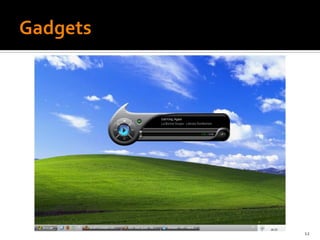
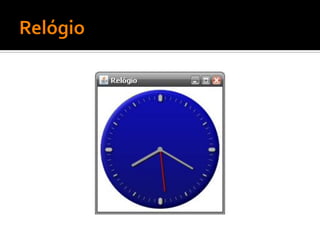
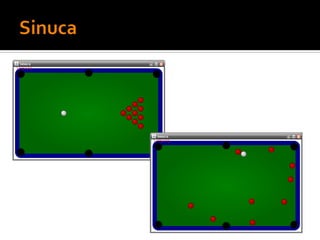
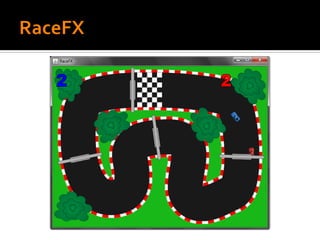
   Exemplos com JavaFX
   Por que JavaFX?
   JavaFX Script
   GUI com JavaFX Script
   Informações adicionais
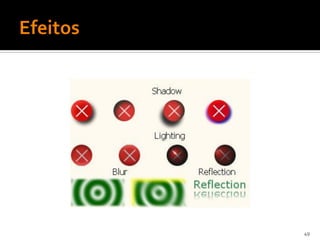
   Java “Effects”

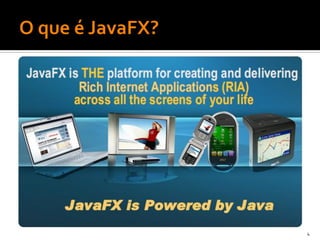
   JavaFX é a melhor forma para criar conteúdo
    rico expressivo. Baseado na Plataforma Java,
    JavaFX oferece uma atraente combinação de
    onipresença, capacidade, expressividade e
    performance.


                                                   3
4
5
6
7
9
10
11
12
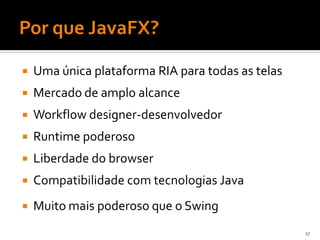
   Uma única plataforma RIA para todas as telas
   Mercado de amplo alcance
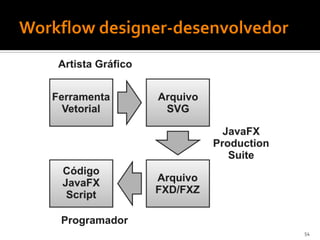
   Workflow designer-desenvolvedor
   Runtime poderoso
   Liberdade do browser
   Compatibilidade com tecnologias Java
   Muito mais poderoso que o Swing
                                                   17
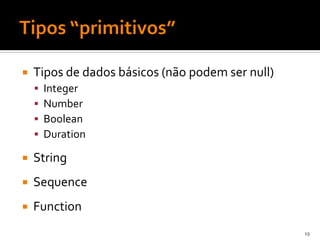
   Tipos de dados básicos (não podem ser null)
       Integer
       Number
       Boolean
       Duration

   String
   Sequence
   Function
                                                  19
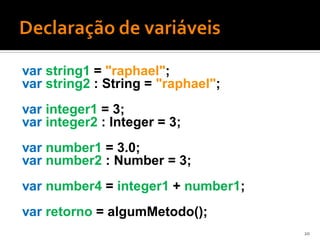
var string1 = "raphael";
var string2 : String = "raphael";
var integer1 = 3;
var integer2 : Integer = 3;
var number1 = 3.0;
var number2 : Number = 3;
var number4 = integer1 + number1;
var retorno = algumMetodo();
                                    20
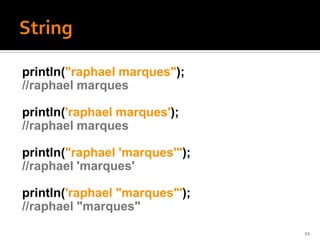
println("raphael marques");
//raphael marques

println('raphael marques');
//raphael marques

println("raphael 'marques'");
//raphael 'marques'

println('raphael "marques"');
//raphael "marques"
                                21
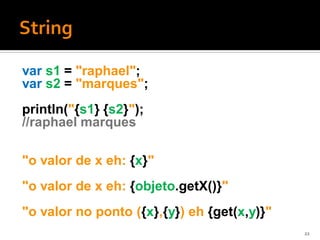
var s1 = "raphael";
var s2 = "marques";
println("{s1} {s2}");
//raphael marques

"o valor de x eh: {x}"
"o valor de x eh: {objeto.getX()}"
"o valor no ponto ({x},{y}) eh {get(x,y)}"
                                             22
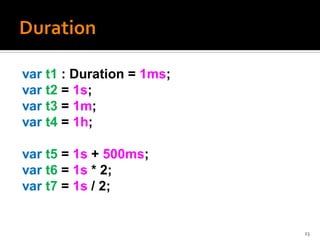
var t1 : Duration = 1ms;
var t2 = 1s;
var t3 = 1m;
var t4 = 1h;

var t5 = 1s + 500ms;
var t6 = 1s * 2;
var t7 = 1s / 2;


                           23
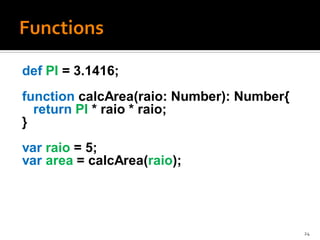
def PI = 3.1416;
function calcArea(raio: Number): Number{
  return PI * raio * raio;
}
var raio = 5;
var area = calcArea(raio);


                                           24
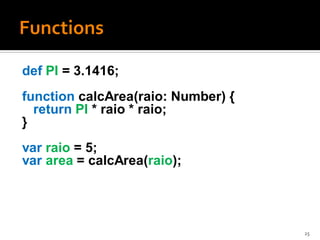
def PI = 3.1416;
function calcArea(raio: Number) {
  return PI * raio * raio;
}
var raio = 5;
var area = calcArea(raio);


                                    25
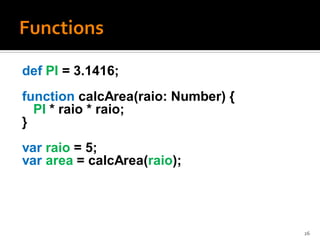
def PI = 3.1416;
function calcArea(raio: Number) {
  PI * raio * raio;
}
var raio = 5;
var area = calcArea(raio);


                                    26
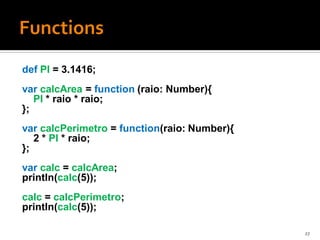
def PI = 3.1416;
var calcArea = function (raio: Number){
   PI * raio * raio;
};
var calcPerimetro = function(raio: Number){
   2 * PI * raio;
};
var calc = calcArea;
println(calc(5));
calc = calcPerimetro;
println(calc(5));

                                              27
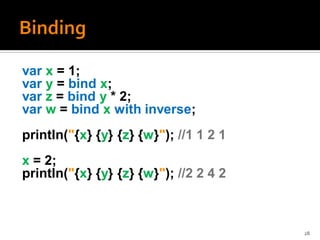
var x = 1;
var y = bind x;
var z = bind y * 2;
var w = bind x with inverse;
println("{x} {y} {z} {w}"); //1 1 2 1
x = 2;
println("{x} {y} {z} {w}"); //2 2 4 2


                                        28
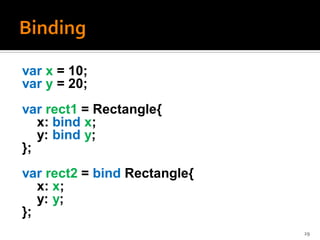
var x = 10;
var y = 20;
var rect1 = Rectangle{
   x: bind x;
   y: bind y;
};
var rect2 = bind Rectangle{
   x: x;
   y: y;
};
                              29
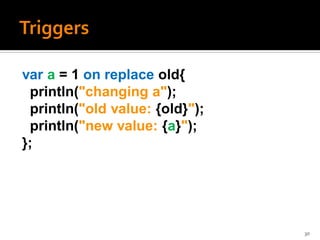
var a = 1 on replace old{
 println("changing a");
 println("old value: {old}");
 println("new value: {a}");
};


                                30
var seq1 : Integer[ ] = [1,2,3,4,5,6,7,8,9,10];
var seq2 = [1..10];
var seq3 = [1..10 step 2];
var seq4 = [seq1 , seq2 , seq3];
var seq5 = seq1[4..];
var seq6 = seq1[i | i mod 2 == 0];

Operações:
 insert, delete, reverse, ==
{
    var a = 3;
    ...
    y = a;
}
if(a > 0) {x = a} else {x = a+b};
for(i in [1..5]){
  insert i*i into quadrados;
}
var y = {
  var a = 3;
  ...
  a;
}
var x = if(a > 0) {a} else {a+b};
var quadrados = for(i in [1..5]){
  i*i;
}
public class HelloWorldSwing{
  public static void main(String[] args){
     JFrame frame =
            new JFrame("HelloWorld Swing");
     JLabel label =
            new JLabel("Hello World");
     frame.getContentPane().add(label);
     frame.setDefaultCloseOperation(
            JFrame.EXIT_ON_CLOSE);
     frame.pack();
     frame.setVisible(true);
  }
}
                                              35
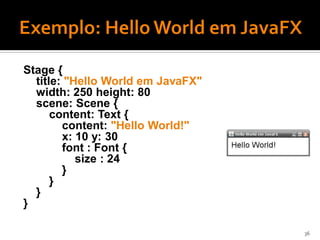
Stage {
  title: "Hello World em JavaFX"
  width: 250 height: 80
  scene: Scene {
      content: Text {
        content: "Hello World!"
        x: 10 y: 30
        font : Font {
           size : 24
        }
      }
  }
}

                                   36
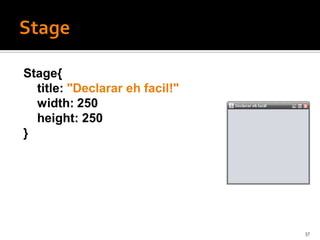
Stage{
  title: "Declarar eh facil!"
  width: 250
  height: 250
}


                                37
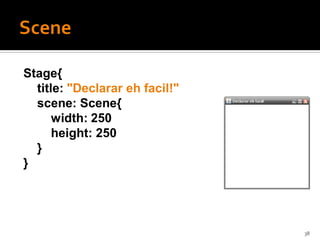
Stage{
  title: "Declarar eh facil!"
  scene: Scene{
      width: 250
      height: 250
  }
}


                                38
Stage{
  ...
  scene: Scene{
      ...
      content: [
          Rectangle{
            x: 45 y: 45
            width: 160 height: 160
            arcWidth: 15 arcHeight: 15
            fill: Color.GREEN
          }
      ]
  }
}

                                         39
...
content: [
    Rectangle{
      ...
    }
    Circle{
      centerX: 125 centerY: 125
      radius: 90
      fill: Color.WHITE
      stroke: Color.RED
    }
]
...

                                  40
...
content: [
    Circle{
      ...
    }
    Rectangle{
      ...
    }
]
...
                 41
...
content: [
    Circle{
      ...
    }
    Rectangle{
      ...
      opacity: 0.6
    }
]
...
                     42
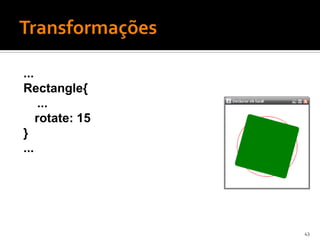
...
Rectangle{
     ...
    rotate: 15
}
...


                 43
...
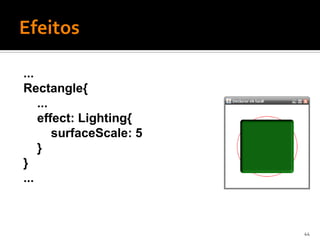
Rectangle{
    ...
    effect: Lighting{
        surfaceScale: 5
    }
}
...


                          44
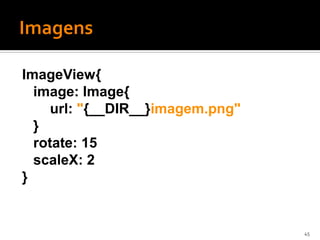
ImageView{
  image: Image{
     url: "{__DIR__}imagem.png"
  }
  rotate: 15
  scaleX: 2
}


                                  45
...
Group{
    translateX: 15           Group
    translateY: 15
    content: [
       Text{
               ...
       }                    Translate
       Circle{
               ...
       }
    ]
}
...                  Text               Circle


                                                 46
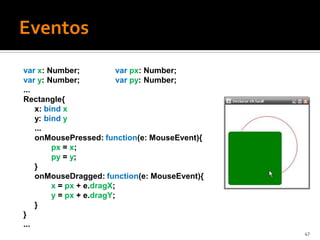
var x: Number;             var px: Number;
var y: Number;             var py: Number;
...
Rectangle{
    x: bind x
    y: bind y
    ...
    onMousePressed: function(e: MouseEvent){
         px = x;
         py = y;
    }
    onMouseDragged: function(e: MouseEvent){
         x = px + e.dragX;
         y = px + e.dragY;
    }
}
...
                                               47
48
49
50
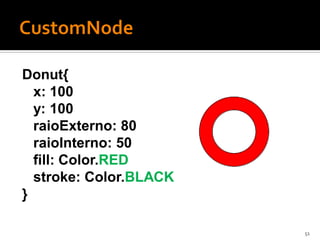
Donut{
  x: 100
  y: 100
  raioExterno: 80
  raioInterno: 50
  fill: Color.RED
  stroke: Color.BLACK
}

                        51
var timeline = Timeline {
   keyFrames : [
     KeyFrame {
          time: 2s
          values : variavel => 100
               tween Interpolator.LINEAR
     }
   ]
};
timeline.play();

                                           52
53
54
55
56
57
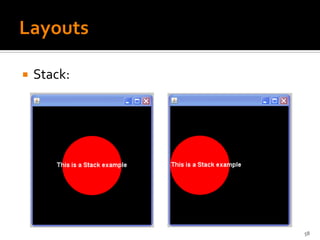
   Stack:


             58
59
   Suporte para RSS e ATOM feeds
   Suporte a múltiplas telas
   Armazenamento local
   Herança múltipla
   Algumas palavras “reservadas” não são mais
    reservadas
     init, step, replace, etc...
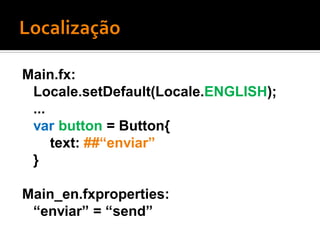
Main.fx:
 Locale.setDefault(Locale.ENGLISH);
 ...
 var button = Button{
     text: ##“enviar”
 }

Main_en.fxproperties:
 “enviar” = “send”
   Distribuição:
     Carregamento do Applet
     JavaWebStart em inglês
     JavaFX Runtime online na 1ª vez
     Java Runtime maior

   Integração com Java:
     Bind com objetos Java


                                        63
   JavaFX
     http://javafx.com/

   JavaFX Developer Home
     http://java.sun.com/javafx/

   JavaFX Programing (with Passion!)
     http://www.javapassion.com/javafx/


                                           64
   Windows, Linux, Mac OS X e Solaris x86
     Windows Mobile 6
   JavaFX 1.2.1 SDK
   Netbeans IDE 6.7.1 para JavaFX 1.2
   JavaFX 1.2 Eclipse-plugin
   JavaFX 1.2 Production Suite
     Plugin para Adobe Illustrator e Adobe Photoshop
     Media Factory
      ▪ JavaFX Graphics Viewer e SVG Converter


                                                        65
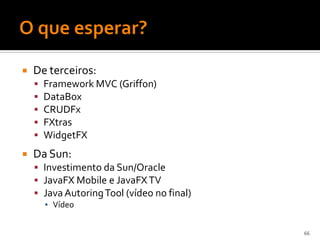
   De terceiros:
       Framework MVC (Griffon)
       DataBox
       CRUDFx
       FXtras
       WidgetFX
   Da Sun:
     Investimento da Sun/Oracle
     JavaFX Mobile e JavaFX TV
     Java Autoring Tool (vídeo no final)
        ▪ Vídeo


                                            66
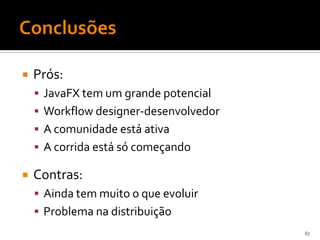
   Prós:
     JavaFX tem um grande potencial
     Workflow designer-desenvolvedor
     A comunidade está ativa
     A corrida está só começando

   Contras:
     Ainda tem muito o que evoluir
     Problema na distribuição
                                        67
José Raphael Teixeira Marques   Mestrando em Informática (UFPB)
                                raphaelmarques.wordpress.com
                                joseraphael@di.ufpb.br

Introdução ao JavaFX

  • 1.
    José Raphael TeixeiraMarques Mestrando em Informática (UFPB) raphaelmarques.wordpress.com joseraphael@di.ufpb.br
  • 2.
    O que é JavaFX?  Exemplos com JavaFX  Por que JavaFX?  JavaFX Script  GUI com JavaFX Script  Informações adicionais
  • 3.
    Java “Effects”  JavaFX é a melhor forma para criar conteúdo rico expressivo. Baseado na Plataforma Java, JavaFX oferece uma atraente combinação de onipresença, capacidade, expressividade e performance. 3
  • 4.
  • 5.
  • 6.
  • 7.
  • 9.
  • 10.
  • 11.
  • 12.
  • 17.
    Uma única plataforma RIA para todas as telas  Mercado de amplo alcance  Workflow designer-desenvolvedor  Runtime poderoso  Liberdade do browser  Compatibilidade com tecnologias Java  Muito mais poderoso que o Swing 17
  • 19.
    Tipos de dados básicos (não podem ser null)  Integer  Number  Boolean  Duration  String  Sequence  Function 19
  • 20.
    var string1 ="raphael"; var string2 : String = "raphael"; var integer1 = 3; var integer2 : Integer = 3; var number1 = 3.0; var number2 : Number = 3; var number4 = integer1 + number1; var retorno = algumMetodo(); 20
  • 21.
    println("raphael marques"); //raphael marques println('raphaelmarques'); //raphael marques println("raphael 'marques'"); //raphael 'marques' println('raphael "marques"'); //raphael "marques" 21
  • 22.
    var s1 ="raphael"; var s2 = "marques"; println("{s1} {s2}"); //raphael marques "o valor de x eh: {x}" "o valor de x eh: {objeto.getX()}" "o valor no ponto ({x},{y}) eh {get(x,y)}" 22
  • 23.
    var t1 :Duration = 1ms; var t2 = 1s; var t3 = 1m; var t4 = 1h; var t5 = 1s + 500ms; var t6 = 1s * 2; var t7 = 1s / 2; 23
  • 24.
    def PI =3.1416; function calcArea(raio: Number): Number{ return PI * raio * raio; } var raio = 5; var area = calcArea(raio); 24
  • 25.
    def PI =3.1416; function calcArea(raio: Number) { return PI * raio * raio; } var raio = 5; var area = calcArea(raio); 25
  • 26.
    def PI =3.1416; function calcArea(raio: Number) { PI * raio * raio; } var raio = 5; var area = calcArea(raio); 26
  • 27.
    def PI =3.1416; var calcArea = function (raio: Number){ PI * raio * raio; }; var calcPerimetro = function(raio: Number){ 2 * PI * raio; }; var calc = calcArea; println(calc(5)); calc = calcPerimetro; println(calc(5)); 27
  • 28.
    var x =1; var y = bind x; var z = bind y * 2; var w = bind x with inverse; println("{x} {y} {z} {w}"); //1 1 2 1 x = 2; println("{x} {y} {z} {w}"); //2 2 4 2 28
  • 29.
    var x =10; var y = 20; var rect1 = Rectangle{ x: bind x; y: bind y; }; var rect2 = bind Rectangle{ x: x; y: y; }; 29
  • 30.
    var a =1 on replace old{ println("changing a"); println("old value: {old}"); println("new value: {a}"); }; 30
  • 31.
    var seq1 :Integer[ ] = [1,2,3,4,5,6,7,8,9,10]; var seq2 = [1..10]; var seq3 = [1..10 step 2]; var seq4 = [seq1 , seq2 , seq3]; var seq5 = seq1[4..]; var seq6 = seq1[i | i mod 2 == 0]; Operações: insert, delete, reverse, ==
  • 32.
    { var a = 3; ... y = a; } if(a > 0) {x = a} else {x = a+b}; for(i in [1..5]){ insert i*i into quadrados; }
  • 33.
    var y ={ var a = 3; ... a; } var x = if(a > 0) {a} else {a+b}; var quadrados = for(i in [1..5]){ i*i; }
  • 35.
    public class HelloWorldSwing{ public static void main(String[] args){ JFrame frame = new JFrame("HelloWorld Swing"); JLabel label = new JLabel("Hello World"); frame.getContentPane().add(label); frame.setDefaultCloseOperation( JFrame.EXIT_ON_CLOSE); frame.pack(); frame.setVisible(true); } } 35
  • 36.
    Stage { title: "Hello World em JavaFX" width: 250 height: 80 scene: Scene { content: Text { content: "Hello World!" x: 10 y: 30 font : Font { size : 24 } } } } 36
  • 37.
    Stage{ title:"Declarar eh facil!" width: 250 height: 250 } 37
  • 38.
    Stage{ title:"Declarar eh facil!" scene: Scene{ width: 250 height: 250 } } 38
  • 39.
    Stage{ ... scene: Scene{ ... content: [ Rectangle{ x: 45 y: 45 width: 160 height: 160 arcWidth: 15 arcHeight: 15 fill: Color.GREEN } ] } } 39
  • 40.
    ... content: [ Rectangle{ ... } Circle{ centerX: 125 centerY: 125 radius: 90 fill: Color.WHITE stroke: Color.RED } ] ... 40
  • 41.
    ... content: [ Circle{ ... } Rectangle{ ... } ] ... 41
  • 42.
    ... content: [ Circle{ ... } Rectangle{ ... opacity: 0.6 } ] ... 42
  • 43.
    ... Rectangle{ ... rotate: 15 } ... 43
  • 44.
    ... Rectangle{ ... effect: Lighting{ surfaceScale: 5 } } ... 44
  • 45.
    ImageView{ image:Image{ url: "{__DIR__}imagem.png" } rotate: 15 scaleX: 2 } 45
  • 46.
    ... Group{ translateX: 15 Group translateY: 15 content: [ Text{ ... } Translate Circle{ ... } ] } ... Text Circle 46
  • 47.
    var x: Number; var px: Number; var y: Number; var py: Number; ... Rectangle{ x: bind x y: bind y ... onMousePressed: function(e: MouseEvent){ px = x; py = y; } onMouseDragged: function(e: MouseEvent){ x = px + e.dragX; y = px + e.dragY; } } ... 47
  • 48.
  • 49.
  • 50.
  • 51.
    Donut{ x:100 y: 100 raioExterno: 80 raioInterno: 50 fill: Color.RED stroke: Color.BLACK } 51
  • 52.
    var timeline =Timeline { keyFrames : [ KeyFrame { time: 2s values : variavel => 100 tween Interpolator.LINEAR } ] }; timeline.play(); 52
  • 53.
  • 54.
  • 55.
  • 56.
  • 57.
  • 58.
    Stack: 58
  • 59.
  • 60.
    Suporte para RSS e ATOM feeds  Suporte a múltiplas telas  Armazenamento local  Herança múltipla  Algumas palavras “reservadas” não são mais reservadas  init, step, replace, etc...
  • 61.
    Main.fx: Locale.setDefault(Locale.ENGLISH); ... var button = Button{ text: ##“enviar” } Main_en.fxproperties: “enviar” = “send”
  • 63.
    Distribuição:  Carregamento do Applet  JavaWebStart em inglês  JavaFX Runtime online na 1ª vez  Java Runtime maior  Integração com Java:  Bind com objetos Java 63
  • 64.
    JavaFX  http://javafx.com/  JavaFX Developer Home  http://java.sun.com/javafx/  JavaFX Programing (with Passion!)  http://www.javapassion.com/javafx/ 64
  • 65.
    Windows, Linux, Mac OS X e Solaris x86  Windows Mobile 6  JavaFX 1.2.1 SDK  Netbeans IDE 6.7.1 para JavaFX 1.2  JavaFX 1.2 Eclipse-plugin  JavaFX 1.2 Production Suite  Plugin para Adobe Illustrator e Adobe Photoshop  Media Factory ▪ JavaFX Graphics Viewer e SVG Converter 65
  • 66.
    De terceiros:  Framework MVC (Griffon)  DataBox  CRUDFx  FXtras  WidgetFX  Da Sun:  Investimento da Sun/Oracle  JavaFX Mobile e JavaFX TV  Java Autoring Tool (vídeo no final) ▪ Vídeo 66
  • 67.
    Prós:  JavaFX tem um grande potencial  Workflow designer-desenvolvedor  A comunidade está ativa  A corrida está só começando  Contras:  Ainda tem muito o que evoluir  Problema na distribuição 67
  • 68.
    José Raphael TeixeiraMarques Mestrando em Informática (UFPB) raphaelmarques.wordpress.com joseraphael@di.ufpb.br