Sistemas de Microprocessadores 2013/2014
Sistemas de Microprocessadores - MIEEC - Ano Lectivo 2013/14
João P Barreto (jpbar@deec.uc.pt)
Introdução
Sistemas de Microprocessadores - MIEEC - Ano Lectivo 2013/14
João P Barreto (jpbar@deec.uc.pt)
Os Computadores são Inteligentes?
Na perspectiva do programador:
§ Operações/Funções muito complexas:
Ä (map (lambda (x) (* x x)) '(1 2 3 4))
§ Gestão automática de memória:
Ä List l = new List;
§ Estruturas "básicas" pré-definidas:
Ä Integers, floats, caracteres, operadores, print commands
Computers
are smart!
Sistemas de Microprocessadores - MIEEC - Ano Lectivo 2013/14
João P Barreto (jpbar@deec.uc.pt)
Os Computadores são Inteligentes?
No mundo "real" do hardware:
§ Meia dúzia de operações lógicas:
Ä {and, or, not}
§ A memória não se gere sozinha
§ Só dois valores possíveis:
Ä {0, 1} ou {low, high} ou {off, on}
Computers are
dumb !
Sistemas de Microprocessadores - MIEEC - Ano Lectivo 2013/14
João P Barreto (jpbar@deec.uc.pt)
SMP/AC
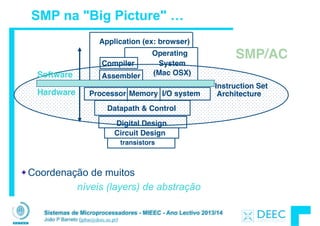
SMP na "Big Picture" …
Coordenação de muitos
níveis (layers) de abstração
I/O systemProcessor
Compiler
Operating
System!
(Mac OSX)
Application (ex: browser)
Digital Design
Circuit Design
Instruction Set!
Architecture
Datapath & Control
transistors
MemoryHardware
Software Assembler
Sistemas de Microprocessadores - MIEEC - Ano Lectivo 2013/14
João P Barreto (jpbar@deec.uc.pt)
Vamos fazer a ponte entre PC e LSD ...
lw $t0, 0($2)
lw $t1, 4($2)
sw $t1, 0($2)
sw $t0, 4($2)
High Level Language
Program (e.g., C)
Assembly Language
Program (e.g.,MIPS)
Machine Language
Program (MIPS)
Hardware Architecture Description
(Logic, Logisim, Verilog, etc.)
Compiler
Assembler
Machine
Interpretation
temp = v[k];!
v[k] = v[k+1];!
v[k+1] = temp;
0000 1001 1100 0110 1010 1111 0101 1000
1010 1111 0101 1000 0000 1001 1100 0110
1100 0110 1010 1111 0101 1000 0000 1001
0101 1000 0000 1001 1100 0110 1010 1111
Logic Circuit Description
(Logisim, etc.)
Architecture
Implementation
Sistemas de Microprocessadores - MIEEC - Ano Lectivo 2013/14
João P Barreto (jpbar@deec.uc.pt)
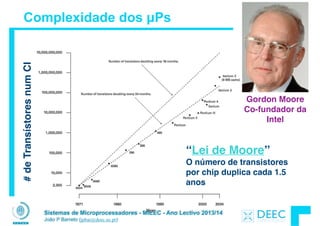
Complexidade dos µPs
“Lei de Moore”!
O número de transistores
por chip duplica cada 1.5
anos
Gordon Moore

Co-fundador da 

Intel
#deTransístoresnumCI
Sistemas de Microprocessadores - MIEEC - Ano Lectivo 2013/14
João P Barreto (jpbar@deec.uc.pt)
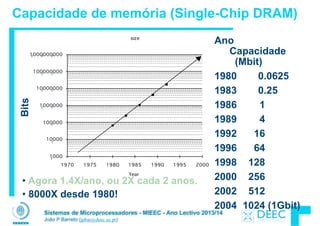
Capacidade de memória (Single-Chip DRAM)
Ano
Capacidade
(Mbit)
1980 0.0625
1983 0.25
1986 1
1989 4
1992 16
1996 64
1998 128
2000 256
2002 512
2004 1024 (1Gbit)
!
• Agora 1.4X/ano, ou 2X cada 2 anos.
• 8000X desde 1980!
Bits
Sistemas de Microprocessadores - MIEEC - Ano Lectivo 2013/14
João P Barreto (jpbar@deec.uc.pt)
Performance(vs.VAX-11/780)
1.0000
10.0000
100.0000
1000.0000
10000.0000
1978 1980 1982 1984 1986 1988 1990 1992 1994 1996 1998 2000 2002 2004 2006
25%/year
52%/year
20%/year
Desmpenho de um µP (SPECint)
• VAX : 1.25x/ano 1978 a 1986
• RISC + x86: 1.52x/ano 1986 a 2002
• RISC + x86: 1.20x/ano 2002 …
1.25x/year
1.52x/year
1.20x/year
Performance(vs.VAX-11/780)
A abrandar devido a limitações físicas
(já se fala de nanotubos de carbono
para dissipação mais eficiente)
Sistemas de Microprocessadores - MIEEC - Ano Lectivo 2013/14
João P Barreto (jpbar@deec.uc.pt)
Pondo as coisas em perspectiva …
“If the automobile had followed the
same development cycle as the
computer,

a Rolls-Royce would today cost
$100,

get a million miles per gallon, 

and explode once a year, 

killing everyone inside.” 

– Robert X. Cringely
Sistemas de Microprocessadores - MIEEC - Ano Lectivo 2013/14
João P Barreto (jpbar@deec.uc.pt)
Objectivos
Perceber os principios e ideias dominantes que estão por detrás da
computação e engenharia:
!
§ Principios de abstração usados para construir as diferentes camadas dos
sistemas
§ Dados são bytes em memória: o seu tipo (integers, floating point,
characters) é uma interpretação determinada pelo programa
§ Armazenamento de programas: instruções são bytes na memória, a
diferença entre instruções e dados é a forma como são interpretados
§ Príncipios de localidade usados na hierarquia de memória
§ Aumento de desempenho tirando partido do paralelismo
§ Compilação v. Interpretação
Sistemas de Microprocessadores - MIEEC - Ano Lectivo 2013/14
João P Barreto (jpbar@deec.uc.pt)
Competências Adicionais
Programação em C
§ Quem sabe uma linguagem (Python/C) deve ser capaz de aprender outra
de forma autónoma
§ Consolidação das competências de programação
§ Compreensão da razão de ser de muitas das regras de sintaxe
§ No final serão programadores muito mais "hardware aware"
Programação em Assembly
§ Competência adquirida como efeito "colateral" de compreender os grandes
príncipios que regem uma máquina-computador
Desenho e Arquitectura de Computadores
§ Introdução ao desenho de hardware
§ Poderão continuar a aprender em Arquitectura de Computadores e
Projecto de Sistemas de Digitais (4º ano do Ramo de Computadores)
Sistemas de Microprocessadores - MIEEC - Ano Lectivo 2013/14
João P Barreto (jpbar@deec.uc.pt)
Tópicos que vamos abordar ...
!
Módulo 1: A Linguagem C e o Hardware
§ Linguagem C (básico + ponteiros)
§ Gestão de Memória (alocação dinâmica, estática, etc)
§ Portos de I/O e programação de hardware
Módulo 2: Programação em Assembly para o MIPS
§ Instruções Aritméticas Básicas
§ Leitura e escrita da memória
§ Controlo de Fluxo
§ Codificação de instruções
§ Números e representação em floating point
§ make-ing an Executable (compilação, assemblagem, etc)
Módulo 3: Introdução à Arquitectura de Computadores
§ Organização do CPU
§ Pipelining
§ Caches e Hierarquia de Memória
§ Polling e interrupções
Sistemas de Microprocessadores - MIEEC - Ano Lectivo 2013/14
João P Barreto (jpbar@deec.uc.pt)
Funcionamento: Pré - Requisitos
Sistemas de Microprocessadores - MIEEC - Ano Lectivo 2011/12
João P Barreto (jpbar@deec.uc.pt)
•Domínio de pelo menos uma linguagem de
programação
-Definição de variáveis, Operadores, Ciclos, Rotinas e
Procedimentos, principios de algoritmia, etc
!
•Conhecimentos básicos de Sistemas Digitais
-Portas lógicas, Mux, Demux, Flip-flops, circuitos
combinacionais, circuitos sequenciais/máquinas de estado,
etc.
!
•Representação de números inteiros positivos e
negativos
-Binário, hexadecimal, complementos de 2, overflow, bit, Kbit,
Mbit, Byte, KByte, MByte, etc
Sistemas de Microprocessadores - MIEEC - Ano Lectivo 2013/14
João P Barreto (jpbar@deec.uc.pt)
Funcionamento: Aulas & Laboratórios
•Uma aula semanal de 2 horas para exposição e discussão
teórica
‣ 1 hora de preparação através da leitura prévia dos slides
‣ 2 a 3 horas de estudo posterior para consolidar os conhecimentos
!
•Uma aula semanal de 3 horas para a realização de práticas
laboratoriais
‣1 trabalho por semana (total de 12 trabalhos)
‣2 horas de preparação prévia
‣Instalar "tools" no computador pessoal a partir da primeira aula
!
•Notas:
‣O tempo de preparação e estudo são valores mínimos
aconselhados
‣Não há picos de trabalho (carga média semanal à volta de 10
horas)
Sistemas de Microprocessadores - MIEEC - Ano Lectivo 2013/14
João P Barreto (jpbar@deec.uc.pt)
Funcionamento: Atitude e Método
•Ser participativo nas aulas, não hesitando em interromper o
instrutor sempre que algo não é claro.
‣Já que estou na aula vou aproveitar para não ter que estudar tanto
em casa.
‣O instrutor só pode saber que está a ir muito depressa se alguém lhe
disser
‣A aula passa a ser bem mais interessante para toda a gente
!
•Ler os slides antes da aula (1 hora) e preparar os trabalhos
(2horas)
!
•Tirar notas para apoiar o estudo
‣As notas permitem-me recordar o que foi dito na aula (que pode não
estar nos livros)
‣Vou saber aquilo a que o professor dá mais importância (útil para o
exame)
Sistemas de Microprocessadores - MIEEC - Ano Lectivo 2013/14
João P Barreto (jpbar@deec.uc.pt)
Funcionamento: Avaliação
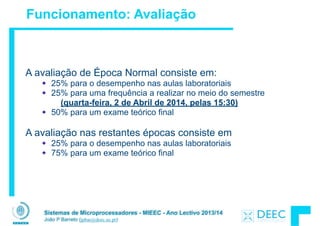
A avaliação de Época Normal consiste em:
25% para o desempenho nas aulas laboratoriais
25% para uma frequência a realizar no meio do semestre
(quarta-feira, 2 de Abril de 2014, pelas 15:30)
50% para um exame teórico final
!
A avaliação nas restantes épocas consiste em
25% para o desempenho nas aulas laboratoriais
75% para um exame teórico final
!
!
!
Sistemas de Microprocessadores - MIEEC - Ano Lectivo 2013/14
João P Barreto (jpbar@deec.uc.pt)
Funcionamento: Avaliação
Notas Importantes:
!
O aluno será avaliado em cada aula laboratorial. A nota final da
prática será obtida através da média das 85% melhores
classificações.
!
Os estudantes trabalhadores têm de cumprir a componente
laboratorial. No caso de haver dificuldades de horários deverão
contactar o docente das teóricas IMEDIATAMENTE
!
Não é permitido os alunos frequentarem regularmente turmas
práticas em que não estejam inscritos (situações pontuais deverão
merecer anuência prévia do docente responsável).
Sistemas de Microprocessadores - MIEEC - Ano Lectivo 2013/14
João P Barreto (jpbar@deec.uc.pt)
Funcionamento: Avaliação
Notas Importantes:
!
A FRAUDE não será tolerada!!!!!
!
Os alunos que obtenham uma nota final igual ou superior a
16 valores poderão ser chamados a fazer uma prova
adicional (defesa de nota) em que o 16 fica garantido.
Nessa prova tanto poderão subir como descer (e.g.
alguém admitido à defesa de nota com 16 poderá
terminar com 20). Quem preferir não fazer a prova terá
sempre 16 valores
!
Sistemas de Microprocessadores - MIEEC - Ano Lectivo 2013/14
João P Barreto (jpbar@deec.uc.pt)
Bibliografia
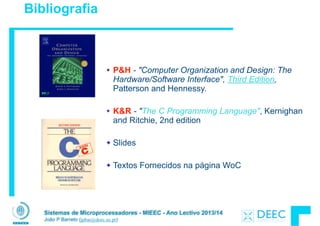
P&H - "Computer Organization and Design: The
Hardware/Software Interface", Third Edition,
Patterson and Hennessy.
!
K&R - "The C Programming Language", Kernighan
and Ritchie, 2nd edition
!
Slides
!
Textos Fornecidos na página WoC
Sistemas de Microprocessadores - MIEEC - Ano Lectivo 2013/14
João P Barreto (jpbar@deec.uc.pt)
A Equipa ...
João P. Barreto - Gab.1.1
Coordenação / Teórica + Labs
jpbar@deec.uc.pt
Tiago Morgado - Gab.3A.24
Labs
tiago.morgado@co.it.pt
We Want
YOU!
Gabriel Falcão - Gab.3A.1
Labs
gff@deec.uc.pt
Sistemas de Microprocessadores 2013/2014
Sistemas de Microprocessadores - MIEEC - Ano Lectivo 2013/14
João P Barreto (jpbar@deec.uc.pt)
Linguagem C

- Ponteiros e Arrays -
Sistemas de Microprocessadores - MIEEC - Ano Lectivo 2013/14
João P Barreto (jpbar@deec.uc.pt)
Programa em C espalhado por ficheiros
#include<stdio.h>
int IntroduzFaltas();
!
int main(){
int total=15, faltas;
faltas=IntroduzFaltas();
printf("Vai entao assistir a %d aulas n",total-faltas);
}
#include<stdio.h>
!
int IntroduzFaltas(){
int tmp;
printf("Quantas faltas vai dar? ");
scanf("%d",&tmp);
return(tmp);
}
Ficheiromain.cFicheirointro.c
Sistemas de Microprocessadores - MIEEC - Ano Lectivo 2013/14
João P Barreto (jpbar@deec.uc.pt)
Compilação : Overview
O compilador converte C em código máquina (string
the 0s e 1s) que é específico da arquitectura.
§ Diferente do Java que converte para um bytecode
independente da arquitectura (máquina virtuais).
§ Diferente do Python que interpreta o código permitindo
interactividade.
§ Para o C a geração do executável passa normalmente por
duas etapas principais:
Ä A compilação, que converte ficheiros .c (código fonte) em
ficheiros .o (código objecto).
gcc -c main.c
gcc -c intro.c
!
Ä A linkagem, que junta os ficheiros .o num executável final
gcc -o final.exe main.o intro.o
Sistemas de Microprocessadores - MIEEC - Ano Lectivo 2013/14
João P Barreto (jpbar@deec.uc.pt)
Anatomia de um Computador
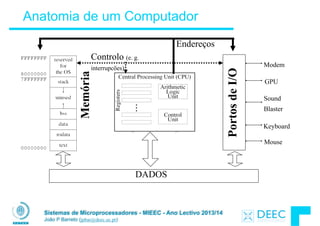
PortosdeI/O
Memória GPU
Sound
Blaster
Keyboard
Mouse
Modem
Controlo (e. g.
interrupcões)
Endereços
DADOS
Sistemas de Microprocessadores - MIEEC - Ano Lectivo 2013/14
João P Barreto (jpbar@deec.uc.pt)
Endereço vs. Valor
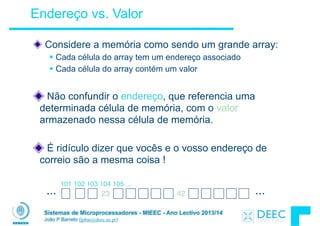
Considere a memória como sendo um grande array:
§ Cada célula do array tem um endereço associado
§ Cada célula do array contém um valor
!
Não confundir o endereço, que referencia uma
determinada célula de memória, com o valor
armazenado nessa célula de memória.
!
É ridículo dizer que vocês e o vosso endereço de
correio são a mesma coisa !
23 42 ......
101 102 103 104 105 ...
Sistemas de Microprocessadores - MIEEC - Ano Lectivo 2013/14
João P Barreto (jpbar@deec.uc.pt)
Ponteiros (revisão)
Um endereço referencia uma determinada zona da
memória. Por outras palavras, aponta para essa zona
de memória.
Ponteiro: uma variável que contém um endereço de
memória
23 42 ......
101 102 103 104 105 ...
x y
zona (endereço)
Nome
da variável
p
104
Sistemas de Microprocessadores - MIEEC - Ano Lectivo 2013/14
João P Barreto (jpbar@deec.uc.pt)
Ponteiros (revisão)
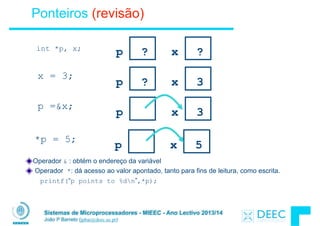
Operador & : obtém o endereço da variável
Operador *: dá acesso ao valor apontado, tanto para fins de leitura, como escrita.
printf(“p points to %dn”,*p);
x = 3;
p ? x 3
p =&x;
p x 3
p ? x ?int *p, x;
p x 5
*p = 5;
Sistemas de Microprocessadores - MIEEC - Ano Lectivo 2013/14
João P Barreto (jpbar@deec.uc.pt)
Ponteiros e Passagem de Parâmetros (revisão)
!
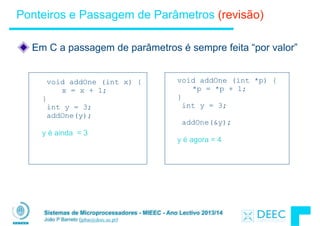
Em C a passagem de parâmetros é sempre feita “por valor”
void addOne (int x) {

x = x + 1;

}
int y = 3;
addOne(y);
!
y é ainda = 3
void addOne (int *p) {

*p = *p + 1;

}
int y = 3;
!
addOne(&y);
!
y é agora = 4
Sistemas de Microprocessadores - MIEEC - Ano Lectivo 2013/14
João P Barreto (jpbar@deec.uc.pt)
Sintaxe do C: Função main (revisão)
Para a função main aceitar parâmetros de entrada
passados pela linha de comando, utilize o seguinte:
!
int main (int argc, char *argv[])
!
O que é isto significa?
§ argc indica o número de strings na linha de comando (o
executável conta um, mais um por cada argumento adicional).
Ä Example: unix% sort myFile
§ argv é um ponteiro para uma array que contém as strings da
linha de comando (ver adiante).
Sistemas de Microprocessadores - MIEEC - Ano Lectivo 2013/14
João P Barreto (jpbar@deec.uc.pt)
Concluíndo ...
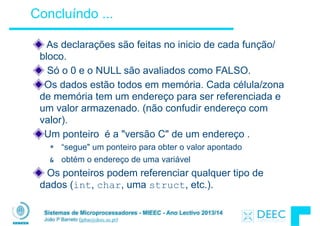
As declarações são feitas no inicio de cada função/
bloco.
Só o 0 e o NULL são avaliados como FALSO.
Os dados estão todos em memória. Cada célula/zona
de memória tem um endereço para ser referenciada e
um valor armazenado. (não confudir endereço com
valor).
Um ponteiro é a "versão C" de um endereço .
* “segue" um ponteiro para obter o valor apontado
& obtém o endereço de uma variável
Os ponteiros podem referenciar qualquer tipo de
dados (int, char, uma struct, etc.).
Sistemas de Microprocessadores - MIEEC - Ano Lectivo 2013/14
João P Barreto (jpbar@deec.uc.pt)
Trabalho para Casa ...
P&H - Computer Organization and Design!
Capítulo 1 (ler) Secções 3.1, 3.2 e 3.3 (ignorar referências ao MIPS)!
!
K&R - The C Programming Language!
Capítulos 1 a 5 (revisão de programação em C)!
!
Sistemas de Microprocessadores 2013/2014
Sistemas de Microprocessadores - MIEEC - Ano Lectivo 2013/14
João P Barreto (jpbar@deec.uc.pt)
Linguagem C

- Ponteiros e Arrays -
(Continuação)
C
Sistemas de Microprocessadores - MIEEC - Ano Lectivo 2013/14
João P Barreto (jpbar@deec.uc.pt)
Ponteiros e Alocação (1/2)
Depois de declararmos um ponteiro:
!
int *ptr;
!
ptr não aponta ainda para nada (na realidade aponta
para algo … só não sabemos o quê!). Podemos:
!
§ Fazê-lo apontar para algo que já existe (operador &), ou
§ Alocar espaço em memória e pô-lo a apontar para algo novo
… (veremos isto mais à frente)
Sistemas de Microprocessadores - MIEEC - Ano Lectivo 2013/14
João P Barreto (jpbar@deec.uc.pt)
Ponteiros & Alocação (2/2)
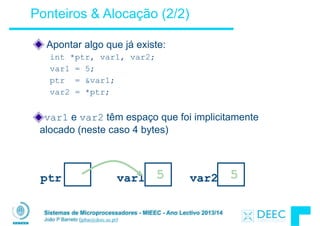
Apontar algo que já existe:
int *ptr, var1, var2;
var1 = 5;
ptr = &var1;
var2 = *ptr;
!
var1 e var2 têm espaço que foi implicitamente
alocado (neste caso 4 bytes)
ptr var1 ? var2 ?5 5?
Sistemas de Microprocessadores - MIEEC - Ano Lectivo 2013/14
João P Barreto (jpbar@deec.uc.pt)
Atenção aos Ponteiros !!!
Declarar um ponteiro somente aloca espaço para
guardar um endereço de memória - não aloca nenhum
espaço a ser apontado.
As variáveis em C não são inicializadas, elas podem
conter qualquer coisa.
O que fará a seguinte função?
void f()
{
int *ptr;
*ptr = 5;
}
DESASTRE
Sistemas de Microprocessadores - MIEEC - Ano Lectivo 2013/14
João P Barreto (jpbar@deec.uc.pt)
Tabelas/Arrays (1/5)
Declaração:
int ar[2];
declara uma tabela de inteiros com 2 elementos. Uma
tabela/array é só um bloco de memória (neste caso de
8 bytes).
Declaração:

int ar[] = {795, 635};
declara e preenche uma tabela de inteiros de 2
elementos.
Acesso a elementos:
ar[num];
devolve o numº elemento (atenção o primeiro elemento
é acedido com num=0).
Sistemas de Microprocessadores - MIEEC - Ano Lectivo 2013/14
João P Barreto (jpbar@deec.uc.pt)
Arrays são (quase) idênticos a ponteiros
§ char *string e char string[] são declarações muito
semelhantes
§ As diferenças são subtis: incremento, declaração de
preenchimento de células, etc
!
Conceito Chave: Uma variável array (o "nome da
tabela") é um ponteiro para o primeiro elemento..
Tabelas/Arrays (2/5)
Sistemas de Microprocessadores - MIEEC - Ano Lectivo 2013/14
João P Barreto (jpbar@deec.uc.pt)
!
Consequências:
!
§ ar é uma variável array mas em muitos aspectos comporta-se
como um ponteiro
§ ar[0] é o mesmo que *ar
§ ar[2] é o mesmo que *(ar+2)
§ Podemos utilizar aritmética de ponteiros para aceder aos
elementos de uma tabela de forma mais conveniente.
!
O que está errado na seguinte função?
!
char *foo() {

char string[32]; ...;

return string;

}
Tabelas/Arrays (3/5)
Sistemas de Microprocessadores - MIEEC - Ano Lectivo 2013/14
João P Barreto (jpbar@deec.uc.pt)
Array de dimensão n; queremos aceder aos elementos
de 0 a n-1, usando como teste de saída a comparação
com o endereço da "casa" depois do fim do array.
int ar[10], *p, *q, sum = 0;

...

p = &ar[0]; q = &ar[10];

while (p != q)

sum += *p++; /* sum = sum + *p; p = p + 1; */
O C assume que depois da tabela continua a ser um
endereço válido, i.e., não causa um erro de bus ou um
segmentation fault
O que aconteceria se acrescentassemos a seguinte
instrução?
*q=20;
Tabelas/Arrays (4/5)
Sistemas de Microprocessadores - MIEEC - Ano Lectivo 2013/14
João P Barreto (jpbar@deec.uc.pt)
Erro Frequente: Uma tabela em C NÃO sabe a sua
própria dimensão, e os seus limites não são verificados
automaticamente!
§ Consequência: Podemos acidentalmente transpôr os limites
da tabela. É necessário evitar isto de forma explicita
§ Consequência: Uma função que percorra uma tabela tem que
receber a variável array e a respectiva dimensão.
!
Segmentation faults e bus errors:
§ Isto são "runtime errors" muito difíceis de detectar. É preciso
ser cuidadoso! (Nas práticas veremos como fazer o debug
usando gdb…)
Tabelas/Arrays (5/5)
Sistemas de Microprocessadores - MIEEC - Ano Lectivo 2013/14
João P Barreto (jpbar@deec.uc.pt)
Segmentation Fault vs Bus Error?
Retirado de
http://www.hyperdictionary.com/
!
Bus Error
§ A fatal failure in the execution of a machine language
instruction resulting from the processor detecting an
anomalous condition on its bus. Such conditions include
invalid address alignment (accessing a multi-byte number at
an odd address), accessing a physical address that does not
correspond to any device, or some other device-specific
hardware error. A bus error triggers a processor-level
exception which Unix translates into a “SIGBUS” signal which,
if not caught, will terminate the current process.
!
Segmentation Fault
§ An error in which a running Unix program attempts to access
memory not allocated to it and terminates with a segmentation
violation error and usually a core dump.
Sistemas de Microprocessadores - MIEEC - Ano Lectivo 2013/14
João P Barreto (jpbar@deec.uc.pt)
Boas e Más Práticas
Má Prática
int i, ar[10];

for(i = 0; i < 10; i++){ ... }
!
Boa Prática 

#define ARRAY_SIZE 10

int i, a[ARRAY_SIZE];

for(i = 0; i < ARRAY_SIZE; i++){ ... }
!
Porquê? SINGLE SOURCE OF TRUTH
§ Evitar ter múltiplas cópias do número 10.
Sistemas de Microprocessadores - MIEEC - Ano Lectivo 2013/14
João P Barreto (jpbar@deec.uc.pt)
Aritmética de Ponteiros (1/4)
!
Um ponteiro é simplesmente um endereço de memória.
Podemos adicionar-lhe valores de forma a percorrermos
uma tabela/array.
p+1 é um ponteiro para o próximo elemento do array.
*p++ vs (*p)++ ?
§ x = *p++ ⇒ x = *p ; p = p + 1;
§ x = (*p)++ ⇒ x = *p ; *p = *p + 1;
O que acontece se cada célula da tabela tiver uma
dimensão superior a 1 byte?
§ O C trata disto automáticamente. Na realidade p+1 não
adiciona 1 ao endereço de memória, adiciona sim o
tamanho de cada elemento da tabela. (por isso é que
associamos tipos aos ponteiros)
Sistemas de Microprocessadores - MIEEC - Ano Lectivo 2013/14
João P Barreto (jpbar@deec.uc.pt)
Aritmética de Ponteiros (2/4)
!
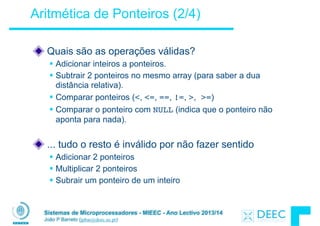
Quais são as operações válidas?
§ Adicionar inteiros a ponteiros.
§ Subtrair 2 ponteiros no mesmo array (para saber a dua
distância relativa).
§ Comparar ponteiros (<, <=, ==, !=, >, >=)
§ Comparar o ponteiro com NULL (indica que o ponteiro não
aponta para nada).
!
... tudo o resto é inválido por não fazer sentido
§ Adicionar 2 ponteiros
§ Multiplicar 2 ponteiros
§ Subrair um ponteiro de um inteiro
Sistemas de Microprocessadores - MIEEC - Ano Lectivo 2013/14
João P Barreto (jpbar@deec.uc.pt)
int get(int array[], int n)
{
return (array[n]);
/* OR */
return *(array + n);
}
Aritmética de Ponteiros (3/4)
O C sabe o tamanho daquilo que o ponteiro aponta (definido
implicitamente na declaração) – assim uma adição/subtracção
move o ponteiro o número adequado de bytes.
§ 1 byte para char, 4 bytes para int, etc.
!
As seguintes instruções são equivalentes:
Sistemas de Microprocessadores - MIEEC - Ano Lectivo 2013/14
João P Barreto (jpbar@deec.uc.pt)
Aritmética de Ponteiros (4/4)
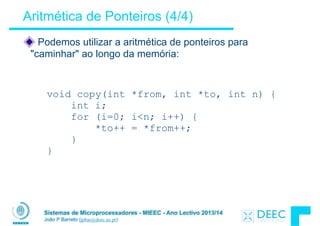
Podemos utilizar a aritmética de ponteiros para
"caminhar" ao longo da memória:
void copy(int *from, int *to, int n) {
int i;
for (i=0; i<n; i++) {
*to++ = *from++;
}
}
Sistemas de Microprocessadores - MIEEC - Ano Lectivo 2013/14
João P Barreto (jpbar@deec.uc.pt)
Representação ASCII the carácteres
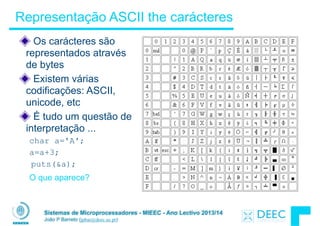
Os carácteres são
representados através
de bytes
Existem várias
codificações: ASCII,
unicode, etc
É tudo um questão de
interpretação ...
char a='A';
a=a+3;
puts(&a);
O que aparece?
Sistemas de Microprocessadores - MIEEC - Ano Lectivo 2013/14
João P Barreto (jpbar@deec.uc.pt)
Uma string em C é um array de carácteres.
char string[] = "abc";
!
Como é que sabemos quando uma string termina?
§ O último carácter é seguido de um byte a 0 (null terminator)
!
!
!
!
!
Um erro comum é esquecer de alocar um byte para o terminador
C Strings
int strlen(char s[])
{
int n = 0;
while (s[n] != 0) n++;
return n;
}
Sistemas de Microprocessadores - MIEEC - Ano Lectivo 2013/14
João P Barreto (jpbar@deec.uc.pt)
Arrays bi-dimensionais (1/2)
#define ROW_SIZE 3
#define COL_SIZE 2
!
...
char Mat[ROW_SIZE][COL_SIZE];
char aux=0;
int i, j;
for ( i=0; i<ROW_SIZE; i++)
for ( j=0; j<COL_SIZE; j++) {
Mat[i][j]=aux;
aux++;
}
...
6
5
4
3
2
1
0 Mat
Endereços
MEMÒRIA
0 1
2 3
4 5
Mat =
Sistemas de Microprocessadores - MIEEC - Ano Lectivo 2013/14
João P Barreto (jpbar@deec.uc.pt)
Arrays bi-dimensionais (2/2)
O C arruma um array bi-dimensional empilhando as linhas
umas a seguir às outras.
!
O espaço total de memória ocupado é
ROW_SIZExCOL_SIZE
!
Temos que:
Mat[2][1] é o mesmo que Mat[2*COL_SIZE+1]
Sistemas de Microprocessadores - MIEEC - Ano Lectivo 2013/14
João P Barreto (jpbar@deec.uc.pt)
Arrays vs. Ponteiros
O nome de um array é um ponteiro para o primeiro
elemento da tabela (indíce 0).
Um parâmetro tabela pode ser declarado como um
array ou um ponteiro.
int strlen(char s[])
{
int n = 0;
while (s[n] != 0)
n++;
return n;
}
int strlen(char *s)
{
int n = 0;
while (s[n] != 0)
n++;
return n;
}
Pode ser escrito:

while (s[n])
Sistemas de Microprocessadores - MIEEC - Ano Lectivo 2013/14
João P Barreto (jpbar@deec.uc.pt)
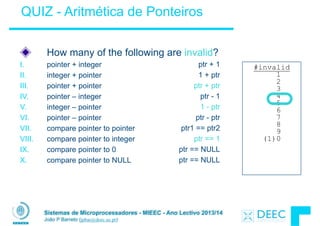
!
ptr + 1
1 + ptr
ptr + ptr
ptr - 1
1 - ptr
ptr - ptr
ptr1 == ptr2
ptr == 1
ptr == NULL
ptr == NULL
How many of the following are invalid?
I. pointer + integer
II. integer + pointer
III. pointer + pointer
IV. pointer – integer
V. integer – pointer
VI. pointer – pointer
VII. compare pointer to pointer
VIII. compare pointer to integer
IX. compare pointer to 0
X. compare pointer to NULL
QUIZ - Aritmética de Ponteiros
#invalid
1
2
3
4
5
6
7
8
9
(1)0
Sistemas de Microprocessadores - MIEEC - Ano Lectivo 2013/14
João P Barreto (jpbar@deec.uc.pt)
Concluindo …
Ponteiros e arrays são virtualmente o mesmo
!
O C sabe como incrementar ponteiros
!
O C é uma linguagem eficiente com muito poucas
protecções
§ Os limites das arrays não são verificados
§ As variáveis não são automaticamente inicializadas
!
(Atenção) O custo da eficiência é um "overhead"
adicional para o programador
§ “C gives you a lot of extra rope but be careful not to hang
yourself with it!” (tirado de K&R)
Sistemas de Microprocessadores 2013/2014
Sistemas de Microprocessadores - MIEEC - Ano Lectivo 2013/14
João P Barreto (jpbar@deec.uc.pt)
Linguagem C

- Alocação Dinâmica -
Sistemas de Microprocessadores - MIEEC - Ano Lectivo 2013/14
João P Barreto (jpbar@deec.uc.pt)
Alocação dinâmica de memória (1/4)
Em C existe a função sizeof() que dá a dimensão em bytes do tipo ou
variável que é passada como parâmetro.
!
Partir do príncipio que conhecemos o tamanho dos objectos pode dar
origem a erros e é uma má prática, por isso utilize sizeof(type)
§ Há muitos anos o tamanho de um int eram 16 bits, e muitos
programas foram escritos com este pressuposto.
§ Qual é o tamanho actual de um int?
!
“sizeof” determina o tamanho para arrays:
int ar[3]; // Or: int ar[] = {54, 47, 99}
sizeof(ar) ⇒ 12
§ …bem como para arrays cujo tamanho é definido em run-time:
int n = 3;
int ar[n]; // Or: int ar[fun_that_returns_3()];
sizeof(ar) ⇒ 12
Sistemas de Microprocessadores - MIEEC - Ano Lectivo 2013/14
João P Barreto (jpbar@deec.uc.pt)
Para alocar memória para algo novo utilize a função
malloc() com a ajuda de typecast e sizeof:
!
ptr = (int *) malloc (sizeof(int));
§ ptr aponta para um espaço algures na memória com tamanho
(sizeof(int)) bytes.
§ (int *) indica ao compilador o tipo de objectos que irá ser
guardado naquele espaço (chama-se um typecast ou
simplesmente cast).
!
malloc é raramente utilizado para uma única variável
ptr = (int *) malloc (n*sizeof(int));
§ Isto um array de n inteiros.
Alocação dinâmica de memória (2/4)
Sistemas de Microprocessadores - MIEEC - Ano Lectivo 2013/14
João P Barreto (jpbar@deec.uc.pt)
Depois do malloc() ser chamado, a memória
alocada contém só lixo, portanto não a utilize até ter
definido os valores aí guardados.
!
Depois de alocar dinâmicamente espaço, deverá
libertá-lo de forma também dinâmica:
free(ptr);
!
Utilize a função free()para fazer a limpeza
§ Embora o programa liberte toda a memória na saída (ou
quando o main termina), não seja preguiçoso!
§ Nunca sabe quando o seu código será re-aproveitado e o
main transformado numa sub-rotina!
Alocação dinâmica de memória (3/4)
Sistemas de Microprocessadores - MIEEC - Ano Lectivo 2013/14
João P Barreto (jpbar@deec.uc.pt)
Alocação dinâmica de memória (4/4)
As seguintes acções fazem com que o seu programa "crash" ou
se comporte estranhamente mais à frente. Estes dois erros são
bugs MUITO MUITO difíceis de se apanhar, portanto atenção:
§ free()ing a mesma zona de memória mais do que uma vez
§ chamar free() sobre algo que não foi devolvido por
malloc()
!
O runtime não verifica este tipo de erros
§ A alocação de memória é tão crítica para o desempenho que
simplesmente não há tempo para fazer estas verificações
§ Assim, este tipo de erros faz com que as estruturas internas
de gestão de memória sejam corrompidas
§ E o problema só se manifesta mais tarde numa zona de
código que não tem nada a ver …!
Sistemas de Microprocessadores - MIEEC - Ano Lectivo 2013/14
João P Barreto (jpbar@deec.uc.pt)
Duferença súbtil entre arrays e ponteiros
void foo() {

int *p, *q, x, a[1]; // a[] = {3} also works here 

p = (int *) malloc (sizeof(int));

q = &x;


*p = 1; // p[0] would also work here 

*q = 2; // q[0] would also work here 

*a = 3; // a[0] would also work here


printf("*p:%u, p:%u, &p:%un", *p, p, &p);

printf("*q:%u, q:%u, &q:%un", *q, q, &q);

printf("*a:%u, a:%u, &a:%un", *a, a, &a);
}
? ? ......
12 16 20 24 28 32 36 40 44 48 52 56 60 64 68 ...
p q x a
? ? ?
unnamed-malloc-space
52 32 2 3 1
*p:1, p:52, &p:24
*q:2, q:32, &q:28
*a:3, a:36, &a:36
Sistemas de Microprocessadores - MIEEC - Ano Lectivo 2013/14
João P Barreto (jpbar@deec.uc.pt)
Binky Video
Sistemas de Microprocessadores - MIEEC - Ano Lectivo 2013/14
João P Barreto (jpbar@deec.uc.pt)
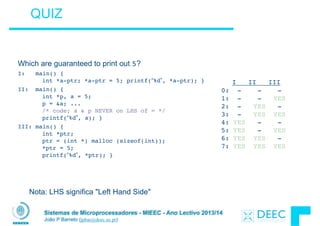
Which are guaranteed to print out 5?
I: main() { 

int *a-ptr; *a-ptr = 5; printf(“%d”, *a-ptr); }
II: main() {

int *p, a = 5; 

p = &a; ...

/* code; a & p NEVER on LHS of = */ 

printf(“%d”, a); }
III: main() {

int *ptr;

ptr = (int *) malloc (sizeof(int));

*ptr = 5;

printf(“%d”, *ptr); }
QUIZ
I II III

0: - - -

1: - - YES

2: - YES -

3: - YES YES

4: YES - - 

5: YES - YES

6: YES YES -

7: YES YES YES
Nota: LHS significa "Left Hand Side"
Sistemas de Microprocessadores - MIEEC - Ano Lectivo 2013/14
João P Barreto (jpbar@deec.uc.pt)
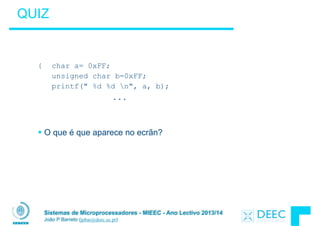
QUIZ
!
!
{ char a= 0xFF;
unsigned char b=0xFF;
printf(" %d %d n", a, b);
...
!
!
§ O que é que aparece no ecrãn?
Sistemas de Microprocessadores - MIEEC - Ano Lectivo 2013/14
João P Barreto (jpbar@deec.uc.pt)
Para saber mais ...
K&R - The C Programming Language
§ Capítulo 5
!
Tutorial de Nick Parlante
!
Links úteis para Introdução ao C
§ http://man.he.net/ (man pages de Unix)
§ http://linux.die.net/man/ (man pages de Unix)
!
§ http://www.lysator.liu.se/c/bwk-tutor.html
§ http://www.allfreetutorials.com/content/view/16/33/ (vários tutoriais)
Sistemas de Microprocessadores 2013/2014
Sistemas de Microprocessadores - MIEEC - Ano Lectivo 2013/14
João P Barreto (jpbar@deec.uc.pt)
Linguagem C

- Zonas de Memória -
Sistemas de Microprocessadores - MIEEC - Ano Lectivo 2013/14
João P Barreto (jpbar@deec.uc.pt)
Variáveis Globais
A declaração de ponteiros não aloca memória
em frente do ponteiro
Até agora falámos de duas maneiras
diferentes de alocar memória:
§ Declaração de variáveis locais
int i; char *string; int ar[n];
§ Alocação dinâmica em runtime usando "malloc"
ptr = (struct Node *) malloc(sizeof(struct
Node)*n);
Existe uma terceira possibilidade ...
§ Declaração de variáveis fora de uma função (i.e.
antes do main)
Ä É similar às variavéis locais mas tem um âmbito
global, podendo ser lida e escrita de qualquer ponto
do programa
int myGlobal;
main() {
}
Sistemas de Microprocessadores - MIEEC - Ano Lectivo 2013/14
João P Barreto (jpbar@deec.uc.pt)
Gestão de Memória em C (1/2)
Um programa em C define três zonas de memória
distintas para o armazenamento de dados
§ Static Storage: onde ficam as variáveis globais que podem ser
lidas/escritas por qualquer função do programa. Este espaço está
alocado permanetemente durante todo o tempo em que o
programa corre (daí o nome estático)
§ A Pilha/Stack: armazenamento de variáveis locais, parâmetros,
endereços de retorno, etc.
§ A Heap (dynamic malloc storage): os dados são válidos até ao
instante em que o programador faz a desalocação manual com
free().
!
O C precisa de saber a localização dos objectos na
memória, senão as coisas não funcionam como devem.
Sistemas de Microprocessadores - MIEEC - Ano Lectivo 2013/14
João P Barreto (jpbar@deec.uc.pt)
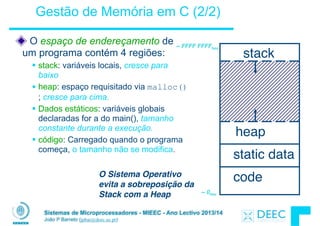
O espaço de endereçamento de
um programa contém 4 regiões:
§ stack: variáveis locais, cresce para
baixo
§ heap: espaço requisitado via malloc()
; cresce para cima.
§ Dados estáticos: variáveis globais
declaradas for a do main(), tamanho
constante durante a execução.
§ código: Carregado quando o programa
começa, o tamanho não se modifica.
O Sistema Operativo
evita a sobreposição da
Stack com a Heap
code
static data
heap
stack
~ FFFF FFFFhex
~ 0hex
Gestão de Memória em C (2/2)
Sistemas de Microprocessadores - MIEEC - Ano Lectivo 2013/14
João P Barreto (jpbar@deec.uc.pt)
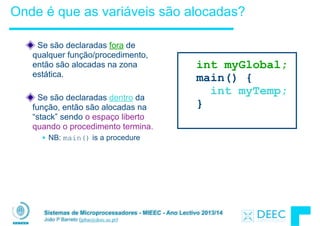
Onde é que as variáveis são alocadas?
Se são declaradas fora de
qualquer função/procedimento,
então são alocadas na zona
estática.
!
Se são declaradas dentro da
função, então são alocadas na
“stack” sendo o espaço liberto
quando o procedimento termina.
§ NB: main() is a procedure
int myGlobal;
main() {
int myTemp;
}
Sistemas de Microprocessadores - MIEEC - Ano Lectivo 2013/14
João P Barreto (jpbar@deec.uc.pt)
SP
A Pilha/Stack (1/2)
Um "Stack Frame" incluí:
§ Endereços de retorno
§ Parâmetros
§ Espaço para variáveis locais
Os "Stack frames" são blocos
contíguos de memória; o "stack
pointer" indica qual é o "frame" no
topo da pilha (ver FILO)
Quando uma rotina termina o seu
"stack frame" é descartado (não
explicitamente apagado). Isto
permite libertar memória para futuras
utilizações
frame
frame
frame
frame
Sistemas de Microprocessadores - MIEEC - Ano Lectivo 2013/14
João P Barreto (jpbar@deec.uc.pt)
A Pilha/Stack (2/2)
Last In, First Out (LIFO) data structure
main ()
{ a(0);
}
void a (int m)
{ b(1);
}
void b (int n)
{ c(2);
}
void c (int o)
{ d(3);
}
void d (int p)
{
}
stack
Stack Pointer
Stack Pointer
Stack Pointer
Stack Pointer
Stack Pointer
Stack
grows
down
Sistemas de Microprocessadores - MIEEC - Ano Lectivo 2013/14
João P Barreto (jpbar@deec.uc.pt)
Os ponteiros em C permitem-nos aceder a zonas de
memória que foram entretanto desalocadas. Isto pode levar a
problemas de consistência e bugs difíceis de encontrar !
!
int *ptr () {

int y;

y = 3;

return &y;

};

main () {

int *stackAddr,content; 

stackAddr = ptr();

content = *stackAddr;

printf("%d", content); /* 3 */

content = *stackAddr;

printf("%d", content); /*13451514 */

};
main
ptr()

(y==3)
SP
main
SP
main
printf()

(y==?)
SP
Quem gere a pilha ?
Sistemas de Microprocessadores - MIEEC - Ano Lectivo 2013/14
João P Barreto (jpbar@deec.uc.pt)
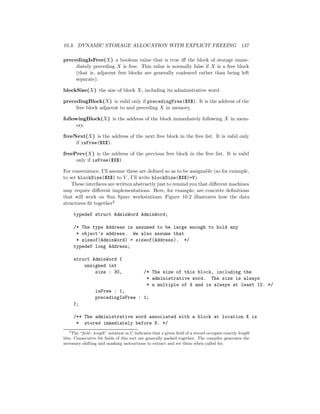
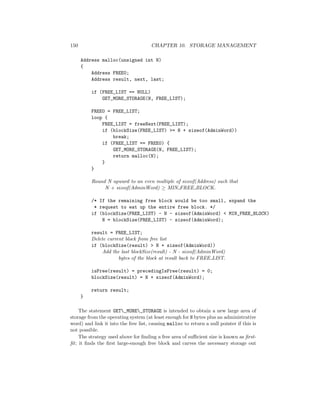
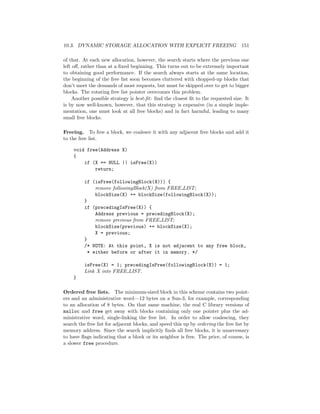
A Heap (Memória Dinâmica)
!
Grande bloco de memória, onde a alocação não é feita de
forma contígua. É uma espécie de "espaço comunal" do
programa.
!
Em C, é necessário especificar o número exacto de bytes
que se pretende alocar
int *ptr;

ptr = (int *) malloc(sizeof(int));

/* malloc returns type (void *),

so need to cast to right type */
§ malloc(): aloca memória não inicializada na área da heap
Sistemas de Microprocessadores - MIEEC - Ano Lectivo 2013/14
João P Barreto (jpbar@deec.uc.pt)
Características das diferentes zonas de memória
Variáveis estáticas
§ Espaço de memória acessível a partir de qualquer zona do
programa
§ O espaço de memória permanece alocado durante todo o
"runtime" (pouco eficiente)
!
Pilha/Stack
§ Guarda variáveis locais, endereços de retorno, etc.
§ A memória é desalocada sempre que uma rotina termina,
permitindo a re-utilização por um novo procedimento.
§ Funciona como o "bloco de notas" das funções/procedimentos
§ Não é adequada para armazenar dados de grandes dimensões
(stack overflow)
§ Não permite a partilha de dados entre diferentes procedimentos
Sistemas de Microprocessadores - MIEEC - Ano Lectivo 2013/14
João P Barreto (jpbar@deec.uc.pt)
Características das diferentes zonas de memória
Heap / Alocação dinâmica
§ Alocação em "runtime" de blocos de memória
§ A alocação não é contígua, e os blocos podem ficar muito distantes
no espaço de endereçamento
§ Em C, a dealocação tem que ser feita de forma explícita pelo
programador (no Garbage Collector)
§ Os mecanismos de gestão de memória são complexos de forma a
evitar a fragmentação
Sistemas de Microprocessadores - MIEEC - Ano Lectivo 2013/14
João P Barreto (jpbar@deec.uc.pt)
Gestão de Memória
Como é feita a gestão de memória?
!
§ Zona do código e variáveis estáticas é fácil: 

estas zonas nunca aumentam ou diminuem
!
§ O espaço da pilha também é fácil: 

As "stack frames" são criadas e destruídas usando uma ordem
last-in, first-out (LIFO)
!
§ Gerir a heap já é mais complicado:

a memória pode ser alocada / desalocada em qualquer
instante
Sistemas de Microprocessadores - MIEEC - Ano Lectivo 2013/14
João P Barreto (jpbar@deec.uc.pt)
Requisitos da Gestão da Heap
As funções malloc() e free() devem executar
rapidamente.
!
Pretende-se o mínimo de overhead na gestão de memória
!
Queremos evitar fragmentação (externa)* – 

quando a maior parte da memória está dividida em vários
blocos pequenos
§ Neste caso podemos ter muito bytes disponíveis mas não sermos
capazes de dar resposta a uma solicitação de espaço porque os
bytes livres não são contíguos.
Sistemas de Microprocessadores - MIEEC - Ano Lectivo 2013/14
João P Barreto (jpbar@deec.uc.pt)
Gestão da Heap (1/2)
Exemplo
§ Request R1 for 100 bytes
§ Request R2 for 1 byte
§ Memory from R1 is freed
§ Request R3 for 50 bytes
R2 (1 byte)
R1 (100 bytes)
Sistemas de Microprocessadores - MIEEC - Ano Lectivo 2013/14
João P Barreto (jpbar@deec.uc.pt)
Gestão da Heap (2/2)
Exemplo
§ Request R1 for 100 bytes
§ Request R2 for 1 byte
§ Memory from R1 is freed
§ Request R3 for 50 bytes
R2 (1 byte)
R3?
R3?
Sistemas de Microprocessadores - MIEEC - Ano Lectivo 2013/14
João P Barreto (jpbar@deec.uc.pt)
QUIZ do Intervalo
int main(void){

int A[] = {5,10};

int *p = A;


printf(“%u %d %d %dn”,p,*p,A[0],A[1]);

p = p + 1;

printf(“%u %d %d %dn”,p,*p,A[0],A[1]);

*p = *p + 1;

printf(“%u %d %d %dn”,p,*p,A[0],A[1]);

}
Se o primeiro printf mostrar 100 5 5 10, qual será o output dos outros dois printf ?
1: 101 10 5 10 then 101 11 5 11

2: 104 10 5 10 then 104 11 5 11

3: 101 <other> 5 10 then 101 <3-others>

4: 104 <other> 5 10 then 104 <3-others>

5: Um dos dois printfs causa um ERROR 

6: Rendo-me!
A[1]
5 10
A[0] p
Sistemas de Microprocessadores 2013/2014
Sistemas de Microprocessadores - MIEEC - Ano Lectivo 2013/14
João P Barreto (jpbar@deec.uc.pt)
Linguagem C

- Gestão da Memória Dinâmica-
Sistemas de Microprocessadores - MIEEC - Ano Lectivo 2013/14
João P Barreto (jpbar@deec.uc.pt)
Mecanismos de Gestão da Heap
Alocação Dinâmica "Manual" - Caso do C, em que o
programador é responsável por alocar e libertar os blocos de
memória
§ Malloc()/free() implementação do K&R Sec 8.7 (ler só introdução)
§ Slab Alocators
§ Buddy System
Alocação "Automática" / Garbage Collectors - O sistema
mantém registo de forma automática das zonas da heap que
estão alocadas e em uso, reclamando todas as restantes*
§ Contagem de referências
§ Mark and Sweep
§ Copying Garbage Collection
* O overhead com Garbage Collectors é obviamente maior
Sistemas de Microprocessadores - MIEEC - Ano Lectivo 2013/14
João P Barreto (jpbar@deec.uc.pt)
Implementração do Malloc/Free (K&R Sec. 8.7)
Cada bloco de memória na heap tem um cabeçalho
com dois campos:
§ tamanho do bloco e
§ um ponteiro para o bloco livre seguinte
!
Todos os blocos livres são mantidos numa lista ligada
circular (a "free list").
!
Normalmente os blocos da "free list" estão por ordem
crescente de endereços no espaço de endereçamento
!
No caso de um bloco ser alocado, o sue ponteiro fica
NULL.
Sistemas de Microprocessadores - MIEEC - Ano Lectivo 2013/14
João P Barreto (jpbar@deec.uc.pt)
Implementração do Malloc/Free (K&R Sec. 8.7)
malloc() procura na "free list" um bloco que seja
suficientemente grande para satisfazer o pedido.
§ Se existir, então bloco é partido de forma a satisfazer o pedido, e
a "sobra" é mantida na lista.
§ Se não existir então é feito um pedido ao sistema operativo de
mais áreas de memória.
!
free() verifica se os blocos adjacentes ao bloco liberto
tambésm estão livres.
§ Se sim, então os blocos adjacentes são juntos (coalesced) num
único bloco de maiores dimensões (evitar fragmentação)
§ Se não, o bloco é simplesmente adicionado à "free list".
Sistemas de Microprocessadores - MIEEC - Ano Lectivo 2013/14
João P Barreto (jpbar@deec.uc.pt)
Qual é o bloco que o malloc()escolhe?
Se existirem vários blocos na "free list" que
satisfaçam os requisitos, qual deles é que é escolhido?
!
§ best-fit: escolhe o bloco mais pequeno que satisfaça os
requisitos de espaço
!
§ first-fit: Escolhe o primeiro bloco que satisfaça os requisitos
!
§ next-fit: semelhante ao first-fit, mas lembra-se onde terminou a
pesquisa da última vez, e retoma-a a partir desse ponto (não
volta ao inicio)
Sistemas de Microprocessadores - MIEEC - Ano Lectivo 2013/14
João P Barreto (jpbar@deec.uc.pt)
QUIZ - Prós e Contras dos "Fit"
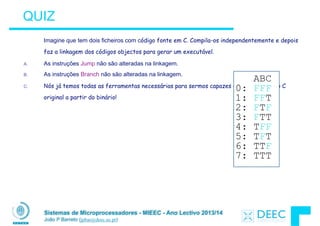
A. Um contra do first-fit é que resulta em vários pequenos blocos
no inicio da free list
B. Um contra do next-fit é que é mais lento do que o first-fit, dado
que demora mais tempo à procura de um bloco adequado
C. Um contra do best-fit é que gera muitos blocos de pequenas
dimensões na free list
ABC
0: FFF
1: FFT
2: FTF
3: FTT
4: TFF
5: TFT
6: TTF
7: TTT
Sistemas de Microprocessadores - MIEEC - Ano Lectivo 2013/14
João P Barreto (jpbar@deec.uc.pt)
Slab Allocator (1/2)
Um sistema alternativo utilizado na GNU libc
!
Divide os blocos que formam a heap em "grandes" e
"pequenos". Os "grandes" são geridos através de uma
freelist como anterioremente
!
Para blocos pequenos, a alocação é feita em blocos
que são múltiplos de potências de 2
§ e.g., se o programa quiser alocar 20 bytes, dá-se-lhe 32 bytes.
Sistemas de Microprocessadores - MIEEC - Ano Lectivo 2013/14
João P Barreto (jpbar@deec.uc.pt)
Slab Allocator (2/2)
A gestão dos pequenos blocos é fácil; basta usar um bitmap para
cada gama de blocos do mesmo tamanho
!
!
!
!
!
!
Os bitmaps permitem minimizar os overheads na alocação de blocos
pequenos (mais frequentes)
!
As desvantagens do esquema são
!Existem zonas alocadas que não são utilizadas (caso dos 32 bytes para
20 pedidos)
!A alocação de blocos grandes é lenta
16 byte blocks:
32 byte blocks:
64 byte blocks:
16 byte block bitmap: 11011000
32 byte block bitmap: 0111
64 byte block bitmap: 00
Sistemas de Microprocessadores - MIEEC - Ano Lectivo 2013/14
João P Barreto (jpbar@deec.uc.pt)
Fragmentação Externa vs Interna
Com o slab allocator, a diferença entre o tamanho
requisitado e a potência de 2 mais próxima faz com que
se desperdice muito espaço
§ e.g., se o programa quer alocar 20 bytes e nós damos 32
bytes, então há 12 bytes que não são utilizados
!
Repare que isto não é fragmentação externa. A
fragmentação externa refere-se aos espaço
desperdiçado entre blocos alocados.
Este problema é conhecido por fragmentação interna.
Trata-se de espaço desperdiçado dentro de um bloco já
alocado.
Sistemas de Microprocessadores - MIEEC - Ano Lectivo 2013/14
João P Barreto (jpbar@deec.uc.pt)
Buddy System (1/2)
Outro sistema de gestão de memória usado no kernel
do Linux.
!
É semelhante ao “slab allocator”, mas só aloca blocos
em tamanhos que são potência 2 (fragmentação
interna é ainda possível)
!
Matém free-lists separadas para cada tamanho
§ e.g., listas separadas para 16 byte, 32 byte, 64 byte, etc.
Sistemas de Microprocessadores - MIEEC - Ano Lectivo 2013/14
João P Barreto (jpbar@deec.uc.pt)
Buddy System (2/2)
Se não há um bloco de tamanho n disponível, então
procura um bloco de tamanho 2n e divide-o em dois blocos
de tamanho n
Quando o bloco de tamanho n é liberto, então, se o
vizinho (buddy) estiver também livre, os dois são
combinados num bloco de 2n 


!
!
Tem as mesmas vantagens de velocidade que o slab
buddies NOT buddies
Sistemas de Microprocessadores - MIEEC - Ano Lectivo 2013/14
João P Barreto (jpbar@deec.uc.pt)
Esquemas de Alocação
Qual destes sistemas é o melhor?
!
§ Não existe um esquema que seja melhor para toda
e qualquer aplicação
§ As aplicações têm diferentes padrões de alocação/
dealocação.
§ Um esquema que funcione bem para uma
aplicação, poderá não funcionar bem para outra.
Sistemas de Microprocessadores - MIEEC - Ano Lectivo 2013/14
João P Barreto (jpbar@deec.uc.pt)
Gestão automática de memória
É díficil gerir e manter registos das alocação/
desalocações de memória – porque não tentar faze-lo
de forma automática?
!
Se conseguirmos saber em cada instante de runtime
os blocos da heap que estão a ser usados, então todo
o espaço restante está livre para alocação.
§ A memória que não está a ser apontada chama-se garbage (é
impossível aceder-lhe). O processo de a recuperar chama-se
garbage collection. No C a recuperação/libertação de memória
tem que ser feita manualmente
!
Como conseguimos saber o que está a ser usado?
Sistemas de Microprocessadores - MIEEC - Ano Lectivo 2013/14
João P Barreto (jpbar@deec.uc.pt)
Manter Registo da Memória Utilizada
As técnica dependem da linguagem de programação
utilizada e precisam da ajuda do compilador.
!
Pode começar-se por manter registo de todos os
ponteiros, definidos tanto como váriaveis globais ou locais
(root set). (para isto o compilador tem de colaborar)
!
Ideia Chave: Durante o runtime mantém-se registo dos
objectos dinâmicos apontados por esses ponteiros.
§ Á partida um objecto que não seja apontado por ninguém é
garbage e pode ser desalocado.
Sistemas de Microprocessadores - MIEEC - Ano Lectivo 2013/14
João P Barreto (jpbar@deec.uc.pt)
Manter Registo da Memória Utilizada
Mas o problema não é assim tão simples …
§ O que é que acontece se houver um type cast daquilo que é
apontado pelo ponteiro? (permitido pelo C)
§ O que acontece se são definidas variáveis ponteiro na zona
alocada?
A pesquisa de garbage tem de ser sempre feita de forma
recursiva.
Não é um mecanismo simples e envolve sempre maiores
overheads do que a gestão manual
Os "Garbage Collectors" estão fora do nosso programa,
mas os alunos interessados poderão consultar o material
suplementar fornecido na WoC.
Sistemas de Microprocessadores - MIEEC - Ano Lectivo 2013/14
João P Barreto (jpbar@deec.uc.pt)
Concluindo …
O C tem 3 zonas de memória
§ Armazenamento estático: variáveis globais
§ A Pilha: variáveis locais, parâmetros, etc
§ A heap (alocação dinâmica): malloc() aloca espaço, free() liberta
espaço.
Várias técnicas para gerir a heap via malloc e free: best-,
first-, next-fit
§ 2 tipos de fragmentação de memória: interna e externa; todas as
técnicas sofrem com pelo menos uma delas
§ Cada técnica tem pontos fortes e fracos, e nenhuma é melhor para
todos os casos
A gestão automática de memória liberta o programador da
responsabilidade de gerir a memória. O preço é um maior
overhead durante a execução.
Sistemas de Microprocessadores - MIEEC - Ano Lectivo 2013/14
João P Barreto (jpbar@deec.uc.pt)
Para saber mais ...
Hilfiger Notes (fornecidas na WoC)
!
Artigo a explicar a divisão de memória no C (atenção
dividem a zona estática em inicializada e não inicializada)
!http://www.informit.com/articles/article.aspx?p=173438
!
A Wikipedia ao nosso serviço
!http://en.wikipedia.org/wiki/Dynamic_memory_allocation
!http://en.wikipedia.org/wiki/
Garbage_collection_(computer_science)
Sistemas Microprocessadores 2013/2014
Sistemas de Microprocessadores - MIEEC - Ano Lectivo 2013/14
João P Barreto (jpbar@deec.uc.pt)
Introdução ao MIPS

- Linguagem Assembly e Operações
Aritméticas -
Sistemas de Microprocessadores - MIEEC - Ano Lectivo 2013/14
João P Barreto (jpbar@deec.uc.pt)
Linguagem Assembly
• Tarefa principal do CPU: Executar muitas instruções.
!
• As instruções definem as acções/operações básicas
que o CPU é capaz de levar a cabo.
!
• Diferentes CPUs implementam diferentes conjuntos de
instruções. O conjunto de instruções implementado por
um determinado CPU designa-se por Instruction Set
Arquitecture (ISA).
§ Examplos: Intel 80x86 (Pentium 4), IBM/Motorola PowerPC
(Macintosh), MIPS, Intel IA64, ...
Sistemas de Microprocessadores - MIEEC - Ano Lectivo 2013/14
João P Barreto (jpbar@deec.uc.pt)
Instruction Set Architectures
• Inicialmente a filosofia de desenvolvimento consistia em
adicionar mais instruções aos novos processadores para
realizar tarefas cada vez mais complexas
§ A arquitectura VAX tinha instruções para a multiplicação de
polinómios!
§ Estes eram os processadores CISC (Complete Instruction Set
Computing)
!
• A partir da década de 80 a filosofia RISC - Reduced
Instruction Set Computing - começou a impor-se
§ Manter um "instruction set" pequeno e simples facilita o desenho de
hardware mais rápido (smaller is faster).
§ As operações complicadas são feitas pelo software através da
composição de várias instruções simples.
Sistemas de Microprocessadores - MIEEC - Ano Lectivo 2013/14
João P Barreto (jpbar@deec.uc.pt)
Arquitectura do MIPS
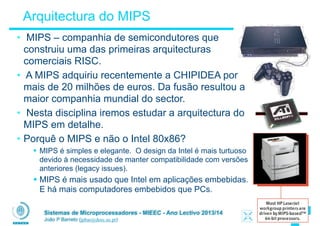
• MIPS – companhia de semicondutores que
construiu uma das primeiras arquitecturas
comerciais RISC.
• A MIPS adquiriu recentemente a CHIPIDEA por
mais de 20 milhões de euros. Da fusão resultou a
maior companhia mundial do sector.
• Nesta disciplina iremos estudar a arquitectura do
MIPS em detalhe.
• Porquê o MIPS e não o Intel 80x86?
§ MIPS é simples e elegante. O design da Intel é mais turtuoso
devido à necessidade de manter compatibilidade com versões
anteriores (legacy issues).
§ MIPS é mais usado que Intel em aplicações embebidas.
E há mais computadores embebidos que PCs.
Sistemas de Microprocessadores - MIEEC - Ano Lectivo 2013/14
João P Barreto (jpbar@deec.uc.pt)
"Variáveis" em Assembly: Registos (1/3)
• Ao contrário de Linguagens de Alto Nível, como o C e o
Python, o assembly não pode usar variáveis
§ Porque não? "Keep the hardware simple"
!
• Os operandos em assembly são os registos
§ Pequeno número de locais de armazenamento construídos
directamente em hardware
§ As operações só podem ser realizadas sobre os registos!
!
• Benefício: Como os registos são construídos
directamente em hardware, são muito rápidos 

(uma mudança num registo é feita em menos de um
nano-segundo )
Sistemas de Microprocessadores - MIEEC - Ano Lectivo 2013/14
João P Barreto (jpbar@deec.uc.pt)
"Variáveis" em Assembly: Registos (2/3)
• Desvantagem: Como os registos são construídos em
hardware, existe um número pré-determinado que não
pode ser aumentado.
§ Solução: O código do MIPS tem que ser feito com cuidado de
forma a usar eficientemente os recursos disponíveis.
!
• O MIPS tem 32 registos ... e o x86 ainda tem menos!
§ Porquê 32? Smaller is faster
!
• Os registos no MIPS têem todos 32 bits
§ Os grupos de 32 bits chamam-se uma word na arquitectura do
MIPS
§ Atenção que a dimensão de uma word muda entre diferentes
arquitecturas
Sistemas de Microprocessadores - MIEEC - Ano Lectivo 2013/14
João P Barreto (jpbar@deec.uc.pt)
"Variáveis" em Assembly: Registos (3/3)
• Os registos estão numerados de 0 a 31
!
!
• Os registos tanto podem ser referenciados por um número como por um nome:
§ Referência por número :
$0, $1, $2, … $30, $31
§ Referência por nome :
Ä Semelhante às variáveis em C
$16 - $23 è $s0 - $s7
Ä Variáveis temporárias
$8 - $15 è $t0 - $t7
§ Mais à frente falaremos dos nomes dos 16 registos que faltam.
!
• Utilize preferencialmente nomes para tornar o seu código mais legível
Sistemas de Microprocessadores - MIEEC - Ano Lectivo 2013/14
João P Barreto (jpbar@deec.uc.pt)
QUIZ
Para Pensar:
!
- Quais serão os programas compilados que ocuparão mais
espaço em memória? Os programas para uma arquitectura
CISC ou RISC?
!
- Em que medida o aumento no tamanho das memórias
disponíveis terá ajudado à mudança de CISC para RISC
Sistemas de Microprocessadores - MIEEC - Ano Lectivo 2013/14
João P Barreto (jpbar@deec.uc.pt)
C, Java variáveis vs. registos
• Nas linguagens de alto nível como o C, as variáveis têm
de ser previamente declarada como pertencendo a um
determinado tipo
§ Exemplo: 

int fahr, celsius; 

char a, b, c, d, e;
• Uma variável só pode representar um valor do tipo
declarado (e.g. não podemos misturar e comparar
variáveis do tipo int e char).
!
• Em assembly os registos não têm um tipo pré-definido.
As operações sobre os registos é que vão definir
implicitamente o tipo dos dados.
Sistemas de Microprocessadores - MIEEC - Ano Lectivo 2013/14
João P Barreto (jpbar@deec.uc.pt)
Comentários em Assembly
• Utilizar comentários também ajuda a tornar o código
mais legível!
!
• Em MIPS para comentar uma linha utilize o simbolo
cardinal (#)
!
• Nota: Diferente do C
§ Os comentários em C têm a forma 

/* comment */ 

e podem ter múltiplas linhas
Sistemas de Microprocessadores - MIEEC - Ano Lectivo 2013/14
João P Barreto (jpbar@deec.uc.pt)
Instruções em Assembly
• Em assembly, cada linha de código (designada por
Instrução), executa uma, e uma só, acção de uma lista
de comandos simples pré-estabelecidos
!
• Ao contrário do que acontece no C, cada linha contém
no máximo uma instrução para o processador.
!
• As instruções em assembly são equivalentes às
operações (=, +, -, *, /) em C ou Java.
!
• OK, chega de conversa introdutória … vamos começar
a controlar o MIPS!
Sistemas de Microprocessadores - MIEEC - Ano Lectivo 2013/14
João P Barreto (jpbar@deec.uc.pt)
• Sintáxe:
1 2, 3, 4
Onde :
1) nome da operação
2) operando que recebe o resultado (“destination”)
3) 1º operando (“source1”)
4) 2º operando (“source2”)
!
• A sintáxe é rígida:
§ 1 operador + 3 operandos
§ Porquê? Regularidade para manter o hardware simples
Adição e Subtracção no MIPS (1/4)
Sistemas de Microprocessadores - MIEEC - Ano Lectivo 2013/14
João P Barreto (jpbar@deec.uc.pt)
Adição e Subtracção no MIPS (2/4)
• Adição em assembly
§ Exemplo: add $s0,$s1,$s2 (MIPS)
Equivalente a: a = b + c (C)
onde os registos do MIPS $s0,$s1,$s2 estão associados com
as variáveis do C a, b, c
!
• Subtração em assembly
§ Exemplo: sub $s3,$s4,$s5 (MIPS)
Equivalente a: d = e - f (C)
onde os registos do MIPS $s3,$s4,$s5 estão associados com
as variáveis do C d, e, f
Sistemas de Microprocessadores - MIEEC - Ano Lectivo 2013/14
João P Barreto (jpbar@deec.uc.pt)
Adição e Subtracção no MIPS (3/4)
• Qual é o equivalente à seguinte instrução em C?
a = b + c + d - e;
!
• Dividir em múltiplas instruções
add $t0, $s1, $s2 # temp = b + c
add $t0, $t0, $s3 # temp = temp + d
sub $s0, $t0, $s4 # a = temp - e
!
• Nota: Uma única linha em C pode dar origem a várias linhas
em assembly do MIPS.
!
• Nota: Tudo aquilo que estiver depois do cardinal é ignorado
(comentários)
Sistemas de Microprocessadores - MIEEC - Ano Lectivo 2013/14
João P Barreto (jpbar@deec.uc.pt)
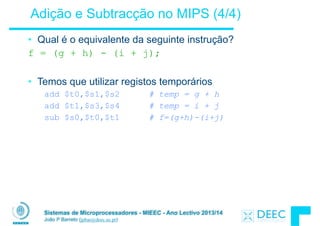
Adição e Subtracção no MIPS (4/4)
• Qual é o equivalente da seguinte instrução?
f = (g + h) - (i + j);
!
• Temos que utilizar registos temporários
add $t0,$s1,$s2 # temp = g + h
add $t1,$s3,$s4 # temp = i + j
sub $s0,$t0,$t1 # f=(g+h)-(i+j)
Sistemas de Microprocessadores - MIEEC - Ano Lectivo 2013/14
João P Barreto (jpbar@deec.uc.pt)
Registo Zero
• O número zero (0) é um "imediato" que aparece muito
frequentemente no código.
!
• Definimos um registo zero ($0 ou $zero) para termos o
valor 0 sempre à mão; e.g.
add $s0,$s1,$zero (MIPS)
f = g (C)
onde os registos do MIPS $s0,$s1 estão associados com as
variáveis do C f, g
!
• O registo $zero está definido no hardware, e a instrução
add $zero,$zero,$s0
não faz nada
Sistemas de Microprocessadores - MIEEC - Ano Lectivo 2013/14
João P Barreto (jpbar@deec.uc.pt)
Valores Imediatos (1/2)
• As constantes númericas designam-se pro "imediatos".
!
• Os "imediatos" aparecem frequentemente no código. Sempre
que aparecem valores constantes temos que usar instruções
específicas (Porquê?)
!
• Adição com imediatos:
addi $s0,$s1,10 (MIPS)
f = g + 10 (C)
Onde os registos $s0,$s1 estão associados às variáveis do C f, g
!
• Sintáxe semelhante à instrução add, excepto no facto que o
último argumento é um número em vez de um registo
Sistemas de Microprocessadores - MIEEC - Ano Lectivo 2013/14
João P Barreto (jpbar@deec.uc.pt)
Valores Imediatos (2/2)
• Não existe uma instrução no MIPS para subtração com
imediatos: Porquê?
!
• O conjunto de instruções elementares deve ter a menor
dimensão possível de forma a simplificar o hardware.
§ Se uma operação pode ser decomposta em instruções mais
simples, então não faz sentido inclui-la no "instruction set"
§ addi …, -X é o mesmo que subi …, X portanto não há subi
!
• addi $s0,$s1,-10 (MIPS)
f = g - 10 (C)
onde os registos $s0,$s1 estão associados com as variáveis do C
f, g
Sistemas de Microprocessadores - MIEEC - Ano Lectivo 2013/14
João P Barreto (jpbar@deec.uc.pt)
QUIZ
A. Os Tipos é algo característico das declarações em C,
que se reflecte nas instruções (operadores) do MIPS.
!
B. Assumindo os 16 registos que vimos, como só existem
8 variáveis locais ($s) e 8 variáveis temporárias ($t),
nós não podemos escrever em assembly do MIPS
expressões em C que contenham involvam mais do que
16 variáveis.
!
C. Se a variável p (armazenada no registo $s0) for um
ponteiro para um array de ints, então a instrução em C
p++; corresponde a addi $s0 $s0 1
ABC
1: FFF
2: FFT
3: FTF
4: FTT
5: TFF
6: TFT
7: TTF
8: TTT
Sistemas de Microprocessadores - MIEEC - Ano Lectivo 2013/14
João P Barreto (jpbar@deec.uc.pt)
Concluindo …
• Na linguagem Assembly do MIPS:
§ Os registos substituem as variáveis em C
§ Existe uma instrução elementar por linha
§ "Simpler is Better"
§ "Smaller is Faster"
!
• Novas instruções que aprendemos:
add, addi, sub
!
• Novos registos:
Variáveis género C: $s0 - $s7
Variáveis temporárias: $t0 - $t9
Zero: $zero
Sistemas Microprocessadores 2013/2014
Sistemas de Microprocessadores - MIEEC - Ano Lectivo 2013/14
João P Barreto (jpbar@deec.uc.pt)
Introdução à Linguagem Assembly 

- Load & Store -
Sistemas de Microprocessadores - MIEEC - Ano Lectivo 2013/14
João P Barreto (jpbar@deec.uc.pt)
A Memória
• Até aqui mapeámos as variáveis do C em registos do processador; o que
fazer com estruturas de dados de maiores dimensões como as tabelas/
arrays?
!
• As estruturas de dados são guardadas na memória, que é 1 dos 5
componentes fundamentais do computador
!
• As instruções aritméticas do MIPS só operam sobre registos, e nunca
sobre a memória.
!
• As instruções de transferência de dados permitem transferir dados entre
os registos e a memória:
§ Da memória para um registo
§ De um registo para a memória
Sistemas de Microprocessadores - MIEEC - Ano Lectivo 2013/14
João P Barreto (jpbar@deec.uc.pt)
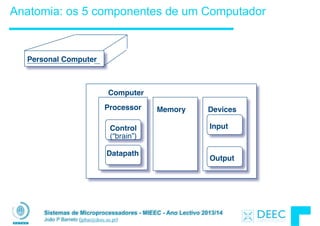
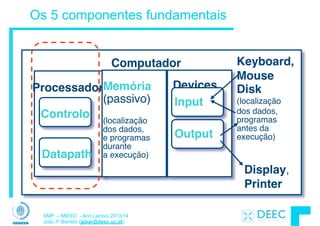
Anatomia: os 5 componentes de um Computador
Processor
Computer
Control
(“brain”)
Datapath
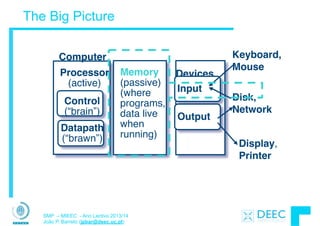
Memory Devices
Input
Output
Personal Computer
Sistemas de Microprocessadores - MIEEC - Ano Lectivo 2013/14
João P Barreto (jpbar@deec.uc.pt)
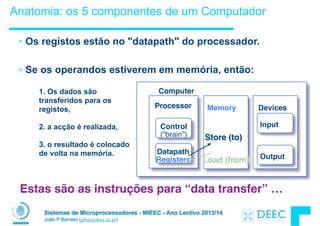
• Os registos estão no "datapath" do processador.
!
• Se os operandos estiverem em memória, então:
Anatomia: os 5 componentes de um Computador
Processor
Computer
Control
(“brain”)
Datapath
Registers
Memory Devices
Input
Output
Load (from)
Store (to)
Estas são as instruções para “data transfer” …
1. Os dados são
transferidos para os
registos,
2. a acção é realizada,
!
3. o resultado é colocado
de volta na memória.
Sistemas de Microprocessadores - MIEEC - Ano Lectivo 2013/14
João P Barreto (jpbar@deec.uc.pt)
Data Transfer: Memória para Reg. (1/4)
• Para transferir uma "word" de dados precisamos de
especificar duas coisas:
§ Registo: especifica-se usando o # de referência ($0 - $31) ou o
nome simbólico ($s0,…, $t0, …)
§ Endereço de memória: mais difícil
Ä Pense na memória como sendo uma grande tabela uni-
dimensional. Cada elemento dessa tabela é referenciado
por um ponteiro que corresponde ao endereço de uma
célula do array (char=1 byte) .
Ä Muitas vezes iremos crer incrementar esse ponteiro/
endereço
!
• Lembre-se:
§ “Load FROM memory”
Sistemas de Microprocessadores - MIEEC - Ano Lectivo 2013/14
João P Barreto (jpbar@deec.uc.pt)
Data Transfer: Memória para Reg. (2/4)
• Para especificar um endereço de memória de onde quer
copiar precisa de duas coisas:
§ Um registo contendo um ponteiro para memória
§ Um deslocamento (offset) numérico (sempre bytes pois em
assembly não existem tipos)
!
• O endereço de memória pretendido é a soma destes dois
elementos.
!
• Exemplo: 8($t0)
§ Especifica o endereço de memória apontado pelo valor no registo
$t0, mais 8 bytes
Sistemas de Microprocessadores - MIEEC - Ano Lectivo 2013/14
João P Barreto (jpbar@deec.uc.pt)
Data Transfer: Memória para Reg. (3/4)
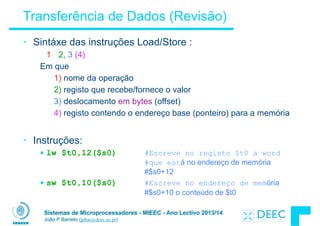
• Sintáxe da instrução Load :
1 2, 3 (4)
Em que
1) nome da operação
2) registo que recebe o valor
3) deslocamento em bytes (offset)
4) registo contendo o endereço base (ponteiro) para a memória
!
• Nome da Operação:
§ lw (que significa Load Word, ou seja transferir 32 bits (1 word) de
cada vez)
Sistemas de Microprocessadores - MIEEC - Ano Lectivo 2013/14
João P Barreto (jpbar@deec.uc.pt)
Data Transfer: Memória para Reg. (4/4)
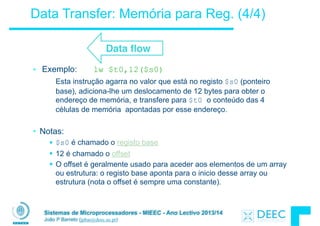
• Exemplo: lw $t0,12($s0)
Esta instrução agarra no valor que está no registo $s0 (ponteiro
base), adiciona-lhe um deslocamento de 12 bytes para obter o
endereço de memória, e transfere para $t0 o conteúdo das 4
células de memória apontadas por esse endereço.
!
• Notas:
§ $s0 é chamado o registo base
§ 12 é chamado o offset
§ O offset é geralmente usado para aceder aos elementos de um array
ou estrutura: o registo base aponta para o inicio desse array ou
estrutura (nota o offset é sempre uma constante).
Data flow
Sistemas de Microprocessadores - MIEEC - Ano Lectivo 2013/14
João P Barreto (jpbar@deec.uc.pt)
Data Transfer: Registo para Memória
• Queremos agora transferir do registo para a memória
§ A instrução store tem uma sintáxe semelhante ao load
• MIPS Instruction Name:
sw (significa Store Word, ou seja transferir 32 bits (1 word) de
cada vez)
!
!
• Exemplo: sw $t0,10($s0)
Esta instrução agarra no ponteiro em $s0, adiciona-lhe 10 bytes, e depois
guarda o valor do registo $t0 no endereço de memória assim calculado
!
• Lembre-se: “Store INTO memory”
Data flow
Sistemas de Microprocessadores - MIEEC - Ano Lectivo 2013/14
João P Barreto (jpbar@deec.uc.pt)
Ponteiro vs. Valor
• Conceito Chave: Um registo guarda sempre um valor de 32
bits. Esse valor pode ser um int, um unsigned int, um
ponteiro (endereço de memória), etc. O "tipo" é implicitamente
definido pela operação sobre os dados
!
• Se fizer add $t2,$t1,$t0
então $t0 e $t1 contém valores/parcelas

• Se fizer lw $t2,0($t0)
então $t0 deve conter um ponteiro
!
• Não faça confusão com isto!
Sistemas de Microprocessadores - MIEEC - Ano Lectivo 2013/14
João P Barreto (jpbar@deec.uc.pt)
Endereçamento: Byte vs. word
• Todas as words em memória têm um endereço.
!
• Os primeiros computadores referenciavam as words da mesma
forma que o C numera elementos num array:
§ Memory[0], Memory[1], Memory[2], …
“endereço” de uma word
No entanto os computadores precisam de referenciar
simultaneamente bytes e words (4 bytes/word)
!
Hoje em dia todas as arquitecturas endereçam a memória em bytes
(i.e.,“Byte Addressed”). Assim para aceder a words de 32-bits os
endereços têm que dar saltos de 4 bytes
§ Memory[0], Memory[4], Memory[8], …
Sistemas de Microprocessadores - MIEEC - Ano Lectivo 2013/14
João P Barreto (jpbar@deec.uc.pt)
Compilação de Acessos à Memória
• Qual o offset que devemos usar com lw para aceder a
A[5], sendo A uma tabela de int em C?
§ Para seleccionar A[5]temos que 4x5=20: byte v. word
!
• Desafio: Compile a instrução à mão usando registos:
§ g = h + A[5]com g: $s1, h: $s2, endereço base de A: $s3
!
§ Transfira da memória para o registo:
!! lw $t0,20($s3) # $t0 gets A[5]
Ä Adicione 20 a $s3 para seleccionar A[5]e coloque em $t0
!
§ Adicione o resutado a h e coloque em g

! add $s1,$s2,$t0 # $s1 = h+A[5]
Sistemas de Microprocessadores - MIEEC - Ano Lectivo 2013/14
João P Barreto (jpbar@deec.uc.pt)
Notas sobre a memmória
• Erro Frequente: Esquecermo-nos que os endereços
de words sucessivas numa máquina com “Byte
Addressing” diferem em mais do que 1.
§ Muitos programadores de assembly cometem erros por
assumirem que o endereço da próxima word pode ser obtido
incrementando o registo em 1 unidade em vez de adicionarem
o número de bytes da word (diferente do C).
§ Ao contrário do que acontece no C, em assembly não existe a
noção de tipo, e é impossível o computador saber o tamanho
de uma word fazendo o ajuste implícito do incremento dos
ponteiros.
§ Lembre-se também que no lw e sw, a soma do endereço de
base com o offset deve ser sempre um múltiplo de 4 ( word
aligned memory )
Sistemas de Microprocessadores - MIEEC - Ano Lectivo 2013/14
João P Barreto (jpbar@deec.uc.pt)
Alinhamento de Memória
• No MIPS as words e objectos são guardados em memória
em bytes cujo endereço é sempre múltiplo de 4.
Alinhamento de Memória: os objectos começam sem pre
em endereços que são múltiplos do seu tamanho
§ Lembram-se do “Bus Error”?
0 1 2 3
Aligned
Not
Aligned
0, 4, 8, or Chex
O Último digíto hexa
do endereço é:
1, 5, 9, or Dhex
2, 6, A, or Ehex
3, 7, B, or Fhex
Sistemas de Microprocessadores - MIEEC - Ano Lectivo 2013/14
João P Barreto (jpbar@deec.uc.pt)
Registos vs Memória
• O que acontece se houver mais variáveis do que registos?
§ O compilador tenta manter as variáveis mais utilizadas nos registos
§ As variáveis menos usadas são armazenadas em memória: spilling
§ Consulte o comando register o C
!
• Porque não manter todas as variáveis em memória?
§ Smaller is faster: os registos são mais rápidos do que a memória
§ Os registos são mais versáteis:
Ä Cada instrução aritmética do MIPS pode ler 2 registos, fazer uma
operação sobre os dados, e escrever o resultado num registo
Ä Uma instrução de transferência de dados só pode ler ou escrever 1
operando.
Sistemas de Microprocessadores - MIEEC - Ano Lectivo 2013/14
João P Barreto (jpbar@deec.uc.pt)
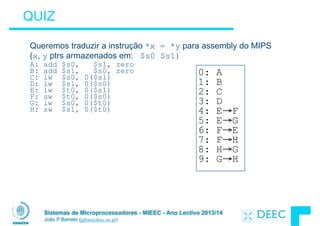
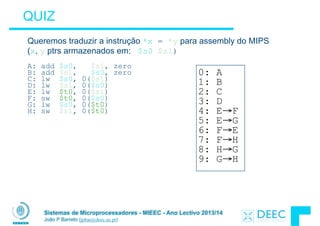
QUIZ
Queremos traduzir a instrução *x = *y para assembly do MIPS
(x, y ptrs armazenados em: $s0 $s1)
A: add $s0, $s1, zero
B: add $s1, $s0, zero
C: lw $s0, 0($s1)
D: lw $s1, 0($s0)
E: lw $t0, 0($s1)
F: sw $t0, 0($s0)
G: lw $s0, 0($t0)
H: sw $s1, 0($t0)
0: A
1: B
2: C
3: D
4: E→F
5: E→G
6: F→E
7: F→H
8: H→G
9: G→H
Sistemas de Microprocessadores - MIEEC - Ano Lectivo 2013/14
João P Barreto (jpbar@deec.uc.pt)
E concluindo ...
• A memória é endereçada em bytes, mas as instruções lw e
sw acedem a uma word (4 bytes) de cada vez.
!
• Um ponteiro (usado em lw e sw) é só um endereço de
memórias. Podemos adicionar ou subtrair valores ao
endereço base (using offset).
!
• Novas instruções que vimos:
lw, sw
Sistemas de Microprocessadores - MIEEC - Ano Lectivo 2013/14
João P Barreto (jpbar@deec.uc.pt)
Para saber mais ...
• P&H - Capítulos 2.1, 2.2, 2.3 e 2.6
!
• P&H - Capítulo 2.9 páginas 95 e 96
Sistemas Microprocessadores 2013/2014
Sistemas de Microprocessadores - MIEEC - Ano Lectivo 2013/14
João P Barreto (jpbar@deec.uc.pt)
Introdução ao MIPS

- Instruções de Decisão -
Sistemas de Microprocessadores - MIEEC - Ano Lectivo 2013/14
João P Barreto (jpbar@deec.uc.pt)
Registos no MIPS (Revisão)
• Como os registos são construídos em hardware, existe um número pré-
determinado que não pode ser aumentado.
§ Solução: O código do MIPS tem que ser feito com cuidado de forma a usar
eficientemente os recursos disponíveis.
!
• O MIPS tem 32 registos de 32 bits cada (word). Os registos estão numerados
de 0 a 31
• Os registos tanto podem ser referenciados por um número como por um nome:
§ Referência por número :
$0, $1, $2, … $30, $31
§ Referência por nome :
Ä Semelhante às variáveis em C
$16 - $23 è $s0 - $s7
Ä Variáveis temporárias
$8 - $15 è $t0 - $t7
Sistemas de Microprocessadores - MIEEC - Ano Lectivo 2013/14
João P Barreto (jpbar@deec.uc.pt)
Operações Aritméticas no MIPS (Revisão)
• Sintáxe:
1 2, 3, 4
Onde :
1) nome da operação
2) operando que recebe o resultado (“destination”)
3) 1º operando (“source1”)
4) 2º operando (“source2”)
!
• Adição e subração em assembly
§ add $s0,$s1,$s2 # $s0=$s1+$s2
§ sub $s3,$s4,$s5 # $s3=$s4-$s5
§ addi $s0,$s1,10 # $s0=$s1+10
§ add $zero,$zero,$s0 # O que acontece?
Sistemas de Microprocessadores - MIEEC - Ano Lectivo 2013/14
João P Barreto (jpbar@deec.uc.pt)
Overflow Aritmético (1/2)
• Relembrar: O overflow acontece quando existe um erro
numa operação aritmética devido á precisão limitada dos
computadores (número fixo de bits por registo)
!
• Exemplo (números de 4-bits sem sinal):
+15 1111
+3 0011
+18 1 0010
§ Não há espaço para o 5º bit da soma, assim a solução seri 0010,
que é +2 em decimal, e portanto está errada.
Sistemas de Microprocessadores - MIEEC - Ano Lectivo 2013/14
João P Barreto (jpbar@deec.uc.pt)
Overflow Aritmético (2/2)
!
• Algumas linguagens detectam o overflow (Ada), enquanto
outras não (C)
!
• No MIPS existem 2 tipos de instruções:
§ add (add), add immediate (addi) e subtract (sub) em que o
overflow é detectado
§ add unsigned (addu), add immediate unsigned (addiu) e subtract
unsigned (subu) que não fazem detecção de overflow (no caso de
ocorrer é ignorado)
!
• O compilador utiliza a aritmética conveniente
§ O compilador de C para o MIPS utiliza

addu, addiu, subu
Sistemas de Microprocessadores - MIEEC - Ano Lectivo 2013/14
João P Barreto (jpbar@deec.uc.pt)
Instruções “Lógicas”
!
• Shift Left: sll $s1,$s2,2 #s1=s2<<2
§ Guarda em $s1 o valor de $s2 deslocada 2 bits para a esquerda,
colocando 0’s nos bits da direita que ficam “livres”; (<< em C)
§ Antes: 00 00 00 02 hex

0000 0000 0000 0000 0000 0000 0000 0010two
§ Depois: 00 00 00 08hex

0000 0000 0000 0000 0000 0000 0000 1000two
§ QUIZ: Qual é o efeito aritmético do sll?
!
• Shift Right: srl é o deslocamento no sentido oposto; >>
Sistemas de Microprocessadores - MIEEC - Ano Lectivo 2013/14
João P Barreto (jpbar@deec.uc.pt)
Anatomia: os 5 componentes de um Computador
• Os registos estão no "datapath" do processador.
!
• Se os operandos estiverem em memória, então:
Processor
Computer
Control
(“brain”)
Datapath
Registers
Memory Devices
Input
Output
Load (from)
Store (to)
Estas são as instruções para “data transfer” …
1. Os dados são
transferidos para os
registos,
2. a acção é realizada,
!
3. o resultado é colocado
de volta na memória.
Sistemas de Microprocessadores - MIEEC - Ano Lectivo 2013/14
João P Barreto (jpbar@deec.uc.pt)
Transferência de Dados (Revisão)
• Sintáxe das instruções Load/Store :
1 2, 3 (4)
Em que
1) nome da operação
2) registo que recebe/fornece o valor
3) deslocamento em bytes (offset)
4) registo contendo o endereço base (ponteiro) para a memória
!
• Instruções:
§ lw $t0,12($s0) #Escreve no registo $t0 a word
#que está no endereço de memória
#$s0+12
§ sw $t0,10($s0) #Escreve no endereço de memória
#$s0+10 o conteúdo de $t0
Sistemas de Microprocessadores - MIEEC - Ano Lectivo 2013/14
João P Barreto (jpbar@deec.uc.pt)
Notas sobre a memória (Revisão)
• Erro Frequente: Esquecermo-nos que os endereços de
words sucessivas numa máquina com “Byte Addressing”
diferem em mais do que 1.
§ Muitos programadores de assembly cometem erros por assumirem
que o endereço da próxima word pode ser obtido incrementando o
registo em 1 unidade em vez de adicionarem o número de bytes da
word (diferente do C).
§ Ao contrário do que acontece no C, em assembly não existe a
noção de tipo, e é impossível o computador saber o tamanho de
uma word fazendo o ajuste implícito do incremento dos ponteiros.
§ Lembre-se também que no lw e sw, a soma do endereço de base
com o offset deve ser sempre um múltiplo de 4 ( word aligned
memory )
Sistemas de Microprocessadores - MIEEC - Ano Lectivo 2013/14
João P Barreto (jpbar@deec.uc.pt)
Alinhamento de Memória (Revisão)
• No MIPS as words e objectos são guardados em memória
em bytes cujo endereço é sempre múltiplo de 4.
Alinhamento de Memória: os objectos começam sempre
em endereços que são múltiplos do seu tamanho
§ Lembram-se do “Bus Error”?
0 1 2 3
Aligned
Not
Aligned
0, 4, 8, or Chex
O Último digíto hexa
do endereço é:
1, 5, 9, or Dhex
2, 6, A, or Ehex
3, 7, B, or Fhex
Sistemas de Microprocessadores - MIEEC - Ano Lectivo 2013/14
João P Barreto (jpbar@deec.uc.pt)
Registos vs Memória (revisão)
• O que acontece se houver mais variáveis do que registos?
§ O compilador tenta manter as variáveis mais utilizadas nos registos
§ As variáveis menos usadas são armazenadas em memória: spilling
§ Consulte o comando register o C
!
• Porque não manter todas as variáveis em memória?
§ Smaller is faster: os registos são mais rápidos do que a memória
§ Os registos são mais versáteis:
Ä Cada instrução aritmética do MIPS pode ler 2 registos, fazer uma
operação sobre os dados, e escrever o resultado num registo
Ä Uma instrução de transferência de dados só pode ler ou escrever 1
operando.
Sistemas de Microprocessadores - MIEEC - Ano Lectivo 2013/14
João P Barreto (jpbar@deec.uc.pt)
Leitura e escrita de bytes (1/2)
• Para além da transferência de “words” (4 bytes usando lw
e sw), o MIPS permite também a transferência de bytes:
§ load byte: lb
§ store byte: sb
!
• O formato das instruções é semelhante ao lw, sw
E.g., lb $s0, 3($s1)
o byte de memória com endereço = “3” + “contéudo do
registo s1” é copiado para o byte menos significativo do
registo s0.
Sistemas de Microprocessadores - MIEEC - Ano Lectivo 2013/14
João P Barreto (jpbar@deec.uc.pt)
Leitura e escrita de bytes (2/2)
• O que é que acontece com os outros 24 bits do registo de
32 bits?
§ lb: estensão de sinal para preencher os 24 bits mais significativos
(relembrar que a representação em complementos de 2 assume
um número fixo de bits)
x
byte

lido…é copiado (extensão de sinal)
Este bit
xxxx xxxx xxxx xxxx xxxx xxxx zzz zzzz
• No caso de leitura de “chars” nós não queremos que
haja extensão de sinal!
• Neste caso devemos usar a seguinte instrução
load byte unsigned: lbu
Sistemas de Microprocessadores - MIEEC - Ano Lectivo 2013/14
João P Barreto (jpbar@deec.uc.pt)
Concluindo
• A memória é endereçada em bytes, mas as instruções lw e
sw acedem a uma word (4 bytes) de cada vez.
• Um ponteiro (usado em lw e sw) é só um endereço de
memórias. Podemos adicionar ou subtrair valores ao
endereço base (using offset).
• Para carregar e armazenar bytes devemos utilizar as
instruções lb/sb (signed) e lbu/sbu (unsigned)
• As instruções addu/subu/addui não causam overflow
• Novas instruções que vimos:
lw, sw, sll, srl, addu, addiu, subu, lb, sb
Sistemas de Microprocessadores - MIEEC - Ano Lectivo 2013/14
João P Barreto (jpbar@deec.uc.pt)
QUIZ
Queremos traduzir a instrução *x = *y para assembly do MIPS
(x, y ptrs armazenados em: $s0 $s1)
!
A: add $s0, $s1, zero
B: add $s1, $s0, zero
C: lw $s0, 0($s1)
D: lw $s1, 0($s0)
E: lw $t0, 0($s1)
F: sw $t0, 0($s0)
G: lw $s0, 0($t0)
H: sw $s1, 0($t0)
0: A
1: B
2: C
3: D
4: E→F
5: E→G
6: F→E
7: F→H
8: H→G
9: G→H
Sistemas de Microprocessadores - MIEEC - Ano Lectivo 2013/14
João P Barreto (jpbar@deec.uc.pt)
O que vimos até agora ...
• As instruções que vimos até agora só manipulam informação (operações
aritméticas e transferência de dados) …
!
• Para construir um computador precisamos de tomar decisões e alterar a
sequência de execução durante o “runtime” … imagine como seria fazer um
programa se não existissem instruções “if”, “while”, “for”, etc!
!
• O C ( e o MIPS) permitem usar labels como suporte ao comando “goto”.
§ C: o uso de “breaks” e “goto” é deselegante e altamente desaconselhado;
§ MIPS: A utilização de “goto” é a única forma de modificar o fluxo sequencial
de execução!
Sistemas de Microprocessadores - MIEEC - Ano Lectivo 2013/14
João P Barreto (jpbar@deec.uc.pt)
Decisões em C: o comando if
• Existem 2 tipos de “if statements” em C
if (condition) clause
if (condition) clause1 else clause2
!
• Rearranje o 2º if da seguinte forma:
if (condition) goto L1;

clause2;

goto L2;

L1: clause1;
L2:
!
• Não é tão elegante como if-else, mas faz mesma coisa
Sistemas de Microprocessadores - MIEEC - Ano Lectivo 2013/14
João P Barreto (jpbar@deec.uc.pt)
Instruções de decisão no MIPS
• Instrução de decisão no MIPS:
beq register1, register2, L1
beq significa “Branch if (registers are) equal”
A tradução em C seria: 

if (register1==register2) goto L1
!
• Instrução de decisão complementar
bne register1, register2, L1
bne significa “Branch if (registers are) NOT equal”
A tradução em C seria : 

if (register1!=register2) goto L1
!
• Estas instruções são os “conditional branches” (saltos
Sistemas de Microprocessadores - MIEEC - Ano Lectivo 2013/14
João P Barreto (jpbar@deec.uc.pt)
Instrução “goto” no MIPS
• Para além dos saltos condicionais, o MIPS tem ainda o
salto incondicional (unconditional branch):
j label
!
§ O salto na execução é feito directamente para o sítio referenciado
por “label” sem ser necessário satisfazer uma condição
!
• Equivalente em C a: 

goto label
!
• Tecnicamente tem o mesmo efeito que :
beq $0,$0,label
Sistemas de Microprocessadores - MIEEC - Ano Lectivo 2013/14
João P Barreto (jpbar@deec.uc.pt)
Compilação de um if em C (1/2)
• Compile à mão
if (i == j)
f=g+h; 

else
f=g-h;
!
• Assumindo o seguinte
mapeamento variável-registo:


f: $s0

g: $s1

h: $s2

i: $s3

j: $s4
Exit
i == j?
f=g+h f=g-h
(false) 

i != j
(true) 

i == j
Sistemas de Microprocessadores - MIEEC - Ano Lectivo 2013/14
João P Barreto (jpbar@deec.uc.pt)
Compilação de um if em C (2/2)
•Compile à mão
if (i == j)
f=g+h; 

else
f=g-h;
!
!
• Código em assembly para MIPS:
beq $s3,$s4,True # branch i==j

sub $s0,$s1,$s2 # f=g-h(false)

j Fim # goto Fim

True: add $s0,$s1,$s2 # f=g+h (true)

Fin:
!
Nota: O compilador cria automaticamente labels quando aparecem instruções de
decisão (branches).

Exit
i == j?
f=g+h f=g-h
(false) 

i != j
(true) 

i == j
Sistemas de Microprocessadores - MIEEC - Ano Lectivo 2013/14
João P Barreto (jpbar@deec.uc.pt)
Ciclos (Loops) em C/Assembly (1/3)
• Ciclo simples em C; A[] é um array de ints
do {
g = g + A[i];
i = i + j;}
while (i != h);
• Re-esrevendo de uma forma deselegante:
Loop: g = g + A[i];

i = i + j;

if (i != h)
goto Loop;
• Assumindo agora o seguinte mapeamento variável-registo:

g, h, i, j, base of A

$s1, $s2, $s3, $s4, $s5
Sistemas de Microprocessadores - MIEEC - Ano Lectivo 2013/14
João P Barreto (jpbar@deec.uc.pt)
Ciclos (Loops) em C/Assembly (2/3)
!
• Código compilado para MIPS:
Loop: sll $t1,$s3,2 #$t1= 4*i

add $t1,$t1,$s5 #$t1=addr A

lw $t1,0($t1) #$t1=A[i]

add $s1,$s1,$t1 #g=g+A[i]

add $s3,$s3,$s4 #i=i+j

bne $s3,$s2,Loop # goto Loop

# if i!=h
• Código original (guia):
Loop: g = g + A[i];

i = i + j;

if (i != h) goto Loop;
Sistemas de Microprocessadores - MIEEC - Ano Lectivo 2013/14
João P Barreto (jpbar@deec.uc.pt)
Ciclos/Loops em C/Assembly (3/3)
• Existem 3 tipos diferentes de ciclos em C:
§ while
§ do… while
§ For
!
• Cada um destes ciclos pode ser re-escrito usando um dos
outros dois. Assim o método utilizado para o do… while
pode ser também usado para implementar o while e for.
!
• Ideia Chave: Apesar de existirem diferentes formas de
construir um ciclo em MIPS, todos eles passam por tomar
uma decisão com um conditional branch
Sistemas de Microprocessadores - MIEEC - Ano Lectivo 2013/14
João P Barreto (jpbar@deec.uc.pt)
Desigualdades no MIPS (1/4)
• Até agora só trabalhámos com igualdades 

(== e != no C). No entanto um programa também trabalha
com desigualdades (< e > no C).
!
• Instruções de desigualdade no MIPS :
§ “Set on Less Than”
§ Sintaxe: slt reg1,reg2,reg3
§ Significado:
if (reg2 < reg3) 

reg1 = 1; 

else
reg1 = 0;
“set” significa “set to 1”,
Sistemas de Microprocessadores - MIEEC - Ano Lectivo 2013/14
João P Barreto (jpbar@deec.uc.pt)
Desigualdades no MIPS (2/4)
• Compile “à mão” o seguinte código
if (g < h) goto Less; # assuma g:$s0, h:$s1
!
• O resultado em assembly para o MIPS é …
slt $t0,$s0,$s1 # $t0 = 1 if g<h 

bne $t0,$0,Less # goto Less

# if $t0!=0

# (if (g<h)) Less:
!
• O registo $0 contém sempre o valor 0, e por isso é frequentemente utilizado
com bne e beq depois de uma instrução slt.
!
• O par de instruções slt è bne significa if(… < …)goto…
Sistemas de Microprocessadores - MIEEC - Ano Lectivo 2013/14
João P Barreto (jpbar@deec.uc.pt)
Desigualdades no MIPS (3/4)
• Com o slt podemos implementar “<” ! Mas como será
que podemos implementar o >, ≤ e ≥ ?
!
• Poderiam haver mais 3 instruções similares, mas:
§ Filosofia do MIPS: Simpler is Better, Smaller is faster
!
• Será que podemos implementar o ≥ usando unicamente o
slt e “branches”?
!
• E quanto ao >?
!
• E ao ≤?
Sistemas de Microprocessadores - MIEEC - Ano Lectivo 2013/14
João P Barreto (jpbar@deec.uc.pt)
Desigualdades no MIPS (4/4)
# a:$s0, b:$s1 

slt $t0,$s0,$s1 # $t0 = 1 if a<b 

beq $t0,$0,skip # skip if a >= b

<stuff> # do if a<b
skip:
!
Existem sempre duas variações:
Usar slt $t0,$s1,$s0 em vez de slt $t0,$s0,$s1
!
Usar bne em vez de beq
Sistemas de Microprocessadores - MIEEC - Ano Lectivo 2013/14
João P Barreto (jpbar@deec.uc.pt)
Desigualdades e Imediatos
• Existe também uma versão do slt para trabalhar com
argumentos imediatos (constantes) : slti
§ Ùtil em ciclos for
if (g >= 1) goto Loop
Loop: . . .


slti $t0,$s0,1 # $t0 = 1 if

# $s0<1 (g<1)

beq $t0,$0,Loop # goto Loop

# if $t0==0

# (if (g>=1)
C
M

I

P

S
O par slt è beq significa em C if(… ≥ …)goto…
Sistemas de Microprocessadores - MIEEC - Ano Lectivo 2013/14
João P Barreto (jpbar@deec.uc.pt)
E quanto aos números sem sinal?
• Existem também uma instrução de desigualdade para
trabalhar com números sem sinal (unsigned) :
sltu, sltiu
…que coloca o registo de output a 1 (set) ou 0 (reset) em
função de uma comparação sem sinal
!
• Qual é o valor de $t0 e $t1?
($s0 = FFFF FFFAhex, $s1 = 0000 FFFAhex)
slt $t0, $s0, $s1
sltu $t1, $s0, $s1
Sistemas de Microprocessadores - MIEEC - Ano Lectivo 2013/14
João P Barreto (jpbar@deec.uc.pt)
Signed/Unsigned tem diferentes significados!
• Os termos Signed/Unsigned estão “sobre
utilizados”. É preciso ter cuidado com os seus
múltiplos significados
!
§ Faz / Não faz extensão de sinal 

(lb, lbu)
!
§ Não detecta overflow
(addu, addiu, subu, multu, divu)
!
§ Faz comparação com/sem sinal
(slt, slti/sltu, sltiu)
Sistemas de Microprocessadores - MIEEC - Ano Lectivo 2013/14
João P Barreto (jpbar@deec.uc.pt)
Exemplo: O Switch do C (1/3)
• Escolha entre quatro alternativas diferentes em função de k ter os
valores 0, 1, 2 ou 3. Compile “à mão” o seguinte código em C:


switch (k) {

case 0: f=i+j; break; /* k=0 */

case 1: f=g+h; break; /* k=1 */

case 2: f=g–h; break; /* k=2 */

case 3: f=i–j; break; /* k=3 */

}
Sistemas de Microprocessadores - MIEEC - Ano Lectivo 2013/14
João P Barreto (jpbar@deec.uc.pt)
Exemplo: O Switch do C (2/3)
• Isto é um ciclo complicado, portanto o primeiro passo é
simplificar.
!
• Escreva o ciclo como uma cadeia de declarações if-else,
as quais já sabemos compilar:
if(k==0) f=i+j; 

else if(k==1) f=g+h; 

else if(k==2) f=g–h;

else if(k==3) f=i–j;
!
• Assumindo o seguinte mapeamento:
f:$s0, g:$s1, h:$s2,

i:$s3, j:$s4, k:$s5
Sistemas de Microprocessadores - MIEEC - Ano Lectivo 2013/14
João P Barreto (jpbar@deec.uc.pt)
Exemplo: O switch do C (3/3)
• O código compilado é:


bne $s5,$0,L1 # branch k!=0

add $s0,$s3,$s4 #k==0 so f=i+j

j Exit # end of case so Exit

L1: addi $t0,$s5,-1 # $t0=k-1

bne $t0,$0,L2 # branch k!=1

add $s0,$s1,$s2 #k==1 so f=g+h

j Exit # end of case so Exit

L2: addi $t0,$s5,-2 # $t0=k-2

bne $t0,$0,L3 # branch k!=2

sub $s0,$s1,$s2 #k==2 so f=g-h

j Exit # end of case so Exit

L3: addi $t0,$s5,-3 # $t0=k-3

bne $t0,$0,Exit # branch k!=3

sub $s0,$s3,$s4 #k==3 so f=i-j 

Exit:
Sistemas de Microprocessadores - MIEEC - Ano Lectivo 2013/14
João P Barreto (jpbar@deec.uc.pt)
QUIZ
Indique o que deveria estar na zona com os pontos de interrogação!
do {i--;} while(???);
Loop:addi $s0,$s0,-1 # i = i - 1

slti $t0,$s1,2 # $t0 =(j < 2)

beq $t0,$0 ,Loop # goto Loop if $t0 == 0
slt $t0,$s1,$s0 # $t0 =(j < i)

bne $t0,$0 ,Loop # goto Loop if $t0 != 0
0: j < 2 && j < i

1: j ≥ 2 && j < i

2: j < 2 && j ≥ i

3: j ≥ 2 && j ≥ i

4: j > 2 && j < i

5: j < 2 || j < i

6: j ≥ 2 || j < i

7: j < 2 || j ≥ i

8: j ≥ 2 || j ≥ i

9: j > 2 || j < i
($s0=i, $s1=j)
Sistemas de Microprocessadores - MIEEC - Ano Lectivo 2013/14
João P Barreto (jpbar@deec.uc.pt)
Concluindo
• Os branches permitem tomar a decisão do que vai ser executado em
“runtime” em vez de “compile time”.
!
• As decisões em C são feitas usando conditional statements como o
if, while, do while, for.
!
• As decisões em MIPS são feitas usando conditional branches: beq e
bne.
!
• Para complementar os conditional branches em decisões que
involvam desigualdades, vimos as instruções “Set on Less Than”: slt,
slti, sltu, sltiu
!
• Novas instruções que vimos:

beq, bne, j, slt, slti, sltu, sltiu

Sistemas de Microprocessadores - MIEEC - Ano Lectivo 2013/14
João P Barreto (jpbar@deec.uc.pt)
Notas para mim
• Explicar pseudo-instruções (e.g. Move, branches)
• Explicar Operandos imediatos de 32 bits (instruções la e li)
• Explicar syscall
• Explicar trap e EPC
Sistemas de Microprocessadores - MIEEC - Ano Lectivo 2013/14
João P Barreto (jpbar@deec.uc.pt)
Para saber mais ...
• P&H - Capítulos 2.1, 2.2, 2.3, 2.5 e 2.6
!
• P&H - Capítulo 3.3
!
!
• Resolver a ficha de trabalho
Sistemas Microprocessadores 2013/2014
Sistemas de Microprocessadores - MIEEC - Ano Lectivo 2013/14
João P Barreto (jpbar@deec.uc.pt)
Introdução ao MIPS

- Funções e Procedimentos -
Sistemas de Microprocessadores - MIEEC - Ano Lectivo 2013/14
João P Barreto (jpbar@deec.uc.pt)
Revisão
• Os branches permitem tomar a decisão do que vai ser executado em
“runtime” em vez de “compile time”.
!
• As decisões em C são feitas usando conditional statements como o
if, while, do while, for.
!
• As decisões em MIPS são feitas usando conditional branches: beq e
bne.
!
• Para complementar os conditional branches em decisões que
involvam desigualdades, vimos as instruções “Set on Less Than”: slt,
slti, sltu, sltiu
!
• Novas instruções que vimos:

beq, bne, j, slt, slti, sltu, sltiu

Sistemas de Microprocessadores - MIEEC - Ano Lectivo 2013/14
João P Barreto (jpbar@deec.uc.pt)
Funções em C
main() {

int i,j,k,m;

...

i = mult(j,k); ... 

m = mult(i,i); ...
}
/* forma burra de implementar mult */
int mult (int mcand, int mlier){

int product;
product = 0;

while (mlier > 0) {

product = product + mcand;

mlier = mlier -1; }

return product;
}
Numa chamada a
função que
informação é que o
compilador/
programador
precisa de registar ?
!
Que instruções
permitem fazer isto?
Sistemas de Microprocessadores - MIEEC - Ano Lectivo 2013/14
João P Barreto (jpbar@deec.uc.pt)
Chamada de funções - Bookkeeping
• No MIPS os registos são fundamentais para
guardar a informação necessária à chamada de
funções.
!
• Convenção de utilização de registos:
§ Endereço de retorno. $ra
§ Argumentos / Parâmetros: $a0, $a1, $a2, $a3
§ Retorno de valores: $v0, $v1
§ Variáveis locais: $s0, $s1, … , $s7
!
• Veremos mais tarde que a stack também é utilizada.
Sistemas de Microprocessadores - MIEEC - Ano Lectivo 2013/14
João P Barreto (jpbar@deec.uc.pt)
Instruções de suporte a funções (1/6)
... sum(a,b);... /* a,b:$s0,$s1 */

}

int sum(int x, int y) {

return x+y;

}
address

1000 

1004 

1008 

1012 

1016
2000 

2004
C
M

I

P

S
No MIPS todas as instruções
têm 4 bytes e são armazenadas
em memória de forma
semelhante aos dados. Estes
são os endereços onde o
programa está armazenado.
Sistemas de Microprocessadores - MIEEC - Ano Lectivo 2013/14
João P Barreto (jpbar@deec.uc.pt)
Instruções de suporte a funções (2/6)
... sum(a,b);... /* a,b:$s0,$s1 */

}

int sum(int x, int y) {

return x+y;

}
address

1000 add $a0,$s0,$zero # x = a

1004 add $a1,$s1,$zero # y = b 

1008 addi $ra,$zero,1016 #$ra=1016

1012 j sum #jump to sum

1016 ...
2000 sum: add $v0,$a0,$a1

2004 jr $ra # nova instrução - salta
C
M

I

P

S
Sistemas de Microprocessadores - MIEEC - Ano Lectivo 2013/14
João P Barreto (jpbar@deec.uc.pt)
Instruções de suporte a funções (3/6)
... sum(a,b);... /* a,b:$s0,$s1 */

}

int sum(int x, int y) {

return x+y;

}
!
§ Pergunta: Porquê utilizar jr? Porque não j?
§ Resposta: A função sum pode ser chamada de muitos sítios
diferentes. Assim, não podemos regressar para um endereço fizo
pré-definido. É preciso disponibilizar um mecanismo para dizer
“regressa aqui” !
2000 sum: add $v0,$a0,$a1

2004 jr $ra # new instruction
C
M

I

P

S
Sistemas de Microprocessadores - MIEEC - Ano Lectivo 2013/14
João P Barreto (jpbar@deec.uc.pt)
Instruções de suporte a funções (4/6)
• Instrução para simultaneament saltar e fazer a salvaguarda do
endereço de retorno: jump and link (jal)
!
• Sem jal:

1008 addi $ra,$zero,1016 #$ra=1016

1012 j sum #goto sum
!
• Com jal:

1008 jal sum # $ra=1012,goto sum
!
• Será que jal é imprescíndivel?
§ “Make the common case fast”: a chamada a funções é uma
operação muito ferquente.
§ Para além disso com jal o programador não precisa de saber
onde é que o código vai ser carregado.
Sistemas de Microprocessadores - MIEEC - Ano Lectivo 2013/14
João P Barreto (jpbar@deec.uc.pt)
Instruções de suporte a funções (5/6)
• A sintáxe do jal (jump and link) é semelhante à do j
(jump):
jal label
!
• Na verdade o jal deveria ser chamado laj (link and
jump):
§ Passo 1 (link) - Guarda o endereço da próxima instrução em $ra
§ Passo 2(jump) - Salta para a instrução assinalada por label
!
• Porque é que é guardado o endereço da instrução
seguinte em vez da instrução corrente?
Sistemas de Microprocessadores - MIEEC - Ano Lectivo 2013/14
João P Barreto (jpbar@deec.uc.pt)
Instrução de Suporte a Funções (6/6)
• Sintáxe do jr (jump register):
!
jr register
!
• Em vez de darmos um “label” ao jump, passamos um
registo que contém o endereço para onde queremos saltar.
!
• Estas duas instruções são muito úteis para chamada de
funções:
§ jal guarda o endereço de retorno no registo ($ra)
§ jr $ra salta de volta para o sítio onde a função foi chamada (se
entretanto não alterarmos o conteúdo do registo)
Sistemas de Microprocessadores - MIEEC - Ano Lectivo 2013/14
João P Barreto (jpbar@deec.uc.pt)
Nested Procedures (1/2)
int sumSquare(int x, int y) {

return mult(x,x)+ y;

}
!
• Alguém chamou sumSquare, e agora sumSquare está a
chamar mult.
!
• Assim o endereço que está $ra é o sítio para onde
sumSquare vai ter que regressar. No entanto o registo vai
ser escrito pela chamada a mult.
!
• Vamos ter que guardar o endereço de retorno de
sumSquare antes de fazer a chamada a mult.
Sistemas de Microprocessadores - MIEEC - Ano Lectivo 2013/14
João P Barreto (jpbar@deec.uc.pt)
Nested Procedures (2/2)
• Iremos ver para a frente que normalmente precisamos de guardar
outras informações para além do contéudo de $ra.
!
• Onde será que podemos guardar essa informação?
!
• Quando um programa em C está a correr existem 3 zonas diferentes
de memória:
§ Static: Variáveis declaradas uma única vez no inicio do programa. Esta
zona só é desalocada quando o programa termina.
§ Heap: Variáveis declaradas de forma dinâmica
§ Stack: Espaço para ser utilizado pelas funções/procedmentos durante a
execução. Este é a zona onde fazemos a salvaguarda de contexto!
Sistemas de Microprocessadores - MIEEC - Ano Lectivo 2013/14
João P Barreto (jpbar@deec.uc.pt)
Revisão da alocação de memória em C
0
∞Address
Code Programa
Static Variáveis Globais
Heap
Espaço criado explicitamente, 

e.g., malloc(); ponteiros do C
Stack
Espaço para guardar
informação dos
procedimentos$sp
stack
pointer
Sistemas de Microprocessadores - MIEEC - Ano Lectivo 2013/14
João P Barreto (jpbar@deec.uc.pt)
Utilização da Pilha (1/2)
• O registo $sp contém sempre o endereço da última zona
de memória que está a ser ocupada pela stack (topo da
pilha ... ou melhor fundo da pilha!).
!
• Para utilizar a pilha, devemos decrementar o ponteiro $sp
pelo número de bytes que vamos precisar para guardar a
informação.
!
• Como é que devemos então compilar o programa?
int sumSquare(int x, int y) {

return mult(x,x)+ y;

}
Sistemas de Microprocessadores - MIEEC - Ano Lectivo 2013/14
João P Barreto (jpbar@deec.uc.pt)
Utilização da Pilha (2/2)
• Compile “à mão a”
!
# x e y estão em $a0 e $a1
sumSquare: 

addi $sp,$sp,-8 # espaço na stack 2 words

sw $ra, 4($sp) # guardar ret addr

sw $a1, 0($sp) # guardar y
add $a1,$a0,$zero # mult(x,x)

jal mult # chamar mult
lw $a1, 0($sp) # restaurar y
add $v0,$v0,$a1 # mult()+y
lw $ra, 4($sp) # obter ret addr

addi $sp,$sp,8 # libertar a stack
jr $ra

mult: ...
int sumSquare(int x, int y) {

return mult(x,x)+ y; }
“push”
“pop”
Sistemas de Microprocessadores - MIEEC - Ano Lectivo 2013/14
João P Barreto (jpbar@deec.uc.pt)
Passos na chamada de uma função
1) Salvaguardar a informação necessária na pilha
(e.g. Endereço de retorno em $ra).
!
2) Fazer a passagem de parâmetro(s), se houverem.
!
3) Saltar para a função chamada usando jal
!
4) Restabelecer valores a partir da pilha.
Sistemas de Microprocessadores - MIEEC - Ano Lectivo 2013/14
João P Barreto (jpbar@deec.uc.pt)
Regras a respeitar pela função chamada
• A função é chamada através da instrução jal, e regressa
usando jr $ra
!
• Aceita um máximo de 4 parâmetros passados através dos
registos $a0, $a1, $a2 e $a3
!
• O retorno de valores é sempre feito através de $v0 (e se
necessário de $v1)
!
• Tem de obedecer às convenções de registos
O que será isto?
Sistemas de Microprocessadores - MIEEC - Ano Lectivo 2013/14
João P Barreto (jpbar@deec.uc.pt)
Estrutura básica de uma função
!
entry_label: 

addi $sp,$sp, -framesize

sw $ra, framesize-4($sp) # guarda $ra

(salvaguarda outros registos se necessário)
...
!
!
(recupera outros registos)

lw $ra, framesize-4($sp) # recupera $ra

addi $sp,$sp, framesize 

jr $ra
Epilógo
Prólogo
Corpo (chama outras funções…)
ra
memory
Sistemas de Microprocessadores - MIEEC - Ano Lectivo 2013/14
João P Barreto (jpbar@deec.uc.pt)
Registos Gerais do MIPS
Constante 0 $0 $zero
Reservado para o Assembler $1 $at

Retorno de Valores $2-$3 $v0-$v1

Parâmetros $4-$7 $a0-$a3

Variáveis Temporárias $8-$15 $t0-$t7

Variáveis (saved) $16-$23 $s0-$s7

Mais variáveis temporárias $24-$25 $t8-$t9

Reservado para o Kernel $26-27 $k0-$k1

Ponteiro Global $28 $gp

Ponteiro da Pilha $29 $sp

Ponteiro de “Frame” $30 $fp

Endereço de Retorno $31 $ra
!
Existem ainda: Registos reservados (e.g. PC), e registos de vírgula
flutuante
Sistemas de Microprocessadores - MIEEC - Ano Lectivo 2013/14
João P Barreto (jpbar@deec.uc.pt)
Registos desconhecidos
• $at: pode ser utilizado pelo assembler em qualquer altura;
não é seguro utilizar
!
• $k0-$k1: podem ser usados pelo OS em qualquer altura;
não é seguro utilizar.
!
• $gp, $fp: vamos ignorar estes registos. Podem ler sobre
eles no apêndice A do livro, mas vamos passar sem eles
na escrita dos nossos códigos.
Sistemas de Microprocessadores - MIEEC - Ano Lectivo 2013/14
João P Barreto (jpbar@deec.uc.pt)
Convenção dos Registos (1/4)
• Chamante ou CalleR: a função que chama
!
• Chamada ou CalleE: a função chamada
!
• Quando a função chamada regressa, a função chamante
precisa de saber que registos foram alterados e que
registos mantiverma o valor.
!
• Convenção de registos: Conjunto de regras ou
convenções, a ser respeitadas pelo programdor/
compilador, que define quais os registos que podem ser
alterados depois da chamada a jal, e quais têm de ser
preservados no regresso.
Sistemas de Microprocessadores - MIEEC - Ano Lectivo 2013/14
João P Barreto (jpbar@deec.uc.pt)
Convenção dos Registos (2/4) - SAVED
• $0: Não Altera. Sempre 0.
!
• $s0-$s7: Repôr se modificado. É por isso que são
chamados “saved registers”. Se a função chamada alterar
estes registos deverá restaurá-los antes de regressar à
função chamante.
!
• $sp: Repôr se modificado. O stack pointer deverá apontar
para o mesmo endereço de memória antes e depois da
instrução jal que passa a execução para a função
chamada.
!
Sistemas de Microprocessadores - MIEEC - Ano Lectivo 2013/14
João P Barreto (jpbar@deec.uc.pt)
Convenção dos Registos (3/4) - VOLÁTEIS
!
• $ra: Pode ser alterado. A própria instrução jal modifica este registo. A
função Chamante tem a obrigação de o salvaguardar na pilha antes de
passar a execução a outra função.
!
• $v0-$v1: Podem ser alterados. Este registos contêm os valores de
retorno
!
• $a0-$a3: Podem ser alterados. Servem para passar parâmetros à
função chamada. A função chamante tem que os salvaguardar se
precisar de manter estes valores depois da função chamada regressar.
!
• $t0-$t9: Podem ser alterados. Por alguma coisa são chamados
temporários ...
Sistemas de Microprocessadores - MIEEC - Ano Lectivo 2013/14
João P Barreto (jpbar@deec.uc.pt)
Convenção de Registos (4/4)
• Se R é a função chamante, e E é a função chamada,
temos em resumo que ...
!
§ A função R, antes de fazer o jal para E, tem que guardar na pilha
todos os registos temporários que tencione usar mais tarde (isto
para além de $ra)
!
§ A função E tem que guardar na pilha todos os registos S (saved)
que pretende utilizar, de forma a poder repôr os seus valores antes
de regressar com jr
!
§ Atenção: Caller/callee só precisam de guardar os registos
temporários/saved que precisem/utilizem, e não todos os registos.
Sistemas de Microprocessadores - MIEEC - Ano Lectivo 2013/14
João P Barreto (jpbar@deec.uc.pt)
Concluindo
• As funções são chamadas com jal, e regressam com jr $ra.
!
• “The stack is your friend!”. Utilize-a para guardar tudo aquilo que precisa ... Só
tem de ter o cuidado de a deixar como a encontrou.
!
• As instruções que já aprendemos
Aritmetica: add, addi, sub, addu, addiu, subu
Memória: lw, sw, lb, sb, lbu, sbu
Decisão: beq, bne, slt, slti, sltu, sltiu
Saltos incondicionais: j, jal, jr
!
• Os registos que já conhecemos
§ Todos !
Sistemas de Microprocessadores - MIEEC - Ano Lectivo 2013/14
João P Barreto (jpbar@deec.uc.pt)
Para saber mais ...
• P&H - Capítulos 2.6 e 2.7
!
• P&H - Capítulo 2.9 páginas 95 e 96
!
• Anexo A-6 no CD que vem com o livro
Sistemas Microprocessadores 2013/2014
Sistemas de Microprocessadores - MIEEC - Ano Lectivo 2013/14
João P Barreto (jpbar@deec.uc.pt)
Introdução ao MIPS

- Operações Lógicas -
Sistemas de Microprocessadores - MIEEC - Ano Lectivo 2013/14
João P Barreto (jpbar@deec.uc.pt)
Revisão
• As funções são chamadas com jal, e regressam com jr $ra.
!
• Para passar parâmetros/argumentos utilizam-se os registos $a0, $a1, $a2 e
$a3
!
• Para devolver resultados utilizam-se os registos $v0 e $v1
!
• A pilha é utilizada para guardar tudo aquilo que precisamos ... Mas é preciso ter
cuidado porque um procedimento quando regressa tem que deixar a pilha
exactamente como a encontrou.
!
• Os procedimentos têm de respeitar a “Convenção de Registos”, ou seja:
§ A função chamante tem de fazer “backup” na pilha de todos os registos voláteis que
esteja a utilizar (e depois repô-los)
§ A função chamada tem de repôr todos os registos “saved” que tenha utilizado
!
• Os registos que já conhecemos
Sistemas de Microprocessadores - MIEEC - Ano Lectivo 2013/14
João P Barreto (jpbar@deec.uc.pt)
Utilização da Pilha (Revisão)
• Compile “à mão a”
!
# x e y estão em $a0 e $a1
sumSquare: 

addi $sp,$sp,-8 # espaço na stack 2 words

sw $ra, 4($sp) # guardar ret addr

sw $a1, 0($sp) # guardar y
add $a1,$a0,$zero # mult(x,x)

jal mult # chamar mult
lw $a1, 0($sp) # restaurar y
add $v0,$v0,$a1 # mult()+y
lw $ra, 4($sp) # obter ret addr

addi $sp,$sp,8 # libertar a stack
jr $ra

mult: ...
int sumSquare(int x, int y) {

return mult(x,x)+ y; }
“push”
“pop”
Sistemas de Microprocessadores - MIEEC - Ano Lectivo 2013/14
João P Barreto (jpbar@deec.uc.pt)
Registos Gerais do MIPS
Constante 0 $0 $zero
Reservado para o Assembler $1 $at

Retorno de Valores $2-$3 $v0-$v1

Parâmetros $4-$7 $a0-$a3

Variáveis Temporárias $8-$15 $t0-$t7

Variáveis (saved) $16-$23 $s0-$s7

Mais variáveis temporárias $24-$25 $t8-$t9

Reservado para o Kernel $26-27 $k0-$k1

Ponteiro Global $28 $gp

Ponteiro da Pilha $29 $sp

Ponteiro de “Frame” $30 $fp

Endereço de Retorno $31 $ra
!
Existem ainda: Registos reservados (e.g. PC), e registos de vírgula
flutuante
Sistemas de Microprocessadores - MIEEC - Ano Lectivo 2013/14
João P Barreto (jpbar@deec.uc.pt)
Convenção dos Registos (Revisão) - SAVED
• $0: Não Altera. Sempre 0.
!
• $s0-$s7: Repôr se modificado. É por isso que são
chamados “saved registers”. Se a função chamada alterar
estes registos deverá restaurá-los antes de regressar à
função chamante.
!
• $sp: Repôr se modificado. O stack pointer deverá apontar
para o mesmo endereço de memória antes e depois da
instrução jal que passa a execução para a função
chamada.
!
Sistemas de Microprocessadores - MIEEC - Ano Lectivo 2013/14
João P Barreto (jpbar@deec.uc.pt)
Convenção dos Registos (Revisão) - VOLÁTEIS
!
• $ra: Pode ser alterado. A própria instrução jal modifica este registo. A
função Chamante tem a obrigação de o salvaguardar na pilha antes de
passar a execução a outra função.
!
• $v0-$v1: Podem ser alterados. Este registos contêm os valores de
retorno
!
• $a0-$a3: Podem ser alterados. Servem para passar parâmetros à
função chamada. A função chamante tem que os salvaguardar se
precisar de manter estes valores depois da função chamada regressar.
!
• $t0-$t9: Podem ser alterados. Por alguma coisa são chamados
temporários ...
Sistemas de Microprocessadores - MIEEC - Ano Lectivo 2013/14
João P Barreto (jpbar@deec.uc.pt)
Convenção de Registos (Revisão)
• Se R é a função chamante, e E é a função chamada,
temos em resumo que ...
!
§ A função R, antes de fazer o jal para E, tem que guardar na pilha
todos os registos temporários que tencione usar mais tarde (isto
para além de $ra)
!
§ A função E tem que guardar na pilha todos os registos S (saved)
que pretende utilizar, de forma a poder repôr os seus valores antes
de regressar com jr
!
§ Atenção: Caller/callee só precisam de guardar os registos
temporários/saved que precisem/utilizem, e não todos os
registos.
Sistemas de Microprocessadores - MIEEC - Ano Lectivo 2013/14
João P Barreto (jpbar@deec.uc.pt)
Exemplo: Séries de Fibonacci (1/4)
• Os números de Fibonacci definem-se da seguinte forma:
F(n) = F(n – 1) + F(n – 2), 

F(0) e F(1) são sempre 1
!
• Assim a série de Fibonacci para n=9 é:
F(0)=1; F(3)=3; F(6)=13; F(9)=55;
F(1)=1; F(4)=5; F(7)=21;
F(2)=2; F(5)=8; F(8)=34;
!
• E o código recursivo em C é
!
! int fib(int n) {! ! ! !  
! ! if(n == 0) { return 1; }
! ! if(n == 1) { return 1; }! !  
! ! return (fib(n - 1) + fib(n - 2));
! }
Sistemas de Microprocessadores - MIEEC - Ano Lectivo 2013/14
João P Barreto (jpbar@deec.uc.pt)
Exemplo: Séries de Fibonacci 2/4
int fib(int n) {
if(n == 0) { return 1; }
if(n == 1) { return 1; }
return (fib(n - 1) + fib(n - 2));
}
Vamos compilar “à mão”!
Argumento de entrada => $a0
!
Passagem de resultado => $v0
!
Precisamos de guardar 3 words na pilha:
§ $ra (a função chama outras funções)
§ Um registo para acumular o resultado (e.g. $s0)
§ Guardar o valor de “n” para passar correctamente o parâmetro na
segunda chamada
!
Durante a resolução use o seu espirito crítico para ver se
conseguiria resolver o problema guardando menos de 3 words na
pilha
Sistemas de Microprocessadores - MIEEC - Ano Lectivo 2013/14
João P Barreto (jpbar@deec.uc.pt)
Exemplo: Série de Fibonacci (3/4)
Epílogo
!
fin:
lw $s0, 4($sp) #Repôr $s0
lw $ra, 8($sp) #Repôr o endereço de retorno
addi $sp, $sp, 12 #Colocar a pilha como foi recebida
jr $ra #Regressar à função chamante
Prólogo
!
fib:
addi $sp, $sp, -12 # Espaço para 3 words
sw $ra, 8($sp) # Guardar endereço de retorno
sw $s0, 4($sp) # Salvaguardar $s0
int fib(int n) {
if(n == 0) { return 1; }
if(n == 1) { return 1; }
return (fib(n - 1) + fib(n - 2));
}
Sistemas de Microprocessadores - MIEEC - Ano Lectivo 2013/14
João P Barreto (jpbar@deec.uc.pt)
Exemplo: Série de Fibonacci (4/4)
Corpo
# Retornar 1 quando $a0 é 0 ou 1
addiu $v0, $zero, 1
beq $a0, $zero, fin #Preparar para sair ($a0=0)
addiu $t0, $zero, 1 #Será que podiamos não sujar $t0?
beq $a0, $t0, fin #Preparar para sair ($a0=1)
!
addiu $a0, $a0, -1 #Preparar argumento 1ªchamada
sw $a0, 0($sp) #Salvaguardar para a 2ª chamada
jal fib #fib(n-1)
addi $s0, $v0, $zero #salvaguardar o result preliminar
lw $a0, 0($sp) #Preparar argumento 2ªchamada
addiu $a0, $a0, -1
jal fib #fib(n-2)
!
addi $v0, $v0, $s0 #resultado final
int fib(int n) {
if(n == 0) { return 1; }
if(n == 1) { return 1; }
return (fib(n - 1) + fib(n - 2));
}
Sistemas de Microprocessadores - MIEEC - Ano Lectivo 2013/14
João P Barreto (jpbar@deec.uc.pt)
Exemplo B - Faça a Compilação (1/3)
main() {

int i,j,k,m; /* i-m:$s0-$s3 */

...

i = mult(j,k); ... 

m = mult(i,i); ...
}
!
int mult (int mcand, int mlier){

int product;
product = 0;

while (mlier > 0) {

product += mcand;

mlier -= 1; }

return product;
}
Sistemas de Microprocessadores - MIEEC - Ano Lectivo 2013/14
João P Barreto (jpbar@deec.uc.pt)
Exemplo B - Faça a Compilação (2/3)
main:
...
add $a0,$s1,$0 # arg0 = j

add $a1,$s2,$0 # arg1 = k 

jal mult # call mult

add $s0,$v0,$0 # i = mult()

...
add $a0,$s0,$0 # arg0 = i

add $a1,$s0,$0 # arg1 = i 

jal mult # call mult

add $s3,$v0,$0 # m = mult()

...
main() {

int i,j,k,m; /* i-m:$s0-$s3 */

...

i = mult(j,k); ... 

m = mult(i,i); ... }
§ Nota: todas as variáveis a ser preservadas na função main
estão em registos “saved” e portanto não precisam de ser
salvaguardadas na pilha.
Sistemas de Microprocessadores - MIEEC - Ano Lectivo 2013/14
João P Barreto (jpbar@deec.uc.pt)
Exemplo B - Faça a Compilação (3/3)
mult:
add $t0,$0,$0 # prod=0
Loop:

slt $t1,$0,$a1 # mlr > 0?

beq $t1,$0,Fin # no=>Fin

add $t0,$t0,$a0 # prod+=mc

addi $a1,$a1,-1 # mlr-=1

j Loop # goto Loop
Fin:

add $v0,$t0,$0 # $v0=prod

jr $ra # return
int mult (int mcand, int mlier){

int product = 0;

while (mlier > 0) {

product += mcand;

mlier -= 1; }

return product;

}
Notas:
§ Não há chamadas a jal feitas dentro do mult, assim não é preciso fazer a
slavaguarda de $ra
§ Também não são usados saved registers o que significa que não há
contexto a ser guardado na pilha
Sistemas de Microprocessadores - MIEEC - Ano Lectivo 2013/14
João P Barreto (jpbar@deec.uc.pt)
QUIZ
Na tradução para MIPS ...
A. Podemos COPIAR $a0 para $a1 (e depois não guardar $a0 ou
$a1 na pilha) para guardar o n em chamadas sucessivas.
B. Temos SEMPRE que salvaguardar o $a0 na pilha dado que é
alterado.
C. Temos sempre que salvaguardar o $ra na pilha dado que
precisamos de saber para onde retornar …
ABC
0: FFF
1: FFT
2: FTF
3: FTT
4: TFF
5: TFT
6: TTF
7: TTT
int factorial(int n){
if(n == 0)
return 1;
else
return(n*factorial(n-1));}
Sistemas de Microprocessadores - MIEEC - Ano Lectivo 2013/14
João P Barreto (jpbar@deec.uc.pt)
Multiplicação Inteira (1/2)
• No MIPS, se multiplicarmos 2 registos de 32 bits temos um
resultado que em geral ocupa 64 bits:
§ 32-bit value x 32-bit value = 64-bit value
!
• Sintáxe da multiplicação (com sinal):
mult register1, register2
§ O resultado de 64 bits é guardado em dois registos especiais:
Ä A word mais significativa do produto é guardada no registo HI
Ä e a word menos significativa no registo LO
§ HI e LO são 2 registos especiais separados dos 32 registos
“general purpose”
§ Use mfhi register & mflo register para mover o conteúdos de HI,
LO para outro registo
Sistemas de Microprocessadores - MIEEC - Ano Lectivo 2013/14
João P Barreto (jpbar@deec.uc.pt)
Multiplicação Inteira (2/2)
• Exemplo:
§ em C: a = b * c;
§ em MIPS:
Ä considere b:c em $s2:$s3; e assuma que a ocupa $s0 e $s1
!
mult $s2,$s3 # b*c
mfhi $s0 # upper half of
# product into $s0

mflo $s1 # lower half of

# product into $s1
!
• Nota: Muitas vezes só nos importamos com a word menos
significativa.
Sistemas de Microprocessadores - MIEEC - Ano Lectivo 2013/14
João P Barreto (jpbar@deec.uc.pt)
Voltando ao factorial
int factorial(int n){
if(n == 0)
return 1;
else
return(n*factorial(n-1));}
factorial:
addu $v0, $zero, 1
Loop:
addiu $a0, $a0, -1
beq $a0, $zero, fin
mult $v0, $a0
mflo $v0
j Loop
fin:
Sistemas de Microprocessadores - MIEEC - Ano Lectivo 2013/14
João P Barreto (jpbar@deec.uc.pt)
Operações Bitwise
• Até agora fizemos operações aritméticas (add, sub,addi ), acessos a
memória (lw e sw), “branches” e saltos.
!
• Em todos estes casos o registo é visto como um todo, representando um
número com ou sem sinal.
!
• Nova Perspectiva: Ver o registo como um conjunto de 32 bits não relacionados,
em vez de um número único representado por 32 bits.
!
• Neste contexto podemos querer aceder a bits individuais (ou grupos de bits).
!
• Para isso vamos precisar de duas novas classes de operações:
§ Operações lógicas
§ Shifts/Deslocamentos (já vimos)
Sistemas de Microprocessadores - MIEEC - Ano Lectivo 2013/14
João P Barreto (jpbar@deec.uc.pt)
Operações Lógicas
• As duas operações lógicas fundamentais são:
§ AND: saída 1 se, e só se, ambas as entradas são 1
§ OR: saída 0 se, e só se, ambas as entradas forem 0
!
• Sintáxe semelhante ao add, addi, etc
§ OP $destino, $fonte1, $fonte2/imediato
!
• Nome das instruções:
§ and, or: Neste caso o terceiro argumento é um registo
§ andi, ori: Neste caso o terceiro argumento é um imediato
!
• Os operadores lógicos do MIPS são sempre bitwise, significando que o bit 0
da saída depende dos bits 0’s das entradas, o bit 1 dos bits 1’s, etc.
§ C: Bitwise AND é & (e.g., z = x & y;)
§ C: Bitwise OR é | (e.g., z = x | y;)
Sistemas de Microprocessadores - MIEEC - Ano Lectivo 2013/14
João P Barreto (jpbar@deec.uc.pt)
Utilidade das Operações Lógicas (1/2)
• Note que fazer o and de um bit desconhecido com 0
produz sempre 0. Por outro lado o resultado do and com
1 produz sempre o bit original.
!
• Isto é extremamente útil para criar máscaras (lembre-se
que já usámos este recurso no trabalho do piano)
§ Exemplo:
1011 0110 1010 0100 0011 1101 1001 1010
0000 0000 0000 0000 0000 1111 1111 1111
§ O resultado deste AND é:
0000 0000 0000 0000 0000 1101 1001 1010
mask:
mask os últimos 12 bits
Sistemas de Microprocessadores - MIEEC - Ano Lectivo 2013/14
João P Barreto (jpbar@deec.uc.pt)
Utilidade das Operações Lógicas (2/2)
• A segunda sequência de bits do exemplo é chamada uma máscara, e
serve para isolar os últimos 12 bits da direita mascarando o resto da
“bitstring” original.
!
• Usando a instrução andi, e assumindo que a sequência original
estava no registo $t0, teriamos:
andi $t0,$t0,0xFFF
!
• De forma semelhante repare que fazer o or de um bit desconhecido
com 1 produz sempre 1, e com 0 produz o bit original.
!
• Esta propriedade pode ser utilizada para forçar (mascarar) certos bits
da string a ser 1s.
§ Se $t0 contém 0x12345678, então depois da instrução:
ori $t0, $t0, 0xFFFF
§ … $t0 contém 0x1234FFFF.
Sistemas de Microprocessadores - MIEEC - Ano Lectivo 2013/14
João P Barreto (jpbar@deec.uc.pt)
Instruções de Deslocamento (revisão) (1/3)
• Sintáxe
OP $destino, $fonte, imediato
!
• O valor imediato especifica o número de bits que são
deslocados (<32)
!
• MIPS shift instructions:
!
§ sll (shift left logical): desloca para a esquerda e preenche os bits vazios
com 0’s
!
§ srl (shift right logical): desloca para a direita e preenche os bits vazios
com 0’s
!
§ sra (shift right arithmetic): desloca para a direita e prenche os bits vazios
com a extensão de sinal
Sistemas de Microprocessadores - MIEEC - Ano Lectivo 2013/14
João P Barreto (jpbar@deec.uc.pt)
Instruções de Deslocamento (revisão) (2/3)
• Deslocamentos lógicos para a esquerda e direita
§ Exemplo: shift right de 8 bits
0001 0010 0011 0100 0101 0110 0111 1000
0000 0000 0001 0010 0011 0100 0101 0110
§ Exemplo: shift left de 8 bits
0001 0010 0011 0100 0101 0110 0111 1000
0011 0100 0101 0110 0111 1000 0000 0000
Um bom compilador de C detecta quando existem
multiplicações por potências de 2 e usa a instrução sll
a *= 8; (em C)
Compila como:
sll $s0,$s0,3 (em MIPS)
Sistemas de Microprocessadores - MIEEC - Ano Lectivo 2013/14
João P Barreto (jpbar@deec.uc.pt)
Instruções de deslocamento (3/3)
• Deslocamento aritmético
§ Exemplo: shift right arith de 8 bits
0001 0010 0011 0100 0101 0110 0111 1000
0000 0000 0001 0010 0011 0100 0101 0110
§ Exemplo: shift right arith de 8 bits
1001 0010 0011 0100 0101 0110 0111 1000
1111 1111 1001 0010 0011 0100 0101 0110
A instrução sar é utilizada para fazer divisões com sinal
por potências de 2
Sistemas Microprocessadores 2013/2014
Sistemas de Microprocessadores - MIEEC - Ano Lectivo 2013/14
João P Barreto (jpbar@deec.uc.pt)
Introdução ao MIPS

- Representação de Instruções -
Sistemas de Microprocessadores - MIEEC - Ano Lectivo 2013/14
João P Barreto (jpbar@deec.uc.pt)
Níveis de representação num computador
High Level Language
Program (e.g., C)
Assembly Language
Program (e.g.,MIPS)
Machine Language
Program (MIPS)
Hardware Architecture Description
(e.g., block diagrams)
Compiler
Assembler
Machine
Interpretation
temp = v[k];
v[k] = v[k+1];
v[k+1] = temp;
lw $t0, 0($2)
lw $t1, 4($2)
sw $t1, 0($2)
sw $t0, 4($2)
0000 1001 1100 0110 1010 1111 0101 1000
1010 1111 0101 1000 0000 1001 1100 0110
1100 0110 1010 1111 0101 1000 0000 1001
0101 1000 0000 1001 1100 0110 1010 1111
Logic Circuit Description (Circuit
Schematic Diagrams)
Architecture
Implementation
Register File
ALU
PPP
LSD
SMP
Sistemas de Microprocessadores - MIEEC - Ano Lectivo 2013/14
João P Barreto (jpbar@deec.uc.pt)
Ideia Brilhante: O conceito de Stored-Program
• Os computadores baseiam-se em 2 príncipios chave:
1) As instruções são representadas através de “bitstrings”/
padrões de bits - podemos pensar nas instruções como
números.
2) Assim, programas inteiros podem ser armazenados em
memória para serem lidos ou escritos de forma
semelhante ao que acontece com os dados.
!
• VANTAGEM: Simplifica o SW/HW dos computadores:
§ A tecnologia de memória para dados é usada também
para programas
Sistemas de Microprocessadores - MIEEC - Ano Lectivo 2013/14
João P Barreto (jpbar@deec.uc.pt)
Consequência 1: Tudo funciona por endereços
• Como tanto as instruções como os dados são
armazenados em memória, tudo é referenciado por
endereços: instruções, dados, words, etc.
!
• Os ponteiros do C são simplesmente endereços de
memória
§ isto permite-nos apontar para qualquer coisa o que pode conduzir
a bugs difíceis de apanhar
!
• O MIPS tem um registo, o “Program Counter” (PC), que
indica a próxima instrução a ser executada.
!
• Os “branches” e os “jumps” modificam a sequência de
execução através de escritas no PC
Sistemas de Microprocessadores - MIEEC - Ano Lectivo 2013/14
João P Barreto (jpbar@deec.uc.pt)
Consequência 2: Binary Compatibility
• Os programas são normalmente distribuídos em binário por questões de
simplicidade de instalação e protecção da propriedade intelectual:
§ O programa fica vinculado a um determinado instruction set
§ Diferentes versões para diferentes arquitecturas (Macintoshes, PCs)
§ A comunidade “open source” muitas vezes disponibiliza as fontes (rpm vs build)
!
• As novas máquinas querem simultâneamente correr velhos programas
(“binaries”) bem como novos programas compilados com novas instruções
!
• Isto obriga “backward compatible” dos instruction sets (e.g. Intel)
Sistemas de Microprocessadores - MIEEC - Ano Lectivo 2013/14
João P Barreto (jpbar@deec.uc.pt)
As instruções como números binários (1/2)
• No MIPS a manipulação de dados é feita com base em
words (blocos de 32-bits):
§ Cada registo é uma word
§ Tanto lw e sw transaccionam com a memória uma word de cada
vez.
!
• Então como será que devemos representar instruções em
binário?
§ A filosofia do MIPS (RISC) é baseada na simplicidade: assim, se
os dados estão em words, é conveniente colocar as instruções
também em words.
!
• 1 instrução => 1 word em memória
Sistemas de Microprocessadores - MIEEC - Ano Lectivo 2013/14
João P Barreto (jpbar@deec.uc.pt)
As instruções como números binários (2/2)
• Como uma word tem 32 bits, dividimos a word que representa uma
instrução em partes chamados “campos”.
!
• Cada “campo” diz ao processador algo sobre a instrução em causa.
!
• Podiamos definir “campos” diferentes para instruções diferentes, no
entanto isto contraria a filosofia do MIPS de simplicidade e
“standardização”.
!
• O MIPS tem somente três tipos de instruções, obedecendo cada tipo à
mesma organização em termos de “campos”.
§ formato I: usado para codificar instruções com imediatos (excepto os
shifts) , os lw e sw (em que o offset conta como um imediato), e os
“branches” (beq e bne),
§ J-format: usado para o j e jal
§ formato R: usado para todas as outras instruções
Sistemas de Microprocessadores - MIEEC - Ano Lectivo 2013/14
João P Barreto (jpbar@deec.uc.pt)
Instruções formato R (1/3)
• Tem seis “campos” distintos com o seguinte número de
bits: 6 + 5 + 5 + 5 + 5 + 6 = 32
6 5 5 5 65
opcode rs rt rd functshamt
Cada campo tem um nome/sigla:
Os campos “r” normalmente especificam registos
§rs (Source Register): especifica o primeiro operando
§rt (Target Register): especifica o segundo operando
§rd (Destination Register):especifica o registo que recebe o resultado
!
Nota: Cada campo tem 5 bits permitindo distinguir 32 entidades (bate certo?)
Sistemas de Microprocessadores - MIEEC - Ano Lectivo 2013/14
João P Barreto (jpbar@deec.uc.pt)
Instruções formato R (2/3)
• O campo opcode especifica parcialmente qual é a
instrução.
!
• O campo funct é combinado com opcode para definir
exactamente a instrução (um add, sub, etc)
!
• No caso das instruções R o campo opcode é sempre
zero. Assim a instrução é definida unicamente pelo
conteúdo de funct.
opcode rs rt rd functshamt
Sistemas de Microprocessadores - MIEEC - Ano Lectivo 2013/14
João P Barreto (jpbar@deec.uc.pt)
Instruções formato R (2/3)
• Questões Pertinente:
§ Porque é que opcode e funct não são contíguos formando um único
campo de 12 bits?
§ Porque é que as instruções de tipo R têm campo opcode?
ÄResposta: Vamos ver isto melhor mais à frente ... Mas a razão é mais
uma vez simplicidade e uniformidade da arquitectura.
!
• O campo shamt indica o deslocamento a ser feito pelas instruções slr, sll
e sar . Este campo está a 0 em todas as instruções R que não sejam shift’s.
!
• Repare que os campos rs, rt, rd e shamt só têm 5 bits, o que significa
que só podem representar números inteiros entre 0 e 31.
§ Será isto suficiente?
opcode rs rt rd functshamt
Sistemas de Microprocessadores - MIEEC - Ano Lectivo 2013/14
João P Barreto (jpbar@deec.uc.pt)
Exemplo formato R (1/2)
• Instrução MIPS:
add $8,$9,$10
!
opcode = 0 (veja a tabela no livro)
funct = 32 (veja a tabela no livro)
rd = 8 (destino)
rs = 9 (primeiro operando)
rt = 10 (segundo operando)
shamt = 0 (não é um shift)
Sistemas de Microprocessadores - MIEEC - Ano Lectivo 2013/14
João P Barreto (jpbar@deec.uc.pt)
Exemplo formato R (2/2)
• Instrução MIPS:
add $8,$9,$10
0 9 10 8 320
Representação em binário:
§ Isto é uma Instrução em Linguagem Máquina (Machine
Language Instruction)
Representação em decimal do valor de cada campo:
Representação em hexa: 012A 4020hex
Representação em decimal: 19,546,144ten
000000 01001 01010 01000 10000000000
hex
Sistemas de Microprocessadores - MIEEC - Ano Lectivo 2013/14
João P Barreto (jpbar@deec.uc.pt)
Instruções formato I (1/4)
• E quanto às instruções com valores imediatos
(constantes)?
!
§ Um campo de 5-bits só pode representar valores entre 0 e 31:
normalmente os valores imediatos são bastante maiores que 31
!
§ Idealmente o MIPS só teria uma formato de instrução, mas
infelizmente isso não é possível. Assim temos que fazer
compromissos (é por isso que somos engenheiros ;-) )
!
• Vamos tentar definir um novo formato que permita
representar imediatos e seja o mais consistente possível
com o formato R:
§ Repare que as instruções com imediatos involvem no máximo 2
registos (e nunca 3).
Sistemas de Microprocessadores - MIEEC - Ano Lectivo 2013/14
João P Barreto (jpbar@deec.uc.pt)
Instruções formato I (2/4)
• Vamos definir uma divisão em “campos” com o seguinte
número de bits: 6 + 5 + 5 + 16 = 32 bits
6 5 5 16
opcode rs rt imediato
O nome dos campos são:
Ideia Chave: Repare que só o último campo é
inconsistente com o formato R. E ainda mais importante:
o opcode, que define a instrução, está ainda no
mesmo sítio.
§ Começa a perceber agora o porquê dos campos opcode e
funct nas instruções R?
Sistemas de Microprocessadores - MIEEC - Ano Lectivo 2013/14
João P Barreto (jpbar@deec.uc.pt)
Instruções formato I (3/4)
• O que significam estes campos
!
§ opcode: o mesmo que vimos para as instruções R com a excepção que agora não
existe um campo funct. O campo opcode define sozinho de que instrução se
trata.
!
§ Isto também esclarece o facto das instruções R terem dois campos de 6-bits para
identificar a instrução, em vez de um único campo de 12-bits. É a forma de manter
a coerência entre diferentes formatos, deixando 16 bits contíguos para acomodar
imediatos no caos das instruções I.
!
§ rs: especifica um registo operando (no caso de existir)
!
§ rt: especifica o registo que vai receber o resultado (target register).
opcode rs rt imediato
Sistemas de Microprocessadores - MIEEC - Ano Lectivo 2013/14
João P Barreto (jpbar@deec.uc.pt)
Instruções formato I (4/4)
• O campo imediato:
§ O campo imediato tem 16bits e pode representar 216 valores
diferentes
!
§ Esta gama é suficientemente ampla para armazenar o
deslocamento típico em instruções lw e sw, bem como a maioria
dos valores usados com a instrução slti.
!
§ Nas instruções addi, slti, sltiu, o sinal do resultado é
extendido para 32 bits e guardado no registo rt. Assim o imediato
é interpretado como um inteiro com sinal (complementos de 2).
!
§ Veremos à frente o que fazer quando o número imediato é
demasiado grande para ser representado só com 16 bits...
Sistemas de Microprocessadores - MIEEC - Ano Lectivo 2013/14
João P Barreto (jpbar@deec.uc.pt)
Exemplo formato I (1/2)
• Instrução MIPS:
addi $21,$22,-50
!
opcode = 8 (ver tabela no livro)
rs = 22 (registo operando)
rt = 21 (resgisto alvo/destino)
immediate = -50 (valor passado)
Sistemas de Microprocessadores - MIEEC - Ano Lectivo 2013/14
João P Barreto (jpbar@deec.uc.pt)
Exemplo formato I (2/2)
• MIPS Instruction:
addi $21,$22,-50
8 22 21 -50
001000 10110 10101 1111111111001110
Representação de campos decimal:
Representação de campos binária:
Representação hexadecimal : 22D5 FFCEhex
Representação decimal: 584,449,998ten
Sistemas de Microprocessadores - MIEEC - Ano Lectivo 2013/14
João P Barreto (jpbar@deec.uc.pt)
Quiz
Que instrução é representado por 35(10)?
1. add $0, $0, $0
2. subu $s0,$s0,$s0
3. lw $0, 0($0)
4. addi $0, $0, 35
5. subu $0, $0, $0
!
Números e nomes dos registos: 

0: $0, .. 8: $t0, 9:$t1, ..15: $t7, 16: $s0, 17: $s1, .. 23: $s7
Opcodes e campos
add: opcode = 0, funct = 32
subu: opcode = 0, funct = 35
addi: opcode = 8
opcode rs rt offset
rd functshamtopcode rs rt
opcode rs rt immediate
rd functshamtopcode rs rt
Sistemas Microprocessadores 2013/2014
Sistemas de Microprocessadores - MIEEC - Ano Lectivo 2013/14
João P Barreto (jpbar@deec.uc.pt)
Introdução ao MIPS

- Representação de Instruções -
(Continuação)
Sistemas de Microprocessadores - MIEEC - Ano Lectivo 2013/14
João P Barreto (jpbar@deec.uc.pt)
As instruções como números binários (Revisão)
• As instruções são representadas em “bitstrings” que, tal como os
dados, são armazenadas em memória (conceito de “stored program”)
!
• Cada instrução no MIPS corresponde a uma word de 32 bits.
!
• Cada word que representa uma instrução, está dividida em “campos”.
§ Podiamos definir “campos” diferentes para instruções diferentes, no
entanto isto contraria a filosofia do MIPS de simplicidade e
“standardização”.
!
• O MIPS tem somente três tipos de instruções, obedecendo cada tipo à
mesma organização em termos de “campos”.
§ formato I: usado para codificar instruções com imediatos (excepto os
shifts) , os lw e sw (em que o offset conta como um imediato), e os
“branches” (beq e bne),
§ Formato J: usado para o j e jal
Sistemas de Microprocessadores - MIEEC - Ano Lectivo 2013/14
João P Barreto (jpbar@deec.uc.pt)
Instruções formato R (Revisão)
• O campo funct é combinado com opcode para definir
exactamente a instrução (um add, sub, etc)
!
• No caso das instruções R o campo opcode é sempre
zero. Assim a instrução é definida unicamente pelo
conteúdo de funct.
!
• O campo shamt indica o deslocamento a ser feito pelas
instruções slr, sll e sar . Este campo está a 0 em
todas as instruções R que não sejam shift’s.
opcode rs rt rd functshamt
6 5 5 5 65
Sistemas de Microprocessadores - MIEEC - Ano Lectivo 2013/14
João P Barreto (jpbar@deec.uc.pt)
Instruções formato I (Revisão)
• Vamos definir uma divisão em “campos” com o seguinte
número de bits: 6 + 5 + 5 + 16 = 32 bits
6 5 5 16
opcode rs rt imediato
O nome dos campos são:
• O campo imediato tem 16bits e pode representar 216
valores diferentes
Sistemas de Microprocessadores - MIEEC - Ano Lectivo 2013/14
João P Barreto (jpbar@deec.uc.pt)
Exemplo formato I (Revisão)
• Instrução MIPS:
addi $21,$22,-50
!
opcode = 8 (ver tabela no livro)
rs = 22 (registo operando)
rt = 21 (resgisto alvo/destino)
immediate = -50 (valor passado)
Sistemas de Microprocessadores - MIEEC - Ano Lectivo 2013/14
João P Barreto (jpbar@deec.uc.pt)
Limitação do formato I (1/3)
• Problema:
!
§ Na maior parte das situações instruções como addi, lw, sw e
slti têm imediatos que são suficientemente pequenos para
caberem num campo de 16 bits.
!
§ Isto valida a opção de usar instruções I que ocupam uma word
(make the common case faster)
!
§ …no entanto o que fazer quando o imediato não couber no campo
de 16 bits?
!
§ Precisamos de ter uma estratégia para lidar com imediatos de 32
bits.
Sistemas de Microprocessadores - MIEEC - Ano Lectivo 2013/14
João P Barreto (jpbar@deec.uc.pt)
Limitação do formato I (2/3)
• Solução:
§ Resolver com software + nova instrução de suporte
§ Em vez de criarmos um conjunto de novas instruções, vamos
manter aquelas que já vimos que serão coadjuvadas por nova
instrução adicional.
!
• Nova instrução:
lui register, immediate
§ lui significa Load Upper Immediate
§ A instrução agarra nos 16-bits mais significativos do imediato e
coloca-os na metade de cima do registo destino
§ A metada mais baixa do registo fica com 0s
Sistemas de Microprocessadores - MIEEC - Ano Lectivo 2013/14
João P Barreto (jpbar@deec.uc.pt)
Limitação do formato I (3/3)
• Solução do problema:
§ Como é lui nos pode ajudar?
!
§ Exemplo:
addi $t0,$t0, 0xABABCDCD
É codificado:
lui $at, 0xABAB
ori $at, $at, 0xCDCD
add $t0,$t0,$at
!
§ As instruções de formato I ori e add têm um imediato de 16-bits.
!
§ Era bom que o assemblador fizesse este desdobramento de forma
automática ...
Lembra-se do registo
$at ?
É o registo “assembler
temporary”
Sistemas de Microprocessadores - MIEEC - Ano Lectivo 2013/14
João P Barreto (jpbar@deec.uc.pt)
Pseudo-Instruções (1/4)
Pseudo-Instrução: É um comando para o MIPS que não é
directamente mapeado numa instrução linguagem
máquina.
§ Em vez de ser codificada em hardware, a pseudo-instrução é
convertida pelo assemblador numa sequência de instruções
linguagem máquina.
!
Exemplos:
!
§ Resgister move
!
move reg2,reg1
!
É desdobrado em:
!
add reg2,$zero,reg1
Sistemas de Microprocessadores - MIEEC - Ano Lectivo 2013/14
João P Barreto (jpbar@deec.uc.pt)
Pseudo-Instruções (2/4)
Exemplos:
!
§ Load Immediate
!
li reg,value
!
Se o imediato couber em 16 bits:
!
addi reg,$zero,value
!
Caso contrário:
!
lui reg,upper 16 bits of value
ori reg,reg,lower 16 bits
!
Nota: Repare que o assemblador tem que fazer a
avaliação em “compile time”
Sistemas de Microprocessadores - MIEEC - Ano Lectivo 2013/14
João P Barreto (jpbar@deec.uc.pt)
Pseudo-Instruções (3/4)
Exemplo:
§ Load Address: Coloca o endereço de uma instrução ou
variável global num registo
!
la reg,label
!
Se o valor couber em 16 bits:
addi reg,$zero,label_value
!
Senão:
!
lui reg,upper 16 bits of value
ori reg,reg,lower 16 bits
Sistemas de Microprocessadores - MIEEC - Ano Lectivo 2013/14
João P Barreto (jpbar@deec.uc.pt)
Pseudo-Instruções (4/4)
!
Exemplo
§ Rotate Right Instruction
!
ror reg, value
!
Fica como:
!
srl $at, reg, value
sll reg, reg, 32-value
or reg, reg, $at
0
0
!
O registo $at é utilizado pelo assemblador como
registo auxiliar para implementar as pseudo-instruções.
Por isso não dever ser utilizado directamente pelo
programador
Sistemas de Microprocessadores - MIEEC - Ano Lectivo 2013/14
João P Barreto (jpbar@deec.uc.pt)
True Assembly Language (1/2)
MAL (MIPS Assembly Language): conjunto de instruções
que o programador pode utilizar para fazer código para o
MIPS; isto incluí as pseudo-instruções.
!
TAL (True Assembly Language): conjunto de instruções
que são traduzidas directamente para uma instrução
linguagem máquina de 32 bits
!
Um programa tem de ser convertido de MAL para TAL
antes de ser traduzido em 1s e 0s.
Sistemas de Microprocessadores - MIEEC - Ano Lectivo 2013/14
João P Barreto (jpbar@deec.uc.pt)
True Assembly Language (2/2)
Como é que o assemblador do MIPS reconhece uma pseudo-
instrução?
§ Verifica se a instrução está na lista oficial de pseudo-instruções (caso
do ror e move)
§ Também existem situações em que a instrução tem um sinónimo TAL
mas os operandos estão incorrectos (tipicamente existe um imediato
com mais de 16 bits). Neste caso faz o desdobramento ...
!
addi $t0, $s0, 0x0ABC3EF1
!
O imediato tem mais do que 16 bits. Assim de MAL para TAL temos ..
!
lui $at, 0x0ABC
ori $at,$at,0x3EF1
add $t0,$s0,$at
Sistemas de Microprocessadores - MIEEC - Ano Lectivo 2013/14
João P Barreto (jpbar@deec.uc.pt)
Branches e endereçamento relativo (1/5)
• Considere o formato I para codificar a instrução beq ou bne
opcode rs rt immediate
opcode especifica beq ou bne
rs e rt especificam os registos a ser comparados
O que é que o campo immediate especifica?
§ Immediate só tem 16 bits
§ PC (Program Counter) tem o endereço da instrução que está a
ser executada. É um ponteiro para memória com 32-bits.
Assim o immediate não pode especificar o endereço
completo para onde queremos saltar com o branch.
Sistemas de Microprocessadores - MIEEC - Ano Lectivo 2013/14
João P Barreto (jpbar@deec.uc.pt)
Branches e endereçamento relativo (2/5)
!
• Como é que tipicamente se usam branches (“check the
common case”)?
§ Resposta: ciclos if-else, while, for
§ Os Loops são normalmente pequenos: tipicamente até 50
instruções
§ As chamadas de funções e os saltos incodicionais são feitos com
instruções j e jal), e não branches.
!
• Conclusão: potencialmente um “branch” pode mover a
execução para qualquer ponto da memória, mas, na maior
parte dos casos, o branch só precisa de alterar o PC numa
pequena quantidade.
Sistemas de Microprocessadores - MIEEC - Ano Lectivo 2013/14
João P Barreto (jpbar@deec.uc.pt)
Branches e endereçamento relativo (3/5)
• Solução para os “branches” serem codificados numa
instrução de 32-bits: PC-Relative Addressing
!
• O campo immediate de 16 bits é interpretado como um
inteiro com sinal em complementos de 2. Este valor é
adicionado ao PC no caso de se verificar o salto
(endereçamento relativo à posição actual)
!
• Com este mecanismo é possivel fazer saltos de ± 215 bytes
com relação ao valor corrente do registo PC. Isto é
suficiente para a maior parte dos loops!
!
• Ideias para optimizar isto ainda mais?
Sistemas de Microprocessadores - MIEEC - Ano Lectivo 2013/14
João P Barreto (jpbar@deec.uc.pt)
Branches e endereçamento relativo (4/5)
• Lembre-se que as instruções são words, e que as words são
guardadas de forma alinhada na memória (o “byte address” de uma
instrução é sempre um múltiplo de 4, o que significa que termina
sempre em 00 em binário).
§ Assim o número de bytes a adicionar ao PC é sempre um múltiplo de 4 de
forma a respeitar o alinhamento.
§ Então podemos especificar o immediate em termos de words.
!
• Com este ajuste passamos a poder dar saltos de ± 215 words a partir
do PC (or ± 217 bytes), sendo possível lidar com loops 4 vezes
maiores.
Sistemas de Microprocessadores - MIEEC - Ano Lectivo 2013/14
João P Barreto (jpbar@deec.uc.pt)
Branches e endereçamento relativo (5/5)
• Cálculo de saltos em Branches :
§ Se não houver salto:
PC = PC + 4
PC+4 = “byte address” da próxiam instrução
§ Se houver salto:
PC = (PC + 4) + (immediate * 4)
§ Observations
ÄImmediate especifica o número de words a saltar, o que é o mesmo
que dizer o número de instruções.
ÄImmediate pode ser um número positivo ou negativo.
Sistemas de Microprocessadores - MIEEC - Ano Lectivo 2013/14
João P Barreto (jpbar@deec.uc.pt)
Exemplo de Branch
• Código MIPS:
Loop: beq $9,$0,End
add $8,$8,$10
addi $9,$9,-1
j Loop
End:
!
• beq branch tem formato I:
opcode = 4
rs = 9
rt = 0
immediate = 3 (número de instruções a saltar)
!
Cuidado: o que aconteceria se tivesse
Sistemas de Microprocessadores - MIEEC - Ano Lectivo 2013/14
João P Barreto (jpbar@deec.uc.pt)
Questões PC-addressing
• Does the value in branch field change if we move the
code?
• What do we do if destination is > 215 instructions away from
branch?
• Why do we need different addressing modes (different
ways of forming a memory address)? Why not just one?
Sistemas de Microprocessadores - MIEEC - Ano Lectivo 2013/14
João P Barreto (jpbar@deec.uc.pt)
Instruções formato J (1/4)
• No caso dos branches, partimos do principio que o salto
nunca seria muito distante. Isto permitiu a codificação em
instruções formato I usando endereçamento relativo a
partir do valor corrente de PC.
• No entanto, no caso de saltos incondicionais (j e jal),
podemos querer saltar para qualquer lugar na memória.
• Nesta caso deveriamos ser capazes de especificar um
endereço de 32 bits.
• Infelizmente é impossível colocar numa instrução com o
tamanho de uma word um opcode de 6 bits e um
endereço de 32 bits.
Sistemas de Microprocessadores - MIEEC - Ano Lectivo 2013/14
João P Barreto (jpbar@deec.uc.pt)
Instruções formato J (2/4)
• Este tipo de instruções tem dois “campos” com o seguinte
tamanho:
6 bits 26 bits
opcode target address
Os nomes dos campos são:
Ideia chave
§ Manter o campo de opcode idêntico ao formato R e formato I
por razões de consistência.
§ Colapsar todos os outros campos para arranjar o máximo de
espaço possível para colocar o endereço.
Sistemas de Microprocessadores - MIEEC - Ano Lectivo 2013/14
João P Barreto (jpbar@deec.uc.pt)
Instruções formato J (3/4)
• Para já conseguimos acomodar 26 bits de um endereço de
32-bits.
!
• Optimização:
§ Como a memória está alinhada podemos usar o mesmo truque
que usámos para as instruções I: o campo é interpretado em
termos de número de words em vez de bytes.
§ Desta forma conseguimos “cobrir” uma região de 228 bytes de
memória.
Sistemas de Microprocessadores - MIEEC - Ano Lectivo 2013/14
João P Barreto (jpbar@deec.uc.pt)
Instruções formato J (4/4)
• Assim conseguimos especificar 28 bits do endereço de 32-bits
!
• O que fazer quanto aos 4 bits que faltam?
§ Na prática cosnideramos que os 4 bits mais significativos de PC se
mantêm, e a instrução sõ especifica os 28 menos significativos.
§ Tecnicamente isto significa que não podemos saltar para qualquer sítio da
memória. No entanto esta solução permite resolver 99.9999…% das
situações reais
Ä Repare que conseguimos lidar com blocos de memória até 256 MB
!
• Nos casos em que é necessário especificar um endereço de 32 bits
temos que o colocar num registo e usar a instrução jr (este jump é
uma instrução de tipo R)
Sistemas de Microprocessadores - MIEEC - Ano Lectivo 2013/14
João P Barreto (jpbar@deec.uc.pt)
QUIZ
Imagine que tem dois ficheiros com código fonte em C. Compila-os independentemente e depois
faz a linkagem dos códigos objectos para gerar um executável.
A. As instruções Jump não são alteradas na linkagem.
B. As instruções Branch não são alteradas na linkagem.
C. Nós já temos todas as ferramentas necessárias para sermos capazes de gerar o código C
original a partir do binário!
ABC
0: FFF
1: FFT
2: FTF
3: FTT
4: TFF
5: TFT
6: TTF
7: TTT
Sistemas de Microprocessadores - MIEEC - Ano Lectivo 2013/14
João P Barreto (jpbar@deec.uc.pt)
Concluindo …
• MIPS Machine Language Instruction: 

cada instrução é representada por uma word de 32 bits


!
!
!
• Os branches usam endereçamento relativo a partir do valor corrente
de PC, os jumps usam endereçamento absoluto.
!
• A Desassemblagem é possível se começarmos por fazer a
descodificação do campo opcode. (a ver)
opcode rs rt immediate
opcode rs rt rd functshamtR
I
J target addressopcode
Sistemas de Microprocessadores - MIEEC - Ano Lectivo 2013/14
João P Barreto (jpbar@deec.uc.pt)
Para saber mais ...
• P&H - Capítulos 2.4, 2.9 e 2.10
!
• Anexo A17
Sistemas Microprocessadores 2013/2014
Sistemas de Microprocessadores - MIEEC - Ano Lectivo 2013/14
João P Barreto (jpbar@deec.uc.pt)
Introdução ao MIPS

- Correr um Programa -
Compilação, Assemblagem, Linkagem e
Carregamento
Sistemas de Microprocessadores - MIEEC - Ano Lectivo 2013/14
João P Barreto (jpbar@deec.uc.pt)
Revisão
• Podemos fazer a desassemblagem de instruções máquina começando por
interpretar o campo de opcode.
§ Depois de sabermos a instrução (add, lw, etc), passamos a conhecer o seu
formato e podemos facilmente decompô-la nos seus campos.
§ Será que é possível gerar o código C a partir do binário?
• O Assemblador expande o conjunto de instruções máquina (TAL) com pseudo-
instruções (MAL)
§ Só o TAL é que tem um paralelo em binário
§ A tarefa do assemblador é traduzir de MAL para TAL, e depois de TAL para binário
§ O assemblador utiliza o registo reservardo $at
§ O MAL torna muito mais fácil a tarefa do programador de escrever código MIPS.
Sistemas de Microprocessadores - MIEEC - Ano Lectivo 2013/14
João P Barreto (jpbar@deec.uc.pt)
Tradução: Do código fonte ao executável
C program: foo.c
Compilação
Assembly program: foo.s
Assemblador
Linker
Executable(mach lang pgm): a.out
Loader
Memory
Object(mach lang module): foo.o
lib.o
Sistemas de Microprocessadores - MIEEC - Ano Lectivo 2013/14
João P Barreto (jpbar@deec.uc.pt)
Compilação
• Input: Código fonte escrito numa linguagem de alto nível 

(e.g., C, Java como foo.c)
!
• Output: Código em linguagem assembly

(e.g., foo.s para o MIPS)
!
• Nota: O output pode conter pseudo-instruções
!
• Pseudo-instruções: instruções que o assemblador
compreende mas que não fazem parte do “instruction set”
do processador. Por exemplo
§ move $s1,$s2 ⇒ add $s1,$s2,$zero
Sistemas de Microprocessadores - MIEEC - Ano Lectivo 2013/14
João P Barreto (jpbar@deec.uc.pt)
Em que etapa estamos?
C program: foo.c
Assembly program: foo.s
Executable(mach lang pgm): a.out
Compiler
Assemblador
Linker
LoaderMemory
Object(mach lang module): foo.o
lib.o
Sistemas de Microprocessadores - MIEEC - Ano Lectivo 2013/14
João P Barreto (jpbar@deec.uc.pt)
Assemblagem
• Input: Código em linguagem assembly

(e.g., foo.s para o MIPS)
!
• Output: Código objecto, tabelas

(e.g., foo.o para o MIPS)
!
• Lê e utiliza Directivas
• Substituí Pseudo-instruções (MAL para TAL)
• Produz código máquina
• Cria Ficheiro de Código Objecto
Sistemas de Microprocessadores - MIEEC - Ano Lectivo 2013/14
João P Barreto (jpbar@deec.uc.pt)
Directivas do Assemblador (p. A-51 a A-53)
• Dá indicações ao assemblador, mas não é traduzido em
instruções máquina
!
§ .text: Colocar o que vem a seguir no segmento de texto do
utlizador (a ser traduzido em código máquina)
§ .data: Colocar o que vem a seguir no segmento de dados do
utlizador
§ .globl sym: declarar sym como “label” global que pode ser
referenciado a partir de outros ficheiros
§ .asciiz str: Armazenar a string str em memória terminada por
null
§ .word w1…wn: Armazenar as n quantidades de 32-bit em words
sucessivas de memória
Sistemas de Microprocessadores - MIEEC - Ano Lectivo 2013/14
João P Barreto (jpbar@deec.uc.pt)
Substituição de Pseudo-Instruções
• O assemblador não só considera como pseudo-instruções, instruções
que manifestamente não fazem parte do ISA, como rectifica variações
cujo sentido é claro.


Pseudo: Real:
subu $sp,$sp,32 addiu $sp,$sp,-32
sd $a0, 32($sp) sw $a0, 32($sp)

sw $a1, 36($sp)
mul $t7,$t6,$t5 mul $t6,$t5

mflo $t7
addu $t0,$t6,1 addiu $t0,$t6,1
ble $t0,100,loop slti $at,$t0,101

bne $at,$0,loop
la $a0, str lui $at,left(str)

ori $a0,$at,right(str)
Sistemas de Microprocessadores - MIEEC - Ano Lectivo 2013/14
João P Barreto (jpbar@deec.uc.pt)
Geração de Código Máquina (1/3)
• Casos Simples
§ Instruções aritméticas e lógicas (add, sub, shl, or, etc)
§ Toda a informação necessária está codificada na própria instrução
!
• E quanto aos “branches” condicionais?
§ Salto relativo ao valor do PC
§ Só podemos saber o tamanho real do salto relativo, depois de as
pseudo-instruções terem sido sunstituídas
!
• No caso dos “branches” a assemblagem requer duas
passagens
Sistemas de Microprocessadores - MIEEC - Ano Lectivo 2013/14
João P Barreto (jpbar@deec.uc.pt)
Geração de Código Máquina (2/3)
“Forward Reference” problem
§ As instruções de “branch” podem fazer referência a “labels” que
estão à frente no código
!
!
!
!
!
!
!
§ A tradução para código máquina da instrução “beq” é feita em 2
passagens
ÄA primeira passagem determina a posição do label
ÄA segunda passagem usa a posição do label para fazer a tradução
!
or $v0,$0,$0
L1: slt $t0,$0,$a1
beq $t0,$0,L2
addi $a1,$a1,-1
j L1
L2: add $t1,$a0,$a1
Sistemas de Microprocessadores - MIEEC - Ano Lectivo 2013/14
João P Barreto (jpbar@deec.uc.pt)
Geração de Linguagem Máquina (3/3)
• E quanto aos jumps (j e jal)?
§ Os jumps funcionam en termos de endereços absolutos.
§ Só é possível gerar a instrução máquina depois de se saber a
posição do label em memória (o salto não é relativo)
§ Isto só pode ser resolvido depois da linkagem
!
• E quanto às referências a dados?
§ la é desdobrado num lui e ori
§ Estes precisam de saber o endereço de 32 bits dos dados ...
(mesmo problema que os jumps)
!
• Como isto só se sabe depois da assemblagem,
precisamos de criar duas tabelas …
Sistemas de Microprocessadores - MIEEC - Ano Lectivo 2013/14
João P Barreto (jpbar@deec.uc.pt)
Tabelas
• Tabela de Símbolos
§ Lista os “items” do “ficheiro .o” que podem ser referenciados deste
ou de outros “ficheiros .o”.
§ Que items são estes?
ÄLabels: e.g. chamada de funções
ÄDados: quaquer coisa da secção .data; variáveis que podem ser
acedidas a partir de outros ficheiros
!
• Tabela de Realocação
§ Lista the “items” que o “ficheiro .o” referencia e do qual não tem o
endereço porque são externos (estão noutro ficheiro) ou serão
resolvidos em “runtime”.
Ä Os “labels” usados nos j ou jal
–internos
–externos (includindo ficheiros .lib)
ÄDados
Sistemas de Microprocessadores - MIEEC - Ano Lectivo 2013/14
João P Barreto (jpbar@deec.uc.pt)
Formato dos ficheiros .o (código objecto)
• Cabeçalho: posição e tamanho dos diferentes componentes do ficheiro
objecto.
!
• Segmento de texto: código máquina
• Segmento de dados: representação binária dos dados e estruturas declarados
no código fonte (normalmente declarações globais)
!
• Tabela de realocação: identifica as linhas de código onde há endereços a ser
resolvidos
• Tabela de símbolos: lista de “labels” internos que podem ser referenciados,
quer a partid do ficheiro, quer a partir de ficheiros externos.
!
• Informação de debug: (lembre-se da flag do gcc)
• Um formato standard é o ELF (excepto MS)
http://www.skyfree.org/linux/references/ELF_Format.pdf
Sistemas de Microprocessadores - MIEEC - Ano Lectivo 2013/14
João P Barreto (jpbar@deec.uc.pt)
Em que etapa estamos?
C program: foo.c
Assembly program: foo.s
Executable(mach lang pgm): a.out
Compiler
Assembler
Linker
LoaderMemory
Object(mach lang module): foo.o
lib.o
Sistemas de Microprocessadores - MIEEC - Ano Lectivo 2013/14
João P Barreto (jpbar@deec.uc.pt)
Linker (1/3)
• Input: Ficheiros código objecto, tabelas (e.g.,
foo.o,libc.o para o MIPS)
!
• Output: Código executável

(e.g., a.out para MIPS)
!
• Combina vários ficheiros (.o) num único executável
(“linking”)
!
• A técnica permite a compilação separada de diferentes
ficheiros
§ Alterações num ficheiro fonte não requerem a recompilação de
todo o programa (lembra-se do makefile? )
ÄO código fonte do Windows NT tem > 40 M linhas de código!
Sistemas de Microprocessadores - MIEEC - Ano Lectivo 2013/14
João P Barreto (jpbar@deec.uc.pt)
Linker (2/3)
.o file 1
text 1
data 1
info 1
.o file 2
text 2
data 2
info 2
Linker
a.out
Relocated text 1
Relocated text 2
Relocated data 1
Relocated data 2
Sistemas de Microprocessadores - MIEEC - Ano Lectivo 2013/14
João P Barreto (jpbar@deec.uc.pt)
Linker (3/3)
• Passo 1: Concatenação dos segmentos de texto de cada
ficheiro .o
!
• Passo 2: Juntar os segmentos de dados de cada
ficheiro .o e concatená-los com o segmento de texto
!
• Passo 3: Resolver as referências
§ Ver as tabelas de re-alocação e resolver cada entrada
§ Defenir os endereços absolutos em relação ao inicio do programa
Sistemas de Microprocessadores - MIEEC - Ano Lectivo 2013/14
João P Barreto (jpbar@deec.uc.pt)
Tipos de Endereçamento
• Endereçamento em relação ao PC (beq, bne): não é
usada realocação
!
• Endereçamento absoluto (j, jal): realocação sempre
!
• Referências Externas (normalmente jal): realocação
sempre
!
• Referência a dados (normalmente lui e ori): realocação
sempre
Sistemas de Microprocessadores - MIEEC - Ano Lectivo 2013/14
João P Barreto (jpbar@deec.uc.pt)
Endereçamento Absoluto no MIPS
• Quais as instruções que precisam de realocação de
endereços?
§ J-format: jump, jump and link
j/jal xxxxx
§ Loads e stores de variáveis na zona estática, referenciadas em
relação ao global pointer
lw/sw $gp $x address
E quanto aos branches condicionais?
beq/bne $rs $rt address
§ Como o endereçamento é feito em relação ao PC, as
referências reltivas mantêm-se mesmo que o código mude de
sítio
Sistemas de Microprocessadores - MIEEC - Ano Lectivo 2013/14
João P Barreto (jpbar@deec.uc.pt)
Resolver Referências (1/2)
• O Linker assume que a primeira palavra do primeiro
segmento de texto está no endereço 0x00000000.
(Quando estudarem o mecanismo de memória virtual voltarão a falar
disto)
!
• O Linker sabe:
§ O tamanho do segmento de texto e dados
§ A ordem e posição dos segmentos de texto e dados
!
• O Linker calcula com base nisto:
§ O endereço absoluto de cada label associado aos jumps (internos
e externos) bem como cada bloco de dados que é referenciado
Sistemas de Microprocessadores - MIEEC - Ano Lectivo 2013/14
João P Barreto (jpbar@deec.uc.pt)
Resolver Referências (2/2)
• Para resolver as referências:
§ Procurar a referência (dados ou label) na tabela de símbolos
§ Se a referência não for encontrada, procurar nos ficheiros das
livrarias (e.g. printf)
§ Assim que o endereço absoluto for encontrado, preencher o código
máquina de forma apropriada
!
• Output do linker: ficheiro executável contendo o segmento
de texto, o segmento de dados, e o cabeçalho a ser lido
pelo “loader” (ver a seguir)
Sistemas de Microprocessadores - MIEEC - Ano Lectivo 2013/14
João P Barreto (jpbar@deec.uc.pt)
Livrarias Estáticas e Dinâmicas
• Aquilo que descrevemos é a forma tradicional de fazer
“linkagem”, normalmente conhecida por “linkagem
estática”
§ No final a livraria é parte do executável. Assim, se posteriormente
houverem actualizações da livraria, o código criado não irá
beneficiar das melhorias (teria que ser re-compilado a partir das
fontes)
§ O executável incluí toda a livraria, mesmo que só uma pequena
parte tenha sido utilzada (e.g. Só a função printf)
§ O executável é auto-contido.
!
• Uma alternativa é usar “livrarias dinâmicas” (DLL-
dynamically linked libraries), que são muito comuns no
Windows & UNIX
Sistemas de Microprocessadores - MIEEC - Ano Lectivo 2013/14
João P Barreto (jpbar@deec.uc.pt)
Dynamically linked libraries
• Espaço em Disco / Tempo de Execução
§ + O executável requer menos espaço em disco
§ + Como o executável é mais pequeno, o seu envio/partilha é feito
de forma mais rápida
§ + A execução de dois programas que partilhem a mesma livraria é
mais rápida (ver o que é código re-entrante)
§ – Existe um “overhead” em runtime para ser feita a linkagem
!
• Upgrades
§ + Substituindo um ficheiro (libXYZ.so) faz o upgrade de todos os
programas que usem XYZ.
§ – O executável não é auto-contido
en.wikipedia.org/wiki/Dynamic_linking
Sistemas de Microprocessadores - MIEEC - Ano Lectivo 2013/14
João P Barreto (jpbar@deec.uc.pt)
Em que etapa estamos?
C program: foo.c
Assembly program: foo.s
Executable(mach lang pgm): a.out
Compiler
Assembler
Linker
LoaderMemory
Object(mach lang module): foo.o
lib.o
Sistemas de Microprocessadores - MIEEC - Ano Lectivo 2013/14
João P Barreto (jpbar@deec.uc.pt)
Loader (1/2)
• Input: Código Executável

(e.g., a.out para MIPS)
!
• Output: (programa a correr)
!
• Os ficheiros executáveis estão armazenados em disco.
!
• Quando o executável é chamado, o “loader” tem a tarefa
de o carregar e memória e iniciar a execução.
!
• Normalmente o “loader” é o próprio OS
§ O carregamento de programas é uma das tarefas do OS
Sistemas de Microprocessadores - MIEEC - Ano Lectivo 2013/14
João P Barreto (jpbar@deec.uc.pt)
Loader (2/2)
• O que é que o “loader” faz?
§ Lê o cabeçalho dos executáveis para determinar o tamanho e
posição dos segmentos de texto e dados
§ Cria um espaço de endereçamento para o programa capaz de
receber o texto, dados e pilha (e eventualmente “heap”)
§ Copia os dados e instruções do executável para o espaço de
endereçamento criado
§ Copia os argumentos de chamada para a pilha (lembre-se do argc
e argv no C)
§ Inicializa os registos do processador
ÄA maioria dos registos são colocados a 0, mas o “stack pointer” fica a
apontar para a 1ª frame livre
§ Salta para a rotina de “start-up” (ainda OS) que copia os
argumentos do programa e faz o set do PC
§ Se a rotina principal (main) refressar, a rotina de “startup” termina o
programa com uma chamada a exit.
Sistemas de Microprocessadores - MIEEC - Ano Lectivo 2013/14
João P Barreto (jpbar@deec.uc.pt)
Exemplo: C ⇒ Asm ⇒ Obj ⇒ Exe ⇒ Run
#include <stdio.h>
int main (int argc, char *argv[]) {
int i, sum = 0;
for (i = 0; i <= 100; i++)

sum = sum + i * i;
printf ("The sum of sq from 0 .. 100 is %dn", sum);
}
Código fonte do programa em C : prog.c
“printf” está em “libc”
Sistemas de Microprocessadores - MIEEC - Ano Lectivo 2013/14
João P Barreto (jpbar@deec.uc.pt)
Compilação: MAL
.text
.align 2
.globl main
main:
subu $sp,$sp,32
sw $ra, 20($sp)
sd $a0, 32($sp)
sw $0, 24($sp)
sw $0, 28($sp)
loop:
lw $t6, 28($sp)
mul $t7, $t6,$t6
lw $t8, 24($sp)
addu $t9,$t8,$t7
sw $t9, 24($sp)
addu $t0, $t6, 1
sw $t0, 28($sp)
ble $t0,100, loop
la $a0, str
lw $a1, 24($sp)
jal printf
move $v0, $0
lw $ra, 20($sp)
addiu $sp,$sp,32
jr $ra
.data
.align 0
str:
.asciiz "The sum of
sq from 0 .. 100 is %d
n"
Onde estão as 7
pseudo-instrucões?
Sistemas de Microprocessadores - MIEEC - Ano Lectivo 2013/14
João P Barreto (jpbar@deec.uc.pt)
.text
.align 2
.globl main
main:
subu $sp,$sp,32
sw $ra, 20($sp)
sd $a0, 32($sp)
sw $0, 24($sp)
sw $0, 28($sp)
loop:
lw $t6, 28($sp)
mul $t7, $t6,$t6
lw $t8, 24($sp)
addu $t9,$t8,$t7
sw $t9, 24($sp)
addu $t0, $t6, 1
sw $t0, 28($sp)
ble $t0,100, loop
la $a0, str
lw $a1, 24($sp)
jal printf
move $v0, $0
lw $ra, 20($sp)
addiu $sp,$sp,32
jr $ra
.data
.align 0
str:
.asciiz "The sum of
sq from 0 .. 100 is %d
n"
Compilação: MAL
Sistemas de Microprocessadores - MIEEC - Ano Lectivo 2013/14
João P Barreto (jpbar@deec.uc.pt)
Assemblagem: Passo 1
00 addiu $29,$29,-32
04 sw $31,20($29)
08 sw $4, 32($29)
0c sw $5, 36($29)
10 sw $0, 24($29)
14 sw $0, 28($29)
18 lw $14, 28($29)
1c multu $14, $14
20 mflo $15
24 lw $24, 24($29)
28 addu $25,$24,$15
2c sw $25, 24($29)
30 addiu $8,$14, 1
34 sw $8,28($29)
38 slti $1,$8, 101
3c bne $1,$0, loop
40 lui $4, l.str
44 ori $4,$4,r.str
48 lw $5,24($29)
4c jal printf
50 add $2, $0, $0
54 lw $31,20($29)
58 addiu $29,$29,32
5c jr $31
•Substituir Pseudo-instruções, atribuir endereços
Sistemas de Microprocessadores - MIEEC - Ano Lectivo 2013/14
João P Barreto (jpbar@deec.uc.pt)
Assemblagem: Passo 2
• Tabela de símbolos
Label address (in module) type
main: 0x00000000 global text
loop: 0x00000018 local text
str: 0x00000000 local data
• Tabela de realocação
Address Instr. type Dependency
0x00000040 lui l.str

0x00000044 ori r.str 

0x0000004c jal printf
•Criar tabelas de símbolos e realocação
Sistemas de Microprocessadores - MIEEC - Ano Lectivo 2013/14
João P Barreto (jpbar@deec.uc.pt)
Assemblagem: Passo 3
00 addiu $29,$29,-32
04 sw $31,20($29)
08 sw $4, 32($29)
0c sw $5, 36($29)
10 sw $0, 24($29)
14 sw $0, 28($29)
18 lw $14, 28($29)
1c multu $14, $14
20 mflo $15
24 lw $24, 24($29)
28 addu $25,$24,$15
2c sw $25, 24($29)
30 addiu $8,$14, 1
34 sw $8,28($29)
38 slti $1,$8, 101
3c bne $1,$0, -10
40 lui $4, l.str
44 ori $4,$4,r.str
48 lw $5,24($29)
4c jal printf
50 add $2, $0, $0
54 lw $31,20($29)
58 addiu $29,$29,32
5c jr $31
•Resolução de labels locais relativos a PC
Sistemas de Microprocessadores - MIEEC - Ano Lectivo 2013/14
João P Barreto (jpbar@deec.uc.pt)
Assemblagem: Passo 4
• Gerar ficheiro código objecto (.o):
§ Representação binária
ÄSegmento de texto (instruções),
ÄSegmento de dados,
ÄTabelas de símbolos e realocação.
§ Utiliza endereços “dummy” para referências não resolvidas
(endereços absolutos e items externos).
Sistemas de Microprocessadores - MIEEC - Ano Lectivo 2013/14
João P Barreto (jpbar@deec.uc.pt)
Segmento de Texto no ficheiro .o
0x000000 00100111101111011111111111100000
0x000004 10101111101111110000000000010100
0x000008 10101111101001000000000000100000
0x00000c 10101111101001010000000000100100
0x000010 10101111101000000000000000011000
0x000014 10101111101000000000000000011100
0x000018 10001111101011100000000000011100
0x00001c 10001111101110000000000000011000
0x000020 00000001110011100000000000011001
0x000024 00100101110010000000000000000001
0x000028 00101001000000010000000001100101
0x00002c 10101111101010000000000000011100
0x000030 00000000000000000111100000010010
0x000034 00000011000011111100100000100001
0x000038 00010100001000001111111111110111
0x00003c 10101111101110010000000000011000
0x000040 00111100000001000000000000000000
0x000044 10001111101001010000000000000000
0x000048 00001100000100000000000011101100
0x00004c 00100100000000000000000000000000
0x000050 10001111101111110000000000010100
0x000054 00100111101111010000000000100000
0x000058 00000011111000000000000000001000
0x00005c 00000000000000000001000000100001
Entradas na
Tabela de
realocação
Sistemas de Microprocessadores - MIEEC - Ano Lectivo 2013/14
João P Barreto (jpbar@deec.uc.pt)
Link passo 1: combina prog.o, libc.o
• Junta os segmentos de texto/dados
• Cria endereços absolutos de memória (o inicio do programa é
0x00000000)
• Modifica e concatena as tabelas de símbolos e realocação
• Tabela de símbolos
§ Label Address
main: 0x00000000
loop: 0x00000018
str: 0x10000430
printf: 0x000003b0 …
• Informação de realocação
§ Address Instr. Type Dependency
0x00000040 lui l.str

0x00000044 ori r.str 

0x0000004c jal printf …
Sistemas de Microprocessadores - MIEEC - Ano Lectivo 2013/14
João P Barreto (jpbar@deec.uc.pt)
Link passo 2:
00 addiu $29,$29,-32
04 sw $31,20($29)
08 sw $4, 32($29)
0c sw $5, 36($29)
10 sw $0, 24($29)
14 sw $0, 28($29)
18 lw $14, 28($29)
1c multu $14, $14
20 mflo $15
24 lw $24, 24($29)
28 addu $25,$24,$15
2c sw $25, 24($29)
30 addiu $8,$14, 1
34 sw $8,28($29)
38 slti $1,$8, 101
3c bne $1,$0, -10
40 lui $4, 4096
44 ori $4,$4,1072
48 lw $5,24($29)
4c jal 812
50 add $2, $0, $0
54 lw $31,20($29)
58 addiu $29,$29,32
5c jr $31
•Edita endereços da tabela de realocação
• (mostrado em TAL por razões de clareza, mas feito em
binário )
Sistemas de Microprocessadores - MIEEC - Ano Lectivo 2013/14
João P Barreto (jpbar@deec.uc.pt)
Link passo 3:
• Executável.
§ Um único segmento de texto
§ Um único segmento de dados
§ Cabeçalho com informação da posição e tamanho de cada
segmento (informação para o loader)
Sistemas de Microprocessadores - MIEEC - Ano Lectivo 2013/14
João P Barreto (jpbar@deec.uc.pt)
Para saber mais ...
• P&H - Capítulo 2.10
!
• Ver anexos A.1 a A.4 (disponível na página das práticas)
Sistemas de Microprocessadores 2013/14
SMP – MIEEC - Ano Lectivo 2013/14
João P. Barreto (jpbar@deec.uc.pt)
Introdução à Arquitectura de Computadores

- Etapas do Datapath -
SMP – MIEEC - Ano Lectivo 2013/14
João P. Barreto (jpbar@deec.uc.pt)
Os 5 componentes fundamentais
Processador
Computador
Controlo
Datapath
Memória
(passivo)
!
(localização
dos dados,
e programas
durante
a execução)
Devices
Input
Output
Keyboard, 

Mouse
Display, 

Printer
Disk 

(localização
dos dados,
programas
antes da
execução)
SMP – MIEEC - Ano Lectivo 2013/14
João P. Barreto (jpbar@deec.uc.pt)
O CPU
• Processador (CPU): a parte activa do computador que
faz o trabalho (manipulação de dados e tomada de
decisões)
!
• Datapath: parte do processador que contém o hardware
necessário ao desempenho de operações (the brawn)
!
• Control: parte do processador (também em hardware)
que diz ao datapath o que é preciso ser feito (the brain)
SMP – MIEEC - Ano Lectivo 2013/14
João P. Barreto (jpbar@deec.uc.pt)
Etapas do Datapath : Overview
• Problema: A utilização de um único bloco de hardware
que “execute a instrução” do inicio ao fim conduziria a
um design complexo e a um desempenho ineficiente.
!
• Ideia Chave: dividir o processo de “executar uma
instrução” num conjunto de etapas, e depois ligar
todas estas etapas para criar o datapath completo
§ Etapas menores especializadas são mais simples de
desenhar em hardware (dividir o problema em sub-
problemas)
§ Podemos optimizar uma determinada etapa sem interferir
com as outras (modularidade)
SMP – MIEEC - Ano Lectivo 2013/14
João P. Barreto (jpbar@deec.uc.pt)
Etapas do Datapath (1/6)
• O “Instruction Set” do MIPS é composto por instruções
muito variadas: Quais serão as etapas que elas têm
em comum?
!
• Etapa 1: Instruction Fetch
§ A word de 32-bits na qual a instrução é codificada tem que ser
sempre lida da memória (instruction fetch)
§ Para além disso o PC (programa counter) tem que ser
sempre incrementado para apontar para a instrução seguinte
(PC = PC + 4)
SMP – MIEEC - Ano Lectivo 2013/14
João P. Barreto (jpbar@deec.uc.pt)
Etapas do Datapath (2/6)
• Etapa 2: Instruction Decode
§ Depois do fetch, é necessário fazer a descodificação da
instrução e obter os dados associados a cada campo
§ Primeiro, ler o opcode para determinar o tipo de instrução e o
tamanho dos campos
§ Segundo, ler os dados de todos os registos indicados de
forma a definir os operandos
ÄPara o add, lê-se dois registos
ÄPara o addi, lê-se um único registo
ÄPara o jal, não é necessário ler-se registos
SMP – MIEEC - Ano Lectivo 2013/14
João P. Barreto (jpbar@deec.uc.pt)
Etapas do Datapath (3/6)
• Etapa 3: ALU (Unidade Aritmética e Lógica)
§ Na maior parte das instruções o trabalho efectivo é feito neste
nível: aritmética (+, -, *, /), deslocamento, lógica (&, |),
comparações (slt)
§ E quanto aos loads e stores?
Älw $t0, 40($t1)
ÄRepare que é necessário calcular o endereço final através da
adição de 40 (imediato) ao contéudo do registo $t1
ÄA adição para o cálculo do endereço é feita nesta etapa
SMP – MIEEC - Ano Lectivo 2013/14
João P. Barreto (jpbar@deec.uc.pt)
Etapas do Datapath (4/6)
• Etapa 4: Memory Access
§ Somente as instruções load e store é que fazem trocas de
informação com a memória (leitura e escrita); todas as outras
instruções ficam inactivas (idle) durante esta etapa.
§ Este é uma etapa incontornável para a implementação dos
loads e stores. Assim, e apesar das outras instruções não
terem este passo, o datapath tem que conter esta etapa.
SMP – MIEEC - Ano Lectivo 2013/14
João P. Barreto (jpbar@deec.uc.pt)
Etapas do Datapath (5/6)
• Etapa 5: Register Write
§ A maioria das instruções escreve o resultado de uma
determinada operação num registo destino.
§ exemplos: operações aritméticas e logicas, deslocamentos,
loads, slt
§ E quanto aos stores, jumps e branches?
ÄEstas instruções não escrevem nenhum resultado num registo
destino
ÄSão instruções que permanecem inactivas durante esta etapa.
SMP – MIEEC - Ano Lectivo 2013/14
João P. Barreto (jpbar@deec.uc.pt)
Etapas do Datapath (6/6)
PC
instruction
memory
+4
rt
rs
rd
registers
ALU
Data
memory
imm
1. Instruction
Fetch
!
2. Decode/
Register
Read
3. Execute 4. Memory
5. Reg.
Write
SMP – MIEEC - Ano Lectivo 2013/14
João P. Barreto (jpbar@deec.uc.pt)
Datapath Walkthroughs (1/3)
• add $r3,$r1,$r2 # r3 = r1+r2
!
§ Etapa 1: instruction fetch, inc. PC
§ Etapa 2: descodificação para determinar que é um add.
Leitura dos registos $r1 e $r2
§ Etapa 3: soma dos dois valores provenientes da etapa 2
§ Etapa 4: idle (não há qualquer leitura/escrita de memória)
§ Etapa 5: escrita do resultado da etapa 3 no registo $r3
SMP – MIEEC - Ano Lectivo 2013/14
João P. Barreto (jpbar@deec.uc.pt)
Exemplo: instrução add
PC
instruction
memory
+4
registers
ALU
Data
memory
imm
2
1
3
addr3,r1,r2
reg[1]+reg[2]
reg[2]
reg[1]
SMP – MIEEC - Ano Lectivo 2013/14
João P. Barreto (jpbar@deec.uc.pt)
Datapath Walkthroughs (2/3)
• slti $r3,$r1,17
!
§ Etapa 1: fetch da instrução, inc. PC
§ Etapa 2: descodificação para descrobrir que é um slti. Leitura
do registo $r1
§ Etapa 3: comparação do valor proveniente da Etapa 2 com o
inteiro 17
§ Etapa 4: idle
§ Etapa 5: escrita do resultado da etapa 3 no registo $r3
SMP – MIEEC - Ano Lectivo 2013/14
João P. Barreto (jpbar@deec.uc.pt)
Exemplo: Instrução slti
PC
instruction
memory
+4
registers
ALU
Data
memory
imm
3
1
x
sltir3,r1,17
reg[1]<17?
17
reg[1]
SMP – MIEEC - Ano Lectivo 2013/14
João P. Barreto (jpbar@deec.uc.pt)
Datapath Walkthroughs (3/3)
• sw $r3, 17($r1)
!
§ Etapa 1: fetch da instrução, inc. PC
§ Etapa 2: descodificação para saber que é um sw. Leitura dos
registos $r1 e $r3
§ Etapa 3: soma de 17 ao valor do registo $r1
§ Etapa 4: escrita do valor no registo $r3 (proveniente da Etapa
2) na posição de memória com o endereço calculado na
Etapa 3
§ Etapa 5: idle (não há nada a escrever nos registos)
SMP – MIEEC - Ano Lectivo 2013/14
João P. Barreto (jpbar@deec.uc.pt)
Exemplo: Instrução sw
PC
instruction
memory
+4
registers
ALU
Data
memory
imm
3
1
x
SWr3,17(r1)
reg[1]+17
17
reg[1]
MEM[r1+17]<=r3
reg[3]
SMP – MIEEC - Ano Lectivo 2013/14
João P. Barreto (jpbar@deec.uc.pt)
Porquê 5 etapas? (1/2)
• Poderiamos ter um número diferente de etapas?
§ Sim, há outras arquitecturas que têm um número diferente
!
• Então porque é que o MIPS tem 5 etapas quando a
maior parte das instruções estão inactivas em pelo
menos um estágio? Quatro não seria sufciente?
§ As cinco etapas são a união de todas as operações
necessárias à implementação do Instruction Set.
§ Há uma instrução que está activa nas cinco etapas: o load
SMP – MIEEC - Ano Lectivo 2013/14
João P. Barreto (jpbar@deec.uc.pt)
Porquê 5 etapas? (2/2)
• lw $r3, 17($r1)
!
§ Etapa 1: fetch da instrução, inc. PC
§ Etapa 2: descodificação para determinar que é um lw. Leitura
do registo $r1
§ Etapa 3: soma 17 ao valor do registo $r1
§ Etapa 4: leitura da posição de memória com o endereço
calculado no estágio 3
§ Etapa 5: escrita do valor lido no registo $r3
SMP – MIEEC - Ano Lectivo 2013/14
João P. Barreto (jpbar@deec.uc.pt)
Example: lw Instruction
PC
instruction
memory
+4
registers
ALU
Data
memory
imm
3
1
x
LWr3,17(r1)
reg[1]+17
17
reg[1]
MEM[r1+17]
SMP – MIEEC - Ano Lectivo 2013/14
João P. Barreto (jpbar@deec.uc.pt)
Sumário - Datapath
• O datapath é definido pelas transferências de dados
necessárias à execução da instrução
• O controlador faz acontecer as transferências de dados
correctas (sinais de controlo)
PC
instruction
memory
+4
rt
rs
rd
registers
ALU
Data
memory
imm
Controller
opcode, funct
SMP – MIEEC - Ano Lectivo 2013/14
João P. Barreto (jpbar@deec.uc.pt)
Qual é o hardware necessário? (1/2)
• PC: um registo que guarda o endereço de memória
onde se encontra a próxima instrução
!
• Registos de Utilização Geral
§ Usados nas Etapas 2 (Leitura) e 5 (Escrita)
§ MIPS tem 32 registos destes
!
• Memória
§ Usada nas Etapas 1 (Fetch) e 4 (R/W)
§ Veremos à frente que o sistema de cache tenta tornar estas
duas Etapas tão rápidas como as restantes.
SMP – MIEEC - Ano Lectivo 2013/14
João P. Barreto (jpbar@deec.uc.pt)
Qual é o hardware necessário? (2/2)
• ALU
§ Usada na Etapa 3
§ Algo que implementa todas as funções necessárias:
aritméticas, lógicas, etc.
!
• Registos Auxiliares
§ Nas implementações em que cada etapa é executada num
ciclo de relógio, é muitas vezes necessário utilizar registos
auxiliares para guardar resultados intermédios entre etapas,
bem como sinais de controlo que viajam de uma etapa para a
outra.
SMP – MIEEC - Ano Lectivo 2013/14
João P. Barreto (jpbar@deec.uc.pt)
CPU clocking (1/2)
• Single Cycle CPU:Todas as etapas de uma instrução
são completadas em um único longo ciclo de relógio.
Como é que controlamos o fluxo de
informação que atravessa o datapath?
1. Instruction
Fetch
!
2. Decode/
Register
Read
3. Execute 4. Memory
5. Reg.
Write
SMP – MIEEC - Ano Lectivo 2013/14
João P. Barreto (jpbar@deec.uc.pt)
CPU clocking (2/2)
• Multiple-cycle CPU: Cada etapa corresponde a um ciclo de
relógio.
§ O período do relógio é igual à duração da etapa mais longa
!
!
!
!
!
!
!
!
!
• O multi-cycle tem vantagens em relação ao single cycle:
§ Podemos saltar etapas em que uma determinada instrução está
inactiva
§ Podemos implementar mecanismos de sobreposição/pipelining.
1. Instruction
Fetch
!
2. Decode/
Register
Read
3. Execute 4. Memory
5. Reg.
Write
Como é que controlamos o fluxo de
informação que atravessa o datapath?
SMP – MIEEC - Ano Lectivo 2013/14
João P. Barreto (jpbar@deec.uc.pt)
Como desenhar um processador: passo-a-passo
1. Analisar o “Instruction Set” a ser implementado (ISA) para
obter os requisitos do datapath
Cada instrução define um conjunto de transferências entre registos
que deve ser suportada pelo datapath.
2. Seleccione os componentes de hardware (somadores, mux,
etc) que vai utilizar e defina um método de clocking:
Single Cycle CPU ou Multi-Cycle CPU
3. Faça a montagem do datapath de forma a ir ao encontro dos
requisitos.
4. Analíse a implementação de cada instrução para determinar
os pontos de controlo que afectam a transferência entre
registos.
5. Construa a lógica de controlo
SMP – MIEEC - Ano Lectivo 2013/14
João P. Barreto (jpbar@deec.uc.pt)
Building Blocks - Lógica Combinatória
• Somador
!
!
• MUX
!
!
• ALU
32
32
A
B
32
Sum
CarryOut
32
32
A
B
32
Result
OP
32
A
B
32
Y
32
Select
Adder
MUX
ALU
CarryIn
SMP – MIEEC - Ano Lectivo 2013/14
João P. Barreto (jpbar@deec.uc.pt)
Building Blocks - Armazenamento em registos
§ Semelhante a um Flip-Flop D excepto
ÄEntrada e saída de N-bits
ÄWrite Enable
§ Write Enable:
ÄNão asserido (0): 

Data Out não se modifica
ÄAsserido (1): 

Data Out fica igual a Data In na vertente positiva do relógio
clk
Data In
Write Enable
N N
Data Out
SMP – MIEEC - Ano Lectivo 2013/14
João P. Barreto (jpbar@deec.uc.pt)
Armazenamento: Register File
• Consiste em 32 registos:
§ 2 buses de saída de 32-bit (busA and busB)
§ 1 bus de entrada de 32-bit: busW
• O Registo é seleccionado por:
§ RA (número) selecciona o registo para busA
§ RB (número) selecciona o registo para busB
§ RW (número) selecciona o registo a ser escrito 

via busW quando Write Enable é 1
• Repare que é possível fazer leitura e escrita simultaneamente
• Clock input (clk)
§ O clk input só é importante para operações de escrita
§ Ne leitura o “register file” comporta-se como lógica combinacional:
Ä RA ou RB válido ⇒ busA ou busB válido depois de “access time.”
Clk
busW
Write Enable
32
32
busA
32
busB
5 5 5
RWRA RB
32 32-bit
Registers
SMP – MIEEC - Ano Lectivo 2013/14
João P. Barreto (jpbar@deec.uc.pt)
Notas Finais
• O desenho da lógica de controlo é sempre a parte mais complexa na
implementação em hardware de uma arquitectura
!
• Repare que consegue antever como tudo isto pode ser feito usando os
conhecimentos que adquiriu em Laboratório de Sistemas Digitais / Tecnologia
dos Computadores.
!
• O livro discute como fazer a implementação de um single-cycle CPU (Cáp. 5.3) e
de um multi-cycle CPU (Cáp. 5.4).
!
• Disciplinas avançadas que discutem o desenho de CPUs
§ Arquitectura de Computadores (DEEC)
§ Projecto de Sistemas Digitais (DEEC)
!
• Se tivermos tempo ainda voltaremos a esta questão ... Mas para já vamos
assumir uma implementação multi-cycle e discutir como aumentar o
desempenho tirando partido do paralelismo entre instruções.
SMP – MIEEC - Ano Lectivo 2013/14
João P. Barreto (jpbar@deec.uc.pt)
Para saber mais ...
• P&H - Capítulos 5.1 e 5.2
!
• P&H - Capítulos 5.3, 5.4
(implementação de um single cycle
CPU) e 5.5 (implementação de um
multi-cycle CPU). Esta matéria não
foi dada em detalhe nas aulas, mas
deverá interessar aos mais curiosos.
SMP – MIEEC - Ano Lectivo 2013/14
João P. Barreto (jpbar@deec.uc.pt)
10 mandamentos
• 1 - Não sobreporás a pilha à sua heap!
• 2 - Static, não te mexerás durante todo o processo.
• 3 - Faz free na heap, não sejas preguiçoso!
• 4 - Não esquecerás de deixar a pilha tal como a encontraste.
• 5 - Armazenarás sempre globais na static!
• 6 - Trate a memória por dois zeros no final. Ela Agradecerá.
• 7 - Honrarás o Code.
• 8 - Fragmentarás o menos possível a memória.
• 9 - Não farás free duas vezes ao mesmo ptr.
• 10 - Ama a memória como mais nenhuma outra coisa; não uses
ídolos que não a memória. Proteja-a com a vida!
Sistemas de Microprocessadores 2013/14
SMP – MIEEC - Ano Lectivo 2013/14
João P. Barreto (jpbar@deec.uc.pt)
Introdução à Arquitectura de Computadores

- Pipelining para melhoria de Desempenho -
SMP – MIEEC - Ano Lectivo 2013/14
João P. Barreto (jpbar@deec.uc.pt)
Vamos lavar a roupa ...
° A Ana, Bernardo, Carlos e Diana
têm um saco de roupa suja para
lavar, secar, dobrar e arrumar na
gaveta.
A B C D
° O secador de roupa demora 30 minutos
° A “dobragem” demora 30 minutos
° A “arrumação” na gaveta demora 30
minutos
° A máquina de lavar demora 30
minutos
SMP – MIEEC - Ano Lectivo 2013/14
João P. Barreto (jpbar@deec.uc.pt)
Operação Sequencial
• Fazendo as coisas de forma sequencial demoramos
um total de 8 horas para 4 cargas de roupa
T
a
s
k
!
O
r
d
e
r
B
C
D
A
30
Time
3030 3030 30 3030 3030 3030 3030 3030
6 PM 7 8 9 10 11 12 1 2 AM
SMP – MIEEC - Ano Lectivo 2013/14
João P. Barreto (jpbar@deec.uc.pt)
Operação em Pipeline
• Executando em pipeline demoramos 3.5 horas para 4
cargas de roupa sem precisarmos de recursos
adicionais (e.g. outra máquina de lavar ou secar)!
T
a
s
k
!
O
r
d
e
r
B
C
D
A
12 2 AM6 PM 7 8 9 10 11 1
Time303030 3030 3030
SMP – MIEEC - Ano Lectivo 2013/14
João P. Barreto (jpbar@deec.uc.pt)
Defenições
• Latência: tempo necessário à execução de uma
determinada tarefa
§ Exemplo: o tempo para ler um sector do disco é o tempo de
acesso a disco ou latência do disco
!
• Throughput: Quantidade de trabalho que conseguimos
fazer durante um determinado período de tempo.
!
• Speedup: factor multiplicativo de aceleração
SMP – MIEEC - Ano Lectivo 2013/14
João P. Barreto (jpbar@deec.uc.pt)
Lições sobre execução em Pipelining (1/2)
• O Pipelining não melhora a latência
inerente a cada tarefa, aquilo que
faz é melhorar o throughput na
execução de um número de tarefas
(workload), que podem ser total ou
parcialmente paralelizáveis.
!
• A ideia base é executar múltiplas
tarefas simultaneamente usando
diferentes recursos físicos.
!
• Potential speedup = Número de
estágios/etapas no pipe
!
• O tempo necessário para “encher” e
“limpar” o pipeline reduz o speedup:
§ 2.3X (8/3.5) versus. 4X (8/4)
6 PM 7 8 9
Time
B
C
D
A
303030 3030 30 30
T
a
s
k
!
O
r
d
e
r
SMP – MIEEC - Ano Lectivo 2013/14
João P. Barreto (jpbar@deec.uc.pt)
Lições sobre execução em Pipelining (2/2)
• Imagine que novas
máquinas reduzem os
tempos de lavagem e
secagem para 20
minutes. Será que isto vai
melhorar o desempenho
global?
• Não! O Pipeline é limitado
pela duração da etapa
mais lenta.
• Desiquilibrios na duração
dos estágios do linha
implicam uma redução de
speedup.
6 PM 7 8 9
Time
B
C
D
A
303030 3030 30 30
T
a
s
k
!
O
r
d
e
r
SMP – MIEEC - Ano Lectivo 2013/14
João P. Barreto (jpbar@deec.uc.pt)
1) IFtch: Instruction Fetch, Incrementa PC
!
2) Dcd: Instruction Decode, Lê Registos
!
3) Exec:

Mem-ref: Cálcula endereços
Arith-log: Executa a operação
!
4) Mem: 

Load: Leitura de dados da memória

Store: Escrita de dados para a memória
!
5) WB: Write Data Back to Register
Estágios de Pipeline no MIPS
SMP – MIEEC - Ano Lectivo 2013/14
João P. Barreto (jpbar@deec.uc.pt)
Representação da Execução em Pipeline
• Cada instrução tem que passar pelo mesmo número de
etapas, designadas como “estágios” do pipeline. Já vimos
que algumas das instruções ficam inactivas em alguns dos
estágios.
IFtch Dcd Exec Mem WB
Time
SMP – MIEEC - Ano Lectivo 2013/14
João P. Barreto (jpbar@deec.uc.pt)
Revisão: Datapath para o MIPS
• Use as figuras do
datapath para
representar o pipeline
IFtch Dcd Exec Mem WB
ALU
I$ Reg D$ Reg
PC
instruction
memory
+4
rt
rs
rd
registers
ALU
Data
memory
imm
1. Instruction
Fetch
!
2. Decode/
Register Read
3. Execute 4. Memory
5. Write

Back
SMP – MIEEC - Ano Lectivo 2013/14
João P. Barreto (jpbar@deec.uc.pt)
Representação Gráfica do Pipeline
I
n
s
t
r.
!
O
r
d
e
r
Load
Add
Store
Sub
Or
I$
Time (clock cycles)
I$
ALU
Reg
Reg
I$
D$
ALU
ALU
Reg
D$
Reg
I$
D$
Reg
ALU
Reg Reg
Reg
D$
Reg
D$
ALU
(Nos Registos, sombra do lado direito significa leitura, e no lado esquerdo
escrita)
Reg
I$
SMP – MIEEC - Ano Lectivo 2013/14
João P. Barreto (jpbar@deec.uc.pt)
Conflitos no Pipeline (Pipeline Hazards)
• Suponha que o
par de uma
peúga no saco
A seguiu por
engano no
saco D.
• A depende de
D; isto causa
um stall
(paragem) no
estágio de
“dobragem”
T
a
s
k
!
O
r
d
e
r
B
C
D
A
E
F
bubble
12 2 AM6 PM 7 8 9 10 11 1
Time303030 3030 3030
SMP – MIEEC - Ano Lectivo 2013/14
João P. Barreto (jpbar@deec.uc.pt)
Problemas no Pipeline
• Limitações da técnica de Pipelining: Podem ocorrer conflitos
que bloqueiam a instrução seguinte, evitando que ela seja
executada no ciclo de relógio previsto
§ Conflitos Estruturais (structural hazards): O HW físico não permite
suportar determinadas combinações de instruções (e.g. Uma única
pessoa não pode dobrar e arrumar a roupa simultaneamente)
§ Conflitos de Controlo (conflitos de controlos): Quando aparecem
saltos potenciais no fluxo de execução (instruções de branch) existe
incerteza quanto às instruções que se seguem. Isto causa paragens e
poderá levar a uma limpeza do pipeline e retrocesso na execução
(“flush”).
§ Conflitos de Dados (data hazards): Instruções que dependem do
resultado de outras instruções que ainda estão no pipeline (o caso do
par de peúgas)
• Qualquer um destes conflitos conduz a situações de paragem
(“stalls”), criando “bolhas” no pipeline.
SMP – MIEEC - Ano Lectivo 2013/14
João P. Barreto (jpbar@deec.uc.pt)
Conflito Estrutural #1: Acesso a Memória (1/2)
Duas leituras de memória no mesmo clock cycle
I$
Load
Instr 1
Instr 2
Instr 3
Instr 4
ALU
I$ Reg D$ Reg
ALU
I$ Reg D$ Reg
ALU
I$ Reg D$ Reg
ALU
Reg D$ Reg
ALU
I$ Reg D$ Reg
I
n
s
t
r.
!
O
r
d
e
r
Time (clock cycles)
SMP – MIEEC - Ano Lectivo 2013/14
João P. Barreto (jpbar@deec.uc.pt)
Conflito Estrutural #1: Acesso a Memória (2/2)
• Solução:
!
§ Replicar as memórias: Ineficiente e Não Exequível (veremos
isto melhor quando falarmos da hierarquia de memória)
!
§ Simular duas memórias usando dois níveis de Cache Level 1
(uma cache é uma pequena cópia temporária da memória,
com a informação que foi usada recentemente)
!
§ Neste caso teremos uma Instruction Cache e uma Data
Cache, sendo o HW de controlo mais complexo no caso de
haver dois “cache misses” simultâneos.
SMP – MIEEC - Ano Lectivo 2013/14
João P. Barreto (jpbar@deec.uc.pt)
Conflito Estrutural #2: Registos (1/2)
Podemos ler e escrever simultâneamente em
registos?
I$
lw
Instr 1
Instr 2
Instr 3
Instr 4
ALU
I$ Reg D$ Reg
ALU
I$ Reg D$ Reg
ALU
I$ Reg D$ Reg
ALU
Reg D$ Reg
ALU
I$ Reg D$ Reg
I
n
s
t
r.
!
O
r
d
e
r
Time (clock cycles)
SMP – MIEEC - Ano Lectivo 2013/14
João P. Barreto (jpbar@deec.uc.pt)
Conflito Estrutural #2: Registos (2/2)
• Existem duas soluções diferentes para este problema:
!
§ 1) O acesso ao file de registos é muito rápido: demora menos de
metade do tempo da etapa ALU. Assim,
ÄPodemos escrever no RedFile durante a primeira metade do ciclo de
relógio
ÄLer os registos na segunda metade do ciclo
ÄSerá que faria sentido fazer primeiro a leitura e depois a escrita?
!
§ 2) Implementar o RegFile em HW definindo portos independentes
para leitura e escrita (já vimos isto).
!
• Resultado: É possível escrever e ler os registos no mesmo
ciclo de relógio
SMP – MIEEC - Ano Lectivo 2013/14
João P. Barreto (jpbar@deec.uc.pt)
Revisão: Register File
• Consiste em 32 registos:
§ 2 buses de saída de 32-bit (busA and busB)
§ 1 bus de entrada de 32-bit: busW
• O Registo é seleccionado por:
§ RA (número) selecciona o registo para busA
§ RB (número) selecciona o registo para busB
§ RW (número) selecciona o registo a ser escrito 

via busW quando Write Enable é 1
• Repare que é possível fazer leitura e escrita simultaneamente
• Clock input (clk)
§ O clk input só é importante para operações de escrita
§ Ne leitura o “register file” comporta-se como lógica combinacional:
Ä RA ou RB válido ⇒ busA ou busB válido depois de “access time.”
Clk
busW
Write Enable
32
32
busA
32
busB
5 5 5
RWRA RB
32 32-bit
Registers
SMP – MIEEC - Ano Lectivo 2013/14
João P. Barreto (jpbar@deec.uc.pt)
QUIZ
A. Graças à execução em pipeline, eu sou capaz de reduzir o
tempo de lavagem da minha camisa.
B. Pipelines mais longo são sempre vantajosos! (havendo
menos trabalho por estágio é possível acelerar o relógio).
C. Podemos utilizar os compiladores para nos ajudar a evitar os
conflitos de dados através de um re-ordenamento das
instruções.
ABC
0: FFF
1: FFT
2: FTF
3: FTT
4: TFF
5: TFT
6: TTF
7: TTT
SMP – MIEEC - Ano Lectivo 2013/14
João P. Barreto (jpbar@deec.uc.pt)
Conflitos de Controlo: Branching (1/7)
Quando é feita a comparação que decide o branch?
I$
beq
Instr 1
Instr 2
Instr 3
Instr 4
ALU
I$ Reg D$ Reg
ALU
I$ Reg D$ Reg
ALU
I$ Reg D$ Reg
ALU
Reg D$ Reg
ALU
I$ Reg D$ Reg
I
n
s
t
r.
!
O
r
d
e
r
Time (clock cycles)
SMP – MIEEC - Ano Lectivo 2013/14
João P. Barreto (jpbar@deec.uc.pt)
Conflitos de Controlo: Branching (2/7)
• Até aqui assumimos a decisão de salto é tomada
quando é feita comparação no estágio ALU.
§ Assim, existem sempre duas instruções depois do branch que
entram no pipeline. Se houver salto essas instruções não são
para executar, perdendo-se dois ciclos.
!
• Idealmente um branch deve funcionar da seguinte
forma:
§ Se o salto não ocorrer, a execução deve continuar de forma
normal sem perda de tempo
§ Se o salto ocorrer, as instruções a seguir ao branch não
devem ser executados, passando a execução para o ponto
indicado pelo “label”
SMP – MIEEC - Ano Lectivo 2013/14
João P. Barreto (jpbar@deec.uc.pt)
Conflitos de Controlo: Branching (3/7)
• Solução 1 : Paragem no pipeline
§ Inserir instruções “no-op” a seguir ao branch, ou não fazer fetch de
instruções até a decisão de salto ser tomada (stall durante 2 ciclos de
relógio).
§ Desvantagem: as instruções de branch passam a demorar 3 ciclos de
relógio em vez de um único ciclo
!
• Otimização #1:Implementar um comparador para “branches
no estágio 2
§ Assim que uma instrução é descodificada, verifica-se se o opcode
corresponde a um branch. Neste caso a decisão é imediatamente
tomada e o PC é ajustado de forma adequada.
§ Vantagem: Como o branch é completado no estágio 2, só a instrução a
seguir é que entra no pipeline, bastando um único “nop”
§ Nota: A instrução de “branch” está inactiva nos estágios 3, 4 e 5.
SMP – MIEEC - Ano Lectivo 2013/14
João P. Barreto (jpbar@deec.uc.pt)
Conflitos de Controlo: Branching (4/7)
A comparação do branch passa para o estágio 2.
I$
beq
Instr 1
Instr 2
Instr 3
Instr 4
ALU
I$ Reg D$ Reg
ALU
I$ Reg D$ Reg
ALU
I$ Reg D$ Reg
ALU
Reg D$ Reg
ALU
I$ Reg D$ Reg
I
n
s
t
r.
!
O
r
d
e
r
Time (clock cycles)
SMP – MIEEC - Ano Lectivo 2013/14
João P. Barreto (jpbar@deec.uc.pt)
• O utilizador/programador insere uma instrução “no-op”
Conflitos de Controlo: Branching (5/7)
add
beq
nop ALU
I$ Reg D$ Reg
ALU
I$ Reg D$ Reg
ALU
Reg D$ RegI$
I
n
s
t
r.
!
O
r
d
e
r
Time (clock cycles)
bubbl
e
Impacto: 2 ciclos de relógio / instrução de branch ⇒ ainda é
lento
lw
bubbl
e
bubbl
e
bubbl
e
bubbl
e
SMP – MIEEC - Ano Lectivo 2013/14
João P. Barreto (jpbar@deec.uc.pt)
Conflitos de Controlo: Branching (6/7)
• Optimização #2: Re-definir o comportamento do
branch
§ Definição até agora: se o salto acontecer, nenhuma das
instruções a seguir ao “branch” deve ser acidentalmente
executada.
§ Nova definição: independentemente do salto acontecer, ou
não, a instrução a seguir ao branch deve ser sempre
executada (chama-se a isto branch-delay slot)
!
• O termo “Delayed Branch” significa que a instrução a
seguir ao branch é sempre executada
!
• Esta optimização é utilizada no MIPS
SMP – MIEEC - Ano Lectivo 2013/14
João P. Barreto (jpbar@deec.uc.pt)
Conflitos de Controlo: Branching (7/7)
• Como funciona o Branch-Delay Slot?
§ Worst-Case Scenario: colocamos uma instrução “no-op” no
branch-delay slot
§ Solução mais optimizada: podemos colocar no branch-delay
slot, uma instrução originalmente antes do “branch”, que pode
ser colocada depois sem afectar o correcto fluxo de
execução.
ÄA re-ordenação das instruções é muitas vezes utilziada para
acelerar os programas
ÄO compilador tem que ser muito “esperto” para fazer esta re-
ordenação de forma automática
ÄEm cerca de 50% dos casos é possível encontrar uma instrução
para preencher o “delay slot”, evitando-se completamente o
conflito de controlo
ÄRepare que os jumps têm o mesmo problema dos branches …
SMP – MIEEC - Ano Lectivo 2013/14
João P. Barreto (jpbar@deec.uc.pt)
Exemple: Nondelayed vs. Delayed
Branch
add $1 ,$2,$3
sub $4, $5,$6
beq $1, $4, Exit
or $8, $9 ,$10
xor $10, $1,$11
Nondelayed Branch
add $1 ,$2,$3
sub $4, $5,$6
beq $1, $4, Exit
or $8, $9 ,$10
xor $10, $1,$11
Delayed Branch
Exit: Exit:
SMP – MIEEC - Ano Lectivo 2013/14
João P. Barreto (jpbar@deec.uc.pt)
Conflitos de Dados (1/2)
add $t0, $t1, $t2
sub $t4, $t0 ,$t3
and $t5, $t0 ,$t6
or $t7, $t0 ,$t8
xor $t9, $t0 ,$t10
• Considere a seguinte sequência de instruções
SMP – MIEEC - Ano Lectivo 2013/14
João P. Barreto (jpbar@deec.uc.pt)
Conflitos de Dados (2/2)
sub $t4,$t0,$t3
ALU
I$ Reg D$ Reg
and $t5,$t0,$t6
ALU
I$ Reg D$ Reg
or $t7,$t0,$t8 I$
ALU
Reg D$ Reg
xor $t9,$t0,$t10
ALU
I$ Reg D$ Reg
add $t0,$t1,$t2
IF ID/RF EX MEM WB
ALU
I$ Reg D$ Reg
I
n
s
t
r.
!
O
r
d
e
r
Time (clock cycles)
• Fluxos de informação no sentido contrário ao tempo geram
conflitos de dados
SMP – MIEEC - Ano Lectivo 2013/14
João P. Barreto (jpbar@deec.uc.pt)
Solução para Conflitos de Dados: Forwarding
sub $t4,$t0,$t3
ALU
I$ Reg D$ Reg
and $t5,$t0,$t6
ALU
I$ Reg D$ Reg
or $t7,$t0,$t8 I$
ALU
Reg D$ Reg
xor $t9,$t0,$t10
ALU
I$ Reg D$ Reg
add $t0,$t1,$t2
IF ID/RF EX MEM WB
ALU
I$ Reg D$ Reg
• Repare que o valor a ser escrito em $t0 está disponível à saida da ALU
• Podemos fazer FORWARD de um estágio para outro de forma a evitar
conflitos
• Repare que o conflito no “or” é evitado pelo HW do RegFile (escrita antes da
leitura)
SMP – MIEEC - Ano Lectivo 2013/14
João P. Barreto (jpbar@deec.uc.pt)
Conflitos de Dados: Loads (1/4)
sub $t3,$t0,$t2
ALU
I$ Reg D$ Reg
lw $t0,0($t1)
IF ID/RF EX MEM WB
ALU
I$ Reg D$ Reg
• Neste caso o valor para o “sub” não é conhecido antes de
ser necessário
• A técnica de “forwarding” não resolve a situação
• É necessário colocar um “stall” depois do load, e depois
fazer forwarding (mais hardware específico para realizar
esta operação)
SMP – MIEEC - Ano Lectivo 2013/14
João P. Barreto (jpbar@deec.uc.pt)
Conflitos de Dados: Loads (2/4)
sub $t3,$t0,$t2
ALU
I$ Reg D$ Reg
bubbl
e
and $t5,$t0,$t4
ALU
I$ Reg D$ Regbubbl
e
or $t7,$t0,$t6 I$
ALU
Reg D$
bubbl
e
lw $t0, 0($t1)
IF ID/RF EX MEM WB
ALU
I$ Reg D$ Reg
• O próprio HW faz “stall” do pipeline: chama-se a isto
“interlock”
SMP – MIEEC - Ano Lectivo 2013/14
João P. Barreto (jpbar@deec.uc.pt)
Conflitos de Dados : Loads (3/4)
• A slot depois do load é chamada “load delay slot”
• Se a instrução utilizar o resultado do load, então o
hardware faz um interlock para fazer parar o pipeline
durante um ciclo de relógio (stall).
• Repare que o HW consegue saber se deve ou não
colocar o “stall”. Já identificou o load, e a instrução
também já foi descodificada sendo os operandos
conhecidos.
• O compilador pode fazer um re-ordenamento de forma a
que a instrução na “load delay slot” não dependa do load.
Neste caso evita-se a bolha no pipeline.
• Deixar o HW fazer o “interlock” é equivalente a colocar
uma instrução “no-op” a seguir ao load. (excepto que
esta última solução implica mais espaço para código)
SMP – MIEEC - Ano Lectivo 2013/14
João P. Barreto (jpbar@deec.uc.pt)
Conflitos de Dados: Loads (4/4)
• Stall é equivalente a nop
sub $t3,$t0,$t2
and $t5,$t0,$t4
or $t7,$t0,$t6 I$
ALU
Reg D$
lw $t0, 0($t1)
ALU
I$ Reg D$ Reg
bubbl
e
bubbl
e
bubbl
e
bubbl
e
bubbl
e
ALU
I$ Reg D$ Reg
ALU
I$ Reg D$ Reg
nop
SMP – MIEEC - Ano Lectivo 2013/14
João P. Barreto (jpbar@deec.uc.pt)
Curiosidade Histórica
• A primeira versão do MIPS caracterizava-se por não
existir nenhum mecanismo de “interlock” por hardware. A
resolução de conflitos tinha que ser feita ao nível do
compilador
!
Microprocessor without 

Interlocked 

Pipeline 

Stages
!
• E não a interpretação do acrónimo “Millions of
Instructions Per Second” que depois muita gente fez.
SMP – MIEEC - Ano Lectivo 2013/14
João P. Barreto (jpbar@deec.uc.pt)
Sumário: Pipelining (1/2)
!
• Pipelining em circunstâncias ideais
§ Cada estágio executa uma parte da instrução num ciclo de relógio
§ Assim processador termina a execução de uma instrução por cada ciclo
de relógio.
§ Em média a execução torna-se muito mais rápida.
!
• Porque é que isto funciona?
§ Em geral, a semelhança e uniformidade das instruções permitem-nos usar
os mesmos estágios para executar cada uma delas (filosofia dos
processadores RISC).
§ A divisão em estágios/etapas é equilibrada de forma a que cada um deles
tenha aproximadamente a mesma duração: minimizar o depsperdicio de
tempo.
!
• O Pipelining é uma GRANDE IDEIA, sendo muito utilizada
SMP – MIEEC - Ano Lectivo 2013/14
João P. Barreto (jpbar@deec.uc.pt)
Sumário: Pipelining (2/2)
• Quais são os problemas e limitações inerentes a fazer
pipelining?
§ Conflitos Estruturais: Tratam-se de conflitos devidos a falta de
recursos físicos. Imagine que só temos uma cache que é partilhada
por dados e instruções? ⇒ A solução passa por ampliar os recursos
de HW disponíveis
§ Conflitos de Controlo: Nas instruções de salto (branches e jumps)
não sabemos qual é a instrução que se segue. ⇒ Solução Possível:
Delayed branch, ou seja re-ordenar as instruções para colocar uma
instrução anterior ao branch na “delay slot” (se isto não for possível o
compilador coloca um no-op)
§ Conflitos de Dados: Fluxo de informação no sentido contrário ao
tempo / estágios do pipeline.
Ä Forwarding evita muitos destes conflitos
Ä Load delay slot / interlock é necessário porque forwarding não
resolve
SMP – MIEEC - Ano Lectivo 2013/14
João P. Barreto (jpbar@deec.uc.pt)
Mas a história não termina aqui ...
• Desempenhos mais agressivos com processadores super-
escalares:
§ Exemplo: Placas gráficas com vários pipelines em paralelo
!
• Execução fora de ordem
!
• Todos estes mecanismos exigem replicação de recursos
de HW
SMP – MIEEC - Ano Lectivo 2013/14
João P. Barreto (jpbar@deec.uc.pt)
Pipeline Hazard: O problema de juntar as peúgas
• A depende de D; causando um stall na dobragem;
• Note que isto é diferente dos conflitos que vimos até agora ... Nunca
tivemos uma instrução a depender do resultado de outra instrução
que vem a seguir
• Chama-se a isto execução fora de ordem
T
a
s
k
!
O
r
d
e
r
B
C
D
A
E
F
bubble
12 2 AM6 PM 7 8 9 10 11 1
Time303030 3030 3030
SMP – MIEEC - Ano Lectivo 2013/14
João P. Barreto (jpbar@deec.uc.pt)
Execução Fora de Ordem: Não Espere!
• A depende de D; continuamos com o resto; são
precisos mais recursos
T
a
s
k
!
O
r
d
e
r
12 2 AM6 PM 7 8 9 10 11 1
Time
B
C
D
A
303030 3030 3030
E
F
bubble
SMP – MIEEC - Ano Lectivo 2013/14
João P. Barreto (jpbar@deec.uc.pt)
Execução Superscalar : Estágios Paralelos
T
a
s
k
!
O
r
d
e
r
12 2 AM6 PM 7 8 9 10 11 1
Time
B
C
D
A
E
F
(light clothing)
(dark clothing)
(very dirty clothing)
(light clothing)
(dark clothing)
(very dirty clothing)
303030 3030
SMP – MIEEC - Ano Lectivo 2013/14
João P. Barreto (jpbar@deec.uc.pt)
Execução Superscalar: Desperdício de recursos
Task mix underutilizes extra resources
T
a
s
k
!
O
r
d
e
r
12 2 AM6 PM 7 8 9 10 11 1
Time303030 3030 3030
(light clothing)
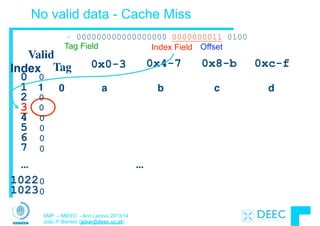
(light clothing)
(dark clothing)
(light clothing)
A
B
D
C
SMP – MIEEC - Ano Lectivo 2013/14
João P. Barreto (jpbar@deec.uc.pt)
QUIZ (1/2)
• Assuma 1 instr/clock, delayed branch, 5 estágios de pipeline,
forwarding, interlock nos conflitos de dados involvendo o
load. O loop tem 103 iterações (pipeline cheio).
!
Loop: lw $t0, 0($s1)

addu $t0, $t0, $s2

sw $t0, 0($s1)

addiu $s1, $s1, -4

bne $s1, $zero, Loop

nop
• Qual é a duração em ciclos de relógio para a execução de
uma iteração do ciclo?
1.
2. (data hazard so stall)
3.
4.
5.
6.
(delayed branch so exec. nop)7.
1 2 3 4 5 6 7 8 9 10
SMP – MIEEC - Ano Lectivo 2013/14
João P. Barreto (jpbar@deec.uc.pt)
• Assuma 1 instr/clock, delayed branch, 5 estágios de pipeline,
forwarding, interlock nos conflitos de dados involvendo o load. O loop
tem 103 iterações (pipeline cheio). Reescreva o código para optimizar
o tempo de execução
!
Loop: lw $t0, 0($s1)

addu $t0, $t0, $s2

sw $t0, 0($s1)

addiu $s1, $s1, -4

bne $s1, $zero, Loop

nop
• Qual é a duração em ciclos de relógio para a execução de uma
iteração do ciclo?
QUIZ (2/2)
1 2 3 4 5 6 7 8 9 10
SMP – MIEEC - Ano Lectivo 2013/14
João P. Barreto (jpbar@deec.uc.pt)
QUIZ (2/2)
!
• Qual é a duração em ciclos de relógio para a execução
de uma iteração do ciclo?
Reescreva o código para optimizar o tempo de execução
!
Loop: lw $t0, 0($s1)

addiu $s1, $s1, -4 

addu $t0, $t0, $s2

bne $s1, $zero, Loop

sw $t0, +4($s1)
(no hazard since extra cycle)
1.
3.
4.
5.
2.
(modified sw to put past addiu)
1 2 3 4 5 6 7 8 9 10
SMP – MIEEC - Ano Lectivo 2013/14
João P. Barreto (jpbar@deec.uc.pt)
Para saber mais ...
• P&H - Capítulos 6.1 a 6.6
!
• É essencial que estudem pelo livro!
Sistemas de Microprocessadores 2013/14
SMP – MIEEC - Ano Lectivo 2013/14
João P. Barreto (jpbar@deec.uc.pt)
Introdução à Arquitectura de Computadores

- Hierarquia de Memória -
SMP – MIEEC - Ano Lectivo 2013/14
João P. Barreto (jpbar@deec.uc.pt)
The Big Picture
Processor
(active)
Computer
Control
(“brain”)
Datapath
(“brawn”)
Memory
(passive)
(where
programs,
data live
when
running)
Devices
Input
Output
Keyboard, 

Mouse
Display, 

Printer
Disk,
Network
SMP – MIEEC - Ano Lectivo 2013/14
João P. Barreto (jpbar@deec.uc.pt)
Memory Hierarchy
• Processor
§ holds data in register file (~100 Bytes)
§ Registers accessed on nanosecond timescale
!
• Memory (we’ll call “main memory”)
§ More capacity than registers (~Gbytes)
§ Access time ~50-100 ns
§ Hundreds of clock cycles per memory access?!
!
• Disk
§ HUGE capacity (virtually limitless)
§ VERY slow: runs ~milliseconds
Storage in computer systems:
SMP – MIEEC - Ano Lectivo 2013/14
João P. Barreto (jpbar@deec.uc.pt)
Motivation: Why do we use caches?
µProc
60%/yr.
DRAM
7%/yr.
1
10
100
1000
1980
1981
1983
1984
1985
1986
1987
1988
1989
1990
1991
1992
1993
1994
1995
1996
1997
1998
1999
2000
DRAM
CPU
1982
Processor-Memory
Performance Gap:

(grows 50% / year)
Performance
• 1989 first Intel CPU with cache on chip
• 1998 Pentium III has two levels of cache on chip
SMP – MIEEC - Ano Lectivo 2013/14
João P. Barreto (jpbar@deec.uc.pt)
Memory Caching
• Mismatch between processor and memory speeds leads
us to add a new level: a memory cache
!
• Implemented with same IC processing technology as the
CPU (usually integrated on same chip): faster but more
expensive than DRAM memory
!
• Cache is a copy of a subset of main memory.
!
• Most processors have separate caches for instructions
and data (remember the discussion around structural
hazards?)
SMP – MIEEC - Ano Lectivo 2013/14
João P. Barreto (jpbar@deec.uc.pt)
Memory Hierarchy
Processor
Size of memory at each level
Increasing
Distance from
Proc.,

Decreasing
speed
Level 1
Level 2
Level n
Level 3
. . .
Higher
Lower
Levels in
memory
hierarchy
As we move to deeper levels the latency
goes up and price per bit goes down.
SMP – MIEEC - Ano Lectivo 2013/14
João P. Barreto (jpbar@deec.uc.pt)
Memory Hierarchy
• If level closer to Processor, it is:
§ smaller
§ faster
§ subset of lower levels (contains most recently used data)
!
• Lowest Level (usually disk) contains all available data
(or does it go beyond the disk?)
!
• Memory Hierarchy presents the processor with the
illusion of a very large very fast memory.
SMP – MIEEC - Ano Lectivo 2013/14
João P. Barreto (jpbar@deec.uc.pt)
Memory Hierarchy Analogy: Library (1/2)
• You’re writing a document at a table in the Library
!
• The Library is equivalent to disk
§ essentially limitless capacity
§ very slow to retrieve a book
!
• Table is main memory
§ smaller capacity: means you must return book when table fills
up
§ easier and faster to find a book there once you’ve already
retrieved it
SMP – MIEEC - Ano Lectivo 2013/14
João P. Barreto (jpbar@deec.uc.pt)
Memory Hierarchy Analogy: Library (2/2)
• Open books on table are cache
§ smaller capacity: can have very few open books fit on table; again,
when table fills up, you must close a book
§ much, much faster to retrieve data
!
• Illusion created: whole library open on the tabletop
§ Keep as many recently used books open on table as possible
since likely to use again
§ Also keep as many books on table as possible, since faster than
going to library
SMP – MIEEC - Ano Lectivo 2013/14
João P. Barreto (jpbar@deec.uc.pt)
Memory Hierarchy Basis
• Cache contains copies of data in memory that are
being used.
!
• Memory contains copies of data on disk that are being
used.
!
• Caches work on the principles of temporal and spatial
locality.
§ Temporal Locality: if we use it now, chances are we’ll want to
use it again soon.
§ Spatial Locality: if we use a piece of memory, chances are
we’ll use the neighboring pieces soon.
SMP – MIEEC - Ano Lectivo 2013/14
João P. Barreto (jpbar@deec.uc.pt)
Cache Design
• How do we organize cache?
!
• Where does each memory address map to?
(Remember that cache is subset of memory, so multiple memory
addresses map to the same cache location.)
!
• How do we know which elements are in cache?
!
• How do we quickly locate them?
SMP – MIEEC - Ano Lectivo 2013/14
João P. Barreto (jpbar@deec.uc.pt)
Direct-Mapped Cache (1/4)
• In a direct-mapped cache, each memory address is
associated with one possible block within the cache
!
§ We only need to look in a single location to check if the data
exists in the cache
!
§ Block is the unit of transfer between cache and memory
SMP – MIEEC - Ano Lectivo 2013/14
João P. Barreto (jpbar@deec.uc.pt)
Direct-Mapped Cache (2/4)
Cache Location 0 can be occupied by
data from:
§ Memory location 0, 4, 8, ...
§ 4 blocks ⇒ any memory location that is
multiple of 4
MemoryMemory 

Address
0
1
2
3
4
5
6
7
8
9
A
B
C
D
E
F
4 Byte
Direct
Mapped
Cache
Cache Index
0
1
2
3
What if we want a block

to be bigger than one byte?
Block size = 1 byte
SMP – MIEEC - Ano Lectivo 2013/14
João P. Barreto (jpbar@deec.uc.pt)
Direct-Mapped Cache (3/4)
• When we ask for a byte, the system finds out the right
block, and loads it all!
§ How does it know right block?
§ How do we select the byte?
• E.g., Mem address 11101?
• How does it know WHICH colored block it originated
from?
§ What do you do at baggage claim?
Memory
Memory 

Address
0
2
4
6
8
A
C
E
10
12
14
16
18
1A
1C
1E
8 Byte
Direct
Mapped
Cache
Cache Index
0
1
2
3
01
23
etc
Block size = 2 bytes
45
67
89
SMP – MIEEC - Ano Lectivo 2013/14
João P. Barreto (jpbar@deec.uc.pt)
Direct-Mapped Cache (4/4)
• What should go in the tag?
§ Do we need the entire address?
Ä What do all these tags have in common?
§ What did we do with the immediate when we were
branch addressing, always count by bytes?
• Why not count by cache #?
§ It’s useful to draw memory with the same width as
the block size
Memory (addresses
shown)
0
2
4
6
8
A
C
E
10
12
14
16
18
1A
1C
1E
8 Byte Direct
Mapped Cache w/Tag!
Cache Index
0
1
2
3
01
23
etc
Tag Data
(Block size = 2 bytes)
45
67
89
8
3
1E
140
1
2
3
Cache#
1
0
3
2
SMP – MIEEC - Ano Lectivo 2013/14
João P. Barreto (jpbar@deec.uc.pt)
Issues with Direct-Mapped
• Since multiple memory addresses map to same cache
index, how do we tell which one is in there?
!
• What if we have a block size > 1 byte?
!
• Answer: divide memory address into three fields
ttttttttttttttttt iiiiiiiiii oooo
tag index offset

to check if we to select desired byte
have the correct block the block within the block

SMP – MIEEC - Ano Lectivo 2013/14
João P. Barreto (jpbar@deec.uc.pt)
Direct-Mapped Cache Terminology
• All fields are read as unsigned integers.
!
• Index: specifies the cache index (which “row”/block of
the cache we should look in)
• Offset: once we’ve found correct block, specifies which
byte within the block we want
• Tag: the remaining bits after offset and index are
determined; these are used to distinguish between all
the memory addresses that map to the same location
SMP – MIEEC - Ano Lectivo 2013/14
João P. Barreto (jpbar@deec.uc.pt)
Direct-Mapped Cache Example (1/3)
• Suppose we have a 16KB of data in a direct-mapped
cache with 4 word blocks
!
• Determine the size of the tag, index and offset fields if
we’re using a 32-bit architecture
!
• Offset
§ need to specify correct byte within a block
§ block contains 4 words
= 16 bytes
= 24 bytes
§ need 4 bits to specify correct byte
SMP – MIEEC - Ano Lectivo 2013/14
João P. Barreto (jpbar@deec.uc.pt)
Direct-Mapped Cache Example (2/3)
• Index: (~index into an “array of blocks”)
§ need to specify correct block in cache
§ cache contains 16 KB = 214 bytes
§ block contains 24 bytes (4 words)
§ # blocks/cache
= bytes/cache
bytes/block
= 214 bytes/cache
24 bytes/block
= 210 blocks/cache
§ need 10 bits to specify this many blocks
SMP – MIEEC - Ano Lectivo 2013/14
João P. Barreto (jpbar@deec.uc.pt)
Direct-Mapped Cache Example (3/3)
• Tag: use remaining bits as tag
§ tag length = addr length – offset - index 

= 32 - 4 - 10 bits

= 18 bits
§ so tag is leftmost 18 bits of memory address
!
• Why not full 32 bit address as tag?
§ All bytes within block need same address (4bits)
§ Index must be same for every address within a block, so it’s
redundant in tag check, thus can leave off to save memory (here 10
bits)
SMP – MIEEC - Ano Lectivo 2013/14
João P. Barreto (jpbar@deec.uc.pt)
QUIZ
A. The number of bits in the tag only depends of the cache
size. It does not depend of the block size.
B. If you know your computer’s cache size, you can often make
your code run faster.
C. Memory hierarchies take advantage of spatial locality by
keeping the most recent data items closer to the processor.
ABC
0: FFF
1: FFT
2: FTF
3: FTT
4: TFF
5: TFT
6: TTF
7: TTT
SMP – MIEEC - Ano Lectivo 2013/14
João P. Barreto (jpbar@deec.uc.pt)
Conclusion
• We would like to have the capacity of disk at the speed
of the processor: unfortunately this is not feasible.
!
• So we create a memory hierarchy:
§ each successively lower level contains “most used” data from
next higher level
§ exploits temporal & spatial locality
§ do the common case fast, worry less about the exceptions 

(design principle of MIPS)
!
• Locality of reference is a Big Idea
SMP – MIEEC - Ano Lectivo 2013/14
João P. Barreto (jpbar@deec.uc.pt)
Para saber mais ...
• P&H - Capítulo 7.1 e 7.2
!
• Slides sobre “Code Optimization”
Sistemas de Microprocessadores 2013/14
SMP – MIEEC - Ano Lectivo 2013/14
João P. Barreto (jpbar@deec.uc.pt)
Introdução à Arquitectura de Computadores

- Hierarquia de Memória II -
SMP – MIEEC - Ano Lectivo 2013/14
João P. Barreto (jpbar@deec.uc.pt)
Caching Terminology
• When we try to read memory, 3 things can happen:
1. cache hit: cache block is valid and contains proper
address, so read desired word
!
2. cache miss: nothing in cache in appropriate block, so
fetch from memory
!
3. cache miss, block replacement: wrong data is in cache at
appropriate block, so discard it and fetch desired data
from memory (cache always copy)
SMP – MIEEC - Ano Lectivo 2013/14
João P. Barreto (jpbar@deec.uc.pt)
Accessing data in a direct mapped cache
• Ex.: 16KB of data, direct-
mapped, 4 word blocks
!
• Read 4 addresses
1. 0x00000014
2. 0x0000001C
3. 0x00000034
4. 0x00008014
!
• Memory values on right:
Address (hex) Value of Word
Memory
00000010
00000014
00000018
0000001C
a
b
c
d
... ...
00000030
00000034
00000038
0000003C
e
f
g
h
00008010
00008014
00008018
0000801C
i
j
k
l
... ...
... ...
... ...
SMP – MIEEC - Ano Lectivo 2013/14
João P. Barreto (jpbar@deec.uc.pt)
Accessing data in a direct mapped cache
• 4 Addresses:
§ 0x00000014, 0x0000001C, 

0x00000034, 0x00008014
!
• 4 Addresses divided (for convenience) into Tag, Index,
Byte Offset fields
000000000000000000 0000000001 0100
000000000000000000 0000000001 1100
000000000000000000 0000000011 0100
000000000000000010 0000000001 0100
Tag Index Offset
SMP – MIEEC - Ano Lectivo 2013/14
João P. Barreto (jpbar@deec.uc.pt)
16 KB Direct Mapped Cache, 16B blocks
• Valid bit: determines whether anything is stored in that row
(when computer initially turned on, all entries invalid)
...
Valid
Tag 0x0-3 0x4-7 0x8-b 0xc-f
0
1
2
3
4
5
6
7
1022
1023
...
Index
0
0
0
0
0
0
0
0
0
0
SMP – MIEEC - Ano Lectivo 2013/14
João P. Barreto (jpbar@deec.uc.pt)
1. Read 0x00000014
...
Valid
Tag 0x0-3 0x4-7 0x8-b 0xc-f
0
1
2
3
4
5
6
7
1022
1023
...
• 000000000000000000 0000000001 0100
Index
0
0
0
0
0
0
0
0
0
0
Tag Field Index Field Offset
SMP – MIEEC - Ano Lectivo 2013/14
João P. Barreto (jpbar@deec.uc.pt)
So we read block 1 (0000000001)
...
Valid
Tag 0x0-3 0x4-7 0x8-b 0xc-f
0
1
2
3
4
5
6
7
1022
1023
...
• 000000000000000000 0000000001 0100
Index
0
0
0
0
0
0
0
0
0
0
Tag Field Index Field Offset
SMP – MIEEC - Ano Lectivo 2013/14
João P. Barreto (jpbar@deec.uc.pt)
No valid data - Cache Miss
...
Valid
Tag 0x0-3 0x4-7 0x8-b 0xc-f
0
1
2
3
4
5
6
7
1022
1023
...
• 000000000000000000 0000000001 0100
Index
0
0
0
0
0
0
0
0
0
0
Tag Field Index Field Offset
SMP – MIEEC - Ano Lectivo 2013/14
João P. Barreto (jpbar@deec.uc.pt)
So load that data into cache, setting tag, valid
...
Valid
Tag 0x0-3 0x4-7 0x8-b 0xc-f
0
1
2
3
4
5
6
7
1022
1023
...
1 0 a b c d
• 000000000000000000 0000000001 0100
Index
0
0
0
0
0
0
0
0
0
Tag Field Index Field Offset
SMP – MIEEC - Ano Lectivo 2013/14
João P. Barreto (jpbar@deec.uc.pt)
Read from cache at offset, return word b
• 000000000000000000 0000000001 0100
...
Valid
Tag 0x0-3 0x4-7 0x8-b 0xc-f
0
1
2
3
4
5
6
7
1022
1023
...
1 0 a b c d
Index
0
0
0
0
0
0
0
0
0
Tag Field Index Field Offset
SMP – MIEEC - Ano Lectivo 2013/14
João P. Barreto (jpbar@deec.uc.pt)
2. Read 0x0000001C = 0…00 0..001 1100
...
Valid
Tag 0x0-3 0x4-7 0x8-b 0xc-f
0
1
2
3
4
5
6
7
1022
1023
...
1 0 a b c d
• 000000000000000000 0000000001 1100
Index
0
0
0
0
0
0
0
0
0
Tag Field Index Field Offset
SMP – MIEEC - Ano Lectivo 2013/14
João P. Barreto (jpbar@deec.uc.pt)
Index is Valid
...
Valid
Tag 0x0-3 0x4-7 0x8-b 0xc-f
0
1
2
3
4
5
6
7
1022
1023
...
1 0 a b c d
• 000000000000000000 0000000001 1100
Index
0
0
0
0
0
0
0
0
0
Tag Field Index Field Offset
SMP – MIEEC - Ano Lectivo 2013/14
João P. Barreto (jpbar@deec.uc.pt)
Index valid, Tag Matches - Cache Hit
...
Valid
Tag 0x0-3 0x4-7 0x8-b 0xc-f
0
1
2
3
4
5
6
7
1022
1023
...
1 0 a b c d
• 000000000000000000 0000000001 1100
Index
0
0
0
0
0
0
0
0
0
Tag Field Index Field Offset
SMP – MIEEC - Ano Lectivo 2013/14
João P. Barreto (jpbar@deec.uc.pt)
Index Valid, Tag Matches, return d
...
Valid
Tag 0x0-3 0x4-7 0x8-b 0xc-f
0
1
2
3
4
5
6
7
1022
1023
...
1 0 a b c d
• 000000000000000000 0000000001 1100
Index
0
0
0
0
0
0
0
0
0
Tag Field Index Field Offset
SMP – MIEEC - Ano Lectivo 2013/14
João P. Barreto (jpbar@deec.uc.pt)
3. Read 0x00000034 = 0…00 0..011 0100
...
Valid
Tag 0x0-3 0x4-7 0x8-b 0xc-f
0
1
2
3
4
5
6
7
1022
1023
...
1 0 a b c d
• 000000000000000000 0000000011 0100
Index
0
0
0
0
0
0
0
0
0
Tag Field Index Field Offset
SMP – MIEEC - Ano Lectivo 2013/14
João P. Barreto (jpbar@deec.uc.pt)
So read block 3
...
Valid
Tag 0x0-3 0x4-7 0x8-b 0xc-f
0
1
2
3
4
5
6
7
1022
1023
...
1 0 a b c d
• 000000000000000000 0000000011 0100
Index
0
0
0
0
0
0
0
0
0
Tag Field Index Field Offset
SMP – MIEEC - Ano Lectivo 2013/14
João P. Barreto (jpbar@deec.uc.pt)
No valid data - Cache Miss
...
Valid
Tag 0x0-3 0x4-7 0x8-b 0xc-f
0
1
2
3
4
5
6
7
1022
1023
...
1 0 a b c d
• 000000000000000000 0000000011 0100
Index
0
0
0
0
0
0
0
0
0
Tag Field Index Field Offset
SMP – MIEEC - Ano Lectivo 2013/14
João P. Barreto (jpbar@deec.uc.pt)
Load that cache block, return word f
...
Valid
Tag 0x0-3 0x4-7 0x8-b 0xc-f
0
1
2
3
4
5
6
7
1022
1023
...
1 0 a b c d
• 000000000000000000 0000000011 0100
1 0 e f g h
Index
0
0
0
0
0
0
0
0
Tag Field Index Field Offset
SMP – MIEEC - Ano Lectivo 2013/14
João P. Barreto (jpbar@deec.uc.pt)
4. Read 0x00008014 = 0…10 0..001 0100
...
Valid
Tag 0x0-3 0x4-7 0x8-b 0xc-f
0
1
2
3
4
5
6
7
1022
1023
...
1 0 a b c d
• 000000000000000010 0000000001 0100
1 0 e f g h
Index
0
0
0
0
0
0
0
0
Tag Field Index Field Offset
SMP – MIEEC - Ano Lectivo 2013/14
João P. Barreto (jpbar@deec.uc.pt)
So read Cache Block 1, Data is Valid
...
Valid
Tag 0x0-3 0x4-7 0x8-b 0xc-f
0
1
2
3
4
5
6
7
1022
1023
...
1 0 a b c d
• 000000000000000010 0000000001 0100
1 0 e f g h
Index
0
0
0
0
0
0
0
0
Tag Field Index Field Offset
SMP – MIEEC - Ano Lectivo 2013/14
João P. Barreto (jpbar@deec.uc.pt)
Tag does not match (0 != 2) - Cache Miss BR
...
Valid
Tag 0x0-3 0x4-7 0x8-b 0xc-f
0
1
2
3
4
5
6
7
1022
1023
...
1 0 a b c d
• 000000000000000010 0000000001 0100
1 0 e f g h
Index
0
0
0
0
0
0
0
0
Tag Field Index Field Offset
SMP – MIEEC - Ano Lectivo 2013/14
João P. Barreto (jpbar@deec.uc.pt)
Replace block 1 with new data & tag
...
Valid
Tag 0x0-3 0x4-7 0x8-b 0xc-f
0
1
2
3
4
5
6
7
1022
1023
...
1 2 i j k l
• 000000000000000010 0000000001 0100
1 0 e f g h
Index
0
0
0
0
0
0
0
0
Tag Field Index Field Offset
SMP – MIEEC - Ano Lectivo 2013/14
João P. Barreto (jpbar@deec.uc.pt)
And return word j
...
Valid
Tag 0x0-3 0x4-7 0x8-b 0xc-f
0
1
2
3
4
5
6
7
1022
1023
...
1 2 i j k l
• 000000000000000010 0000000001 0100
1 0 e f g h
Index
0
0
0
0
0
0
0
0
Tag Field Index Field Offset
SMP – MIEEC - Ano Lectivo 2013/14
João P. Barreto (jpbar@deec.uc.pt)
Do an example yourself. What happens?
• Choose from: Cache: Hit, Miss, Miss w. replace

Values returned: a ,b, c, d, e, ..., k, l
• Read address 0x00000030 ? 000000000000000000 0000000011 0000
§ Cache Hit; Returns e
• Read address 0x0000001c ? 000000000000000000 0000000001 1100
§ Cache Miss with Block Replacement
...
Valid Tag 0x0-3 0x4-7 0x8-b 0xc-f
0
1
2
3
4
5
6
7
...
1 2 i j k l
1 0 e f g h
0
0
0
0
0
0
SMP – MIEEC - Ano Lectivo 2013/14
João P. Barreto (jpbar@deec.uc.pt)
QUIZ
1. A - All caches take advantage of spatial locality.
B - All caches take advantage of temporal locality.
C - On a read, the return value will depend on what is in
the cache.
ABC
0: FFF
1: FFT
2: FTF
3: FTT
4: TFF
5: TFT
6: TTF
7: TTT
SMP – MIEEC - Ano Lectivo 2013/14
João P. Barreto (jpbar@deec.uc.pt)
What to do on a write hit?
• Write-through
§ update the word in cache block and corresponding word in
memory
• Write-back
§ update word in cache block
§ allow memory word to be “stale”
⇒ add ‘dirty’ bit to each block indicating that memory needs to
be updated when block is replaced
⇒ OS flushes cache before I/O…
• Performance trade-offs?
SMP – MIEEC - Ano Lectivo 2013/14
João P. Barreto (jpbar@deec.uc.pt)
Block Size Tradeoff (1/3)
• Benefits of Larger Block Size
§ Spatial Locality: if we access a given word, we’re likely to access
other nearby words soon
§ Very applicable with Stored-Program Concept: if we execute a
given instruction, it’s likely that we’ll execute the next few as well
§ Works nicely in sequential array accesses too
SMP – MIEEC - Ano Lectivo 2013/14
João P. Barreto (jpbar@deec.uc.pt)
Block Size Tradeoff (2/3)
• Drawbacks of Larger Block Size
§ Larger block size means 

larger miss penalty
Äon a miss, takes longer time to load a new block from next level
§ If block size is too big relative to cache size, then there are too
few blocks
ÄResult: miss rate goes up
!
• In general, minimize Average Memory Access Time
(AMAT)
= Hit Time + Miss Penalty x Miss Rate
SMP – MIEEC - Ano Lectivo 2013/14
João P. Barreto (jpbar@deec.uc.pt)
Block Size Tradeoff (3/3)
• Hit Time = time to find and retrieve data from current
level cache
!
• Miss Penalty = average time to retrieve data on a
current level miss (includes the possibility of misses on
successive levels of memory hierarchy)
!
• Hit Rate = % of requests that are found in current level
cache
!
• Miss Rate = 1 - Hit Rate
SMP – MIEEC - Ano Lectivo 2013/14
João P. Barreto (jpbar@deec.uc.pt)
Extreme Example: One Big Block
• Cache Size = 4 bytes Block Size = 4 bytes
§ Only ONE entry (row) in the cache!
!
• If item accessed, likely accessed again soon
§ But unlikely will be accessed again immediately!
!
• The next access will likely to be a miss again
§ Continually loading data into the cache but discard data (force
out) before use it again
§ Nightmare for cache designer: Ping Pong Effect
Cache DataValid Bit
B 0B 1B 3
Tag
B 2
SMP – MIEEC - Ano Lectivo 2013/14
João P. Barreto (jpbar@deec.uc.pt)
Block Size Tradeoff Conclusions
Miss
Penalty
Block Size
Increased Miss Penalty
& Miss Rate
Average
Access
Time
Block Size
Exploits Spatial Locality
Fewer blocks:
compromises
temporal locality
Miss
Rate
Block Size
SMP – MIEEC - Ano Lectivo 2013/14
João P. Barreto (jpbar@deec.uc.pt)
Types of Cache Misses (1/2)
• “Three Cs” Model of Misses
!
• 1st C: Compulsory Misses
§ occur when a program is first started
§ cache does not contain any of that program’s data yet, so
misses are bound to occur
§ can’t be avoided easily, so won’t focus on these in this course
!
• 2nd C: Capacity Misses
§ miss that occurs because the cache has a limited size
§ miss that would not occur if we increase the size of the cache
§ sketchy definition, so just get the general idea
SMP – MIEEC - Ano Lectivo 2013/14
João P. Barreto (jpbar@deec.uc.pt)
Types of Cache Misses (2/2)
• 3rd C: Conflict Misses
§ miss that occurs because two distinct memory addresses map to
the same cache location
§ two blocks (which happen to map to the same location) can keep
overwriting each other
§ it is a waste in case there are other free blocks corresponding to
mem addresses that are not being accessed
§ big problem in direct-mapped caches!
§ how do we lessen the effect of these?
!
• Dealing with Conflict Misses
§ Solution 1: Make the cache size bigger
Ä Fails at some point
§ Solution 2: Multiple distinct blocks can fit in the same cache Index?
SMP – MIEEC - Ano Lectivo 2013/14
João P. Barreto (jpbar@deec.uc.pt)
Fully Associative Cache (1/3)
• Memory address fields:
§ Tag: same as before
§ Offset: same as before
§ Index: non-existant
!
• What does this mean?
§ no “rows”: any block can go anywhere in the cache
§ must compare with all tags in entire cache to see if data is there
SMP – MIEEC - Ano Lectivo 2013/14
João P. Barreto (jpbar@deec.uc.pt)
Fully Associative Cache (2/3)
• Fully Associative Cache (e.g., 32 B block)
§ compare tags in parallel
Byte Offset
:
Cache Data
B 0
0431
:
Cache Tag (27 bits long)
Valid
:
B 1B 31
:
Cache Tag
=
=
=
=
=
:
SMP – MIEEC - Ano Lectivo 2013/14
João P. Barreto (jpbar@deec.uc.pt)
Fully Associative Cache (3/3)
• Benefit of Fully Assoc Cache
§ No Conflict Misses (since data can go anywhere)
§ The primary type of miss is Capacity Miss
!
• Drawbacks of Fully Assoc Cache
§ Need hardware comparator for every single entry: if we have a
64KB of data in cache with 4B entries, we need 16K
comparators: infeasible
SMP – MIEEC - Ano Lectivo 2013/14
João P. Barreto (jpbar@deec.uc.pt)
N-Way Set Associative Cache (1/3)
• Memory address fields:
§ Tag: same as before
§ Offset: same as before
§ Index: points us to the correct “row” (called a set in this case)
!
• So what’s the difference?
§ each set contains multiple blocks
§ once we’ve found correct set, must compare with all tags in
that set to find our data
SMP – MIEEC - Ano Lectivo 2013/14
João P. Barreto (jpbar@deec.uc.pt)
Associative Cache Example
• Here’s a simple 2 way set
associative cache.
F
Cache
Index
0
0
1
1
Memory
0
1
2
3
4
5
6
7
8
9
A
B
C
D
E
SMP – MIEEC - Ano Lectivo 2013/14
João P. Barreto (jpbar@deec.uc.pt)
N-Way Set Associative Cache (2/3)
• Basic Idea
§ cache is direct-mapped w/respect to sets
§ each set is fully associative
§ basically N direct-mapped caches working in parallel: each
has its own valid bit and data
!
• Given memory address:
§ Find correct set using Index value.
§ Compare Tag with all Tag values in the determined set.
§ If a match occurs, hit!, otherwise a miss.
§ Finally, use the offset field as usual to find the desired data
within the block.
SMP – MIEEC - Ano Lectivo 2013/14
João P. Barreto (jpbar@deec.uc.pt)
N-Way Set Associative Cache (3/3)
• What’s so great about this?
§ even a 2-way set assoc cache avoids a lot of conflict misses
§ hardware cost isn’t that bad: only need N comparators
!
• In fact, for a cache with M blocks,
§ it’s Direct-Mapped if it’s 1-way set assoc
§ it’s Fully Assoc if it’s M-way set assoc
§ so these two are just special cases of the more general set
associative design
SMP – MIEEC - Ano Lectivo 2013/14
João P. Barreto (jpbar@deec.uc.pt)
4-Way Set Associative Cache Circuit
tag
index
SMP – MIEEC - Ano Lectivo 2013/14
João P. Barreto (jpbar@deec.uc.pt)
Block Replacement Policy
• Direct-Mapped Cache: index completely specifies position which position a
block can go in on a miss
• N-Way Set Assoc: index specifies a set, but block can occupy any position
within the set on a miss
• Fully Associative: block can be written into any position
• Question: if we have the choice, where should we write an incoming block?
§ If there are any locations with valid bit off (empty), then usually write the new block
into the first one.
§ If all possible locations already have a valid block, we must pick a replacement
policy: rule by which we determine which block gets “cached out” on a miss.
SMP – MIEEC - Ano Lectivo 2013/14
João P. Barreto (jpbar@deec.uc.pt)
Block Replacement Policy: LRU
• LRU (Least Recently Used)
§ Idea: cache out block which has been accessed (read or
write) least recently
§ Pro: temporal locality ⇒ recent past use implies likely future
use: in fact, this is a very effective policy
§ Con: with 2-way set assoc, easy to keep track (one LRU bit);
with 4-way or greater, requires complicated hardware and
much time to keep track of this
SMP – MIEEC - Ano Lectivo 2013/14
João P. Barreto (jpbar@deec.uc.pt)
Big Idea
• How to choose between associativity, block size,
replacement & write policy?
!
• Design against a performance model
!
§ Minimize:
Average Memory Access Time = Hit Time + Miss Penalty x Miss
Rate
!
§ influenced by technology & program behavior
!
• Create the illusion of a memory that is large, cheap, and
fast - on average
!
• How can we improve miss penalty?
SMP – MIEEC - Ano Lectivo 2013/14
João P. Barreto (jpbar@deec.uc.pt)
Improving Miss Penalty
• When caches first became popular, Miss Penalty ~ 10
processor clock cycles
!
• Today 2400 MHz Processor (0.4 ns per clock cycle) and
80 ns to go to DRAM 

⇒ 200 processor clock cycles!
Proc $2
DRAM
$
MEM
Solution: another cache between memory and
the processor cache: Second Level (L2) Cache
SMP – MIEEC - Ano Lectivo 2013/14
João P. Barreto (jpbar@deec.uc.pt)
Analyzing Multi-level cache hierarchy
Proc $2
DRAM
$
L1 hit
time
L1 Miss Rate
L1 Miss Penalty
Avg Mem Access Time =
" L1 Hit Time + L1 Miss Rate * L1 Miss Penalty
L1 Miss Penalty =
" L2 Hit Time + L2 Miss Rate * L2 Miss Penalty
Avg Mem Access Time =
" L1 Hit Time + L1 Miss Rate * 

" (L2 Hit Time + L2 Miss Rate * L2 Miss Penalty)
L2 hit
time L2 Miss Rate
L2 Miss Penalty
SMP – MIEEC - Ano Lectivo 2013/14
João P. Barreto (jpbar@deec.uc.pt)
Example: with L2 cache
• Assume
§ L1 Hit Time = 1 cycle
§ L1 Miss rate = 5%
§ L2 Hit Time = 5 cycles
§ L2 Miss rate = 15% (% L1 misses that miss)
§ L2 Miss Penalty = 200 cycles
• L1 miss penalty = 5 + 0.15 * 200 = 35
• Avg mem access time = 1 + 0.05 x 35
= 2.75 cycles
SMP – MIEEC - Ano Lectivo 2013/14
João P. Barreto (jpbar@deec.uc.pt)
Example: without L2 cache
• Assume
§ L1 Hit Time = 1 cycle
§ L1 Miss rate = 5%
§ L1 Miss Penalty = 200 cycles
• Avg mem access time = 1 + 0.05 x 200
= 11 cycles
!
• 4x faster with L2 cache! (2.75 vs. 11)
SMP – MIEEC - Ano Lectivo 2013/14
João P. Barreto (jpbar@deec.uc.pt)
Conclusion
• We’ve discussed memory caching in detail. Caching in general shows up
over and over in computer systems
§ Filesystem cache
§ Web page cache
§ Game databases / tablebases
§ Software memoization
§ Others?
• Big idea: if something is expensive but we want to do it repeatedly, do it
once and cache the result.
• Cache design choices:
§ Write through v. write back
§ size of cache: speed v. capacity
§ direct-mapped v. associative
§ for N-way set assoc: choice of N
§ block replacement policy
§ 2nd level cache?
§ 3rd level cache?
• Use performance model to pick between choices, depending on programs,
technology, budget, ...
SMP – MIEEC - Ano Lectivo 2013/14
João P. Barreto (jpbar@deec.uc.pt)
An Actual CPU – Pentium M
32KB I$
32KB D$
SMP – MIEEC - Ano Lectivo 2013/14
João P. Barreto (jpbar@deec.uc.pt)
Peer Instructions
1. A - In the last 10 years, the gap between the access time of DRAMs &
the cycle time of processors has decreased. (I.e., is closing)
!
2. B - A 2-way set-associative cache can be outperformed by a direct-
mapped cache.
!
3. C - Larger block size ⇒ lower miss rate ABC
0: FFF
1: FFT
2: FTF
3: FTT
4: TFF
5: TFT
6: TTF
7: TTT
SMP – MIEEC - Ano Lectivo 2013/14
João P. Barreto (jpbar@deec.uc.pt)
Para saber mais ...
• P&H - Capítulo 7.3
Pointers and
MemoryBy Nick Parlante Copyright ©1998-2000, Nick Parlante
Abstract
This document explains how pointers and memory work and how to use them—from the
basic concepts through all the major programming techniques. For each topic there is a
combination of discussion, sample C code, and drawings.
Audience
This document can be used as an introduction to pointers for someone with basic
programming experience. Alternately, it can be used to review and to fill in gaps for
someone with a partial understanding of pointers and memory. Many advanced
programming and debugging problems only make sense with a complete understanding
of pointers and memory — this document tries to provide that understanding. This
document concentrates on explaining how pointers work. For more advanced pointer
applications and practice problems, see the other resources below.
Pace
Like most CS Education Library documents, the coverage here tries to be complete but
fast. The document starts with the basics and advances through all the major topics. The
pace is fairly quick — each basic concept is covered once and usually there is some
example code and a memory drawing. Then the text moves on to the next topic. For more
practice, you can take the time to work through the examples and sample problems. Also,
see the references below for more practice problems.
Topics
Topics include: pointers, local memory, allocation, deallocation, dereference operations,
pointer assignment, deep vs. shallow copies, the ampersand operator (&), bad pointers,
the NULL pointer, value parameters, reference parameters, heap allocation and
deallocation, memory ownership models, and memory leaks. The text focuses on pointers
and memory in compiled languages like C and C++. At the end of each section, there is
some related but optional material, and in particular there are occasional notes on other
languages, such as Java.
Pointers and Memory – document #102 in the Stanford CS Education Library. This and
other free educational materials are available at http://cslibrary.stanford.edu/102/. This
document is free to be used, reproduced, sold, or retransmitted so long as this notice is
clearly reproduced at its beginning.
Other CS Education Library Documents
• Point Fun With Binky Video (http://cslibrary.stanford.edu/104/)
A silly video about pointer basics.
• Linked list Basics (http://cslibrary.stanford.edu/103/)
Introduces the basic techniques for building linked lists in C.
2
• Linked List Problems (http://cslibrary.stanford.edu/105/)
18 classic linked list problems with solutions — a great way to practice
with realistic, pointer intensive C code, and there's just no substitute for
practice!
• Essential C (http://cslibrary.stanford.edu/101/)
Complete coverage of the C language, including all of the syntax used in
this document.
Table of Contents
Section 1 Basic Pointers.......................................................................... pg. 3
The basic rules and drawings for pointers: pointers, pointees, pointer
assignment (=), pointer comparison (==), the ampersand operator (&), the
NULL pointer, bad pointers, and bad dereferences.
Section 2 Local Memory......................................................................... pg. 11
How local variables and parameters work: local storage, allocation,
deallocation, the ampersand bug. Understanding the separation of local
memory between separate functions.
Section 3 Reference Parameters.............................................................. pg. 17
Combines the previous two sections to show how a function can use
"reference parameters" to communicate back to its caller.
Section 4 Heap Memory ........................................................................ pg. 24
Builds on all the previous sections to explain dynamic heap memory: heap
allocation, heap deallocation, array allocation, memory ownership models,
and memory leaks.
Edition
The first edition of this document was on Jan 19, 1999. This Feb 21, 2000 edition
represents only very minor changes. The author may be reached at
nick.parlante@cs.stanford.edu. The CS Education Library may be reached at
cslibrary@cs.stanford.edu.
Dedication
This document is distributed for the benefit and education of all. That someone seeking
education should have the opportunity to find it. May you learn from it in the spirit in
which it is given — to make efficiency and beauty in your designs, peace and fairness in
your actions.
Preface To The First Edition
This article has appeared to hover at around 80% done for 6 months! Every time I add
one section, I think of two more which also need to be written. I was motivated to keep
working on it since there are so many other articles which use memory, &, ... in passing
where I wanted something to refer to. I hope you find it valuable in its current form. I'm
going to ship it quickly before I accidentally start adding another section!
3
Section 1 —
Basic Pointers
Pointers — Before and After
There's a lot of nice, tidy code you can write without knowing about pointers. But once
you learn to use the power of pointers, you can never go back. There are too many things
that can only be done with pointers. But with increased power comes increased
responsibility. Pointers allow new and more ugly types of bugs, and pointer bugs can
crash in random ways which makes them more difficult to debug. Nonetheless, even with
their problems, pointers are an irresistibly powerful programming construct. (The
following explanation uses the C language syntax where a syntax is required; there is a
discussion of Java at the section.)
Why Have Pointers?
Pointers solve two common software problems. First, pointers allow different sections of
code to share information easily. You can get the same effect by copying information
back and forth, but pointers solve the problem better. Second, pointers enable complex
"linked" data structures like linked lists and binary trees.
What Is A Pointer?
Simple int and float variables operate pretty intuitively. An int variable is like a
box which can store a single int value such as 42. In a drawing, a simple variable is a
box with its current value drawn inside.
num 42
A pointer works a little differently— it does not store a simple value directly. Instead, a
pointer stores a reference to another value. The variable the pointer refers to is
sometimes known as its "pointee". In a drawing, a pointer is a box which contains the
beginning of an arrow which leads to its pointee. (There is no single, official, word for
the concept of a pointee — pointee is just the word used in these explanations.)
The following drawing shows two variables: num and numPtr. The simple variable num
contains the value 42 in the usual way. The variable numPtr is a pointer which contains
a reference to the variable num. The numPtr variable is the pointer and num is its
pointee. What is stored inside of numPtr? Its value is not an int. Its value is a
reference to an int.
num 42
A pointer variable. The current
value is a reference to the
pointee num above.
A simple int variable. The current
value is the integer 42. This variable
also plays the role of pointee for the
pointer below.
numPtr
4
Pointer Dereference
The "dereference" operation follows a pointer's reference to get the value of its pointee.
The value of the dereference of numPtr above is 42. When the dereference operation is
used correctly, it's simple. It just accesses the value of the pointee. The only restriction is
that the pointer must have a pointee for the dereference to access. Almost all bugs in
pointer code involve violating that one restriction. A pointer must be assigned a pointee
before dereference operations will work.
The NULL Pointer
The constant NULL is a special pointer value which encodes the idea of "points to
nothing." It turns out to be convenient to have a well defined pointer value which
represents the idea that a pointer does not have a pointee. It is a runtime error to
dereference a NULL pointer. In drawings, the value NULL is usually drawn as a diagonal
line between the corners of the pointer variable's box...
numPtr
The C language uses the symbol NULL for this purpose. NULL is equal to the integer
constant 0, so NULL can play the role of a boolean false. Official C++ no longer uses the
NULL symbolic constant — use the integer constant 0 directly. Java uses the symbol
null.
Pointer Assignment
The assignment operation (=) between two pointers makes them point to the same
pointee. It's a simple rule for a potentially complex situation, so it is worth repeating:
assigning one pointer to another makes them point to the same thing. The example below
adds a second pointer, second, assigned with the statement second = numPtr;.
The result is that second points to the same pointee as numPtr. In the drawing, this
means that the second and numPtr boxes both contain arrows pointing to num.
Assignment between pointers does not change or even touch the pointees. It just changes
which pointee a pointer refers to.
num 42
numPtr
second
A second pointer ptr initialized
with the assignment
second = numPtr;. This causes
second to refer to the same
pointeee as numPtr.
After assignment, the == test comparing the two pointers will return true. For example
(second==numPtr) above is true. The assignment operation also works with the
NULL value. An assignment operation with a NULL pointer copies the NULL value
from one pointer to another.
Make A Drawing
Memory drawings are the key to thinking about pointer code. When you are looking at
code, thinking about how it will use memory at run time....make a quick drawing to work
out your ideas. This article certainly uses drawings to show how pointers work. That's the
way to do it.
5
Sharing
Two pointers which both refer to a single pointee are said to be "sharing". That two or
more entities can cooperatively share a single memory structure is a key advantage of
pointers in all computer languages. Pointer manipulation is just technique — sharing is
often the real goal. In Section 3 we will see how sharing can be used to provide efficient
communication between parts of a program.
Shallow and Deep Copying
In particular, sharing can enable communication between two functions. One function
passes a pointer to the value of interest to another function. Both functions can access the
value of interest, but the value of interest itself is not copied. This communication is
called "shallow" since instead of making and sending a (large) copy of the value of
interest, a (small) pointer is sent and the value of interest is shared. The recipient needs to
understand that they have a shallow copy, so they know not to change or delete it since it
is shared. The alternative where a complete copy is made and sent is known as a "deep"
copy. Deep copies are simpler in a way, since each function can change their copy
without interfering with the other copy, but deep copies run slower because of all the
copying.
The drawing below shows shallow and deep copying between two functions, A() and B().
In the shallow case, the smiley face is shared by passing a pointer between the two. In the
deep case, the smiley face is copied, and each function gets their own...
A()
B()
Shallow / Sharing Deep / Copying
A()
B()
Section 2 will explain the above sharing technique in detail.
Bad Pointers
When a pointer is first allocated, it does not have a pointee. The pointer is "uninitialized"
or simply "bad". A dereference operation on a bad pointer is a serious runtime error. If
you are lucky, the dereference operation will crash or halt immediately (Java behaves this
way). If you are unlucky, the bad pointer dereference will corrupt a random area of
memory, slightly altering the operation of the program so that it goes wrong some
indefinite time later. Each pointer must be assigned a pointee before it can support
dereference operations. Before that, the pointer is bad and must not be used. In our
memory drawings, the bad pointer value is shown with an XXX value...
numPtr
Bad pointers are very common. In fact, every pointer starts out with a bad value.
Correct code overwrites the bad value with a correct reference to a pointee, and thereafter
the pointer works fine. There is nothing automatic that gives a pointer a valid pointee.
6
Quite the opposite — most languages make it easy to omit this important step. You just
have to program carefully. If your code is crashing, a bad pointer should be your first
suspicion.
Pointers in dynamic languages such as Perl, LISP, and Java work a little differently. The
run-time system sets each pointer to NULL when it is allocated and checks it each time it
is dereferenced. So code can still exhibit pointer bugs, but they will halt politely on the
offending line instead of crashing haphazardly like C. As a result, it is much easier to
locate and fix pointer bugs in dynamic languages. The run-time checks are also a reason
why such languages always run at least a little slower than a compiled language like C or
C++.
Two Levels
One way to think about pointer code is that operates at two levels — pointer level and
pointee level. The trick is that both levels need to be initialized and connected for things
to work. (1) the pointer must be allocated, (1) the pointee must be allocated, and (3) the
pointer must be assigned to point to the pointee. It's rare to forget step (1). But forget (2)
or (3), and the whole thing will blow up at the first dereference. Remember to account for
both levels — make a memory drawing during your design to make sure it's right.
Syntax
The above basic features of pointers, pointees, dereferencing, and assigning are the only
concepts you need to build pointer code. However, in order to talk about pointer code, we
need to use a known syntax which is about as interesting as....a syntax. We will use the C
language syntax which has the advantage that it has influenced the syntaxes of several
languages.
Pointer Type Syntax
A pointer type in C is just the pointee type followed by a asterisk (*)...
int* type: pointer to int
float* type: pointer to float
struct fraction* type: pointer to struct fraction
struct fraction** type: pointer to struct fraction*
Pointer Variables
Pointer variables are declared just like any other variable. The declaration gives the type
and name of the new variable and reserves memory to hold its value. The declaration
does not assign a pointee for the pointer — the pointer starts out with a bad value.
int* numPtr; // Declare the int* (pointer to int) variable "numPtr".
// This allocates space for the pointer, but not the pointee.
// The pointer starts out "bad".
7
The & Operator — Reference To
There are several ways to compute a reference to a pointee suitable for storing in a
pointer. The simplest way is the & operator. The & operator can go to the left of any
variable, and it computes a reference to that variable. The code below uses a pointer and
an & to produce the earlier num/numPtr example.
num 42
numPtr
void NumPtrExample() {
int num;
int* numPtr;
num = 42;
numPtr = &num; // Compute a reference to "num", and store it in numPtr
// At this point, memory looks like drawing above
}
It is possible to use & in a way which compiles fine but which creates problems at run
time — the full discussion of how to correctly use & is in Section 2. For now we will just
use & in a simple way.
The * Operator — Dereference
The star operator (*) dereferences a pointer. The * is a unary operator which goes to the
left of the pointer it dereferences. The pointer must have a pointee, or it's a runtime error.
Example Pointer Code
With the syntax defined, we can now write some pointer code that demonstrates all the
pointer rules...
void PointerTest() {
// allocate three integers and two pointers
int a = 1;
int b = 2;
int c = 3;
int* p;
int* q;
// Here is the state of memory at this point.
// T1 -- Notice that the pointers start out bad...
a 1
b 2
c 3
p
q
p = &a; // set p to refer to a
8
q = &b; // set q to refer to b
// T2 -- The pointers now have pointees
a 1
b 2
c 3
p
q
// Now we mix things up a bit...
c = *p; // retrieve p's pointee value (1) and put it in c
p = q; // change p to share with q (p's pointee is now b)
*p = 13; // dereference p to set its pointee (b) to 13 (*q is now 13)
// T3 -- Dereferences and assignments mix things up
a 1
b 13
c 1
p
q
}
Bad Pointer Example
Code with the most common sort of pointer bug will look like the above correct code, but
without the middle step where the pointers are assigned pointees. The bad code will
compile fine, but at run-time, each dereference with a bad pointer will corrupt memory in
some way. The program will crash sooner or later. It is up to the programmer to ensure
that each pointer is assigned a pointee before it is used. The following example shows a
simple example of the bad code and a drawing of how memory is likely to react...
void BadPointer() {
int* p; // allocate the pointer, but not the pointee
*p = 42; // this dereference is a serious runtime error
}
// What happens at runtime when the bad pointer is dereferenced...
p
Pow!
9
Pointer Rules Summary
No matter how complex a pointer structure gets, the list of rules remains short.
• A pointer stores a reference to its pointee. The pointee, in turn, stores
something useful.
• The dereference operation on a pointer accesses its pointee. A pointer may
only be dereferenced after it has been assigned to refer to a pointee. Most
pointer bugs involve violating this one rule.
• Allocating a pointer does not automatically assign it to refer to a pointee.
Assigning the pointer to refer to a specific pointee is a separate operation
which is easy to forget.
• Assignment between two pointers makes them refer to the same pointee
which introduces sharing.
Section 1 — Extra Optional Material
Extra: How Do Pointers Work In Java
Java has pointers, but they are not manipulated with explicit operators such as * and &. In
Java, simple data types such as int and char operate just as in C. More complex types
such as arrays and objects are automatically implemented using pointers. The language
automatically uses pointers behind the scenes for such complex types, and no pointer
specific syntax is required. The programmer just needs to realize that operations like
a=b; will automatically be implemented with pointers if a and b are arrays or objects. Or
put another way, the programmer needs to remember that assignments and parameters
with arrays and objects are intrinsically shallow or shared— see the Deep vs. Shallow
material above. The following code shows some Java object references. Notice that there
are no *'s or &'s in the code to create pointers. The code intrinsically uses pointers. Also,
the garbage collector (Section 4), takes care of the deallocation automatically at the end
of the function.
public void JavaShallow() {
Foo a = new Foo(); // Create a Foo object (no * in the declaration)
Foo b = new Foo(); // Create another Foo object
b=a; // This is automatically a shallow assignment --
// a and b now refer to the same object.
a.Bar(); // This could just as well be written b.Bar();
// There is no memory leak here -- the garbage collector
// will automatically recycle the memory for the two objects.
}
The Java approach has two main features...
• Fewer bugs. Because the language implements the pointer manipulation
accurately and automatically, the most common pointer bug are no longer
possible, Yay! Also, the Java runtime system checks each pointer value
every time it is used, so NULL pointer dereferences are caught
immediately on the line where they occur. This can make a programmer
much more productive.
10
• Slower. Because the language takes responsibility for implementing so
much pointer machinery at runtime, Java code runs slower than the
equivalent C code. (There are other reasons for Java to run slowly as well.
There is active research in making Java faser in interesting ways — the
Sun "Hot Spot" project.) In any case, the appeal of increased programmer
efficiency and fewer bugs makes the slowness worthwhile for some
applications.
Extra: How Are Pointers Implemented In The Machine?
How are pointers implemented? The short explanation is that every area of memory in the
machine has a numeric address like 1000 or 20452. A pointer to an area of memory is
really just an integer which is storing the address of that area of memory. The dereference
operation looks at the address, and goes to that area of memory to retrieve the pointee
stored there. Pointer assignment just copies the numeric address from one pointer to
another. The NULL value is generally just the numeric address 0 — the computer just
never allocates a pointee at 0 so that address can be used to represent NULL. A bad
pointer is really just a pointer which contains a random address — just like an
uninitialized int variable which starts out with a random int value. The pointer has not
yet been assigned the specific address of a valid pointee. This is why dereference
operations with bad pointers are so unpredictable. They operate on whatever random area
of memory they happen to have the address of.
Extra: The Term "Reference"
The word "reference" means almost the same thing as the word "pointer". The difference
is that "reference" tends to be used in a discussion of pointer issues which is not specific
to any particular language or implementation. The word "pointer" connotes the common
C/C++ implementation of pointers as addresses. The word "reference" is also used in the
phrase "reference parameter" which is a technique which uses pointer parameters for two-
way communication between functions — this technique is the subject of Section 3.
Extra: Why Are Bad Pointer Bugs So Common?
Why is it so often the case that programmers will allocate a pointer, but forget to set it to
refer to a pointee? The rules for pointers don't seem that complex, yet every programmer
makes this error repeatedly. Why? The problem is that we are trained by the tools we use.
Simple variables don't require any extra setup. You can allocate a simple variable, such as
int, and use it immediately. All that int, char, struct fraction code you have
written has trained you, quite reasonably, that a variable may be used once it is declared.
Unfortunately, pointers look like simple variables but they require the extra initialization
before use. It's unfortunate, in a way, that pointers happen look like other variables, since
it makes it easy to forget that the rules for their use are very different. Oh well. Try to
remember to assign your pointers to refer to pointees. Don't be surprised when you forget.
11
Section 2 —
Local Memory
Thanks For The Memory
Local variables are the programming structure everyone uses but no one thinks about.
You think about them a little when first mastering the syntax. But after a few weeks, the
variables are so automatic that you soon forget to think about how they work. This
situation is a credit to modern programming languages— most of the time variables
appear automatically when you need them, and they disappear automatically when you
are finished. For basic programming, this is a fine situation. However, for advanced
programming, it's going to be useful to have an idea of how variables work...
Allocation And Deallocation
Variables represent storage space in the computer's memory. Each variable presents a
convenient names like length or sum in the source code. Behind the scenes at runtime,
each variable uses an area of the computer's memory to store its value. It is not the case
that every variable in a program has a permanently assigned area of memory. Instead,
modern languages are smart about giving memory to a variable only when necessary. The
terminology is that a variable is allocated when it is given an area of memory to store its
value. While the variable is allocated, it can operate as a variable in the usual way to hold
a value. A variable is deallocated when the system reclaims the memory from the
variable, so it no longer has an area to store its value. For a variable, the period of time
from its allocation until its deallocation is called its lifetime.
The most common memory related error is using a deallocated variable. For local
variables, modern languages automatically protect against this error. With pointers, as we
will see however, the programmer must make sure that allocation is handled correctly..
Local Memory
The most common variables you use are "local" variables within functions such as the
variables num and result in the following function. All of the local variables and
parameters taken together are called its "local storage" or just its "locals", such as num
and result in the following code...
// Local storage example
int Square(int num) {
int result;
result = num * num;
return result;
}
The variables are called "local" to capture the idea that their lifetime is tied to the
function where they are declared. Whenever the function runs, its local variables are
allocated. When the function exits, its locals are deallocated. For the above example, that
means that when the Square() function is called, local storage is allocated for num and
result. Statements like result = num * num; in the function use the local
storage. When the function finally exits, its local storage is deallocated.
12
Here is a more detailed version of the rules of local storage...
1. When a function is called, memory is allocated for all of its locals. In other
words, when the flow of control hits the starting '{' for the function, all of
its locals are allocated memory. Parameters such as num and local
variables such as result in the above example both count as locals. The
only difference between parameters and local variables is that parameters
start out with a value copied from the caller while local variables start with
random initial values. This article mostly uses simple int variables for its
examples, however local allocation works for any type: structs, arrays...
these can all be allocated locally.
2. The memory for the locals continues to be allocated so long as the thread
of control is within the owning function. Locals continue to exist even if
the function temporarily passes off the thread of control by calling another
function. The locals exist undisturbed through all of this.
3. Finally, when the function finishes and exits, its locals are deallocated.
This makes sense in a way — suppose the locals were somehow to
continue to exist — how could the code even refer to them? The names
like num and result only make sense within the body of Square()
anyway. Once the flow of control leaves that body, there is no way to refer
to the locals even if they were allocated. That locals are available
("scoped") only within their owning function is known as "lexical
scoping" and pretty much all languages do it that way now.
Small Locals Example
Here is a simple example of the lifetime of local storage...
void Foo(int a) { // (1) Locals (a, b, i, scores) allocated when Foo runs
int i;
float scores[100]; // This array of 100 floats is allocated locally.
a = a + 1; // (2) Local storage is used by the computation
for (i=0; i<a; i++) {
Bar(i + a); // (3) Locals continue to exist undisturbed,
} // even during calls to other functions.
} // (4) The locals are all deallocated when the function exits.
Large Locals Example
Here is a larger example which shows how the simple rule "the locals are allocated when
their function begins running and are deallocated when it exits" can build more complex
behavior. You will need a firm grasp of how local allocation works to understand the
material in sections 3 and 4 later.
The drawing shows the sequence of allocations and deallocations which result when the
function X() calls the function Y() twice. The points in time T1, T2, etc. are marked in
the code and the state of memory at that time is shown in the drawing.
13
void X() {
int a = 1;
int b = 2;
// T1
Y(a);
// T3
Y(b);
// T5
}
void Y(int p) {
int q;
q = p + 2;
// T2 (first time through), T4 (second time through)
}
T1 - X()'s locals
have been
allocated and
given values..
T2 - Y() is
called with p=1,
and its locals
are allocated.
X()'s locals
continue to be
allocated.
T3 - Y() exits
and its locals
are deallocated.
We are left only
with X()'s
locals.
T4 - Y() is
called again
with p=2, and
its locals are
allocated a
second time.
T5 - Y() exits
and its locals
are deallocated.
X()'s locals will
be deallocated
when it exits.
1
3
p
q
Y()
2
4
p
q
Y()
1
2
a
b
X()
1
2
a
b
X()
1
2
a
b
X()
1
2
a
b
X()
1
2
a
b
X()
(optional extra...) The drawing shows the sequence of the locals being allocated and
deallocated — in effect the drawing shows the operation over time of the "stack" which is
the data structure which the system uses to implement local storage.
Observations About Local Parameters
Local variables are tightly associated with their function — they are used there and
nowhere else. Only the X() code can refer to its a and b. Only the Y() code can refer to
its p and q. This independence of local storage is the root cause of both its advantages
and disadvantages.
Advantages Of Locals
Locals are great for 90% of a program's memory needs....
Convenient. Locals satisfy a convenient need — functions often need
some temporary memory which exists only during the function's
computation. Local variables conveniently provide this sort of temporary,
independent memory.
Efficient. Relative to other memory use techniques, locals are very
efficient. Allocating and deallocating them is time efficient (fast) and they
are space efficient in the way they use and recycle memory.
14
Local Copies. Local parameters are basically local copies of the
information from the caller. This is also known as "pass by value."
Parameters are local variables which are initialized with an assignment (=)
operation from the caller. The caller is not "sharing" the parameter value
with the callee in the pointer sense— the callee is getting its own copy.
This has the advantage that the callee can change its local copy without
affecting the caller. (Such as with the "p" parameter in the above
example.) This independence is good since it keeps the operation of the
caller and callee functions separate which follows the rules of good
software engineering — keep separate components as independent as
possible.
Disadvantages Of Locals
There are two disadvantages of Locals
Short Lifetime. Their allocation and deallocation schedule (their
"lifetime") is very strict. Sometimes a program needs memory which
continues to be allocated even after the function which originally allocated
it has exited. Local variables will not work since they are deallocated
automatically when their owning function exits. This problem will be
solved later in Section 4 with "heap" memory.
Restricted Communication. Since locals are copies of the caller
parameters, they do not provide a means of communication from the callee
back to the caller. This is the downside of the "independence" advantage.
Also, sometimes making copies of a value is undesirable for other reasons.
We will see the solution to this problem below in Section 3 "Reference
Parameters".
Synonyms For "Local"
Local variables are also known as "automatic" variables since their allocation and
deallocation is done automatically as part of the function call mechanism. Local variables
are also sometimes known as "stack" variables because, at a low level, languages almost
always implement local variables using a stack structure in memory.
The Ampersand (&) Bug — TAB
Now that you understand the allocation schedule of locals, you can appreciate one of the
more ugly bugs possible in C and C++. What is wrong with the following code where the
function Victim() calls the function TAB()? To see the problem, it may be useful to make
a drawing to trace the local storage of the two functions...
// TAB -- The Ampersand Bug function
// Returns a pointer to an int
int* TAB() {
int temp;
return(&temp); // return a pointer to the local int
}
void Victim() {
int* ptr;
ptr = TAB();
*ptr = 42; // Runtime error! The pointee was local to TAB
}
15
TAB() is actually fine while it is running. The problem happens to its caller after TAB()
exits. TAB() returns a pointer to an int, but where is that int allocated? The problem is
that the local int, temp, is allocated only while TAB() is running. When TAB() exits,
all of its locals are deallocated. So the caller is left with a pointer to a deallocated
variable. TAB()'s locals are deallocated when it exits, just as happened to the locals for
Y() in the previous example.
It is incorrect (and useless) for TAB() to return a pointer to memory which is about to be
deallocated. We are essentially running into the "lifetime" constraint of local variables.
We want the int to exist, but it gets deallocated automatically. Not all uses of & between
functions are incorrect — only when used to pass a pointer back to the caller. The correct
uses of & are discussed in section 3, and the way to pass a pointer back to the caller is
shown in section 4.
Local Memory Summary
Locals are very convenient for what they do — providing convenient and efficient
memory for a function which exists only so long as the function is executing. Locals have
two deficiencies which we will address in the following sections — how a function can
communicate back to its caller (Section 3), and how a function can allocate separate
memory with a less constrained lifetime (section 4).
Section 2 — Extra Optional Material
Extra: How Does The Function Call Stack Work?
You do not need to know how local variables are implemented during a function call, but
here is a rough outline of the steps if you are curious. The exact details of the
implementation are language and compiler specific. However, the basic structure below is
approximates the method used by many different systems and languages...
To call a function such as foo(6, x+1)...
1. Evaluate the actual parameter expressions, such as the x+1, in the caller's
context.
2. Allocate memory for foo()'s locals by pushing a suitable "local block" of
memory onto a runtime "call stack" dedicated to this purpose. For
parameters but not local variables, store the values from step (1) into the
appropriate slot in foo()'s local block.
3. Store the caller's current address of execution (its "return address") and
switch execution to foo().
4. foo() executes with its local block conveniently available at the end of the
call stack.
5. When foo() is finished, it exits by popping its locals off the stack and
"returns" to the caller using the previously stored return address. Now the
caller's locals are on the end of the stack and it can resume executing.
16
For the extremely curious, here are other miscellaneous notes on the function call
process...
• This is why infinite recursion results in a "Stack Overflow Error" — the
code keeps calling and calling resulting in steps (1) (2) (3), (1) (2) (3), but
never a step (4)....eventually the call stack runs out of memory.
• This is why local variables have random initial values — step (2) just
pushes the whole local block in one operation. Each local gets its own area
of memory, but the memory will contain whatever the most recent tenant
left there. To clear all of the local block for each function call would be
too time expensive.
• The "local block" is also known as the function's "activation record" or
"stack frame". The entire block can be pushed onto the stack (step 2), in a
single CPU operation — it is a very fast operation.
• For a multithreaded environment, each thread gets its own call stack
instead of just having single, global call stack.
• For performance reasons, some languages pass some parameters through
registers and others through the stack, so the overall process is complex.
However, the apparent the lifetime of the variables will always follow the
"stack" model presented here.
17
Section 3 —
Reference Parameters
In the simplest "pass by value" or "value parameter" scheme, each function has separate,
local memory and parameters are copied from the caller to the callee at the moment of the
function call. But what about the other direction? How can the callee communicate back
to its caller? Using a "return" at the end of the callee to copy a result back to the caller
works for simple cases, but does not work well for all situations. Also, sometimes
copying values back and forth is undesirable. "Pass by reference" parameters solve all of
these problems.
For the following discussion, the term "value of interest" will be a value that the caller
and callee wish to communicate between each other. A reference parameter passes a
pointer to the value of interest instead of a copy of the value of interest. This technique
uses the sharing property of pointers so that the caller and callee can share the value of
interest.
Bill Gates Example
Suppose functions A() and B() both do computations involving Bill Gates' net worth
measured in billions of dollars — the value of interest for this problem. A() is the main
function and its stores the initial value (about 55 as of 1998). A() calls B() which tries to
add 1 to the value of interest.
Bill Gates By Value
Here is the code and memory drawing for a simple, but incorrect implementation where
A() and B() use pass by value. Three points in time, T1, T2, and T3 are marked in the
code and the state of memory is shown for each state...
void B(int worth) {
worth = worth + 1;
// T2
}
void A() {
int netWorth;
netWorth = 55; // T1
B(netWorth);
// T3 -- B() did not change netWorth
}
T1 -- The value of interest
netWorth is local to A().
T2 -- netWorth is copied
to B()'s local worth. B()
changes its local worth
from 55 to 56.
T3 -- B() exits and its local
worth is deallocated. The
value of interest has not
been changed.
A() 55netWorth A() 55netWorth
B() 55 56worth
A() 55netWorth
18
B() adds 1 to its local worth copy, but when B() exits, worth is deallocated, so
changing it was useless. The value of interest, netWorth, rests unchanged the whole
time in A()'s local storage. A function can change its local copy of the value of interest,
but that change is not reflected back in the original value. This is really just the old
"independence" property of local storage, but in this case it is not what is wanted.
By Reference
The reference solution to the Bill Gates problem is to use a single netWorth variable
for the value of interest and never copy it. Instead, each function can receives a pointer to
netWorth. Each function can see the current value of netWorth by dereferencing its
pointer. More importantly, each function can change the net worth — just dereference
the pointer to the centralized netWorth and change it directly. Everyone agrees what
the current value of netWorth because it exists in only one place — everyone has a
pointer to the one master copy. The following memory drawing shows A() and B()
functions changed to use "reference" parameters. As before, T1, T2, and T3 correspond to
points in the code (below), but you can study the memory structure without looking at the
code yet.
T1 -- The value of interest,
netWorth, is local to A()
as before.
T2 -- Instead of a copy, B()
receives a pointer to
netWorth. B()
dereferences its pointer to
access and change the real
netWorth.
T3 -- B() exits, and
netWorth has been
changed.
A() 55netWorth A() 55 56netWorth
B() worth
A() 56netWorth
The reference parameter strategy: B() receives a pointer to the value of interest instead of
a copy.
Passing By Reference
Here are the steps to use in the code to use the pass-by-reference strategy...
• Have a single copy of the value of interest. The single "master" copy.
• Pass pointers to that value to any function which wants to see or change
the value.
• Functions can dereference their pointer to see or change the value of
interest.
• Functions must remember that they do not have their own local copies. If
they dereference their pointer and change the value, they really are
changing the master value. If a function wants a local copy to change
safely, the function must explicitly allocate and initialize such a local
copy.
19
Syntax
The syntax for by reference parameters in the C language just uses pointer operations on
the parameters...
1. Suppose a function wants to communicate about some value of interest —
int or float or struct fraction.
2. The function takes as its parameter a pointer to the value of interest — an
int* or float* or struct fraction*. Some programmers will
add the word "ref" to the name of a reference parameter as a reminder that
it is a reference to the value of interest instead of a copy.
3. At the time of the call, the caller computes a pointer to the value of interest
and passes that pointer. The type of the pointer (pointer to the value of
interest) will agree with the type in (2) above. If the value of interest is
local to the caller, then this will often involve a use of the & operator
(Section 1).
4. When the callee is running, if it wishes to access the value of interest, it
must dereference its pointer to access the actual value of interest.
Typically, this equates to use of the dereference operator (*) in the
function to see the value of interest.
Bill Gates By Reference
Here is the Bill Gates example written to use reference parameters. This code now
matches the by-reference memory drawing above.
// B() now uses a reference parameter -- a pointer to
// the value of interest. B() uses a dereference (*) on the
// reference parameter to get at the value of interest.
void B(int* worthRef) { // reference parameter
*worthRef = *worthRef + 1; // use * to get at value of interest
// T2
}
void A() {
int netWorth;
netWorth = 55; // T1 -- the value of interest is local to A()
B(&netWorth); // Pass a pointer to the value of interest.
// In this case using &.
// T3 -- B() has used its pointer to change the value of interest
}
Don't Make Copies
Reference parameters enable communication between the callee and its caller. Another
reason to use reference parameters is to avoid making copies. For efficiency, making
copies may be undesirable if the value of interest is large, such as an array. Making the
copy requires extra space for the copy itself and extra time to do the copying. From a
design point of view, making copies may be undesirable because as soon as there are two
copies, it is unclear which one is the "correct" one if either is changed. Proverb: "A
person with one watch always knows what time it is. A person with two watches is never
sure." Avoid making copies.
20
Simple Reference Parameter Example — Swap()
The standard example of reference parameters is a Swap() function which exchanges the
values of two ints. It's a simple function, but it does need to change the caller's memory
which is the key feature of pass by reference.
Swap() Function
The values of interest for Swap() are two ints. Therefore, Swap() does not take ints
as its parameters. It takes a pointers to int — (int*)'s. In the body of Swap() the
parameters, a and b, are dereferenced with * to get at the actual (int) values of interest.
void Swap(int* a, int* b) {
int temp;
temp = *a;
*a = *b;
*b = temp;
}
Swap() Caller
To call Swap(), the caller must pass pointers to the values of interest...
void SwapCaller() {
int x = 1;
int y = 2;
Swap(&x, &y); // Use & to pass pointers to the int values of interest
// (x and y).
}
ba temp 1
SwapCaller()
Swap()
2 1y1 2x
The parameters to Swap() are pointers to values of interest which are back in the caller's
locals. The Swap() code can dereference the pointers to get back to the caller's memory to
exchange the values. In this case, Swap() follows the pointers to exchange the values in
the variables x and y back in SwapCaller(). Swap() will exchange any two ints given
pointers to those two ints.
Swap() With Arrays
Just to demonstrate that the value of interest does not need to be a simple variable, here's
a call to Swap() to exchange the first and last ints in an array. Swap() takes int*'s, but
the ints can be anywhere. An int inside an array is still an int.
void SwapCaller2() {
int scores[10];
scores[0] = 1;
scores[9[ = 2;
Swap(&(scores[0]), &(scores[9]));// the ints of interest do not need to be
// simple variables -- they can be any int. The caller is responsible
// for computing a pointer to the int.
21
The above call to Swap() can be written equivalently as Swap(scores, scores+9)
due to the array syntax in C. You can ignore this case if it is not familiar to you — it's
not an important area of the language and both forms compile to the exact same thing
anyway.
Is The & Always Necessary?
When passing by reference, the caller does not always need to use & to compute a new
pointer to the value of interest. Sometimes the caller already has a pointer to the value of
interest, and so no new pointer computation is required. The pointer to the value of
interest can be passed through unchanged.
For example, suppose B() is changed so it calls a C() function which adds 2 to the value
of interest...
// Takes the value of interest by reference and adds 2.
void C(int* worthRef) {
*worthRef = *worthRef + 2;
}
// Adds 1 to the value of interest, and calls C().
void B(int* worthRef) {
*worthRef = *worthRef + 1; // add 1 to value of interest as before
C(worthRef); // NOTE no & required. We already have
// a pointer to the value of interest, so
// it can be passed through directly.
}
What About The & Bug TAB?
All this use of & might make you nervous — are we committing the & bug from Section
2? No, it turns out the above uses of & are fine. The & bug happens when an & passes a
pointer to local storage from the callee back to its caller. When the callee exits, its local
memory is deallocated and so the pointer no longer has a pointee. In the above, correct
cases, we use & to pass a pointer from the caller to the callee. The pointer remains valid
for the callee to use because the caller locals continue to exist while the callee is running.
The pointees will remain valid due to the simple constraint that the caller can only exit
sometime after its callee exits. Using & to pass a pointer to local storage from the caller
to the callee is fine. The reverse case, from the callee to the caller, is the & bug.
The ** Case
What if the value of interest to be shared and changed between the caller and callee is
already a pointer, such as an int* or a struct fraction*? Does that change the
rules for setting up reference parameters? No. In that case, there is no change in the rules.
They operate just as before. The reference parameter is still a pointer to the value of
interest, even if the value of interest is itself a pointer. Suppose the value of interest is
int*. This means there is an int* value which the caller and callee want to share and
change. Then the reference parameter should be an int**. For a struct
fraction* value of interest, the reference parameter is struct fraction**. A
single dereference (*) operation on the reference parameter yields the value of interest as
it did in the simple cases. Double pointer (**) parameters are common in linked list or
other pointer manipulating code were the value of interest to share and change is itself a
pointer, such as a linked list head pointer.
22
Reference Parameter Summary
Passing by value (copying) does not allow the callee to communicate back to its caller
and has also has the usual disadvantages of making copies. Pass by reference uses
pointers to avoid copying the value of interest, and allow the callee to communicate back
to the caller.
For pass by reference, there is only one copy of the value of interest, and pointers to that
one copy are passed. So if the value of interest is an int, its reference parameter is an int*.
If the value of interest is a struct fraction*, its reference parameters is a struct fraction**.
Functions use the dereference operator (*) on the reference parameter to see or change the
value of interest.
Section 3 — Extra Optional Material
Extra: Reference Parameters in Java
Because Java has no */& operators, it is not possible to implement reference parameters
in Java directly. Maybe this is ok — in the OOP paradigm, you should change objects by
sending them messages which makes the reference parameter concept unnecessary. The
caller passes the callee a (shallow) reference to the value of interest (object of interest?),
and the callee can send it a message to change it. Since all objects are intrinsically
shallow, any change is communicated back to the caller automatically since the object of
interest was never copied.
Extra: Reference Parameters in C++
Reference parameters are such a common programming task that they have been added as
an official feature to the C++ language. So programming reference parameters in C++ is
simpler than in C. All the programmer needs to do is syntactically indicate that they wish
for a particular parameter to be passed by reference, and the compiler takes care of it. The
syntax is to append a single '&' to right hand side of the parameter type. So an int
parameter passes an integer by value, but an int& parameter passes an integer value by
reference. The key is that the compiler takes care of it. In the source code, there's no
additional fiddling around with &'s or *'s. So Swap() and SwapCaller() written with C++
look simpler than in C, even though they accomplish the same thing...
23
void Swap(int& a, int& b) { // The & declares pass by reference
int temp;
temp = a; // No *'s required -- the compiler takes care of it
a = b;
b = temp;
}
void SwapCaller() {
int x = 1;
int y = 2;
Swap(x, y); // No &'s required -- the compiler takes care of it
}
The types of the various variables and parameters operate simply as they are declared
(int in this case). The complicating layer of pointers required to implement the
reference parameters is hidden. The compiler takes care of it without allowing the
complication to disturb the types in the source code.
24
Section 4 —
Heap Memory
"Heap" memory, also known as "dynamic" memory, is an alternative to local stack
memory. Local memory (Section 2) is quite automatic — it is allocated automatically on
function call and it is deallocated automatically when a function exits. Heap memory is
different in every way. The programmer explicitly requests the allocation of a memory
"block" of a particular size, and the block continues to be allocated until the programmer
explicitly requests that it be deallocated. Nothing happens automatically. So the
programmer has much greater control of memory, but with greater responsibility since
the memory must now be actively managed. The advantages of heap memory are...
Lifetime. Because the programmer now controls exactly when memory is
allocated and deallocated, it is possible to build a data structure in
memory, and return that data structure to the caller. This was never
possible with local memory which was automatically deallocated when the
function exited.
Size. The size of allocated memory can be controlled with more detail.
For example, a string buffer can be allocated at run-time which is exactly
the right size to hold a particular string. With local memory, the code is
more likely to declare a buffer size 1000 and hope for the best. (See the
StringCopy() example below.)
The disadvantages of heap memory are...
More Work. Heap allocation needs to arranged explicitly in the code
which is just more work.
More Bugs. Because it's now done explicitly in the code, realistically on
occasion the allocation will be done incorrectly leading to memory bugs.
Local memory is constrained, but at least it's never wrong.
Nonetheless, there are many problems that can only be solved with heap memory, so
that's that way it has to be. In languages with garbage collectors such as Perl, LISP, or
Java, the above disadvantages are mostly eliminated. The garbage collector takes over
most of the responsibility for heap management at the cost of a little extra time taken at
run-time.
What Does The Heap Look Like?
Before seeing the exact details, let's look at a rough example of allocation and
deallocation in the heap...
Allocation
The heap is a large area of memory available for use by the program. The program can
request areas, or "blocks", of memory for its use within the heap. In order to allocate a
block of some size, the program makes an explicit request by calling the heap allocation
function. The allocation function reserves a block of memory of the requested size in the
heap and returns a pointer to it. Suppose a program makes three allocation requests to
25
allocate memory to hold three separate GIF images in the heap each of which takes 1024
bytes of memory. After the three allocation requests, memory might look like...
Local Heap
(Free)
(Gif1)
(Gif2)
(Gif3)
3 separate
heap
blocks —
each 1024
bytes in
size.
Each allocation request reserves a contiguous area of the requested size in the heap and
returns a pointer to that new block to the program. Since each block is always referred to
by a pointer, the block always plays the role of a "pointee" (Section 1) and the program
always manipulates its heap blocks through pointers. The heap block pointers are
sometimes known as "base address" pointers since by convention they point to the base
(lowest address byte) of the block.
In this example, the three blocks have been allocated contiguously starting at the bottom
of the heap, and each block is 1024 bytes in size as requested. In reality, the heap
manager can allocate the blocks wherever it wants in the heap so long as the blocks do
not overlap and they are at least the requested size. At any particular moment, some areas
in the heap have been allocated to the program, and so are "in use". Other areas have yet
to be committed and so are "free" and are available to satisfy allocation requests. The
heap manager has its own, private data structures to record what areas of the heap are
committed to what purpose at any moment The heap manager satisfies each allocation
request from the pool of free memory and updates its private data structures to record
which areas of the heap are in use.
Deallocation
When the program is finished using a block of memory, it makes an explicit deallocation
request to indicate to the heap manager that the program is now finished with that block.
The heap manager updates its private data structures to show that the area of memory
occupied by the block is free again and so may be re-used to satisfy future allocation
requests. Here's what the heap would look like if the program deallocates the second of
the three blocks...
26
Local Heap
(Free)
(Gif1)
(Gif3)
(Free)
After the deallocation, the pointer continues to point to the now deallocated block. The
program must not access the deallocated pointee. This is why the pointer is drawn in gray
— the pointer is there, but it must not be used. Sometimes the code will set the pointer to
NULL immediately after the deallocation to make explicit the fact that it is no longer
valid.
Programming The Heap
Programming the heap looks pretty much the same in most languages. The basic features
are....
• The heap is an area of memory available to allocate areas ("blocks") of
memory for the program.
• There is some "heap manager" library code which manages the heap for
the program. The programmer makes requests to the heap manager, which
in turn manages the internals of the heap. In C, the heap is managed by the
ANSI library functions malloc(), free(), and realloc().
• The heap manager uses its own private data structures to keep track of
which blocks in the heap are "free" (available for use) and which blocks
are currently in use by the program and how large those blocks are.
Initially, all of the heap is free.
• The heap may be of a fixed size (the usual conceptualization), or it may
appear to be of a fixed but extremely large size backed by virtual memory.
In either case, it is possible for the heap to get "full" if all of its memory
has been allocated and so it cannot satisfy an allocation request. The
allocation function will communicate this run-time condition in some way
to the program — usually by returning a NULL pointer or raising a
language specific run-time exception.
• The allocation function requests a block in the heap of a particular size.
The heap manager selects an area of memory to use to satisfy the request,
marks that area as "in use" in its private data structures, and returns a
pointer to the heap block. The caller is now free to use that memory by
dereferencing the pointer. The block is guaranteed to be reserved for the
sole use of the caller — the heap will not hand out that same area of
memory to some other caller. The block does not move around inside the
27
heap — its location and size are fixed once it is allocated. Generally, when
a block is allocated, its contents are random. The new owner is responsible
for setting the memory to something meaningful. Sometimes there is
variation on the memory allocation function which sets the block to all
zeros (calloc() in C).
• The deallocation function is the opposite of the allocation function. The
program makes a single deallocation call to return a block of memory to
the heap free area for later re-use. Each block should only be deallocated
once. The deallocation function takes as its argument a pointer to a heap
block previously furnished by the allocation function. The pointer must be
exactly the same pointer returned earlier by the allocation function, not
just any pointer into the block. After the deallocation, the program must
treat the pointer as bad and not access the deallocated pointee.
C Specifics
In the C language, the library functions which make heap requests are malloc() ("memory
allocate") and free(). The prototypes for these functions are in the header file <stdlib.h>.
Although the syntax varies between languages, the roles of malloc() and free() are nearly
identical in all languages...
void* malloc(unsigned long size); The malloc() function
takes an unsigned integer which is the requested size of the block
measured in bytes. Malloc() returns a pointer to a new heap block if the
allocation is successful, and NULL if the request cannot be satisfied
because the heap is full. The C operator sizeof() is a convenient way to
compute the size in bytes of a type —sizeof(int) for an int pointee,
sizeof(struct fraction) for a struct fraction pointee.
void free(void* heapBlockPointer); The free() function
takes a pointer to a heap block and returns it to the free pool for later re-
use. The pointer passed to free() must be exactly the pointer returned
earlier by malloc(), not just a pointer to somewhere in the block. Calling
free() with the wrong sort of pointer is famous for the particularly ugly
sort of crashing which it causes. The call to free() does not need to give
the size of the heap block — the heap manager will have noted the size in
its private data structures. The call to free() just needs to identify which
block to deallocate by its pointer. If a program correctly deallocates all of
the memory it allocates, then every call to malloc() will later be matched
by exactly one call to free() As a practical matter however, it is not always
necessary for a program to deallocate every block it allocates — see
"Memory Leaks" below.
Simple Heap Example
Here is a simple example which allocates an int block in the heap, stores the number 42
in the block, and then deallocates it. This is the simplest possible example of heap block
allocation, use, and deallocation. The example shows the state of memory at three
different times during the execution of the above code. The stack and heap are shown
separately in the drawing — a drawing for code which uses stack and heap memory needs
to distinguish between the two areas to be accurate since the rules which govern the two
areas are so different. In this case, the lifetime of the local variable intPtr is totally
separate from the lifetime of the heap block, and the drawing needs to reflect that
difference.
28
void Heap1() {
int* intPtr;
// Allocates local pointer local variable (but not its pointee)
// T1
Local Heap
intPtr
// Allocates heap block and stores its pointer in local variable.
// Dereferences the pointer to set the pointee to 42.
intPtr = malloc(sizeof(int));
*intPtr = 42;
// T2
Local Heap
intPtr 42
// Deallocates heap block making the pointer bad.
// The programmer must remember not to use the pointer
// after the pointee has been deallocated (this is
// why the pointer is shown in gray).
free(intPtr);
// T3
Local Heap
intPtr
}
Simple Heap Observations
• After the allocation call allocates the block in the heap. The program
stores the pointer to the block in the local variable intPtr. The block is the
"pointee" and intPtr is its pointer as shown at T2. In this state, the pointer
may be dereferenced safely to manipulate the pointee. The pointer/pointee
rules from Section 1 still apply, the only difference is how the pointee is
initially allocated.
29
• At T1 before the call to malloc(), intPtr is uninitialized does not have a
pointee — at this point intPtr "bad" in the same sense as discussed in
Section 1. As before, dereferencing such an uninitialized pointer is a
common, but catastrophic error. Sometimes this error will crash
immediately (lucky). Other times it will just slightly corrupt a random data
structure (unlucky).
• The call to free() deallocates the pointee as shown at T3. Dereferencing
the pointer after the pointee has been deallocated is an error.
Unfortunately, this error will almost never be flagged as an immediate
run-time error. 99% of the time the dereference will produce reasonable
results 1% of the time the dereference will produce slightly wrong results.
Ironically, such a rarely appearing bug is the most difficult type to track
down.
• When the function exits, its local variable intPtr will be automatically
deallocated following the usual rules for local variables (Section 2). So
this function has tidy memory behavior — all of the memory it allocates
while running (its local variable, its one heap block) is deallocated by the
time it exits.
Heap Array
In the C language, it's convenient to allocate an array in the heap, since C can treat any
pointer as an array. The size of the array memory block is the size of each element (as
computed by the sizeof() operator) multiplied by the number of elements (See CS
Education Library/101 The C Language, for a complete discussion of C, and arrays and
pointers in particular). So the following code heap allocates an array of 100 struct
fraction's in the heap, sets them all to 22/7, and deallocates the heap array...
void HeapArray() {
struct fraction* fracts;
int i;
// allocate the array
fracts = malloc(sizeof(struct fraction) * 100);
// use it like an array -- in this case set them all to 22/7
for (i=0; i<99; i++) {
fracts[i].numerator = 22;
fracts[i].denominator = 7;
}
// Deallocate the whole array
free(fracts);
}
30
Heap String Example
Here is a more useful heap array example. The StringCopy() function takes a C string,
makes a copy of that string in the heap, and returns a pointer to the new string. The caller
takes over ownership of the new string and is responsible for freeing it.
/*
Given a C string, return a heap allocated copy of the string.
Allocate a block in the heap of the appropriate size,
copies the string into the block, and returns a pointer to the block.
The caller takes over ownership of the block and is responsible
for freeing it.
*/
char* StringCopy(const char* string) {
char* newString;
int len;
len = strlen(string) + 1; // +1 to account for the '0'
newString = malloc(sizeof(char)*len); // elem-size * number-of-elements
assert(newString != NULL); // simplistic error check (a good habit)
strcpy(newString, string); // copy the passed in string to the block
return(newString); // return a ptr to the block
}
Heap String Observations
StringCopy() takes advantage of both of the key features of heap memory...
Size. StringCopy() specifies, at run-time, the exact size of the block
needed to store the string in its call to malloc(). Local memory cannot do
that since its size is specified at compile-time. The call to
sizeof(char) is not really necessary, since the size of char is 1 by
definition. In any case, the example demonstrates the correct formula for
the size of an array block which is element-size * number-of-elements.
Lifetime. StringCopy() allocates the block, but then passes ownership of it
to the caller. There is no call to free(), so the block continues to exist even
after the function exits. Local memory cannot do that. The caller will need
to take care of the deallocation when it is finished with the string.
Memory Leaks
What happens if some memory is heap allocated, but never deallocated? A program
which forgets to deallocate a block is said to have a "memory leak" which may or may
not be a serious problem. The result will be that the heap gradually fill up as there
continue to be allocation requests, but no deallocation requests to return blocks for re-use.
For a program which runs, computes something, and exits immediately, memory leaks
are not usually a concern. Such a "one shot" program could omit all of its deallocation
requests and still mostly work. Memory leaks are more of a problem for a program which
runs for an indeterminate amount of time. In that case, the memory leaks can gradually
fill the heap until allocation requests cannot be satisfied, and the program stops working
or crashes. Many commercial programs have memory leaks, so that when run for long
enough, or with large data-sets, they fill their heaps and crash. Often the error detection
and avoidance code for the heap-full error condition is not well tested, precisely because
the case is rarely encountered with short runs of the program — that's why filling the
heap often results in a real crash instead of a polite error message. Most compilers have a
31
"heap debugging" utility which adds debugging code to a program to track every
allocation and deallocation. When an allocation has no matching deallocation, that's a
leak, and the heap debugger can help you find them.
Ownership
StringCopy() allocates the heap block, but it does not deallocate it. This is so the caller
can use the new string. However, this introduces the problem that somebody does need to
remember to deallocate the block, and it is not going to be StringCopy(). That is why the
comment for StringCopy() mentions specifically that the caller is taking on ownership of
the block. Every block of memory has exactly one "owner" who takes responsibility for
deallocating it. Other entities can have pointers, but they are just sharing. There's only
one owner, and the comment for StringCopy() makes it clear that ownership is being
passed from StringCopy() to the caller. Good documentation always remembers to
discuss the ownership rules which a function expects to apply to its parameters or return
value. Or put the other way, a frequent error in documentation is that it forgets to
mention, one way or the other, what the ownership rules are for a parameter or return
value. That's one way that memory errors and leaks are created.
Ownership Models
The two common patterns for ownership are...
Caller ownership. The caller owns its own memory. It may pass a pointer
to the callee for sharing purposes, but the caller retains ownership. The
callee can access things while it runs, and allocate and deallocate its own
memory, but it should not disrupt the caller's memory.
Callee allocated and returned. The callee allocates some memory and
returns it to the caller. This happens because the result of the callee
computation needs new memory to be stored or represented. The new
memory is passed to the caller so they can see the result, and the caller
must take over ownership of the memory. This is the pattern demonstrated
in StringCopy().
Heap Memory Summary
Heap memory provides greater control for the programmer — the blocks of memory can
be requested in any size, and they remain allocated until they are deallocated explicitly.
Heap memory can be passed back to the caller since it is not deallocated on exit, and it
can be used to build linked structures such as linked lists and binary trees. The
disadvantage of heap memory is that the program must make explicit allocation and
deallocate calls to manage the heap memory. The heap memory does not operate
automatically and conveniently the way local memory does.
Chapter 10
Storage Management
[These notes are slightly modified from notes on C storage allocation from the Fall
1991 offering of CS60C. The language used is C, not Java.]
10.1 Classification of storage
In languages like C or Java, the storage used by a program generally comes in three
categories.
Static storage. This refers to variables—generally given names by declarations—
whose lifetime by definition encompasses the entire program’s execution.
Local storage. Variables—also usually named in declarations—whose lifetimes
end after the execution of some function or block.
Dynamic storage. Variables (generally anonymous) whose lifetime begins with
the evaluation of a specific statement or expression and ends either at an
explicit deallocation statement or at program termination.
For example, in Java, static variables are introduced by as static fields in classes. C
and C++ also allow for static variables in functions and outside classes and functions
(at the “outer level” where they are in effect static fields in a giant anonymous class).
For example,
int rand(void) /* C code */
{
static int lastValue = 42;
extern int randomStatistics;
...
}
Here, there is a single variable lastValue and a single variable randomStatistics
that retain their last values from call to call. It is true that only the function rand
143
144 CHAPTER 10. STORAGE MANAGEMENT
is allowed to access lastValue by name, but that is an independent question1.
Local variables in Java and C are simply non-static, non-external variables or
parameters declared in a function. They disappear upon exit from the function,
which is why the following piece of code, beloved of C beginners, is almost certainly
incorrect.
int* newIntPointer(int N) /* C code */
/* Return a pointer to an integer initially containing N. */
{
int X = N;
return &X;
}
In C, one can have pointers to simple containers: &X creates a pointer to the con-
tainer X, and int* denotes the type pointer-to-int. The variable X officially dis-
appears immediately after the return. Practically speaking, this means that the
compiler is allowed to re-use the storage location that was used to contain X at any
subsequent time (which will probably be the very next call to any function).
Finally, dynamic variables in Java and C++ are the anonymous objects the
programmer creates using new, or in C using calloc or malloc. In C and C++,
any deallocation that takes place must be explicit (by use of the free function or
delete operator, respectively). Languages like Java and Lisp have no explicit free
operation, and instead deallocate storage at some point where the storage is no
longer needed. We’ll discuss how later in this chapter
Just to show that hybridization is possible, some C implementations support
a function called alloca. This takes the same argument as malloc and returns a
pointer to storage. But the lifetime of the storage ends when the function that called
alloca exits (one may not free storage allocated by alloca). The storage is there-
fore sort of “locally dynamic.” It is useful for functions that create local linked lists
(for example) or arrays whose sizes are not known at compilation. Alas, due to the
peculiar runtime memory layouts used by some machines and C implementations,
it is not a standard function.
10.2 Implementation of storage classes
It is not my purpose to give a comprehensive survey of all the twists employed in
implementing the various classes of storage described above. Instead, I’ll describe
one implementation as representative—that used in most Unix implementations.
Figure 10.1 diagrams the layout of memory from the point of view of a single
Unix process2. Static storage resides in a fixed, writable area immediately after
1
Rules that determine which parts of a program may name the variable defined by a particular
declaration are called scope rules. In this section, we discuss rules about how long a variable
exists—its extent or lifetime—regardless of who (if anyone) is allowed to name it. Unfortunately,
the term “scope” has been given various meanings in the literature, some of which involve lifetime.
Be cautious, therefore, in interpreting the term.
2
As you probably know, there are generally numerous Unix processes at any given time, each
10.3. DYNAMIC STORAGE ALLOCATION WITH EXPLICIT FREEING 145
Stack
Unallocated
Heap
Static
storage
Executable
codeAddress 0
Figure 10.1: An example of run-time storage layout: the Unix C library strategy.
the area containing instructions and constants for the program (which is called
the text segment). Local storage resides in the run-time stack, which grows down
toward the static storage area. The area in between is available for the program to
request and use as it will. The standard C library uses the beginning of this area
for dynamic storage, growing the portion it uses for this purpose toward the stack.
By an unfortunate and confusing convention, the dynamic storage area is known
as the “heap,” although it has nothing in common with the data structure we have
used for priority queues.
10.3 Dynamic storage allocation with explicit freeing
The C language and its standard library present the following features.
1. Storage may be allocated dynamically at any time by a library call.
2. Dynamically-allocated storage may be freed at any time by a library call.
running its own program. All of them seem to have access to all of memory, as if they were each
alone on the machine. This trick is accomplished by means of a hardware feature known as virtual
memory, which allows different processes to have the same address for physically distinct pieces of
memory.
146 CHAPTER 10. STORAGE MANAGEMENT
3. Programs may cast void pointers—which include the pointers returned by
dynamic allocation—to and from pointers of any type with a compatible size
and alignment. This casting operation may not change the contents of the
allocated storage.
4. Programs may cast the pointers returned by dynamic allocation to and from
sufficiently large integer types.
As will become clearer when we look at storage management in Lisp and Java,
items 3 and 4 above militate against automatic storage de-allocation in C. That is,
it is in principle impossible to determine automatically that a particular piece of
storage is no longer needed and may be “recycled” for use in future allocations. It is
likewise impossible to move dynamically-allocated storage regions around “behind
the programmer’s back” to make room, say, for a new, dynamically-allocated object.
The C library allocates blocks of storage when requested and never touches them
again until it is requested to free them.
The general strategy is to maintain a list of blocks of unallocated storage, called
the free list. When there is a request to allocate storage, we search the free list
for a block of sufficient size, and return the address of an appropriate portion of
it, possibly returning leftover storage to the free list. When no block of sufficient
size for a request exists on the free list, the library requests a new large block of
free storage from the underlying operating system. When there is a request to free
storage, we return the block of storage to the free list.
This sketchy description needs some refinement. We must assume that the li-
brary can determine sizes of allocated and free blocks. There is also a problem that
will arise when a large number of blocks have been freed: storage becomes frag-
mented as small blocks are released. Formerly-large blocks gradually get allocated
as many small ones, until requests for large amounts of storage cannot be met. To
combat this problem, it is often desirable to coalesce adjacent blocks of free storage
back into larger blocks. There are numerous ways of filling in the resulting strategy.
Here, I’ll describe two concrete methods for explicitly allocating and freeing storage.
Java does not provide the operations needed to implement memory management,
so the remainder of this chapter actually uses C, which your instructor can explain
as needed. Basically, the additional functionality we need is the ability to change
an arbitrary integer number back and forth into an address of an arbitrary kind of
object.
10.3.1 Boundary tag method
The first method requires an additional administrative word of storage for each free
or allocated block, which will immediately precede the block. The free list will be
a circular doubly-linked list of blocks. If X is a pointer to a block, then we will
assume the existence of the following operations on a block X and its administrative
word.
isFree(X) a boolean value that is true iff X is the address of a free block.
10.3. DYNAMIC STORAGE ALLOCATION WITH EXPLICIT FREEING 147
precedingIsFree(X) a boolean value that is true iff the block of storage imme-
diately preceding X is free. This value is normally false if X is a free block
(that is, adjacent free blocks are generally coalesced rather than being left
separate).
blockSize(X) the size of block X, including its administrative word.
precedingBlock(X) is valid only if precedingFree($X$). It is the address of the
free block adjacent to and preceding X in memory.
followingBlock(X) is the address of the block immediately following X in mem-
ory.
freeNext(X) is the address of the next free block in the free list. It is valid only
if isFree($X$).
freePrev(X) is the address of the previous free block in the free list. It is valid
only if isFree($X$).
For convenience, I’ll assume these are defined so as to be assignable (so for example,
to set blockSize($X$) to V , I’ll write blockSize($X$)=V).
These interfaces are written abstractly just to remind you that different machines
may require different implementations. Here, for example, are concrete definitions
that will work on Sun Sparc workstations; Figure 10.2 illustrates how the data
structures fit together3
typedef struct AdminWord AdminWord;
/* The type Address is assumed to be large enough to hold any
* object’s address. We also assume that
* sizeof(AdminWord) = sizeof(Address). */
typedef long Address;
struct AdminWord {
unsigned int
size : 30, /* The size of this block, including the
* administrative word. The size is always
* a multiple of 4 and is always at least 12. */
isFree : 1,
precedingIsFree : 1;
};
/** The administrative word associated with a block at location X is
* stored immediately before X. */
3
The “field : length” notation in C indicates that a given field of a record occupies exactly length
bits. Consecutive bit fields of this sort are generally packed together. The compiler generates the
necessary shifting and masking instructions to extract and set them when called for.
148 CHAPTER 10. STORAGE MANAGEMENT
#define _ADMIN_WORD(X) ((AdminWord *) (X))[-1]
/** The minimum size of a free block. */
#define MIN_FREE_BLOCK (3 * sizeof(Address))
/** True iff the block at location X is a free block. */
#define isFree(X) (_ADMIN_WORD(X).isFree)
/** True iff the block just before the block at location X is a free
* block. */
#define precedingIsFree(X) (_ADMIN_WORD(X).precedingIsFree)
/** The size of the block at X, including the administrative word. */
#define blockSize(X) (_ADMIN_WORD(X).size)
/** A pointer to the block next in memory after the one at X. */
#define followingBlock(X) ((Address) (X) + blockSize(X))
/** If X points to a free block, then the link to the next block in the
* free list is at location X, and a back link to the previous block
* in the free list is at the end of the block pointed to by X.
* If precedingIsFree(X), then the back link for the free block
* that precedes X in memory is immediately before the
* administrative block for X. Therefore, one can find the address
* of the free block that precedes X in memory by the circuitous
* route of picking up this back link and then following the
* forward from there. */
#define freeNext(X) 
((Address*) (X))[0]
#define precedingBackLink(X) 
((Address*) (X))[-2]
#define freePrev(X) 
precedingBackLink(followingBlock(X))
#define precedingBlock(X) 
freeNext(precedingBackLink(X))
Address FREE_LIST;
Initially, the allocation routines reserve a large, contiguous block of storage,
allocating a dummy sentinel block at the high end to prevent the free routine
from attempting to coalesce a newly-freed block with the storage that follows. The
freeNext and freePrev pointers for the remaining initial free block are initialized
to point to the block itself, creating a one-element circular, doubly-linked list.
Allocation. To allocate a block, we use the following procedure (text in italics
for missing code, which is left to the reader to supply).
10.3. DYNAMIC STORAGE ALLOCATION WITH EXPLICIT FREEING 149
S
100
F
1
P
0
0
NEXT
4
PREV S
120
F
0
P
1
100
S
160
F
0
P
0
220
S
24
F
1
P
0
380
NEXT
384
PREV S
32
F
0
P
1
404
S
160
F
1
P
0
436
NEXT
440
PREV S
4
F
0
P
1
596
X Y Z
FREE
LIST
G1 = malloc(96);
X = malloc(115);
Y = malloc(156);
G2 = malloc(19);
Z = malloc(26);
G3 = malloc(155);
free(G1); free(G3); free(G2);
Figure 10.2: The state of the storage allocator after executing the allocations and
frees shown above. Shaded areas are being used by the program; unshaded areas
are used by the storage allocator. The original block of free space was 600 bytes
long. A permanently-allocated 4-byte block at the end is a sentinel that guarantees
that all other blocks have a block following them. Memory addresses relative to
the beginning of the entire chunk of storage are shown above certain boxes. The
quantities used by the storage allocator are labeled ‘S’ for blockSize, ‘F’ for isFree,
‘P’ for precedingIsFree, ‘NEXT’ for freeNext, and ‘PREV’ for freePrev.
150 CHAPTER 10. STORAGE MANAGEMENT
Address malloc(unsigned int N)
{
Address FREE0;
Address result, next, last;
if (FREE_LIST == NULL)
GET_MORE_STORAGE(N, FREE_LIST);
FREE0 = FREE_LIST;
loop {
FREE_LIST = freeNext(FREE_LIST);
if (blockSize(FREE_LIST) >= N + sizeof(AdminWord))
break;
if (FREE_LIST == FREE0) {
GET_MORE_STORAGE(N, FREE_LIST);
return malloc(N);
}
}
Round N upward to an even multiple of sizeof(Address) such that
N + sizeof(AdminWord) ≥ MIN FREE BLOCK.
/* If the remaining free block would be too small, expand the
* request to eat up the entire free block. */
if (blockSize(FREE_LIST) - N - sizeof(AdminWord) < MIN_FREE_BLOCK)
N = blockSize(FREE_LIST) - sizeof(AdminWord);
result = FREE_LIST;
Delete current block from free list
if (blockSize(result) > N + sizeof(AdminWord))
Add the last blockSize(result) - N - sizeof(AdminWord)
bytes of the block at result back to FREE LIST.
isFree(result) = precedingIsFree(result) = 0;
blockSize(result) = N + sizeof(AdminWord);
return result;
}
The statement GET_MORE_STORAGE is intended to obtain a new large area of
storage from the operating system (at least enough for N bytes plus an administrative
word) and link it into the free list, causing malloc to return a null pointer if this is
not possible.
The strategy used above for finding a free area of sufficient size is known as first-
fit; it finds the first large-enough free block and carves the necessary storage out
10.3. DYNAMIC STORAGE ALLOCATION WITH EXPLICIT FREEING 151
of that. At each new allocation, however, the search starts where the previous one
left off, rather than at a fixed beginning. This turns out to be extremely important
to obtaining good performance. If the search always starts at the same location,
the beginning of the free list soon becomes cluttered with chopped-up blocks that
don’t meet the demands of most requests, but must be skipped over to get to bigger
blocks. The rotating free list pointer overcomes this problem.
Another possible strategy is best-fit: find the closest fit to the requested size. It
is by now well-known, however, that this strategy is expensive (in a simple imple-
mentation, one must look at all free blocks) and in fact harmful, leading to many
small free blocks.
Freeing. To free a block, we coalesce it with any adjacent free blocks and add it
to the free list.
void free(Address X)
{
if (X == NULL || isFree(X))
return;
if (isFree(followingBlock(X))) {
remove followingBlock(X) from FREE LIST;
blockSize(X) += blockSize(followingBlock(X));
}
if (precedingIsFree(X)) {
Address previous = precedingBlock(X);
remove previous from FREE LIST;
blockSize(previous) += blockSize(X);
X = previous;
}
/* NOTE: At this point, X is not adjacent to any free block,
* either before or after it in memory. */
isFree(X) = 1; precedingIsFree(followingBlock(X)) = 1;
Link X into FREE LIST.
}
Ordered free lists. The minimum-sized block in this scheme contains two point-
ers and an administrative word—12 bytes on a Sun-3, for example, corresponding
to an allocation of 8 bytes. On that same machine, the real C library versions of
malloc and free get away with blocks containing only one pointer plus the ad-
ministrative word, single-linking the free list. In order to allow coalescing, they
search the free list for adjacent blocks, and speed this up by ordering the free list by
memory address. Since the search implicitly finds all free blocks, it is unnecessary
to have flags indicating that a block or its neighbor is free. The price, of course, is
a slower free procedure.
152 CHAPTER 10. STORAGE MANAGEMENT
10.3.2 Buddy system method
When there is a single free list to search, the time required to perform allocation
cannot easily be bounded. In some applications, this may be a problem. The buddy
system provides for allocation and freeing of storage in time O(lg N), where N is
the size of storage. It allocates storage in units of 2k storage units (bytes, words,
whatever) for k ≥ k0, where 2k0 storage units is the minimum needed to hold
forward and backward pointers for a free list (this information appears only in free
blocks).
The idea is to treat the allocatable storage area as an array of storage units,
indexed 0 through 2m 1. A block (free or allocated) of size 2k will always start at
an index in this array that is evenly divisible by 2k. Free blocks are only coalesced
with other free blocks of the same size, and only in such a way as to preserve the
property that each free block starts at an index position that is divisible by its size.
For example, suppose that a block of size 16 becomes free and that it starts at
index position 48 in the storage array. This block may be merged with a block of
size 16 that starts in position 32. It may not be merged with a block of size 16
that starts in position 64, because the resulting block would be of size 32, and such
blocks may only start at positions divisible by 32; merging our block at 48 with one
at 64 would result in a block of size 32 that started at position 48, which is not
allowed. We say that the blocks of size 16 at positions 32 and 48 are buddies, while
those at 48 and 64 are not.
Thus, the rule is that a free block may only be coalesced with its buddy (and
only if that block is free). The calculation of one’s buddy’s index is quite easy, if a
bit obscure. The buddy of a block of size 2k at an index X begins at index X ⊕ 2k,
where ‘⊕’ computes the exclusive or of the binary representations of its operands
(the ‘string^’ operator in C).
Each free block contains forward and backward links for inclusion in a free list.
The system maintains four arrays.
MEMORY is the actual allocatable storage (containing 2m StorageUnits, where
the type StorageUnit is typically something like char).
FREE LIST is an array of FreeBlocks with FREE_LIST[k] being the sentinel
for the list of free blocks of size 2k. Each list is circular and doubly-linked.
Initially, FreeBlock[m] contains the entire block of allocatable storage (of size
2m) and all other free lists contain only their sentinel nodes (are empty, in
other words).
IS FREE is an array of true/false values, with IS_FREE[$X$] being true iff
X is the index of a free block. Since each element is either true or false,
this array may be represented compactly—perhaps as a bit vector. Initially,
IS_FREE[0] is true and all others are false.
SIZE is an array of integers in the range 0 to m. If there is a block (free or
allocated) of size 2k that begins at location X, then SIZE[$X$] contains k.
10.3. DYNAMIC STORAGE ALLOCATION WITH EXPLICIT FREEING 153
Because these values tend to be small, and because X will always be divisible
by 2k0 , it is possible to represent SIZE compactly. Initially, SIZE[0] is m.
Allocation. To allocate under the buddy system, we first round the size request
up to a power of 2. If no block of the desired size is free, we allocate a block of
double the size (recursively) and then break it into its constituent buddies, putting
one of them back on the free list and returning the other as the desired allocation.
unsigned int buddyAlloc(unsigned int N)
/* Return the index in MEMORY of a new block of storage at least */
/* N storage units large. */
{
Choose the minimum k ≥ k0 with 2k ≥ N and set N to 2k.
if (k > m)
ERROR: insufficient storage.
if (isEmpty(FREE_LIST[k])) {
unsigned int R = buddyAlloc(2*N);
IS_FREE[R] = TRUE;
SIZE[R] = k;
Add the block at R to FREE LIST[k].
return R+N; /* i.e., the second half of the size 2N block at R */
}
else {
Remove an item, R, from FREE LIST[k].
IS_FREE[R] = FALSE;
return R;
}
}
Address malloc(unsigned int N)
{
return & MEMORY[buddyAlloc(N)];
}
Freeing. To see if a newly-freed block may be coalesced with its buddy, we first
see if the block at the buddy’s location is free, and then see if that block has the
right size (the buddy may have been broken down to satisfy a request for something
smaller).
154 CHAPTER 10. STORAGE MANAGEMENT
/** Free the storage at index L in MEMORY. */
void buddyFree(unsigned int L)
{
int k = SIZE[L];
int N = 1 << k;
unsigned int Lbuddy = L string^ N;
if (k < m && IS_FREE[Lbuddy] && SIZE[Lbuddy] == k) {
Remove Lbuddy from FREE LIST[k]
IS_FREE[Lbuddy] = FALSE;
if (L > Lbuddy)
L = Lbuddy;
SIZE[L] = k+1;
buddyFree(L); /* recursively free the coalesced block */
}
else {
IS_FREE[L] = TRUE;
Add L to FREE LIST[k];
}
}
void free(Address X)
{
unsigned int L = (StorageUnit*) X - (StorageUnit*) MEMORY;
if (X == NULL || IS_FREE[L])
return;
buddyFree(L);
}
10.3.3 “Quick fit”
The use of an array of free lists in the buddy system suggests a simple way to
speed up allocation and deallocation. When there are certain sizes of object that
you often request, maintain a separate free list for each of these sizes. Requests for
other sizes may be satisfied with a heterogeneous list, as described in the sections
above. Free items on the one-size lists need not be coalesced (except perhaps in
an emergency, when there is insufficient storage to meet a larger request), and no
searching is needed to find an item of one of those sizes on a non-empty list. This
means, of course, that allocation and freeing go very fast for those sizes. The term
quick-fit has been used to describe this scheme.
10.4. AUTOMATIC FREEING 155
10.4 Automatic Freeing
There are two problems with having the programmer free dynamic storage explicitly.
First, it complicates and obscures programs to do so. Second, it is prone to error.
Suppose, for example, that I introduce a string module into C. It provides a type,
String, whose variables may contain arbitrary strings, of any length, and whose
operations allow the programmer to form catenations, substrings, and so forth. I’d
like to use String variables as conveniently as if they were integers. To make good
use of space, it is convenient to use dynamic storage. This presents a problem,
however. In contrast to the situation with int variables, my String variables don’t
entirely vanish when I exit the procedure that declares them. I must explicitly
deallocate them—my string module will have provided a deallocation procedure, of
course, but I (the programmer) must still write something. Worse yet, consider a
procedure such as this.
/** Return the concatenation of the strings in X. */
String concatList(String X[], int N)
{
int i;
String R = nullString();
for (i = 0; i < N; i += 1)
R = concat(R, X[i]);
return R;
}
This seems innocuous, but it is unlikely to work well. The problem is that the
function concat does not know that the storage used by its first operand can be
deallocated immediately after use (since the result of concat is going back into R).
The programmer must explicitly deallocate each intermediate value of R instead,
which will complicate this function considerably.
Perhaps the most common error found in programs that do explicit freeing is the
memory leak: storage that is never deallocated, even after it is no longer needed.
Other errors are possible, as well; attempts to access storage after it has been freed
can lead to extremely obscure errors (I suspect, however, that these bugs are less
common than memory leaks).
These considerations lead us to consider methods for automatically freeing dy-
namic storage that is no longer needed. This generally translates to dynamic stor-
age that is no longer reachable—that the program can no longer reference since no
pointers lead to it (directly or indirectly) from any named variables the program
can access. Such storage is called garbage, and the process of reclaiming it garbage
collection4.
Some assumptions. Automatic storage reclamation generally requires some co¨operation
from the compiler and the programming language being used. All of the methods
4
Some authors reserve the term “garbage collection” for methods that use marking (see below),
excluding reference counting. Here, I will use the term for all forms of automatic reclamation.
156 CHAPTER 10. STORAGE MANAGEMENT
discussed below follow pointers that they find embedded in dynamically-allocated
objects. In order to do this, they must first be able to find all such pointers. This
requires a certain amount of what we generically call type information; the run-time
routines must be able to find out at least enough about an object’s type to deduce
where its pointer fields are. There are various ways to arrange this.
• The language may have only one kind of dynamically-allocated object, whose
pointers are all in the same places. For example, early Lisp systems had only
cons cells (objects containing only a pair of pointers).
• The language may be strongly typed so that the type of all quantities is known
by the compiler and conveyed somehow (by tables perhaps) to the run-time
storage management routines.
• The system may store type information (indicating the positions of all point-
ers) with every object at some standard location, so that a storage-freeing
routine can acquire this information without knowing anything beforehand
about the program being run.
• The system may store type information in the pointers. Sometimes the pos-
sible addresses in a certain system leave certain bits of each pointer value 0,
so that the runtime system may store useful information in these bits (mask-
ing them out when it really needs the pointer). Another approach is to put
all objects of a particular type at particular ranges of addresses, so that by
looking at a pointer’s value, a storage deallocator may deduce its type.
In what follows, I’ll just assume we have some way of finding this information,
without going into particulars.
Automatic storage reclamation also requires that the values stored in pointers
be under fairly strict control. A language or language implementation that allows
arbitrary integers in pointer variables can seriously confuse a procedure that is
trying to follow a trail of pointers through a data structure. In Lisp, for example,
all pointer variables (that is to say, all variables) are initialized to values that the
run-time system understands (when a variable is “undefined” or “unbound,” it
contains a special recognizable “undefined” value, even if the programmer can’t
mention such a thing directly). One can store numbers into variables in Lisp, but
the representations of these numbers is such that they are always distinguishable
from pointers5.
Finally, certain storage management schemes require that we be able to find all
roots of dynamic data structures. A root, in this context, is a named variable (either
static or local) that a program can possibly mention, and therefore might get used
by the program. There various ways of insuring that a de-allocation routine (the
usual customer) can find all roots. The compiler can leave around the necessary
5
For example, in one common technique, small integers (say in the range 0–1023) are represented
as in most C implementations, but any other integers are actually pointers to structures (called
“bignums”). Arithmetic operations always check to see if they have created a big enough number
to require allocation of a new dynamic structure.
10.4. AUTOMATIC FREEING 157
information. In Lisp systems, the execution-time stacks contain only pointers, and
therefore the roots simply comprise the entire stack, the registers, and a few fixed
static variables6.
We can consider all the dynamic data in a program as a giant graph structure,
where objects are the vertices and pointers are the edges. Any dynamically-allocated
object that is not reachable from some root will never again be used by the program,
and is therefore garbage. The problem is to find this garbage and free it.
10.4.1 Reference counting garbage collection
One way to determine when storage can be deallocated is to keep track of how many
copies there are of a pointer to a particular object. When this number reaches 0,
the object can no longer be reached from any root, and may therefore be deleted.
The most convenient technique is to put a reference count in each object (initially
0). Whenever the compiler encounters an assignment of one variable to another,
X ← Y;
it generates code with the following effect.
if (Y is a non-null pointer)
increment the reference count of Y;
if (X contains a non-null pointer) {
decrement the reference count of X;
if (reference count of X == 0)
freeStructure(X);
}
X = Y;
/** Free the object pointed to by X, decrementing the reference
* counts of any of its fields. */
void freeStructure(Address X)
{
for each field, F, in the object pointed to by X {
if (F contains a non-null pointer) {
decrement the reference count of F;
if (reference count of F == 0)
freeStructure(F);
}
}
}
The assignment procedure must be used not only for explicit assignments, but
also when a function exits (all local variables of the function, including by-value
parameters, are in effect assigned NULL), when a value from a variable is passed
6
For example, there is typically have one static variable that points to a hash table containing
all symbols.
158 CHAPTER 10. STORAGE MANAGEMENT
as a parameter to a function (in effect, this is an assignment of value to a new
variable), when a variable’s value is returned from a function (if it is a pointer, this
creates a temporary copy of it), and when a function’s value is ignored (if it is a
pointer, this destroys a copy of it).
Reference counting is used, for example, in the UNIX file system. The objects
that contain pointers are directories. They contain pointers (“hard links”) to the
actual files (“inodes”). Removing a file (the rm command) merely removes a certain
directory entry and the pointer it contains. Only if this is the last pointer does the
file really get deleted.
There is a problem with reference counting: circular structures (like doubly-
linked lists) will always have pointers to themselves, even when they cannot be
reached from a root7. In programs or languages that do not allow circular struc-
tures, this poses no particular problem. Otherwise, the system must make some
other provision for circular structures (such as periodic marking garbage collection,
described below, or ‘planned’ periodic crashing).
In addition, reference counting (at least in the naive form described here) re-
quires a great deal of work. Each assignment performs incrementing and decrement-
ing, which considerably increases the cost of so otherwise simple an operation. The
remaining automatic schemes perform their collection all at once, generally avoiding
much of the work of done by reference-counting techniques.
10.4.2 Mark-and-sweep garbage collection
Providing garbage collection of circular structures is a nice practical application of
graph traversal. To find the currently-reachable objects, we can perform depth-
first traversals starting from each of the roots, where visiting a node does nothing
but mark it (the marks may either be on the objects themselves or in a separate
bit vector, indexed by object addresses). Doing this clearly requires both that the
storage de-allocator be able to find all the pointers in any given object, but also
(unlike reference counting) that it be able to find all roots. The objects marked
by this traversal (known as the marking phase) are precisely the reachable objects;
all others are garbage and may be freed. The procedure clearly is not confused by
unreachable circular structures—it simply never gets to them.
Assume that all dynamically-allocated objects are laid out consecutively in mem-
ory (as is usually the case) and that (as before) we can obtain the size of each object
once we have a pointer to it. Then we can collect garbage by means of a sweep
through memory:
7
The UNIX directory structure is doubly-linked, which is why one must delete directory struc-
tures starting from the leaves and working up, breaking the double-links on the way up.
10.4. AUTOMATIC FREEING 159
/** Return a list of all unmarked objects between addresses L and
* U, inclusive. All objects are unmarked at the conclusion. */
ListOfObjects sweepGarbage(Address L, Address U)
{
ListOfObjects freeList;
Address m;
freeList = nullList();
for (m = L; m <= U; m += objectSize(m)) {
if (! MARK(m)) {
(Optional) coalesce the object at m with any following
free object.
Place the object at location m of size objectSize(m)
on freeList.
SET_MARK(m, FALSE);
}
}
return freeList;
}
As you might expect, objectSize applied to an Address gives the size of the object
at that address, while MARK and SET_MARK manipulate the mark bit associated
with it. Figure 10.3 gives a sample configuration of objects just before a garbage
collection. Figure 10.4 shows how this might be laid out in storage before sweeping
and after marking, and Figure 10.5 shows the configuration after sweeping.
The optional coalesce operation is inappropriate for applications in which there
are only a few sizes of objects. In Lisp, for example, most allocations tend to be
cons cells, and coalescing is not a good idea. When sizes are many and varied,
coalescing has the same advantages as in the previous sections on explicit freeing.
The system will typically perform a garbage collection whenever an attempt to
allocate storage fails (no sufficiently-large block on the free list). The time required
to sweep memory is proportional to the number of objects in it, while the time
required for marking is proportional to the total number of roots and of pointers in
reachable objects (the latter correspond to the number of edges in a graph).
10.4.3 Copying garbage collection
In mark-and-sweep garbage collection, as for explicit storage allocation, storage
can become increasingly fragmented. When there are few distinct object sizes,
this is not a problem, of course. Otherwise, one way to overcome this difficulty
is to use a type of garbage collection that copies reachable objects rather than
collecting unreachable ones, in the process compressing out unallocated (garbage)
space between reachable objects. To do this, we divide storage into two areas,
called to-space and from-space. Before a garbage collection, all dynamic storage
160 CHAPTER 10. STORAGE MANAGEMENT
Roots
5 E B G
D
7
C
42
A
F
Figure 10.3: An example of dynamically-allocated storage. Labels above the upper
left corners of objects are for reference only; they are not variable names. The Roots
include all the named variables (their names are not shown). Objects contain either
pointers, nulls (crossed out), or other things (represented by numbers here). The
objects labeled C, A, and F are unreachable garbage; other objects are reachable
and must be preserved during garbage collection.
42
A φ1
D
B*
G F
C
A φ1
φ0 D*
7 G D
E* F
C
G*
E
Figure 10.4: A possible layout of the objects depicted in Figure 10.3 just after the
marking phase and before the sweep of a garbage collection. Marked nodes are
indicated by asterisks. The reference labels from the preceding figure appear at the
upper left of each object. To avoid a nest of arrows, pointers are represented by the
reference labels of the objects they point to. Objects labeled φi are on the free list,
which starts at φ0. Presumably there is about to be a garbage collection because
the program has made a request for an object larger than two words.
10.4. AUTOMATIC FREEING 161
(a)
φ4
φ4
φ3
D
B
G φ3
φ2
φ2
φ1 D
7 G D
E
φ1
φ0 G
E
(b)
φ2
D
B
G φ2
φ1 D
7 G D
E
φ1
φ0 G
E
Figure 10.5: State of storage after a sweep that starts with the situation in Fig-
ure 10.4 (a) without coalescing and (b) with coalescing of adjacent free areas. The
new free list starts at φ0.
is in from-space and to-space is empty. The effect of collection is to move the
reachable objects in from-space to to-space, changing all pointers in the roots and
in the objects themselves to point to the new copies of the objects. At the next
garbage collection, to-space and from-space change places, and the contents of what
was from-space are simply ignored.
Updating the pointers correctly requires one new trick. If, as we traverse the
objects copied from from-space, we encounter a pointer to an object we have pre-
viously copied, it is necessary to find the new location of that object. The usual
method is to leave behind a forwarding pointer in the old object pointing to the
new copy (since the old object’s contents have been copied to its new location, the
system is free to use its storage for such purposes). When we encounter a marked
object, we know that it has been copied and that it contains a forwarding pointer,
which may use to update the value of the pointer we are processing. The resulting
program is given below. Assume that FETCH(X) fetches the pointer value at the
Address X in memory, and SET(X,V) sets the contents of Address X in memory to
V (it doesn’t change X itself). Figure 10.6 illustrates copying garbage collection for
the objects shown in Figure 10.3.
162 CHAPTER 10. STORAGE MANAGEMENT
static Address to_space, from_space;
/** The first free location in to_space **/
static Address nextFree;
void copyReachables(void)
{
Address toDo;
Swap from space and to space.
nextFree = to_space;
for each root, R {
if (R is a pointer into from_space)
R = copyObject(R);
}
/* All roots contain their correct new values */
for (toDo = to_space; toDo < nextFree; toDo += sizeof(Address)) {
/* The copied objects between to_space and toDo contain
* correct pointers to new objects in to_space. Objects between
* toDo and nextFree contain only pointers into from_space. */
if (toDo is the address of a pointer field in to_space) {
if (FETCH(toDo) is a pointer into from_space) {
if (MARK(FETCH(toDo)))
/* FETCH(FETCH(toDo)) is a forwarding pointer */
SET(toDo, FETCH(FETCH(toDo)));
else
SET(toDo, copyObject(FETCH(toDo)));
}
}
}
}
/** Copy the from_space object X into to_space, mark X, leave a
* forwarding pointer, and return the Address of the copy */
static Address copyObject(Address X)
{
Address newObject = nextFree;
nextFree += objectSize(X);
copy objectSize(X) bytes from location X to location newObject
SET(X, newObject); SET_MARK(X);
return newObject;
}
As you can see from Figure 10.6, the free storage in to-space is contiguous after
10.4. AUTOMATIC FREEING 163
garbage collection. The “good” storage has all been collected into one contiguous
area, leaving the rest free (this sort of garbage collecting is therefore sometimes
called compacting). This fact makes subsequent storage allocation extremely easy
and fast. There is no free list to search; to allocate n bytes of storage, we simply
increment the pointer nextFree by n.
Of course, you may well object to the fact that from-space (one half of allocatable
storage) is unused between garbage collections. While this is a disadvantage, it is
not as bad as it seems. In particular, because of virtual memory, it is not necessary
to waste half of the computer’s physical memory. Further improvement is possible
through the technique of generational garbage collection.
10.4.4 Generational garbage collection
Copying garbage collection shares one problem with mark-and-sweep: long-lived
objects are repeatedly traversed, even though they tend not to change very quickly
after they are allocated and initialized. Also, in typical programs written for lan-
guages like Lisp, objects that become garbage often tend to do so early in their
lifetimes. This suggests that it would be nice to restrict garbage collection to young
(recently-allocated) objects, ignoring ones that have remain reachable for a certain
period of time. With some care, this can be done; the result is known as generational
garbage collection.
The idea is to divide objects into generations, each in a separate area of memory.
Objects are initially “born” into the youngest generation. When the to-space for
this generation fills up, it is garbage collected using copying, but pointers into older
generations (whose objects were allocated before those in the youngest generation)
are mostly ignored (i.e., not traversed). Objects that survive one or more of these
collections of the youngest generation (details vary from system to system) are
tenured—that is, copied into the to-space for the next-older generation. Because
objects tend to die young, this older generation fills up much more slowly than
the youngest. It is also made to be much larger than the youngest generation, so
that the need to perform garbage collection for the older generations is relatively
uncommon.
I said that pointers to older objects are “mostly” ignored because older objects
generally do not point at younger ones, and so need not be traversed in order to
mark and copy younger objects. The reason should be clear—after one allocates an
object, one initializes its fields to point to objects that already exist and are therefore
older than it is. The only time an object contains a pointer to something younger
is when one of its fields is assigned to after its initial allocation and initialization.
Statistics show these events to be relatively rare in Lisp programs, for example
(cons is a common operation; set-car! is not). Therefore, systems that use gen-
erational garbage collection simply keep an array (called a “remembered list”) of
pointers to old objects that have had young pointers assigned to their fields. The
young-generation pointers in these objects are then counted as roots during garbage
collection of the youngest generation.
Generational garbage collection has proven to be extremely effective. In one
164 CHAPTER 10. STORAGE MANAGEMENT
Roots
B
5
E
from: 42
A
D
B
G F
C
A
D
7 G D
E F
C
G
E
to:
(a)
Roots
B’
5
E’
from: 42
A
B’
B*
G F
C
A
D
7 G E’
E* F
C
G
E
to: D
B’
G D
E’
(b)
Roots
B’
5
E’
from: 42
A
B’
B*
G F
C
A D’
D*
7 G E’
E* F
C G’
G*
E
to: D’
B’
G’ D
E’ D’
7 G
G’
E
(c)
Roots
B’
5
E’
from: 42
A
B’
B*
G F
C
A D’
D*
7 G E’
E* F
C G’
G*
E
to: D’
B’
G’ D’
E’ D’
7 G’
G’
E’
(d)
Figure 10.6: Example of copying garbage collection. (a) shows the configuration of
from-space and to-space just before copying the roots. The arrow indicates the po-
sition of the toDo pointer and the area to the right of nextFree is shaded. (b) shows
the configuration immediately after the roots are copied. Primes after a label distin-
guish a to-space copy from the from-space original. Marked nodes in from-spaced
are marked with asterisks; their first words have been replaced with forwarding
pointers. (c) shows the configuration immediately after copyReachables finishes
processing the pointers in object B’. (d) shows the final configuration. Nothing
further is copied after (c); the rest of the processing involves replacing from-space
pointers with the appropriate forwarding pointers.
10.4. AUTOMATIC FREEING 165
Smalltalk system developed at Berkeley, generational garbage collection accounted
for only about 3% of the total execution time.
10.4.5 Parallel garbage collection
By a simple trick, the copying garbage collectors described above can be made to
run simultaneously with the program that is generating garbage (which is called the
mutator).
The trick does require some co¨operation from the operating system: it must be
possible to temporarily read protect blocks of memory under program control so that
when the mutator attempts to read from one of these blocks, it will be interrupted
and made to do something else. Our Unix implementation, for example, provides a
function mprotect that allows a program to set the protection of blocks of memory
in units called pages.
The technique for getting a parallel algorithm now follows from a few of obser-
vations.
• Immediately after the roots are moved, all pointers in the roots are into to-
space.
• A program can only read from memory locations a root points to (to com-
pute something like, e.g., X->tail->tail, the computer in effect first reads
X->tail into a register, which is one of the roots).
• The area of to-space that can contain unprocessed pointers (i.e., pointers to
old, uncollected objects in from-space) is between toDo and nextFree while
copying garbage collection is in progress.
Therefore, if the garbage collector protects the storage between toDo and newFree
so that whenever the mutator tries to read from there, it is interrupted, we can
make sure that the mutator never sees an old, unprocessed pointer into from-space.
Whenever it tries to read such a pointer from to-space, it is interrupted, and can
be made to wait while the pointers area it is trying to read are processed.

Sistemas de Microprocessadores 2013/2014

  • 1.
    Sistemas de Microprocessadores2013/2014 Sistemas de Microprocessadores - MIEEC - Ano Lectivo 2013/14 João P Barreto (jpbar@deec.uc.pt) Introdução
  • 2.
    Sistemas de Microprocessadores- MIEEC - Ano Lectivo 2013/14 João P Barreto (jpbar@deec.uc.pt) Os Computadores são Inteligentes? Na perspectiva do programador: § Operações/Funções muito complexas: Ä (map (lambda (x) (* x x)) '(1 2 3 4)) § Gestão automática de memória: Ä List l = new List; § Estruturas "básicas" pré-definidas: Ä Integers, floats, caracteres, operadores, print commands Computers are smart!
  • 3.
    Sistemas de Microprocessadores- MIEEC - Ano Lectivo 2013/14 João P Barreto (jpbar@deec.uc.pt) Os Computadores são Inteligentes? No mundo "real" do hardware: § Meia dúzia de operações lógicas: Ä {and, or, not} § A memória não se gere sozinha § Só dois valores possíveis: Ä {0, 1} ou {low, high} ou {off, on} Computers are dumb !
  • 4.
    Sistemas de Microprocessadores- MIEEC - Ano Lectivo 2013/14 João P Barreto (jpbar@deec.uc.pt) SMP/AC SMP na "Big Picture" … Coordenação de muitos níveis (layers) de abstração I/O systemProcessor Compiler Operating System! (Mac OSX) Application (ex: browser) Digital Design Circuit Design Instruction Set! Architecture Datapath & Control transistors MemoryHardware Software Assembler
  • 5.
    Sistemas de Microprocessadores- MIEEC - Ano Lectivo 2013/14 João P Barreto (jpbar@deec.uc.pt) Vamos fazer a ponte entre PC e LSD ... lw $t0, 0($2) lw $t1, 4($2) sw $t1, 0($2) sw $t0, 4($2) High Level Language Program (e.g., C) Assembly Language Program (e.g.,MIPS) Machine Language Program (MIPS) Hardware Architecture Description (Logic, Logisim, Verilog, etc.) Compiler Assembler Machine Interpretation temp = v[k];! v[k] = v[k+1];! v[k+1] = temp; 0000 1001 1100 0110 1010 1111 0101 1000 1010 1111 0101 1000 0000 1001 1100 0110 1100 0110 1010 1111 0101 1000 0000 1001 0101 1000 0000 1001 1100 0110 1010 1111 Logic Circuit Description (Logisim, etc.) Architecture Implementation
  • 6.
    Sistemas de Microprocessadores- MIEEC - Ano Lectivo 2013/14 João P Barreto (jpbar@deec.uc.pt) Complexidade dos µPs “Lei de Moore”! O número de transistores por chip duplica cada 1.5 anos Gordon Moore
 Co-fundador da 
 Intel #deTransístoresnumCI
  • 7.
    Sistemas de Microprocessadores- MIEEC - Ano Lectivo 2013/14 João P Barreto (jpbar@deec.uc.pt) Capacidade de memória (Single-Chip DRAM) Ano Capacidade (Mbit) 1980 0.0625 1983 0.25 1986 1 1989 4 1992 16 1996 64 1998 128 2000 256 2002 512 2004 1024 (1Gbit) ! • Agora 1.4X/ano, ou 2X cada 2 anos. • 8000X desde 1980! Bits
  • 8.
    Sistemas de Microprocessadores- MIEEC - Ano Lectivo 2013/14 João P Barreto (jpbar@deec.uc.pt) Performance(vs.VAX-11/780) 1.0000 10.0000 100.0000 1000.0000 10000.0000 1978 1980 1982 1984 1986 1988 1990 1992 1994 1996 1998 2000 2002 2004 2006 25%/year 52%/year 20%/year Desmpenho de um µP (SPECint) • VAX : 1.25x/ano 1978 a 1986 • RISC + x86: 1.52x/ano 1986 a 2002 • RISC + x86: 1.20x/ano 2002 … 1.25x/year 1.52x/year 1.20x/year Performance(vs.VAX-11/780) A abrandar devido a limitações físicas (já se fala de nanotubos de carbono para dissipação mais eficiente)
  • 9.
    Sistemas de Microprocessadores- MIEEC - Ano Lectivo 2013/14 João P Barreto (jpbar@deec.uc.pt) Pondo as coisas em perspectiva … “If the automobile had followed the same development cycle as the computer,
 a Rolls-Royce would today cost $100,
 get a million miles per gallon, 
 and explode once a year, 
 killing everyone inside.” 
 – Robert X. Cringely
  • 10.
    Sistemas de Microprocessadores- MIEEC - Ano Lectivo 2013/14 João P Barreto (jpbar@deec.uc.pt) Objectivos Perceber os principios e ideias dominantes que estão por detrás da computação e engenharia: ! § Principios de abstração usados para construir as diferentes camadas dos sistemas § Dados são bytes em memória: o seu tipo (integers, floating point, characters) é uma interpretação determinada pelo programa § Armazenamento de programas: instruções são bytes na memória, a diferença entre instruções e dados é a forma como são interpretados § Príncipios de localidade usados na hierarquia de memória § Aumento de desempenho tirando partido do paralelismo § Compilação v. Interpretação
  • 11.
    Sistemas de Microprocessadores- MIEEC - Ano Lectivo 2013/14 João P Barreto (jpbar@deec.uc.pt) Competências Adicionais Programação em C § Quem sabe uma linguagem (Python/C) deve ser capaz de aprender outra de forma autónoma § Consolidação das competências de programação § Compreensão da razão de ser de muitas das regras de sintaxe § No final serão programadores muito mais "hardware aware" Programação em Assembly § Competência adquirida como efeito "colateral" de compreender os grandes príncipios que regem uma máquina-computador Desenho e Arquitectura de Computadores § Introdução ao desenho de hardware § Poderão continuar a aprender em Arquitectura de Computadores e Projecto de Sistemas de Digitais (4º ano do Ramo de Computadores)
  • 12.
    Sistemas de Microprocessadores- MIEEC - Ano Lectivo 2013/14 João P Barreto (jpbar@deec.uc.pt) Tópicos que vamos abordar ... ! Módulo 1: A Linguagem C e o Hardware § Linguagem C (básico + ponteiros) § Gestão de Memória (alocação dinâmica, estática, etc) § Portos de I/O e programação de hardware Módulo 2: Programação em Assembly para o MIPS § Instruções Aritméticas Básicas § Leitura e escrita da memória § Controlo de Fluxo § Codificação de instruções § Números e representação em floating point § make-ing an Executable (compilação, assemblagem, etc) Módulo 3: Introdução à Arquitectura de Computadores § Organização do CPU § Pipelining § Caches e Hierarquia de Memória § Polling e interrupções
  • 13.
    Sistemas de Microprocessadores- MIEEC - Ano Lectivo 2013/14 João P Barreto (jpbar@deec.uc.pt) Funcionamento: Pré - Requisitos Sistemas de Microprocessadores - MIEEC - Ano Lectivo 2011/12 João P Barreto (jpbar@deec.uc.pt) •Domínio de pelo menos uma linguagem de programação -Definição de variáveis, Operadores, Ciclos, Rotinas e Procedimentos, principios de algoritmia, etc ! •Conhecimentos básicos de Sistemas Digitais -Portas lógicas, Mux, Demux, Flip-flops, circuitos combinacionais, circuitos sequenciais/máquinas de estado, etc. ! •Representação de números inteiros positivos e negativos -Binário, hexadecimal, complementos de 2, overflow, bit, Kbit, Mbit, Byte, KByte, MByte, etc
  • 14.
    Sistemas de Microprocessadores- MIEEC - Ano Lectivo 2013/14 João P Barreto (jpbar@deec.uc.pt) Funcionamento: Aulas & Laboratórios •Uma aula semanal de 2 horas para exposição e discussão teórica ‣ 1 hora de preparação através da leitura prévia dos slides ‣ 2 a 3 horas de estudo posterior para consolidar os conhecimentos ! •Uma aula semanal de 3 horas para a realização de práticas laboratoriais ‣1 trabalho por semana (total de 12 trabalhos) ‣2 horas de preparação prévia ‣Instalar "tools" no computador pessoal a partir da primeira aula ! •Notas: ‣O tempo de preparação e estudo são valores mínimos aconselhados ‣Não há picos de trabalho (carga média semanal à volta de 10 horas)
  • 15.
    Sistemas de Microprocessadores- MIEEC - Ano Lectivo 2013/14 João P Barreto (jpbar@deec.uc.pt) Funcionamento: Atitude e Método •Ser participativo nas aulas, não hesitando em interromper o instrutor sempre que algo não é claro. ‣Já que estou na aula vou aproveitar para não ter que estudar tanto em casa. ‣O instrutor só pode saber que está a ir muito depressa se alguém lhe disser ‣A aula passa a ser bem mais interessante para toda a gente ! •Ler os slides antes da aula (1 hora) e preparar os trabalhos (2horas) ! •Tirar notas para apoiar o estudo ‣As notas permitem-me recordar o que foi dito na aula (que pode não estar nos livros) ‣Vou saber aquilo a que o professor dá mais importância (útil para o exame)
  • 16.
    Sistemas de Microprocessadores- MIEEC - Ano Lectivo 2013/14 João P Barreto (jpbar@deec.uc.pt) Funcionamento: Avaliação A avaliação de Época Normal consiste em: 25% para o desempenho nas aulas laboratoriais 25% para uma frequência a realizar no meio do semestre (quarta-feira, 2 de Abril de 2014, pelas 15:30) 50% para um exame teórico final ! A avaliação nas restantes épocas consiste em 25% para o desempenho nas aulas laboratoriais 75% para um exame teórico final ! ! !
  • 17.
    Sistemas de Microprocessadores- MIEEC - Ano Lectivo 2013/14 João P Barreto (jpbar@deec.uc.pt) Funcionamento: Avaliação Notas Importantes: ! O aluno será avaliado em cada aula laboratorial. A nota final da prática será obtida através da média das 85% melhores classificações. ! Os estudantes trabalhadores têm de cumprir a componente laboratorial. No caso de haver dificuldades de horários deverão contactar o docente das teóricas IMEDIATAMENTE ! Não é permitido os alunos frequentarem regularmente turmas práticas em que não estejam inscritos (situações pontuais deverão merecer anuência prévia do docente responsável).
  • 18.
    Sistemas de Microprocessadores- MIEEC - Ano Lectivo 2013/14 João P Barreto (jpbar@deec.uc.pt) Funcionamento: Avaliação Notas Importantes: ! A FRAUDE não será tolerada!!!!! ! Os alunos que obtenham uma nota final igual ou superior a 16 valores poderão ser chamados a fazer uma prova adicional (defesa de nota) em que o 16 fica garantido. Nessa prova tanto poderão subir como descer (e.g. alguém admitido à defesa de nota com 16 poderá terminar com 20). Quem preferir não fazer a prova terá sempre 16 valores !
  • 19.
    Sistemas de Microprocessadores- MIEEC - Ano Lectivo 2013/14 João P Barreto (jpbar@deec.uc.pt) Bibliografia P&H - "Computer Organization and Design: The Hardware/Software Interface", Third Edition, Patterson and Hennessy. ! K&R - "The C Programming Language", Kernighan and Ritchie, 2nd edition ! Slides ! Textos Fornecidos na página WoC
  • 20.
    Sistemas de Microprocessadores- MIEEC - Ano Lectivo 2013/14 João P Barreto (jpbar@deec.uc.pt) A Equipa ... João P. Barreto - Gab.1.1 Coordenação / Teórica + Labs jpbar@deec.uc.pt Tiago Morgado - Gab.3A.24 Labs tiago.morgado@co.it.pt We Want YOU! Gabriel Falcão - Gab.3A.1 Labs gff@deec.uc.pt
  • 21.
    Sistemas de Microprocessadores2013/2014 Sistemas de Microprocessadores - MIEEC - Ano Lectivo 2013/14 João P Barreto (jpbar@deec.uc.pt) Linguagem C
 - Ponteiros e Arrays -
  • 22.
    Sistemas de Microprocessadores- MIEEC - Ano Lectivo 2013/14 João P Barreto (jpbar@deec.uc.pt) Programa em C espalhado por ficheiros #include<stdio.h> int IntroduzFaltas(); ! int main(){ int total=15, faltas; faltas=IntroduzFaltas(); printf("Vai entao assistir a %d aulas n",total-faltas); } #include<stdio.h> ! int IntroduzFaltas(){ int tmp; printf("Quantas faltas vai dar? "); scanf("%d",&tmp); return(tmp); } Ficheiromain.cFicheirointro.c
  • 23.
    Sistemas de Microprocessadores- MIEEC - Ano Lectivo 2013/14 João P Barreto (jpbar@deec.uc.pt) Compilação : Overview O compilador converte C em código máquina (string the 0s e 1s) que é específico da arquitectura. § Diferente do Java que converte para um bytecode independente da arquitectura (máquina virtuais). § Diferente do Python que interpreta o código permitindo interactividade. § Para o C a geração do executável passa normalmente por duas etapas principais: Ä A compilação, que converte ficheiros .c (código fonte) em ficheiros .o (código objecto). gcc -c main.c gcc -c intro.c ! Ä A linkagem, que junta os ficheiros .o num executável final gcc -o final.exe main.o intro.o
  • 24.
    Sistemas de Microprocessadores- MIEEC - Ano Lectivo 2013/14 João P Barreto (jpbar@deec.uc.pt) Anatomia de um Computador PortosdeI/O Memória GPU Sound Blaster Keyboard Mouse Modem Controlo (e. g. interrupcões) Endereços DADOS
  • 25.
    Sistemas de Microprocessadores- MIEEC - Ano Lectivo 2013/14 João P Barreto (jpbar@deec.uc.pt) Endereço vs. Valor Considere a memória como sendo um grande array: § Cada célula do array tem um endereço associado § Cada célula do array contém um valor ! Não confundir o endereço, que referencia uma determinada célula de memória, com o valor armazenado nessa célula de memória. ! É ridículo dizer que vocês e o vosso endereço de correio são a mesma coisa ! 23 42 ...... 101 102 103 104 105 ...
  • 26.
    Sistemas de Microprocessadores- MIEEC - Ano Lectivo 2013/14 João P Barreto (jpbar@deec.uc.pt) Ponteiros (revisão) Um endereço referencia uma determinada zona da memória. Por outras palavras, aponta para essa zona de memória. Ponteiro: uma variável que contém um endereço de memória 23 42 ...... 101 102 103 104 105 ... x y zona (endereço) Nome da variável p 104
  • 27.
    Sistemas de Microprocessadores- MIEEC - Ano Lectivo 2013/14 João P Barreto (jpbar@deec.uc.pt) Ponteiros (revisão) Operador & : obtém o endereço da variável Operador *: dá acesso ao valor apontado, tanto para fins de leitura, como escrita. printf(“p points to %dn”,*p); x = 3; p ? x 3 p =&x; p x 3 p ? x ?int *p, x; p x 5 *p = 5;
  • 28.
    Sistemas de Microprocessadores- MIEEC - Ano Lectivo 2013/14 João P Barreto (jpbar@deec.uc.pt) Ponteiros e Passagem de Parâmetros (revisão) ! Em C a passagem de parâmetros é sempre feita “por valor” void addOne (int x) {
 x = x + 1;
 } int y = 3; addOne(y); ! y é ainda = 3 void addOne (int *p) {
 *p = *p + 1;
 } int y = 3; ! addOne(&y); ! y é agora = 4
  • 29.
    Sistemas de Microprocessadores- MIEEC - Ano Lectivo 2013/14 João P Barreto (jpbar@deec.uc.pt) Sintaxe do C: Função main (revisão) Para a função main aceitar parâmetros de entrada passados pela linha de comando, utilize o seguinte: ! int main (int argc, char *argv[]) ! O que é isto significa? § argc indica o número de strings na linha de comando (o executável conta um, mais um por cada argumento adicional). Ä Example: unix% sort myFile § argv é um ponteiro para uma array que contém as strings da linha de comando (ver adiante).
  • 30.
    Sistemas de Microprocessadores- MIEEC - Ano Lectivo 2013/14 João P Barreto (jpbar@deec.uc.pt) Concluíndo ... As declarações são feitas no inicio de cada função/ bloco. Só o 0 e o NULL são avaliados como FALSO. Os dados estão todos em memória. Cada célula/zona de memória tem um endereço para ser referenciada e um valor armazenado. (não confudir endereço com valor). Um ponteiro é a "versão C" de um endereço . * “segue" um ponteiro para obter o valor apontado & obtém o endereço de uma variável Os ponteiros podem referenciar qualquer tipo de dados (int, char, uma struct, etc.).
  • 31.
    Sistemas de Microprocessadores- MIEEC - Ano Lectivo 2013/14 João P Barreto (jpbar@deec.uc.pt) Trabalho para Casa ... P&H - Computer Organization and Design! Capítulo 1 (ler) Secções 3.1, 3.2 e 3.3 (ignorar referências ao MIPS)! ! K&R - The C Programming Language! Capítulos 1 a 5 (revisão de programação em C)! !
  • 32.
    Sistemas de Microprocessadores2013/2014 Sistemas de Microprocessadores - MIEEC - Ano Lectivo 2013/14 João P Barreto (jpbar@deec.uc.pt) Linguagem C
 - Ponteiros e Arrays - (Continuação) C
  • 33.
    Sistemas de Microprocessadores- MIEEC - Ano Lectivo 2013/14 João P Barreto (jpbar@deec.uc.pt) Ponteiros e Alocação (1/2) Depois de declararmos um ponteiro: ! int *ptr; ! ptr não aponta ainda para nada (na realidade aponta para algo … só não sabemos o quê!). Podemos: ! § Fazê-lo apontar para algo que já existe (operador &), ou § Alocar espaço em memória e pô-lo a apontar para algo novo … (veremos isto mais à frente)
  • 34.
    Sistemas de Microprocessadores- MIEEC - Ano Lectivo 2013/14 João P Barreto (jpbar@deec.uc.pt) Ponteiros & Alocação (2/2) Apontar algo que já existe: int *ptr, var1, var2; var1 = 5; ptr = &var1; var2 = *ptr; ! var1 e var2 têm espaço que foi implicitamente alocado (neste caso 4 bytes) ptr var1 ? var2 ?5 5?
  • 35.
    Sistemas de Microprocessadores- MIEEC - Ano Lectivo 2013/14 João P Barreto (jpbar@deec.uc.pt) Atenção aos Ponteiros !!! Declarar um ponteiro somente aloca espaço para guardar um endereço de memória - não aloca nenhum espaço a ser apontado. As variáveis em C não são inicializadas, elas podem conter qualquer coisa. O que fará a seguinte função? void f() { int *ptr; *ptr = 5; } DESASTRE
  • 36.
    Sistemas de Microprocessadores- MIEEC - Ano Lectivo 2013/14 João P Barreto (jpbar@deec.uc.pt) Tabelas/Arrays (1/5) Declaração: int ar[2]; declara uma tabela de inteiros com 2 elementos. Uma tabela/array é só um bloco de memória (neste caso de 8 bytes). Declaração:
 int ar[] = {795, 635}; declara e preenche uma tabela de inteiros de 2 elementos. Acesso a elementos: ar[num]; devolve o numº elemento (atenção o primeiro elemento é acedido com num=0).
  • 37.
    Sistemas de Microprocessadores- MIEEC - Ano Lectivo 2013/14 João P Barreto (jpbar@deec.uc.pt) Arrays são (quase) idênticos a ponteiros § char *string e char string[] são declarações muito semelhantes § As diferenças são subtis: incremento, declaração de preenchimento de células, etc ! Conceito Chave: Uma variável array (o "nome da tabela") é um ponteiro para o primeiro elemento.. Tabelas/Arrays (2/5)
  • 38.
    Sistemas de Microprocessadores- MIEEC - Ano Lectivo 2013/14 João P Barreto (jpbar@deec.uc.pt) ! Consequências: ! § ar é uma variável array mas em muitos aspectos comporta-se como um ponteiro § ar[0] é o mesmo que *ar § ar[2] é o mesmo que *(ar+2) § Podemos utilizar aritmética de ponteiros para aceder aos elementos de uma tabela de forma mais conveniente. ! O que está errado na seguinte função? ! char *foo() {
 char string[32]; ...;
 return string;
 } Tabelas/Arrays (3/5)
  • 39.
    Sistemas de Microprocessadores- MIEEC - Ano Lectivo 2013/14 João P Barreto (jpbar@deec.uc.pt) Array de dimensão n; queremos aceder aos elementos de 0 a n-1, usando como teste de saída a comparação com o endereço da "casa" depois do fim do array. int ar[10], *p, *q, sum = 0;
 ...
 p = &ar[0]; q = &ar[10];
 while (p != q)
 sum += *p++; /* sum = sum + *p; p = p + 1; */ O C assume que depois da tabela continua a ser um endereço válido, i.e., não causa um erro de bus ou um segmentation fault O que aconteceria se acrescentassemos a seguinte instrução? *q=20; Tabelas/Arrays (4/5)
  • 40.
    Sistemas de Microprocessadores- MIEEC - Ano Lectivo 2013/14 João P Barreto (jpbar@deec.uc.pt) Erro Frequente: Uma tabela em C NÃO sabe a sua própria dimensão, e os seus limites não são verificados automaticamente! § Consequência: Podemos acidentalmente transpôr os limites da tabela. É necessário evitar isto de forma explicita § Consequência: Uma função que percorra uma tabela tem que receber a variável array e a respectiva dimensão. ! Segmentation faults e bus errors: § Isto são "runtime errors" muito difíceis de detectar. É preciso ser cuidadoso! (Nas práticas veremos como fazer o debug usando gdb…) Tabelas/Arrays (5/5)
  • 41.
    Sistemas de Microprocessadores- MIEEC - Ano Lectivo 2013/14 João P Barreto (jpbar@deec.uc.pt) Segmentation Fault vs Bus Error? Retirado de http://www.hyperdictionary.com/ ! Bus Error § A fatal failure in the execution of a machine language instruction resulting from the processor detecting an anomalous condition on its bus. Such conditions include invalid address alignment (accessing a multi-byte number at an odd address), accessing a physical address that does not correspond to any device, or some other device-specific hardware error. A bus error triggers a processor-level exception which Unix translates into a “SIGBUS” signal which, if not caught, will terminate the current process. ! Segmentation Fault § An error in which a running Unix program attempts to access memory not allocated to it and terminates with a segmentation violation error and usually a core dump.
  • 42.
    Sistemas de Microprocessadores- MIEEC - Ano Lectivo 2013/14 João P Barreto (jpbar@deec.uc.pt) Boas e Más Práticas Má Prática int i, ar[10];
 for(i = 0; i < 10; i++){ ... } ! Boa Prática 
 #define ARRAY_SIZE 10
 int i, a[ARRAY_SIZE];
 for(i = 0; i < ARRAY_SIZE; i++){ ... } ! Porquê? SINGLE SOURCE OF TRUTH § Evitar ter múltiplas cópias do número 10.
  • 43.
    Sistemas de Microprocessadores- MIEEC - Ano Lectivo 2013/14 João P Barreto (jpbar@deec.uc.pt) Aritmética de Ponteiros (1/4) ! Um ponteiro é simplesmente um endereço de memória. Podemos adicionar-lhe valores de forma a percorrermos uma tabela/array. p+1 é um ponteiro para o próximo elemento do array. *p++ vs (*p)++ ? § x = *p++ ⇒ x = *p ; p = p + 1; § x = (*p)++ ⇒ x = *p ; *p = *p + 1; O que acontece se cada célula da tabela tiver uma dimensão superior a 1 byte? § O C trata disto automáticamente. Na realidade p+1 não adiciona 1 ao endereço de memória, adiciona sim o tamanho de cada elemento da tabela. (por isso é que associamos tipos aos ponteiros)
  • 44.
    Sistemas de Microprocessadores- MIEEC - Ano Lectivo 2013/14 João P Barreto (jpbar@deec.uc.pt) Aritmética de Ponteiros (2/4) ! Quais são as operações válidas? § Adicionar inteiros a ponteiros. § Subtrair 2 ponteiros no mesmo array (para saber a dua distância relativa). § Comparar ponteiros (<, <=, ==, !=, >, >=) § Comparar o ponteiro com NULL (indica que o ponteiro não aponta para nada). ! ... tudo o resto é inválido por não fazer sentido § Adicionar 2 ponteiros § Multiplicar 2 ponteiros § Subrair um ponteiro de um inteiro
  • 45.
    Sistemas de Microprocessadores- MIEEC - Ano Lectivo 2013/14 João P Barreto (jpbar@deec.uc.pt) int get(int array[], int n) { return (array[n]); /* OR */ return *(array + n); } Aritmética de Ponteiros (3/4) O C sabe o tamanho daquilo que o ponteiro aponta (definido implicitamente na declaração) – assim uma adição/subtracção move o ponteiro o número adequado de bytes. § 1 byte para char, 4 bytes para int, etc. ! As seguintes instruções são equivalentes:
  • 46.
    Sistemas de Microprocessadores- MIEEC - Ano Lectivo 2013/14 João P Barreto (jpbar@deec.uc.pt) Aritmética de Ponteiros (4/4) Podemos utilizar a aritmética de ponteiros para "caminhar" ao longo da memória: void copy(int *from, int *to, int n) { int i; for (i=0; i<n; i++) { *to++ = *from++; } }
  • 47.
    Sistemas de Microprocessadores- MIEEC - Ano Lectivo 2013/14 João P Barreto (jpbar@deec.uc.pt) Representação ASCII the carácteres Os carácteres são representados através de bytes Existem várias codificações: ASCII, unicode, etc É tudo um questão de interpretação ... char a='A'; a=a+3; puts(&a); O que aparece?
  • 48.
    Sistemas de Microprocessadores- MIEEC - Ano Lectivo 2013/14 João P Barreto (jpbar@deec.uc.pt) Uma string em C é um array de carácteres. char string[] = "abc"; ! Como é que sabemos quando uma string termina? § O último carácter é seguido de um byte a 0 (null terminator) ! ! ! ! ! Um erro comum é esquecer de alocar um byte para o terminador C Strings int strlen(char s[]) { int n = 0; while (s[n] != 0) n++; return n; }
  • 49.
    Sistemas de Microprocessadores- MIEEC - Ano Lectivo 2013/14 João P Barreto (jpbar@deec.uc.pt) Arrays bi-dimensionais (1/2) #define ROW_SIZE 3 #define COL_SIZE 2 ! ... char Mat[ROW_SIZE][COL_SIZE]; char aux=0; int i, j; for ( i=0; i<ROW_SIZE; i++) for ( j=0; j<COL_SIZE; j++) { Mat[i][j]=aux; aux++; } ... 6 5 4 3 2 1 0 Mat Endereços MEMÒRIA 0 1 2 3 4 5 Mat =
  • 50.
    Sistemas de Microprocessadores- MIEEC - Ano Lectivo 2013/14 João P Barreto (jpbar@deec.uc.pt) Arrays bi-dimensionais (2/2) O C arruma um array bi-dimensional empilhando as linhas umas a seguir às outras. ! O espaço total de memória ocupado é ROW_SIZExCOL_SIZE ! Temos que: Mat[2][1] é o mesmo que Mat[2*COL_SIZE+1]
  • 51.
    Sistemas de Microprocessadores- MIEEC - Ano Lectivo 2013/14 João P Barreto (jpbar@deec.uc.pt) Arrays vs. Ponteiros O nome de um array é um ponteiro para o primeiro elemento da tabela (indíce 0). Um parâmetro tabela pode ser declarado como um array ou um ponteiro. int strlen(char s[]) { int n = 0; while (s[n] != 0) n++; return n; } int strlen(char *s) { int n = 0; while (s[n] != 0) n++; return n; } Pode ser escrito:
 while (s[n])
  • 52.
    Sistemas de Microprocessadores- MIEEC - Ano Lectivo 2013/14 João P Barreto (jpbar@deec.uc.pt) ! ptr + 1 1 + ptr ptr + ptr ptr - 1 1 - ptr ptr - ptr ptr1 == ptr2 ptr == 1 ptr == NULL ptr == NULL How many of the following are invalid? I. pointer + integer II. integer + pointer III. pointer + pointer IV. pointer – integer V. integer – pointer VI. pointer – pointer VII. compare pointer to pointer VIII. compare pointer to integer IX. compare pointer to 0 X. compare pointer to NULL QUIZ - Aritmética de Ponteiros #invalid 1 2 3 4 5 6 7 8 9 (1)0
  • 53.
    Sistemas de Microprocessadores- MIEEC - Ano Lectivo 2013/14 João P Barreto (jpbar@deec.uc.pt) Concluindo … Ponteiros e arrays são virtualmente o mesmo ! O C sabe como incrementar ponteiros ! O C é uma linguagem eficiente com muito poucas protecções § Os limites das arrays não são verificados § As variáveis não são automaticamente inicializadas ! (Atenção) O custo da eficiência é um "overhead" adicional para o programador § “C gives you a lot of extra rope but be careful not to hang yourself with it!” (tirado de K&R)
  • 54.
    Sistemas de Microprocessadores2013/2014 Sistemas de Microprocessadores - MIEEC - Ano Lectivo 2013/14 João P Barreto (jpbar@deec.uc.pt) Linguagem C
 - Alocação Dinâmica -
  • 55.
    Sistemas de Microprocessadores- MIEEC - Ano Lectivo 2013/14 João P Barreto (jpbar@deec.uc.pt) Alocação dinâmica de memória (1/4) Em C existe a função sizeof() que dá a dimensão em bytes do tipo ou variável que é passada como parâmetro. ! Partir do príncipio que conhecemos o tamanho dos objectos pode dar origem a erros e é uma má prática, por isso utilize sizeof(type) § Há muitos anos o tamanho de um int eram 16 bits, e muitos programas foram escritos com este pressuposto. § Qual é o tamanho actual de um int? ! “sizeof” determina o tamanho para arrays: int ar[3]; // Or: int ar[] = {54, 47, 99} sizeof(ar) ⇒ 12 § …bem como para arrays cujo tamanho é definido em run-time: int n = 3; int ar[n]; // Or: int ar[fun_that_returns_3()]; sizeof(ar) ⇒ 12
  • 56.
    Sistemas de Microprocessadores- MIEEC - Ano Lectivo 2013/14 João P Barreto (jpbar@deec.uc.pt) Para alocar memória para algo novo utilize a função malloc() com a ajuda de typecast e sizeof: ! ptr = (int *) malloc (sizeof(int)); § ptr aponta para um espaço algures na memória com tamanho (sizeof(int)) bytes. § (int *) indica ao compilador o tipo de objectos que irá ser guardado naquele espaço (chama-se um typecast ou simplesmente cast). ! malloc é raramente utilizado para uma única variável ptr = (int *) malloc (n*sizeof(int)); § Isto um array de n inteiros. Alocação dinâmica de memória (2/4)
  • 57.
    Sistemas de Microprocessadores- MIEEC - Ano Lectivo 2013/14 João P Barreto (jpbar@deec.uc.pt) Depois do malloc() ser chamado, a memória alocada contém só lixo, portanto não a utilize até ter definido os valores aí guardados. ! Depois de alocar dinâmicamente espaço, deverá libertá-lo de forma também dinâmica: free(ptr); ! Utilize a função free()para fazer a limpeza § Embora o programa liberte toda a memória na saída (ou quando o main termina), não seja preguiçoso! § Nunca sabe quando o seu código será re-aproveitado e o main transformado numa sub-rotina! Alocação dinâmica de memória (3/4)
  • 58.
    Sistemas de Microprocessadores- MIEEC - Ano Lectivo 2013/14 João P Barreto (jpbar@deec.uc.pt) Alocação dinâmica de memória (4/4) As seguintes acções fazem com que o seu programa "crash" ou se comporte estranhamente mais à frente. Estes dois erros são bugs MUITO MUITO difíceis de se apanhar, portanto atenção: § free()ing a mesma zona de memória mais do que uma vez § chamar free() sobre algo que não foi devolvido por malloc() ! O runtime não verifica este tipo de erros § A alocação de memória é tão crítica para o desempenho que simplesmente não há tempo para fazer estas verificações § Assim, este tipo de erros faz com que as estruturas internas de gestão de memória sejam corrompidas § E o problema só se manifesta mais tarde numa zona de código que não tem nada a ver …!
  • 59.
    Sistemas de Microprocessadores- MIEEC - Ano Lectivo 2013/14 João P Barreto (jpbar@deec.uc.pt) Duferença súbtil entre arrays e ponteiros void foo() {
 int *p, *q, x, a[1]; // a[] = {3} also works here 
 p = (int *) malloc (sizeof(int));
 q = &x;
 
 *p = 1; // p[0] would also work here 
 *q = 2; // q[0] would also work here 
 *a = 3; // a[0] would also work here
 
 printf("*p:%u, p:%u, &p:%un", *p, p, &p);
 printf("*q:%u, q:%u, &q:%un", *q, q, &q);
 printf("*a:%u, a:%u, &a:%un", *a, a, &a); } ? ? ...... 12 16 20 24 28 32 36 40 44 48 52 56 60 64 68 ... p q x a ? ? ? unnamed-malloc-space 52 32 2 3 1 *p:1, p:52, &p:24 *q:2, q:32, &q:28 *a:3, a:36, &a:36
  • 60.
    Sistemas de Microprocessadores- MIEEC - Ano Lectivo 2013/14 João P Barreto (jpbar@deec.uc.pt) Binky Video
  • 61.
    Sistemas de Microprocessadores- MIEEC - Ano Lectivo 2013/14 João P Barreto (jpbar@deec.uc.pt) Which are guaranteed to print out 5? I: main() { 
 int *a-ptr; *a-ptr = 5; printf(“%d”, *a-ptr); } II: main() {
 int *p, a = 5; 
 p = &a; ...
 /* code; a & p NEVER on LHS of = */ 
 printf(“%d”, a); } III: main() {
 int *ptr;
 ptr = (int *) malloc (sizeof(int));
 *ptr = 5;
 printf(“%d”, *ptr); } QUIZ I II III
 0: - - -
 1: - - YES
 2: - YES -
 3: - YES YES
 4: YES - - 
 5: YES - YES
 6: YES YES -
 7: YES YES YES Nota: LHS significa "Left Hand Side"
  • 62.
    Sistemas de Microprocessadores- MIEEC - Ano Lectivo 2013/14 João P Barreto (jpbar@deec.uc.pt) QUIZ ! ! { char a= 0xFF; unsigned char b=0xFF; printf(" %d %d n", a, b); ... ! ! § O que é que aparece no ecrãn?
  • 63.
    Sistemas de Microprocessadores- MIEEC - Ano Lectivo 2013/14 João P Barreto (jpbar@deec.uc.pt) Para saber mais ... K&R - The C Programming Language § Capítulo 5 ! Tutorial de Nick Parlante ! Links úteis para Introdução ao C § http://man.he.net/ (man pages de Unix) § http://linux.die.net/man/ (man pages de Unix) ! § http://www.lysator.liu.se/c/bwk-tutor.html § http://www.allfreetutorials.com/content/view/16/33/ (vários tutoriais)
  • 64.
    Sistemas de Microprocessadores2013/2014 Sistemas de Microprocessadores - MIEEC - Ano Lectivo 2013/14 João P Barreto (jpbar@deec.uc.pt) Linguagem C
 - Zonas de Memória -
  • 65.
    Sistemas de Microprocessadores- MIEEC - Ano Lectivo 2013/14 João P Barreto (jpbar@deec.uc.pt) Variáveis Globais A declaração de ponteiros não aloca memória em frente do ponteiro Até agora falámos de duas maneiras diferentes de alocar memória: § Declaração de variáveis locais int i; char *string; int ar[n]; § Alocação dinâmica em runtime usando "malloc" ptr = (struct Node *) malloc(sizeof(struct Node)*n); Existe uma terceira possibilidade ... § Declaração de variáveis fora de uma função (i.e. antes do main) Ä É similar às variavéis locais mas tem um âmbito global, podendo ser lida e escrita de qualquer ponto do programa int myGlobal; main() { }
  • 66.
    Sistemas de Microprocessadores- MIEEC - Ano Lectivo 2013/14 João P Barreto (jpbar@deec.uc.pt) Gestão de Memória em C (1/2) Um programa em C define três zonas de memória distintas para o armazenamento de dados § Static Storage: onde ficam as variáveis globais que podem ser lidas/escritas por qualquer função do programa. Este espaço está alocado permanetemente durante todo o tempo em que o programa corre (daí o nome estático) § A Pilha/Stack: armazenamento de variáveis locais, parâmetros, endereços de retorno, etc. § A Heap (dynamic malloc storage): os dados são válidos até ao instante em que o programador faz a desalocação manual com free(). ! O C precisa de saber a localização dos objectos na memória, senão as coisas não funcionam como devem.
  • 67.
    Sistemas de Microprocessadores- MIEEC - Ano Lectivo 2013/14 João P Barreto (jpbar@deec.uc.pt) O espaço de endereçamento de um programa contém 4 regiões: § stack: variáveis locais, cresce para baixo § heap: espaço requisitado via malloc() ; cresce para cima. § Dados estáticos: variáveis globais declaradas for a do main(), tamanho constante durante a execução. § código: Carregado quando o programa começa, o tamanho não se modifica. O Sistema Operativo evita a sobreposição da Stack com a Heap code static data heap stack ~ FFFF FFFFhex ~ 0hex Gestão de Memória em C (2/2)
  • 68.
    Sistemas de Microprocessadores- MIEEC - Ano Lectivo 2013/14 João P Barreto (jpbar@deec.uc.pt) Onde é que as variáveis são alocadas? Se são declaradas fora de qualquer função/procedimento, então são alocadas na zona estática. ! Se são declaradas dentro da função, então são alocadas na “stack” sendo o espaço liberto quando o procedimento termina. § NB: main() is a procedure int myGlobal; main() { int myTemp; }
  • 69.
    Sistemas de Microprocessadores- MIEEC - Ano Lectivo 2013/14 João P Barreto (jpbar@deec.uc.pt) SP A Pilha/Stack (1/2) Um "Stack Frame" incluí: § Endereços de retorno § Parâmetros § Espaço para variáveis locais Os "Stack frames" são blocos contíguos de memória; o "stack pointer" indica qual é o "frame" no topo da pilha (ver FILO) Quando uma rotina termina o seu "stack frame" é descartado (não explicitamente apagado). Isto permite libertar memória para futuras utilizações frame frame frame frame
  • 70.
    Sistemas de Microprocessadores- MIEEC - Ano Lectivo 2013/14 João P Barreto (jpbar@deec.uc.pt) A Pilha/Stack (2/2) Last In, First Out (LIFO) data structure main () { a(0); } void a (int m) { b(1); } void b (int n) { c(2); } void c (int o) { d(3); } void d (int p) { } stack Stack Pointer Stack Pointer Stack Pointer Stack Pointer Stack Pointer Stack grows down
  • 71.
    Sistemas de Microprocessadores- MIEEC - Ano Lectivo 2013/14 João P Barreto (jpbar@deec.uc.pt) Os ponteiros em C permitem-nos aceder a zonas de memória que foram entretanto desalocadas. Isto pode levar a problemas de consistência e bugs difíceis de encontrar ! ! int *ptr () {
 int y;
 y = 3;
 return &y;
 };
 main () {
 int *stackAddr,content; 
 stackAddr = ptr();
 content = *stackAddr;
 printf("%d", content); /* 3 */
 content = *stackAddr;
 printf("%d", content); /*13451514 */
 }; main ptr()
 (y==3) SP main SP main printf()
 (y==?) SP Quem gere a pilha ?
  • 72.
    Sistemas de Microprocessadores- MIEEC - Ano Lectivo 2013/14 João P Barreto (jpbar@deec.uc.pt) A Heap (Memória Dinâmica) ! Grande bloco de memória, onde a alocação não é feita de forma contígua. É uma espécie de "espaço comunal" do programa. ! Em C, é necessário especificar o número exacto de bytes que se pretende alocar int *ptr;
 ptr = (int *) malloc(sizeof(int));
 /* malloc returns type (void *),
 so need to cast to right type */ § malloc(): aloca memória não inicializada na área da heap
  • 73.
    Sistemas de Microprocessadores- MIEEC - Ano Lectivo 2013/14 João P Barreto (jpbar@deec.uc.pt) Características das diferentes zonas de memória Variáveis estáticas § Espaço de memória acessível a partir de qualquer zona do programa § O espaço de memória permanece alocado durante todo o "runtime" (pouco eficiente) ! Pilha/Stack § Guarda variáveis locais, endereços de retorno, etc. § A memória é desalocada sempre que uma rotina termina, permitindo a re-utilização por um novo procedimento. § Funciona como o "bloco de notas" das funções/procedimentos § Não é adequada para armazenar dados de grandes dimensões (stack overflow) § Não permite a partilha de dados entre diferentes procedimentos
  • 74.
    Sistemas de Microprocessadores- MIEEC - Ano Lectivo 2013/14 João P Barreto (jpbar@deec.uc.pt) Características das diferentes zonas de memória Heap / Alocação dinâmica § Alocação em "runtime" de blocos de memória § A alocação não é contígua, e os blocos podem ficar muito distantes no espaço de endereçamento § Em C, a dealocação tem que ser feita de forma explícita pelo programador (no Garbage Collector) § Os mecanismos de gestão de memória são complexos de forma a evitar a fragmentação
  • 75.
    Sistemas de Microprocessadores- MIEEC - Ano Lectivo 2013/14 João P Barreto (jpbar@deec.uc.pt) Gestão de Memória Como é feita a gestão de memória? ! § Zona do código e variáveis estáticas é fácil: 
 estas zonas nunca aumentam ou diminuem ! § O espaço da pilha também é fácil: 
 As "stack frames" são criadas e destruídas usando uma ordem last-in, first-out (LIFO) ! § Gerir a heap já é mais complicado:
 a memória pode ser alocada / desalocada em qualquer instante
  • 76.
    Sistemas de Microprocessadores- MIEEC - Ano Lectivo 2013/14 João P Barreto (jpbar@deec.uc.pt) Requisitos da Gestão da Heap As funções malloc() e free() devem executar rapidamente. ! Pretende-se o mínimo de overhead na gestão de memória ! Queremos evitar fragmentação (externa)* – 
 quando a maior parte da memória está dividida em vários blocos pequenos § Neste caso podemos ter muito bytes disponíveis mas não sermos capazes de dar resposta a uma solicitação de espaço porque os bytes livres não são contíguos.
  • 77.
    Sistemas de Microprocessadores- MIEEC - Ano Lectivo 2013/14 João P Barreto (jpbar@deec.uc.pt) Gestão da Heap (1/2) Exemplo § Request R1 for 100 bytes § Request R2 for 1 byte § Memory from R1 is freed § Request R3 for 50 bytes R2 (1 byte) R1 (100 bytes)
  • 78.
    Sistemas de Microprocessadores- MIEEC - Ano Lectivo 2013/14 João P Barreto (jpbar@deec.uc.pt) Gestão da Heap (2/2) Exemplo § Request R1 for 100 bytes § Request R2 for 1 byte § Memory from R1 is freed § Request R3 for 50 bytes R2 (1 byte) R3? R3?
  • 79.
    Sistemas de Microprocessadores- MIEEC - Ano Lectivo 2013/14 João P Barreto (jpbar@deec.uc.pt) QUIZ do Intervalo int main(void){
 int A[] = {5,10};
 int *p = A;
 
 printf(“%u %d %d %dn”,p,*p,A[0],A[1]);
 p = p + 1;
 printf(“%u %d %d %dn”,p,*p,A[0],A[1]);
 *p = *p + 1;
 printf(“%u %d %d %dn”,p,*p,A[0],A[1]);
 } Se o primeiro printf mostrar 100 5 5 10, qual será o output dos outros dois printf ? 1: 101 10 5 10 then 101 11 5 11
 2: 104 10 5 10 then 104 11 5 11
 3: 101 <other> 5 10 then 101 <3-others>
 4: 104 <other> 5 10 then 104 <3-others>
 5: Um dos dois printfs causa um ERROR 
 6: Rendo-me! A[1] 5 10 A[0] p
  • 80.
    Sistemas de Microprocessadores2013/2014 Sistemas de Microprocessadores - MIEEC - Ano Lectivo 2013/14 João P Barreto (jpbar@deec.uc.pt) Linguagem C
 - Gestão da Memória Dinâmica-
  • 81.
    Sistemas de Microprocessadores- MIEEC - Ano Lectivo 2013/14 João P Barreto (jpbar@deec.uc.pt) Mecanismos de Gestão da Heap Alocação Dinâmica "Manual" - Caso do C, em que o programador é responsável por alocar e libertar os blocos de memória § Malloc()/free() implementação do K&R Sec 8.7 (ler só introdução) § Slab Alocators § Buddy System Alocação "Automática" / Garbage Collectors - O sistema mantém registo de forma automática das zonas da heap que estão alocadas e em uso, reclamando todas as restantes* § Contagem de referências § Mark and Sweep § Copying Garbage Collection * O overhead com Garbage Collectors é obviamente maior
  • 82.
    Sistemas de Microprocessadores- MIEEC - Ano Lectivo 2013/14 João P Barreto (jpbar@deec.uc.pt) Implementração do Malloc/Free (K&R Sec. 8.7) Cada bloco de memória na heap tem um cabeçalho com dois campos: § tamanho do bloco e § um ponteiro para o bloco livre seguinte ! Todos os blocos livres são mantidos numa lista ligada circular (a "free list"). ! Normalmente os blocos da "free list" estão por ordem crescente de endereços no espaço de endereçamento ! No caso de um bloco ser alocado, o sue ponteiro fica NULL.
  • 83.
    Sistemas de Microprocessadores- MIEEC - Ano Lectivo 2013/14 João P Barreto (jpbar@deec.uc.pt) Implementração do Malloc/Free (K&R Sec. 8.7) malloc() procura na "free list" um bloco que seja suficientemente grande para satisfazer o pedido. § Se existir, então bloco é partido de forma a satisfazer o pedido, e a "sobra" é mantida na lista. § Se não existir então é feito um pedido ao sistema operativo de mais áreas de memória. ! free() verifica se os blocos adjacentes ao bloco liberto tambésm estão livres. § Se sim, então os blocos adjacentes são juntos (coalesced) num único bloco de maiores dimensões (evitar fragmentação) § Se não, o bloco é simplesmente adicionado à "free list".
  • 84.
    Sistemas de Microprocessadores- MIEEC - Ano Lectivo 2013/14 João P Barreto (jpbar@deec.uc.pt) Qual é o bloco que o malloc()escolhe? Se existirem vários blocos na "free list" que satisfaçam os requisitos, qual deles é que é escolhido? ! § best-fit: escolhe o bloco mais pequeno que satisfaça os requisitos de espaço ! § first-fit: Escolhe o primeiro bloco que satisfaça os requisitos ! § next-fit: semelhante ao first-fit, mas lembra-se onde terminou a pesquisa da última vez, e retoma-a a partir desse ponto (não volta ao inicio)
  • 85.
    Sistemas de Microprocessadores- MIEEC - Ano Lectivo 2013/14 João P Barreto (jpbar@deec.uc.pt) QUIZ - Prós e Contras dos "Fit" A. Um contra do first-fit é que resulta em vários pequenos blocos no inicio da free list B. Um contra do next-fit é que é mais lento do que o first-fit, dado que demora mais tempo à procura de um bloco adequado C. Um contra do best-fit é que gera muitos blocos de pequenas dimensões na free list ABC 0: FFF 1: FFT 2: FTF 3: FTT 4: TFF 5: TFT 6: TTF 7: TTT
  • 86.
    Sistemas de Microprocessadores- MIEEC - Ano Lectivo 2013/14 João P Barreto (jpbar@deec.uc.pt) Slab Allocator (1/2) Um sistema alternativo utilizado na GNU libc ! Divide os blocos que formam a heap em "grandes" e "pequenos". Os "grandes" são geridos através de uma freelist como anterioremente ! Para blocos pequenos, a alocação é feita em blocos que são múltiplos de potências de 2 § e.g., se o programa quiser alocar 20 bytes, dá-se-lhe 32 bytes.
  • 87.
    Sistemas de Microprocessadores- MIEEC - Ano Lectivo 2013/14 João P Barreto (jpbar@deec.uc.pt) Slab Allocator (2/2) A gestão dos pequenos blocos é fácil; basta usar um bitmap para cada gama de blocos do mesmo tamanho ! ! ! ! ! ! Os bitmaps permitem minimizar os overheads na alocação de blocos pequenos (mais frequentes) ! As desvantagens do esquema são !Existem zonas alocadas que não são utilizadas (caso dos 32 bytes para 20 pedidos) !A alocação de blocos grandes é lenta 16 byte blocks: 32 byte blocks: 64 byte blocks: 16 byte block bitmap: 11011000 32 byte block bitmap: 0111 64 byte block bitmap: 00
  • 88.
    Sistemas de Microprocessadores- MIEEC - Ano Lectivo 2013/14 João P Barreto (jpbar@deec.uc.pt) Fragmentação Externa vs Interna Com o slab allocator, a diferença entre o tamanho requisitado e a potência de 2 mais próxima faz com que se desperdice muito espaço § e.g., se o programa quer alocar 20 bytes e nós damos 32 bytes, então há 12 bytes que não são utilizados ! Repare que isto não é fragmentação externa. A fragmentação externa refere-se aos espaço desperdiçado entre blocos alocados. Este problema é conhecido por fragmentação interna. Trata-se de espaço desperdiçado dentro de um bloco já alocado.
  • 89.
    Sistemas de Microprocessadores- MIEEC - Ano Lectivo 2013/14 João P Barreto (jpbar@deec.uc.pt) Buddy System (1/2) Outro sistema de gestão de memória usado no kernel do Linux. ! É semelhante ao “slab allocator”, mas só aloca blocos em tamanhos que são potência 2 (fragmentação interna é ainda possível) ! Matém free-lists separadas para cada tamanho § e.g., listas separadas para 16 byte, 32 byte, 64 byte, etc.
  • 90.
    Sistemas de Microprocessadores- MIEEC - Ano Lectivo 2013/14 João P Barreto (jpbar@deec.uc.pt) Buddy System (2/2) Se não há um bloco de tamanho n disponível, então procura um bloco de tamanho 2n e divide-o em dois blocos de tamanho n Quando o bloco de tamanho n é liberto, então, se o vizinho (buddy) estiver também livre, os dois são combinados num bloco de 2n 
 
 
 ! ! Tem as mesmas vantagens de velocidade que o slab buddies NOT buddies
  • 91.
    Sistemas de Microprocessadores- MIEEC - Ano Lectivo 2013/14 João P Barreto (jpbar@deec.uc.pt) Esquemas de Alocação Qual destes sistemas é o melhor? ! § Não existe um esquema que seja melhor para toda e qualquer aplicação § As aplicações têm diferentes padrões de alocação/ dealocação. § Um esquema que funcione bem para uma aplicação, poderá não funcionar bem para outra.
  • 92.
    Sistemas de Microprocessadores- MIEEC - Ano Lectivo 2013/14 João P Barreto (jpbar@deec.uc.pt) Gestão automática de memória É díficil gerir e manter registos das alocação/ desalocações de memória – porque não tentar faze-lo de forma automática? ! Se conseguirmos saber em cada instante de runtime os blocos da heap que estão a ser usados, então todo o espaço restante está livre para alocação. § A memória que não está a ser apontada chama-se garbage (é impossível aceder-lhe). O processo de a recuperar chama-se garbage collection. No C a recuperação/libertação de memória tem que ser feita manualmente ! Como conseguimos saber o que está a ser usado?
  • 93.
    Sistemas de Microprocessadores- MIEEC - Ano Lectivo 2013/14 João P Barreto (jpbar@deec.uc.pt) Manter Registo da Memória Utilizada As técnica dependem da linguagem de programação utilizada e precisam da ajuda do compilador. ! Pode começar-se por manter registo de todos os ponteiros, definidos tanto como váriaveis globais ou locais (root set). (para isto o compilador tem de colaborar) ! Ideia Chave: Durante o runtime mantém-se registo dos objectos dinâmicos apontados por esses ponteiros. § Á partida um objecto que não seja apontado por ninguém é garbage e pode ser desalocado.
  • 94.
    Sistemas de Microprocessadores- MIEEC - Ano Lectivo 2013/14 João P Barreto (jpbar@deec.uc.pt) Manter Registo da Memória Utilizada Mas o problema não é assim tão simples … § O que é que acontece se houver um type cast daquilo que é apontado pelo ponteiro? (permitido pelo C) § O que acontece se são definidas variáveis ponteiro na zona alocada? A pesquisa de garbage tem de ser sempre feita de forma recursiva. Não é um mecanismo simples e envolve sempre maiores overheads do que a gestão manual Os "Garbage Collectors" estão fora do nosso programa, mas os alunos interessados poderão consultar o material suplementar fornecido na WoC.
  • 95.
    Sistemas de Microprocessadores- MIEEC - Ano Lectivo 2013/14 João P Barreto (jpbar@deec.uc.pt) Concluindo … O C tem 3 zonas de memória § Armazenamento estático: variáveis globais § A Pilha: variáveis locais, parâmetros, etc § A heap (alocação dinâmica): malloc() aloca espaço, free() liberta espaço. Várias técnicas para gerir a heap via malloc e free: best-, first-, next-fit § 2 tipos de fragmentação de memória: interna e externa; todas as técnicas sofrem com pelo menos uma delas § Cada técnica tem pontos fortes e fracos, e nenhuma é melhor para todos os casos A gestão automática de memória liberta o programador da responsabilidade de gerir a memória. O preço é um maior overhead durante a execução.
  • 96.
    Sistemas de Microprocessadores- MIEEC - Ano Lectivo 2013/14 João P Barreto (jpbar@deec.uc.pt) Para saber mais ... Hilfiger Notes (fornecidas na WoC) ! Artigo a explicar a divisão de memória no C (atenção dividem a zona estática em inicializada e não inicializada) !http://www.informit.com/articles/article.aspx?p=173438 ! A Wikipedia ao nosso serviço !http://en.wikipedia.org/wiki/Dynamic_memory_allocation !http://en.wikipedia.org/wiki/ Garbage_collection_(computer_science)
  • 97.
    Sistemas Microprocessadores 2013/2014 Sistemasde Microprocessadores - MIEEC - Ano Lectivo 2013/14 João P Barreto (jpbar@deec.uc.pt) Introdução ao MIPS
 - Linguagem Assembly e Operações Aritméticas -
  • 98.
    Sistemas de Microprocessadores- MIEEC - Ano Lectivo 2013/14 João P Barreto (jpbar@deec.uc.pt) Linguagem Assembly • Tarefa principal do CPU: Executar muitas instruções. ! • As instruções definem as acções/operações básicas que o CPU é capaz de levar a cabo. ! • Diferentes CPUs implementam diferentes conjuntos de instruções. O conjunto de instruções implementado por um determinado CPU designa-se por Instruction Set Arquitecture (ISA). § Examplos: Intel 80x86 (Pentium 4), IBM/Motorola PowerPC (Macintosh), MIPS, Intel IA64, ...
  • 99.
    Sistemas de Microprocessadores- MIEEC - Ano Lectivo 2013/14 João P Barreto (jpbar@deec.uc.pt) Instruction Set Architectures • Inicialmente a filosofia de desenvolvimento consistia em adicionar mais instruções aos novos processadores para realizar tarefas cada vez mais complexas § A arquitectura VAX tinha instruções para a multiplicação de polinómios! § Estes eram os processadores CISC (Complete Instruction Set Computing) ! • A partir da década de 80 a filosofia RISC - Reduced Instruction Set Computing - começou a impor-se § Manter um "instruction set" pequeno e simples facilita o desenho de hardware mais rápido (smaller is faster). § As operações complicadas são feitas pelo software através da composição de várias instruções simples.
  • 100.
    Sistemas de Microprocessadores- MIEEC - Ano Lectivo 2013/14 João P Barreto (jpbar@deec.uc.pt) Arquitectura do MIPS • MIPS – companhia de semicondutores que construiu uma das primeiras arquitecturas comerciais RISC. • A MIPS adquiriu recentemente a CHIPIDEA por mais de 20 milhões de euros. Da fusão resultou a maior companhia mundial do sector. • Nesta disciplina iremos estudar a arquitectura do MIPS em detalhe. • Porquê o MIPS e não o Intel 80x86? § MIPS é simples e elegante. O design da Intel é mais turtuoso devido à necessidade de manter compatibilidade com versões anteriores (legacy issues). § MIPS é mais usado que Intel em aplicações embebidas. E há mais computadores embebidos que PCs.
  • 101.
    Sistemas de Microprocessadores- MIEEC - Ano Lectivo 2013/14 João P Barreto (jpbar@deec.uc.pt) "Variáveis" em Assembly: Registos (1/3) • Ao contrário de Linguagens de Alto Nível, como o C e o Python, o assembly não pode usar variáveis § Porque não? "Keep the hardware simple" ! • Os operandos em assembly são os registos § Pequeno número de locais de armazenamento construídos directamente em hardware § As operações só podem ser realizadas sobre os registos! ! • Benefício: Como os registos são construídos directamente em hardware, são muito rápidos 
 (uma mudança num registo é feita em menos de um nano-segundo )
  • 102.
    Sistemas de Microprocessadores- MIEEC - Ano Lectivo 2013/14 João P Barreto (jpbar@deec.uc.pt) "Variáveis" em Assembly: Registos (2/3) • Desvantagem: Como os registos são construídos em hardware, existe um número pré-determinado que não pode ser aumentado. § Solução: O código do MIPS tem que ser feito com cuidado de forma a usar eficientemente os recursos disponíveis. ! • O MIPS tem 32 registos ... e o x86 ainda tem menos! § Porquê 32? Smaller is faster ! • Os registos no MIPS têem todos 32 bits § Os grupos de 32 bits chamam-se uma word na arquitectura do MIPS § Atenção que a dimensão de uma word muda entre diferentes arquitecturas
  • 103.
    Sistemas de Microprocessadores- MIEEC - Ano Lectivo 2013/14 João P Barreto (jpbar@deec.uc.pt) "Variáveis" em Assembly: Registos (3/3) • Os registos estão numerados de 0 a 31 ! ! • Os registos tanto podem ser referenciados por um número como por um nome: § Referência por número : $0, $1, $2, … $30, $31 § Referência por nome : Ä Semelhante às variáveis em C $16 - $23 è $s0 - $s7 Ä Variáveis temporárias $8 - $15 è $t0 - $t7 § Mais à frente falaremos dos nomes dos 16 registos que faltam. ! • Utilize preferencialmente nomes para tornar o seu código mais legível
  • 104.
    Sistemas de Microprocessadores- MIEEC - Ano Lectivo 2013/14 João P Barreto (jpbar@deec.uc.pt) QUIZ Para Pensar: ! - Quais serão os programas compilados que ocuparão mais espaço em memória? Os programas para uma arquitectura CISC ou RISC? ! - Em que medida o aumento no tamanho das memórias disponíveis terá ajudado à mudança de CISC para RISC
  • 105.
    Sistemas de Microprocessadores- MIEEC - Ano Lectivo 2013/14 João P Barreto (jpbar@deec.uc.pt) C, Java variáveis vs. registos • Nas linguagens de alto nível como o C, as variáveis têm de ser previamente declarada como pertencendo a um determinado tipo § Exemplo: 
 int fahr, celsius; 
 char a, b, c, d, e; • Uma variável só pode representar um valor do tipo declarado (e.g. não podemos misturar e comparar variáveis do tipo int e char). ! • Em assembly os registos não têm um tipo pré-definido. As operações sobre os registos é que vão definir implicitamente o tipo dos dados.
  • 106.
    Sistemas de Microprocessadores- MIEEC - Ano Lectivo 2013/14 João P Barreto (jpbar@deec.uc.pt) Comentários em Assembly • Utilizar comentários também ajuda a tornar o código mais legível! ! • Em MIPS para comentar uma linha utilize o simbolo cardinal (#) ! • Nota: Diferente do C § Os comentários em C têm a forma 
 /* comment */ 
 e podem ter múltiplas linhas
  • 107.
    Sistemas de Microprocessadores- MIEEC - Ano Lectivo 2013/14 João P Barreto (jpbar@deec.uc.pt) Instruções em Assembly • Em assembly, cada linha de código (designada por Instrução), executa uma, e uma só, acção de uma lista de comandos simples pré-estabelecidos ! • Ao contrário do que acontece no C, cada linha contém no máximo uma instrução para o processador. ! • As instruções em assembly são equivalentes às operações (=, +, -, *, /) em C ou Java. ! • OK, chega de conversa introdutória … vamos começar a controlar o MIPS!
  • 108.
    Sistemas de Microprocessadores- MIEEC - Ano Lectivo 2013/14 João P Barreto (jpbar@deec.uc.pt) • Sintáxe: 1 2, 3, 4 Onde : 1) nome da operação 2) operando que recebe o resultado (“destination”) 3) 1º operando (“source1”) 4) 2º operando (“source2”) ! • A sintáxe é rígida: § 1 operador + 3 operandos § Porquê? Regularidade para manter o hardware simples Adição e Subtracção no MIPS (1/4)
  • 109.
    Sistemas de Microprocessadores- MIEEC - Ano Lectivo 2013/14 João P Barreto (jpbar@deec.uc.pt) Adição e Subtracção no MIPS (2/4) • Adição em assembly § Exemplo: add $s0,$s1,$s2 (MIPS) Equivalente a: a = b + c (C) onde os registos do MIPS $s0,$s1,$s2 estão associados com as variáveis do C a, b, c ! • Subtração em assembly § Exemplo: sub $s3,$s4,$s5 (MIPS) Equivalente a: d = e - f (C) onde os registos do MIPS $s3,$s4,$s5 estão associados com as variáveis do C d, e, f
  • 110.
    Sistemas de Microprocessadores- MIEEC - Ano Lectivo 2013/14 João P Barreto (jpbar@deec.uc.pt) Adição e Subtracção no MIPS (3/4) • Qual é o equivalente à seguinte instrução em C? a = b + c + d - e; ! • Dividir em múltiplas instruções add $t0, $s1, $s2 # temp = b + c add $t0, $t0, $s3 # temp = temp + d sub $s0, $t0, $s4 # a = temp - e ! • Nota: Uma única linha em C pode dar origem a várias linhas em assembly do MIPS. ! • Nota: Tudo aquilo que estiver depois do cardinal é ignorado (comentários)
  • 111.
    Sistemas de Microprocessadores- MIEEC - Ano Lectivo 2013/14 João P Barreto (jpbar@deec.uc.pt) Adição e Subtracção no MIPS (4/4) • Qual é o equivalente da seguinte instrução? f = (g + h) - (i + j); ! • Temos que utilizar registos temporários add $t0,$s1,$s2 # temp = g + h add $t1,$s3,$s4 # temp = i + j sub $s0,$t0,$t1 # f=(g+h)-(i+j)
  • 112.
    Sistemas de Microprocessadores- MIEEC - Ano Lectivo 2013/14 João P Barreto (jpbar@deec.uc.pt) Registo Zero • O número zero (0) é um "imediato" que aparece muito frequentemente no código. ! • Definimos um registo zero ($0 ou $zero) para termos o valor 0 sempre à mão; e.g. add $s0,$s1,$zero (MIPS) f = g (C) onde os registos do MIPS $s0,$s1 estão associados com as variáveis do C f, g ! • O registo $zero está definido no hardware, e a instrução add $zero,$zero,$s0 não faz nada
  • 113.
    Sistemas de Microprocessadores- MIEEC - Ano Lectivo 2013/14 João P Barreto (jpbar@deec.uc.pt) Valores Imediatos (1/2) • As constantes númericas designam-se pro "imediatos". ! • Os "imediatos" aparecem frequentemente no código. Sempre que aparecem valores constantes temos que usar instruções específicas (Porquê?) ! • Adição com imediatos: addi $s0,$s1,10 (MIPS) f = g + 10 (C) Onde os registos $s0,$s1 estão associados às variáveis do C f, g ! • Sintáxe semelhante à instrução add, excepto no facto que o último argumento é um número em vez de um registo
  • 114.
    Sistemas de Microprocessadores- MIEEC - Ano Lectivo 2013/14 João P Barreto (jpbar@deec.uc.pt) Valores Imediatos (2/2) • Não existe uma instrução no MIPS para subtração com imediatos: Porquê? ! • O conjunto de instruções elementares deve ter a menor dimensão possível de forma a simplificar o hardware. § Se uma operação pode ser decomposta em instruções mais simples, então não faz sentido inclui-la no "instruction set" § addi …, -X é o mesmo que subi …, X portanto não há subi ! • addi $s0,$s1,-10 (MIPS) f = g - 10 (C) onde os registos $s0,$s1 estão associados com as variáveis do C f, g
  • 115.
    Sistemas de Microprocessadores- MIEEC - Ano Lectivo 2013/14 João P Barreto (jpbar@deec.uc.pt) QUIZ A. Os Tipos é algo característico das declarações em C, que se reflecte nas instruções (operadores) do MIPS. ! B. Assumindo os 16 registos que vimos, como só existem 8 variáveis locais ($s) e 8 variáveis temporárias ($t), nós não podemos escrever em assembly do MIPS expressões em C que contenham involvam mais do que 16 variáveis. ! C. Se a variável p (armazenada no registo $s0) for um ponteiro para um array de ints, então a instrução em C p++; corresponde a addi $s0 $s0 1 ABC 1: FFF 2: FFT 3: FTF 4: FTT 5: TFF 6: TFT 7: TTF 8: TTT
  • 116.
    Sistemas de Microprocessadores- MIEEC - Ano Lectivo 2013/14 João P Barreto (jpbar@deec.uc.pt) Concluindo … • Na linguagem Assembly do MIPS: § Os registos substituem as variáveis em C § Existe uma instrução elementar por linha § "Simpler is Better" § "Smaller is Faster" ! • Novas instruções que aprendemos: add, addi, sub ! • Novos registos: Variáveis género C: $s0 - $s7 Variáveis temporárias: $t0 - $t9 Zero: $zero
  • 117.
    Sistemas Microprocessadores 2013/2014 Sistemasde Microprocessadores - MIEEC - Ano Lectivo 2013/14 João P Barreto (jpbar@deec.uc.pt) Introdução à Linguagem Assembly 
 - Load & Store -
  • 118.
    Sistemas de Microprocessadores- MIEEC - Ano Lectivo 2013/14 João P Barreto (jpbar@deec.uc.pt) A Memória • Até aqui mapeámos as variáveis do C em registos do processador; o que fazer com estruturas de dados de maiores dimensões como as tabelas/ arrays? ! • As estruturas de dados são guardadas na memória, que é 1 dos 5 componentes fundamentais do computador ! • As instruções aritméticas do MIPS só operam sobre registos, e nunca sobre a memória. ! • As instruções de transferência de dados permitem transferir dados entre os registos e a memória: § Da memória para um registo § De um registo para a memória
  • 119.
    Sistemas de Microprocessadores- MIEEC - Ano Lectivo 2013/14 João P Barreto (jpbar@deec.uc.pt) Anatomia: os 5 componentes de um Computador Processor Computer Control (“brain”) Datapath Memory Devices Input Output Personal Computer
  • 120.
    Sistemas de Microprocessadores- MIEEC - Ano Lectivo 2013/14 João P Barreto (jpbar@deec.uc.pt) • Os registos estão no "datapath" do processador. ! • Se os operandos estiverem em memória, então: Anatomia: os 5 componentes de um Computador Processor Computer Control (“brain”) Datapath Registers Memory Devices Input Output Load (from) Store (to) Estas são as instruções para “data transfer” … 1. Os dados são transferidos para os registos, 2. a acção é realizada, ! 3. o resultado é colocado de volta na memória.
  • 121.
    Sistemas de Microprocessadores- MIEEC - Ano Lectivo 2013/14 João P Barreto (jpbar@deec.uc.pt) Data Transfer: Memória para Reg. (1/4) • Para transferir uma "word" de dados precisamos de especificar duas coisas: § Registo: especifica-se usando o # de referência ($0 - $31) ou o nome simbólico ($s0,…, $t0, …) § Endereço de memória: mais difícil Ä Pense na memória como sendo uma grande tabela uni- dimensional. Cada elemento dessa tabela é referenciado por um ponteiro que corresponde ao endereço de uma célula do array (char=1 byte) . Ä Muitas vezes iremos crer incrementar esse ponteiro/ endereço ! • Lembre-se: § “Load FROM memory”
  • 122.
    Sistemas de Microprocessadores- MIEEC - Ano Lectivo 2013/14 João P Barreto (jpbar@deec.uc.pt) Data Transfer: Memória para Reg. (2/4) • Para especificar um endereço de memória de onde quer copiar precisa de duas coisas: § Um registo contendo um ponteiro para memória § Um deslocamento (offset) numérico (sempre bytes pois em assembly não existem tipos) ! • O endereço de memória pretendido é a soma destes dois elementos. ! • Exemplo: 8($t0) § Especifica o endereço de memória apontado pelo valor no registo $t0, mais 8 bytes
  • 123.
    Sistemas de Microprocessadores- MIEEC - Ano Lectivo 2013/14 João P Barreto (jpbar@deec.uc.pt) Data Transfer: Memória para Reg. (3/4) • Sintáxe da instrução Load : 1 2, 3 (4) Em que 1) nome da operação 2) registo que recebe o valor 3) deslocamento em bytes (offset) 4) registo contendo o endereço base (ponteiro) para a memória ! • Nome da Operação: § lw (que significa Load Word, ou seja transferir 32 bits (1 word) de cada vez)
  • 124.
    Sistemas de Microprocessadores- MIEEC - Ano Lectivo 2013/14 João P Barreto (jpbar@deec.uc.pt) Data Transfer: Memória para Reg. (4/4) • Exemplo: lw $t0,12($s0) Esta instrução agarra no valor que está no registo $s0 (ponteiro base), adiciona-lhe um deslocamento de 12 bytes para obter o endereço de memória, e transfere para $t0 o conteúdo das 4 células de memória apontadas por esse endereço. ! • Notas: § $s0 é chamado o registo base § 12 é chamado o offset § O offset é geralmente usado para aceder aos elementos de um array ou estrutura: o registo base aponta para o inicio desse array ou estrutura (nota o offset é sempre uma constante). Data flow
  • 125.
    Sistemas de Microprocessadores- MIEEC - Ano Lectivo 2013/14 João P Barreto (jpbar@deec.uc.pt) Data Transfer: Registo para Memória • Queremos agora transferir do registo para a memória § A instrução store tem uma sintáxe semelhante ao load • MIPS Instruction Name: sw (significa Store Word, ou seja transferir 32 bits (1 word) de cada vez) ! ! • Exemplo: sw $t0,10($s0) Esta instrução agarra no ponteiro em $s0, adiciona-lhe 10 bytes, e depois guarda o valor do registo $t0 no endereço de memória assim calculado ! • Lembre-se: “Store INTO memory” Data flow
  • 126.
    Sistemas de Microprocessadores- MIEEC - Ano Lectivo 2013/14 João P Barreto (jpbar@deec.uc.pt) Ponteiro vs. Valor • Conceito Chave: Um registo guarda sempre um valor de 32 bits. Esse valor pode ser um int, um unsigned int, um ponteiro (endereço de memória), etc. O "tipo" é implicitamente definido pela operação sobre os dados ! • Se fizer add $t2,$t1,$t0 então $t0 e $t1 contém valores/parcelas
 • Se fizer lw $t2,0($t0) então $t0 deve conter um ponteiro ! • Não faça confusão com isto!
  • 127.
    Sistemas de Microprocessadores- MIEEC - Ano Lectivo 2013/14 João P Barreto (jpbar@deec.uc.pt) Endereçamento: Byte vs. word • Todas as words em memória têm um endereço. ! • Os primeiros computadores referenciavam as words da mesma forma que o C numera elementos num array: § Memory[0], Memory[1], Memory[2], … “endereço” de uma word No entanto os computadores precisam de referenciar simultaneamente bytes e words (4 bytes/word) ! Hoje em dia todas as arquitecturas endereçam a memória em bytes (i.e.,“Byte Addressed”). Assim para aceder a words de 32-bits os endereços têm que dar saltos de 4 bytes § Memory[0], Memory[4], Memory[8], …
  • 128.
    Sistemas de Microprocessadores- MIEEC - Ano Lectivo 2013/14 João P Barreto (jpbar@deec.uc.pt) Compilação de Acessos à Memória • Qual o offset que devemos usar com lw para aceder a A[5], sendo A uma tabela de int em C? § Para seleccionar A[5]temos que 4x5=20: byte v. word ! • Desafio: Compile a instrução à mão usando registos: § g = h + A[5]com g: $s1, h: $s2, endereço base de A: $s3 ! § Transfira da memória para o registo: !! lw $t0,20($s3) # $t0 gets A[5] Ä Adicione 20 a $s3 para seleccionar A[5]e coloque em $t0 ! § Adicione o resutado a h e coloque em g
 ! add $s1,$s2,$t0 # $s1 = h+A[5]
  • 129.
    Sistemas de Microprocessadores- MIEEC - Ano Lectivo 2013/14 João P Barreto (jpbar@deec.uc.pt) Notas sobre a memmória • Erro Frequente: Esquecermo-nos que os endereços de words sucessivas numa máquina com “Byte Addressing” diferem em mais do que 1. § Muitos programadores de assembly cometem erros por assumirem que o endereço da próxima word pode ser obtido incrementando o registo em 1 unidade em vez de adicionarem o número de bytes da word (diferente do C). § Ao contrário do que acontece no C, em assembly não existe a noção de tipo, e é impossível o computador saber o tamanho de uma word fazendo o ajuste implícito do incremento dos ponteiros. § Lembre-se também que no lw e sw, a soma do endereço de base com o offset deve ser sempre um múltiplo de 4 ( word aligned memory )
  • 130.
    Sistemas de Microprocessadores- MIEEC - Ano Lectivo 2013/14 João P Barreto (jpbar@deec.uc.pt) Alinhamento de Memória • No MIPS as words e objectos são guardados em memória em bytes cujo endereço é sempre múltiplo de 4. Alinhamento de Memória: os objectos começam sem pre em endereços que são múltiplos do seu tamanho § Lembram-se do “Bus Error”? 0 1 2 3 Aligned Not Aligned 0, 4, 8, or Chex O Último digíto hexa do endereço é: 1, 5, 9, or Dhex 2, 6, A, or Ehex 3, 7, B, or Fhex
  • 131.
    Sistemas de Microprocessadores- MIEEC - Ano Lectivo 2013/14 João P Barreto (jpbar@deec.uc.pt) Registos vs Memória • O que acontece se houver mais variáveis do que registos? § O compilador tenta manter as variáveis mais utilizadas nos registos § As variáveis menos usadas são armazenadas em memória: spilling § Consulte o comando register o C ! • Porque não manter todas as variáveis em memória? § Smaller is faster: os registos são mais rápidos do que a memória § Os registos são mais versáteis: Ä Cada instrução aritmética do MIPS pode ler 2 registos, fazer uma operação sobre os dados, e escrever o resultado num registo Ä Uma instrução de transferência de dados só pode ler ou escrever 1 operando.
  • 132.
    Sistemas de Microprocessadores- MIEEC - Ano Lectivo 2013/14 João P Barreto (jpbar@deec.uc.pt) QUIZ Queremos traduzir a instrução *x = *y para assembly do MIPS (x, y ptrs armazenados em: $s0 $s1) A: add $s0, $s1, zero B: add $s1, $s0, zero C: lw $s0, 0($s1) D: lw $s1, 0($s0) E: lw $t0, 0($s1) F: sw $t0, 0($s0) G: lw $s0, 0($t0) H: sw $s1, 0($t0) 0: A 1: B 2: C 3: D 4: E→F 5: E→G 6: F→E 7: F→H 8: H→G 9: G→H
  • 133.
    Sistemas de Microprocessadores- MIEEC - Ano Lectivo 2013/14 João P Barreto (jpbar@deec.uc.pt) E concluindo ... • A memória é endereçada em bytes, mas as instruções lw e sw acedem a uma word (4 bytes) de cada vez. ! • Um ponteiro (usado em lw e sw) é só um endereço de memórias. Podemos adicionar ou subtrair valores ao endereço base (using offset). ! • Novas instruções que vimos: lw, sw
  • 134.
    Sistemas de Microprocessadores- MIEEC - Ano Lectivo 2013/14 João P Barreto (jpbar@deec.uc.pt) Para saber mais ... • P&H - Capítulos 2.1, 2.2, 2.3 e 2.6 ! • P&H - Capítulo 2.9 páginas 95 e 96
  • 135.
    Sistemas Microprocessadores 2013/2014 Sistemasde Microprocessadores - MIEEC - Ano Lectivo 2013/14 João P Barreto (jpbar@deec.uc.pt) Introdução ao MIPS
 - Instruções de Decisão -
  • 136.
    Sistemas de Microprocessadores- MIEEC - Ano Lectivo 2013/14 João P Barreto (jpbar@deec.uc.pt) Registos no MIPS (Revisão) • Como os registos são construídos em hardware, existe um número pré- determinado que não pode ser aumentado. § Solução: O código do MIPS tem que ser feito com cuidado de forma a usar eficientemente os recursos disponíveis. ! • O MIPS tem 32 registos de 32 bits cada (word). Os registos estão numerados de 0 a 31 • Os registos tanto podem ser referenciados por um número como por um nome: § Referência por número : $0, $1, $2, … $30, $31 § Referência por nome : Ä Semelhante às variáveis em C $16 - $23 è $s0 - $s7 Ä Variáveis temporárias $8 - $15 è $t0 - $t7
  • 137.
    Sistemas de Microprocessadores- MIEEC - Ano Lectivo 2013/14 João P Barreto (jpbar@deec.uc.pt) Operações Aritméticas no MIPS (Revisão) • Sintáxe: 1 2, 3, 4 Onde : 1) nome da operação 2) operando que recebe o resultado (“destination”) 3) 1º operando (“source1”) 4) 2º operando (“source2”) ! • Adição e subração em assembly § add $s0,$s1,$s2 # $s0=$s1+$s2 § sub $s3,$s4,$s5 # $s3=$s4-$s5 § addi $s0,$s1,10 # $s0=$s1+10 § add $zero,$zero,$s0 # O que acontece?
  • 138.
    Sistemas de Microprocessadores- MIEEC - Ano Lectivo 2013/14 João P Barreto (jpbar@deec.uc.pt) Overflow Aritmético (1/2) • Relembrar: O overflow acontece quando existe um erro numa operação aritmética devido á precisão limitada dos computadores (número fixo de bits por registo) ! • Exemplo (números de 4-bits sem sinal): +15 1111 +3 0011 +18 1 0010 § Não há espaço para o 5º bit da soma, assim a solução seri 0010, que é +2 em decimal, e portanto está errada.
  • 139.
    Sistemas de Microprocessadores- MIEEC - Ano Lectivo 2013/14 João P Barreto (jpbar@deec.uc.pt) Overflow Aritmético (2/2) ! • Algumas linguagens detectam o overflow (Ada), enquanto outras não (C) ! • No MIPS existem 2 tipos de instruções: § add (add), add immediate (addi) e subtract (sub) em que o overflow é detectado § add unsigned (addu), add immediate unsigned (addiu) e subtract unsigned (subu) que não fazem detecção de overflow (no caso de ocorrer é ignorado) ! • O compilador utiliza a aritmética conveniente § O compilador de C para o MIPS utiliza
 addu, addiu, subu
  • 140.
    Sistemas de Microprocessadores- MIEEC - Ano Lectivo 2013/14 João P Barreto (jpbar@deec.uc.pt) Instruções “Lógicas” ! • Shift Left: sll $s1,$s2,2 #s1=s2<<2 § Guarda em $s1 o valor de $s2 deslocada 2 bits para a esquerda, colocando 0’s nos bits da direita que ficam “livres”; (<< em C) § Antes: 00 00 00 02 hex
 0000 0000 0000 0000 0000 0000 0000 0010two § Depois: 00 00 00 08hex
 0000 0000 0000 0000 0000 0000 0000 1000two § QUIZ: Qual é o efeito aritmético do sll? ! • Shift Right: srl é o deslocamento no sentido oposto; >>
  • 141.
    Sistemas de Microprocessadores- MIEEC - Ano Lectivo 2013/14 João P Barreto (jpbar@deec.uc.pt) Anatomia: os 5 componentes de um Computador • Os registos estão no "datapath" do processador. ! • Se os operandos estiverem em memória, então: Processor Computer Control (“brain”) Datapath Registers Memory Devices Input Output Load (from) Store (to) Estas são as instruções para “data transfer” … 1. Os dados são transferidos para os registos, 2. a acção é realizada, ! 3. o resultado é colocado de volta na memória.
  • 142.
    Sistemas de Microprocessadores- MIEEC - Ano Lectivo 2013/14 João P Barreto (jpbar@deec.uc.pt) Transferência de Dados (Revisão) • Sintáxe das instruções Load/Store : 1 2, 3 (4) Em que 1) nome da operação 2) registo que recebe/fornece o valor 3) deslocamento em bytes (offset) 4) registo contendo o endereço base (ponteiro) para a memória ! • Instruções: § lw $t0,12($s0) #Escreve no registo $t0 a word #que está no endereço de memória #$s0+12 § sw $t0,10($s0) #Escreve no endereço de memória #$s0+10 o conteúdo de $t0
  • 143.
    Sistemas de Microprocessadores- MIEEC - Ano Lectivo 2013/14 João P Barreto (jpbar@deec.uc.pt) Notas sobre a memória (Revisão) • Erro Frequente: Esquecermo-nos que os endereços de words sucessivas numa máquina com “Byte Addressing” diferem em mais do que 1. § Muitos programadores de assembly cometem erros por assumirem que o endereço da próxima word pode ser obtido incrementando o registo em 1 unidade em vez de adicionarem o número de bytes da word (diferente do C). § Ao contrário do que acontece no C, em assembly não existe a noção de tipo, e é impossível o computador saber o tamanho de uma word fazendo o ajuste implícito do incremento dos ponteiros. § Lembre-se também que no lw e sw, a soma do endereço de base com o offset deve ser sempre um múltiplo de 4 ( word aligned memory )
  • 144.
    Sistemas de Microprocessadores- MIEEC - Ano Lectivo 2013/14 João P Barreto (jpbar@deec.uc.pt) Alinhamento de Memória (Revisão) • No MIPS as words e objectos são guardados em memória em bytes cujo endereço é sempre múltiplo de 4. Alinhamento de Memória: os objectos começam sempre em endereços que são múltiplos do seu tamanho § Lembram-se do “Bus Error”? 0 1 2 3 Aligned Not Aligned 0, 4, 8, or Chex O Último digíto hexa do endereço é: 1, 5, 9, or Dhex 2, 6, A, or Ehex 3, 7, B, or Fhex
  • 145.
    Sistemas de Microprocessadores- MIEEC - Ano Lectivo 2013/14 João P Barreto (jpbar@deec.uc.pt) Registos vs Memória (revisão) • O que acontece se houver mais variáveis do que registos? § O compilador tenta manter as variáveis mais utilizadas nos registos § As variáveis menos usadas são armazenadas em memória: spilling § Consulte o comando register o C ! • Porque não manter todas as variáveis em memória? § Smaller is faster: os registos são mais rápidos do que a memória § Os registos são mais versáteis: Ä Cada instrução aritmética do MIPS pode ler 2 registos, fazer uma operação sobre os dados, e escrever o resultado num registo Ä Uma instrução de transferência de dados só pode ler ou escrever 1 operando.
  • 146.
    Sistemas de Microprocessadores- MIEEC - Ano Lectivo 2013/14 João P Barreto (jpbar@deec.uc.pt) Leitura e escrita de bytes (1/2) • Para além da transferência de “words” (4 bytes usando lw e sw), o MIPS permite também a transferência de bytes: § load byte: lb § store byte: sb ! • O formato das instruções é semelhante ao lw, sw E.g., lb $s0, 3($s1) o byte de memória com endereço = “3” + “contéudo do registo s1” é copiado para o byte menos significativo do registo s0.
  • 147.
    Sistemas de Microprocessadores- MIEEC - Ano Lectivo 2013/14 João P Barreto (jpbar@deec.uc.pt) Leitura e escrita de bytes (2/2) • O que é que acontece com os outros 24 bits do registo de 32 bits? § lb: estensão de sinal para preencher os 24 bits mais significativos (relembrar que a representação em complementos de 2 assume um número fixo de bits) x byte
 lido…é copiado (extensão de sinal) Este bit xxxx xxxx xxxx xxxx xxxx xxxx zzz zzzz • No caso de leitura de “chars” nós não queremos que haja extensão de sinal! • Neste caso devemos usar a seguinte instrução load byte unsigned: lbu
  • 148.
    Sistemas de Microprocessadores- MIEEC - Ano Lectivo 2013/14 João P Barreto (jpbar@deec.uc.pt) Concluindo • A memória é endereçada em bytes, mas as instruções lw e sw acedem a uma word (4 bytes) de cada vez. • Um ponteiro (usado em lw e sw) é só um endereço de memórias. Podemos adicionar ou subtrair valores ao endereço base (using offset). • Para carregar e armazenar bytes devemos utilizar as instruções lb/sb (signed) e lbu/sbu (unsigned) • As instruções addu/subu/addui não causam overflow • Novas instruções que vimos: lw, sw, sll, srl, addu, addiu, subu, lb, sb
  • 149.
    Sistemas de Microprocessadores- MIEEC - Ano Lectivo 2013/14 João P Barreto (jpbar@deec.uc.pt) QUIZ Queremos traduzir a instrução *x = *y para assembly do MIPS (x, y ptrs armazenados em: $s0 $s1) ! A: add $s0, $s1, zero B: add $s1, $s0, zero C: lw $s0, 0($s1) D: lw $s1, 0($s0) E: lw $t0, 0($s1) F: sw $t0, 0($s0) G: lw $s0, 0($t0) H: sw $s1, 0($t0) 0: A 1: B 2: C 3: D 4: E→F 5: E→G 6: F→E 7: F→H 8: H→G 9: G→H
  • 150.
    Sistemas de Microprocessadores- MIEEC - Ano Lectivo 2013/14 João P Barreto (jpbar@deec.uc.pt) O que vimos até agora ... • As instruções que vimos até agora só manipulam informação (operações aritméticas e transferência de dados) … ! • Para construir um computador precisamos de tomar decisões e alterar a sequência de execução durante o “runtime” … imagine como seria fazer um programa se não existissem instruções “if”, “while”, “for”, etc! ! • O C ( e o MIPS) permitem usar labels como suporte ao comando “goto”. § C: o uso de “breaks” e “goto” é deselegante e altamente desaconselhado; § MIPS: A utilização de “goto” é a única forma de modificar o fluxo sequencial de execução!
  • 151.
    Sistemas de Microprocessadores- MIEEC - Ano Lectivo 2013/14 João P Barreto (jpbar@deec.uc.pt) Decisões em C: o comando if • Existem 2 tipos de “if statements” em C if (condition) clause if (condition) clause1 else clause2 ! • Rearranje o 2º if da seguinte forma: if (condition) goto L1;
 clause2;
 goto L2;
 L1: clause1; L2: ! • Não é tão elegante como if-else, mas faz mesma coisa
  • 152.
    Sistemas de Microprocessadores- MIEEC - Ano Lectivo 2013/14 João P Barreto (jpbar@deec.uc.pt) Instruções de decisão no MIPS • Instrução de decisão no MIPS: beq register1, register2, L1 beq significa “Branch if (registers are) equal” A tradução em C seria: 
 if (register1==register2) goto L1 ! • Instrução de decisão complementar bne register1, register2, L1 bne significa “Branch if (registers are) NOT equal” A tradução em C seria : 
 if (register1!=register2) goto L1 ! • Estas instruções são os “conditional branches” (saltos
  • 153.
    Sistemas de Microprocessadores- MIEEC - Ano Lectivo 2013/14 João P Barreto (jpbar@deec.uc.pt) Instrução “goto” no MIPS • Para além dos saltos condicionais, o MIPS tem ainda o salto incondicional (unconditional branch): j label ! § O salto na execução é feito directamente para o sítio referenciado por “label” sem ser necessário satisfazer uma condição ! • Equivalente em C a: 
 goto label ! • Tecnicamente tem o mesmo efeito que : beq $0,$0,label
  • 154.
    Sistemas de Microprocessadores- MIEEC - Ano Lectivo 2013/14 João P Barreto (jpbar@deec.uc.pt) Compilação de um if em C (1/2) • Compile à mão if (i == j) f=g+h; 
 else f=g-h; ! • Assumindo o seguinte mapeamento variável-registo:
 
 f: $s0
 g: $s1
 h: $s2
 i: $s3
 j: $s4 Exit i == j? f=g+h f=g-h (false) 
 i != j (true) 
 i == j
  • 155.
    Sistemas de Microprocessadores- MIEEC - Ano Lectivo 2013/14 João P Barreto (jpbar@deec.uc.pt) Compilação de um if em C (2/2) •Compile à mão if (i == j) f=g+h; 
 else f=g-h; ! ! • Código em assembly para MIPS: beq $s3,$s4,True # branch i==j
 sub $s0,$s1,$s2 # f=g-h(false)
 j Fim # goto Fim
 True: add $s0,$s1,$s2 # f=g+h (true)
 Fin: ! Nota: O compilador cria automaticamente labels quando aparecem instruções de decisão (branches).
 Exit i == j? f=g+h f=g-h (false) 
 i != j (true) 
 i == j
  • 156.
    Sistemas de Microprocessadores- MIEEC - Ano Lectivo 2013/14 João P Barreto (jpbar@deec.uc.pt) Ciclos (Loops) em C/Assembly (1/3) • Ciclo simples em C; A[] é um array de ints do { g = g + A[i]; i = i + j;} while (i != h); • Re-esrevendo de uma forma deselegante: Loop: g = g + A[i];
 i = i + j;
 if (i != h) goto Loop; • Assumindo agora o seguinte mapeamento variável-registo:
 g, h, i, j, base of A
 $s1, $s2, $s3, $s4, $s5
  • 157.
    Sistemas de Microprocessadores- MIEEC - Ano Lectivo 2013/14 João P Barreto (jpbar@deec.uc.pt) Ciclos (Loops) em C/Assembly (2/3) ! • Código compilado para MIPS: Loop: sll $t1,$s3,2 #$t1= 4*i
 add $t1,$t1,$s5 #$t1=addr A
 lw $t1,0($t1) #$t1=A[i]
 add $s1,$s1,$t1 #g=g+A[i]
 add $s3,$s3,$s4 #i=i+j
 bne $s3,$s2,Loop # goto Loop
 # if i!=h • Código original (guia): Loop: g = g + A[i];
 i = i + j;
 if (i != h) goto Loop;
  • 158.
    Sistemas de Microprocessadores- MIEEC - Ano Lectivo 2013/14 João P Barreto (jpbar@deec.uc.pt) Ciclos/Loops em C/Assembly (3/3) • Existem 3 tipos diferentes de ciclos em C: § while § do… while § For ! • Cada um destes ciclos pode ser re-escrito usando um dos outros dois. Assim o método utilizado para o do… while pode ser também usado para implementar o while e for. ! • Ideia Chave: Apesar de existirem diferentes formas de construir um ciclo em MIPS, todos eles passam por tomar uma decisão com um conditional branch
  • 159.
    Sistemas de Microprocessadores- MIEEC - Ano Lectivo 2013/14 João P Barreto (jpbar@deec.uc.pt) Desigualdades no MIPS (1/4) • Até agora só trabalhámos com igualdades 
 (== e != no C). No entanto um programa também trabalha com desigualdades (< e > no C). ! • Instruções de desigualdade no MIPS : § “Set on Less Than” § Sintaxe: slt reg1,reg2,reg3 § Significado: if (reg2 < reg3) 
 reg1 = 1; 
 else reg1 = 0; “set” significa “set to 1”,
  • 160.
    Sistemas de Microprocessadores- MIEEC - Ano Lectivo 2013/14 João P Barreto (jpbar@deec.uc.pt) Desigualdades no MIPS (2/4) • Compile “à mão” o seguinte código if (g < h) goto Less; # assuma g:$s0, h:$s1 ! • O resultado em assembly para o MIPS é … slt $t0,$s0,$s1 # $t0 = 1 if g<h 
 bne $t0,$0,Less # goto Less
 # if $t0!=0
 # (if (g<h)) Less: ! • O registo $0 contém sempre o valor 0, e por isso é frequentemente utilizado com bne e beq depois de uma instrução slt. ! • O par de instruções slt è bne significa if(… < …)goto…
  • 161.
    Sistemas de Microprocessadores- MIEEC - Ano Lectivo 2013/14 João P Barreto (jpbar@deec.uc.pt) Desigualdades no MIPS (3/4) • Com o slt podemos implementar “<” ! Mas como será que podemos implementar o >, ≤ e ≥ ? ! • Poderiam haver mais 3 instruções similares, mas: § Filosofia do MIPS: Simpler is Better, Smaller is faster ! • Será que podemos implementar o ≥ usando unicamente o slt e “branches”? ! • E quanto ao >? ! • E ao ≤?
  • 162.
    Sistemas de Microprocessadores- MIEEC - Ano Lectivo 2013/14 João P Barreto (jpbar@deec.uc.pt) Desigualdades no MIPS (4/4) # a:$s0, b:$s1 
 slt $t0,$s0,$s1 # $t0 = 1 if a<b 
 beq $t0,$0,skip # skip if a >= b
 <stuff> # do if a<b skip: ! Existem sempre duas variações: Usar slt $t0,$s1,$s0 em vez de slt $t0,$s0,$s1 ! Usar bne em vez de beq
  • 163.
    Sistemas de Microprocessadores- MIEEC - Ano Lectivo 2013/14 João P Barreto (jpbar@deec.uc.pt) Desigualdades e Imediatos • Existe também uma versão do slt para trabalhar com argumentos imediatos (constantes) : slti § Ùtil em ciclos for if (g >= 1) goto Loop Loop: . . .
 
 slti $t0,$s0,1 # $t0 = 1 if
 # $s0<1 (g<1)
 beq $t0,$0,Loop # goto Loop
 # if $t0==0
 # (if (g>=1) C M
 I
 P
 S O par slt è beq significa em C if(… ≥ …)goto…
  • 164.
    Sistemas de Microprocessadores- MIEEC - Ano Lectivo 2013/14 João P Barreto (jpbar@deec.uc.pt) E quanto aos números sem sinal? • Existem também uma instrução de desigualdade para trabalhar com números sem sinal (unsigned) : sltu, sltiu …que coloca o registo de output a 1 (set) ou 0 (reset) em função de uma comparação sem sinal ! • Qual é o valor de $t0 e $t1? ($s0 = FFFF FFFAhex, $s1 = 0000 FFFAhex) slt $t0, $s0, $s1 sltu $t1, $s0, $s1
  • 165.
    Sistemas de Microprocessadores- MIEEC - Ano Lectivo 2013/14 João P Barreto (jpbar@deec.uc.pt) Signed/Unsigned tem diferentes significados! • Os termos Signed/Unsigned estão “sobre utilizados”. É preciso ter cuidado com os seus múltiplos significados ! § Faz / Não faz extensão de sinal 
 (lb, lbu) ! § Não detecta overflow (addu, addiu, subu, multu, divu) ! § Faz comparação com/sem sinal (slt, slti/sltu, sltiu)
  • 166.
    Sistemas de Microprocessadores- MIEEC - Ano Lectivo 2013/14 João P Barreto (jpbar@deec.uc.pt) Exemplo: O Switch do C (1/3) • Escolha entre quatro alternativas diferentes em função de k ter os valores 0, 1, 2 ou 3. Compile “à mão” o seguinte código em C:
 
 switch (k) {
 case 0: f=i+j; break; /* k=0 */
 case 1: f=g+h; break; /* k=1 */
 case 2: f=g–h; break; /* k=2 */
 case 3: f=i–j; break; /* k=3 */
 }
  • 167.
    Sistemas de Microprocessadores- MIEEC - Ano Lectivo 2013/14 João P Barreto (jpbar@deec.uc.pt) Exemplo: O Switch do C (2/3) • Isto é um ciclo complicado, portanto o primeiro passo é simplificar. ! • Escreva o ciclo como uma cadeia de declarações if-else, as quais já sabemos compilar: if(k==0) f=i+j; 
 else if(k==1) f=g+h; 
 else if(k==2) f=g–h;
 else if(k==3) f=i–j; ! • Assumindo o seguinte mapeamento: f:$s0, g:$s1, h:$s2,
 i:$s3, j:$s4, k:$s5
  • 168.
    Sistemas de Microprocessadores- MIEEC - Ano Lectivo 2013/14 João P Barreto (jpbar@deec.uc.pt) Exemplo: O switch do C (3/3) • O código compilado é:
 
 bne $s5,$0,L1 # branch k!=0
 add $s0,$s3,$s4 #k==0 so f=i+j
 j Exit # end of case so Exit
 L1: addi $t0,$s5,-1 # $t0=k-1
 bne $t0,$0,L2 # branch k!=1
 add $s0,$s1,$s2 #k==1 so f=g+h
 j Exit # end of case so Exit
 L2: addi $t0,$s5,-2 # $t0=k-2
 bne $t0,$0,L3 # branch k!=2
 sub $s0,$s1,$s2 #k==2 so f=g-h
 j Exit # end of case so Exit
 L3: addi $t0,$s5,-3 # $t0=k-3
 bne $t0,$0,Exit # branch k!=3
 sub $s0,$s3,$s4 #k==3 so f=i-j 
 Exit:
  • 169.
    Sistemas de Microprocessadores- MIEEC - Ano Lectivo 2013/14 João P Barreto (jpbar@deec.uc.pt) QUIZ Indique o que deveria estar na zona com os pontos de interrogação! do {i--;} while(???); Loop:addi $s0,$s0,-1 # i = i - 1
 slti $t0,$s1,2 # $t0 =(j < 2)
 beq $t0,$0 ,Loop # goto Loop if $t0 == 0 slt $t0,$s1,$s0 # $t0 =(j < i)
 bne $t0,$0 ,Loop # goto Loop if $t0 != 0 0: j < 2 && j < i
 1: j ≥ 2 && j < i
 2: j < 2 && j ≥ i
 3: j ≥ 2 && j ≥ i
 4: j > 2 && j < i
 5: j < 2 || j < i
 6: j ≥ 2 || j < i
 7: j < 2 || j ≥ i
 8: j ≥ 2 || j ≥ i
 9: j > 2 || j < i ($s0=i, $s1=j)
  • 170.
    Sistemas de Microprocessadores- MIEEC - Ano Lectivo 2013/14 João P Barreto (jpbar@deec.uc.pt) Concluindo • Os branches permitem tomar a decisão do que vai ser executado em “runtime” em vez de “compile time”. ! • As decisões em C são feitas usando conditional statements como o if, while, do while, for. ! • As decisões em MIPS são feitas usando conditional branches: beq e bne. ! • Para complementar os conditional branches em decisões que involvam desigualdades, vimos as instruções “Set on Less Than”: slt, slti, sltu, sltiu ! • Novas instruções que vimos:
 beq, bne, j, slt, slti, sltu, sltiu

  • 171.
    Sistemas de Microprocessadores- MIEEC - Ano Lectivo 2013/14 João P Barreto (jpbar@deec.uc.pt) Notas para mim • Explicar pseudo-instruções (e.g. Move, branches) • Explicar Operandos imediatos de 32 bits (instruções la e li) • Explicar syscall • Explicar trap e EPC
  • 172.
    Sistemas de Microprocessadores- MIEEC - Ano Lectivo 2013/14 João P Barreto (jpbar@deec.uc.pt) Para saber mais ... • P&H - Capítulos 2.1, 2.2, 2.3, 2.5 e 2.6 ! • P&H - Capítulo 3.3 ! ! • Resolver a ficha de trabalho
  • 173.
    Sistemas Microprocessadores 2013/2014 Sistemasde Microprocessadores - MIEEC - Ano Lectivo 2013/14 João P Barreto (jpbar@deec.uc.pt) Introdução ao MIPS
 - Funções e Procedimentos -
  • 174.
    Sistemas de Microprocessadores- MIEEC - Ano Lectivo 2013/14 João P Barreto (jpbar@deec.uc.pt) Revisão • Os branches permitem tomar a decisão do que vai ser executado em “runtime” em vez de “compile time”. ! • As decisões em C são feitas usando conditional statements como o if, while, do while, for. ! • As decisões em MIPS são feitas usando conditional branches: beq e bne. ! • Para complementar os conditional branches em decisões que involvam desigualdades, vimos as instruções “Set on Less Than”: slt, slti, sltu, sltiu ! • Novas instruções que vimos:
 beq, bne, j, slt, slti, sltu, sltiu

  • 175.
    Sistemas de Microprocessadores- MIEEC - Ano Lectivo 2013/14 João P Barreto (jpbar@deec.uc.pt) Funções em C main() {
 int i,j,k,m;
 ...
 i = mult(j,k); ... 
 m = mult(i,i); ... } /* forma burra de implementar mult */ int mult (int mcand, int mlier){
 int product; product = 0;
 while (mlier > 0) {
 product = product + mcand;
 mlier = mlier -1; }
 return product; } Numa chamada a função que informação é que o compilador/ programador precisa de registar ? ! Que instruções permitem fazer isto?
  • 176.
    Sistemas de Microprocessadores- MIEEC - Ano Lectivo 2013/14 João P Barreto (jpbar@deec.uc.pt) Chamada de funções - Bookkeeping • No MIPS os registos são fundamentais para guardar a informação necessária à chamada de funções. ! • Convenção de utilização de registos: § Endereço de retorno. $ra § Argumentos / Parâmetros: $a0, $a1, $a2, $a3 § Retorno de valores: $v0, $v1 § Variáveis locais: $s0, $s1, … , $s7 ! • Veremos mais tarde que a stack também é utilizada.
  • 177.
    Sistemas de Microprocessadores- MIEEC - Ano Lectivo 2013/14 João P Barreto (jpbar@deec.uc.pt) Instruções de suporte a funções (1/6) ... sum(a,b);... /* a,b:$s0,$s1 */
 }
 int sum(int x, int y) {
 return x+y;
 } address
 1000 
 1004 
 1008 
 1012 
 1016 2000 
 2004 C M
 I
 P
 S No MIPS todas as instruções têm 4 bytes e são armazenadas em memória de forma semelhante aos dados. Estes são os endereços onde o programa está armazenado.
  • 178.
    Sistemas de Microprocessadores- MIEEC - Ano Lectivo 2013/14 João P Barreto (jpbar@deec.uc.pt) Instruções de suporte a funções (2/6) ... sum(a,b);... /* a,b:$s0,$s1 */
 }
 int sum(int x, int y) {
 return x+y;
 } address
 1000 add $a0,$s0,$zero # x = a
 1004 add $a1,$s1,$zero # y = b 
 1008 addi $ra,$zero,1016 #$ra=1016
 1012 j sum #jump to sum
 1016 ... 2000 sum: add $v0,$a0,$a1
 2004 jr $ra # nova instrução - salta C M
 I
 P
 S
  • 179.
    Sistemas de Microprocessadores- MIEEC - Ano Lectivo 2013/14 João P Barreto (jpbar@deec.uc.pt) Instruções de suporte a funções (3/6) ... sum(a,b);... /* a,b:$s0,$s1 */
 }
 int sum(int x, int y) {
 return x+y;
 } ! § Pergunta: Porquê utilizar jr? Porque não j? § Resposta: A função sum pode ser chamada de muitos sítios diferentes. Assim, não podemos regressar para um endereço fizo pré-definido. É preciso disponibilizar um mecanismo para dizer “regressa aqui” ! 2000 sum: add $v0,$a0,$a1
 2004 jr $ra # new instruction C M
 I
 P
 S
  • 180.
    Sistemas de Microprocessadores- MIEEC - Ano Lectivo 2013/14 João P Barreto (jpbar@deec.uc.pt) Instruções de suporte a funções (4/6) • Instrução para simultaneament saltar e fazer a salvaguarda do endereço de retorno: jump and link (jal) ! • Sem jal:
 1008 addi $ra,$zero,1016 #$ra=1016
 1012 j sum #goto sum ! • Com jal:
 1008 jal sum # $ra=1012,goto sum ! • Será que jal é imprescíndivel? § “Make the common case fast”: a chamada a funções é uma operação muito ferquente. § Para além disso com jal o programador não precisa de saber onde é que o código vai ser carregado.
  • 181.
    Sistemas de Microprocessadores- MIEEC - Ano Lectivo 2013/14 João P Barreto (jpbar@deec.uc.pt) Instruções de suporte a funções (5/6) • A sintáxe do jal (jump and link) é semelhante à do j (jump): jal label ! • Na verdade o jal deveria ser chamado laj (link and jump): § Passo 1 (link) - Guarda o endereço da próxima instrução em $ra § Passo 2(jump) - Salta para a instrução assinalada por label ! • Porque é que é guardado o endereço da instrução seguinte em vez da instrução corrente?
  • 182.
    Sistemas de Microprocessadores- MIEEC - Ano Lectivo 2013/14 João P Barreto (jpbar@deec.uc.pt) Instrução de Suporte a Funções (6/6) • Sintáxe do jr (jump register): ! jr register ! • Em vez de darmos um “label” ao jump, passamos um registo que contém o endereço para onde queremos saltar. ! • Estas duas instruções são muito úteis para chamada de funções: § jal guarda o endereço de retorno no registo ($ra) § jr $ra salta de volta para o sítio onde a função foi chamada (se entretanto não alterarmos o conteúdo do registo)
  • 183.
    Sistemas de Microprocessadores- MIEEC - Ano Lectivo 2013/14 João P Barreto (jpbar@deec.uc.pt) Nested Procedures (1/2) int sumSquare(int x, int y) {
 return mult(x,x)+ y;
 } ! • Alguém chamou sumSquare, e agora sumSquare está a chamar mult. ! • Assim o endereço que está $ra é o sítio para onde sumSquare vai ter que regressar. No entanto o registo vai ser escrito pela chamada a mult. ! • Vamos ter que guardar o endereço de retorno de sumSquare antes de fazer a chamada a mult.
  • 184.
    Sistemas de Microprocessadores- MIEEC - Ano Lectivo 2013/14 João P Barreto (jpbar@deec.uc.pt) Nested Procedures (2/2) • Iremos ver para a frente que normalmente precisamos de guardar outras informações para além do contéudo de $ra. ! • Onde será que podemos guardar essa informação? ! • Quando um programa em C está a correr existem 3 zonas diferentes de memória: § Static: Variáveis declaradas uma única vez no inicio do programa. Esta zona só é desalocada quando o programa termina. § Heap: Variáveis declaradas de forma dinâmica § Stack: Espaço para ser utilizado pelas funções/procedmentos durante a execução. Este é a zona onde fazemos a salvaguarda de contexto!
  • 185.
    Sistemas de Microprocessadores- MIEEC - Ano Lectivo 2013/14 João P Barreto (jpbar@deec.uc.pt) Revisão da alocação de memória em C 0 ∞Address Code Programa Static Variáveis Globais Heap Espaço criado explicitamente, 
 e.g., malloc(); ponteiros do C Stack Espaço para guardar informação dos procedimentos$sp stack pointer
  • 186.
    Sistemas de Microprocessadores- MIEEC - Ano Lectivo 2013/14 João P Barreto (jpbar@deec.uc.pt) Utilização da Pilha (1/2) • O registo $sp contém sempre o endereço da última zona de memória que está a ser ocupada pela stack (topo da pilha ... ou melhor fundo da pilha!). ! • Para utilizar a pilha, devemos decrementar o ponteiro $sp pelo número de bytes que vamos precisar para guardar a informação. ! • Como é que devemos então compilar o programa? int sumSquare(int x, int y) {
 return mult(x,x)+ y;
 }
  • 187.
    Sistemas de Microprocessadores- MIEEC - Ano Lectivo 2013/14 João P Barreto (jpbar@deec.uc.pt) Utilização da Pilha (2/2) • Compile “à mão a” ! # x e y estão em $a0 e $a1 sumSquare: 
 addi $sp,$sp,-8 # espaço na stack 2 words
 sw $ra, 4($sp) # guardar ret addr
 sw $a1, 0($sp) # guardar y add $a1,$a0,$zero # mult(x,x)
 jal mult # chamar mult lw $a1, 0($sp) # restaurar y add $v0,$v0,$a1 # mult()+y lw $ra, 4($sp) # obter ret addr
 addi $sp,$sp,8 # libertar a stack jr $ra
 mult: ... int sumSquare(int x, int y) {
 return mult(x,x)+ y; } “push” “pop”
  • 188.
    Sistemas de Microprocessadores- MIEEC - Ano Lectivo 2013/14 João P Barreto (jpbar@deec.uc.pt) Passos na chamada de uma função 1) Salvaguardar a informação necessária na pilha (e.g. Endereço de retorno em $ra). ! 2) Fazer a passagem de parâmetro(s), se houverem. ! 3) Saltar para a função chamada usando jal ! 4) Restabelecer valores a partir da pilha.
  • 189.
    Sistemas de Microprocessadores- MIEEC - Ano Lectivo 2013/14 João P Barreto (jpbar@deec.uc.pt) Regras a respeitar pela função chamada • A função é chamada através da instrução jal, e regressa usando jr $ra ! • Aceita um máximo de 4 parâmetros passados através dos registos $a0, $a1, $a2 e $a3 ! • O retorno de valores é sempre feito através de $v0 (e se necessário de $v1) ! • Tem de obedecer às convenções de registos O que será isto?
  • 190.
    Sistemas de Microprocessadores- MIEEC - Ano Lectivo 2013/14 João P Barreto (jpbar@deec.uc.pt) Estrutura básica de uma função ! entry_label: 
 addi $sp,$sp, -framesize
 sw $ra, framesize-4($sp) # guarda $ra
 (salvaguarda outros registos se necessário) ... ! ! (recupera outros registos)
 lw $ra, framesize-4($sp) # recupera $ra
 addi $sp,$sp, framesize 
 jr $ra Epilógo Prólogo Corpo (chama outras funções…) ra memory
  • 191.
    Sistemas de Microprocessadores- MIEEC - Ano Lectivo 2013/14 João P Barreto (jpbar@deec.uc.pt) Registos Gerais do MIPS Constante 0 $0 $zero Reservado para o Assembler $1 $at
 Retorno de Valores $2-$3 $v0-$v1
 Parâmetros $4-$7 $a0-$a3
 Variáveis Temporárias $8-$15 $t0-$t7
 Variáveis (saved) $16-$23 $s0-$s7
 Mais variáveis temporárias $24-$25 $t8-$t9
 Reservado para o Kernel $26-27 $k0-$k1
 Ponteiro Global $28 $gp
 Ponteiro da Pilha $29 $sp
 Ponteiro de “Frame” $30 $fp
 Endereço de Retorno $31 $ra ! Existem ainda: Registos reservados (e.g. PC), e registos de vírgula flutuante
  • 192.
    Sistemas de Microprocessadores- MIEEC - Ano Lectivo 2013/14 João P Barreto (jpbar@deec.uc.pt) Registos desconhecidos • $at: pode ser utilizado pelo assembler em qualquer altura; não é seguro utilizar ! • $k0-$k1: podem ser usados pelo OS em qualquer altura; não é seguro utilizar. ! • $gp, $fp: vamos ignorar estes registos. Podem ler sobre eles no apêndice A do livro, mas vamos passar sem eles na escrita dos nossos códigos.
  • 193.
    Sistemas de Microprocessadores- MIEEC - Ano Lectivo 2013/14 João P Barreto (jpbar@deec.uc.pt) Convenção dos Registos (1/4) • Chamante ou CalleR: a função que chama ! • Chamada ou CalleE: a função chamada ! • Quando a função chamada regressa, a função chamante precisa de saber que registos foram alterados e que registos mantiverma o valor. ! • Convenção de registos: Conjunto de regras ou convenções, a ser respeitadas pelo programdor/ compilador, que define quais os registos que podem ser alterados depois da chamada a jal, e quais têm de ser preservados no regresso.
  • 194.
    Sistemas de Microprocessadores- MIEEC - Ano Lectivo 2013/14 João P Barreto (jpbar@deec.uc.pt) Convenção dos Registos (2/4) - SAVED • $0: Não Altera. Sempre 0. ! • $s0-$s7: Repôr se modificado. É por isso que são chamados “saved registers”. Se a função chamada alterar estes registos deverá restaurá-los antes de regressar à função chamante. ! • $sp: Repôr se modificado. O stack pointer deverá apontar para o mesmo endereço de memória antes e depois da instrução jal que passa a execução para a função chamada. !
  • 195.
    Sistemas de Microprocessadores- MIEEC - Ano Lectivo 2013/14 João P Barreto (jpbar@deec.uc.pt) Convenção dos Registos (3/4) - VOLÁTEIS ! • $ra: Pode ser alterado. A própria instrução jal modifica este registo. A função Chamante tem a obrigação de o salvaguardar na pilha antes de passar a execução a outra função. ! • $v0-$v1: Podem ser alterados. Este registos contêm os valores de retorno ! • $a0-$a3: Podem ser alterados. Servem para passar parâmetros à função chamada. A função chamante tem que os salvaguardar se precisar de manter estes valores depois da função chamada regressar. ! • $t0-$t9: Podem ser alterados. Por alguma coisa são chamados temporários ...
  • 196.
    Sistemas de Microprocessadores- MIEEC - Ano Lectivo 2013/14 João P Barreto (jpbar@deec.uc.pt) Convenção de Registos (4/4) • Se R é a função chamante, e E é a função chamada, temos em resumo que ... ! § A função R, antes de fazer o jal para E, tem que guardar na pilha todos os registos temporários que tencione usar mais tarde (isto para além de $ra) ! § A função E tem que guardar na pilha todos os registos S (saved) que pretende utilizar, de forma a poder repôr os seus valores antes de regressar com jr ! § Atenção: Caller/callee só precisam de guardar os registos temporários/saved que precisem/utilizem, e não todos os registos.
  • 197.
    Sistemas de Microprocessadores- MIEEC - Ano Lectivo 2013/14 João P Barreto (jpbar@deec.uc.pt) Concluindo • As funções são chamadas com jal, e regressam com jr $ra. ! • “The stack is your friend!”. Utilize-a para guardar tudo aquilo que precisa ... Só tem de ter o cuidado de a deixar como a encontrou. ! • As instruções que já aprendemos Aritmetica: add, addi, sub, addu, addiu, subu Memória: lw, sw, lb, sb, lbu, sbu Decisão: beq, bne, slt, slti, sltu, sltiu Saltos incondicionais: j, jal, jr ! • Os registos que já conhecemos § Todos !
  • 198.
    Sistemas de Microprocessadores- MIEEC - Ano Lectivo 2013/14 João P Barreto (jpbar@deec.uc.pt) Para saber mais ... • P&H - Capítulos 2.6 e 2.7 ! • P&H - Capítulo 2.9 páginas 95 e 96 ! • Anexo A-6 no CD que vem com o livro
  • 199.
    Sistemas Microprocessadores 2013/2014 Sistemasde Microprocessadores - MIEEC - Ano Lectivo 2013/14 João P Barreto (jpbar@deec.uc.pt) Introdução ao MIPS
 - Operações Lógicas -
  • 200.
    Sistemas de Microprocessadores- MIEEC - Ano Lectivo 2013/14 João P Barreto (jpbar@deec.uc.pt) Revisão • As funções são chamadas com jal, e regressam com jr $ra. ! • Para passar parâmetros/argumentos utilizam-se os registos $a0, $a1, $a2 e $a3 ! • Para devolver resultados utilizam-se os registos $v0 e $v1 ! • A pilha é utilizada para guardar tudo aquilo que precisamos ... Mas é preciso ter cuidado porque um procedimento quando regressa tem que deixar a pilha exactamente como a encontrou. ! • Os procedimentos têm de respeitar a “Convenção de Registos”, ou seja: § A função chamante tem de fazer “backup” na pilha de todos os registos voláteis que esteja a utilizar (e depois repô-los) § A função chamada tem de repôr todos os registos “saved” que tenha utilizado ! • Os registos que já conhecemos
  • 201.
    Sistemas de Microprocessadores- MIEEC - Ano Lectivo 2013/14 João P Barreto (jpbar@deec.uc.pt) Utilização da Pilha (Revisão) • Compile “à mão a” ! # x e y estão em $a0 e $a1 sumSquare: 
 addi $sp,$sp,-8 # espaço na stack 2 words
 sw $ra, 4($sp) # guardar ret addr
 sw $a1, 0($sp) # guardar y add $a1,$a0,$zero # mult(x,x)
 jal mult # chamar mult lw $a1, 0($sp) # restaurar y add $v0,$v0,$a1 # mult()+y lw $ra, 4($sp) # obter ret addr
 addi $sp,$sp,8 # libertar a stack jr $ra
 mult: ... int sumSquare(int x, int y) {
 return mult(x,x)+ y; } “push” “pop”
  • 202.
    Sistemas de Microprocessadores- MIEEC - Ano Lectivo 2013/14 João P Barreto (jpbar@deec.uc.pt) Registos Gerais do MIPS Constante 0 $0 $zero Reservado para o Assembler $1 $at
 Retorno de Valores $2-$3 $v0-$v1
 Parâmetros $4-$7 $a0-$a3
 Variáveis Temporárias $8-$15 $t0-$t7
 Variáveis (saved) $16-$23 $s0-$s7
 Mais variáveis temporárias $24-$25 $t8-$t9
 Reservado para o Kernel $26-27 $k0-$k1
 Ponteiro Global $28 $gp
 Ponteiro da Pilha $29 $sp
 Ponteiro de “Frame” $30 $fp
 Endereço de Retorno $31 $ra ! Existem ainda: Registos reservados (e.g. PC), e registos de vírgula flutuante
  • 203.
    Sistemas de Microprocessadores- MIEEC - Ano Lectivo 2013/14 João P Barreto (jpbar@deec.uc.pt) Convenção dos Registos (Revisão) - SAVED • $0: Não Altera. Sempre 0. ! • $s0-$s7: Repôr se modificado. É por isso que são chamados “saved registers”. Se a função chamada alterar estes registos deverá restaurá-los antes de regressar à função chamante. ! • $sp: Repôr se modificado. O stack pointer deverá apontar para o mesmo endereço de memória antes e depois da instrução jal que passa a execução para a função chamada. !
  • 204.
    Sistemas de Microprocessadores- MIEEC - Ano Lectivo 2013/14 João P Barreto (jpbar@deec.uc.pt) Convenção dos Registos (Revisão) - VOLÁTEIS ! • $ra: Pode ser alterado. A própria instrução jal modifica este registo. A função Chamante tem a obrigação de o salvaguardar na pilha antes de passar a execução a outra função. ! • $v0-$v1: Podem ser alterados. Este registos contêm os valores de retorno ! • $a0-$a3: Podem ser alterados. Servem para passar parâmetros à função chamada. A função chamante tem que os salvaguardar se precisar de manter estes valores depois da função chamada regressar. ! • $t0-$t9: Podem ser alterados. Por alguma coisa são chamados temporários ...
  • 205.
    Sistemas de Microprocessadores- MIEEC - Ano Lectivo 2013/14 João P Barreto (jpbar@deec.uc.pt) Convenção de Registos (Revisão) • Se R é a função chamante, e E é a função chamada, temos em resumo que ... ! § A função R, antes de fazer o jal para E, tem que guardar na pilha todos os registos temporários que tencione usar mais tarde (isto para além de $ra) ! § A função E tem que guardar na pilha todos os registos S (saved) que pretende utilizar, de forma a poder repôr os seus valores antes de regressar com jr ! § Atenção: Caller/callee só precisam de guardar os registos temporários/saved que precisem/utilizem, e não todos os registos.
  • 206.
    Sistemas de Microprocessadores- MIEEC - Ano Lectivo 2013/14 João P Barreto (jpbar@deec.uc.pt) Exemplo: Séries de Fibonacci (1/4) • Os números de Fibonacci definem-se da seguinte forma: F(n) = F(n – 1) + F(n – 2), 
 F(0) e F(1) são sempre 1 ! • Assim a série de Fibonacci para n=9 é: F(0)=1; F(3)=3; F(6)=13; F(9)=55; F(1)=1; F(4)=5; F(7)=21; F(2)=2; F(5)=8; F(8)=34; ! • E o código recursivo em C é ! ! int fib(int n) {! ! ! !   ! ! if(n == 0) { return 1; } ! ! if(n == 1) { return 1; }! !   ! ! return (fib(n - 1) + fib(n - 2)); ! }
  • 207.
    Sistemas de Microprocessadores- MIEEC - Ano Lectivo 2013/14 João P Barreto (jpbar@deec.uc.pt) Exemplo: Séries de Fibonacci 2/4 int fib(int n) { if(n == 0) { return 1; } if(n == 1) { return 1; } return (fib(n - 1) + fib(n - 2)); } Vamos compilar “à mão”! Argumento de entrada => $a0 ! Passagem de resultado => $v0 ! Precisamos de guardar 3 words na pilha: § $ra (a função chama outras funções) § Um registo para acumular o resultado (e.g. $s0) § Guardar o valor de “n” para passar correctamente o parâmetro na segunda chamada ! Durante a resolução use o seu espirito crítico para ver se conseguiria resolver o problema guardando menos de 3 words na pilha
  • 208.
    Sistemas de Microprocessadores- MIEEC - Ano Lectivo 2013/14 João P Barreto (jpbar@deec.uc.pt) Exemplo: Série de Fibonacci (3/4) Epílogo ! fin: lw $s0, 4($sp) #Repôr $s0 lw $ra, 8($sp) #Repôr o endereço de retorno addi $sp, $sp, 12 #Colocar a pilha como foi recebida jr $ra #Regressar à função chamante Prólogo ! fib: addi $sp, $sp, -12 # Espaço para 3 words sw $ra, 8($sp) # Guardar endereço de retorno sw $s0, 4($sp) # Salvaguardar $s0 int fib(int n) { if(n == 0) { return 1; } if(n == 1) { return 1; } return (fib(n - 1) + fib(n - 2)); }
  • 209.
    Sistemas de Microprocessadores- MIEEC - Ano Lectivo 2013/14 João P Barreto (jpbar@deec.uc.pt) Exemplo: Série de Fibonacci (4/4) Corpo # Retornar 1 quando $a0 é 0 ou 1 addiu $v0, $zero, 1 beq $a0, $zero, fin #Preparar para sair ($a0=0) addiu $t0, $zero, 1 #Será que podiamos não sujar $t0? beq $a0, $t0, fin #Preparar para sair ($a0=1) ! addiu $a0, $a0, -1 #Preparar argumento 1ªchamada sw $a0, 0($sp) #Salvaguardar para a 2ª chamada jal fib #fib(n-1) addi $s0, $v0, $zero #salvaguardar o result preliminar lw $a0, 0($sp) #Preparar argumento 2ªchamada addiu $a0, $a0, -1 jal fib #fib(n-2) ! addi $v0, $v0, $s0 #resultado final int fib(int n) { if(n == 0) { return 1; } if(n == 1) { return 1; } return (fib(n - 1) + fib(n - 2)); }
  • 210.
    Sistemas de Microprocessadores- MIEEC - Ano Lectivo 2013/14 João P Barreto (jpbar@deec.uc.pt) Exemplo B - Faça a Compilação (1/3) main() {
 int i,j,k,m; /* i-m:$s0-$s3 */
 ...
 i = mult(j,k); ... 
 m = mult(i,i); ... } ! int mult (int mcand, int mlier){
 int product; product = 0;
 while (mlier > 0) {
 product += mcand;
 mlier -= 1; }
 return product; }
  • 211.
    Sistemas de Microprocessadores- MIEEC - Ano Lectivo 2013/14 João P Barreto (jpbar@deec.uc.pt) Exemplo B - Faça a Compilação (2/3) main: ... add $a0,$s1,$0 # arg0 = j
 add $a1,$s2,$0 # arg1 = k 
 jal mult # call mult
 add $s0,$v0,$0 # i = mult()
 ... add $a0,$s0,$0 # arg0 = i
 add $a1,$s0,$0 # arg1 = i 
 jal mult # call mult
 add $s3,$v0,$0 # m = mult()
 ... main() {
 int i,j,k,m; /* i-m:$s0-$s3 */
 ...
 i = mult(j,k); ... 
 m = mult(i,i); ... } § Nota: todas as variáveis a ser preservadas na função main estão em registos “saved” e portanto não precisam de ser salvaguardadas na pilha.
  • 212.
    Sistemas de Microprocessadores- MIEEC - Ano Lectivo 2013/14 João P Barreto (jpbar@deec.uc.pt) Exemplo B - Faça a Compilação (3/3) mult: add $t0,$0,$0 # prod=0 Loop:
 slt $t1,$0,$a1 # mlr > 0?
 beq $t1,$0,Fin # no=>Fin
 add $t0,$t0,$a0 # prod+=mc
 addi $a1,$a1,-1 # mlr-=1
 j Loop # goto Loop Fin:
 add $v0,$t0,$0 # $v0=prod
 jr $ra # return int mult (int mcand, int mlier){
 int product = 0;
 while (mlier > 0) {
 product += mcand;
 mlier -= 1; }
 return product;
 } Notas: § Não há chamadas a jal feitas dentro do mult, assim não é preciso fazer a slavaguarda de $ra § Também não são usados saved registers o que significa que não há contexto a ser guardado na pilha
  • 213.
    Sistemas de Microprocessadores- MIEEC - Ano Lectivo 2013/14 João P Barreto (jpbar@deec.uc.pt) QUIZ Na tradução para MIPS ... A. Podemos COPIAR $a0 para $a1 (e depois não guardar $a0 ou $a1 na pilha) para guardar o n em chamadas sucessivas. B. Temos SEMPRE que salvaguardar o $a0 na pilha dado que é alterado. C. Temos sempre que salvaguardar o $ra na pilha dado que precisamos de saber para onde retornar … ABC 0: FFF 1: FFT 2: FTF 3: FTT 4: TFF 5: TFT 6: TTF 7: TTT int factorial(int n){ if(n == 0) return 1; else return(n*factorial(n-1));}
  • 214.
    Sistemas de Microprocessadores- MIEEC - Ano Lectivo 2013/14 João P Barreto (jpbar@deec.uc.pt) Multiplicação Inteira (1/2) • No MIPS, se multiplicarmos 2 registos de 32 bits temos um resultado que em geral ocupa 64 bits: § 32-bit value x 32-bit value = 64-bit value ! • Sintáxe da multiplicação (com sinal): mult register1, register2 § O resultado de 64 bits é guardado em dois registos especiais: Ä A word mais significativa do produto é guardada no registo HI Ä e a word menos significativa no registo LO § HI e LO são 2 registos especiais separados dos 32 registos “general purpose” § Use mfhi register & mflo register para mover o conteúdos de HI, LO para outro registo
  • 215.
    Sistemas de Microprocessadores- MIEEC - Ano Lectivo 2013/14 João P Barreto (jpbar@deec.uc.pt) Multiplicação Inteira (2/2) • Exemplo: § em C: a = b * c; § em MIPS: Ä considere b:c em $s2:$s3; e assuma que a ocupa $s0 e $s1 ! mult $s2,$s3 # b*c mfhi $s0 # upper half of # product into $s0
 mflo $s1 # lower half of
 # product into $s1 ! • Nota: Muitas vezes só nos importamos com a word menos significativa.
  • 216.
    Sistemas de Microprocessadores- MIEEC - Ano Lectivo 2013/14 João P Barreto (jpbar@deec.uc.pt) Voltando ao factorial int factorial(int n){ if(n == 0) return 1; else return(n*factorial(n-1));} factorial: addu $v0, $zero, 1 Loop: addiu $a0, $a0, -1 beq $a0, $zero, fin mult $v0, $a0 mflo $v0 j Loop fin:
  • 217.
    Sistemas de Microprocessadores- MIEEC - Ano Lectivo 2013/14 João P Barreto (jpbar@deec.uc.pt) Operações Bitwise • Até agora fizemos operações aritméticas (add, sub,addi ), acessos a memória (lw e sw), “branches” e saltos. ! • Em todos estes casos o registo é visto como um todo, representando um número com ou sem sinal. ! • Nova Perspectiva: Ver o registo como um conjunto de 32 bits não relacionados, em vez de um número único representado por 32 bits. ! • Neste contexto podemos querer aceder a bits individuais (ou grupos de bits). ! • Para isso vamos precisar de duas novas classes de operações: § Operações lógicas § Shifts/Deslocamentos (já vimos)
  • 218.
    Sistemas de Microprocessadores- MIEEC - Ano Lectivo 2013/14 João P Barreto (jpbar@deec.uc.pt) Operações Lógicas • As duas operações lógicas fundamentais são: § AND: saída 1 se, e só se, ambas as entradas são 1 § OR: saída 0 se, e só se, ambas as entradas forem 0 ! • Sintáxe semelhante ao add, addi, etc § OP $destino, $fonte1, $fonte2/imediato ! • Nome das instruções: § and, or: Neste caso o terceiro argumento é um registo § andi, ori: Neste caso o terceiro argumento é um imediato ! • Os operadores lógicos do MIPS são sempre bitwise, significando que o bit 0 da saída depende dos bits 0’s das entradas, o bit 1 dos bits 1’s, etc. § C: Bitwise AND é & (e.g., z = x & y;) § C: Bitwise OR é | (e.g., z = x | y;)
  • 219.
    Sistemas de Microprocessadores- MIEEC - Ano Lectivo 2013/14 João P Barreto (jpbar@deec.uc.pt) Utilidade das Operações Lógicas (1/2) • Note que fazer o and de um bit desconhecido com 0 produz sempre 0. Por outro lado o resultado do and com 1 produz sempre o bit original. ! • Isto é extremamente útil para criar máscaras (lembre-se que já usámos este recurso no trabalho do piano) § Exemplo: 1011 0110 1010 0100 0011 1101 1001 1010 0000 0000 0000 0000 0000 1111 1111 1111 § O resultado deste AND é: 0000 0000 0000 0000 0000 1101 1001 1010 mask: mask os últimos 12 bits
  • 220.
    Sistemas de Microprocessadores- MIEEC - Ano Lectivo 2013/14 João P Barreto (jpbar@deec.uc.pt) Utilidade das Operações Lógicas (2/2) • A segunda sequência de bits do exemplo é chamada uma máscara, e serve para isolar os últimos 12 bits da direita mascarando o resto da “bitstring” original. ! • Usando a instrução andi, e assumindo que a sequência original estava no registo $t0, teriamos: andi $t0,$t0,0xFFF ! • De forma semelhante repare que fazer o or de um bit desconhecido com 1 produz sempre 1, e com 0 produz o bit original. ! • Esta propriedade pode ser utilizada para forçar (mascarar) certos bits da string a ser 1s. § Se $t0 contém 0x12345678, então depois da instrução: ori $t0, $t0, 0xFFFF § … $t0 contém 0x1234FFFF.
  • 221.
    Sistemas de Microprocessadores- MIEEC - Ano Lectivo 2013/14 João P Barreto (jpbar@deec.uc.pt) Instruções de Deslocamento (revisão) (1/3) • Sintáxe OP $destino, $fonte, imediato ! • O valor imediato especifica o número de bits que são deslocados (<32) ! • MIPS shift instructions: ! § sll (shift left logical): desloca para a esquerda e preenche os bits vazios com 0’s ! § srl (shift right logical): desloca para a direita e preenche os bits vazios com 0’s ! § sra (shift right arithmetic): desloca para a direita e prenche os bits vazios com a extensão de sinal
  • 222.
    Sistemas de Microprocessadores- MIEEC - Ano Lectivo 2013/14 João P Barreto (jpbar@deec.uc.pt) Instruções de Deslocamento (revisão) (2/3) • Deslocamentos lógicos para a esquerda e direita § Exemplo: shift right de 8 bits 0001 0010 0011 0100 0101 0110 0111 1000 0000 0000 0001 0010 0011 0100 0101 0110 § Exemplo: shift left de 8 bits 0001 0010 0011 0100 0101 0110 0111 1000 0011 0100 0101 0110 0111 1000 0000 0000 Um bom compilador de C detecta quando existem multiplicações por potências de 2 e usa a instrução sll a *= 8; (em C) Compila como: sll $s0,$s0,3 (em MIPS)
  • 223.
    Sistemas de Microprocessadores- MIEEC - Ano Lectivo 2013/14 João P Barreto (jpbar@deec.uc.pt) Instruções de deslocamento (3/3) • Deslocamento aritmético § Exemplo: shift right arith de 8 bits 0001 0010 0011 0100 0101 0110 0111 1000 0000 0000 0001 0010 0011 0100 0101 0110 § Exemplo: shift right arith de 8 bits 1001 0010 0011 0100 0101 0110 0111 1000 1111 1111 1001 0010 0011 0100 0101 0110 A instrução sar é utilizada para fazer divisões com sinal por potências de 2
  • 224.
    Sistemas Microprocessadores 2013/2014 Sistemasde Microprocessadores - MIEEC - Ano Lectivo 2013/14 João P Barreto (jpbar@deec.uc.pt) Introdução ao MIPS
 - Representação de Instruções -
  • 225.
    Sistemas de Microprocessadores- MIEEC - Ano Lectivo 2013/14 João P Barreto (jpbar@deec.uc.pt) Níveis de representação num computador High Level Language Program (e.g., C) Assembly Language Program (e.g.,MIPS) Machine Language Program (MIPS) Hardware Architecture Description (e.g., block diagrams) Compiler Assembler Machine Interpretation temp = v[k]; v[k] = v[k+1]; v[k+1] = temp; lw $t0, 0($2) lw $t1, 4($2) sw $t1, 0($2) sw $t0, 4($2) 0000 1001 1100 0110 1010 1111 0101 1000 1010 1111 0101 1000 0000 1001 1100 0110 1100 0110 1010 1111 0101 1000 0000 1001 0101 1000 0000 1001 1100 0110 1010 1111 Logic Circuit Description (Circuit Schematic Diagrams) Architecture Implementation Register File ALU PPP LSD SMP
  • 226.
    Sistemas de Microprocessadores- MIEEC - Ano Lectivo 2013/14 João P Barreto (jpbar@deec.uc.pt) Ideia Brilhante: O conceito de Stored-Program • Os computadores baseiam-se em 2 príncipios chave: 1) As instruções são representadas através de “bitstrings”/ padrões de bits - podemos pensar nas instruções como números. 2) Assim, programas inteiros podem ser armazenados em memória para serem lidos ou escritos de forma semelhante ao que acontece com os dados. ! • VANTAGEM: Simplifica o SW/HW dos computadores: § A tecnologia de memória para dados é usada também para programas
  • 227.
    Sistemas de Microprocessadores- MIEEC - Ano Lectivo 2013/14 João P Barreto (jpbar@deec.uc.pt) Consequência 1: Tudo funciona por endereços • Como tanto as instruções como os dados são armazenados em memória, tudo é referenciado por endereços: instruções, dados, words, etc. ! • Os ponteiros do C são simplesmente endereços de memória § isto permite-nos apontar para qualquer coisa o que pode conduzir a bugs difíceis de apanhar ! • O MIPS tem um registo, o “Program Counter” (PC), que indica a próxima instrução a ser executada. ! • Os “branches” e os “jumps” modificam a sequência de execução através de escritas no PC
  • 228.
    Sistemas de Microprocessadores- MIEEC - Ano Lectivo 2013/14 João P Barreto (jpbar@deec.uc.pt) Consequência 2: Binary Compatibility • Os programas são normalmente distribuídos em binário por questões de simplicidade de instalação e protecção da propriedade intelectual: § O programa fica vinculado a um determinado instruction set § Diferentes versões para diferentes arquitecturas (Macintoshes, PCs) § A comunidade “open source” muitas vezes disponibiliza as fontes (rpm vs build) ! • As novas máquinas querem simultâneamente correr velhos programas (“binaries”) bem como novos programas compilados com novas instruções ! • Isto obriga “backward compatible” dos instruction sets (e.g. Intel)
  • 229.
    Sistemas de Microprocessadores- MIEEC - Ano Lectivo 2013/14 João P Barreto (jpbar@deec.uc.pt) As instruções como números binários (1/2) • No MIPS a manipulação de dados é feita com base em words (blocos de 32-bits): § Cada registo é uma word § Tanto lw e sw transaccionam com a memória uma word de cada vez. ! • Então como será que devemos representar instruções em binário? § A filosofia do MIPS (RISC) é baseada na simplicidade: assim, se os dados estão em words, é conveniente colocar as instruções também em words. ! • 1 instrução => 1 word em memória
  • 230.
    Sistemas de Microprocessadores- MIEEC - Ano Lectivo 2013/14 João P Barreto (jpbar@deec.uc.pt) As instruções como números binários (2/2) • Como uma word tem 32 bits, dividimos a word que representa uma instrução em partes chamados “campos”. ! • Cada “campo” diz ao processador algo sobre a instrução em causa. ! • Podiamos definir “campos” diferentes para instruções diferentes, no entanto isto contraria a filosofia do MIPS de simplicidade e “standardização”. ! • O MIPS tem somente três tipos de instruções, obedecendo cada tipo à mesma organização em termos de “campos”. § formato I: usado para codificar instruções com imediatos (excepto os shifts) , os lw e sw (em que o offset conta como um imediato), e os “branches” (beq e bne), § J-format: usado para o j e jal § formato R: usado para todas as outras instruções
  • 231.
    Sistemas de Microprocessadores- MIEEC - Ano Lectivo 2013/14 João P Barreto (jpbar@deec.uc.pt) Instruções formato R (1/3) • Tem seis “campos” distintos com o seguinte número de bits: 6 + 5 + 5 + 5 + 5 + 6 = 32 6 5 5 5 65 opcode rs rt rd functshamt Cada campo tem um nome/sigla: Os campos “r” normalmente especificam registos §rs (Source Register): especifica o primeiro operando §rt (Target Register): especifica o segundo operando §rd (Destination Register):especifica o registo que recebe o resultado ! Nota: Cada campo tem 5 bits permitindo distinguir 32 entidades (bate certo?)
  • 232.
    Sistemas de Microprocessadores- MIEEC - Ano Lectivo 2013/14 João P Barreto (jpbar@deec.uc.pt) Instruções formato R (2/3) • O campo opcode especifica parcialmente qual é a instrução. ! • O campo funct é combinado com opcode para definir exactamente a instrução (um add, sub, etc) ! • No caso das instruções R o campo opcode é sempre zero. Assim a instrução é definida unicamente pelo conteúdo de funct. opcode rs rt rd functshamt
  • 233.
    Sistemas de Microprocessadores- MIEEC - Ano Lectivo 2013/14 João P Barreto (jpbar@deec.uc.pt) Instruções formato R (2/3) • Questões Pertinente: § Porque é que opcode e funct não são contíguos formando um único campo de 12 bits? § Porque é que as instruções de tipo R têm campo opcode? ÄResposta: Vamos ver isto melhor mais à frente ... Mas a razão é mais uma vez simplicidade e uniformidade da arquitectura. ! • O campo shamt indica o deslocamento a ser feito pelas instruções slr, sll e sar . Este campo está a 0 em todas as instruções R que não sejam shift’s. ! • Repare que os campos rs, rt, rd e shamt só têm 5 bits, o que significa que só podem representar números inteiros entre 0 e 31. § Será isto suficiente? opcode rs rt rd functshamt
  • 234.
    Sistemas de Microprocessadores- MIEEC - Ano Lectivo 2013/14 João P Barreto (jpbar@deec.uc.pt) Exemplo formato R (1/2) • Instrução MIPS: add $8,$9,$10 ! opcode = 0 (veja a tabela no livro) funct = 32 (veja a tabela no livro) rd = 8 (destino) rs = 9 (primeiro operando) rt = 10 (segundo operando) shamt = 0 (não é um shift)
  • 235.
    Sistemas de Microprocessadores- MIEEC - Ano Lectivo 2013/14 João P Barreto (jpbar@deec.uc.pt) Exemplo formato R (2/2) • Instrução MIPS: add $8,$9,$10 0 9 10 8 320 Representação em binário: § Isto é uma Instrução em Linguagem Máquina (Machine Language Instruction) Representação em decimal do valor de cada campo: Representação em hexa: 012A 4020hex Representação em decimal: 19,546,144ten 000000 01001 01010 01000 10000000000 hex
  • 236.
    Sistemas de Microprocessadores- MIEEC - Ano Lectivo 2013/14 João P Barreto (jpbar@deec.uc.pt) Instruções formato I (1/4) • E quanto às instruções com valores imediatos (constantes)? ! § Um campo de 5-bits só pode representar valores entre 0 e 31: normalmente os valores imediatos são bastante maiores que 31 ! § Idealmente o MIPS só teria uma formato de instrução, mas infelizmente isso não é possível. Assim temos que fazer compromissos (é por isso que somos engenheiros ;-) ) ! • Vamos tentar definir um novo formato que permita representar imediatos e seja o mais consistente possível com o formato R: § Repare que as instruções com imediatos involvem no máximo 2 registos (e nunca 3).
  • 237.
    Sistemas de Microprocessadores- MIEEC - Ano Lectivo 2013/14 João P Barreto (jpbar@deec.uc.pt) Instruções formato I (2/4) • Vamos definir uma divisão em “campos” com o seguinte número de bits: 6 + 5 + 5 + 16 = 32 bits 6 5 5 16 opcode rs rt imediato O nome dos campos são: Ideia Chave: Repare que só o último campo é inconsistente com o formato R. E ainda mais importante: o opcode, que define a instrução, está ainda no mesmo sítio. § Começa a perceber agora o porquê dos campos opcode e funct nas instruções R?
  • 238.
    Sistemas de Microprocessadores- MIEEC - Ano Lectivo 2013/14 João P Barreto (jpbar@deec.uc.pt) Instruções formato I (3/4) • O que significam estes campos ! § opcode: o mesmo que vimos para as instruções R com a excepção que agora não existe um campo funct. O campo opcode define sozinho de que instrução se trata. ! § Isto também esclarece o facto das instruções R terem dois campos de 6-bits para identificar a instrução, em vez de um único campo de 12-bits. É a forma de manter a coerência entre diferentes formatos, deixando 16 bits contíguos para acomodar imediatos no caos das instruções I. ! § rs: especifica um registo operando (no caso de existir) ! § rt: especifica o registo que vai receber o resultado (target register). opcode rs rt imediato
  • 239.
    Sistemas de Microprocessadores- MIEEC - Ano Lectivo 2013/14 João P Barreto (jpbar@deec.uc.pt) Instruções formato I (4/4) • O campo imediato: § O campo imediato tem 16bits e pode representar 216 valores diferentes ! § Esta gama é suficientemente ampla para armazenar o deslocamento típico em instruções lw e sw, bem como a maioria dos valores usados com a instrução slti. ! § Nas instruções addi, slti, sltiu, o sinal do resultado é extendido para 32 bits e guardado no registo rt. Assim o imediato é interpretado como um inteiro com sinal (complementos de 2). ! § Veremos à frente o que fazer quando o número imediato é demasiado grande para ser representado só com 16 bits...
  • 240.
    Sistemas de Microprocessadores- MIEEC - Ano Lectivo 2013/14 João P Barreto (jpbar@deec.uc.pt) Exemplo formato I (1/2) • Instrução MIPS: addi $21,$22,-50 ! opcode = 8 (ver tabela no livro) rs = 22 (registo operando) rt = 21 (resgisto alvo/destino) immediate = -50 (valor passado)
  • 241.
    Sistemas de Microprocessadores- MIEEC - Ano Lectivo 2013/14 João P Barreto (jpbar@deec.uc.pt) Exemplo formato I (2/2) • MIPS Instruction: addi $21,$22,-50 8 22 21 -50 001000 10110 10101 1111111111001110 Representação de campos decimal: Representação de campos binária: Representação hexadecimal : 22D5 FFCEhex Representação decimal: 584,449,998ten
  • 242.
    Sistemas de Microprocessadores- MIEEC - Ano Lectivo 2013/14 João P Barreto (jpbar@deec.uc.pt) Quiz Que instrução é representado por 35(10)? 1. add $0, $0, $0 2. subu $s0,$s0,$s0 3. lw $0, 0($0) 4. addi $0, $0, 35 5. subu $0, $0, $0 ! Números e nomes dos registos: 
 0: $0, .. 8: $t0, 9:$t1, ..15: $t7, 16: $s0, 17: $s1, .. 23: $s7 Opcodes e campos add: opcode = 0, funct = 32 subu: opcode = 0, funct = 35 addi: opcode = 8 opcode rs rt offset rd functshamtopcode rs rt opcode rs rt immediate rd functshamtopcode rs rt rd functshamtopcode rs rt
  • 243.
    Sistemas Microprocessadores 2013/2014 Sistemasde Microprocessadores - MIEEC - Ano Lectivo 2013/14 João P Barreto (jpbar@deec.uc.pt) Introdução ao MIPS
 - Representação de Instruções - (Continuação)
  • 244.
    Sistemas de Microprocessadores- MIEEC - Ano Lectivo 2013/14 João P Barreto (jpbar@deec.uc.pt) As instruções como números binários (Revisão) • As instruções são representadas em “bitstrings” que, tal como os dados, são armazenadas em memória (conceito de “stored program”) ! • Cada instrução no MIPS corresponde a uma word de 32 bits. ! • Cada word que representa uma instrução, está dividida em “campos”. § Podiamos definir “campos” diferentes para instruções diferentes, no entanto isto contraria a filosofia do MIPS de simplicidade e “standardização”. ! • O MIPS tem somente três tipos de instruções, obedecendo cada tipo à mesma organização em termos de “campos”. § formato I: usado para codificar instruções com imediatos (excepto os shifts) , os lw e sw (em que o offset conta como um imediato), e os “branches” (beq e bne), § Formato J: usado para o j e jal
  • 245.
    Sistemas de Microprocessadores- MIEEC - Ano Lectivo 2013/14 João P Barreto (jpbar@deec.uc.pt) Instruções formato R (Revisão) • O campo funct é combinado com opcode para definir exactamente a instrução (um add, sub, etc) ! • No caso das instruções R o campo opcode é sempre zero. Assim a instrução é definida unicamente pelo conteúdo de funct. ! • O campo shamt indica o deslocamento a ser feito pelas instruções slr, sll e sar . Este campo está a 0 em todas as instruções R que não sejam shift’s. opcode rs rt rd functshamt 6 5 5 5 65
  • 246.
    Sistemas de Microprocessadores- MIEEC - Ano Lectivo 2013/14 João P Barreto (jpbar@deec.uc.pt) Instruções formato I (Revisão) • Vamos definir uma divisão em “campos” com o seguinte número de bits: 6 + 5 + 5 + 16 = 32 bits 6 5 5 16 opcode rs rt imediato O nome dos campos são: • O campo imediato tem 16bits e pode representar 216 valores diferentes
  • 247.
    Sistemas de Microprocessadores- MIEEC - Ano Lectivo 2013/14 João P Barreto (jpbar@deec.uc.pt) Exemplo formato I (Revisão) • Instrução MIPS: addi $21,$22,-50 ! opcode = 8 (ver tabela no livro) rs = 22 (registo operando) rt = 21 (resgisto alvo/destino) immediate = -50 (valor passado)
  • 248.
    Sistemas de Microprocessadores- MIEEC - Ano Lectivo 2013/14 João P Barreto (jpbar@deec.uc.pt) Limitação do formato I (1/3) • Problema: ! § Na maior parte das situações instruções como addi, lw, sw e slti têm imediatos que são suficientemente pequenos para caberem num campo de 16 bits. ! § Isto valida a opção de usar instruções I que ocupam uma word (make the common case faster) ! § …no entanto o que fazer quando o imediato não couber no campo de 16 bits? ! § Precisamos de ter uma estratégia para lidar com imediatos de 32 bits.
  • 249.
    Sistemas de Microprocessadores- MIEEC - Ano Lectivo 2013/14 João P Barreto (jpbar@deec.uc.pt) Limitação do formato I (2/3) • Solução: § Resolver com software + nova instrução de suporte § Em vez de criarmos um conjunto de novas instruções, vamos manter aquelas que já vimos que serão coadjuvadas por nova instrução adicional. ! • Nova instrução: lui register, immediate § lui significa Load Upper Immediate § A instrução agarra nos 16-bits mais significativos do imediato e coloca-os na metade de cima do registo destino § A metada mais baixa do registo fica com 0s
  • 250.
    Sistemas de Microprocessadores- MIEEC - Ano Lectivo 2013/14 João P Barreto (jpbar@deec.uc.pt) Limitação do formato I (3/3) • Solução do problema: § Como é lui nos pode ajudar? ! § Exemplo: addi $t0,$t0, 0xABABCDCD É codificado: lui $at, 0xABAB ori $at, $at, 0xCDCD add $t0,$t0,$at ! § As instruções de formato I ori e add têm um imediato de 16-bits. ! § Era bom que o assemblador fizesse este desdobramento de forma automática ... Lembra-se do registo $at ? É o registo “assembler temporary”
  • 251.
    Sistemas de Microprocessadores- MIEEC - Ano Lectivo 2013/14 João P Barreto (jpbar@deec.uc.pt) Pseudo-Instruções (1/4) Pseudo-Instrução: É um comando para o MIPS que não é directamente mapeado numa instrução linguagem máquina. § Em vez de ser codificada em hardware, a pseudo-instrução é convertida pelo assemblador numa sequência de instruções linguagem máquina. ! Exemplos: ! § Resgister move ! move reg2,reg1 ! É desdobrado em: ! add reg2,$zero,reg1
  • 252.
    Sistemas de Microprocessadores- MIEEC - Ano Lectivo 2013/14 João P Barreto (jpbar@deec.uc.pt) Pseudo-Instruções (2/4) Exemplos: ! § Load Immediate ! li reg,value ! Se o imediato couber em 16 bits: ! addi reg,$zero,value ! Caso contrário: ! lui reg,upper 16 bits of value ori reg,reg,lower 16 bits ! Nota: Repare que o assemblador tem que fazer a avaliação em “compile time”
  • 253.
    Sistemas de Microprocessadores- MIEEC - Ano Lectivo 2013/14 João P Barreto (jpbar@deec.uc.pt) Pseudo-Instruções (3/4) Exemplo: § Load Address: Coloca o endereço de uma instrução ou variável global num registo ! la reg,label ! Se o valor couber em 16 bits: addi reg,$zero,label_value ! Senão: ! lui reg,upper 16 bits of value ori reg,reg,lower 16 bits
  • 254.
    Sistemas de Microprocessadores- MIEEC - Ano Lectivo 2013/14 João P Barreto (jpbar@deec.uc.pt) Pseudo-Instruções (4/4) ! Exemplo § Rotate Right Instruction ! ror reg, value ! Fica como: ! srl $at, reg, value sll reg, reg, 32-value or reg, reg, $at 0 0 ! O registo $at é utilizado pelo assemblador como registo auxiliar para implementar as pseudo-instruções. Por isso não dever ser utilizado directamente pelo programador
  • 255.
    Sistemas de Microprocessadores- MIEEC - Ano Lectivo 2013/14 João P Barreto (jpbar@deec.uc.pt) True Assembly Language (1/2) MAL (MIPS Assembly Language): conjunto de instruções que o programador pode utilizar para fazer código para o MIPS; isto incluí as pseudo-instruções. ! TAL (True Assembly Language): conjunto de instruções que são traduzidas directamente para uma instrução linguagem máquina de 32 bits ! Um programa tem de ser convertido de MAL para TAL antes de ser traduzido em 1s e 0s.
  • 256.
    Sistemas de Microprocessadores- MIEEC - Ano Lectivo 2013/14 João P Barreto (jpbar@deec.uc.pt) True Assembly Language (2/2) Como é que o assemblador do MIPS reconhece uma pseudo- instrução? § Verifica se a instrução está na lista oficial de pseudo-instruções (caso do ror e move) § Também existem situações em que a instrução tem um sinónimo TAL mas os operandos estão incorrectos (tipicamente existe um imediato com mais de 16 bits). Neste caso faz o desdobramento ... ! addi $t0, $s0, 0x0ABC3EF1 ! O imediato tem mais do que 16 bits. Assim de MAL para TAL temos .. ! lui $at, 0x0ABC ori $at,$at,0x3EF1 add $t0,$s0,$at
  • 257.
    Sistemas de Microprocessadores- MIEEC - Ano Lectivo 2013/14 João P Barreto (jpbar@deec.uc.pt) Branches e endereçamento relativo (1/5) • Considere o formato I para codificar a instrução beq ou bne opcode rs rt immediate opcode especifica beq ou bne rs e rt especificam os registos a ser comparados O que é que o campo immediate especifica? § Immediate só tem 16 bits § PC (Program Counter) tem o endereço da instrução que está a ser executada. É um ponteiro para memória com 32-bits. Assim o immediate não pode especificar o endereço completo para onde queremos saltar com o branch.
  • 258.
    Sistemas de Microprocessadores- MIEEC - Ano Lectivo 2013/14 João P Barreto (jpbar@deec.uc.pt) Branches e endereçamento relativo (2/5) ! • Como é que tipicamente se usam branches (“check the common case”)? § Resposta: ciclos if-else, while, for § Os Loops são normalmente pequenos: tipicamente até 50 instruções § As chamadas de funções e os saltos incodicionais são feitos com instruções j e jal), e não branches. ! • Conclusão: potencialmente um “branch” pode mover a execução para qualquer ponto da memória, mas, na maior parte dos casos, o branch só precisa de alterar o PC numa pequena quantidade.
  • 259.
    Sistemas de Microprocessadores- MIEEC - Ano Lectivo 2013/14 João P Barreto (jpbar@deec.uc.pt) Branches e endereçamento relativo (3/5) • Solução para os “branches” serem codificados numa instrução de 32-bits: PC-Relative Addressing ! • O campo immediate de 16 bits é interpretado como um inteiro com sinal em complementos de 2. Este valor é adicionado ao PC no caso de se verificar o salto (endereçamento relativo à posição actual) ! • Com este mecanismo é possivel fazer saltos de ± 215 bytes com relação ao valor corrente do registo PC. Isto é suficiente para a maior parte dos loops! ! • Ideias para optimizar isto ainda mais?
  • 260.
    Sistemas de Microprocessadores- MIEEC - Ano Lectivo 2013/14 João P Barreto (jpbar@deec.uc.pt) Branches e endereçamento relativo (4/5) • Lembre-se que as instruções são words, e que as words são guardadas de forma alinhada na memória (o “byte address” de uma instrução é sempre um múltiplo de 4, o que significa que termina sempre em 00 em binário). § Assim o número de bytes a adicionar ao PC é sempre um múltiplo de 4 de forma a respeitar o alinhamento. § Então podemos especificar o immediate em termos de words. ! • Com este ajuste passamos a poder dar saltos de ± 215 words a partir do PC (or ± 217 bytes), sendo possível lidar com loops 4 vezes maiores.
  • 261.
    Sistemas de Microprocessadores- MIEEC - Ano Lectivo 2013/14 João P Barreto (jpbar@deec.uc.pt) Branches e endereçamento relativo (5/5) • Cálculo de saltos em Branches : § Se não houver salto: PC = PC + 4 PC+4 = “byte address” da próxiam instrução § Se houver salto: PC = (PC + 4) + (immediate * 4) § Observations ÄImmediate especifica o número de words a saltar, o que é o mesmo que dizer o número de instruções. ÄImmediate pode ser um número positivo ou negativo.
  • 262.
    Sistemas de Microprocessadores- MIEEC - Ano Lectivo 2013/14 João P Barreto (jpbar@deec.uc.pt) Exemplo de Branch • Código MIPS: Loop: beq $9,$0,End add $8,$8,$10 addi $9,$9,-1 j Loop End: ! • beq branch tem formato I: opcode = 4 rs = 9 rt = 0 immediate = 3 (número de instruções a saltar) ! Cuidado: o que aconteceria se tivesse
  • 263.
    Sistemas de Microprocessadores- MIEEC - Ano Lectivo 2013/14 João P Barreto (jpbar@deec.uc.pt) Questões PC-addressing • Does the value in branch field change if we move the code? • What do we do if destination is > 215 instructions away from branch? • Why do we need different addressing modes (different ways of forming a memory address)? Why not just one?
  • 264.
    Sistemas de Microprocessadores- MIEEC - Ano Lectivo 2013/14 João P Barreto (jpbar@deec.uc.pt) Instruções formato J (1/4) • No caso dos branches, partimos do principio que o salto nunca seria muito distante. Isto permitiu a codificação em instruções formato I usando endereçamento relativo a partir do valor corrente de PC. • No entanto, no caso de saltos incondicionais (j e jal), podemos querer saltar para qualquer lugar na memória. • Nesta caso deveriamos ser capazes de especificar um endereço de 32 bits. • Infelizmente é impossível colocar numa instrução com o tamanho de uma word um opcode de 6 bits e um endereço de 32 bits.
  • 265.
    Sistemas de Microprocessadores- MIEEC - Ano Lectivo 2013/14 João P Barreto (jpbar@deec.uc.pt) Instruções formato J (2/4) • Este tipo de instruções tem dois “campos” com o seguinte tamanho: 6 bits 26 bits opcode target address Os nomes dos campos são: Ideia chave § Manter o campo de opcode idêntico ao formato R e formato I por razões de consistência. § Colapsar todos os outros campos para arranjar o máximo de espaço possível para colocar o endereço.
  • 266.
    Sistemas de Microprocessadores- MIEEC - Ano Lectivo 2013/14 João P Barreto (jpbar@deec.uc.pt) Instruções formato J (3/4) • Para já conseguimos acomodar 26 bits de um endereço de 32-bits. ! • Optimização: § Como a memória está alinhada podemos usar o mesmo truque que usámos para as instruções I: o campo é interpretado em termos de número de words em vez de bytes. § Desta forma conseguimos “cobrir” uma região de 228 bytes de memória.
  • 267.
    Sistemas de Microprocessadores- MIEEC - Ano Lectivo 2013/14 João P Barreto (jpbar@deec.uc.pt) Instruções formato J (4/4) • Assim conseguimos especificar 28 bits do endereço de 32-bits ! • O que fazer quanto aos 4 bits que faltam? § Na prática cosnideramos que os 4 bits mais significativos de PC se mantêm, e a instrução sõ especifica os 28 menos significativos. § Tecnicamente isto significa que não podemos saltar para qualquer sítio da memória. No entanto esta solução permite resolver 99.9999…% das situações reais Ä Repare que conseguimos lidar com blocos de memória até 256 MB ! • Nos casos em que é necessário especificar um endereço de 32 bits temos que o colocar num registo e usar a instrução jr (este jump é uma instrução de tipo R)
  • 268.
    Sistemas de Microprocessadores- MIEEC - Ano Lectivo 2013/14 João P Barreto (jpbar@deec.uc.pt) QUIZ Imagine que tem dois ficheiros com código fonte em C. Compila-os independentemente e depois faz a linkagem dos códigos objectos para gerar um executável. A. As instruções Jump não são alteradas na linkagem. B. As instruções Branch não são alteradas na linkagem. C. Nós já temos todas as ferramentas necessárias para sermos capazes de gerar o código C original a partir do binário! ABC 0: FFF 1: FFT 2: FTF 3: FTT 4: TFF 5: TFT 6: TTF 7: TTT
  • 269.
    Sistemas de Microprocessadores- MIEEC - Ano Lectivo 2013/14 João P Barreto (jpbar@deec.uc.pt) Concluindo … • MIPS Machine Language Instruction: 
 cada instrução é representada por uma word de 32 bits


 ! ! ! • Os branches usam endereçamento relativo a partir do valor corrente de PC, os jumps usam endereçamento absoluto. ! • A Desassemblagem é possível se começarmos por fazer a descodificação do campo opcode. (a ver) opcode rs rt immediate opcode rs rt rd functshamtR I J target addressopcode
  • 270.
    Sistemas de Microprocessadores- MIEEC - Ano Lectivo 2013/14 João P Barreto (jpbar@deec.uc.pt) Para saber mais ... • P&H - Capítulos 2.4, 2.9 e 2.10 ! • Anexo A17
  • 271.
    Sistemas Microprocessadores 2013/2014 Sistemasde Microprocessadores - MIEEC - Ano Lectivo 2013/14 João P Barreto (jpbar@deec.uc.pt) Introdução ao MIPS
 - Correr um Programa - Compilação, Assemblagem, Linkagem e Carregamento
  • 272.
    Sistemas de Microprocessadores- MIEEC - Ano Lectivo 2013/14 João P Barreto (jpbar@deec.uc.pt) Revisão • Podemos fazer a desassemblagem de instruções máquina começando por interpretar o campo de opcode. § Depois de sabermos a instrução (add, lw, etc), passamos a conhecer o seu formato e podemos facilmente decompô-la nos seus campos. § Será que é possível gerar o código C a partir do binário? • O Assemblador expande o conjunto de instruções máquina (TAL) com pseudo- instruções (MAL) § Só o TAL é que tem um paralelo em binário § A tarefa do assemblador é traduzir de MAL para TAL, e depois de TAL para binário § O assemblador utiliza o registo reservardo $at § O MAL torna muito mais fácil a tarefa do programador de escrever código MIPS.
  • 273.
    Sistemas de Microprocessadores- MIEEC - Ano Lectivo 2013/14 João P Barreto (jpbar@deec.uc.pt) Tradução: Do código fonte ao executável C program: foo.c Compilação Assembly program: foo.s Assemblador Linker Executable(mach lang pgm): a.out Loader Memory Object(mach lang module): foo.o lib.o
  • 274.
    Sistemas de Microprocessadores- MIEEC - Ano Lectivo 2013/14 João P Barreto (jpbar@deec.uc.pt) Compilação • Input: Código fonte escrito numa linguagem de alto nível 
 (e.g., C, Java como foo.c) ! • Output: Código em linguagem assembly
 (e.g., foo.s para o MIPS) ! • Nota: O output pode conter pseudo-instruções ! • Pseudo-instruções: instruções que o assemblador compreende mas que não fazem parte do “instruction set” do processador. Por exemplo § move $s1,$s2 ⇒ add $s1,$s2,$zero
  • 275.
    Sistemas de Microprocessadores- MIEEC - Ano Lectivo 2013/14 João P Barreto (jpbar@deec.uc.pt) Em que etapa estamos? C program: foo.c Assembly program: foo.s Executable(mach lang pgm): a.out Compiler Assemblador Linker LoaderMemory Object(mach lang module): foo.o lib.o
  • 276.
    Sistemas de Microprocessadores- MIEEC - Ano Lectivo 2013/14 João P Barreto (jpbar@deec.uc.pt) Assemblagem • Input: Código em linguagem assembly
 (e.g., foo.s para o MIPS) ! • Output: Código objecto, tabelas
 (e.g., foo.o para o MIPS) ! • Lê e utiliza Directivas • Substituí Pseudo-instruções (MAL para TAL) • Produz código máquina • Cria Ficheiro de Código Objecto
  • 277.
    Sistemas de Microprocessadores- MIEEC - Ano Lectivo 2013/14 João P Barreto (jpbar@deec.uc.pt) Directivas do Assemblador (p. A-51 a A-53) • Dá indicações ao assemblador, mas não é traduzido em instruções máquina ! § .text: Colocar o que vem a seguir no segmento de texto do utlizador (a ser traduzido em código máquina) § .data: Colocar o que vem a seguir no segmento de dados do utlizador § .globl sym: declarar sym como “label” global que pode ser referenciado a partir de outros ficheiros § .asciiz str: Armazenar a string str em memória terminada por null § .word w1…wn: Armazenar as n quantidades de 32-bit em words sucessivas de memória
  • 278.
    Sistemas de Microprocessadores- MIEEC - Ano Lectivo 2013/14 João P Barreto (jpbar@deec.uc.pt) Substituição de Pseudo-Instruções • O assemblador não só considera como pseudo-instruções, instruções que manifestamente não fazem parte do ISA, como rectifica variações cujo sentido é claro. 
 Pseudo: Real: subu $sp,$sp,32 addiu $sp,$sp,-32 sd $a0, 32($sp) sw $a0, 32($sp)
 sw $a1, 36($sp) mul $t7,$t6,$t5 mul $t6,$t5
 mflo $t7 addu $t0,$t6,1 addiu $t0,$t6,1 ble $t0,100,loop slti $at,$t0,101
 bne $at,$0,loop la $a0, str lui $at,left(str)
 ori $a0,$at,right(str)
  • 279.
    Sistemas de Microprocessadores- MIEEC - Ano Lectivo 2013/14 João P Barreto (jpbar@deec.uc.pt) Geração de Código Máquina (1/3) • Casos Simples § Instruções aritméticas e lógicas (add, sub, shl, or, etc) § Toda a informação necessária está codificada na própria instrução ! • E quanto aos “branches” condicionais? § Salto relativo ao valor do PC § Só podemos saber o tamanho real do salto relativo, depois de as pseudo-instruções terem sido sunstituídas ! • No caso dos “branches” a assemblagem requer duas passagens
  • 280.
    Sistemas de Microprocessadores- MIEEC - Ano Lectivo 2013/14 João P Barreto (jpbar@deec.uc.pt) Geração de Código Máquina (2/3) “Forward Reference” problem § As instruções de “branch” podem fazer referência a “labels” que estão à frente no código ! ! ! ! ! ! ! § A tradução para código máquina da instrução “beq” é feita em 2 passagens ÄA primeira passagem determina a posição do label ÄA segunda passagem usa a posição do label para fazer a tradução ! or $v0,$0,$0 L1: slt $t0,$0,$a1 beq $t0,$0,L2 addi $a1,$a1,-1 j L1 L2: add $t1,$a0,$a1
  • 281.
    Sistemas de Microprocessadores- MIEEC - Ano Lectivo 2013/14 João P Barreto (jpbar@deec.uc.pt) Geração de Linguagem Máquina (3/3) • E quanto aos jumps (j e jal)? § Os jumps funcionam en termos de endereços absolutos. § Só é possível gerar a instrução máquina depois de se saber a posição do label em memória (o salto não é relativo) § Isto só pode ser resolvido depois da linkagem ! • E quanto às referências a dados? § la é desdobrado num lui e ori § Estes precisam de saber o endereço de 32 bits dos dados ... (mesmo problema que os jumps) ! • Como isto só se sabe depois da assemblagem, precisamos de criar duas tabelas …
  • 282.
    Sistemas de Microprocessadores- MIEEC - Ano Lectivo 2013/14 João P Barreto (jpbar@deec.uc.pt) Tabelas • Tabela de Símbolos § Lista os “items” do “ficheiro .o” que podem ser referenciados deste ou de outros “ficheiros .o”. § Que items são estes? ÄLabels: e.g. chamada de funções ÄDados: quaquer coisa da secção .data; variáveis que podem ser acedidas a partir de outros ficheiros ! • Tabela de Realocação § Lista the “items” que o “ficheiro .o” referencia e do qual não tem o endereço porque são externos (estão noutro ficheiro) ou serão resolvidos em “runtime”. Ä Os “labels” usados nos j ou jal –internos –externos (includindo ficheiros .lib) ÄDados
  • 283.
    Sistemas de Microprocessadores- MIEEC - Ano Lectivo 2013/14 João P Barreto (jpbar@deec.uc.pt) Formato dos ficheiros .o (código objecto) • Cabeçalho: posição e tamanho dos diferentes componentes do ficheiro objecto. ! • Segmento de texto: código máquina • Segmento de dados: representação binária dos dados e estruturas declarados no código fonte (normalmente declarações globais) ! • Tabela de realocação: identifica as linhas de código onde há endereços a ser resolvidos • Tabela de símbolos: lista de “labels” internos que podem ser referenciados, quer a partid do ficheiro, quer a partir de ficheiros externos. ! • Informação de debug: (lembre-se da flag do gcc) • Um formato standard é o ELF (excepto MS) http://www.skyfree.org/linux/references/ELF_Format.pdf
  • 284.
    Sistemas de Microprocessadores- MIEEC - Ano Lectivo 2013/14 João P Barreto (jpbar@deec.uc.pt) Em que etapa estamos? C program: foo.c Assembly program: foo.s Executable(mach lang pgm): a.out Compiler Assembler Linker LoaderMemory Object(mach lang module): foo.o lib.o
  • 285.
    Sistemas de Microprocessadores- MIEEC - Ano Lectivo 2013/14 João P Barreto (jpbar@deec.uc.pt) Linker (1/3) • Input: Ficheiros código objecto, tabelas (e.g., foo.o,libc.o para o MIPS) ! • Output: Código executável
 (e.g., a.out para MIPS) ! • Combina vários ficheiros (.o) num único executável (“linking”) ! • A técnica permite a compilação separada de diferentes ficheiros § Alterações num ficheiro fonte não requerem a recompilação de todo o programa (lembra-se do makefile? ) ÄO código fonte do Windows NT tem > 40 M linhas de código!
  • 286.
    Sistemas de Microprocessadores- MIEEC - Ano Lectivo 2013/14 João P Barreto (jpbar@deec.uc.pt) Linker (2/3) .o file 1 text 1 data 1 info 1 .o file 2 text 2 data 2 info 2 Linker a.out Relocated text 1 Relocated text 2 Relocated data 1 Relocated data 2
  • 287.
    Sistemas de Microprocessadores- MIEEC - Ano Lectivo 2013/14 João P Barreto (jpbar@deec.uc.pt) Linker (3/3) • Passo 1: Concatenação dos segmentos de texto de cada ficheiro .o ! • Passo 2: Juntar os segmentos de dados de cada ficheiro .o e concatená-los com o segmento de texto ! • Passo 3: Resolver as referências § Ver as tabelas de re-alocação e resolver cada entrada § Defenir os endereços absolutos em relação ao inicio do programa
  • 288.
    Sistemas de Microprocessadores- MIEEC - Ano Lectivo 2013/14 João P Barreto (jpbar@deec.uc.pt) Tipos de Endereçamento • Endereçamento em relação ao PC (beq, bne): não é usada realocação ! • Endereçamento absoluto (j, jal): realocação sempre ! • Referências Externas (normalmente jal): realocação sempre ! • Referência a dados (normalmente lui e ori): realocação sempre
  • 289.
    Sistemas de Microprocessadores- MIEEC - Ano Lectivo 2013/14 João P Barreto (jpbar@deec.uc.pt) Endereçamento Absoluto no MIPS • Quais as instruções que precisam de realocação de endereços? § J-format: jump, jump and link j/jal xxxxx § Loads e stores de variáveis na zona estática, referenciadas em relação ao global pointer lw/sw $gp $x address E quanto aos branches condicionais? beq/bne $rs $rt address § Como o endereçamento é feito em relação ao PC, as referências reltivas mantêm-se mesmo que o código mude de sítio
  • 290.
    Sistemas de Microprocessadores- MIEEC - Ano Lectivo 2013/14 João P Barreto (jpbar@deec.uc.pt) Resolver Referências (1/2) • O Linker assume que a primeira palavra do primeiro segmento de texto está no endereço 0x00000000. (Quando estudarem o mecanismo de memória virtual voltarão a falar disto) ! • O Linker sabe: § O tamanho do segmento de texto e dados § A ordem e posição dos segmentos de texto e dados ! • O Linker calcula com base nisto: § O endereço absoluto de cada label associado aos jumps (internos e externos) bem como cada bloco de dados que é referenciado
  • 291.
    Sistemas de Microprocessadores- MIEEC - Ano Lectivo 2013/14 João P Barreto (jpbar@deec.uc.pt) Resolver Referências (2/2) • Para resolver as referências: § Procurar a referência (dados ou label) na tabela de símbolos § Se a referência não for encontrada, procurar nos ficheiros das livrarias (e.g. printf) § Assim que o endereço absoluto for encontrado, preencher o código máquina de forma apropriada ! • Output do linker: ficheiro executável contendo o segmento de texto, o segmento de dados, e o cabeçalho a ser lido pelo “loader” (ver a seguir)
  • 292.
    Sistemas de Microprocessadores- MIEEC - Ano Lectivo 2013/14 João P Barreto (jpbar@deec.uc.pt) Livrarias Estáticas e Dinâmicas • Aquilo que descrevemos é a forma tradicional de fazer “linkagem”, normalmente conhecida por “linkagem estática” § No final a livraria é parte do executável. Assim, se posteriormente houverem actualizações da livraria, o código criado não irá beneficiar das melhorias (teria que ser re-compilado a partir das fontes) § O executável incluí toda a livraria, mesmo que só uma pequena parte tenha sido utilzada (e.g. Só a função printf) § O executável é auto-contido. ! • Uma alternativa é usar “livrarias dinâmicas” (DLL- dynamically linked libraries), que são muito comuns no Windows & UNIX
  • 293.
    Sistemas de Microprocessadores- MIEEC - Ano Lectivo 2013/14 João P Barreto (jpbar@deec.uc.pt) Dynamically linked libraries • Espaço em Disco / Tempo de Execução § + O executável requer menos espaço em disco § + Como o executável é mais pequeno, o seu envio/partilha é feito de forma mais rápida § + A execução de dois programas que partilhem a mesma livraria é mais rápida (ver o que é código re-entrante) § – Existe um “overhead” em runtime para ser feita a linkagem ! • Upgrades § + Substituindo um ficheiro (libXYZ.so) faz o upgrade de todos os programas que usem XYZ. § – O executável não é auto-contido en.wikipedia.org/wiki/Dynamic_linking
  • 294.
    Sistemas de Microprocessadores- MIEEC - Ano Lectivo 2013/14 João P Barreto (jpbar@deec.uc.pt) Em que etapa estamos? C program: foo.c Assembly program: foo.s Executable(mach lang pgm): a.out Compiler Assembler Linker LoaderMemory Object(mach lang module): foo.o lib.o
  • 295.
    Sistemas de Microprocessadores- MIEEC - Ano Lectivo 2013/14 João P Barreto (jpbar@deec.uc.pt) Loader (1/2) • Input: Código Executável
 (e.g., a.out para MIPS) ! • Output: (programa a correr) ! • Os ficheiros executáveis estão armazenados em disco. ! • Quando o executável é chamado, o “loader” tem a tarefa de o carregar e memória e iniciar a execução. ! • Normalmente o “loader” é o próprio OS § O carregamento de programas é uma das tarefas do OS
  • 296.
    Sistemas de Microprocessadores- MIEEC - Ano Lectivo 2013/14 João P Barreto (jpbar@deec.uc.pt) Loader (2/2) • O que é que o “loader” faz? § Lê o cabeçalho dos executáveis para determinar o tamanho e posição dos segmentos de texto e dados § Cria um espaço de endereçamento para o programa capaz de receber o texto, dados e pilha (e eventualmente “heap”) § Copia os dados e instruções do executável para o espaço de endereçamento criado § Copia os argumentos de chamada para a pilha (lembre-se do argc e argv no C) § Inicializa os registos do processador ÄA maioria dos registos são colocados a 0, mas o “stack pointer” fica a apontar para a 1ª frame livre § Salta para a rotina de “start-up” (ainda OS) que copia os argumentos do programa e faz o set do PC § Se a rotina principal (main) refressar, a rotina de “startup” termina o programa com uma chamada a exit.
  • 297.
    Sistemas de Microprocessadores- MIEEC - Ano Lectivo 2013/14 João P Barreto (jpbar@deec.uc.pt) Exemplo: C ⇒ Asm ⇒ Obj ⇒ Exe ⇒ Run #include <stdio.h> int main (int argc, char *argv[]) { int i, sum = 0; for (i = 0; i <= 100; i++)
 sum = sum + i * i; printf ("The sum of sq from 0 .. 100 is %dn", sum); } Código fonte do programa em C : prog.c “printf” está em “libc”
  • 298.
    Sistemas de Microprocessadores- MIEEC - Ano Lectivo 2013/14 João P Barreto (jpbar@deec.uc.pt) Compilação: MAL .text .align 2 .globl main main: subu $sp,$sp,32 sw $ra, 20($sp) sd $a0, 32($sp) sw $0, 24($sp) sw $0, 28($sp) loop: lw $t6, 28($sp) mul $t7, $t6,$t6 lw $t8, 24($sp) addu $t9,$t8,$t7 sw $t9, 24($sp) addu $t0, $t6, 1 sw $t0, 28($sp) ble $t0,100, loop la $a0, str lw $a1, 24($sp) jal printf move $v0, $0 lw $ra, 20($sp) addiu $sp,$sp,32 jr $ra .data .align 0 str: .asciiz "The sum of sq from 0 .. 100 is %d n" Onde estão as 7 pseudo-instrucões?
  • 299.
    Sistemas de Microprocessadores- MIEEC - Ano Lectivo 2013/14 João P Barreto (jpbar@deec.uc.pt) .text .align 2 .globl main main: subu $sp,$sp,32 sw $ra, 20($sp) sd $a0, 32($sp) sw $0, 24($sp) sw $0, 28($sp) loop: lw $t6, 28($sp) mul $t7, $t6,$t6 lw $t8, 24($sp) addu $t9,$t8,$t7 sw $t9, 24($sp) addu $t0, $t6, 1 sw $t0, 28($sp) ble $t0,100, loop la $a0, str lw $a1, 24($sp) jal printf move $v0, $0 lw $ra, 20($sp) addiu $sp,$sp,32 jr $ra .data .align 0 str: .asciiz "The sum of sq from 0 .. 100 is %d n" Compilação: MAL
  • 300.
    Sistemas de Microprocessadores- MIEEC - Ano Lectivo 2013/14 João P Barreto (jpbar@deec.uc.pt) Assemblagem: Passo 1 00 addiu $29,$29,-32 04 sw $31,20($29) 08 sw $4, 32($29) 0c sw $5, 36($29) 10 sw $0, 24($29) 14 sw $0, 28($29) 18 lw $14, 28($29) 1c multu $14, $14 20 mflo $15 24 lw $24, 24($29) 28 addu $25,$24,$15 2c sw $25, 24($29) 30 addiu $8,$14, 1 34 sw $8,28($29) 38 slti $1,$8, 101 3c bne $1,$0, loop 40 lui $4, l.str 44 ori $4,$4,r.str 48 lw $5,24($29) 4c jal printf 50 add $2, $0, $0 54 lw $31,20($29) 58 addiu $29,$29,32 5c jr $31 •Substituir Pseudo-instruções, atribuir endereços
  • 301.
    Sistemas de Microprocessadores- MIEEC - Ano Lectivo 2013/14 João P Barreto (jpbar@deec.uc.pt) Assemblagem: Passo 2 • Tabela de símbolos Label address (in module) type main: 0x00000000 global text loop: 0x00000018 local text str: 0x00000000 local data • Tabela de realocação Address Instr. type Dependency 0x00000040 lui l.str
 0x00000044 ori r.str 
 0x0000004c jal printf •Criar tabelas de símbolos e realocação
  • 302.
    Sistemas de Microprocessadores- MIEEC - Ano Lectivo 2013/14 João P Barreto (jpbar@deec.uc.pt) Assemblagem: Passo 3 00 addiu $29,$29,-32 04 sw $31,20($29) 08 sw $4, 32($29) 0c sw $5, 36($29) 10 sw $0, 24($29) 14 sw $0, 28($29) 18 lw $14, 28($29) 1c multu $14, $14 20 mflo $15 24 lw $24, 24($29) 28 addu $25,$24,$15 2c sw $25, 24($29) 30 addiu $8,$14, 1 34 sw $8,28($29) 38 slti $1,$8, 101 3c bne $1,$0, -10 40 lui $4, l.str 44 ori $4,$4,r.str 48 lw $5,24($29) 4c jal printf 50 add $2, $0, $0 54 lw $31,20($29) 58 addiu $29,$29,32 5c jr $31 •Resolução de labels locais relativos a PC
  • 303.
    Sistemas de Microprocessadores- MIEEC - Ano Lectivo 2013/14 João P Barreto (jpbar@deec.uc.pt) Assemblagem: Passo 4 • Gerar ficheiro código objecto (.o): § Representação binária ÄSegmento de texto (instruções), ÄSegmento de dados, ÄTabelas de símbolos e realocação. § Utiliza endereços “dummy” para referências não resolvidas (endereços absolutos e items externos).
  • 304.
    Sistemas de Microprocessadores- MIEEC - Ano Lectivo 2013/14 João P Barreto (jpbar@deec.uc.pt) Segmento de Texto no ficheiro .o 0x000000 00100111101111011111111111100000 0x000004 10101111101111110000000000010100 0x000008 10101111101001000000000000100000 0x00000c 10101111101001010000000000100100 0x000010 10101111101000000000000000011000 0x000014 10101111101000000000000000011100 0x000018 10001111101011100000000000011100 0x00001c 10001111101110000000000000011000 0x000020 00000001110011100000000000011001 0x000024 00100101110010000000000000000001 0x000028 00101001000000010000000001100101 0x00002c 10101111101010000000000000011100 0x000030 00000000000000000111100000010010 0x000034 00000011000011111100100000100001 0x000038 00010100001000001111111111110111 0x00003c 10101111101110010000000000011000 0x000040 00111100000001000000000000000000 0x000044 10001111101001010000000000000000 0x000048 00001100000100000000000011101100 0x00004c 00100100000000000000000000000000 0x000050 10001111101111110000000000010100 0x000054 00100111101111010000000000100000 0x000058 00000011111000000000000000001000 0x00005c 00000000000000000001000000100001 Entradas na Tabela de realocação
  • 305.
    Sistemas de Microprocessadores- MIEEC - Ano Lectivo 2013/14 João P Barreto (jpbar@deec.uc.pt) Link passo 1: combina prog.o, libc.o • Junta os segmentos de texto/dados • Cria endereços absolutos de memória (o inicio do programa é 0x00000000) • Modifica e concatena as tabelas de símbolos e realocação • Tabela de símbolos § Label Address main: 0x00000000 loop: 0x00000018 str: 0x10000430 printf: 0x000003b0 … • Informação de realocação § Address Instr. Type Dependency 0x00000040 lui l.str
 0x00000044 ori r.str 
 0x0000004c jal printf …
  • 306.
    Sistemas de Microprocessadores- MIEEC - Ano Lectivo 2013/14 João P Barreto (jpbar@deec.uc.pt) Link passo 2: 00 addiu $29,$29,-32 04 sw $31,20($29) 08 sw $4, 32($29) 0c sw $5, 36($29) 10 sw $0, 24($29) 14 sw $0, 28($29) 18 lw $14, 28($29) 1c multu $14, $14 20 mflo $15 24 lw $24, 24($29) 28 addu $25,$24,$15 2c sw $25, 24($29) 30 addiu $8,$14, 1 34 sw $8,28($29) 38 slti $1,$8, 101 3c bne $1,$0, -10 40 lui $4, 4096 44 ori $4,$4,1072 48 lw $5,24($29) 4c jal 812 50 add $2, $0, $0 54 lw $31,20($29) 58 addiu $29,$29,32 5c jr $31 •Edita endereços da tabela de realocação • (mostrado em TAL por razões de clareza, mas feito em binário )
  • 307.
    Sistemas de Microprocessadores- MIEEC - Ano Lectivo 2013/14 João P Barreto (jpbar@deec.uc.pt) Link passo 3: • Executável. § Um único segmento de texto § Um único segmento de dados § Cabeçalho com informação da posição e tamanho de cada segmento (informação para o loader)
  • 308.
    Sistemas de Microprocessadores- MIEEC - Ano Lectivo 2013/14 João P Barreto (jpbar@deec.uc.pt) Para saber mais ... • P&H - Capítulo 2.10 ! • Ver anexos A.1 a A.4 (disponível na página das práticas)
  • 309.
    Sistemas de Microprocessadores2013/14 SMP – MIEEC - Ano Lectivo 2013/14 João P. Barreto (jpbar@deec.uc.pt) Introdução à Arquitectura de Computadores
 - Etapas do Datapath -
  • 310.
    SMP – MIEEC- Ano Lectivo 2013/14 João P. Barreto (jpbar@deec.uc.pt) Os 5 componentes fundamentais Processador Computador Controlo Datapath Memória (passivo) ! (localização dos dados, e programas durante a execução) Devices Input Output Keyboard, 
 Mouse Display, 
 Printer Disk 
 (localização dos dados, programas antes da execução)
  • 311.
    SMP – MIEEC- Ano Lectivo 2013/14 João P. Barreto (jpbar@deec.uc.pt) O CPU • Processador (CPU): a parte activa do computador que faz o trabalho (manipulação de dados e tomada de decisões) ! • Datapath: parte do processador que contém o hardware necessário ao desempenho de operações (the brawn) ! • Control: parte do processador (também em hardware) que diz ao datapath o que é preciso ser feito (the brain)
  • 312.
    SMP – MIEEC- Ano Lectivo 2013/14 João P. Barreto (jpbar@deec.uc.pt) Etapas do Datapath : Overview • Problema: A utilização de um único bloco de hardware que “execute a instrução” do inicio ao fim conduziria a um design complexo e a um desempenho ineficiente. ! • Ideia Chave: dividir o processo de “executar uma instrução” num conjunto de etapas, e depois ligar todas estas etapas para criar o datapath completo § Etapas menores especializadas são mais simples de desenhar em hardware (dividir o problema em sub- problemas) § Podemos optimizar uma determinada etapa sem interferir com as outras (modularidade)
  • 313.
    SMP – MIEEC- Ano Lectivo 2013/14 João P. Barreto (jpbar@deec.uc.pt) Etapas do Datapath (1/6) • O “Instruction Set” do MIPS é composto por instruções muito variadas: Quais serão as etapas que elas têm em comum? ! • Etapa 1: Instruction Fetch § A word de 32-bits na qual a instrução é codificada tem que ser sempre lida da memória (instruction fetch) § Para além disso o PC (programa counter) tem que ser sempre incrementado para apontar para a instrução seguinte (PC = PC + 4)
  • 314.
    SMP – MIEEC- Ano Lectivo 2013/14 João P. Barreto (jpbar@deec.uc.pt) Etapas do Datapath (2/6) • Etapa 2: Instruction Decode § Depois do fetch, é necessário fazer a descodificação da instrução e obter os dados associados a cada campo § Primeiro, ler o opcode para determinar o tipo de instrução e o tamanho dos campos § Segundo, ler os dados de todos os registos indicados de forma a definir os operandos ÄPara o add, lê-se dois registos ÄPara o addi, lê-se um único registo ÄPara o jal, não é necessário ler-se registos
  • 315.
    SMP – MIEEC- Ano Lectivo 2013/14 João P. Barreto (jpbar@deec.uc.pt) Etapas do Datapath (3/6) • Etapa 3: ALU (Unidade Aritmética e Lógica) § Na maior parte das instruções o trabalho efectivo é feito neste nível: aritmética (+, -, *, /), deslocamento, lógica (&, |), comparações (slt) § E quanto aos loads e stores? Älw $t0, 40($t1) ÄRepare que é necessário calcular o endereço final através da adição de 40 (imediato) ao contéudo do registo $t1 ÄA adição para o cálculo do endereço é feita nesta etapa
  • 316.
    SMP – MIEEC- Ano Lectivo 2013/14 João P. Barreto (jpbar@deec.uc.pt) Etapas do Datapath (4/6) • Etapa 4: Memory Access § Somente as instruções load e store é que fazem trocas de informação com a memória (leitura e escrita); todas as outras instruções ficam inactivas (idle) durante esta etapa. § Este é uma etapa incontornável para a implementação dos loads e stores. Assim, e apesar das outras instruções não terem este passo, o datapath tem que conter esta etapa.
  • 317.
    SMP – MIEEC- Ano Lectivo 2013/14 João P. Barreto (jpbar@deec.uc.pt) Etapas do Datapath (5/6) • Etapa 5: Register Write § A maioria das instruções escreve o resultado de uma determinada operação num registo destino. § exemplos: operações aritméticas e logicas, deslocamentos, loads, slt § E quanto aos stores, jumps e branches? ÄEstas instruções não escrevem nenhum resultado num registo destino ÄSão instruções que permanecem inactivas durante esta etapa.
  • 318.
    SMP – MIEEC- Ano Lectivo 2013/14 João P. Barreto (jpbar@deec.uc.pt) Etapas do Datapath (6/6) PC instruction memory +4 rt rs rd registers ALU Data memory imm 1. Instruction Fetch ! 2. Decode/ Register Read 3. Execute 4. Memory 5. Reg. Write
  • 319.
    SMP – MIEEC- Ano Lectivo 2013/14 João P. Barreto (jpbar@deec.uc.pt) Datapath Walkthroughs (1/3) • add $r3,$r1,$r2 # r3 = r1+r2 ! § Etapa 1: instruction fetch, inc. PC § Etapa 2: descodificação para determinar que é um add. Leitura dos registos $r1 e $r2 § Etapa 3: soma dos dois valores provenientes da etapa 2 § Etapa 4: idle (não há qualquer leitura/escrita de memória) § Etapa 5: escrita do resultado da etapa 3 no registo $r3
  • 320.
    SMP – MIEEC- Ano Lectivo 2013/14 João P. Barreto (jpbar@deec.uc.pt) Exemplo: instrução add PC instruction memory +4 registers ALU Data memory imm 2 1 3 addr3,r1,r2 reg[1]+reg[2] reg[2] reg[1]
  • 321.
    SMP – MIEEC- Ano Lectivo 2013/14 João P. Barreto (jpbar@deec.uc.pt) Datapath Walkthroughs (2/3) • slti $r3,$r1,17 ! § Etapa 1: fetch da instrução, inc. PC § Etapa 2: descodificação para descrobrir que é um slti. Leitura do registo $r1 § Etapa 3: comparação do valor proveniente da Etapa 2 com o inteiro 17 § Etapa 4: idle § Etapa 5: escrita do resultado da etapa 3 no registo $r3
  • 322.
    SMP – MIEEC- Ano Lectivo 2013/14 João P. Barreto (jpbar@deec.uc.pt) Exemplo: Instrução slti PC instruction memory +4 registers ALU Data memory imm 3 1 x sltir3,r1,17 reg[1]<17? 17 reg[1]
  • 323.
    SMP – MIEEC- Ano Lectivo 2013/14 João P. Barreto (jpbar@deec.uc.pt) Datapath Walkthroughs (3/3) • sw $r3, 17($r1) ! § Etapa 1: fetch da instrução, inc. PC § Etapa 2: descodificação para saber que é um sw. Leitura dos registos $r1 e $r3 § Etapa 3: soma de 17 ao valor do registo $r1 § Etapa 4: escrita do valor no registo $r3 (proveniente da Etapa 2) na posição de memória com o endereço calculado na Etapa 3 § Etapa 5: idle (não há nada a escrever nos registos)
  • 324.
    SMP – MIEEC- Ano Lectivo 2013/14 João P. Barreto (jpbar@deec.uc.pt) Exemplo: Instrução sw PC instruction memory +4 registers ALU Data memory imm 3 1 x SWr3,17(r1) reg[1]+17 17 reg[1] MEM[r1+17]<=r3 reg[3]
  • 325.
    SMP – MIEEC- Ano Lectivo 2013/14 João P. Barreto (jpbar@deec.uc.pt) Porquê 5 etapas? (1/2) • Poderiamos ter um número diferente de etapas? § Sim, há outras arquitecturas que têm um número diferente ! • Então porque é que o MIPS tem 5 etapas quando a maior parte das instruções estão inactivas em pelo menos um estágio? Quatro não seria sufciente? § As cinco etapas são a união de todas as operações necessárias à implementação do Instruction Set. § Há uma instrução que está activa nas cinco etapas: o load
  • 326.
    SMP – MIEEC- Ano Lectivo 2013/14 João P. Barreto (jpbar@deec.uc.pt) Porquê 5 etapas? (2/2) • lw $r3, 17($r1) ! § Etapa 1: fetch da instrução, inc. PC § Etapa 2: descodificação para determinar que é um lw. Leitura do registo $r1 § Etapa 3: soma 17 ao valor do registo $r1 § Etapa 4: leitura da posição de memória com o endereço calculado no estágio 3 § Etapa 5: escrita do valor lido no registo $r3
  • 327.
    SMP – MIEEC- Ano Lectivo 2013/14 João P. Barreto (jpbar@deec.uc.pt) Example: lw Instruction PC instruction memory +4 registers ALU Data memory imm 3 1 x LWr3,17(r1) reg[1]+17 17 reg[1] MEM[r1+17]
  • 328.
    SMP – MIEEC- Ano Lectivo 2013/14 João P. Barreto (jpbar@deec.uc.pt) Sumário - Datapath • O datapath é definido pelas transferências de dados necessárias à execução da instrução • O controlador faz acontecer as transferências de dados correctas (sinais de controlo) PC instruction memory +4 rt rs rd registers ALU Data memory imm Controller opcode, funct
  • 329.
    SMP – MIEEC- Ano Lectivo 2013/14 João P. Barreto (jpbar@deec.uc.pt) Qual é o hardware necessário? (1/2) • PC: um registo que guarda o endereço de memória onde se encontra a próxima instrução ! • Registos de Utilização Geral § Usados nas Etapas 2 (Leitura) e 5 (Escrita) § MIPS tem 32 registos destes ! • Memória § Usada nas Etapas 1 (Fetch) e 4 (R/W) § Veremos à frente que o sistema de cache tenta tornar estas duas Etapas tão rápidas como as restantes.
  • 330.
    SMP – MIEEC- Ano Lectivo 2013/14 João P. Barreto (jpbar@deec.uc.pt) Qual é o hardware necessário? (2/2) • ALU § Usada na Etapa 3 § Algo que implementa todas as funções necessárias: aritméticas, lógicas, etc. ! • Registos Auxiliares § Nas implementações em que cada etapa é executada num ciclo de relógio, é muitas vezes necessário utilizar registos auxiliares para guardar resultados intermédios entre etapas, bem como sinais de controlo que viajam de uma etapa para a outra.
  • 331.
    SMP – MIEEC- Ano Lectivo 2013/14 João P. Barreto (jpbar@deec.uc.pt) CPU clocking (1/2) • Single Cycle CPU:Todas as etapas de uma instrução são completadas em um único longo ciclo de relógio. Como é que controlamos o fluxo de informação que atravessa o datapath? 1. Instruction Fetch ! 2. Decode/ Register Read 3. Execute 4. Memory 5. Reg. Write
  • 332.
    SMP – MIEEC- Ano Lectivo 2013/14 João P. Barreto (jpbar@deec.uc.pt) CPU clocking (2/2) • Multiple-cycle CPU: Cada etapa corresponde a um ciclo de relógio. § O período do relógio é igual à duração da etapa mais longa ! ! ! ! ! ! ! ! ! • O multi-cycle tem vantagens em relação ao single cycle: § Podemos saltar etapas em que uma determinada instrução está inactiva § Podemos implementar mecanismos de sobreposição/pipelining. 1. Instruction Fetch ! 2. Decode/ Register Read 3. Execute 4. Memory 5. Reg. Write Como é que controlamos o fluxo de informação que atravessa o datapath?
  • 333.
    SMP – MIEEC- Ano Lectivo 2013/14 João P. Barreto (jpbar@deec.uc.pt) Como desenhar um processador: passo-a-passo 1. Analisar o “Instruction Set” a ser implementado (ISA) para obter os requisitos do datapath Cada instrução define um conjunto de transferências entre registos que deve ser suportada pelo datapath. 2. Seleccione os componentes de hardware (somadores, mux, etc) que vai utilizar e defina um método de clocking: Single Cycle CPU ou Multi-Cycle CPU 3. Faça a montagem do datapath de forma a ir ao encontro dos requisitos. 4. Analíse a implementação de cada instrução para determinar os pontos de controlo que afectam a transferência entre registos. 5. Construa a lógica de controlo
  • 334.
    SMP – MIEEC- Ano Lectivo 2013/14 João P. Barreto (jpbar@deec.uc.pt) Building Blocks - Lógica Combinatória • Somador ! ! • MUX ! ! • ALU 32 32 A B 32 Sum CarryOut 32 32 A B 32 Result OP 32 A B 32 Y 32 Select Adder MUX ALU CarryIn
  • 335.
    SMP – MIEEC- Ano Lectivo 2013/14 João P. Barreto (jpbar@deec.uc.pt) Building Blocks - Armazenamento em registos § Semelhante a um Flip-Flop D excepto ÄEntrada e saída de N-bits ÄWrite Enable § Write Enable: ÄNão asserido (0): 
 Data Out não se modifica ÄAsserido (1): 
 Data Out fica igual a Data In na vertente positiva do relógio clk Data In Write Enable N N Data Out
  • 336.
    SMP – MIEEC- Ano Lectivo 2013/14 João P. Barreto (jpbar@deec.uc.pt) Armazenamento: Register File • Consiste em 32 registos: § 2 buses de saída de 32-bit (busA and busB) § 1 bus de entrada de 32-bit: busW • O Registo é seleccionado por: § RA (número) selecciona o registo para busA § RB (número) selecciona o registo para busB § RW (número) selecciona o registo a ser escrito 
 via busW quando Write Enable é 1 • Repare que é possível fazer leitura e escrita simultaneamente • Clock input (clk) § O clk input só é importante para operações de escrita § Ne leitura o “register file” comporta-se como lógica combinacional: Ä RA ou RB válido ⇒ busA ou busB válido depois de “access time.” Clk busW Write Enable 32 32 busA 32 busB 5 5 5 RWRA RB 32 32-bit Registers
  • 337.
    SMP – MIEEC- Ano Lectivo 2013/14 João P. Barreto (jpbar@deec.uc.pt) Notas Finais • O desenho da lógica de controlo é sempre a parte mais complexa na implementação em hardware de uma arquitectura ! • Repare que consegue antever como tudo isto pode ser feito usando os conhecimentos que adquiriu em Laboratório de Sistemas Digitais / Tecnologia dos Computadores. ! • O livro discute como fazer a implementação de um single-cycle CPU (Cáp. 5.3) e de um multi-cycle CPU (Cáp. 5.4). ! • Disciplinas avançadas que discutem o desenho de CPUs § Arquitectura de Computadores (DEEC) § Projecto de Sistemas Digitais (DEEC) ! • Se tivermos tempo ainda voltaremos a esta questão ... Mas para já vamos assumir uma implementação multi-cycle e discutir como aumentar o desempenho tirando partido do paralelismo entre instruções.
  • 338.
    SMP – MIEEC- Ano Lectivo 2013/14 João P. Barreto (jpbar@deec.uc.pt) Para saber mais ... • P&H - Capítulos 5.1 e 5.2 ! • P&H - Capítulos 5.3, 5.4 (implementação de um single cycle CPU) e 5.5 (implementação de um multi-cycle CPU). Esta matéria não foi dada em detalhe nas aulas, mas deverá interessar aos mais curiosos.
  • 339.
    SMP – MIEEC- Ano Lectivo 2013/14 João P. Barreto (jpbar@deec.uc.pt) 10 mandamentos • 1 - Não sobreporás a pilha à sua heap! • 2 - Static, não te mexerás durante todo o processo. • 3 - Faz free na heap, não sejas preguiçoso! • 4 - Não esquecerás de deixar a pilha tal como a encontraste. • 5 - Armazenarás sempre globais na static! • 6 - Trate a memória por dois zeros no final. Ela Agradecerá. • 7 - Honrarás o Code. • 8 - Fragmentarás o menos possível a memória. • 9 - Não farás free duas vezes ao mesmo ptr. • 10 - Ama a memória como mais nenhuma outra coisa; não uses ídolos que não a memória. Proteja-a com a vida!
  • 340.
    Sistemas de Microprocessadores2013/14 SMP – MIEEC - Ano Lectivo 2013/14 João P. Barreto (jpbar@deec.uc.pt) Introdução à Arquitectura de Computadores
 - Pipelining para melhoria de Desempenho -
  • 341.
    SMP – MIEEC- Ano Lectivo 2013/14 João P. Barreto (jpbar@deec.uc.pt) Vamos lavar a roupa ... ° A Ana, Bernardo, Carlos e Diana têm um saco de roupa suja para lavar, secar, dobrar e arrumar na gaveta. A B C D ° O secador de roupa demora 30 minutos ° A “dobragem” demora 30 minutos ° A “arrumação” na gaveta demora 30 minutos ° A máquina de lavar demora 30 minutos
  • 342.
    SMP – MIEEC- Ano Lectivo 2013/14 João P. Barreto (jpbar@deec.uc.pt) Operação Sequencial • Fazendo as coisas de forma sequencial demoramos um total de 8 horas para 4 cargas de roupa T a s k ! O r d e r B C D A 30 Time 3030 3030 30 3030 3030 3030 3030 3030 6 PM 7 8 9 10 11 12 1 2 AM
  • 343.
    SMP – MIEEC- Ano Lectivo 2013/14 João P. Barreto (jpbar@deec.uc.pt) Operação em Pipeline • Executando em pipeline demoramos 3.5 horas para 4 cargas de roupa sem precisarmos de recursos adicionais (e.g. outra máquina de lavar ou secar)! T a s k ! O r d e r B C D A 12 2 AM6 PM 7 8 9 10 11 1 Time303030 3030 3030
  • 344.
    SMP – MIEEC- Ano Lectivo 2013/14 João P. Barreto (jpbar@deec.uc.pt) Defenições • Latência: tempo necessário à execução de uma determinada tarefa § Exemplo: o tempo para ler um sector do disco é o tempo de acesso a disco ou latência do disco ! • Throughput: Quantidade de trabalho que conseguimos fazer durante um determinado período de tempo. ! • Speedup: factor multiplicativo de aceleração
  • 345.
    SMP – MIEEC- Ano Lectivo 2013/14 João P. Barreto (jpbar@deec.uc.pt) Lições sobre execução em Pipelining (1/2) • O Pipelining não melhora a latência inerente a cada tarefa, aquilo que faz é melhorar o throughput na execução de um número de tarefas (workload), que podem ser total ou parcialmente paralelizáveis. ! • A ideia base é executar múltiplas tarefas simultaneamente usando diferentes recursos físicos. ! • Potential speedup = Número de estágios/etapas no pipe ! • O tempo necessário para “encher” e “limpar” o pipeline reduz o speedup: § 2.3X (8/3.5) versus. 4X (8/4) 6 PM 7 8 9 Time B C D A 303030 3030 30 30 T a s k ! O r d e r
  • 346.
    SMP – MIEEC- Ano Lectivo 2013/14 João P. Barreto (jpbar@deec.uc.pt) Lições sobre execução em Pipelining (2/2) • Imagine que novas máquinas reduzem os tempos de lavagem e secagem para 20 minutes. Será que isto vai melhorar o desempenho global? • Não! O Pipeline é limitado pela duração da etapa mais lenta. • Desiquilibrios na duração dos estágios do linha implicam uma redução de speedup. 6 PM 7 8 9 Time B C D A 303030 3030 30 30 T a s k ! O r d e r
  • 347.
    SMP – MIEEC- Ano Lectivo 2013/14 João P. Barreto (jpbar@deec.uc.pt) 1) IFtch: Instruction Fetch, Incrementa PC ! 2) Dcd: Instruction Decode, Lê Registos ! 3) Exec:
 Mem-ref: Cálcula endereços Arith-log: Executa a operação ! 4) Mem: 
 Load: Leitura de dados da memória
 Store: Escrita de dados para a memória ! 5) WB: Write Data Back to Register Estágios de Pipeline no MIPS
  • 348.
    SMP – MIEEC- Ano Lectivo 2013/14 João P. Barreto (jpbar@deec.uc.pt) Representação da Execução em Pipeline • Cada instrução tem que passar pelo mesmo número de etapas, designadas como “estágios” do pipeline. Já vimos que algumas das instruções ficam inactivas em alguns dos estágios. IFtch Dcd Exec Mem WB IFtch Dcd Exec Mem WB IFtch Dcd Exec Mem WB IFtch Dcd Exec Mem WB IFtch Dcd Exec Mem WB IFtch Dcd Exec Mem WB Time
  • 349.
    SMP – MIEEC- Ano Lectivo 2013/14 João P. Barreto (jpbar@deec.uc.pt) Revisão: Datapath para o MIPS • Use as figuras do datapath para representar o pipeline IFtch Dcd Exec Mem WB ALU I$ Reg D$ Reg PC instruction memory +4 rt rs rd registers ALU Data memory imm 1. Instruction Fetch ! 2. Decode/ Register Read 3. Execute 4. Memory 5. Write
 Back
  • 350.
    SMP – MIEEC- Ano Lectivo 2013/14 João P. Barreto (jpbar@deec.uc.pt) Representação Gráfica do Pipeline I n s t r. ! O r d e r Load Add Store Sub Or I$ Time (clock cycles) I$ ALU Reg Reg I$ D$ ALU ALU Reg D$ Reg I$ D$ Reg ALU Reg Reg Reg D$ Reg D$ ALU (Nos Registos, sombra do lado direito significa leitura, e no lado esquerdo escrita) Reg I$
  • 351.
    SMP – MIEEC- Ano Lectivo 2013/14 João P. Barreto (jpbar@deec.uc.pt) Conflitos no Pipeline (Pipeline Hazards) • Suponha que o par de uma peúga no saco A seguiu por engano no saco D. • A depende de D; isto causa um stall (paragem) no estágio de “dobragem” T a s k ! O r d e r B C D A E F bubble 12 2 AM6 PM 7 8 9 10 11 1 Time303030 3030 3030
  • 352.
    SMP – MIEEC- Ano Lectivo 2013/14 João P. Barreto (jpbar@deec.uc.pt) Problemas no Pipeline • Limitações da técnica de Pipelining: Podem ocorrer conflitos que bloqueiam a instrução seguinte, evitando que ela seja executada no ciclo de relógio previsto § Conflitos Estruturais (structural hazards): O HW físico não permite suportar determinadas combinações de instruções (e.g. Uma única pessoa não pode dobrar e arrumar a roupa simultaneamente) § Conflitos de Controlo (conflitos de controlos): Quando aparecem saltos potenciais no fluxo de execução (instruções de branch) existe incerteza quanto às instruções que se seguem. Isto causa paragens e poderá levar a uma limpeza do pipeline e retrocesso na execução (“flush”). § Conflitos de Dados (data hazards): Instruções que dependem do resultado de outras instruções que ainda estão no pipeline (o caso do par de peúgas) • Qualquer um destes conflitos conduz a situações de paragem (“stalls”), criando “bolhas” no pipeline.
  • 353.
    SMP – MIEEC- Ano Lectivo 2013/14 João P. Barreto (jpbar@deec.uc.pt) Conflito Estrutural #1: Acesso a Memória (1/2) Duas leituras de memória no mesmo clock cycle I$ Load Instr 1 Instr 2 Instr 3 Instr 4 ALU I$ Reg D$ Reg ALU I$ Reg D$ Reg ALU I$ Reg D$ Reg ALU Reg D$ Reg ALU I$ Reg D$ Reg I n s t r. ! O r d e r Time (clock cycles)
  • 354.
    SMP – MIEEC- Ano Lectivo 2013/14 João P. Barreto (jpbar@deec.uc.pt) Conflito Estrutural #1: Acesso a Memória (2/2) • Solução: ! § Replicar as memórias: Ineficiente e Não Exequível (veremos isto melhor quando falarmos da hierarquia de memória) ! § Simular duas memórias usando dois níveis de Cache Level 1 (uma cache é uma pequena cópia temporária da memória, com a informação que foi usada recentemente) ! § Neste caso teremos uma Instruction Cache e uma Data Cache, sendo o HW de controlo mais complexo no caso de haver dois “cache misses” simultâneos.
  • 355.
    SMP – MIEEC- Ano Lectivo 2013/14 João P. Barreto (jpbar@deec.uc.pt) Conflito Estrutural #2: Registos (1/2) Podemos ler e escrever simultâneamente em registos? I$ lw Instr 1 Instr 2 Instr 3 Instr 4 ALU I$ Reg D$ Reg ALU I$ Reg D$ Reg ALU I$ Reg D$ Reg ALU Reg D$ Reg ALU I$ Reg D$ Reg I n s t r. ! O r d e r Time (clock cycles)
  • 356.
    SMP – MIEEC- Ano Lectivo 2013/14 João P. Barreto (jpbar@deec.uc.pt) Conflito Estrutural #2: Registos (2/2) • Existem duas soluções diferentes para este problema: ! § 1) O acesso ao file de registos é muito rápido: demora menos de metade do tempo da etapa ALU. Assim, ÄPodemos escrever no RedFile durante a primeira metade do ciclo de relógio ÄLer os registos na segunda metade do ciclo ÄSerá que faria sentido fazer primeiro a leitura e depois a escrita? ! § 2) Implementar o RegFile em HW definindo portos independentes para leitura e escrita (já vimos isto). ! • Resultado: É possível escrever e ler os registos no mesmo ciclo de relógio
  • 357.
    SMP – MIEEC- Ano Lectivo 2013/14 João P. Barreto (jpbar@deec.uc.pt) Revisão: Register File • Consiste em 32 registos: § 2 buses de saída de 32-bit (busA and busB) § 1 bus de entrada de 32-bit: busW • O Registo é seleccionado por: § RA (número) selecciona o registo para busA § RB (número) selecciona o registo para busB § RW (número) selecciona o registo a ser escrito 
 via busW quando Write Enable é 1 • Repare que é possível fazer leitura e escrita simultaneamente • Clock input (clk) § O clk input só é importante para operações de escrita § Ne leitura o “register file” comporta-se como lógica combinacional: Ä RA ou RB válido ⇒ busA ou busB válido depois de “access time.” Clk busW Write Enable 32 32 busA 32 busB 5 5 5 RWRA RB 32 32-bit Registers
  • 358.
    SMP – MIEEC- Ano Lectivo 2013/14 João P. Barreto (jpbar@deec.uc.pt) QUIZ A. Graças à execução em pipeline, eu sou capaz de reduzir o tempo de lavagem da minha camisa. B. Pipelines mais longo são sempre vantajosos! (havendo menos trabalho por estágio é possível acelerar o relógio). C. Podemos utilizar os compiladores para nos ajudar a evitar os conflitos de dados através de um re-ordenamento das instruções. ABC 0: FFF 1: FFT 2: FTF 3: FTT 4: TFF 5: TFT 6: TTF 7: TTT
  • 359.
    SMP – MIEEC- Ano Lectivo 2013/14 João P. Barreto (jpbar@deec.uc.pt) Conflitos de Controlo: Branching (1/7) Quando é feita a comparação que decide o branch? I$ beq Instr 1 Instr 2 Instr 3 Instr 4 ALU I$ Reg D$ Reg ALU I$ Reg D$ Reg ALU I$ Reg D$ Reg ALU Reg D$ Reg ALU I$ Reg D$ Reg I n s t r. ! O r d e r Time (clock cycles)
  • 360.
    SMP – MIEEC- Ano Lectivo 2013/14 João P. Barreto (jpbar@deec.uc.pt) Conflitos de Controlo: Branching (2/7) • Até aqui assumimos a decisão de salto é tomada quando é feita comparação no estágio ALU. § Assim, existem sempre duas instruções depois do branch que entram no pipeline. Se houver salto essas instruções não são para executar, perdendo-se dois ciclos. ! • Idealmente um branch deve funcionar da seguinte forma: § Se o salto não ocorrer, a execução deve continuar de forma normal sem perda de tempo § Se o salto ocorrer, as instruções a seguir ao branch não devem ser executados, passando a execução para o ponto indicado pelo “label”
  • 361.
    SMP – MIEEC- Ano Lectivo 2013/14 João P. Barreto (jpbar@deec.uc.pt) Conflitos de Controlo: Branching (3/7) • Solução 1 : Paragem no pipeline § Inserir instruções “no-op” a seguir ao branch, ou não fazer fetch de instruções até a decisão de salto ser tomada (stall durante 2 ciclos de relógio). § Desvantagem: as instruções de branch passam a demorar 3 ciclos de relógio em vez de um único ciclo ! • Otimização #1:Implementar um comparador para “branches no estágio 2 § Assim que uma instrução é descodificada, verifica-se se o opcode corresponde a um branch. Neste caso a decisão é imediatamente tomada e o PC é ajustado de forma adequada. § Vantagem: Como o branch é completado no estágio 2, só a instrução a seguir é que entra no pipeline, bastando um único “nop” § Nota: A instrução de “branch” está inactiva nos estágios 3, 4 e 5.
  • 362.
    SMP – MIEEC- Ano Lectivo 2013/14 João P. Barreto (jpbar@deec.uc.pt) Conflitos de Controlo: Branching (4/7) A comparação do branch passa para o estágio 2. I$ beq Instr 1 Instr 2 Instr 3 Instr 4 ALU I$ Reg D$ Reg ALU I$ Reg D$ Reg ALU I$ Reg D$ Reg ALU Reg D$ Reg ALU I$ Reg D$ Reg I n s t r. ! O r d e r Time (clock cycles)
  • 363.
    SMP – MIEEC- Ano Lectivo 2013/14 João P. Barreto (jpbar@deec.uc.pt) • O utilizador/programador insere uma instrução “no-op” Conflitos de Controlo: Branching (5/7) add beq nop ALU I$ Reg D$ Reg ALU I$ Reg D$ Reg ALU Reg D$ RegI$ I n s t r. ! O r d e r Time (clock cycles) bubbl e Impacto: 2 ciclos de relógio / instrução de branch ⇒ ainda é lento lw bubbl e bubbl e bubbl e bubbl e
  • 364.
    SMP – MIEEC- Ano Lectivo 2013/14 João P. Barreto (jpbar@deec.uc.pt) Conflitos de Controlo: Branching (6/7) • Optimização #2: Re-definir o comportamento do branch § Definição até agora: se o salto acontecer, nenhuma das instruções a seguir ao “branch” deve ser acidentalmente executada. § Nova definição: independentemente do salto acontecer, ou não, a instrução a seguir ao branch deve ser sempre executada (chama-se a isto branch-delay slot) ! • O termo “Delayed Branch” significa que a instrução a seguir ao branch é sempre executada ! • Esta optimização é utilizada no MIPS
  • 365.
    SMP – MIEEC- Ano Lectivo 2013/14 João P. Barreto (jpbar@deec.uc.pt) Conflitos de Controlo: Branching (7/7) • Como funciona o Branch-Delay Slot? § Worst-Case Scenario: colocamos uma instrução “no-op” no branch-delay slot § Solução mais optimizada: podemos colocar no branch-delay slot, uma instrução originalmente antes do “branch”, que pode ser colocada depois sem afectar o correcto fluxo de execução. ÄA re-ordenação das instruções é muitas vezes utilziada para acelerar os programas ÄO compilador tem que ser muito “esperto” para fazer esta re- ordenação de forma automática ÄEm cerca de 50% dos casos é possível encontrar uma instrução para preencher o “delay slot”, evitando-se completamente o conflito de controlo ÄRepare que os jumps têm o mesmo problema dos branches …
  • 366.
    SMP – MIEEC- Ano Lectivo 2013/14 João P. Barreto (jpbar@deec.uc.pt) Exemple: Nondelayed vs. Delayed Branch add $1 ,$2,$3 sub $4, $5,$6 beq $1, $4, Exit or $8, $9 ,$10 xor $10, $1,$11 Nondelayed Branch add $1 ,$2,$3 sub $4, $5,$6 beq $1, $4, Exit or $8, $9 ,$10 xor $10, $1,$11 Delayed Branch Exit: Exit:
  • 367.
    SMP – MIEEC- Ano Lectivo 2013/14 João P. Barreto (jpbar@deec.uc.pt) Conflitos de Dados (1/2) add $t0, $t1, $t2 sub $t4, $t0 ,$t3 and $t5, $t0 ,$t6 or $t7, $t0 ,$t8 xor $t9, $t0 ,$t10 • Considere a seguinte sequência de instruções
  • 368.
    SMP – MIEEC- Ano Lectivo 2013/14 João P. Barreto (jpbar@deec.uc.pt) Conflitos de Dados (2/2) sub $t4,$t0,$t3 ALU I$ Reg D$ Reg and $t5,$t0,$t6 ALU I$ Reg D$ Reg or $t7,$t0,$t8 I$ ALU Reg D$ Reg xor $t9,$t0,$t10 ALU I$ Reg D$ Reg add $t0,$t1,$t2 IF ID/RF EX MEM WB ALU I$ Reg D$ Reg I n s t r. ! O r d e r Time (clock cycles) • Fluxos de informação no sentido contrário ao tempo geram conflitos de dados
  • 369.
    SMP – MIEEC- Ano Lectivo 2013/14 João P. Barreto (jpbar@deec.uc.pt) Solução para Conflitos de Dados: Forwarding sub $t4,$t0,$t3 ALU I$ Reg D$ Reg and $t5,$t0,$t6 ALU I$ Reg D$ Reg or $t7,$t0,$t8 I$ ALU Reg D$ Reg xor $t9,$t0,$t10 ALU I$ Reg D$ Reg add $t0,$t1,$t2 IF ID/RF EX MEM WB ALU I$ Reg D$ Reg • Repare que o valor a ser escrito em $t0 está disponível à saida da ALU • Podemos fazer FORWARD de um estágio para outro de forma a evitar conflitos • Repare que o conflito no “or” é evitado pelo HW do RegFile (escrita antes da leitura)
  • 370.
    SMP – MIEEC- Ano Lectivo 2013/14 João P. Barreto (jpbar@deec.uc.pt) Conflitos de Dados: Loads (1/4) sub $t3,$t0,$t2 ALU I$ Reg D$ Reg lw $t0,0($t1) IF ID/RF EX MEM WB ALU I$ Reg D$ Reg • Neste caso o valor para o “sub” não é conhecido antes de ser necessário • A técnica de “forwarding” não resolve a situação • É necessário colocar um “stall” depois do load, e depois fazer forwarding (mais hardware específico para realizar esta operação)
  • 371.
    SMP – MIEEC- Ano Lectivo 2013/14 João P. Barreto (jpbar@deec.uc.pt) Conflitos de Dados: Loads (2/4) sub $t3,$t0,$t2 ALU I$ Reg D$ Reg bubbl e and $t5,$t0,$t4 ALU I$ Reg D$ Regbubbl e or $t7,$t0,$t6 I$ ALU Reg D$ bubbl e lw $t0, 0($t1) IF ID/RF EX MEM WB ALU I$ Reg D$ Reg • O próprio HW faz “stall” do pipeline: chama-se a isto “interlock”
  • 372.
    SMP – MIEEC- Ano Lectivo 2013/14 João P. Barreto (jpbar@deec.uc.pt) Conflitos de Dados : Loads (3/4) • A slot depois do load é chamada “load delay slot” • Se a instrução utilizar o resultado do load, então o hardware faz um interlock para fazer parar o pipeline durante um ciclo de relógio (stall). • Repare que o HW consegue saber se deve ou não colocar o “stall”. Já identificou o load, e a instrução também já foi descodificada sendo os operandos conhecidos. • O compilador pode fazer um re-ordenamento de forma a que a instrução na “load delay slot” não dependa do load. Neste caso evita-se a bolha no pipeline. • Deixar o HW fazer o “interlock” é equivalente a colocar uma instrução “no-op” a seguir ao load. (excepto que esta última solução implica mais espaço para código)
  • 373.
    SMP – MIEEC- Ano Lectivo 2013/14 João P. Barreto (jpbar@deec.uc.pt) Conflitos de Dados: Loads (4/4) • Stall é equivalente a nop sub $t3,$t0,$t2 and $t5,$t0,$t4 or $t7,$t0,$t6 I$ ALU Reg D$ lw $t0, 0($t1) ALU I$ Reg D$ Reg bubbl e bubbl e bubbl e bubbl e bubbl e ALU I$ Reg D$ Reg ALU I$ Reg D$ Reg nop
  • 374.
    SMP – MIEEC- Ano Lectivo 2013/14 João P. Barreto (jpbar@deec.uc.pt) Curiosidade Histórica • A primeira versão do MIPS caracterizava-se por não existir nenhum mecanismo de “interlock” por hardware. A resolução de conflitos tinha que ser feita ao nível do compilador ! Microprocessor without 
 Interlocked 
 Pipeline 
 Stages ! • E não a interpretação do acrónimo “Millions of Instructions Per Second” que depois muita gente fez.
  • 375.
    SMP – MIEEC- Ano Lectivo 2013/14 João P. Barreto (jpbar@deec.uc.pt) Sumário: Pipelining (1/2) ! • Pipelining em circunstâncias ideais § Cada estágio executa uma parte da instrução num ciclo de relógio § Assim processador termina a execução de uma instrução por cada ciclo de relógio. § Em média a execução torna-se muito mais rápida. ! • Porque é que isto funciona? § Em geral, a semelhança e uniformidade das instruções permitem-nos usar os mesmos estágios para executar cada uma delas (filosofia dos processadores RISC). § A divisão em estágios/etapas é equilibrada de forma a que cada um deles tenha aproximadamente a mesma duração: minimizar o depsperdicio de tempo. ! • O Pipelining é uma GRANDE IDEIA, sendo muito utilizada
  • 376.
    SMP – MIEEC- Ano Lectivo 2013/14 João P. Barreto (jpbar@deec.uc.pt) Sumário: Pipelining (2/2) • Quais são os problemas e limitações inerentes a fazer pipelining? § Conflitos Estruturais: Tratam-se de conflitos devidos a falta de recursos físicos. Imagine que só temos uma cache que é partilhada por dados e instruções? ⇒ A solução passa por ampliar os recursos de HW disponíveis § Conflitos de Controlo: Nas instruções de salto (branches e jumps) não sabemos qual é a instrução que se segue. ⇒ Solução Possível: Delayed branch, ou seja re-ordenar as instruções para colocar uma instrução anterior ao branch na “delay slot” (se isto não for possível o compilador coloca um no-op) § Conflitos de Dados: Fluxo de informação no sentido contrário ao tempo / estágios do pipeline. Ä Forwarding evita muitos destes conflitos Ä Load delay slot / interlock é necessário porque forwarding não resolve
  • 377.
    SMP – MIEEC- Ano Lectivo 2013/14 João P. Barreto (jpbar@deec.uc.pt) Mas a história não termina aqui ... • Desempenhos mais agressivos com processadores super- escalares: § Exemplo: Placas gráficas com vários pipelines em paralelo ! • Execução fora de ordem ! • Todos estes mecanismos exigem replicação de recursos de HW
  • 378.
    SMP – MIEEC- Ano Lectivo 2013/14 João P. Barreto (jpbar@deec.uc.pt) Pipeline Hazard: O problema de juntar as peúgas • A depende de D; causando um stall na dobragem; • Note que isto é diferente dos conflitos que vimos até agora ... Nunca tivemos uma instrução a depender do resultado de outra instrução que vem a seguir • Chama-se a isto execução fora de ordem T a s k ! O r d e r B C D A E F bubble 12 2 AM6 PM 7 8 9 10 11 1 Time303030 3030 3030
  • 379.
    SMP – MIEEC- Ano Lectivo 2013/14 João P. Barreto (jpbar@deec.uc.pt) Execução Fora de Ordem: Não Espere! • A depende de D; continuamos com o resto; são precisos mais recursos T a s k ! O r d e r 12 2 AM6 PM 7 8 9 10 11 1 Time B C D A 303030 3030 3030 E F bubble
  • 380.
    SMP – MIEEC- Ano Lectivo 2013/14 João P. Barreto (jpbar@deec.uc.pt) Execução Superscalar : Estágios Paralelos T a s k ! O r d e r 12 2 AM6 PM 7 8 9 10 11 1 Time B C D A E F (light clothing) (dark clothing) (very dirty clothing) (light clothing) (dark clothing) (very dirty clothing) 303030 3030
  • 381.
    SMP – MIEEC- Ano Lectivo 2013/14 João P. Barreto (jpbar@deec.uc.pt) Execução Superscalar: Desperdício de recursos Task mix underutilizes extra resources T a s k ! O r d e r 12 2 AM6 PM 7 8 9 10 11 1 Time303030 3030 3030 (light clothing) (light clothing) (dark clothing) (light clothing) A B D C
  • 382.
    SMP – MIEEC- Ano Lectivo 2013/14 João P. Barreto (jpbar@deec.uc.pt) QUIZ (1/2) • Assuma 1 instr/clock, delayed branch, 5 estágios de pipeline, forwarding, interlock nos conflitos de dados involvendo o load. O loop tem 103 iterações (pipeline cheio). ! Loop: lw $t0, 0($s1)
 addu $t0, $t0, $s2
 sw $t0, 0($s1)
 addiu $s1, $s1, -4
 bne $s1, $zero, Loop
 nop • Qual é a duração em ciclos de relógio para a execução de uma iteração do ciclo? 1. 2. (data hazard so stall) 3. 4. 5. 6. (delayed branch so exec. nop)7. 1 2 3 4 5 6 7 8 9 10
  • 383.
    SMP – MIEEC- Ano Lectivo 2013/14 João P. Barreto (jpbar@deec.uc.pt) • Assuma 1 instr/clock, delayed branch, 5 estágios de pipeline, forwarding, interlock nos conflitos de dados involvendo o load. O loop tem 103 iterações (pipeline cheio). Reescreva o código para optimizar o tempo de execução ! Loop: lw $t0, 0($s1)
 addu $t0, $t0, $s2
 sw $t0, 0($s1)
 addiu $s1, $s1, -4
 bne $s1, $zero, Loop
 nop • Qual é a duração em ciclos de relógio para a execução de uma iteração do ciclo? QUIZ (2/2) 1 2 3 4 5 6 7 8 9 10
  • 384.
    SMP – MIEEC- Ano Lectivo 2013/14 João P. Barreto (jpbar@deec.uc.pt) QUIZ (2/2) ! • Qual é a duração em ciclos de relógio para a execução de uma iteração do ciclo? Reescreva o código para optimizar o tempo de execução ! Loop: lw $t0, 0($s1)
 addiu $s1, $s1, -4 
 addu $t0, $t0, $s2
 bne $s1, $zero, Loop
 sw $t0, +4($s1) (no hazard since extra cycle) 1. 3. 4. 5. 2. (modified sw to put past addiu) 1 2 3 4 5 6 7 8 9 10
  • 385.
    SMP – MIEEC- Ano Lectivo 2013/14 João P. Barreto (jpbar@deec.uc.pt) Para saber mais ... • P&H - Capítulos 6.1 a 6.6 ! • É essencial que estudem pelo livro!
  • 386.
    Sistemas de Microprocessadores2013/14 SMP – MIEEC - Ano Lectivo 2013/14 João P. Barreto (jpbar@deec.uc.pt) Introdução à Arquitectura de Computadores
 - Hierarquia de Memória -
  • 387.
    SMP – MIEEC- Ano Lectivo 2013/14 João P. Barreto (jpbar@deec.uc.pt) The Big Picture Processor (active) Computer Control (“brain”) Datapath (“brawn”) Memory (passive) (where programs, data live when running) Devices Input Output Keyboard, 
 Mouse Display, 
 Printer Disk, Network
  • 388.
    SMP – MIEEC- Ano Lectivo 2013/14 João P. Barreto (jpbar@deec.uc.pt) Memory Hierarchy • Processor § holds data in register file (~100 Bytes) § Registers accessed on nanosecond timescale ! • Memory (we’ll call “main memory”) § More capacity than registers (~Gbytes) § Access time ~50-100 ns § Hundreds of clock cycles per memory access?! ! • Disk § HUGE capacity (virtually limitless) § VERY slow: runs ~milliseconds Storage in computer systems:
  • 389.
    SMP – MIEEC- Ano Lectivo 2013/14 João P. Barreto (jpbar@deec.uc.pt) Motivation: Why do we use caches? µProc 60%/yr. DRAM 7%/yr. 1 10 100 1000 1980 1981 1983 1984 1985 1986 1987 1988 1989 1990 1991 1992 1993 1994 1995 1996 1997 1998 1999 2000 DRAM CPU 1982 Processor-Memory Performance Gap:
 (grows 50% / year) Performance • 1989 first Intel CPU with cache on chip • 1998 Pentium III has two levels of cache on chip
  • 390.
    SMP – MIEEC- Ano Lectivo 2013/14 João P. Barreto (jpbar@deec.uc.pt) Memory Caching • Mismatch between processor and memory speeds leads us to add a new level: a memory cache ! • Implemented with same IC processing technology as the CPU (usually integrated on same chip): faster but more expensive than DRAM memory ! • Cache is a copy of a subset of main memory. ! • Most processors have separate caches for instructions and data (remember the discussion around structural hazards?)
  • 391.
    SMP – MIEEC- Ano Lectivo 2013/14 João P. Barreto (jpbar@deec.uc.pt) Memory Hierarchy Processor Size of memory at each level Increasing Distance from Proc.,
 Decreasing speed Level 1 Level 2 Level n Level 3 . . . Higher Lower Levels in memory hierarchy As we move to deeper levels the latency goes up and price per bit goes down.
  • 392.
    SMP – MIEEC- Ano Lectivo 2013/14 João P. Barreto (jpbar@deec.uc.pt) Memory Hierarchy • If level closer to Processor, it is: § smaller § faster § subset of lower levels (contains most recently used data) ! • Lowest Level (usually disk) contains all available data (or does it go beyond the disk?) ! • Memory Hierarchy presents the processor with the illusion of a very large very fast memory.
  • 393.
    SMP – MIEEC- Ano Lectivo 2013/14 João P. Barreto (jpbar@deec.uc.pt) Memory Hierarchy Analogy: Library (1/2) • You’re writing a document at a table in the Library ! • The Library is equivalent to disk § essentially limitless capacity § very slow to retrieve a book ! • Table is main memory § smaller capacity: means you must return book when table fills up § easier and faster to find a book there once you’ve already retrieved it
  • 394.
    SMP – MIEEC- Ano Lectivo 2013/14 João P. Barreto (jpbar@deec.uc.pt) Memory Hierarchy Analogy: Library (2/2) • Open books on table are cache § smaller capacity: can have very few open books fit on table; again, when table fills up, you must close a book § much, much faster to retrieve data ! • Illusion created: whole library open on the tabletop § Keep as many recently used books open on table as possible since likely to use again § Also keep as many books on table as possible, since faster than going to library
  • 395.
    SMP – MIEEC- Ano Lectivo 2013/14 João P. Barreto (jpbar@deec.uc.pt) Memory Hierarchy Basis • Cache contains copies of data in memory that are being used. ! • Memory contains copies of data on disk that are being used. ! • Caches work on the principles of temporal and spatial locality. § Temporal Locality: if we use it now, chances are we’ll want to use it again soon. § Spatial Locality: if we use a piece of memory, chances are we’ll use the neighboring pieces soon.
  • 396.
    SMP – MIEEC- Ano Lectivo 2013/14 João P. Barreto (jpbar@deec.uc.pt) Cache Design • How do we organize cache? ! • Where does each memory address map to? (Remember that cache is subset of memory, so multiple memory addresses map to the same cache location.) ! • How do we know which elements are in cache? ! • How do we quickly locate them?
  • 397.
    SMP – MIEEC- Ano Lectivo 2013/14 João P. Barreto (jpbar@deec.uc.pt) Direct-Mapped Cache (1/4) • In a direct-mapped cache, each memory address is associated with one possible block within the cache ! § We only need to look in a single location to check if the data exists in the cache ! § Block is the unit of transfer between cache and memory
  • 398.
    SMP – MIEEC- Ano Lectivo 2013/14 João P. Barreto (jpbar@deec.uc.pt) Direct-Mapped Cache (2/4) Cache Location 0 can be occupied by data from: § Memory location 0, 4, 8, ... § 4 blocks ⇒ any memory location that is multiple of 4 MemoryMemory 
 Address 0 1 2 3 4 5 6 7 8 9 A B C D E F 4 Byte Direct Mapped Cache Cache Index 0 1 2 3 What if we want a block
 to be bigger than one byte? Block size = 1 byte
  • 399.
    SMP – MIEEC- Ano Lectivo 2013/14 João P. Barreto (jpbar@deec.uc.pt) Direct-Mapped Cache (3/4) • When we ask for a byte, the system finds out the right block, and loads it all! § How does it know right block? § How do we select the byte? • E.g., Mem address 11101? • How does it know WHICH colored block it originated from? § What do you do at baggage claim? Memory Memory 
 Address 0 2 4 6 8 A C E 10 12 14 16 18 1A 1C 1E 8 Byte Direct Mapped Cache Cache Index 0 1 2 3 01 23 etc Block size = 2 bytes 45 67 89
  • 400.
    SMP – MIEEC- Ano Lectivo 2013/14 João P. Barreto (jpbar@deec.uc.pt) Direct-Mapped Cache (4/4) • What should go in the tag? § Do we need the entire address? Ä What do all these tags have in common? § What did we do with the immediate when we were branch addressing, always count by bytes? • Why not count by cache #? § It’s useful to draw memory with the same width as the block size Memory (addresses shown) 0 2 4 6 8 A C E 10 12 14 16 18 1A 1C 1E 8 Byte Direct Mapped Cache w/Tag! Cache Index 0 1 2 3 01 23 etc Tag Data (Block size = 2 bytes) 45 67 89 8 3 1E 140 1 2 3 Cache# 1 0 3 2
  • 401.
    SMP – MIEEC- Ano Lectivo 2013/14 João P. Barreto (jpbar@deec.uc.pt) Issues with Direct-Mapped • Since multiple memory addresses map to same cache index, how do we tell which one is in there? ! • What if we have a block size > 1 byte? ! • Answer: divide memory address into three fields ttttttttttttttttt iiiiiiiiii oooo tag index offset
 to check if we to select desired byte have the correct block the block within the block

  • 402.
    SMP – MIEEC- Ano Lectivo 2013/14 João P. Barreto (jpbar@deec.uc.pt) Direct-Mapped Cache Terminology • All fields are read as unsigned integers. ! • Index: specifies the cache index (which “row”/block of the cache we should look in) • Offset: once we’ve found correct block, specifies which byte within the block we want • Tag: the remaining bits after offset and index are determined; these are used to distinguish between all the memory addresses that map to the same location
  • 403.
    SMP – MIEEC- Ano Lectivo 2013/14 João P. Barreto (jpbar@deec.uc.pt) Direct-Mapped Cache Example (1/3) • Suppose we have a 16KB of data in a direct-mapped cache with 4 word blocks ! • Determine the size of the tag, index and offset fields if we’re using a 32-bit architecture ! • Offset § need to specify correct byte within a block § block contains 4 words = 16 bytes = 24 bytes § need 4 bits to specify correct byte
  • 404.
    SMP – MIEEC- Ano Lectivo 2013/14 João P. Barreto (jpbar@deec.uc.pt) Direct-Mapped Cache Example (2/3) • Index: (~index into an “array of blocks”) § need to specify correct block in cache § cache contains 16 KB = 214 bytes § block contains 24 bytes (4 words) § # blocks/cache = bytes/cache bytes/block = 214 bytes/cache 24 bytes/block = 210 blocks/cache § need 10 bits to specify this many blocks
  • 405.
    SMP – MIEEC- Ano Lectivo 2013/14 João P. Barreto (jpbar@deec.uc.pt) Direct-Mapped Cache Example (3/3) • Tag: use remaining bits as tag § tag length = addr length – offset - index 
 = 32 - 4 - 10 bits
 = 18 bits § so tag is leftmost 18 bits of memory address ! • Why not full 32 bit address as tag? § All bytes within block need same address (4bits) § Index must be same for every address within a block, so it’s redundant in tag check, thus can leave off to save memory (here 10 bits)
  • 406.
    SMP – MIEEC- Ano Lectivo 2013/14 João P. Barreto (jpbar@deec.uc.pt) QUIZ A. The number of bits in the tag only depends of the cache size. It does not depend of the block size. B. If you know your computer’s cache size, you can often make your code run faster. C. Memory hierarchies take advantage of spatial locality by keeping the most recent data items closer to the processor. ABC 0: FFF 1: FFT 2: FTF 3: FTT 4: TFF 5: TFT 6: TTF 7: TTT
  • 407.
    SMP – MIEEC- Ano Lectivo 2013/14 João P. Barreto (jpbar@deec.uc.pt) Conclusion • We would like to have the capacity of disk at the speed of the processor: unfortunately this is not feasible. ! • So we create a memory hierarchy: § each successively lower level contains “most used” data from next higher level § exploits temporal & spatial locality § do the common case fast, worry less about the exceptions 
 (design principle of MIPS) ! • Locality of reference is a Big Idea
  • 408.
    SMP – MIEEC- Ano Lectivo 2013/14 João P. Barreto (jpbar@deec.uc.pt) Para saber mais ... • P&H - Capítulo 7.1 e 7.2 ! • Slides sobre “Code Optimization”
  • 409.
    Sistemas de Microprocessadores2013/14 SMP – MIEEC - Ano Lectivo 2013/14 João P. Barreto (jpbar@deec.uc.pt) Introdução à Arquitectura de Computadores
 - Hierarquia de Memória II -
  • 410.
    SMP – MIEEC- Ano Lectivo 2013/14 João P. Barreto (jpbar@deec.uc.pt) Caching Terminology • When we try to read memory, 3 things can happen: 1. cache hit: cache block is valid and contains proper address, so read desired word ! 2. cache miss: nothing in cache in appropriate block, so fetch from memory ! 3. cache miss, block replacement: wrong data is in cache at appropriate block, so discard it and fetch desired data from memory (cache always copy)
  • 411.
    SMP – MIEEC- Ano Lectivo 2013/14 João P. Barreto (jpbar@deec.uc.pt) Accessing data in a direct mapped cache • Ex.: 16KB of data, direct- mapped, 4 word blocks ! • Read 4 addresses 1. 0x00000014 2. 0x0000001C 3. 0x00000034 4. 0x00008014 ! • Memory values on right: Address (hex) Value of Word Memory 00000010 00000014 00000018 0000001C a b c d ... ... 00000030 00000034 00000038 0000003C e f g h 00008010 00008014 00008018 0000801C i j k l ... ... ... ... ... ...
  • 412.
    SMP – MIEEC- Ano Lectivo 2013/14 João P. Barreto (jpbar@deec.uc.pt) Accessing data in a direct mapped cache • 4 Addresses: § 0x00000014, 0x0000001C, 
 0x00000034, 0x00008014 ! • 4 Addresses divided (for convenience) into Tag, Index, Byte Offset fields 000000000000000000 0000000001 0100 000000000000000000 0000000001 1100 000000000000000000 0000000011 0100 000000000000000010 0000000001 0100 Tag Index Offset
  • 413.
    SMP – MIEEC- Ano Lectivo 2013/14 João P. Barreto (jpbar@deec.uc.pt) 16 KB Direct Mapped Cache, 16B blocks • Valid bit: determines whether anything is stored in that row (when computer initially turned on, all entries invalid) ... Valid Tag 0x0-3 0x4-7 0x8-b 0xc-f 0 1 2 3 4 5 6 7 1022 1023 ... Index 0 0 0 0 0 0 0 0 0 0
  • 414.
    SMP – MIEEC- Ano Lectivo 2013/14 João P. Barreto (jpbar@deec.uc.pt) 1. Read 0x00000014 ... Valid Tag 0x0-3 0x4-7 0x8-b 0xc-f 0 1 2 3 4 5 6 7 1022 1023 ... • 000000000000000000 0000000001 0100 Index 0 0 0 0 0 0 0 0 0 0 Tag Field Index Field Offset
  • 415.
    SMP – MIEEC- Ano Lectivo 2013/14 João P. Barreto (jpbar@deec.uc.pt) So we read block 1 (0000000001) ... Valid Tag 0x0-3 0x4-7 0x8-b 0xc-f 0 1 2 3 4 5 6 7 1022 1023 ... • 000000000000000000 0000000001 0100 Index 0 0 0 0 0 0 0 0 0 0 Tag Field Index Field Offset
  • 416.
    SMP – MIEEC- Ano Lectivo 2013/14 João P. Barreto (jpbar@deec.uc.pt) No valid data - Cache Miss ... Valid Tag 0x0-3 0x4-7 0x8-b 0xc-f 0 1 2 3 4 5 6 7 1022 1023 ... • 000000000000000000 0000000001 0100 Index 0 0 0 0 0 0 0 0 0 0 Tag Field Index Field Offset
  • 417.
    SMP – MIEEC- Ano Lectivo 2013/14 João P. Barreto (jpbar@deec.uc.pt) So load that data into cache, setting tag, valid ... Valid Tag 0x0-3 0x4-7 0x8-b 0xc-f 0 1 2 3 4 5 6 7 1022 1023 ... 1 0 a b c d • 000000000000000000 0000000001 0100 Index 0 0 0 0 0 0 0 0 0 Tag Field Index Field Offset
  • 418.
    SMP – MIEEC- Ano Lectivo 2013/14 João P. Barreto (jpbar@deec.uc.pt) Read from cache at offset, return word b • 000000000000000000 0000000001 0100 ... Valid Tag 0x0-3 0x4-7 0x8-b 0xc-f 0 1 2 3 4 5 6 7 1022 1023 ... 1 0 a b c d Index 0 0 0 0 0 0 0 0 0 Tag Field Index Field Offset
  • 419.
    SMP – MIEEC- Ano Lectivo 2013/14 João P. Barreto (jpbar@deec.uc.pt) 2. Read 0x0000001C = 0…00 0..001 1100 ... Valid Tag 0x0-3 0x4-7 0x8-b 0xc-f 0 1 2 3 4 5 6 7 1022 1023 ... 1 0 a b c d • 000000000000000000 0000000001 1100 Index 0 0 0 0 0 0 0 0 0 Tag Field Index Field Offset
  • 420.
    SMP – MIEEC- Ano Lectivo 2013/14 João P. Barreto (jpbar@deec.uc.pt) Index is Valid ... Valid Tag 0x0-3 0x4-7 0x8-b 0xc-f 0 1 2 3 4 5 6 7 1022 1023 ... 1 0 a b c d • 000000000000000000 0000000001 1100 Index 0 0 0 0 0 0 0 0 0 Tag Field Index Field Offset
  • 421.
    SMP – MIEEC- Ano Lectivo 2013/14 João P. Barreto (jpbar@deec.uc.pt) Index valid, Tag Matches - Cache Hit ... Valid Tag 0x0-3 0x4-7 0x8-b 0xc-f 0 1 2 3 4 5 6 7 1022 1023 ... 1 0 a b c d • 000000000000000000 0000000001 1100 Index 0 0 0 0 0 0 0 0 0 Tag Field Index Field Offset
  • 422.
    SMP – MIEEC- Ano Lectivo 2013/14 João P. Barreto (jpbar@deec.uc.pt) Index Valid, Tag Matches, return d ... Valid Tag 0x0-3 0x4-7 0x8-b 0xc-f 0 1 2 3 4 5 6 7 1022 1023 ... 1 0 a b c d • 000000000000000000 0000000001 1100 Index 0 0 0 0 0 0 0 0 0 Tag Field Index Field Offset
  • 423.
    SMP – MIEEC- Ano Lectivo 2013/14 João P. Barreto (jpbar@deec.uc.pt) 3. Read 0x00000034 = 0…00 0..011 0100 ... Valid Tag 0x0-3 0x4-7 0x8-b 0xc-f 0 1 2 3 4 5 6 7 1022 1023 ... 1 0 a b c d • 000000000000000000 0000000011 0100 Index 0 0 0 0 0 0 0 0 0 Tag Field Index Field Offset
  • 424.
    SMP – MIEEC- Ano Lectivo 2013/14 João P. Barreto (jpbar@deec.uc.pt) So read block 3 ... Valid Tag 0x0-3 0x4-7 0x8-b 0xc-f 0 1 2 3 4 5 6 7 1022 1023 ... 1 0 a b c d • 000000000000000000 0000000011 0100 Index 0 0 0 0 0 0 0 0 0 Tag Field Index Field Offset
  • 425.
    SMP – MIEEC- Ano Lectivo 2013/14 João P. Barreto (jpbar@deec.uc.pt) No valid data - Cache Miss ... Valid Tag 0x0-3 0x4-7 0x8-b 0xc-f 0 1 2 3 4 5 6 7 1022 1023 ... 1 0 a b c d • 000000000000000000 0000000011 0100 Index 0 0 0 0 0 0 0 0 0 Tag Field Index Field Offset
  • 426.
    SMP – MIEEC- Ano Lectivo 2013/14 João P. Barreto (jpbar@deec.uc.pt) Load that cache block, return word f ... Valid Tag 0x0-3 0x4-7 0x8-b 0xc-f 0 1 2 3 4 5 6 7 1022 1023 ... 1 0 a b c d • 000000000000000000 0000000011 0100 1 0 e f g h Index 0 0 0 0 0 0 0 0 Tag Field Index Field Offset
  • 427.
    SMP – MIEEC- Ano Lectivo 2013/14 João P. Barreto (jpbar@deec.uc.pt) 4. Read 0x00008014 = 0…10 0..001 0100 ... Valid Tag 0x0-3 0x4-7 0x8-b 0xc-f 0 1 2 3 4 5 6 7 1022 1023 ... 1 0 a b c d • 000000000000000010 0000000001 0100 1 0 e f g h Index 0 0 0 0 0 0 0 0 Tag Field Index Field Offset
  • 428.
    SMP – MIEEC- Ano Lectivo 2013/14 João P. Barreto (jpbar@deec.uc.pt) So read Cache Block 1, Data is Valid ... Valid Tag 0x0-3 0x4-7 0x8-b 0xc-f 0 1 2 3 4 5 6 7 1022 1023 ... 1 0 a b c d • 000000000000000010 0000000001 0100 1 0 e f g h Index 0 0 0 0 0 0 0 0 Tag Field Index Field Offset
  • 429.
    SMP – MIEEC- Ano Lectivo 2013/14 João P. Barreto (jpbar@deec.uc.pt) Tag does not match (0 != 2) - Cache Miss BR ... Valid Tag 0x0-3 0x4-7 0x8-b 0xc-f 0 1 2 3 4 5 6 7 1022 1023 ... 1 0 a b c d • 000000000000000010 0000000001 0100 1 0 e f g h Index 0 0 0 0 0 0 0 0 Tag Field Index Field Offset
  • 430.
    SMP – MIEEC- Ano Lectivo 2013/14 João P. Barreto (jpbar@deec.uc.pt) Replace block 1 with new data & tag ... Valid Tag 0x0-3 0x4-7 0x8-b 0xc-f 0 1 2 3 4 5 6 7 1022 1023 ... 1 2 i j k l • 000000000000000010 0000000001 0100 1 0 e f g h Index 0 0 0 0 0 0 0 0 Tag Field Index Field Offset
  • 431.
    SMP – MIEEC- Ano Lectivo 2013/14 João P. Barreto (jpbar@deec.uc.pt) And return word j ... Valid Tag 0x0-3 0x4-7 0x8-b 0xc-f 0 1 2 3 4 5 6 7 1022 1023 ... 1 2 i j k l • 000000000000000010 0000000001 0100 1 0 e f g h Index 0 0 0 0 0 0 0 0 Tag Field Index Field Offset
  • 432.
    SMP – MIEEC- Ano Lectivo 2013/14 João P. Barreto (jpbar@deec.uc.pt) Do an example yourself. What happens? • Choose from: Cache: Hit, Miss, Miss w. replace
 Values returned: a ,b, c, d, e, ..., k, l • Read address 0x00000030 ? 000000000000000000 0000000011 0000 § Cache Hit; Returns e • Read address 0x0000001c ? 000000000000000000 0000000001 1100 § Cache Miss with Block Replacement ... Valid Tag 0x0-3 0x4-7 0x8-b 0xc-f 0 1 2 3 4 5 6 7 ... 1 2 i j k l 1 0 e f g h 0 0 0 0 0 0
  • 433.
    SMP – MIEEC- Ano Lectivo 2013/14 João P. Barreto (jpbar@deec.uc.pt) QUIZ 1. A - All caches take advantage of spatial locality. B - All caches take advantage of temporal locality. C - On a read, the return value will depend on what is in the cache. ABC 0: FFF 1: FFT 2: FTF 3: FTT 4: TFF 5: TFT 6: TTF 7: TTT
  • 434.
    SMP – MIEEC- Ano Lectivo 2013/14 João P. Barreto (jpbar@deec.uc.pt) What to do on a write hit? • Write-through § update the word in cache block and corresponding word in memory • Write-back § update word in cache block § allow memory word to be “stale” ⇒ add ‘dirty’ bit to each block indicating that memory needs to be updated when block is replaced ⇒ OS flushes cache before I/O… • Performance trade-offs?
  • 435.
    SMP – MIEEC- Ano Lectivo 2013/14 João P. Barreto (jpbar@deec.uc.pt) Block Size Tradeoff (1/3) • Benefits of Larger Block Size § Spatial Locality: if we access a given word, we’re likely to access other nearby words soon § Very applicable with Stored-Program Concept: if we execute a given instruction, it’s likely that we’ll execute the next few as well § Works nicely in sequential array accesses too
  • 436.
    SMP – MIEEC- Ano Lectivo 2013/14 João P. Barreto (jpbar@deec.uc.pt) Block Size Tradeoff (2/3) • Drawbacks of Larger Block Size § Larger block size means 
 larger miss penalty Äon a miss, takes longer time to load a new block from next level § If block size is too big relative to cache size, then there are too few blocks ÄResult: miss rate goes up ! • In general, minimize Average Memory Access Time (AMAT) = Hit Time + Miss Penalty x Miss Rate
  • 437.
    SMP – MIEEC- Ano Lectivo 2013/14 João P. Barreto (jpbar@deec.uc.pt) Block Size Tradeoff (3/3) • Hit Time = time to find and retrieve data from current level cache ! • Miss Penalty = average time to retrieve data on a current level miss (includes the possibility of misses on successive levels of memory hierarchy) ! • Hit Rate = % of requests that are found in current level cache ! • Miss Rate = 1 - Hit Rate
  • 438.
    SMP – MIEEC- Ano Lectivo 2013/14 João P. Barreto (jpbar@deec.uc.pt) Extreme Example: One Big Block • Cache Size = 4 bytes Block Size = 4 bytes § Only ONE entry (row) in the cache! ! • If item accessed, likely accessed again soon § But unlikely will be accessed again immediately! ! • The next access will likely to be a miss again § Continually loading data into the cache but discard data (force out) before use it again § Nightmare for cache designer: Ping Pong Effect Cache DataValid Bit B 0B 1B 3 Tag B 2
  • 439.
    SMP – MIEEC- Ano Lectivo 2013/14 João P. Barreto (jpbar@deec.uc.pt) Block Size Tradeoff Conclusions Miss Penalty Block Size Increased Miss Penalty & Miss Rate Average Access Time Block Size Exploits Spatial Locality Fewer blocks: compromises temporal locality Miss Rate Block Size
  • 440.
    SMP – MIEEC- Ano Lectivo 2013/14 João P. Barreto (jpbar@deec.uc.pt) Types of Cache Misses (1/2) • “Three Cs” Model of Misses ! • 1st C: Compulsory Misses § occur when a program is first started § cache does not contain any of that program’s data yet, so misses are bound to occur § can’t be avoided easily, so won’t focus on these in this course ! • 2nd C: Capacity Misses § miss that occurs because the cache has a limited size § miss that would not occur if we increase the size of the cache § sketchy definition, so just get the general idea
  • 441.
    SMP – MIEEC- Ano Lectivo 2013/14 João P. Barreto (jpbar@deec.uc.pt) Types of Cache Misses (2/2) • 3rd C: Conflict Misses § miss that occurs because two distinct memory addresses map to the same cache location § two blocks (which happen to map to the same location) can keep overwriting each other § it is a waste in case there are other free blocks corresponding to mem addresses that are not being accessed § big problem in direct-mapped caches! § how do we lessen the effect of these? ! • Dealing with Conflict Misses § Solution 1: Make the cache size bigger Ä Fails at some point § Solution 2: Multiple distinct blocks can fit in the same cache Index?
  • 442.
    SMP – MIEEC- Ano Lectivo 2013/14 João P. Barreto (jpbar@deec.uc.pt) Fully Associative Cache (1/3) • Memory address fields: § Tag: same as before § Offset: same as before § Index: non-existant ! • What does this mean? § no “rows”: any block can go anywhere in the cache § must compare with all tags in entire cache to see if data is there
  • 443.
    SMP – MIEEC- Ano Lectivo 2013/14 João P. Barreto (jpbar@deec.uc.pt) Fully Associative Cache (2/3) • Fully Associative Cache (e.g., 32 B block) § compare tags in parallel Byte Offset : Cache Data B 0 0431 : Cache Tag (27 bits long) Valid : B 1B 31 : Cache Tag = = = = = :
  • 444.
    SMP – MIEEC- Ano Lectivo 2013/14 João P. Barreto (jpbar@deec.uc.pt) Fully Associative Cache (3/3) • Benefit of Fully Assoc Cache § No Conflict Misses (since data can go anywhere) § The primary type of miss is Capacity Miss ! • Drawbacks of Fully Assoc Cache § Need hardware comparator for every single entry: if we have a 64KB of data in cache with 4B entries, we need 16K comparators: infeasible
  • 445.
    SMP – MIEEC- Ano Lectivo 2013/14 João P. Barreto (jpbar@deec.uc.pt) N-Way Set Associative Cache (1/3) • Memory address fields: § Tag: same as before § Offset: same as before § Index: points us to the correct “row” (called a set in this case) ! • So what’s the difference? § each set contains multiple blocks § once we’ve found correct set, must compare with all tags in that set to find our data
  • 446.
    SMP – MIEEC- Ano Lectivo 2013/14 João P. Barreto (jpbar@deec.uc.pt) Associative Cache Example • Here’s a simple 2 way set associative cache. F Cache Index 0 0 1 1 Memory 0 1 2 3 4 5 6 7 8 9 A B C D E
  • 447.
    SMP – MIEEC- Ano Lectivo 2013/14 João P. Barreto (jpbar@deec.uc.pt) N-Way Set Associative Cache (2/3) • Basic Idea § cache is direct-mapped w/respect to sets § each set is fully associative § basically N direct-mapped caches working in parallel: each has its own valid bit and data ! • Given memory address: § Find correct set using Index value. § Compare Tag with all Tag values in the determined set. § If a match occurs, hit!, otherwise a miss. § Finally, use the offset field as usual to find the desired data within the block.
  • 448.
    SMP – MIEEC- Ano Lectivo 2013/14 João P. Barreto (jpbar@deec.uc.pt) N-Way Set Associative Cache (3/3) • What’s so great about this? § even a 2-way set assoc cache avoids a lot of conflict misses § hardware cost isn’t that bad: only need N comparators ! • In fact, for a cache with M blocks, § it’s Direct-Mapped if it’s 1-way set assoc § it’s Fully Assoc if it’s M-way set assoc § so these two are just special cases of the more general set associative design
  • 449.
    SMP – MIEEC- Ano Lectivo 2013/14 João P. Barreto (jpbar@deec.uc.pt) 4-Way Set Associative Cache Circuit tag index
  • 450.
    SMP – MIEEC- Ano Lectivo 2013/14 João P. Barreto (jpbar@deec.uc.pt) Block Replacement Policy • Direct-Mapped Cache: index completely specifies position which position a block can go in on a miss • N-Way Set Assoc: index specifies a set, but block can occupy any position within the set on a miss • Fully Associative: block can be written into any position • Question: if we have the choice, where should we write an incoming block? § If there are any locations with valid bit off (empty), then usually write the new block into the first one. § If all possible locations already have a valid block, we must pick a replacement policy: rule by which we determine which block gets “cached out” on a miss.
  • 451.
    SMP – MIEEC- Ano Lectivo 2013/14 João P. Barreto (jpbar@deec.uc.pt) Block Replacement Policy: LRU • LRU (Least Recently Used) § Idea: cache out block which has been accessed (read or write) least recently § Pro: temporal locality ⇒ recent past use implies likely future use: in fact, this is a very effective policy § Con: with 2-way set assoc, easy to keep track (one LRU bit); with 4-way or greater, requires complicated hardware and much time to keep track of this
  • 452.
    SMP – MIEEC- Ano Lectivo 2013/14 João P. Barreto (jpbar@deec.uc.pt) Big Idea • How to choose between associativity, block size, replacement & write policy? ! • Design against a performance model ! § Minimize: Average Memory Access Time = Hit Time + Miss Penalty x Miss Rate ! § influenced by technology & program behavior ! • Create the illusion of a memory that is large, cheap, and fast - on average ! • How can we improve miss penalty?
  • 453.
    SMP – MIEEC- Ano Lectivo 2013/14 João P. Barreto (jpbar@deec.uc.pt) Improving Miss Penalty • When caches first became popular, Miss Penalty ~ 10 processor clock cycles ! • Today 2400 MHz Processor (0.4 ns per clock cycle) and 80 ns to go to DRAM 
 ⇒ 200 processor clock cycles! Proc $2 DRAM $ MEM Solution: another cache between memory and the processor cache: Second Level (L2) Cache
  • 454.
    SMP – MIEEC- Ano Lectivo 2013/14 João P. Barreto (jpbar@deec.uc.pt) Analyzing Multi-level cache hierarchy Proc $2 DRAM $ L1 hit time L1 Miss Rate L1 Miss Penalty Avg Mem Access Time = " L1 Hit Time + L1 Miss Rate * L1 Miss Penalty L1 Miss Penalty = " L2 Hit Time + L2 Miss Rate * L2 Miss Penalty Avg Mem Access Time = " L1 Hit Time + L1 Miss Rate * 
 " (L2 Hit Time + L2 Miss Rate * L2 Miss Penalty) L2 hit time L2 Miss Rate L2 Miss Penalty
  • 455.
    SMP – MIEEC- Ano Lectivo 2013/14 João P. Barreto (jpbar@deec.uc.pt) Example: with L2 cache • Assume § L1 Hit Time = 1 cycle § L1 Miss rate = 5% § L2 Hit Time = 5 cycles § L2 Miss rate = 15% (% L1 misses that miss) § L2 Miss Penalty = 200 cycles • L1 miss penalty = 5 + 0.15 * 200 = 35 • Avg mem access time = 1 + 0.05 x 35 = 2.75 cycles
  • 456.
    SMP – MIEEC- Ano Lectivo 2013/14 João P. Barreto (jpbar@deec.uc.pt) Example: without L2 cache • Assume § L1 Hit Time = 1 cycle § L1 Miss rate = 5% § L1 Miss Penalty = 200 cycles • Avg mem access time = 1 + 0.05 x 200 = 11 cycles ! • 4x faster with L2 cache! (2.75 vs. 11)
  • 457.
    SMP – MIEEC- Ano Lectivo 2013/14 João P. Barreto (jpbar@deec.uc.pt) Conclusion • We’ve discussed memory caching in detail. Caching in general shows up over and over in computer systems § Filesystem cache § Web page cache § Game databases / tablebases § Software memoization § Others? • Big idea: if something is expensive but we want to do it repeatedly, do it once and cache the result. • Cache design choices: § Write through v. write back § size of cache: speed v. capacity § direct-mapped v. associative § for N-way set assoc: choice of N § block replacement policy § 2nd level cache? § 3rd level cache? • Use performance model to pick between choices, depending on programs, technology, budget, ...
  • 458.
    SMP – MIEEC- Ano Lectivo 2013/14 João P. Barreto (jpbar@deec.uc.pt) An Actual CPU – Pentium M 32KB I$ 32KB D$
  • 459.
    SMP – MIEEC- Ano Lectivo 2013/14 João P. Barreto (jpbar@deec.uc.pt) Peer Instructions 1. A - In the last 10 years, the gap between the access time of DRAMs & the cycle time of processors has decreased. (I.e., is closing) ! 2. B - A 2-way set-associative cache can be outperformed by a direct- mapped cache. ! 3. C - Larger block size ⇒ lower miss rate ABC 0: FFF 1: FFT 2: FTF 3: FTT 4: TFF 5: TFT 6: TTF 7: TTT
  • 460.
    SMP – MIEEC- Ano Lectivo 2013/14 João P. Barreto (jpbar@deec.uc.pt) Para saber mais ... • P&H - Capítulo 7.3
  • 461.
    Pointers and MemoryBy NickParlante Copyright ©1998-2000, Nick Parlante Abstract This document explains how pointers and memory work and how to use them—from the basic concepts through all the major programming techniques. For each topic there is a combination of discussion, sample C code, and drawings. Audience This document can be used as an introduction to pointers for someone with basic programming experience. Alternately, it can be used to review and to fill in gaps for someone with a partial understanding of pointers and memory. Many advanced programming and debugging problems only make sense with a complete understanding of pointers and memory — this document tries to provide that understanding. This document concentrates on explaining how pointers work. For more advanced pointer applications and practice problems, see the other resources below. Pace Like most CS Education Library documents, the coverage here tries to be complete but fast. The document starts with the basics and advances through all the major topics. The pace is fairly quick — each basic concept is covered once and usually there is some example code and a memory drawing. Then the text moves on to the next topic. For more practice, you can take the time to work through the examples and sample problems. Also, see the references below for more practice problems. Topics Topics include: pointers, local memory, allocation, deallocation, dereference operations, pointer assignment, deep vs. shallow copies, the ampersand operator (&), bad pointers, the NULL pointer, value parameters, reference parameters, heap allocation and deallocation, memory ownership models, and memory leaks. The text focuses on pointers and memory in compiled languages like C and C++. At the end of each section, there is some related but optional material, and in particular there are occasional notes on other languages, such as Java. Pointers and Memory – document #102 in the Stanford CS Education Library. This and other free educational materials are available at http://cslibrary.stanford.edu/102/. This document is free to be used, reproduced, sold, or retransmitted so long as this notice is clearly reproduced at its beginning. Other CS Education Library Documents • Point Fun With Binky Video (http://cslibrary.stanford.edu/104/) A silly video about pointer basics. • Linked list Basics (http://cslibrary.stanford.edu/103/) Introduces the basic techniques for building linked lists in C.
  • 462.
    2 • Linked ListProblems (http://cslibrary.stanford.edu/105/) 18 classic linked list problems with solutions — a great way to practice with realistic, pointer intensive C code, and there's just no substitute for practice! • Essential C (http://cslibrary.stanford.edu/101/) Complete coverage of the C language, including all of the syntax used in this document. Table of Contents Section 1 Basic Pointers.......................................................................... pg. 3 The basic rules and drawings for pointers: pointers, pointees, pointer assignment (=), pointer comparison (==), the ampersand operator (&), the NULL pointer, bad pointers, and bad dereferences. Section 2 Local Memory......................................................................... pg. 11 How local variables and parameters work: local storage, allocation, deallocation, the ampersand bug. Understanding the separation of local memory between separate functions. Section 3 Reference Parameters.............................................................. pg. 17 Combines the previous two sections to show how a function can use "reference parameters" to communicate back to its caller. Section 4 Heap Memory ........................................................................ pg. 24 Builds on all the previous sections to explain dynamic heap memory: heap allocation, heap deallocation, array allocation, memory ownership models, and memory leaks. Edition The first edition of this document was on Jan 19, 1999. This Feb 21, 2000 edition represents only very minor changes. The author may be reached at nick.parlante@cs.stanford.edu. The CS Education Library may be reached at cslibrary@cs.stanford.edu. Dedication This document is distributed for the benefit and education of all. That someone seeking education should have the opportunity to find it. May you learn from it in the spirit in which it is given — to make efficiency and beauty in your designs, peace and fairness in your actions. Preface To The First Edition This article has appeared to hover at around 80% done for 6 months! Every time I add one section, I think of two more which also need to be written. I was motivated to keep working on it since there are so many other articles which use memory, &, ... in passing where I wanted something to refer to. I hope you find it valuable in its current form. I'm going to ship it quickly before I accidentally start adding another section!
  • 463.
    3 Section 1 — BasicPointers Pointers — Before and After There's a lot of nice, tidy code you can write without knowing about pointers. But once you learn to use the power of pointers, you can never go back. There are too many things that can only be done with pointers. But with increased power comes increased responsibility. Pointers allow new and more ugly types of bugs, and pointer bugs can crash in random ways which makes them more difficult to debug. Nonetheless, even with their problems, pointers are an irresistibly powerful programming construct. (The following explanation uses the C language syntax where a syntax is required; there is a discussion of Java at the section.) Why Have Pointers? Pointers solve two common software problems. First, pointers allow different sections of code to share information easily. You can get the same effect by copying information back and forth, but pointers solve the problem better. Second, pointers enable complex "linked" data structures like linked lists and binary trees. What Is A Pointer? Simple int and float variables operate pretty intuitively. An int variable is like a box which can store a single int value such as 42. In a drawing, a simple variable is a box with its current value drawn inside. num 42 A pointer works a little differently— it does not store a simple value directly. Instead, a pointer stores a reference to another value. The variable the pointer refers to is sometimes known as its "pointee". In a drawing, a pointer is a box which contains the beginning of an arrow which leads to its pointee. (There is no single, official, word for the concept of a pointee — pointee is just the word used in these explanations.) The following drawing shows two variables: num and numPtr. The simple variable num contains the value 42 in the usual way. The variable numPtr is a pointer which contains a reference to the variable num. The numPtr variable is the pointer and num is its pointee. What is stored inside of numPtr? Its value is not an int. Its value is a reference to an int. num 42 A pointer variable. The current value is a reference to the pointee num above. A simple int variable. The current value is the integer 42. This variable also plays the role of pointee for the pointer below. numPtr
  • 464.
    4 Pointer Dereference The "dereference"operation follows a pointer's reference to get the value of its pointee. The value of the dereference of numPtr above is 42. When the dereference operation is used correctly, it's simple. It just accesses the value of the pointee. The only restriction is that the pointer must have a pointee for the dereference to access. Almost all bugs in pointer code involve violating that one restriction. A pointer must be assigned a pointee before dereference operations will work. The NULL Pointer The constant NULL is a special pointer value which encodes the idea of "points to nothing." It turns out to be convenient to have a well defined pointer value which represents the idea that a pointer does not have a pointee. It is a runtime error to dereference a NULL pointer. In drawings, the value NULL is usually drawn as a diagonal line between the corners of the pointer variable's box... numPtr The C language uses the symbol NULL for this purpose. NULL is equal to the integer constant 0, so NULL can play the role of a boolean false. Official C++ no longer uses the NULL symbolic constant — use the integer constant 0 directly. Java uses the symbol null. Pointer Assignment The assignment operation (=) between two pointers makes them point to the same pointee. It's a simple rule for a potentially complex situation, so it is worth repeating: assigning one pointer to another makes them point to the same thing. The example below adds a second pointer, second, assigned with the statement second = numPtr;. The result is that second points to the same pointee as numPtr. In the drawing, this means that the second and numPtr boxes both contain arrows pointing to num. Assignment between pointers does not change or even touch the pointees. It just changes which pointee a pointer refers to. num 42 numPtr second A second pointer ptr initialized with the assignment second = numPtr;. This causes second to refer to the same pointeee as numPtr. After assignment, the == test comparing the two pointers will return true. For example (second==numPtr) above is true. The assignment operation also works with the NULL value. An assignment operation with a NULL pointer copies the NULL value from one pointer to another. Make A Drawing Memory drawings are the key to thinking about pointer code. When you are looking at code, thinking about how it will use memory at run time....make a quick drawing to work out your ideas. This article certainly uses drawings to show how pointers work. That's the way to do it.
  • 465.
    5 Sharing Two pointers whichboth refer to a single pointee are said to be "sharing". That two or more entities can cooperatively share a single memory structure is a key advantage of pointers in all computer languages. Pointer manipulation is just technique — sharing is often the real goal. In Section 3 we will see how sharing can be used to provide efficient communication between parts of a program. Shallow and Deep Copying In particular, sharing can enable communication between two functions. One function passes a pointer to the value of interest to another function. Both functions can access the value of interest, but the value of interest itself is not copied. This communication is called "shallow" since instead of making and sending a (large) copy of the value of interest, a (small) pointer is sent and the value of interest is shared. The recipient needs to understand that they have a shallow copy, so they know not to change or delete it since it is shared. The alternative where a complete copy is made and sent is known as a "deep" copy. Deep copies are simpler in a way, since each function can change their copy without interfering with the other copy, but deep copies run slower because of all the copying. The drawing below shows shallow and deep copying between two functions, A() and B(). In the shallow case, the smiley face is shared by passing a pointer between the two. In the deep case, the smiley face is copied, and each function gets their own... A() B() Shallow / Sharing Deep / Copying A() B() Section 2 will explain the above sharing technique in detail. Bad Pointers When a pointer is first allocated, it does not have a pointee. The pointer is "uninitialized" or simply "bad". A dereference operation on a bad pointer is a serious runtime error. If you are lucky, the dereference operation will crash or halt immediately (Java behaves this way). If you are unlucky, the bad pointer dereference will corrupt a random area of memory, slightly altering the operation of the program so that it goes wrong some indefinite time later. Each pointer must be assigned a pointee before it can support dereference operations. Before that, the pointer is bad and must not be used. In our memory drawings, the bad pointer value is shown with an XXX value... numPtr Bad pointers are very common. In fact, every pointer starts out with a bad value. Correct code overwrites the bad value with a correct reference to a pointee, and thereafter the pointer works fine. There is nothing automatic that gives a pointer a valid pointee.
  • 466.
    6 Quite the opposite— most languages make it easy to omit this important step. You just have to program carefully. If your code is crashing, a bad pointer should be your first suspicion. Pointers in dynamic languages such as Perl, LISP, and Java work a little differently. The run-time system sets each pointer to NULL when it is allocated and checks it each time it is dereferenced. So code can still exhibit pointer bugs, but they will halt politely on the offending line instead of crashing haphazardly like C. As a result, it is much easier to locate and fix pointer bugs in dynamic languages. The run-time checks are also a reason why such languages always run at least a little slower than a compiled language like C or C++. Two Levels One way to think about pointer code is that operates at two levels — pointer level and pointee level. The trick is that both levels need to be initialized and connected for things to work. (1) the pointer must be allocated, (1) the pointee must be allocated, and (3) the pointer must be assigned to point to the pointee. It's rare to forget step (1). But forget (2) or (3), and the whole thing will blow up at the first dereference. Remember to account for both levels — make a memory drawing during your design to make sure it's right. Syntax The above basic features of pointers, pointees, dereferencing, and assigning are the only concepts you need to build pointer code. However, in order to talk about pointer code, we need to use a known syntax which is about as interesting as....a syntax. We will use the C language syntax which has the advantage that it has influenced the syntaxes of several languages. Pointer Type Syntax A pointer type in C is just the pointee type followed by a asterisk (*)... int* type: pointer to int float* type: pointer to float struct fraction* type: pointer to struct fraction struct fraction** type: pointer to struct fraction* Pointer Variables Pointer variables are declared just like any other variable. The declaration gives the type and name of the new variable and reserves memory to hold its value. The declaration does not assign a pointee for the pointer — the pointer starts out with a bad value. int* numPtr; // Declare the int* (pointer to int) variable "numPtr". // This allocates space for the pointer, but not the pointee. // The pointer starts out "bad".
  • 467.
    7 The & Operator— Reference To There are several ways to compute a reference to a pointee suitable for storing in a pointer. The simplest way is the & operator. The & operator can go to the left of any variable, and it computes a reference to that variable. The code below uses a pointer and an & to produce the earlier num/numPtr example. num 42 numPtr void NumPtrExample() { int num; int* numPtr; num = 42; numPtr = &num; // Compute a reference to "num", and store it in numPtr // At this point, memory looks like drawing above } It is possible to use & in a way which compiles fine but which creates problems at run time — the full discussion of how to correctly use & is in Section 2. For now we will just use & in a simple way. The * Operator — Dereference The star operator (*) dereferences a pointer. The * is a unary operator which goes to the left of the pointer it dereferences. The pointer must have a pointee, or it's a runtime error. Example Pointer Code With the syntax defined, we can now write some pointer code that demonstrates all the pointer rules... void PointerTest() { // allocate three integers and two pointers int a = 1; int b = 2; int c = 3; int* p; int* q; // Here is the state of memory at this point. // T1 -- Notice that the pointers start out bad... a 1 b 2 c 3 p q p = &a; // set p to refer to a
  • 468.
    8 q = &b;// set q to refer to b // T2 -- The pointers now have pointees a 1 b 2 c 3 p q // Now we mix things up a bit... c = *p; // retrieve p's pointee value (1) and put it in c p = q; // change p to share with q (p's pointee is now b) *p = 13; // dereference p to set its pointee (b) to 13 (*q is now 13) // T3 -- Dereferences and assignments mix things up a 1 b 13 c 1 p q } Bad Pointer Example Code with the most common sort of pointer bug will look like the above correct code, but without the middle step where the pointers are assigned pointees. The bad code will compile fine, but at run-time, each dereference with a bad pointer will corrupt memory in some way. The program will crash sooner or later. It is up to the programmer to ensure that each pointer is assigned a pointee before it is used. The following example shows a simple example of the bad code and a drawing of how memory is likely to react... void BadPointer() { int* p; // allocate the pointer, but not the pointee *p = 42; // this dereference is a serious runtime error } // What happens at runtime when the bad pointer is dereferenced... p Pow!
  • 469.
    9 Pointer Rules Summary Nomatter how complex a pointer structure gets, the list of rules remains short. • A pointer stores a reference to its pointee. The pointee, in turn, stores something useful. • The dereference operation on a pointer accesses its pointee. A pointer may only be dereferenced after it has been assigned to refer to a pointee. Most pointer bugs involve violating this one rule. • Allocating a pointer does not automatically assign it to refer to a pointee. Assigning the pointer to refer to a specific pointee is a separate operation which is easy to forget. • Assignment between two pointers makes them refer to the same pointee which introduces sharing. Section 1 — Extra Optional Material Extra: How Do Pointers Work In Java Java has pointers, but they are not manipulated with explicit operators such as * and &. In Java, simple data types such as int and char operate just as in C. More complex types such as arrays and objects are automatically implemented using pointers. The language automatically uses pointers behind the scenes for such complex types, and no pointer specific syntax is required. The programmer just needs to realize that operations like a=b; will automatically be implemented with pointers if a and b are arrays or objects. Or put another way, the programmer needs to remember that assignments and parameters with arrays and objects are intrinsically shallow or shared— see the Deep vs. Shallow material above. The following code shows some Java object references. Notice that there are no *'s or &'s in the code to create pointers. The code intrinsically uses pointers. Also, the garbage collector (Section 4), takes care of the deallocation automatically at the end of the function. public void JavaShallow() { Foo a = new Foo(); // Create a Foo object (no * in the declaration) Foo b = new Foo(); // Create another Foo object b=a; // This is automatically a shallow assignment -- // a and b now refer to the same object. a.Bar(); // This could just as well be written b.Bar(); // There is no memory leak here -- the garbage collector // will automatically recycle the memory for the two objects. } The Java approach has two main features... • Fewer bugs. Because the language implements the pointer manipulation accurately and automatically, the most common pointer bug are no longer possible, Yay! Also, the Java runtime system checks each pointer value every time it is used, so NULL pointer dereferences are caught immediately on the line where they occur. This can make a programmer much more productive.
  • 470.
    10 • Slower. Becausethe language takes responsibility for implementing so much pointer machinery at runtime, Java code runs slower than the equivalent C code. (There are other reasons for Java to run slowly as well. There is active research in making Java faser in interesting ways — the Sun "Hot Spot" project.) In any case, the appeal of increased programmer efficiency and fewer bugs makes the slowness worthwhile for some applications. Extra: How Are Pointers Implemented In The Machine? How are pointers implemented? The short explanation is that every area of memory in the machine has a numeric address like 1000 or 20452. A pointer to an area of memory is really just an integer which is storing the address of that area of memory. The dereference operation looks at the address, and goes to that area of memory to retrieve the pointee stored there. Pointer assignment just copies the numeric address from one pointer to another. The NULL value is generally just the numeric address 0 — the computer just never allocates a pointee at 0 so that address can be used to represent NULL. A bad pointer is really just a pointer which contains a random address — just like an uninitialized int variable which starts out with a random int value. The pointer has not yet been assigned the specific address of a valid pointee. This is why dereference operations with bad pointers are so unpredictable. They operate on whatever random area of memory they happen to have the address of. Extra: The Term "Reference" The word "reference" means almost the same thing as the word "pointer". The difference is that "reference" tends to be used in a discussion of pointer issues which is not specific to any particular language or implementation. The word "pointer" connotes the common C/C++ implementation of pointers as addresses. The word "reference" is also used in the phrase "reference parameter" which is a technique which uses pointer parameters for two- way communication between functions — this technique is the subject of Section 3. Extra: Why Are Bad Pointer Bugs So Common? Why is it so often the case that programmers will allocate a pointer, but forget to set it to refer to a pointee? The rules for pointers don't seem that complex, yet every programmer makes this error repeatedly. Why? The problem is that we are trained by the tools we use. Simple variables don't require any extra setup. You can allocate a simple variable, such as int, and use it immediately. All that int, char, struct fraction code you have written has trained you, quite reasonably, that a variable may be used once it is declared. Unfortunately, pointers look like simple variables but they require the extra initialization before use. It's unfortunate, in a way, that pointers happen look like other variables, since it makes it easy to forget that the rules for their use are very different. Oh well. Try to remember to assign your pointers to refer to pointees. Don't be surprised when you forget.
  • 471.
    11 Section 2 — LocalMemory Thanks For The Memory Local variables are the programming structure everyone uses but no one thinks about. You think about them a little when first mastering the syntax. But after a few weeks, the variables are so automatic that you soon forget to think about how they work. This situation is a credit to modern programming languages— most of the time variables appear automatically when you need them, and they disappear automatically when you are finished. For basic programming, this is a fine situation. However, for advanced programming, it's going to be useful to have an idea of how variables work... Allocation And Deallocation Variables represent storage space in the computer's memory. Each variable presents a convenient names like length or sum in the source code. Behind the scenes at runtime, each variable uses an area of the computer's memory to store its value. It is not the case that every variable in a program has a permanently assigned area of memory. Instead, modern languages are smart about giving memory to a variable only when necessary. The terminology is that a variable is allocated when it is given an area of memory to store its value. While the variable is allocated, it can operate as a variable in the usual way to hold a value. A variable is deallocated when the system reclaims the memory from the variable, so it no longer has an area to store its value. For a variable, the period of time from its allocation until its deallocation is called its lifetime. The most common memory related error is using a deallocated variable. For local variables, modern languages automatically protect against this error. With pointers, as we will see however, the programmer must make sure that allocation is handled correctly.. Local Memory The most common variables you use are "local" variables within functions such as the variables num and result in the following function. All of the local variables and parameters taken together are called its "local storage" or just its "locals", such as num and result in the following code... // Local storage example int Square(int num) { int result; result = num * num; return result; } The variables are called "local" to capture the idea that their lifetime is tied to the function where they are declared. Whenever the function runs, its local variables are allocated. When the function exits, its locals are deallocated. For the above example, that means that when the Square() function is called, local storage is allocated for num and result. Statements like result = num * num; in the function use the local storage. When the function finally exits, its local storage is deallocated.
  • 472.
    12 Here is amore detailed version of the rules of local storage... 1. When a function is called, memory is allocated for all of its locals. In other words, when the flow of control hits the starting '{' for the function, all of its locals are allocated memory. Parameters such as num and local variables such as result in the above example both count as locals. The only difference between parameters and local variables is that parameters start out with a value copied from the caller while local variables start with random initial values. This article mostly uses simple int variables for its examples, however local allocation works for any type: structs, arrays... these can all be allocated locally. 2. The memory for the locals continues to be allocated so long as the thread of control is within the owning function. Locals continue to exist even if the function temporarily passes off the thread of control by calling another function. The locals exist undisturbed through all of this. 3. Finally, when the function finishes and exits, its locals are deallocated. This makes sense in a way — suppose the locals were somehow to continue to exist — how could the code even refer to them? The names like num and result only make sense within the body of Square() anyway. Once the flow of control leaves that body, there is no way to refer to the locals even if they were allocated. That locals are available ("scoped") only within their owning function is known as "lexical scoping" and pretty much all languages do it that way now. Small Locals Example Here is a simple example of the lifetime of local storage... void Foo(int a) { // (1) Locals (a, b, i, scores) allocated when Foo runs int i; float scores[100]; // This array of 100 floats is allocated locally. a = a + 1; // (2) Local storage is used by the computation for (i=0; i<a; i++) { Bar(i + a); // (3) Locals continue to exist undisturbed, } // even during calls to other functions. } // (4) The locals are all deallocated when the function exits. Large Locals Example Here is a larger example which shows how the simple rule "the locals are allocated when their function begins running and are deallocated when it exits" can build more complex behavior. You will need a firm grasp of how local allocation works to understand the material in sections 3 and 4 later. The drawing shows the sequence of allocations and deallocations which result when the function X() calls the function Y() twice. The points in time T1, T2, etc. are marked in the code and the state of memory at that time is shown in the drawing.
  • 473.
    13 void X() { inta = 1; int b = 2; // T1 Y(a); // T3 Y(b); // T5 } void Y(int p) { int q; q = p + 2; // T2 (first time through), T4 (second time through) } T1 - X()'s locals have been allocated and given values.. T2 - Y() is called with p=1, and its locals are allocated. X()'s locals continue to be allocated. T3 - Y() exits and its locals are deallocated. We are left only with X()'s locals. T4 - Y() is called again with p=2, and its locals are allocated a second time. T5 - Y() exits and its locals are deallocated. X()'s locals will be deallocated when it exits. 1 3 p q Y() 2 4 p q Y() 1 2 a b X() 1 2 a b X() 1 2 a b X() 1 2 a b X() 1 2 a b X() (optional extra...) The drawing shows the sequence of the locals being allocated and deallocated — in effect the drawing shows the operation over time of the "stack" which is the data structure which the system uses to implement local storage. Observations About Local Parameters Local variables are tightly associated with their function — they are used there and nowhere else. Only the X() code can refer to its a and b. Only the Y() code can refer to its p and q. This independence of local storage is the root cause of both its advantages and disadvantages. Advantages Of Locals Locals are great for 90% of a program's memory needs.... Convenient. Locals satisfy a convenient need — functions often need some temporary memory which exists only during the function's computation. Local variables conveniently provide this sort of temporary, independent memory. Efficient. Relative to other memory use techniques, locals are very efficient. Allocating and deallocating them is time efficient (fast) and they are space efficient in the way they use and recycle memory.
  • 474.
    14 Local Copies. Localparameters are basically local copies of the information from the caller. This is also known as "pass by value." Parameters are local variables which are initialized with an assignment (=) operation from the caller. The caller is not "sharing" the parameter value with the callee in the pointer sense— the callee is getting its own copy. This has the advantage that the callee can change its local copy without affecting the caller. (Such as with the "p" parameter in the above example.) This independence is good since it keeps the operation of the caller and callee functions separate which follows the rules of good software engineering — keep separate components as independent as possible. Disadvantages Of Locals There are two disadvantages of Locals Short Lifetime. Their allocation and deallocation schedule (their "lifetime") is very strict. Sometimes a program needs memory which continues to be allocated even after the function which originally allocated it has exited. Local variables will not work since they are deallocated automatically when their owning function exits. This problem will be solved later in Section 4 with "heap" memory. Restricted Communication. Since locals are copies of the caller parameters, they do not provide a means of communication from the callee back to the caller. This is the downside of the "independence" advantage. Also, sometimes making copies of a value is undesirable for other reasons. We will see the solution to this problem below in Section 3 "Reference Parameters". Synonyms For "Local" Local variables are also known as "automatic" variables since their allocation and deallocation is done automatically as part of the function call mechanism. Local variables are also sometimes known as "stack" variables because, at a low level, languages almost always implement local variables using a stack structure in memory. The Ampersand (&) Bug — TAB Now that you understand the allocation schedule of locals, you can appreciate one of the more ugly bugs possible in C and C++. What is wrong with the following code where the function Victim() calls the function TAB()? To see the problem, it may be useful to make a drawing to trace the local storage of the two functions... // TAB -- The Ampersand Bug function // Returns a pointer to an int int* TAB() { int temp; return(&temp); // return a pointer to the local int } void Victim() { int* ptr; ptr = TAB(); *ptr = 42; // Runtime error! The pointee was local to TAB }
  • 475.
    15 TAB() is actuallyfine while it is running. The problem happens to its caller after TAB() exits. TAB() returns a pointer to an int, but where is that int allocated? The problem is that the local int, temp, is allocated only while TAB() is running. When TAB() exits, all of its locals are deallocated. So the caller is left with a pointer to a deallocated variable. TAB()'s locals are deallocated when it exits, just as happened to the locals for Y() in the previous example. It is incorrect (and useless) for TAB() to return a pointer to memory which is about to be deallocated. We are essentially running into the "lifetime" constraint of local variables. We want the int to exist, but it gets deallocated automatically. Not all uses of & between functions are incorrect — only when used to pass a pointer back to the caller. The correct uses of & are discussed in section 3, and the way to pass a pointer back to the caller is shown in section 4. Local Memory Summary Locals are very convenient for what they do — providing convenient and efficient memory for a function which exists only so long as the function is executing. Locals have two deficiencies which we will address in the following sections — how a function can communicate back to its caller (Section 3), and how a function can allocate separate memory with a less constrained lifetime (section 4). Section 2 — Extra Optional Material Extra: How Does The Function Call Stack Work? You do not need to know how local variables are implemented during a function call, but here is a rough outline of the steps if you are curious. The exact details of the implementation are language and compiler specific. However, the basic structure below is approximates the method used by many different systems and languages... To call a function such as foo(6, x+1)... 1. Evaluate the actual parameter expressions, such as the x+1, in the caller's context. 2. Allocate memory for foo()'s locals by pushing a suitable "local block" of memory onto a runtime "call stack" dedicated to this purpose. For parameters but not local variables, store the values from step (1) into the appropriate slot in foo()'s local block. 3. Store the caller's current address of execution (its "return address") and switch execution to foo(). 4. foo() executes with its local block conveniently available at the end of the call stack. 5. When foo() is finished, it exits by popping its locals off the stack and "returns" to the caller using the previously stored return address. Now the caller's locals are on the end of the stack and it can resume executing.
  • 476.
    16 For the extremelycurious, here are other miscellaneous notes on the function call process... • This is why infinite recursion results in a "Stack Overflow Error" — the code keeps calling and calling resulting in steps (1) (2) (3), (1) (2) (3), but never a step (4)....eventually the call stack runs out of memory. • This is why local variables have random initial values — step (2) just pushes the whole local block in one operation. Each local gets its own area of memory, but the memory will contain whatever the most recent tenant left there. To clear all of the local block for each function call would be too time expensive. • The "local block" is also known as the function's "activation record" or "stack frame". The entire block can be pushed onto the stack (step 2), in a single CPU operation — it is a very fast operation. • For a multithreaded environment, each thread gets its own call stack instead of just having single, global call stack. • For performance reasons, some languages pass some parameters through registers and others through the stack, so the overall process is complex. However, the apparent the lifetime of the variables will always follow the "stack" model presented here.
  • 477.
    17 Section 3 — ReferenceParameters In the simplest "pass by value" or "value parameter" scheme, each function has separate, local memory and parameters are copied from the caller to the callee at the moment of the function call. But what about the other direction? How can the callee communicate back to its caller? Using a "return" at the end of the callee to copy a result back to the caller works for simple cases, but does not work well for all situations. Also, sometimes copying values back and forth is undesirable. "Pass by reference" parameters solve all of these problems. For the following discussion, the term "value of interest" will be a value that the caller and callee wish to communicate between each other. A reference parameter passes a pointer to the value of interest instead of a copy of the value of interest. This technique uses the sharing property of pointers so that the caller and callee can share the value of interest. Bill Gates Example Suppose functions A() and B() both do computations involving Bill Gates' net worth measured in billions of dollars — the value of interest for this problem. A() is the main function and its stores the initial value (about 55 as of 1998). A() calls B() which tries to add 1 to the value of interest. Bill Gates By Value Here is the code and memory drawing for a simple, but incorrect implementation where A() and B() use pass by value. Three points in time, T1, T2, and T3 are marked in the code and the state of memory is shown for each state... void B(int worth) { worth = worth + 1; // T2 } void A() { int netWorth; netWorth = 55; // T1 B(netWorth); // T3 -- B() did not change netWorth } T1 -- The value of interest netWorth is local to A(). T2 -- netWorth is copied to B()'s local worth. B() changes its local worth from 55 to 56. T3 -- B() exits and its local worth is deallocated. The value of interest has not been changed. A() 55netWorth A() 55netWorth B() 55 56worth A() 55netWorth
  • 478.
    18 B() adds 1to its local worth copy, but when B() exits, worth is deallocated, so changing it was useless. The value of interest, netWorth, rests unchanged the whole time in A()'s local storage. A function can change its local copy of the value of interest, but that change is not reflected back in the original value. This is really just the old "independence" property of local storage, but in this case it is not what is wanted. By Reference The reference solution to the Bill Gates problem is to use a single netWorth variable for the value of interest and never copy it. Instead, each function can receives a pointer to netWorth. Each function can see the current value of netWorth by dereferencing its pointer. More importantly, each function can change the net worth — just dereference the pointer to the centralized netWorth and change it directly. Everyone agrees what the current value of netWorth because it exists in only one place — everyone has a pointer to the one master copy. The following memory drawing shows A() and B() functions changed to use "reference" parameters. As before, T1, T2, and T3 correspond to points in the code (below), but you can study the memory structure without looking at the code yet. T1 -- The value of interest, netWorth, is local to A() as before. T2 -- Instead of a copy, B() receives a pointer to netWorth. B() dereferences its pointer to access and change the real netWorth. T3 -- B() exits, and netWorth has been changed. A() 55netWorth A() 55 56netWorth B() worth A() 56netWorth The reference parameter strategy: B() receives a pointer to the value of interest instead of a copy. Passing By Reference Here are the steps to use in the code to use the pass-by-reference strategy... • Have a single copy of the value of interest. The single "master" copy. • Pass pointers to that value to any function which wants to see or change the value. • Functions can dereference their pointer to see or change the value of interest. • Functions must remember that they do not have their own local copies. If they dereference their pointer and change the value, they really are changing the master value. If a function wants a local copy to change safely, the function must explicitly allocate and initialize such a local copy.
  • 479.
    19 Syntax The syntax forby reference parameters in the C language just uses pointer operations on the parameters... 1. Suppose a function wants to communicate about some value of interest — int or float or struct fraction. 2. The function takes as its parameter a pointer to the value of interest — an int* or float* or struct fraction*. Some programmers will add the word "ref" to the name of a reference parameter as a reminder that it is a reference to the value of interest instead of a copy. 3. At the time of the call, the caller computes a pointer to the value of interest and passes that pointer. The type of the pointer (pointer to the value of interest) will agree with the type in (2) above. If the value of interest is local to the caller, then this will often involve a use of the & operator (Section 1). 4. When the callee is running, if it wishes to access the value of interest, it must dereference its pointer to access the actual value of interest. Typically, this equates to use of the dereference operator (*) in the function to see the value of interest. Bill Gates By Reference Here is the Bill Gates example written to use reference parameters. This code now matches the by-reference memory drawing above. // B() now uses a reference parameter -- a pointer to // the value of interest. B() uses a dereference (*) on the // reference parameter to get at the value of interest. void B(int* worthRef) { // reference parameter *worthRef = *worthRef + 1; // use * to get at value of interest // T2 } void A() { int netWorth; netWorth = 55; // T1 -- the value of interest is local to A() B(&netWorth); // Pass a pointer to the value of interest. // In this case using &. // T3 -- B() has used its pointer to change the value of interest } Don't Make Copies Reference parameters enable communication between the callee and its caller. Another reason to use reference parameters is to avoid making copies. For efficiency, making copies may be undesirable if the value of interest is large, such as an array. Making the copy requires extra space for the copy itself and extra time to do the copying. From a design point of view, making copies may be undesirable because as soon as there are two copies, it is unclear which one is the "correct" one if either is changed. Proverb: "A person with one watch always knows what time it is. A person with two watches is never sure." Avoid making copies.
  • 480.
    20 Simple Reference ParameterExample — Swap() The standard example of reference parameters is a Swap() function which exchanges the values of two ints. It's a simple function, but it does need to change the caller's memory which is the key feature of pass by reference. Swap() Function The values of interest for Swap() are two ints. Therefore, Swap() does not take ints as its parameters. It takes a pointers to int — (int*)'s. In the body of Swap() the parameters, a and b, are dereferenced with * to get at the actual (int) values of interest. void Swap(int* a, int* b) { int temp; temp = *a; *a = *b; *b = temp; } Swap() Caller To call Swap(), the caller must pass pointers to the values of interest... void SwapCaller() { int x = 1; int y = 2; Swap(&x, &y); // Use & to pass pointers to the int values of interest // (x and y). } ba temp 1 SwapCaller() Swap() 2 1y1 2x The parameters to Swap() are pointers to values of interest which are back in the caller's locals. The Swap() code can dereference the pointers to get back to the caller's memory to exchange the values. In this case, Swap() follows the pointers to exchange the values in the variables x and y back in SwapCaller(). Swap() will exchange any two ints given pointers to those two ints. Swap() With Arrays Just to demonstrate that the value of interest does not need to be a simple variable, here's a call to Swap() to exchange the first and last ints in an array. Swap() takes int*'s, but the ints can be anywhere. An int inside an array is still an int. void SwapCaller2() { int scores[10]; scores[0] = 1; scores[9[ = 2; Swap(&(scores[0]), &(scores[9]));// the ints of interest do not need to be // simple variables -- they can be any int. The caller is responsible // for computing a pointer to the int.
  • 481.
    21 The above callto Swap() can be written equivalently as Swap(scores, scores+9) due to the array syntax in C. You can ignore this case if it is not familiar to you — it's not an important area of the language and both forms compile to the exact same thing anyway. Is The & Always Necessary? When passing by reference, the caller does not always need to use & to compute a new pointer to the value of interest. Sometimes the caller already has a pointer to the value of interest, and so no new pointer computation is required. The pointer to the value of interest can be passed through unchanged. For example, suppose B() is changed so it calls a C() function which adds 2 to the value of interest... // Takes the value of interest by reference and adds 2. void C(int* worthRef) { *worthRef = *worthRef + 2; } // Adds 1 to the value of interest, and calls C(). void B(int* worthRef) { *worthRef = *worthRef + 1; // add 1 to value of interest as before C(worthRef); // NOTE no & required. We already have // a pointer to the value of interest, so // it can be passed through directly. } What About The & Bug TAB? All this use of & might make you nervous — are we committing the & bug from Section 2? No, it turns out the above uses of & are fine. The & bug happens when an & passes a pointer to local storage from the callee back to its caller. When the callee exits, its local memory is deallocated and so the pointer no longer has a pointee. In the above, correct cases, we use & to pass a pointer from the caller to the callee. The pointer remains valid for the callee to use because the caller locals continue to exist while the callee is running. The pointees will remain valid due to the simple constraint that the caller can only exit sometime after its callee exits. Using & to pass a pointer to local storage from the caller to the callee is fine. The reverse case, from the callee to the caller, is the & bug. The ** Case What if the value of interest to be shared and changed between the caller and callee is already a pointer, such as an int* or a struct fraction*? Does that change the rules for setting up reference parameters? No. In that case, there is no change in the rules. They operate just as before. The reference parameter is still a pointer to the value of interest, even if the value of interest is itself a pointer. Suppose the value of interest is int*. This means there is an int* value which the caller and callee want to share and change. Then the reference parameter should be an int**. For a struct fraction* value of interest, the reference parameter is struct fraction**. A single dereference (*) operation on the reference parameter yields the value of interest as it did in the simple cases. Double pointer (**) parameters are common in linked list or other pointer manipulating code were the value of interest to share and change is itself a pointer, such as a linked list head pointer.
  • 482.
    22 Reference Parameter Summary Passingby value (copying) does not allow the callee to communicate back to its caller and has also has the usual disadvantages of making copies. Pass by reference uses pointers to avoid copying the value of interest, and allow the callee to communicate back to the caller. For pass by reference, there is only one copy of the value of interest, and pointers to that one copy are passed. So if the value of interest is an int, its reference parameter is an int*. If the value of interest is a struct fraction*, its reference parameters is a struct fraction**. Functions use the dereference operator (*) on the reference parameter to see or change the value of interest. Section 3 — Extra Optional Material Extra: Reference Parameters in Java Because Java has no */& operators, it is not possible to implement reference parameters in Java directly. Maybe this is ok — in the OOP paradigm, you should change objects by sending them messages which makes the reference parameter concept unnecessary. The caller passes the callee a (shallow) reference to the value of interest (object of interest?), and the callee can send it a message to change it. Since all objects are intrinsically shallow, any change is communicated back to the caller automatically since the object of interest was never copied. Extra: Reference Parameters in C++ Reference parameters are such a common programming task that they have been added as an official feature to the C++ language. So programming reference parameters in C++ is simpler than in C. All the programmer needs to do is syntactically indicate that they wish for a particular parameter to be passed by reference, and the compiler takes care of it. The syntax is to append a single '&' to right hand side of the parameter type. So an int parameter passes an integer by value, but an int& parameter passes an integer value by reference. The key is that the compiler takes care of it. In the source code, there's no additional fiddling around with &'s or *'s. So Swap() and SwapCaller() written with C++ look simpler than in C, even though they accomplish the same thing...
  • 483.
    23 void Swap(int& a,int& b) { // The & declares pass by reference int temp; temp = a; // No *'s required -- the compiler takes care of it a = b; b = temp; } void SwapCaller() { int x = 1; int y = 2; Swap(x, y); // No &'s required -- the compiler takes care of it } The types of the various variables and parameters operate simply as they are declared (int in this case). The complicating layer of pointers required to implement the reference parameters is hidden. The compiler takes care of it without allowing the complication to disturb the types in the source code.
  • 484.
    24 Section 4 — HeapMemory "Heap" memory, also known as "dynamic" memory, is an alternative to local stack memory. Local memory (Section 2) is quite automatic — it is allocated automatically on function call and it is deallocated automatically when a function exits. Heap memory is different in every way. The programmer explicitly requests the allocation of a memory "block" of a particular size, and the block continues to be allocated until the programmer explicitly requests that it be deallocated. Nothing happens automatically. So the programmer has much greater control of memory, but with greater responsibility since the memory must now be actively managed. The advantages of heap memory are... Lifetime. Because the programmer now controls exactly when memory is allocated and deallocated, it is possible to build a data structure in memory, and return that data structure to the caller. This was never possible with local memory which was automatically deallocated when the function exited. Size. The size of allocated memory can be controlled with more detail. For example, a string buffer can be allocated at run-time which is exactly the right size to hold a particular string. With local memory, the code is more likely to declare a buffer size 1000 and hope for the best. (See the StringCopy() example below.) The disadvantages of heap memory are... More Work. Heap allocation needs to arranged explicitly in the code which is just more work. More Bugs. Because it's now done explicitly in the code, realistically on occasion the allocation will be done incorrectly leading to memory bugs. Local memory is constrained, but at least it's never wrong. Nonetheless, there are many problems that can only be solved with heap memory, so that's that way it has to be. In languages with garbage collectors such as Perl, LISP, or Java, the above disadvantages are mostly eliminated. The garbage collector takes over most of the responsibility for heap management at the cost of a little extra time taken at run-time. What Does The Heap Look Like? Before seeing the exact details, let's look at a rough example of allocation and deallocation in the heap... Allocation The heap is a large area of memory available for use by the program. The program can request areas, or "blocks", of memory for its use within the heap. In order to allocate a block of some size, the program makes an explicit request by calling the heap allocation function. The allocation function reserves a block of memory of the requested size in the heap and returns a pointer to it. Suppose a program makes three allocation requests to
  • 485.
    25 allocate memory tohold three separate GIF images in the heap each of which takes 1024 bytes of memory. After the three allocation requests, memory might look like... Local Heap (Free) (Gif1) (Gif2) (Gif3) 3 separate heap blocks — each 1024 bytes in size. Each allocation request reserves a contiguous area of the requested size in the heap and returns a pointer to that new block to the program. Since each block is always referred to by a pointer, the block always plays the role of a "pointee" (Section 1) and the program always manipulates its heap blocks through pointers. The heap block pointers are sometimes known as "base address" pointers since by convention they point to the base (lowest address byte) of the block. In this example, the three blocks have been allocated contiguously starting at the bottom of the heap, and each block is 1024 bytes in size as requested. In reality, the heap manager can allocate the blocks wherever it wants in the heap so long as the blocks do not overlap and they are at least the requested size. At any particular moment, some areas in the heap have been allocated to the program, and so are "in use". Other areas have yet to be committed and so are "free" and are available to satisfy allocation requests. The heap manager has its own, private data structures to record what areas of the heap are committed to what purpose at any moment The heap manager satisfies each allocation request from the pool of free memory and updates its private data structures to record which areas of the heap are in use. Deallocation When the program is finished using a block of memory, it makes an explicit deallocation request to indicate to the heap manager that the program is now finished with that block. The heap manager updates its private data structures to show that the area of memory occupied by the block is free again and so may be re-used to satisfy future allocation requests. Here's what the heap would look like if the program deallocates the second of the three blocks...
  • 486.
    26 Local Heap (Free) (Gif1) (Gif3) (Free) After thedeallocation, the pointer continues to point to the now deallocated block. The program must not access the deallocated pointee. This is why the pointer is drawn in gray — the pointer is there, but it must not be used. Sometimes the code will set the pointer to NULL immediately after the deallocation to make explicit the fact that it is no longer valid. Programming The Heap Programming the heap looks pretty much the same in most languages. The basic features are.... • The heap is an area of memory available to allocate areas ("blocks") of memory for the program. • There is some "heap manager" library code which manages the heap for the program. The programmer makes requests to the heap manager, which in turn manages the internals of the heap. In C, the heap is managed by the ANSI library functions malloc(), free(), and realloc(). • The heap manager uses its own private data structures to keep track of which blocks in the heap are "free" (available for use) and which blocks are currently in use by the program and how large those blocks are. Initially, all of the heap is free. • The heap may be of a fixed size (the usual conceptualization), or it may appear to be of a fixed but extremely large size backed by virtual memory. In either case, it is possible for the heap to get "full" if all of its memory has been allocated and so it cannot satisfy an allocation request. The allocation function will communicate this run-time condition in some way to the program — usually by returning a NULL pointer or raising a language specific run-time exception. • The allocation function requests a block in the heap of a particular size. The heap manager selects an area of memory to use to satisfy the request, marks that area as "in use" in its private data structures, and returns a pointer to the heap block. The caller is now free to use that memory by dereferencing the pointer. The block is guaranteed to be reserved for the sole use of the caller — the heap will not hand out that same area of memory to some other caller. The block does not move around inside the
  • 487.
    27 heap — itslocation and size are fixed once it is allocated. Generally, when a block is allocated, its contents are random. The new owner is responsible for setting the memory to something meaningful. Sometimes there is variation on the memory allocation function which sets the block to all zeros (calloc() in C). • The deallocation function is the opposite of the allocation function. The program makes a single deallocation call to return a block of memory to the heap free area for later re-use. Each block should only be deallocated once. The deallocation function takes as its argument a pointer to a heap block previously furnished by the allocation function. The pointer must be exactly the same pointer returned earlier by the allocation function, not just any pointer into the block. After the deallocation, the program must treat the pointer as bad and not access the deallocated pointee. C Specifics In the C language, the library functions which make heap requests are malloc() ("memory allocate") and free(). The prototypes for these functions are in the header file <stdlib.h>. Although the syntax varies between languages, the roles of malloc() and free() are nearly identical in all languages... void* malloc(unsigned long size); The malloc() function takes an unsigned integer which is the requested size of the block measured in bytes. Malloc() returns a pointer to a new heap block if the allocation is successful, and NULL if the request cannot be satisfied because the heap is full. The C operator sizeof() is a convenient way to compute the size in bytes of a type —sizeof(int) for an int pointee, sizeof(struct fraction) for a struct fraction pointee. void free(void* heapBlockPointer); The free() function takes a pointer to a heap block and returns it to the free pool for later re- use. The pointer passed to free() must be exactly the pointer returned earlier by malloc(), not just a pointer to somewhere in the block. Calling free() with the wrong sort of pointer is famous for the particularly ugly sort of crashing which it causes. The call to free() does not need to give the size of the heap block — the heap manager will have noted the size in its private data structures. The call to free() just needs to identify which block to deallocate by its pointer. If a program correctly deallocates all of the memory it allocates, then every call to malloc() will later be matched by exactly one call to free() As a practical matter however, it is not always necessary for a program to deallocate every block it allocates — see "Memory Leaks" below. Simple Heap Example Here is a simple example which allocates an int block in the heap, stores the number 42 in the block, and then deallocates it. This is the simplest possible example of heap block allocation, use, and deallocation. The example shows the state of memory at three different times during the execution of the above code. The stack and heap are shown separately in the drawing — a drawing for code which uses stack and heap memory needs to distinguish between the two areas to be accurate since the rules which govern the two areas are so different. In this case, the lifetime of the local variable intPtr is totally separate from the lifetime of the heap block, and the drawing needs to reflect that difference.
  • 488.
    28 void Heap1() { int*intPtr; // Allocates local pointer local variable (but not its pointee) // T1 Local Heap intPtr // Allocates heap block and stores its pointer in local variable. // Dereferences the pointer to set the pointee to 42. intPtr = malloc(sizeof(int)); *intPtr = 42; // T2 Local Heap intPtr 42 // Deallocates heap block making the pointer bad. // The programmer must remember not to use the pointer // after the pointee has been deallocated (this is // why the pointer is shown in gray). free(intPtr); // T3 Local Heap intPtr } Simple Heap Observations • After the allocation call allocates the block in the heap. The program stores the pointer to the block in the local variable intPtr. The block is the "pointee" and intPtr is its pointer as shown at T2. In this state, the pointer may be dereferenced safely to manipulate the pointee. The pointer/pointee rules from Section 1 still apply, the only difference is how the pointee is initially allocated.
  • 489.
    29 • At T1before the call to malloc(), intPtr is uninitialized does not have a pointee — at this point intPtr "bad" in the same sense as discussed in Section 1. As before, dereferencing such an uninitialized pointer is a common, but catastrophic error. Sometimes this error will crash immediately (lucky). Other times it will just slightly corrupt a random data structure (unlucky). • The call to free() deallocates the pointee as shown at T3. Dereferencing the pointer after the pointee has been deallocated is an error. Unfortunately, this error will almost never be flagged as an immediate run-time error. 99% of the time the dereference will produce reasonable results 1% of the time the dereference will produce slightly wrong results. Ironically, such a rarely appearing bug is the most difficult type to track down. • When the function exits, its local variable intPtr will be automatically deallocated following the usual rules for local variables (Section 2). So this function has tidy memory behavior — all of the memory it allocates while running (its local variable, its one heap block) is deallocated by the time it exits. Heap Array In the C language, it's convenient to allocate an array in the heap, since C can treat any pointer as an array. The size of the array memory block is the size of each element (as computed by the sizeof() operator) multiplied by the number of elements (See CS Education Library/101 The C Language, for a complete discussion of C, and arrays and pointers in particular). So the following code heap allocates an array of 100 struct fraction's in the heap, sets them all to 22/7, and deallocates the heap array... void HeapArray() { struct fraction* fracts; int i; // allocate the array fracts = malloc(sizeof(struct fraction) * 100); // use it like an array -- in this case set them all to 22/7 for (i=0; i<99; i++) { fracts[i].numerator = 22; fracts[i].denominator = 7; } // Deallocate the whole array free(fracts); }
  • 490.
    30 Heap String Example Hereis a more useful heap array example. The StringCopy() function takes a C string, makes a copy of that string in the heap, and returns a pointer to the new string. The caller takes over ownership of the new string and is responsible for freeing it. /* Given a C string, return a heap allocated copy of the string. Allocate a block in the heap of the appropriate size, copies the string into the block, and returns a pointer to the block. The caller takes over ownership of the block and is responsible for freeing it. */ char* StringCopy(const char* string) { char* newString; int len; len = strlen(string) + 1; // +1 to account for the '0' newString = malloc(sizeof(char)*len); // elem-size * number-of-elements assert(newString != NULL); // simplistic error check (a good habit) strcpy(newString, string); // copy the passed in string to the block return(newString); // return a ptr to the block } Heap String Observations StringCopy() takes advantage of both of the key features of heap memory... Size. StringCopy() specifies, at run-time, the exact size of the block needed to store the string in its call to malloc(). Local memory cannot do that since its size is specified at compile-time. The call to sizeof(char) is not really necessary, since the size of char is 1 by definition. In any case, the example demonstrates the correct formula for the size of an array block which is element-size * number-of-elements. Lifetime. StringCopy() allocates the block, but then passes ownership of it to the caller. There is no call to free(), so the block continues to exist even after the function exits. Local memory cannot do that. The caller will need to take care of the deallocation when it is finished with the string. Memory Leaks What happens if some memory is heap allocated, but never deallocated? A program which forgets to deallocate a block is said to have a "memory leak" which may or may not be a serious problem. The result will be that the heap gradually fill up as there continue to be allocation requests, but no deallocation requests to return blocks for re-use. For a program which runs, computes something, and exits immediately, memory leaks are not usually a concern. Such a "one shot" program could omit all of its deallocation requests and still mostly work. Memory leaks are more of a problem for a program which runs for an indeterminate amount of time. In that case, the memory leaks can gradually fill the heap until allocation requests cannot be satisfied, and the program stops working or crashes. Many commercial programs have memory leaks, so that when run for long enough, or with large data-sets, they fill their heaps and crash. Often the error detection and avoidance code for the heap-full error condition is not well tested, precisely because the case is rarely encountered with short runs of the program — that's why filling the heap often results in a real crash instead of a polite error message. Most compilers have a
  • 491.
    31 "heap debugging" utilitywhich adds debugging code to a program to track every allocation and deallocation. When an allocation has no matching deallocation, that's a leak, and the heap debugger can help you find them. Ownership StringCopy() allocates the heap block, but it does not deallocate it. This is so the caller can use the new string. However, this introduces the problem that somebody does need to remember to deallocate the block, and it is not going to be StringCopy(). That is why the comment for StringCopy() mentions specifically that the caller is taking on ownership of the block. Every block of memory has exactly one "owner" who takes responsibility for deallocating it. Other entities can have pointers, but they are just sharing. There's only one owner, and the comment for StringCopy() makes it clear that ownership is being passed from StringCopy() to the caller. Good documentation always remembers to discuss the ownership rules which a function expects to apply to its parameters or return value. Or put the other way, a frequent error in documentation is that it forgets to mention, one way or the other, what the ownership rules are for a parameter or return value. That's one way that memory errors and leaks are created. Ownership Models The two common patterns for ownership are... Caller ownership. The caller owns its own memory. It may pass a pointer to the callee for sharing purposes, but the caller retains ownership. The callee can access things while it runs, and allocate and deallocate its own memory, but it should not disrupt the caller's memory. Callee allocated and returned. The callee allocates some memory and returns it to the caller. This happens because the result of the callee computation needs new memory to be stored or represented. The new memory is passed to the caller so they can see the result, and the caller must take over ownership of the memory. This is the pattern demonstrated in StringCopy(). Heap Memory Summary Heap memory provides greater control for the programmer — the blocks of memory can be requested in any size, and they remain allocated until they are deallocated explicitly. Heap memory can be passed back to the caller since it is not deallocated on exit, and it can be used to build linked structures such as linked lists and binary trees. The disadvantage of heap memory is that the program must make explicit allocation and deallocate calls to manage the heap memory. The heap memory does not operate automatically and conveniently the way local memory does.
  • 492.
    Chapter 10 Storage Management [Thesenotes are slightly modified from notes on C storage allocation from the Fall 1991 offering of CS60C. The language used is C, not Java.] 10.1 Classification of storage In languages like C or Java, the storage used by a program generally comes in three categories. Static storage. This refers to variables—generally given names by declarations— whose lifetime by definition encompasses the entire program’s execution. Local storage. Variables—also usually named in declarations—whose lifetimes end after the execution of some function or block. Dynamic storage. Variables (generally anonymous) whose lifetime begins with the evaluation of a specific statement or expression and ends either at an explicit deallocation statement or at program termination. For example, in Java, static variables are introduced by as static fields in classes. C and C++ also allow for static variables in functions and outside classes and functions (at the “outer level” where they are in effect static fields in a giant anonymous class). For example, int rand(void) /* C code */ { static int lastValue = 42; extern int randomStatistics; ... } Here, there is a single variable lastValue and a single variable randomStatistics that retain their last values from call to call. It is true that only the function rand 143
  • 493.
    144 CHAPTER 10.STORAGE MANAGEMENT is allowed to access lastValue by name, but that is an independent question1. Local variables in Java and C are simply non-static, non-external variables or parameters declared in a function. They disappear upon exit from the function, which is why the following piece of code, beloved of C beginners, is almost certainly incorrect. int* newIntPointer(int N) /* C code */ /* Return a pointer to an integer initially containing N. */ { int X = N; return &X; } In C, one can have pointers to simple containers: &X creates a pointer to the con- tainer X, and int* denotes the type pointer-to-int. The variable X officially dis- appears immediately after the return. Practically speaking, this means that the compiler is allowed to re-use the storage location that was used to contain X at any subsequent time (which will probably be the very next call to any function). Finally, dynamic variables in Java and C++ are the anonymous objects the programmer creates using new, or in C using calloc or malloc. In C and C++, any deallocation that takes place must be explicit (by use of the free function or delete operator, respectively). Languages like Java and Lisp have no explicit free operation, and instead deallocate storage at some point where the storage is no longer needed. We’ll discuss how later in this chapter Just to show that hybridization is possible, some C implementations support a function called alloca. This takes the same argument as malloc and returns a pointer to storage. But the lifetime of the storage ends when the function that called alloca exits (one may not free storage allocated by alloca). The storage is there- fore sort of “locally dynamic.” It is useful for functions that create local linked lists (for example) or arrays whose sizes are not known at compilation. Alas, due to the peculiar runtime memory layouts used by some machines and C implementations, it is not a standard function. 10.2 Implementation of storage classes It is not my purpose to give a comprehensive survey of all the twists employed in implementing the various classes of storage described above. Instead, I’ll describe one implementation as representative—that used in most Unix implementations. Figure 10.1 diagrams the layout of memory from the point of view of a single Unix process2. Static storage resides in a fixed, writable area immediately after 1 Rules that determine which parts of a program may name the variable defined by a particular declaration are called scope rules. In this section, we discuss rules about how long a variable exists—its extent or lifetime—regardless of who (if anyone) is allowed to name it. Unfortunately, the term “scope” has been given various meanings in the literature, some of which involve lifetime. Be cautious, therefore, in interpreting the term. 2 As you probably know, there are generally numerous Unix processes at any given time, each
  • 494.
    10.3. DYNAMIC STORAGEALLOCATION WITH EXPLICIT FREEING 145 Stack Unallocated Heap Static storage Executable codeAddress 0 Figure 10.1: An example of run-time storage layout: the Unix C library strategy. the area containing instructions and constants for the program (which is called the text segment). Local storage resides in the run-time stack, which grows down toward the static storage area. The area in between is available for the program to request and use as it will. The standard C library uses the beginning of this area for dynamic storage, growing the portion it uses for this purpose toward the stack. By an unfortunate and confusing convention, the dynamic storage area is known as the “heap,” although it has nothing in common with the data structure we have used for priority queues. 10.3 Dynamic storage allocation with explicit freeing The C language and its standard library present the following features. 1. Storage may be allocated dynamically at any time by a library call. 2. Dynamically-allocated storage may be freed at any time by a library call. running its own program. All of them seem to have access to all of memory, as if they were each alone on the machine. This trick is accomplished by means of a hardware feature known as virtual memory, which allows different processes to have the same address for physically distinct pieces of memory.
  • 495.
    146 CHAPTER 10.STORAGE MANAGEMENT 3. Programs may cast void pointers—which include the pointers returned by dynamic allocation—to and from pointers of any type with a compatible size and alignment. This casting operation may not change the contents of the allocated storage. 4. Programs may cast the pointers returned by dynamic allocation to and from sufficiently large integer types. As will become clearer when we look at storage management in Lisp and Java, items 3 and 4 above militate against automatic storage de-allocation in C. That is, it is in principle impossible to determine automatically that a particular piece of storage is no longer needed and may be “recycled” for use in future allocations. It is likewise impossible to move dynamically-allocated storage regions around “behind the programmer’s back” to make room, say, for a new, dynamically-allocated object. The C library allocates blocks of storage when requested and never touches them again until it is requested to free them. The general strategy is to maintain a list of blocks of unallocated storage, called the free list. When there is a request to allocate storage, we search the free list for a block of sufficient size, and return the address of an appropriate portion of it, possibly returning leftover storage to the free list. When no block of sufficient size for a request exists on the free list, the library requests a new large block of free storage from the underlying operating system. When there is a request to free storage, we return the block of storage to the free list. This sketchy description needs some refinement. We must assume that the li- brary can determine sizes of allocated and free blocks. There is also a problem that will arise when a large number of blocks have been freed: storage becomes frag- mented as small blocks are released. Formerly-large blocks gradually get allocated as many small ones, until requests for large amounts of storage cannot be met. To combat this problem, it is often desirable to coalesce adjacent blocks of free storage back into larger blocks. There are numerous ways of filling in the resulting strategy. Here, I’ll describe two concrete methods for explicitly allocating and freeing storage. Java does not provide the operations needed to implement memory management, so the remainder of this chapter actually uses C, which your instructor can explain as needed. Basically, the additional functionality we need is the ability to change an arbitrary integer number back and forth into an address of an arbitrary kind of object. 10.3.1 Boundary tag method The first method requires an additional administrative word of storage for each free or allocated block, which will immediately precede the block. The free list will be a circular doubly-linked list of blocks. If X is a pointer to a block, then we will assume the existence of the following operations on a block X and its administrative word. isFree(X) a boolean value that is true iff X is the address of a free block.
  • 496.
    10.3. DYNAMIC STORAGEALLOCATION WITH EXPLICIT FREEING 147 precedingIsFree(X) a boolean value that is true iff the block of storage imme- diately preceding X is free. This value is normally false if X is a free block (that is, adjacent free blocks are generally coalesced rather than being left separate). blockSize(X) the size of block X, including its administrative word. precedingBlock(X) is valid only if precedingFree($X$). It is the address of the free block adjacent to and preceding X in memory. followingBlock(X) is the address of the block immediately following X in mem- ory. freeNext(X) is the address of the next free block in the free list. It is valid only if isFree($X$). freePrev(X) is the address of the previous free block in the free list. It is valid only if isFree($X$). For convenience, I’ll assume these are defined so as to be assignable (so for example, to set blockSize($X$) to V , I’ll write blockSize($X$)=V). These interfaces are written abstractly just to remind you that different machines may require different implementations. Here, for example, are concrete definitions that will work on Sun Sparc workstations; Figure 10.2 illustrates how the data structures fit together3 typedef struct AdminWord AdminWord; /* The type Address is assumed to be large enough to hold any * object’s address. We also assume that * sizeof(AdminWord) = sizeof(Address). */ typedef long Address; struct AdminWord { unsigned int size : 30, /* The size of this block, including the * administrative word. The size is always * a multiple of 4 and is always at least 12. */ isFree : 1, precedingIsFree : 1; }; /** The administrative word associated with a block at location X is * stored immediately before X. */ 3 The “field : length” notation in C indicates that a given field of a record occupies exactly length bits. Consecutive bit fields of this sort are generally packed together. The compiler generates the necessary shifting and masking instructions to extract and set them when called for.
  • 497.
    148 CHAPTER 10.STORAGE MANAGEMENT #define _ADMIN_WORD(X) ((AdminWord *) (X))[-1] /** The minimum size of a free block. */ #define MIN_FREE_BLOCK (3 * sizeof(Address)) /** True iff the block at location X is a free block. */ #define isFree(X) (_ADMIN_WORD(X).isFree) /** True iff the block just before the block at location X is a free * block. */ #define precedingIsFree(X) (_ADMIN_WORD(X).precedingIsFree) /** The size of the block at X, including the administrative word. */ #define blockSize(X) (_ADMIN_WORD(X).size) /** A pointer to the block next in memory after the one at X. */ #define followingBlock(X) ((Address) (X) + blockSize(X)) /** If X points to a free block, then the link to the next block in the * free list is at location X, and a back link to the previous block * in the free list is at the end of the block pointed to by X. * If precedingIsFree(X), then the back link for the free block * that precedes X in memory is immediately before the * administrative block for X. Therefore, one can find the address * of the free block that precedes X in memory by the circuitous * route of picking up this back link and then following the * forward from there. */ #define freeNext(X) ((Address*) (X))[0] #define precedingBackLink(X) ((Address*) (X))[-2] #define freePrev(X) precedingBackLink(followingBlock(X)) #define precedingBlock(X) freeNext(precedingBackLink(X)) Address FREE_LIST; Initially, the allocation routines reserve a large, contiguous block of storage, allocating a dummy sentinel block at the high end to prevent the free routine from attempting to coalesce a newly-freed block with the storage that follows. The freeNext and freePrev pointers for the remaining initial free block are initialized to point to the block itself, creating a one-element circular, doubly-linked list. Allocation. To allocate a block, we use the following procedure (text in italics for missing code, which is left to the reader to supply).
  • 498.
    10.3. DYNAMIC STORAGEALLOCATION WITH EXPLICIT FREEING 149 S 100 F 1 P 0 0 NEXT 4 PREV S 120 F 0 P 1 100 S 160 F 0 P 0 220 S 24 F 1 P 0 380 NEXT 384 PREV S 32 F 0 P 1 404 S 160 F 1 P 0 436 NEXT 440 PREV S 4 F 0 P 1 596 X Y Z FREE LIST G1 = malloc(96); X = malloc(115); Y = malloc(156); G2 = malloc(19); Z = malloc(26); G3 = malloc(155); free(G1); free(G3); free(G2); Figure 10.2: The state of the storage allocator after executing the allocations and frees shown above. Shaded areas are being used by the program; unshaded areas are used by the storage allocator. The original block of free space was 600 bytes long. A permanently-allocated 4-byte block at the end is a sentinel that guarantees that all other blocks have a block following them. Memory addresses relative to the beginning of the entire chunk of storage are shown above certain boxes. The quantities used by the storage allocator are labeled ‘S’ for blockSize, ‘F’ for isFree, ‘P’ for precedingIsFree, ‘NEXT’ for freeNext, and ‘PREV’ for freePrev.
  • 499.
    150 CHAPTER 10.STORAGE MANAGEMENT Address malloc(unsigned int N) { Address FREE0; Address result, next, last; if (FREE_LIST == NULL) GET_MORE_STORAGE(N, FREE_LIST); FREE0 = FREE_LIST; loop { FREE_LIST = freeNext(FREE_LIST); if (blockSize(FREE_LIST) >= N + sizeof(AdminWord)) break; if (FREE_LIST == FREE0) { GET_MORE_STORAGE(N, FREE_LIST); return malloc(N); } } Round N upward to an even multiple of sizeof(Address) such that N + sizeof(AdminWord) ≥ MIN FREE BLOCK. /* If the remaining free block would be too small, expand the * request to eat up the entire free block. */ if (blockSize(FREE_LIST) - N - sizeof(AdminWord) < MIN_FREE_BLOCK) N = blockSize(FREE_LIST) - sizeof(AdminWord); result = FREE_LIST; Delete current block from free list if (blockSize(result) > N + sizeof(AdminWord)) Add the last blockSize(result) - N - sizeof(AdminWord) bytes of the block at result back to FREE LIST. isFree(result) = precedingIsFree(result) = 0; blockSize(result) = N + sizeof(AdminWord); return result; } The statement GET_MORE_STORAGE is intended to obtain a new large area of storage from the operating system (at least enough for N bytes plus an administrative word) and link it into the free list, causing malloc to return a null pointer if this is not possible. The strategy used above for finding a free area of sufficient size is known as first- fit; it finds the first large-enough free block and carves the necessary storage out
  • 500.
    10.3. DYNAMIC STORAGEALLOCATION WITH EXPLICIT FREEING 151 of that. At each new allocation, however, the search starts where the previous one left off, rather than at a fixed beginning. This turns out to be extremely important to obtaining good performance. If the search always starts at the same location, the beginning of the free list soon becomes cluttered with chopped-up blocks that don’t meet the demands of most requests, but must be skipped over to get to bigger blocks. The rotating free list pointer overcomes this problem. Another possible strategy is best-fit: find the closest fit to the requested size. It is by now well-known, however, that this strategy is expensive (in a simple imple- mentation, one must look at all free blocks) and in fact harmful, leading to many small free blocks. Freeing. To free a block, we coalesce it with any adjacent free blocks and add it to the free list. void free(Address X) { if (X == NULL || isFree(X)) return; if (isFree(followingBlock(X))) { remove followingBlock(X) from FREE LIST; blockSize(X) += blockSize(followingBlock(X)); } if (precedingIsFree(X)) { Address previous = precedingBlock(X); remove previous from FREE LIST; blockSize(previous) += blockSize(X); X = previous; } /* NOTE: At this point, X is not adjacent to any free block, * either before or after it in memory. */ isFree(X) = 1; precedingIsFree(followingBlock(X)) = 1; Link X into FREE LIST. } Ordered free lists. The minimum-sized block in this scheme contains two point- ers and an administrative word—12 bytes on a Sun-3, for example, corresponding to an allocation of 8 bytes. On that same machine, the real C library versions of malloc and free get away with blocks containing only one pointer plus the ad- ministrative word, single-linking the free list. In order to allow coalescing, they search the free list for adjacent blocks, and speed this up by ordering the free list by memory address. Since the search implicitly finds all free blocks, it is unnecessary to have flags indicating that a block or its neighbor is free. The price, of course, is a slower free procedure.
  • 501.
    152 CHAPTER 10.STORAGE MANAGEMENT 10.3.2 Buddy system method When there is a single free list to search, the time required to perform allocation cannot easily be bounded. In some applications, this may be a problem. The buddy system provides for allocation and freeing of storage in time O(lg N), where N is the size of storage. It allocates storage in units of 2k storage units (bytes, words, whatever) for k ≥ k0, where 2k0 storage units is the minimum needed to hold forward and backward pointers for a free list (this information appears only in free blocks). The idea is to treat the allocatable storage area as an array of storage units, indexed 0 through 2m 1. A block (free or allocated) of size 2k will always start at an index in this array that is evenly divisible by 2k. Free blocks are only coalesced with other free blocks of the same size, and only in such a way as to preserve the property that each free block starts at an index position that is divisible by its size. For example, suppose that a block of size 16 becomes free and that it starts at index position 48 in the storage array. This block may be merged with a block of size 16 that starts in position 32. It may not be merged with a block of size 16 that starts in position 64, because the resulting block would be of size 32, and such blocks may only start at positions divisible by 32; merging our block at 48 with one at 64 would result in a block of size 32 that started at position 48, which is not allowed. We say that the blocks of size 16 at positions 32 and 48 are buddies, while those at 48 and 64 are not. Thus, the rule is that a free block may only be coalesced with its buddy (and only if that block is free). The calculation of one’s buddy’s index is quite easy, if a bit obscure. The buddy of a block of size 2k at an index X begins at index X ⊕ 2k, where ‘⊕’ computes the exclusive or of the binary representations of its operands (the ‘string^’ operator in C). Each free block contains forward and backward links for inclusion in a free list. The system maintains four arrays. MEMORY is the actual allocatable storage (containing 2m StorageUnits, where the type StorageUnit is typically something like char). FREE LIST is an array of FreeBlocks with FREE_LIST[k] being the sentinel for the list of free blocks of size 2k. Each list is circular and doubly-linked. Initially, FreeBlock[m] contains the entire block of allocatable storage (of size 2m) and all other free lists contain only their sentinel nodes (are empty, in other words). IS FREE is an array of true/false values, with IS_FREE[$X$] being true iff X is the index of a free block. Since each element is either true or false, this array may be represented compactly—perhaps as a bit vector. Initially, IS_FREE[0] is true and all others are false. SIZE is an array of integers in the range 0 to m. If there is a block (free or allocated) of size 2k that begins at location X, then SIZE[$X$] contains k.
  • 502.
    10.3. DYNAMIC STORAGEALLOCATION WITH EXPLICIT FREEING 153 Because these values tend to be small, and because X will always be divisible by 2k0 , it is possible to represent SIZE compactly. Initially, SIZE[0] is m. Allocation. To allocate under the buddy system, we first round the size request up to a power of 2. If no block of the desired size is free, we allocate a block of double the size (recursively) and then break it into its constituent buddies, putting one of them back on the free list and returning the other as the desired allocation. unsigned int buddyAlloc(unsigned int N) /* Return the index in MEMORY of a new block of storage at least */ /* N storage units large. */ { Choose the minimum k ≥ k0 with 2k ≥ N and set N to 2k. if (k > m) ERROR: insufficient storage. if (isEmpty(FREE_LIST[k])) { unsigned int R = buddyAlloc(2*N); IS_FREE[R] = TRUE; SIZE[R] = k; Add the block at R to FREE LIST[k]. return R+N; /* i.e., the second half of the size 2N block at R */ } else { Remove an item, R, from FREE LIST[k]. IS_FREE[R] = FALSE; return R; } } Address malloc(unsigned int N) { return & MEMORY[buddyAlloc(N)]; } Freeing. To see if a newly-freed block may be coalesced with its buddy, we first see if the block at the buddy’s location is free, and then see if that block has the right size (the buddy may have been broken down to satisfy a request for something smaller).
  • 503.
    154 CHAPTER 10.STORAGE MANAGEMENT /** Free the storage at index L in MEMORY. */ void buddyFree(unsigned int L) { int k = SIZE[L]; int N = 1 << k; unsigned int Lbuddy = L string^ N; if (k < m && IS_FREE[Lbuddy] && SIZE[Lbuddy] == k) { Remove Lbuddy from FREE LIST[k] IS_FREE[Lbuddy] = FALSE; if (L > Lbuddy) L = Lbuddy; SIZE[L] = k+1; buddyFree(L); /* recursively free the coalesced block */ } else { IS_FREE[L] = TRUE; Add L to FREE LIST[k]; } } void free(Address X) { unsigned int L = (StorageUnit*) X - (StorageUnit*) MEMORY; if (X == NULL || IS_FREE[L]) return; buddyFree(L); } 10.3.3 “Quick fit” The use of an array of free lists in the buddy system suggests a simple way to speed up allocation and deallocation. When there are certain sizes of object that you often request, maintain a separate free list for each of these sizes. Requests for other sizes may be satisfied with a heterogeneous list, as described in the sections above. Free items on the one-size lists need not be coalesced (except perhaps in an emergency, when there is insufficient storage to meet a larger request), and no searching is needed to find an item of one of those sizes on a non-empty list. This means, of course, that allocation and freeing go very fast for those sizes. The term quick-fit has been used to describe this scheme.
  • 504.
    10.4. AUTOMATIC FREEING155 10.4 Automatic Freeing There are two problems with having the programmer free dynamic storage explicitly. First, it complicates and obscures programs to do so. Second, it is prone to error. Suppose, for example, that I introduce a string module into C. It provides a type, String, whose variables may contain arbitrary strings, of any length, and whose operations allow the programmer to form catenations, substrings, and so forth. I’d like to use String variables as conveniently as if they were integers. To make good use of space, it is convenient to use dynamic storage. This presents a problem, however. In contrast to the situation with int variables, my String variables don’t entirely vanish when I exit the procedure that declares them. I must explicitly deallocate them—my string module will have provided a deallocation procedure, of course, but I (the programmer) must still write something. Worse yet, consider a procedure such as this. /** Return the concatenation of the strings in X. */ String concatList(String X[], int N) { int i; String R = nullString(); for (i = 0; i < N; i += 1) R = concat(R, X[i]); return R; } This seems innocuous, but it is unlikely to work well. The problem is that the function concat does not know that the storage used by its first operand can be deallocated immediately after use (since the result of concat is going back into R). The programmer must explicitly deallocate each intermediate value of R instead, which will complicate this function considerably. Perhaps the most common error found in programs that do explicit freeing is the memory leak: storage that is never deallocated, even after it is no longer needed. Other errors are possible, as well; attempts to access storage after it has been freed can lead to extremely obscure errors (I suspect, however, that these bugs are less common than memory leaks). These considerations lead us to consider methods for automatically freeing dy- namic storage that is no longer needed. This generally translates to dynamic stor- age that is no longer reachable—that the program can no longer reference since no pointers lead to it (directly or indirectly) from any named variables the program can access. Such storage is called garbage, and the process of reclaiming it garbage collection4. Some assumptions. Automatic storage reclamation generally requires some co¨operation from the compiler and the programming language being used. All of the methods 4 Some authors reserve the term “garbage collection” for methods that use marking (see below), excluding reference counting. Here, I will use the term for all forms of automatic reclamation.
  • 505.
    156 CHAPTER 10.STORAGE MANAGEMENT discussed below follow pointers that they find embedded in dynamically-allocated objects. In order to do this, they must first be able to find all such pointers. This requires a certain amount of what we generically call type information; the run-time routines must be able to find out at least enough about an object’s type to deduce where its pointer fields are. There are various ways to arrange this. • The language may have only one kind of dynamically-allocated object, whose pointers are all in the same places. For example, early Lisp systems had only cons cells (objects containing only a pair of pointers). • The language may be strongly typed so that the type of all quantities is known by the compiler and conveyed somehow (by tables perhaps) to the run-time storage management routines. • The system may store type information (indicating the positions of all point- ers) with every object at some standard location, so that a storage-freeing routine can acquire this information without knowing anything beforehand about the program being run. • The system may store type information in the pointers. Sometimes the pos- sible addresses in a certain system leave certain bits of each pointer value 0, so that the runtime system may store useful information in these bits (mask- ing them out when it really needs the pointer). Another approach is to put all objects of a particular type at particular ranges of addresses, so that by looking at a pointer’s value, a storage deallocator may deduce its type. In what follows, I’ll just assume we have some way of finding this information, without going into particulars. Automatic storage reclamation also requires that the values stored in pointers be under fairly strict control. A language or language implementation that allows arbitrary integers in pointer variables can seriously confuse a procedure that is trying to follow a trail of pointers through a data structure. In Lisp, for example, all pointer variables (that is to say, all variables) are initialized to values that the run-time system understands (when a variable is “undefined” or “unbound,” it contains a special recognizable “undefined” value, even if the programmer can’t mention such a thing directly). One can store numbers into variables in Lisp, but the representations of these numbers is such that they are always distinguishable from pointers5. Finally, certain storage management schemes require that we be able to find all roots of dynamic data structures. A root, in this context, is a named variable (either static or local) that a program can possibly mention, and therefore might get used by the program. There various ways of insuring that a de-allocation routine (the usual customer) can find all roots. The compiler can leave around the necessary 5 For example, in one common technique, small integers (say in the range 0–1023) are represented as in most C implementations, but any other integers are actually pointers to structures (called “bignums”). Arithmetic operations always check to see if they have created a big enough number to require allocation of a new dynamic structure.
  • 506.
    10.4. AUTOMATIC FREEING157 information. In Lisp systems, the execution-time stacks contain only pointers, and therefore the roots simply comprise the entire stack, the registers, and a few fixed static variables6. We can consider all the dynamic data in a program as a giant graph structure, where objects are the vertices and pointers are the edges. Any dynamically-allocated object that is not reachable from some root will never again be used by the program, and is therefore garbage. The problem is to find this garbage and free it. 10.4.1 Reference counting garbage collection One way to determine when storage can be deallocated is to keep track of how many copies there are of a pointer to a particular object. When this number reaches 0, the object can no longer be reached from any root, and may therefore be deleted. The most convenient technique is to put a reference count in each object (initially 0). Whenever the compiler encounters an assignment of one variable to another, X ← Y; it generates code with the following effect. if (Y is a non-null pointer) increment the reference count of Y; if (X contains a non-null pointer) { decrement the reference count of X; if (reference count of X == 0) freeStructure(X); } X = Y; /** Free the object pointed to by X, decrementing the reference * counts of any of its fields. */ void freeStructure(Address X) { for each field, F, in the object pointed to by X { if (F contains a non-null pointer) { decrement the reference count of F; if (reference count of F == 0) freeStructure(F); } } } The assignment procedure must be used not only for explicit assignments, but also when a function exits (all local variables of the function, including by-value parameters, are in effect assigned NULL), when a value from a variable is passed 6 For example, there is typically have one static variable that points to a hash table containing all symbols.
  • 507.
    158 CHAPTER 10.STORAGE MANAGEMENT as a parameter to a function (in effect, this is an assignment of value to a new variable), when a variable’s value is returned from a function (if it is a pointer, this creates a temporary copy of it), and when a function’s value is ignored (if it is a pointer, this destroys a copy of it). Reference counting is used, for example, in the UNIX file system. The objects that contain pointers are directories. They contain pointers (“hard links”) to the actual files (“inodes”). Removing a file (the rm command) merely removes a certain directory entry and the pointer it contains. Only if this is the last pointer does the file really get deleted. There is a problem with reference counting: circular structures (like doubly- linked lists) will always have pointers to themselves, even when they cannot be reached from a root7. In programs or languages that do not allow circular struc- tures, this poses no particular problem. Otherwise, the system must make some other provision for circular structures (such as periodic marking garbage collection, described below, or ‘planned’ periodic crashing). In addition, reference counting (at least in the naive form described here) re- quires a great deal of work. Each assignment performs incrementing and decrement- ing, which considerably increases the cost of so otherwise simple an operation. The remaining automatic schemes perform their collection all at once, generally avoiding much of the work of done by reference-counting techniques. 10.4.2 Mark-and-sweep garbage collection Providing garbage collection of circular structures is a nice practical application of graph traversal. To find the currently-reachable objects, we can perform depth- first traversals starting from each of the roots, where visiting a node does nothing but mark it (the marks may either be on the objects themselves or in a separate bit vector, indexed by object addresses). Doing this clearly requires both that the storage de-allocator be able to find all the pointers in any given object, but also (unlike reference counting) that it be able to find all roots. The objects marked by this traversal (known as the marking phase) are precisely the reachable objects; all others are garbage and may be freed. The procedure clearly is not confused by unreachable circular structures—it simply never gets to them. Assume that all dynamically-allocated objects are laid out consecutively in mem- ory (as is usually the case) and that (as before) we can obtain the size of each object once we have a pointer to it. Then we can collect garbage by means of a sweep through memory: 7 The UNIX directory structure is doubly-linked, which is why one must delete directory struc- tures starting from the leaves and working up, breaking the double-links on the way up.
  • 508.
    10.4. AUTOMATIC FREEING159 /** Return a list of all unmarked objects between addresses L and * U, inclusive. All objects are unmarked at the conclusion. */ ListOfObjects sweepGarbage(Address L, Address U) { ListOfObjects freeList; Address m; freeList = nullList(); for (m = L; m <= U; m += objectSize(m)) { if (! MARK(m)) { (Optional) coalesce the object at m with any following free object. Place the object at location m of size objectSize(m) on freeList. SET_MARK(m, FALSE); } } return freeList; } As you might expect, objectSize applied to an Address gives the size of the object at that address, while MARK and SET_MARK manipulate the mark bit associated with it. Figure 10.3 gives a sample configuration of objects just before a garbage collection. Figure 10.4 shows how this might be laid out in storage before sweeping and after marking, and Figure 10.5 shows the configuration after sweeping. The optional coalesce operation is inappropriate for applications in which there are only a few sizes of objects. In Lisp, for example, most allocations tend to be cons cells, and coalescing is not a good idea. When sizes are many and varied, coalescing has the same advantages as in the previous sections on explicit freeing. The system will typically perform a garbage collection whenever an attempt to allocate storage fails (no sufficiently-large block on the free list). The time required to sweep memory is proportional to the number of objects in it, while the time required for marking is proportional to the total number of roots and of pointers in reachable objects (the latter correspond to the number of edges in a graph). 10.4.3 Copying garbage collection In mark-and-sweep garbage collection, as for explicit storage allocation, storage can become increasingly fragmented. When there are few distinct object sizes, this is not a problem, of course. Otherwise, one way to overcome this difficulty is to use a type of garbage collection that copies reachable objects rather than collecting unreachable ones, in the process compressing out unallocated (garbage) space between reachable objects. To do this, we divide storage into two areas, called to-space and from-space. Before a garbage collection, all dynamic storage
  • 509.
    160 CHAPTER 10.STORAGE MANAGEMENT Roots 5 E B G D 7 C 42 A F Figure 10.3: An example of dynamically-allocated storage. Labels above the upper left corners of objects are for reference only; they are not variable names. The Roots include all the named variables (their names are not shown). Objects contain either pointers, nulls (crossed out), or other things (represented by numbers here). The objects labeled C, A, and F are unreachable garbage; other objects are reachable and must be preserved during garbage collection. 42 A φ1 D B* G F C A φ1 φ0 D* 7 G D E* F C G* E Figure 10.4: A possible layout of the objects depicted in Figure 10.3 just after the marking phase and before the sweep of a garbage collection. Marked nodes are indicated by asterisks. The reference labels from the preceding figure appear at the upper left of each object. To avoid a nest of arrows, pointers are represented by the reference labels of the objects they point to. Objects labeled φi are on the free list, which starts at φ0. Presumably there is about to be a garbage collection because the program has made a request for an object larger than two words.
  • 510.
    10.4. AUTOMATIC FREEING161 (a) φ4 φ4 φ3 D B G φ3 φ2 φ2 φ1 D 7 G D E φ1 φ0 G E (b) φ2 D B G φ2 φ1 D 7 G D E φ1 φ0 G E Figure 10.5: State of storage after a sweep that starts with the situation in Fig- ure 10.4 (a) without coalescing and (b) with coalescing of adjacent free areas. The new free list starts at φ0. is in from-space and to-space is empty. The effect of collection is to move the reachable objects in from-space to to-space, changing all pointers in the roots and in the objects themselves to point to the new copies of the objects. At the next garbage collection, to-space and from-space change places, and the contents of what was from-space are simply ignored. Updating the pointers correctly requires one new trick. If, as we traverse the objects copied from from-space, we encounter a pointer to an object we have pre- viously copied, it is necessary to find the new location of that object. The usual method is to leave behind a forwarding pointer in the old object pointing to the new copy (since the old object’s contents have been copied to its new location, the system is free to use its storage for such purposes). When we encounter a marked object, we know that it has been copied and that it contains a forwarding pointer, which may use to update the value of the pointer we are processing. The resulting program is given below. Assume that FETCH(X) fetches the pointer value at the Address X in memory, and SET(X,V) sets the contents of Address X in memory to V (it doesn’t change X itself). Figure 10.6 illustrates copying garbage collection for the objects shown in Figure 10.3.
  • 511.
    162 CHAPTER 10.STORAGE MANAGEMENT static Address to_space, from_space; /** The first free location in to_space **/ static Address nextFree; void copyReachables(void) { Address toDo; Swap from space and to space. nextFree = to_space; for each root, R { if (R is a pointer into from_space) R = copyObject(R); } /* All roots contain their correct new values */ for (toDo = to_space; toDo < nextFree; toDo += sizeof(Address)) { /* The copied objects between to_space and toDo contain * correct pointers to new objects in to_space. Objects between * toDo and nextFree contain only pointers into from_space. */ if (toDo is the address of a pointer field in to_space) { if (FETCH(toDo) is a pointer into from_space) { if (MARK(FETCH(toDo))) /* FETCH(FETCH(toDo)) is a forwarding pointer */ SET(toDo, FETCH(FETCH(toDo))); else SET(toDo, copyObject(FETCH(toDo))); } } } } /** Copy the from_space object X into to_space, mark X, leave a * forwarding pointer, and return the Address of the copy */ static Address copyObject(Address X) { Address newObject = nextFree; nextFree += objectSize(X); copy objectSize(X) bytes from location X to location newObject SET(X, newObject); SET_MARK(X); return newObject; } As you can see from Figure 10.6, the free storage in to-space is contiguous after
  • 512.
    10.4. AUTOMATIC FREEING163 garbage collection. The “good” storage has all been collected into one contiguous area, leaving the rest free (this sort of garbage collecting is therefore sometimes called compacting). This fact makes subsequent storage allocation extremely easy and fast. There is no free list to search; to allocate n bytes of storage, we simply increment the pointer nextFree by n. Of course, you may well object to the fact that from-space (one half of allocatable storage) is unused between garbage collections. While this is a disadvantage, it is not as bad as it seems. In particular, because of virtual memory, it is not necessary to waste half of the computer’s physical memory. Further improvement is possible through the technique of generational garbage collection. 10.4.4 Generational garbage collection Copying garbage collection shares one problem with mark-and-sweep: long-lived objects are repeatedly traversed, even though they tend not to change very quickly after they are allocated and initialized. Also, in typical programs written for lan- guages like Lisp, objects that become garbage often tend to do so early in their lifetimes. This suggests that it would be nice to restrict garbage collection to young (recently-allocated) objects, ignoring ones that have remain reachable for a certain period of time. With some care, this can be done; the result is known as generational garbage collection. The idea is to divide objects into generations, each in a separate area of memory. Objects are initially “born” into the youngest generation. When the to-space for this generation fills up, it is garbage collected using copying, but pointers into older generations (whose objects were allocated before those in the youngest generation) are mostly ignored (i.e., not traversed). Objects that survive one or more of these collections of the youngest generation (details vary from system to system) are tenured—that is, copied into the to-space for the next-older generation. Because objects tend to die young, this older generation fills up much more slowly than the youngest. It is also made to be much larger than the youngest generation, so that the need to perform garbage collection for the older generations is relatively uncommon. I said that pointers to older objects are “mostly” ignored because older objects generally do not point at younger ones, and so need not be traversed in order to mark and copy younger objects. The reason should be clear—after one allocates an object, one initializes its fields to point to objects that already exist and are therefore older than it is. The only time an object contains a pointer to something younger is when one of its fields is assigned to after its initial allocation and initialization. Statistics show these events to be relatively rare in Lisp programs, for example (cons is a common operation; set-car! is not). Therefore, systems that use gen- erational garbage collection simply keep an array (called a “remembered list”) of pointers to old objects that have had young pointers assigned to their fields. The young-generation pointers in these objects are then counted as roots during garbage collection of the youngest generation. Generational garbage collection has proven to be extremely effective. In one
  • 513.
    164 CHAPTER 10.STORAGE MANAGEMENT Roots B 5 E from: 42 A D B G F C A D 7 G D E F C G E to: (a) Roots B’ 5 E’ from: 42 A B’ B* G F C A D 7 G E’ E* F C G E to: D B’ G D E’ (b) Roots B’ 5 E’ from: 42 A B’ B* G F C A D’ D* 7 G E’ E* F C G’ G* E to: D’ B’ G’ D E’ D’ 7 G G’ E (c) Roots B’ 5 E’ from: 42 A B’ B* G F C A D’ D* 7 G E’ E* F C G’ G* E to: D’ B’ G’ D’ E’ D’ 7 G’ G’ E’ (d) Figure 10.6: Example of copying garbage collection. (a) shows the configuration of from-space and to-space just before copying the roots. The arrow indicates the po- sition of the toDo pointer and the area to the right of nextFree is shaded. (b) shows the configuration immediately after the roots are copied. Primes after a label distin- guish a to-space copy from the from-space original. Marked nodes in from-spaced are marked with asterisks; their first words have been replaced with forwarding pointers. (c) shows the configuration immediately after copyReachables finishes processing the pointers in object B’. (d) shows the final configuration. Nothing further is copied after (c); the rest of the processing involves replacing from-space pointers with the appropriate forwarding pointers.
  • 514.
    10.4. AUTOMATIC FREEING165 Smalltalk system developed at Berkeley, generational garbage collection accounted for only about 3% of the total execution time. 10.4.5 Parallel garbage collection By a simple trick, the copying garbage collectors described above can be made to run simultaneously with the program that is generating garbage (which is called the mutator). The trick does require some co¨operation from the operating system: it must be possible to temporarily read protect blocks of memory under program control so that when the mutator attempts to read from one of these blocks, it will be interrupted and made to do something else. Our Unix implementation, for example, provides a function mprotect that allows a program to set the protection of blocks of memory in units called pages. The technique for getting a parallel algorithm now follows from a few of obser- vations. • Immediately after the roots are moved, all pointers in the roots are into to- space. • A program can only read from memory locations a root points to (to com- pute something like, e.g., X->tail->tail, the computer in effect first reads X->tail into a register, which is one of the roots). • The area of to-space that can contain unprocessed pointers (i.e., pointers to old, uncollected objects in from-space) is between toDo and nextFree while copying garbage collection is in progress. Therefore, if the garbage collector protects the storage between toDo and newFree so that whenever the mutator tries to read from there, it is interrupted, we can make sure that the mutator never sees an old, unprocessed pointer into from-space. Whenever it tries to read such a pointer from to-space, it is interrupted, and can be made to wait while the pointers area it is trying to read are processed.