
1
Apresentação

Rafael Capucho
rafael.capucho@gmail.com
@rafaelcapucho


Ciência da Computação
Universidade Federal de São Paulo
ICT – Instituto de Ciência e Tecnologia
PESL – Programa de Educação em Software Livre
                                                2
Volta no tempo

Comecei a programar em meados de 2002~2003.


Pude trabalhar até agora com:
XHTML, CSS, Javascript, Python, PHP, C/C++,
 Coldfusion, Java, Actionscript, Melscript, XML,
Perl, Ruby, Prolog, Haskell, Bash. (17+)


                                                   3
Pacote mínimo para desenvolvimento web


Linguagens de Marcação:
HTML, xHTML, HTML 5
Linguagens para folha de estilo:
CSS
Linguagens client-side:
Javascript, Dart?
Linguagens server-side:
Python, PHP, Java, Perl, Ruby, Haskell, Lua.
                                               4
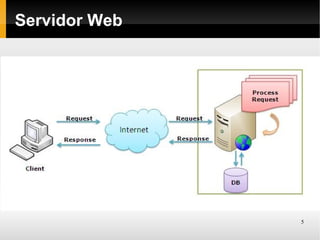
Servidor Web


               5
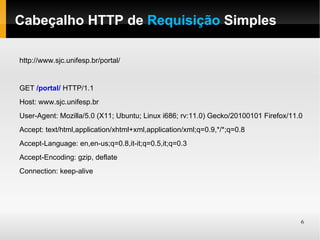
Cabeçalho HTTP de Requisição Simples

http://www.sjc.unifesp.br/portal/


GET /portal/ HTTP/1.1
Host: www.sjc.unifesp.br
User-Agent: Mozilla/5.0 (X11; Ubuntu; Linux i686; rv:11.0) Gecko/20100101 Firefox/11.0
Accept: text/html,application/xhtml+xml,application/xml;q=0.9,*/*;q=0.8
Accept-Language: en,en-us;q=0.8,it-it;q=0.5,it;q=0.3
Accept-Encoding: gzip, deflate
Connection: keep-alive


                                                                                     6
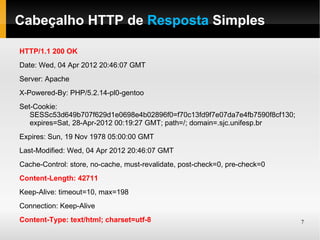
Cabeçalho HTTP de Resposta Simples

HTTP/1.1 200 OK
Date: Wed, 04 Apr 2012 20:46:07 GMT
Server: Apache
X-Powered-By: PHP/5.2.14-pl0-gentoo
Set-Cookie:
   SESSc53d649b707f629d1e0698e4b02896f0=f70c13fd9f7e07da7e4fb7590f8cf130;
   expires=Sat, 28-Apr-2012 00:19:27 GMT; path=/; domain=.sjc.unifesp.br
Expires: Sun, 19 Nov 1978 05:00:00 GMT
Last-Modified: Wed, 04 Apr 2012 20:46:07 GMT
Cache-Control: store, no-cache, must-revalidate, post-check=0, pre-check=0
Content-Length: 42711
Keep-Alive: timeout=10, max=198
Connection: Keep-Alive
Content-Type: text/html; charset=utf-8                                       7
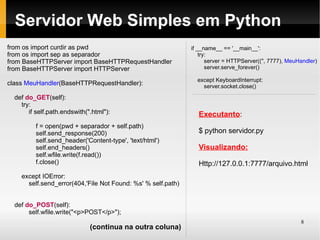
Servidor Web Simples em Python
from os import curdir as pwd                                  if __name__ == '__main__':
from os import sep as separador                                   try:
from BaseHTTPServer import BaseHTTPRequestHandler                    server = HTTPServer(('', 7777), MeuHandler)
from BaseHTTPServer import HTTPServer                                server.serve_forever()

                                                                except KeyboardInterrupt:
class MeuHandler(BaseHTTPRequestHandler):                         server.socket.close()

  def do_GET(self):
    try:
       if self.path.endswith(".html"):                           Executanto:
          f = open(pwd + separador + self.path)
          self.send_response(200)                                $ python servidor.py
          self.send_header('Content-type', 'text/html')
          self.end_headers()                                     Visualizando:
          self.wfile.write(f.read())
          f.close()                                              Http://127.0.0.1:7777/arquivo.html
    except IOError:
      self.send_error(404,'File Not Found: %s' % self.path)


  def do_POST(self):
       self.wfile.write("<p>POST</p>");
                                                                                                         8
                              (continua na outra coluna)
Servidores Web (Ready for Action)
             Strong focus on high concurrency, performance and low
             memory usage. (sic)

             Rápido, Configurável, LoadBalancer, Estável


             Although the main design goal of Apache is not to be the
             "fastest" web server. (sic)

             Configurável, Padrão de Mercado


                                                                  9
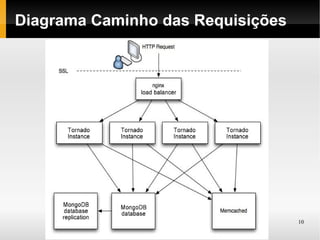
Diagrama Caminho das Requisições


                                   10
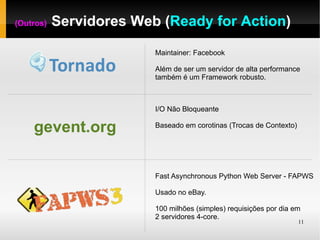
(Outros)   Servidores Web (Ready for Action)

                         Maintainer: Facebook

                         Além de ser um servidor de alta performance
                         também é um Framework robusto.


                         I/O Não Bloqueante

    gevent.org           Baseado em corotinas (Trocas de Contexto)


                         Fast Asynchronous Python Web Server - FAPWS

                         Usado no eBay.

                         100 milhões (simples) requisições por dia em
                         2 servidores 4-core.
                                                                     11
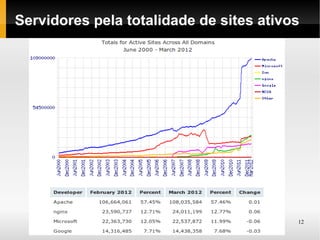
Servidores pela totalidade de sites ativos


                                         12
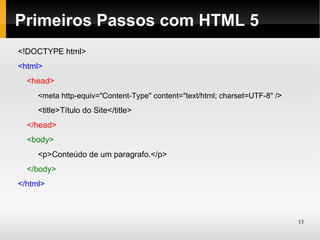
Primeiros Passos com HTML 5
<!DOCTYPE html>
<html>
  <head>
     <meta http-equiv="Content-Type" content="text/html; charset=UTF-8" />
     <title>Título do Site</title>
  </head>
  <body>
     <p>Conteúdo de um paragrafo.</p>
  </body>
</html>


                                                                             13
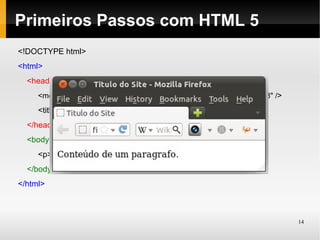
Primeiros Passos com HTML 5
<!DOCTYPE html>
<html>
  <head>
     <meta http-equiv="Content-Type" content="text/html; charset=UTF-8" />
     <title>Titulo do Site</title>
  </head>
  <body>
     <p>Conteúdo de um paragrafo.</p>
  </body>
</html>


                                                                             14
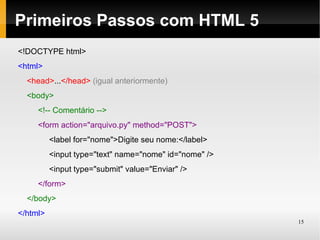
Primeiros Passos com HTML 5
<!DOCTYPE html>
<html>
  <head>...</head> (igual anteriormente)
  <body>
     <!-- Comentário -->
     <form action="arquivo.py" method="POST">
          <label for="nome">Digite seu nome:</label>
          <input type="text" name="nome" id="nome" />
          <input type="submit" value="Enviar" />
     </form>
  </body>
</html>
                                                        15
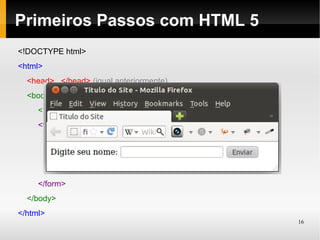
Primeiros Passos com HTML 5
<!DOCTYPE html>
<html>
  <head>...</head> (igual anteriormente)
  <body>
     <!-- Comentário -->
     <form action="arquivo.py" method="POST">
          <label for="nome">Digite seu nome:</label>
          <input type="text" name="nome" id="nome" />
          <input type="submit" value="Enviar" />
     </form>
  </body>
</html>
                                                        16
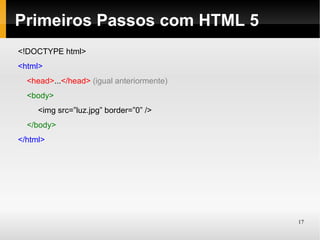
Primeiros Passos com HTML 5
<!DOCTYPE html>
<html>
  <head>...</head> (igual anteriormente)
  <body>
     <img src=”luz.jpg” border=”0” />
  </body>
</html>


                                           17
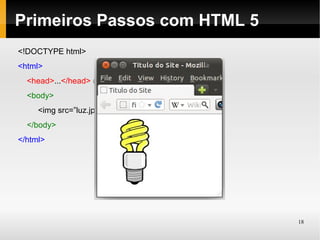
Primeiros Passos com HTML 5
<!DOCTYPE html>
<html>
  <head>...</head> (igual anteriormente)
  <body>
     <img src=”luz.jpg” border=”0” />
  </body>
</html>


                                           18
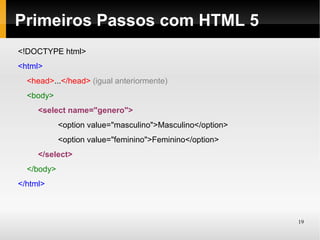
Primeiros Passos com HTML 5
<!DOCTYPE html>
<html>
  <head>...</head> (igual anteriormente)
  <body>
     <select name="genero">
            <option value="masculino">Masculino</option>
            <option value="feminino">Feminino</option>
     </select>
  </body>
</html>


                                                           19
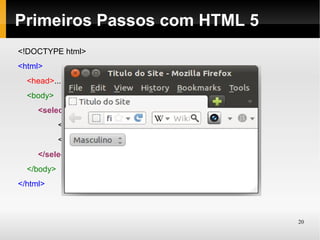
Primeiros Passos com HTML 5
<!DOCTYPE html>
<html>
  <head>...</head> (igual anteriormente)
  <body>
     <select name="genero">
            <option value="masculino">Masculino</option>
            <option value="feminino">Feminino</option>
     </select>
  </body>
</html>


                                                           20
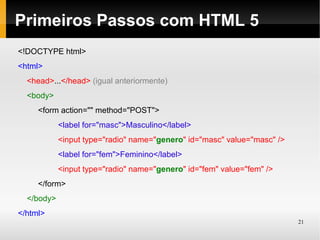
Primeiros Passos com HTML 5
<!DOCTYPE html>
<html>
  <head>...</head> (igual anteriormente)
  <body>
     <form action="" method="POST">
            <label for="masc">Masculino</label>
            <input type="radio" name="genero" id="masc" value="masc" />
            <label for="fem">Feminino</label>
            <input type="radio" name="genero" id="fem" value="fem" />
     </form>
  </body>
</html>
                                                                          21
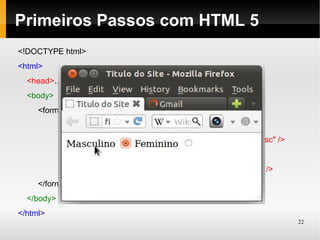
Primeiros Passos com HTML 5
<!DOCTYPE html>
<html>
  <head>...</head> (igual anteriormente)
  <body>
     <form action="" method="POST">
            <label for="masc">Masculino</label>
            <input type="radio" name="genero" id="masc" value="masc" />
            <label for="fem">Feminino</label>
            <input type="radio" name="genero" id="fem" value="fem" />
     </form>
  </body>
</html>
                                                                          22
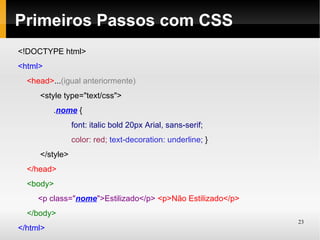
Primeiros Passos com CSS
<!DOCTYPE html>
<html>
  <head>...(igual anteriormente)
     <style type="text/css">
          .nome {
                font: italic bold 20px Arial, sans-serif;
                color: red; text-decoration: underline; }
     </style>
  </head>
  <body>
     <p class="nome">Estilizado</p> <p>Não Estilizado</p>
  </body>
                                                            23
</html>
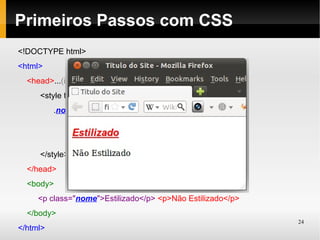
Primeiros Passos com CSS
<!DOCTYPE html>
<html>
  <head>...(igual anteriormente)
     <style type="text/css">
          .nome {
                font: italic bold 20px Arial, sans-serif;
                color: red; text-decoration: underline; }
     </style>
  </head>
  <body>
     <p class="nome">Estilizado</p> <p>Não Estilizado</p>
  </body>
                                                            24
</html>
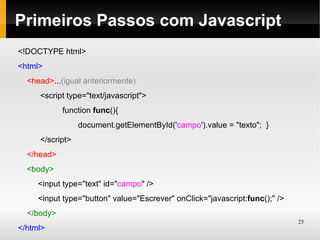
Primeiros Passos com Javascript
<!DOCTYPE html>
<html>
  <head>...(igual anteriormente)
     <script type="text/javascript">
            function func(){
                 document.getElementById('campo').value = "texto"; }
     </script>
  </head>
  <body>
     <input type="text" id="campo" />
     <input type="button" value="Escrever" onClick="javascript:func();" />
  </body>
                                                                             25
</html>
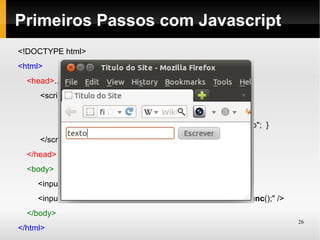
Primeiros Passos com Javascript
<!DOCTYPE html>
<html>
  <head>...(igual anteriormente)
     <script type="text/javascript">
            function func(){
                 document.getElementById('campo').value = "texto"; }
     </script>
  </head>
  <body>
     <input type="text" id="campo" />
     <input type="button" value="Escrever" onClick="javascript:func();" />
  </body>
                                                                             26
</html>
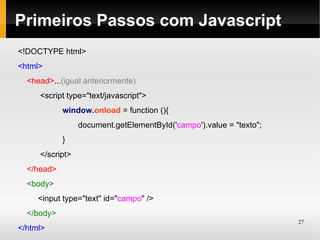
Primeiros Passos com Javascript
<!DOCTYPE html>
<html>
  <head>...(igual anteriormente)
     <script type="text/javascript">
            window.onload = function (){
                 document.getElementById('campo').value = "texto";
            }
     </script>
  </head>
  <body>
     <input type="text" id="campo" />
  </body>
                                                                     27
</html>
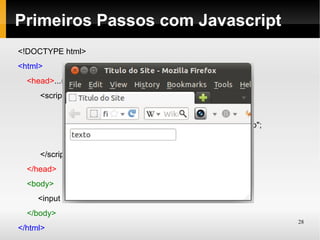
Primeiros Passos com Javascript
<!DOCTYPE html>
<html>
  <head>...(igual anteriormente)
     <script type="text/javascript">
            window.onload = function (){
                 document.getElementById('campo').value = "texto";
            }
     </script>
  </head>
  <body>
     <input type="text" id="campo" />
  </body>
                                                                     28
</html>
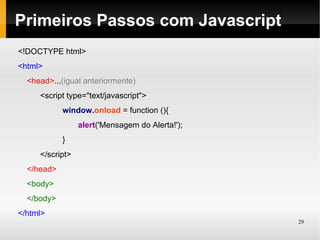
Primeiros Passos com Javascript
<!DOCTYPE html>
<html>
  <head>...(igual anteriormente)
     <script type="text/javascript">
            window.onload = function (){
                 alert('Mensagem do Alerta!');
            }
     </script>
  </head>
  <body>
  </body>
</html>
                                                 29
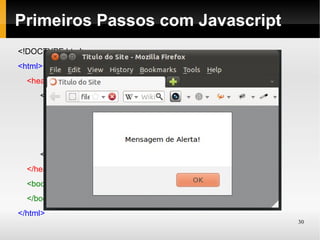
Primeiros Passos com Javascript
<!DOCTYPE html>
<html>
  <head>...(igual anteriormente)
     <script type="text/javascript">
            window.onload = function (){
                 alert('Mensagem do Alerta!');
            }
     </script>
  </head>
  <body>
  </body>
</html>
                                                 30
Dúvidas?

rafael.capucho@gmail.com
@rafaelcapucho


Obrigado


                           31

Introdução a Desenvolvimento Web

  • 1.
  • 2.
    Apresentação Rafael Capucho rafael.capucho@gmail.com @rafaelcapucho Ciência daComputação Universidade Federal de São Paulo ICT – Instituto de Ciência e Tecnologia PESL – Programa de Educação em Software Livre 2
  • 3.
    Volta no tempo Comeceia programar em meados de 2002~2003. Pude trabalhar até agora com: XHTML, CSS, Javascript, Python, PHP, C/C++, Coldfusion, Java, Actionscript, Melscript, XML, Perl, Ruby, Prolog, Haskell, Bash. (17+) 3
  • 4.
    Pacote mínimo paradesenvolvimento web Linguagens de Marcação: HTML, xHTML, HTML 5 Linguagens para folha de estilo: CSS Linguagens client-side: Javascript, Dart? Linguagens server-side: Python, PHP, Java, Perl, Ruby, Haskell, Lua. 4
  • 5.
  • 6.
    Cabeçalho HTTP deRequisição Simples http://www.sjc.unifesp.br/portal/ GET /portal/ HTTP/1.1 Host: www.sjc.unifesp.br User-Agent: Mozilla/5.0 (X11; Ubuntu; Linux i686; rv:11.0) Gecko/20100101 Firefox/11.0 Accept: text/html,application/xhtml+xml,application/xml;q=0.9,*/*;q=0.8 Accept-Language: en,en-us;q=0.8,it-it;q=0.5,it;q=0.3 Accept-Encoding: gzip, deflate Connection: keep-alive 6
  • 7.
    Cabeçalho HTTP deResposta Simples HTTP/1.1 200 OK Date: Wed, 04 Apr 2012 20:46:07 GMT Server: Apache X-Powered-By: PHP/5.2.14-pl0-gentoo Set-Cookie: SESSc53d649b707f629d1e0698e4b02896f0=f70c13fd9f7e07da7e4fb7590f8cf130; expires=Sat, 28-Apr-2012 00:19:27 GMT; path=/; domain=.sjc.unifesp.br Expires: Sun, 19 Nov 1978 05:00:00 GMT Last-Modified: Wed, 04 Apr 2012 20:46:07 GMT Cache-Control: store, no-cache, must-revalidate, post-check=0, pre-check=0 Content-Length: 42711 Keep-Alive: timeout=10, max=198 Connection: Keep-Alive Content-Type: text/html; charset=utf-8 7
  • 8.
    Servidor Web Simplesem Python from os import curdir as pwd if __name__ == '__main__': from os import sep as separador try: from BaseHTTPServer import BaseHTTPRequestHandler server = HTTPServer(('', 7777), MeuHandler) from BaseHTTPServer import HTTPServer server.serve_forever() except KeyboardInterrupt: class MeuHandler(BaseHTTPRequestHandler): server.socket.close() def do_GET(self): try: if self.path.endswith(".html"): Executanto: f = open(pwd + separador + self.path) self.send_response(200) $ python servidor.py self.send_header('Content-type', 'text/html') self.end_headers() Visualizando: self.wfile.write(f.read()) f.close() Http://127.0.0.1:7777/arquivo.html except IOError: self.send_error(404,'File Not Found: %s' % self.path) def do_POST(self): self.wfile.write("<p>POST</p>"); 8 (continua na outra coluna)
  • 9.
    Servidores Web (Readyfor Action) Strong focus on high concurrency, performance and low memory usage. (sic) Rápido, Configurável, LoadBalancer, Estável Although the main design goal of Apache is not to be the "fastest" web server. (sic) Configurável, Padrão de Mercado 9
  • 10.
    Diagrama Caminho dasRequisições 10
  • 11.
    (Outros) Servidores Web (Ready for Action) Maintainer: Facebook Além de ser um servidor de alta performance também é um Framework robusto. I/O Não Bloqueante gevent.org Baseado em corotinas (Trocas de Contexto) Fast Asynchronous Python Web Server - FAPWS Usado no eBay. 100 milhões (simples) requisições por dia em 2 servidores 4-core. 11
  • 12.
    Servidores pela totalidadede sites ativos 12
  • 13.
    Primeiros Passos comHTML 5 <!DOCTYPE html> <html> <head> <meta http-equiv="Content-Type" content="text/html; charset=UTF-8" /> <title>Título do Site</title> </head> <body> <p>Conteúdo de um paragrafo.</p> </body> </html> 13
  • 14.
    Primeiros Passos comHTML 5 <!DOCTYPE html> <html> <head> <meta http-equiv="Content-Type" content="text/html; charset=UTF-8" /> <title>Titulo do Site</title> </head> <body> <p>Conteúdo de um paragrafo.</p> </body> </html> 14
  • 15.
    Primeiros Passos comHTML 5 <!DOCTYPE html> <html> <head>...</head> (igual anteriormente) <body> <!-- Comentário --> <form action="arquivo.py" method="POST"> <label for="nome">Digite seu nome:</label> <input type="text" name="nome" id="nome" /> <input type="submit" value="Enviar" /> </form> </body> </html> 15
  • 16.
    Primeiros Passos comHTML 5 <!DOCTYPE html> <html> <head>...</head> (igual anteriormente) <body> <!-- Comentário --> <form action="arquivo.py" method="POST"> <label for="nome">Digite seu nome:</label> <input type="text" name="nome" id="nome" /> <input type="submit" value="Enviar" /> </form> </body> </html> 16
  • 17.
    Primeiros Passos comHTML 5 <!DOCTYPE html> <html> <head>...</head> (igual anteriormente) <body> <img src=”luz.jpg” border=”0” /> </body> </html> 17
  • 18.
    Primeiros Passos comHTML 5 <!DOCTYPE html> <html> <head>...</head> (igual anteriormente) <body> <img src=”luz.jpg” border=”0” /> </body> </html> 18
  • 19.
    Primeiros Passos comHTML 5 <!DOCTYPE html> <html> <head>...</head> (igual anteriormente) <body> <select name="genero"> <option value="masculino">Masculino</option> <option value="feminino">Feminino</option> </select> </body> </html> 19
  • 20.
    Primeiros Passos comHTML 5 <!DOCTYPE html> <html> <head>...</head> (igual anteriormente) <body> <select name="genero"> <option value="masculino">Masculino</option> <option value="feminino">Feminino</option> </select> </body> </html> 20
  • 21.
    Primeiros Passos comHTML 5 <!DOCTYPE html> <html> <head>...</head> (igual anteriormente) <body> <form action="" method="POST"> <label for="masc">Masculino</label> <input type="radio" name="genero" id="masc" value="masc" /> <label for="fem">Feminino</label> <input type="radio" name="genero" id="fem" value="fem" /> </form> </body> </html> 21
  • 22.
    Primeiros Passos comHTML 5 <!DOCTYPE html> <html> <head>...</head> (igual anteriormente) <body> <form action="" method="POST"> <label for="masc">Masculino</label> <input type="radio" name="genero" id="masc" value="masc" /> <label for="fem">Feminino</label> <input type="radio" name="genero" id="fem" value="fem" /> </form> </body> </html> 22
  • 23.
    Primeiros Passos comCSS <!DOCTYPE html> <html> <head>...(igual anteriormente) <style type="text/css"> .nome { font: italic bold 20px Arial, sans-serif; color: red; text-decoration: underline; } </style> </head> <body> <p class="nome">Estilizado</p> <p>Não Estilizado</p> </body> 23 </html>
  • 24.
    Primeiros Passos comCSS <!DOCTYPE html> <html> <head>...(igual anteriormente) <style type="text/css"> .nome { font: italic bold 20px Arial, sans-serif; color: red; text-decoration: underline; } </style> </head> <body> <p class="nome">Estilizado</p> <p>Não Estilizado</p> </body> 24 </html>
  • 25.
    Primeiros Passos comJavascript <!DOCTYPE html> <html> <head>...(igual anteriormente) <script type="text/javascript"> function func(){ document.getElementById('campo').value = "texto"; } </script> </head> <body> <input type="text" id="campo" /> <input type="button" value="Escrever" onClick="javascript:func();" /> </body> 25 </html>
  • 26.
    Primeiros Passos comJavascript <!DOCTYPE html> <html> <head>...(igual anteriormente) <script type="text/javascript"> function func(){ document.getElementById('campo').value = "texto"; } </script> </head> <body> <input type="text" id="campo" /> <input type="button" value="Escrever" onClick="javascript:func();" /> </body> 26 </html>
  • 27.
    Primeiros Passos comJavascript <!DOCTYPE html> <html> <head>...(igual anteriormente) <script type="text/javascript"> window.onload = function (){ document.getElementById('campo').value = "texto"; } </script> </head> <body> <input type="text" id="campo" /> </body> 27 </html>
  • 28.
    Primeiros Passos comJavascript <!DOCTYPE html> <html> <head>...(igual anteriormente) <script type="text/javascript"> window.onload = function (){ document.getElementById('campo').value = "texto"; } </script> </head> <body> <input type="text" id="campo" /> </body> 28 </html>
  • 29.
    Primeiros Passos comJavascript <!DOCTYPE html> <html> <head>...(igual anteriormente) <script type="text/javascript"> window.onload = function (){ alert('Mensagem do Alerta!'); } </script> </head> <body> </body> </html> 29
  • 30.
    Primeiros Passos comJavascript <!DOCTYPE html> <html> <head>...(igual anteriormente) <script type="text/javascript"> window.onload = function (){ alert('Mensagem do Alerta!'); } </script> </head> <body> </body> </html> 30
  • 31.