CRIANDO SITES COM ESTILOS
CSS
Cascading Style Sheets
DEFINIÇÃO
Cascading Style Sheets (CSS) é uma linguagem de
folhas de estilo utilizada para definir a apresentação
de documentos escritos em uma linguagem de
marcação, como HTML ou XML. O seu principal
benefício é a separação entre o formato e o conteúdo
de um documento.
Em vez de colocar a formatação dentro do
documento, o desenvolvedor cria um link (ligação)
para uma página que contém os estilos, procedendo
de forma idêntica para todas as páginas de um
portal. Quando quiser alterar a aparência do portal
basta portanto modificar apenas um arquivo.
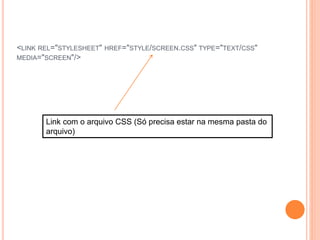
<LINK REL="STYLESHEET" HREF="STYLE/SCREEN.CSS" TYPE="TEXT/CSS"
MEDIA="SCREEN"/>
Link com o arquivo CSS (Só precisa estar na mesma pasta do
arquivo)
EXEMPLO DE CÓDIGO PARTE I
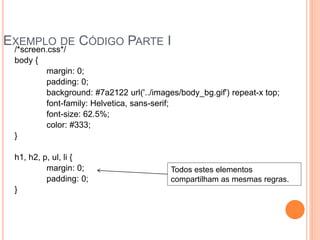
/*screen.css*/
body {
margin: 0;
padding: 0;
background: #7a2122 url('../images/body_bg.gif') repeat-x top;
font-family: Helvetica, sans-serif;
font-size: 62.5%;
color: #333;
}
h1, h2, p, ul, li {
margin: 0;
padding: 0;
}
Todos estes elementos
compartilham as mesmas regras.
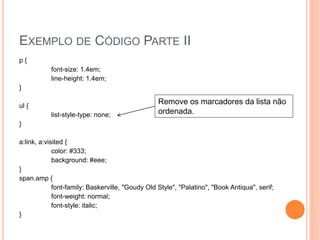
EXEMPLO DE CÓDIGO PARTE II
p {
font-size: 1.4em;
line-height: 1.4em;
}
ul {
list-style-type: none;
}
a:link, a:visited {
color: #333;
background: #eee;
}
span.amp {
font-family: Baskerville, "Goudy Old Style", "Palatino", "Book Antiqua", serif;
font-weight: normal;
font-style: italic;
}
Remove os marcadores da lista não
ordenada.
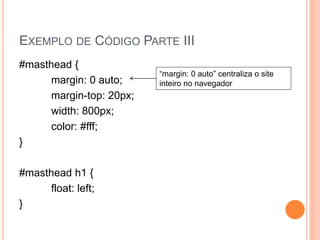
EXEMPLO DE CÓDIGO PARTE III
#masthead {
margin: 0 auto;
margin-top: 20px;
width: 800px;
color: #fff;
}
#masthead h1 {
float: left;
}
“margin: 0 auto” centraliza o site
inteiro no navegador
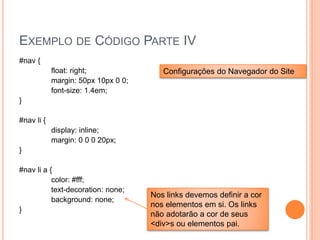
EXEMPLO DE CÓDIGO PARTE IV
#nav {
float: right;
margin: 50px 10px 0 0;
font-size: 1.4em;
}
#nav li {
display: inline;
margin: 0 0 0 20px;
}
#nav li a {
color: #fff;
text-decoration: none;
background: none;
}
Configurações do Navegador do Site
Nos links devemos definir a cor
nos elementos em si. Os links
não adotarão a cor de seus
<div>s ou elementos pai.
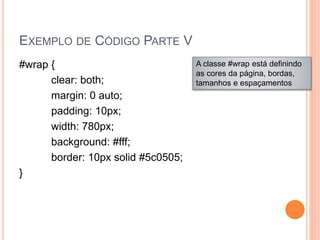
EXEMPLO DE CÓDIGO PARTE V
#wrap {
clear: both;
margin: 0 auto;
padding: 10px;
width: 780px;
background: #fff;
border: 10px solid #5c0505;
}
A classe #wrap está definindo
as cores da página, bordas,
tamanhos e espaçamentos
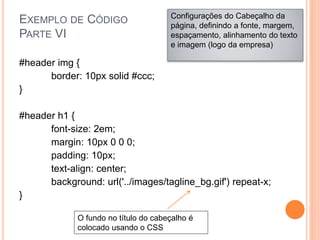
EXEMPLO DE CÓDIGO
PARTE VI
#header img {
border: 10px solid #ccc;
}
#header h1 {
font-size: 2em;
margin: 10px 0 0 0;
padding: 10px;
text-align: center;
background: url('../images/tagline_bg.gif') repeat-x;
}
Configurações do Cabeçalho da
página, definindo a fonte, margem,
espaçamento, alinhamento do texto
e imagem (logo da empresa)
O fundo no título do cabeçalho é
colocado usando o CSS
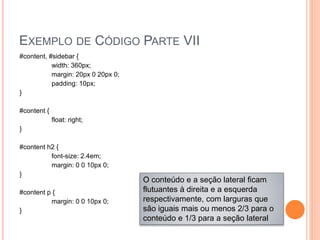
EXEMPLO DE CÓDIGO PARTE VII
#content, #sidebar {
width: 360px;
margin: 20px 0 20px 0;
padding: 10px;
}
#content {
float: right;
}
#content h2 {
font-size: 2.4em;
margin: 0 0 10px 0;
}
#content p {
margin: 0 0 10px 0;
}
O conteúdo e a seção lateral ficam
flutuantes à direita e a esquerda
respectivamente, com larguras que
são iguais mais ou menos 2/3 para o
conteúdo e 1/3 para a seção lateral
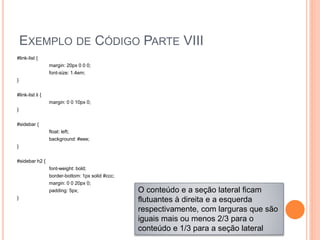
EXEMPLO DE CÓDIGO PARTE VIII
#link-list {
margin: 20px 0 0 0;
font-size: 1.4em;
}
#link-list li {
margin: 0 0 10px 0;
}
#sidebar {
float: left;
background: #eee;
}
#sidebar h2 {
font-weight: bold;
border-bottom: 1px solid #ccc;
margin: 0 0 20px 0;
padding: 5px;
}
O conteúdo e a seção lateral ficam
flutuantes à direita e a esquerda
respectivamente, com larguras que são
iguais mais ou menos 2/3 para o
conteúdo e 1/3 para a seção lateral
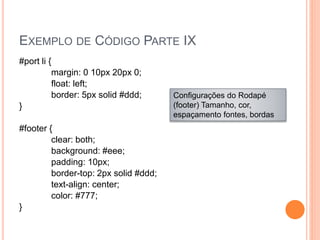
EXEMPLO DE CÓDIGO PARTE IX
#port li {
margin: 0 10px 20px 0;
float: left;
border: 5px solid #ddd;
}
#footer {
clear: both;
background: #eee;
padding: 10px;
border-top: 2px solid #ddd;
text-align: center;
color: #777;
}
Configurações do Rodapé
(footer) Tamanho, cor,
espaçamento fontes, bordas
ALGUNS SIGNIFICADOS
 Background: Fundo (podemos definir um plano de
fundo para as páginas do site com imagens ou uma cor
de acordo com o estilo do site e seu conteúdo)
 Padding: preenchimento (é o espaço reservado com
as medidas definidas para o preenchimento com o
conteúdo)
 Border: Borda (Definição das bordas do site com as
suas margens)
 Margin: Margem (definição das medidas do site com as
suas margens laterais, inferiores e superiores)
 Width: Largura (definição das larguras)
 Float: Flutuador (definição dos elementos que ficam
flutuantes)
CSS EMBUTIDOS NAS PÁGINAS
 Podemos fazer as páginas com os estilos já
embutidos, porém não é recomendado, pois como
já foi comentado, imagine se o cliente desejar fazer
uma alteração na cor de fundo do site inteiro, que
trabalho teremos ao acessar página por página
para alteração.
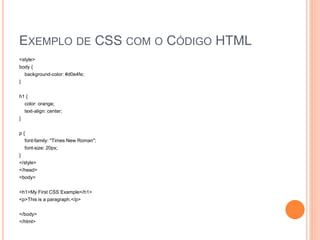
EXEMPLO DE CSS COM O CÓDIGO HTML
<style>
body {
background-color: #d0e4fe;
}
h1 {
color: orange;
text-align: center;
}
p {
font-family: "Times New Roman";
font-size: 20px;
}
</style>
</head>
<body>
<h1>My First CSS Example</h1>
<p>This is a paragraph.</p>
</body>
</html>
ALGUNS EXEMPLOS EXTRAS DE CSS
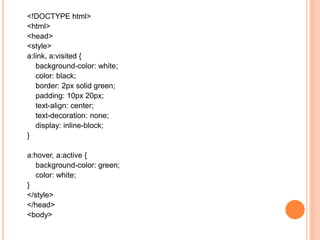
<!DOCTYPE html>
<html>
<head>
<style>
a:link, a:visited {
background-color: white;
color: black;
border: 2px solid green;
padding: 10px 20px;
text-align: center;
text-decoration: none;
display: inline-block;
}
a:hover, a:active {
background-color: green;
color: white;
}
</style>
</head>
<body>
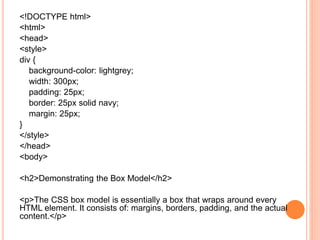
<!DOCTYPE html>
<html>
<head>
<style>
div {
background-color: lightgrey;
width: 300px;
padding: 25px;
border: 25px solid navy;
margin: 25px;
}
</style>
</head>
<body>
<h2>Demonstrating the Box Model</h2>
<p>The CSS box model is essentially a box that wraps around every
HTML element. It consists of: margins, borders, padding, and the actual
content.</p>
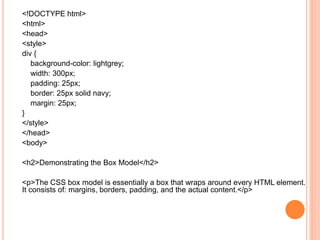
<!DOCTYPE html>
<html>
<head>
<style>
div {
background-color: lightgrey;
width: 300px;
padding: 25px;
border: 25px solid navy;
margin: 25px;
}
</style>
</head>
<body>
<h2>Demonstrating the Box Model</h2>
<p>The CSS box model is essentially a box that wraps around every HTML element.
It consists of: margins, borders, padding, and the actual content.</p>
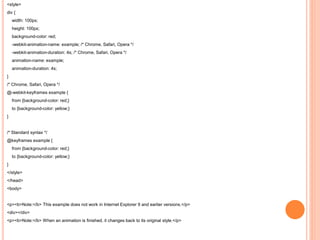
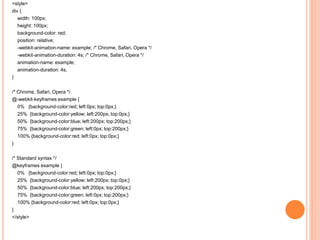
<style>
div {
width: 100px;
height: 100px;
background-color: red;
-webkit-animation-name: example; /* Chrome, Safari, Opera */
-webkit-animation-duration: 4s; /* Chrome, Safari, Opera */
animation-name: example;
animation-duration: 4s;
}
/* Chrome, Safari, Opera */
@-webkit-keyframes example {
from {background-color: red;}
to {background-color: yellow;}
}
/* Standard syntax */
@keyframes example {
from {background-color: red;}
to {background-color: yellow;}
}
</style>
</head>
<body>
<p><b>Note:</b> This example does not work in Internet Explorer 9 and earlier versions.</p>
<div></div>
<p><b>Note:</b> When an animation is finished, it changes back to its original style.</p>
<style>
div {
width: 100px;
height: 100px;
background-color: red;
position: relative;
-webkit-animation-name: example; /* Chrome, Safari, Opera */
-webkit-animation-duration: 4s; /* Chrome, Safari, Opera */
animation-name: example;
animation-duration: 4s;
}
/* Chrome, Safari, Opera */
@-webkit-keyframes example {
0% {background-color:red; left:0px; top:0px;}
25% {background-color:yellow; left:200px; top:0px;}
50% {background-color:blue; left:200px; top:200px;}
75% {background-color:green; left:0px; top:200px;}
100% {background-color:red; left:0px; top:0px;}
}
/* Standard syntax */
@keyframes example {
0% {background-color:red; left:0px; top:0px;}
25% {background-color:yellow; left:200px; top:0px;}
50% {background-color:blue; left:200px; top:200px;}
75% {background-color:green; left:0px; top:200px;}
100% {background-color:red; left:0px; top:0px;}
}
</style>
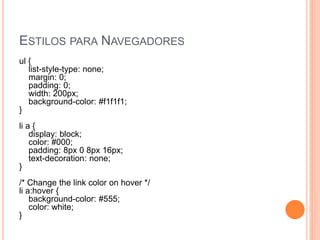
ESTILOS PARA NAVEGADORES
ul {
list-style-type: none;
margin: 0;
padding: 0;
width: 200px;
background-color: #f1f1f1;
}
li a {
display: block;
color: #000;
padding: 8px 0 8px 16px;
text-decoration: none;
}
/* Change the link color on hover */
li a:hover {
background-color: #555;
color: white;
}
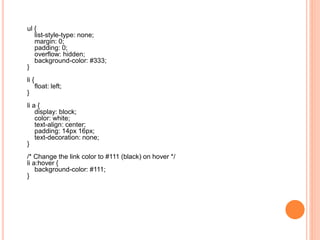
ul {
list-style-type: none;
margin: 0;
padding: 0;
overflow: hidden;
background-color: #333;
}
li {
float: left;
}
li a {
display: block;
color: white;
text-align: center;
padding: 14px 16px;
text-decoration: none;
}
/* Change the link color to #111 (black) on hover */
li a:hover {
background-color: #111;
}
FORMULÁRIOS COM ESTILOS
Parte I
<!DOCTYPE html>
<html>
<style>
input[type=text], select {
width: 100%;
padding: 12px 20px;
margin: 8px 0;
display: inline-block;
border: 1px solid #ccc;
border-radius: 4px;
box-sizing: border-box;
}
input[type=submit] {
width: 100%;
background-color: #4CAF50;
color: white;
padding: 14px 20px;
margin: 8px 0;
border: none;
border-radius: 4px;
cursor: pointer;
}
input[type=submit]:hover {
background-color: #45a049;
}
div {
border-radius: 5px;
background-color: #f2f2f2;
padding: 20px;
Parte II - continuação
}
</style>
<body>
<h3>Using CSS to style a HTML Form</h3>
<div>
<form action="action_page.php">
<label for="fname">First Name</label>
<input type="text" id="fname" name="firstname">
<label for="lname">Last Name</label>
<input type="text" id="lname" name="lastname">
<label for="country">State</label>
<select id="country" name="country">
<option value="australia">Australia</option>
<option value="canada">Canada</option>
<option value="usa">USA</option>
</select>
<input type="submit" value="Submit">
</form>
</div>
</body>
</html>
<!DOCTYPE html>
<html>
<head>
<style>
input[type=text] {
width: 100%;
padding: 12px 20px;
margin: 8px 0;
box-sizing: border-box;
border: none;
background-color: #3CBC8D;
color: white;
}
</style>
</head>
<body>
<p>Colored text fields:</p>
<form>
<label for="fname">First Name</label>
<input type="text" id="fname" name="fname" value="John">
<label for="fname">Last Name</label>
<input type="text" id="lname" name="lname" value="Doe">
</form>
</body>
</html>
<!DOCTYPE html>
<html>
<head>
<style>
input[type=text] {
width: 100%;
box-sizing: border-box;
border: 2px solid #ccc;
border-radius: 4px;
font-size: 16px;
background-color: white;
background-image: url('searchicon.png');
background-position: 10px 10px;
background-repeat: no-repeat;
padding: 12px 20px 12px 40px;
}
</style>
</head>
<body>
<p>Input with icon:</p>
<form>
<input type="text" name="search" placeholder="Search..">
</form>
</body>
</html>
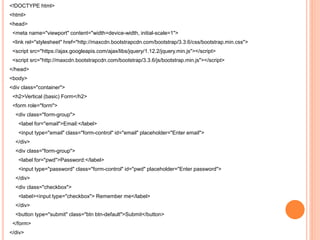
<!DOCTYPE html>
<html>
<head>
<meta name="viewport" content="width=device-width, initial-scale=1">
<link rel="stylesheet" href="http://maxcdn.bootstrapcdn.com/bootstrap/3.3.6/css/bootstrap.min.css">
<script src="https://ajax.googleapis.com/ajax/libs/jquery/1.12.2/jquery.min.js"></script>
<script src="http://maxcdn.bootstrapcdn.com/bootstrap/3.3.6/js/bootstrap.min.js"></script>
</head>
<body>
<div class="container">
<h2>Vertical (basic) Form</h2>
<form role="form">
<div class="form-group">
<label for="email">Email:</label>
<input type="email" class="form-control" id="email" placeholder="Enter email">
</div>
<div class="form-group">
<label for="pwd">Password:</label>
<input type="password" class="form-control" id="pwd" placeholder="Enter password">
</div>
<div class="checkbox">
<label><input type="checkbox"> Remember me</label>
</div>
<button type="submit" class="btn btn-default">Submit</button>
</form>
</div>
TRANSIÇÕES
div {
width: 100px;
height: 100px;
background: red;
-webkit-transition: width 2s; /* Safari */
transition: width 2s;
}
BIBLIOGRAFIA E SITOGRAFIA
Use a Cabeça! Web Design Ethan Watrall e Jeff
Siarto Alta Book Editoras
http://www.w3schools.com

Criando sites com estilos

  • 1.
    CRIANDO SITES COMESTILOS CSS Cascading Style Sheets
  • 2.
    DEFINIÇÃO Cascading Style Sheets(CSS) é uma linguagem de folhas de estilo utilizada para definir a apresentação de documentos escritos em uma linguagem de marcação, como HTML ou XML. O seu principal benefício é a separação entre o formato e o conteúdo de um documento. Em vez de colocar a formatação dentro do documento, o desenvolvedor cria um link (ligação) para uma página que contém os estilos, procedendo de forma idêntica para todas as páginas de um portal. Quando quiser alterar a aparência do portal basta portanto modificar apenas um arquivo.
  • 3.
    <LINK REL="STYLESHEET" HREF="STYLE/SCREEN.CSS"TYPE="TEXT/CSS" MEDIA="SCREEN"/> Link com o arquivo CSS (Só precisa estar na mesma pasta do arquivo)
  • 4.
    EXEMPLO DE CÓDIGOPARTE I /*screen.css*/ body { margin: 0; padding: 0; background: #7a2122 url('../images/body_bg.gif') repeat-x top; font-family: Helvetica, sans-serif; font-size: 62.5%; color: #333; } h1, h2, p, ul, li { margin: 0; padding: 0; } Todos estes elementos compartilham as mesmas regras.
  • 5.
    EXEMPLO DE CÓDIGOPARTE II p { font-size: 1.4em; line-height: 1.4em; } ul { list-style-type: none; } a:link, a:visited { color: #333; background: #eee; } span.amp { font-family: Baskerville, "Goudy Old Style", "Palatino", "Book Antiqua", serif; font-weight: normal; font-style: italic; } Remove os marcadores da lista não ordenada.
  • 6.
    EXEMPLO DE CÓDIGOPARTE III #masthead { margin: 0 auto; margin-top: 20px; width: 800px; color: #fff; } #masthead h1 { float: left; } “margin: 0 auto” centraliza o site inteiro no navegador
  • 7.
    EXEMPLO DE CÓDIGOPARTE IV #nav { float: right; margin: 50px 10px 0 0; font-size: 1.4em; } #nav li { display: inline; margin: 0 0 0 20px; } #nav li a { color: #fff; text-decoration: none; background: none; } Configurações do Navegador do Site Nos links devemos definir a cor nos elementos em si. Os links não adotarão a cor de seus <div>s ou elementos pai.
  • 8.
    EXEMPLO DE CÓDIGOPARTE V #wrap { clear: both; margin: 0 auto; padding: 10px; width: 780px; background: #fff; border: 10px solid #5c0505; } A classe #wrap está definindo as cores da página, bordas, tamanhos e espaçamentos
  • 9.
    EXEMPLO DE CÓDIGO PARTEVI #header img { border: 10px solid #ccc; } #header h1 { font-size: 2em; margin: 10px 0 0 0; padding: 10px; text-align: center; background: url('../images/tagline_bg.gif') repeat-x; } Configurações do Cabeçalho da página, definindo a fonte, margem, espaçamento, alinhamento do texto e imagem (logo da empresa) O fundo no título do cabeçalho é colocado usando o CSS
  • 10.
    EXEMPLO DE CÓDIGOPARTE VII #content, #sidebar { width: 360px; margin: 20px 0 20px 0; padding: 10px; } #content { float: right; } #content h2 { font-size: 2.4em; margin: 0 0 10px 0; } #content p { margin: 0 0 10px 0; } O conteúdo e a seção lateral ficam flutuantes à direita e a esquerda respectivamente, com larguras que são iguais mais ou menos 2/3 para o conteúdo e 1/3 para a seção lateral
  • 11.
    EXEMPLO DE CÓDIGOPARTE VIII #link-list { margin: 20px 0 0 0; font-size: 1.4em; } #link-list li { margin: 0 0 10px 0; } #sidebar { float: left; background: #eee; } #sidebar h2 { font-weight: bold; border-bottom: 1px solid #ccc; margin: 0 0 20px 0; padding: 5px; } O conteúdo e a seção lateral ficam flutuantes à direita e a esquerda respectivamente, com larguras que são iguais mais ou menos 2/3 para o conteúdo e 1/3 para a seção lateral
  • 12.
    EXEMPLO DE CÓDIGOPARTE IX #port li { margin: 0 10px 20px 0; float: left; border: 5px solid #ddd; } #footer { clear: both; background: #eee; padding: 10px; border-top: 2px solid #ddd; text-align: center; color: #777; } Configurações do Rodapé (footer) Tamanho, cor, espaçamento fontes, bordas
  • 13.
    ALGUNS SIGNIFICADOS  Background:Fundo (podemos definir um plano de fundo para as páginas do site com imagens ou uma cor de acordo com o estilo do site e seu conteúdo)  Padding: preenchimento (é o espaço reservado com as medidas definidas para o preenchimento com o conteúdo)  Border: Borda (Definição das bordas do site com as suas margens)  Margin: Margem (definição das medidas do site com as suas margens laterais, inferiores e superiores)  Width: Largura (definição das larguras)  Float: Flutuador (definição dos elementos que ficam flutuantes)
  • 14.
    CSS EMBUTIDOS NASPÁGINAS  Podemos fazer as páginas com os estilos já embutidos, porém não é recomendado, pois como já foi comentado, imagine se o cliente desejar fazer uma alteração na cor de fundo do site inteiro, que trabalho teremos ao acessar página por página para alteração.
  • 15.
    EXEMPLO DE CSSCOM O CÓDIGO HTML <style> body { background-color: #d0e4fe; } h1 { color: orange; text-align: center; } p { font-family: "Times New Roman"; font-size: 20px; } </style> </head> <body> <h1>My First CSS Example</h1> <p>This is a paragraph.</p> </body> </html>
  • 16.
  • 17.
    <!DOCTYPE html> <html> <head> <style> a:link, a:visited{ background-color: white; color: black; border: 2px solid green; padding: 10px 20px; text-align: center; text-decoration: none; display: inline-block; } a:hover, a:active { background-color: green; color: white; } </style> </head> <body>
  • 18.
    <!DOCTYPE html> <html> <head> <style> div { background-color:lightgrey; width: 300px; padding: 25px; border: 25px solid navy; margin: 25px; } </style> </head> <body> <h2>Demonstrating the Box Model</h2> <p>The CSS box model is essentially a box that wraps around every HTML element. It consists of: margins, borders, padding, and the actual content.</p>
  • 19.
    <!DOCTYPE html> <html> <head> <style> div { background-color:lightgrey; width: 300px; padding: 25px; border: 25px solid navy; margin: 25px; } </style> </head> <body> <h2>Demonstrating the Box Model</h2> <p>The CSS box model is essentially a box that wraps around every HTML element. It consists of: margins, borders, padding, and the actual content.</p>
  • 20.
    <style> div { width: 100px; height:100px; background-color: red; -webkit-animation-name: example; /* Chrome, Safari, Opera */ -webkit-animation-duration: 4s; /* Chrome, Safari, Opera */ animation-name: example; animation-duration: 4s; } /* Chrome, Safari, Opera */ @-webkit-keyframes example { from {background-color: red;} to {background-color: yellow;} } /* Standard syntax */ @keyframes example { from {background-color: red;} to {background-color: yellow;} } </style> </head> <body> <p><b>Note:</b> This example does not work in Internet Explorer 9 and earlier versions.</p> <div></div> <p><b>Note:</b> When an animation is finished, it changes back to its original style.</p>
  • 21.
    <style> div { width: 100px; height:100px; background-color: red; position: relative; -webkit-animation-name: example; /* Chrome, Safari, Opera */ -webkit-animation-duration: 4s; /* Chrome, Safari, Opera */ animation-name: example; animation-duration: 4s; } /* Chrome, Safari, Opera */ @-webkit-keyframes example { 0% {background-color:red; left:0px; top:0px;} 25% {background-color:yellow; left:200px; top:0px;} 50% {background-color:blue; left:200px; top:200px;} 75% {background-color:green; left:0px; top:200px;} 100% {background-color:red; left:0px; top:0px;} } /* Standard syntax */ @keyframes example { 0% {background-color:red; left:0px; top:0px;} 25% {background-color:yellow; left:200px; top:0px;} 50% {background-color:blue; left:200px; top:200px;} 75% {background-color:green; left:0px; top:200px;} 100% {background-color:red; left:0px; top:0px;} } </style>
  • 22.
    ESTILOS PARA NAVEGADORES ul{ list-style-type: none; margin: 0; padding: 0; width: 200px; background-color: #f1f1f1; } li a { display: block; color: #000; padding: 8px 0 8px 16px; text-decoration: none; } /* Change the link color on hover */ li a:hover { background-color: #555; color: white; }
  • 23.
    ul { list-style-type: none; margin:0; padding: 0; overflow: hidden; background-color: #333; } li { float: left; } li a { display: block; color: white; text-align: center; padding: 14px 16px; text-decoration: none; } /* Change the link color to #111 (black) on hover */ li a:hover { background-color: #111; }
  • 24.
    FORMULÁRIOS COM ESTILOS ParteI <!DOCTYPE html> <html> <style> input[type=text], select { width: 100%; padding: 12px 20px; margin: 8px 0; display: inline-block; border: 1px solid #ccc; border-radius: 4px; box-sizing: border-box; } input[type=submit] { width: 100%; background-color: #4CAF50; color: white; padding: 14px 20px; margin: 8px 0; border: none; border-radius: 4px; cursor: pointer; } input[type=submit]:hover { background-color: #45a049; } div { border-radius: 5px; background-color: #f2f2f2; padding: 20px; Parte II - continuação } </style> <body> <h3>Using CSS to style a HTML Form</h3> <div> <form action="action_page.php"> <label for="fname">First Name</label> <input type="text" id="fname" name="firstname"> <label for="lname">Last Name</label> <input type="text" id="lname" name="lastname"> <label for="country">State</label> <select id="country" name="country"> <option value="australia">Australia</option> <option value="canada">Canada</option> <option value="usa">USA</option> </select> <input type="submit" value="Submit"> </form> </div> </body> </html>
  • 25.
    <!DOCTYPE html> <html> <head> <style> input[type=text] { width:100%; padding: 12px 20px; margin: 8px 0; box-sizing: border-box; border: none; background-color: #3CBC8D; color: white; } </style> </head> <body> <p>Colored text fields:</p> <form> <label for="fname">First Name</label> <input type="text" id="fname" name="fname" value="John"> <label for="fname">Last Name</label> <input type="text" id="lname" name="lname" value="Doe"> </form> </body> </html>
  • 26.
    <!DOCTYPE html> <html> <head> <style> input[type=text] { width:100%; box-sizing: border-box; border: 2px solid #ccc; border-radius: 4px; font-size: 16px; background-color: white; background-image: url('searchicon.png'); background-position: 10px 10px; background-repeat: no-repeat; padding: 12px 20px 12px 40px; } </style> </head> <body> <p>Input with icon:</p> <form> <input type="text" name="search" placeholder="Search.."> </form> </body> </html>
  • 27.
    <!DOCTYPE html> <html> <head> <meta name="viewport"content="width=device-width, initial-scale=1"> <link rel="stylesheet" href="http://maxcdn.bootstrapcdn.com/bootstrap/3.3.6/css/bootstrap.min.css"> <script src="https://ajax.googleapis.com/ajax/libs/jquery/1.12.2/jquery.min.js"></script> <script src="http://maxcdn.bootstrapcdn.com/bootstrap/3.3.6/js/bootstrap.min.js"></script> </head> <body> <div class="container"> <h2>Vertical (basic) Form</h2> <form role="form"> <div class="form-group"> <label for="email">Email:</label> <input type="email" class="form-control" id="email" placeholder="Enter email"> </div> <div class="form-group"> <label for="pwd">Password:</label> <input type="password" class="form-control" id="pwd" placeholder="Enter password"> </div> <div class="checkbox"> <label><input type="checkbox"> Remember me</label> </div> <button type="submit" class="btn btn-default">Submit</button> </form> </div>
  • 28.
    TRANSIÇÕES div { width: 100px; height:100px; background: red; -webkit-transition: width 2s; /* Safari */ transition: width 2s; }
  • 29.
    BIBLIOGRAFIA E SITOGRAFIA Usea Cabeça! Web Design Ethan Watrall e Jeff Siarto Alta Book Editoras http://www.w3schools.com