Manual HTML Estrutura do HTML (DOM) Exemplo de Estrutura
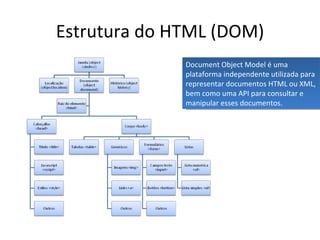
Estrutura do HTML (DOM) Document Object Model é uma plataforma independente utilizada para representar documentos HTML ou XML, bem como uma API para consultar e manipular esses documentos.
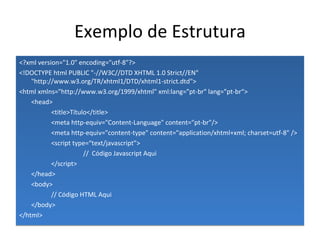
Exemplo de Estrutura <?xml version=&quot;1.0&quot; encoding=&quot;utf-8&quot;?> <!DOCTYPE html PUBLIC &quot;-//W3C//DTD XHTML 1.0 Strict//EN&quot; &quot;http://www.w3.org/TR/xhtml1/DTD/xhtml1-strict.dtd&quot;> <html xmlns=&quot;http://www.w3.org/1999/xhtml&quot; xml:lang=&quot;pt-br&quot; lang=&quot;pt-br“> <head> <title>Título</title> <meta http-equiv=&quot;Content-Language&quot; content=&quot;pt-br&quot;/> <meta http-equiv=&quot;content-type&quot; content=&quot;application/xhtml+xml; charset=utf-8&quot; /> <script type=“text/javascript”> //  Código Javascript Aqui </script> </head> <body> // Código HTML Aqui </body> </html>
Exemplos de código HTML Texto Listas Tabelas Formulários Outros
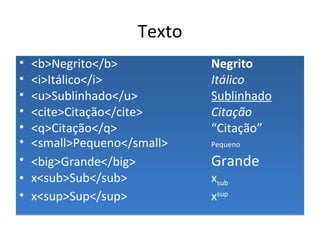
Texto <b>Negrito</b> Negrito   <i>Itálico</i> Itálico <u>Sublinhado</u> Sublinhado <cite>Citação</cite> Citação <q>Citação</q> “Citação” <small>Pequeno</small> Pequeno <big>Grande</big> Grande x<sub>Sub</sub> x sub   x<sup>Sup</sup> x sup
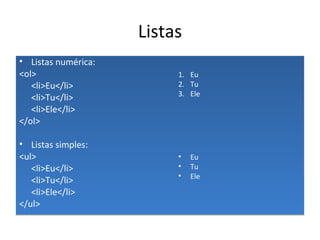
Listas Listas numérica: <ol> <li>Eu</li> <li>Tu</li> <li>Ele</li> </ol> Listas simples: <ul> <li>Eu</li> <li>Tu</li> <li>Ele</li> </ul> Eu Tu Ele Eu Tu Ele
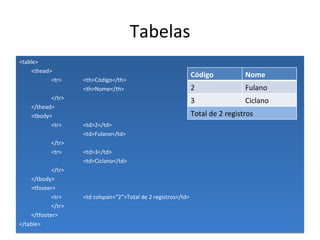
Tabelas <table> <thead> <tr> <th>Código</th> <th>Nome</th> </tr> </thead> <tbody> <tr> <td>2</td> <td>Fulano</td> </tr> <tr> <td>3</td> <td>Ciclano</td> </tr> </tbody> <tfooter> <tr> <td colspan=“2”>Total de 2 registros</td> </tr> </tfooter> </table> Código Nome 2 Fulano 3 Ciclano Total de 2 registros
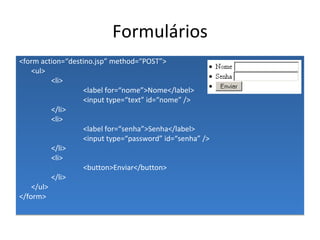
Formulários <form action=“destino.jsp” method=“POST”> <ul> <li> <label for=“nome”>Nome</label> <input type=“text” id=“nome” /> </li> <li> <label for=“senha”>Senha</label> <input type=“password” id=“senha” /> </li> <li> <button>Enviar</button> </li> </ul> </form>
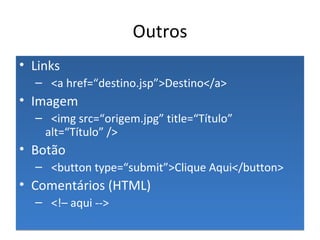
Outros Links <a href=“destino.jsp”>Destino</a> Imagem <img src=“origem.jpg” title=“Título” alt=“Título” /> Botão <button type=“submit”>Clique Aqui</button> Comentários (HTML) <!– aqui -->
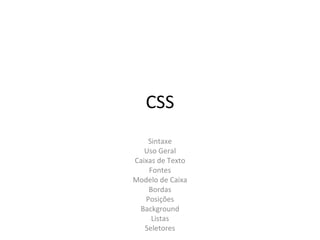
CSS Sintaxe Uso Geral Caixas de Texto Fontes Modelo de Caixa Bordas Posições Background Listas Seletores
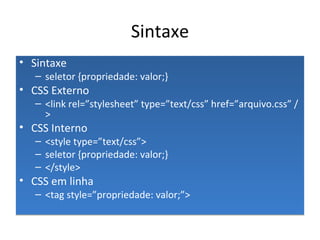
Sintaxe Sintaxe seletor {propriedade: valor;} CSS Externo <link rel=”stylesheet” type=”text/css”  href=”arquivo.css” /> CSS Interno <style type=”text/css”> seletor {propriedade: valor;} </style> CSS em linha <tag style=”propriedade: valor;”>
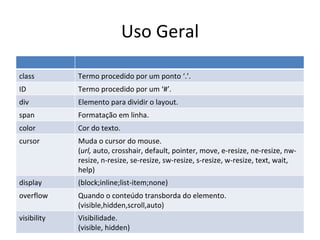
Uso Geral class Termo procedido por um ponto ‘.’. ID Termo procedido por um ‘#’. div Elemento para dividir o layout. span Formatação em linha. color Cor do texto. cursor Muda o cursor do mouse. ( url,  auto, crosshair, default, pointer, move, e-resize, ne-resize, nw-resize, n-resize, se-resize, sw-resize, s-resize, w-resize, text, wait, help) display (block;inline;list-item;none) overflow Quando o conteúdo transborda do elemento. (visible,hidden,scroll,auto) visibility Visibilidade. (visible, hidden)
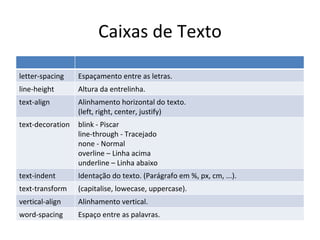
Caixas de Texto letter-spacing Espaçamento entre as letras. line-height Altura da entrelinha. text-align Alinhamento horizontal do texto. (left, right, center, justify) text-decoration blink - Piscar line-through - Tracejado none - Normal overline – Linha acima underline – Linha abaixo text-indent Identação do texto. (Parágrafo em %, px, cm, ...). text-transform (capitalise, lowecase, uppercase). vertical-align Alinhamento vertical. word-spacing Espaço entre as palavras.
Fontes font-style (italic, normal) font-variant (normal, small-caps) font-weight (bold, normal, lighter, bolder, integer[100-900]) font-size Tamanho da fonte. font-family Especifica a família da fonte. (Arial,Verdana,...) font Style, variant, weight, size, family. Ex: font: italic small-caps bold 12px arial;
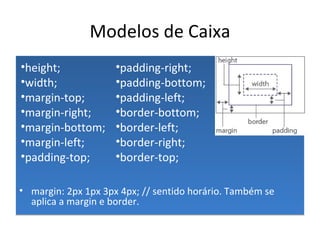
Modelos de Caixa margin: 2px 1px 3px 4px; // sentido horário. Também se aplica a margin e border. padding-right; padding-bottom; padding-left; border-bottom; border-left; border-right; border-top; height; width; margin-top; margin-right; margin-bottom; margin-left; padding-top;
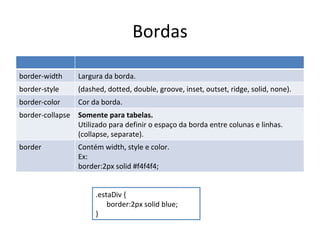
Bordas .estaDiv { border:2px solid blue; } border-width Largura da borda. border-style ( dashed, dotted, double, groove, inset,  outset, ridge, solid, none). border-color Cor da borda. border-collapse Somente para tabelas. Utilizado para definir o espaço da borda entre colunas e linhas. (collapse, separate). border Contém width, style e color. Ex: border:2px solid #f4f4f4;
Posições .EsteRetângulo { position:fixed; top:10px; right:0; } clear O elemento ignora o float de outros elementos. (both, left, right, none) float O elemento flutua para esquerda ou direita. (left, right, none) left Desloca o elemento pela esquerda. (auto, length values [pt, in, cm, px]) top Desloca o elemento pelo topo. (auto, length values [pt, in, cm, px]) position Posição. absolute – Posição relativa a tela. relative – Posição relativa ao seu local no html. static – Posição fixa na tela (independente do scroll do mouse). z-index Muda os elementos de camada. (auto, integer [higher numbers on top])
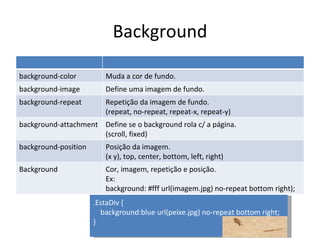
Background background-color Muda a cor de fundo. background-image Define uma imagem de fundo. background-repeat Repetição da imagem de fundo. (repeat, no-repeat, repeat-x, repeat-y) background-attachment Define se o background rola c/ a página. (scroll, fixed) background-position Posição da imagem. (x y), top, center, bottom, left, right) Background Cor, imagem, repetição e posição. Ex:  background: #fff url(imagem.jpg) no-repeat bottom right); .EstaDiv { background:blue url(peixe.jpg) no-repeat bottom right; }
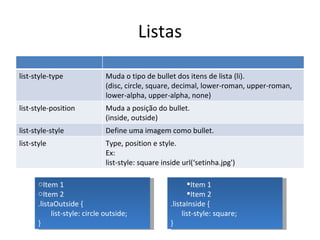
Listas Item 1 Item 2 .listaInside { list-style: square; } Item 1 Item 2 .listaOutside { list-style: circle outside; } list-style-type Muda o tipo de bullet dos itens de lista (li). (disc, circle, square, decimal, lower-roman, upper-roman, lower-alpha, upper-alpha, none) list-style-position Muda a posição do bullet. (inside, outside) list-style-style Define uma imagem como bullet. list-style Type, position e style. Ex: list-style: square inside url(‘setinha.jpg')
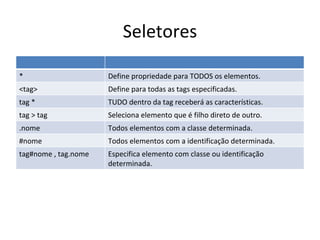
Seletores * Define propriedade para TODOS os elementos. <tag> Define para todas as tags especificadas. tag * TUDO dentro da tag receberá as características. tag > tag Seleciona elemento que é filho direto de outro. .nome Todos elementos com a classe determinada. #nome Todos elementos com a identificação determinada. tag#nome , tag.nome Especifica elemento com classe ou identificação determinada.
Referências Duvidas? www.w3schools.com http://en.wikipedia.org/wiki/HTML_DOM http://www.w3schools.com/Css/css_reference.asp Tableless.com.br – Referência rápida de CSS (Em anexo) Helton Marinho Site www.ninsas.com Blog xhelton.wordpress.com

Aprenda HTML e CSS

  • 1.
    Manual HTML Estruturado HTML (DOM) Exemplo de Estrutura
  • 2.
    Estrutura do HTML(DOM) Document Object Model é uma plataforma independente utilizada para representar documentos HTML ou XML, bem como uma API para consultar e manipular esses documentos.
  • 3.
    Exemplo de Estrutura<?xml version=&quot;1.0&quot; encoding=&quot;utf-8&quot;?> <!DOCTYPE html PUBLIC &quot;-//W3C//DTD XHTML 1.0 Strict//EN&quot; &quot;http://www.w3.org/TR/xhtml1/DTD/xhtml1-strict.dtd&quot;> <html xmlns=&quot;http://www.w3.org/1999/xhtml&quot; xml:lang=&quot;pt-br&quot; lang=&quot;pt-br“> <head> <title>Título</title> <meta http-equiv=&quot;Content-Language&quot; content=&quot;pt-br&quot;/> <meta http-equiv=&quot;content-type&quot; content=&quot;application/xhtml+xml; charset=utf-8&quot; /> <script type=“text/javascript”> // Código Javascript Aqui </script> </head> <body> // Código HTML Aqui </body> </html>
  • 4.
    Exemplos de códigoHTML Texto Listas Tabelas Formulários Outros
  • 5.
    Texto <b>Negrito</b> Negrito <i>Itálico</i> Itálico <u>Sublinhado</u> Sublinhado <cite>Citação</cite> Citação <q>Citação</q> “Citação” <small>Pequeno</small> Pequeno <big>Grande</big> Grande x<sub>Sub</sub> x sub x<sup>Sup</sup> x sup
  • 6.
    Listas Listas numérica:<ol> <li>Eu</li> <li>Tu</li> <li>Ele</li> </ol> Listas simples: <ul> <li>Eu</li> <li>Tu</li> <li>Ele</li> </ul> Eu Tu Ele Eu Tu Ele
  • 7.
    Tabelas <table> <thead><tr> <th>Código</th> <th>Nome</th> </tr> </thead> <tbody> <tr> <td>2</td> <td>Fulano</td> </tr> <tr> <td>3</td> <td>Ciclano</td> </tr> </tbody> <tfooter> <tr> <td colspan=“2”>Total de 2 registros</td> </tr> </tfooter> </table> Código Nome 2 Fulano 3 Ciclano Total de 2 registros
  • 8.
    Formulários <form action=“destino.jsp”method=“POST”> <ul> <li> <label for=“nome”>Nome</label> <input type=“text” id=“nome” /> </li> <li> <label for=“senha”>Senha</label> <input type=“password” id=“senha” /> </li> <li> <button>Enviar</button> </li> </ul> </form>
  • 9.
    Outros Links <ahref=“destino.jsp”>Destino</a> Imagem <img src=“origem.jpg” title=“Título” alt=“Título” /> Botão <button type=“submit”>Clique Aqui</button> Comentários (HTML) <!– aqui -->
  • 10.
    CSS Sintaxe UsoGeral Caixas de Texto Fontes Modelo de Caixa Bordas Posições Background Listas Seletores
  • 11.
    Sintaxe Sintaxe seletor{propriedade: valor;} CSS Externo <link rel=”stylesheet” type=”text/css” href=”arquivo.css” /> CSS Interno <style type=”text/css”> seletor {propriedade: valor;} </style> CSS em linha <tag style=”propriedade: valor;”>
  • 12.
    Uso Geral classTermo procedido por um ponto ‘.’. ID Termo procedido por um ‘#’. div Elemento para dividir o layout. span Formatação em linha. color Cor do texto. cursor Muda o cursor do mouse. ( url, auto, crosshair, default, pointer, move, e-resize, ne-resize, nw-resize, n-resize, se-resize, sw-resize, s-resize, w-resize, text, wait, help) display (block;inline;list-item;none) overflow Quando o conteúdo transborda do elemento. (visible,hidden,scroll,auto) visibility Visibilidade. (visible, hidden)
  • 13.
    Caixas de Textoletter-spacing Espaçamento entre as letras. line-height Altura da entrelinha. text-align Alinhamento horizontal do texto. (left, right, center, justify) text-decoration blink - Piscar line-through - Tracejado none - Normal overline – Linha acima underline – Linha abaixo text-indent Identação do texto. (Parágrafo em %, px, cm, ...). text-transform (capitalise, lowecase, uppercase). vertical-align Alinhamento vertical. word-spacing Espaço entre as palavras.
  • 14.
    Fontes font-style (italic,normal) font-variant (normal, small-caps) font-weight (bold, normal, lighter, bolder, integer[100-900]) font-size Tamanho da fonte. font-family Especifica a família da fonte. (Arial,Verdana,...) font Style, variant, weight, size, family. Ex: font: italic small-caps bold 12px arial;
  • 15.
    Modelos de Caixamargin: 2px 1px 3px 4px; // sentido horário. Também se aplica a margin e border. padding-right; padding-bottom; padding-left; border-bottom; border-left; border-right; border-top; height; width; margin-top; margin-right; margin-bottom; margin-left; padding-top;
  • 16.
    Bordas .estaDiv {border:2px solid blue; } border-width Largura da borda. border-style ( dashed, dotted, double, groove, inset, outset, ridge, solid, none). border-color Cor da borda. border-collapse Somente para tabelas. Utilizado para definir o espaço da borda entre colunas e linhas. (collapse, separate). border Contém width, style e color. Ex: border:2px solid #f4f4f4;
  • 17.
    Posições .EsteRetângulo {position:fixed; top:10px; right:0; } clear O elemento ignora o float de outros elementos. (both, left, right, none) float O elemento flutua para esquerda ou direita. (left, right, none) left Desloca o elemento pela esquerda. (auto, length values [pt, in, cm, px]) top Desloca o elemento pelo topo. (auto, length values [pt, in, cm, px]) position Posição. absolute – Posição relativa a tela. relative – Posição relativa ao seu local no html. static – Posição fixa na tela (independente do scroll do mouse). z-index Muda os elementos de camada. (auto, integer [higher numbers on top])
  • 18.
    Background background-color Mudaa cor de fundo. background-image Define uma imagem de fundo. background-repeat Repetição da imagem de fundo. (repeat, no-repeat, repeat-x, repeat-y) background-attachment Define se o background rola c/ a página. (scroll, fixed) background-position Posição da imagem. (x y), top, center, bottom, left, right) Background Cor, imagem, repetição e posição. Ex: background: #fff url(imagem.jpg) no-repeat bottom right); .EstaDiv { background:blue url(peixe.jpg) no-repeat bottom right; }
  • 19.
    Listas Item 1Item 2 .listaInside { list-style: square; } Item 1 Item 2 .listaOutside { list-style: circle outside; } list-style-type Muda o tipo de bullet dos itens de lista (li). (disc, circle, square, decimal, lower-roman, upper-roman, lower-alpha, upper-alpha, none) list-style-position Muda a posição do bullet. (inside, outside) list-style-style Define uma imagem como bullet. list-style Type, position e style. Ex: list-style: square inside url(‘setinha.jpg')
  • 20.
    Seletores * Definepropriedade para TODOS os elementos. <tag> Define para todas as tags especificadas. tag * TUDO dentro da tag receberá as características. tag > tag Seleciona elemento que é filho direto de outro. .nome Todos elementos com a classe determinada. #nome Todos elementos com a identificação determinada. tag#nome , tag.nome Especifica elemento com classe ou identificação determinada.
  • 21.
    Referências Duvidas? www.w3schools.comhttp://en.wikipedia.org/wiki/HTML_DOM http://www.w3schools.com/Css/css_reference.asp Tableless.com.br – Referência rápida de CSS (Em anexo) Helton Marinho Site www.ninsas.com Blog xhelton.wordpress.com