

© 2016, Amazon Web Services, Inc. or its Affiliates. All rights reserved.
Hugo Rozestraten, Solutions Architect
Belo Horizonte
Outubro, 2016
Criando e conectando seu data center virual
O que é esperado nessa sessão?
• Conceitos de VPC;
• Setup básico de VPC;
• Conectividade com ambiente on-premises;
• Monitoramento do tráfego VPC;
• Caso prático de utilização;
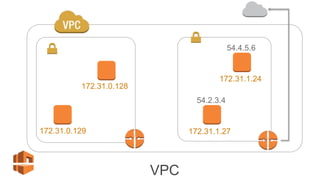
E então, o que é VPC?
• VPC – Virtual Private Cloud;
• Isolamento lógico de rede;
• Permite a segregação de redes (Público e Privada);
• Serviço de escopo de região;
• Permite a escolha do seu proprio range de Ips;
• Provê conexão com infraestrutura on-premises;
172.31.0.128
172.31.0.129
172.31.1.24
172.31.1.27
54.4.5.6
54.2.3.4
VPC
Criando VPC
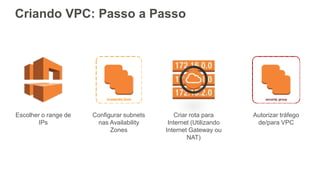
Criando VPC: Passo a Passo
Escolher o range de
IPs
Configurar subnets
nas Availability
Zones
Criar rota para
Internet (Utilizando
Internet Gateway ou
NAT)
Autorizar tráfego
de/para VPC
Escolher o range de IPs
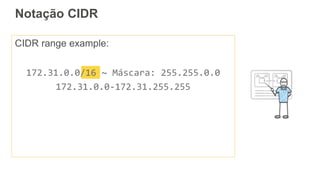
Notação CIDR
CIDR range example:
172.31.0.0/16 ~ Máscara: 255.255.0.0
172.31.0.0-172.31.255.255
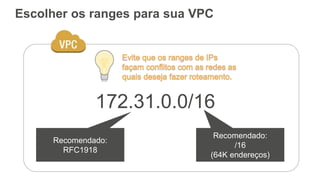
Escolher os ranges para sua VPC
172.31.0.0/16
Recomendado:
RFC1918
Recomendado:
/16
(64K endereços)
Configurar subnets nas
Availability Zones
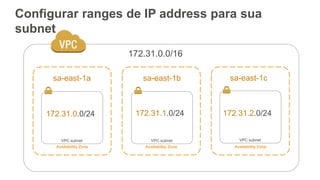
Configurar ranges de IP address para sua
subnet
172.31.0.0/16
Availability Zone Availability Zone Availability Zone
VPC subnet VPC subnet VPC subnet
172.31.0.0/24 172.31.1.0/24 172.31.2.0/24
sa-east-1a sa-east-1b sa-east-1c
Demo
Criação de VPC e
subnets
Criar rotas para Internet
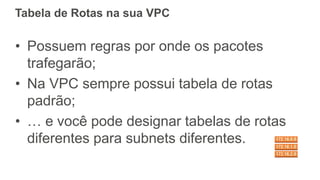
Tabela de Rotas na sua VPC
• Possuem regras por onde os pacotes
trafegarão;
• Na VPC sempre possui tabela de rotas
padrão;
• … e você pode designar tabelas de rotas
diferentes para subnets diferentes.
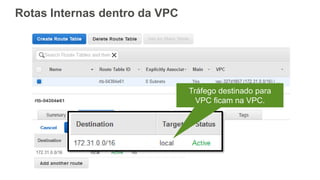
Tráfego destinado para
VPC ficam na VPC.
Rotas Internas dentro da VPC
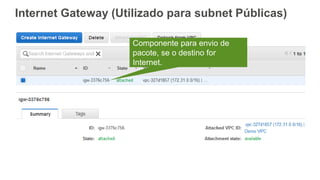
Internet Gateway (Utilizado para subnet Públicas)
Componente para envio de
pacote, se o destino for
Internet.
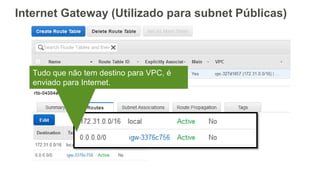
Tudo que não tem destino para VPC, é
enviado para Internet.
Internet Gateway (Utilizado para subnet Públicas)
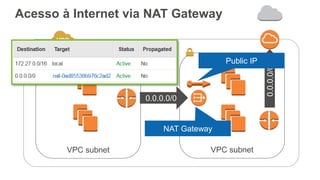
Acesso à Internet via NAT Gateway
VPC subnet VPC subnet
0.0.0.0/0
0.0.0.0/0
Public IP
NAT Gateway
Autorizar tráfego de/para VPC
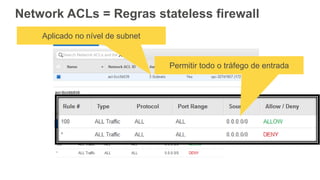
Network ACLs = Regras stateless firewall
Permitir todo o tráfego de entrada
Aplicado no nível de subnet
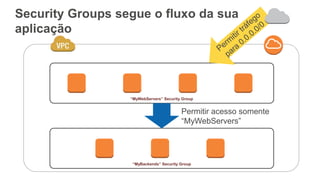
Security Groups segue o fluxo da sua
aplicação
“MyWebServers” Security Group
“MyBackends” Security Group
Permitir acesso somente
“MyWebServers”
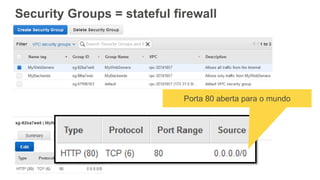
Security Groups = stateful firewall
Porta 80 aberta para o mundo
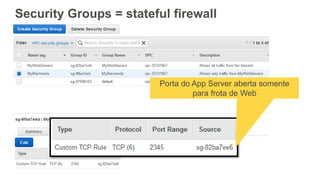
Security Groups = stateful firewall
Porta do App Server aberta somente
para frota de Web
Demo
Criação de Internet
Gateway e Security
Groups
Conectividade na AWS
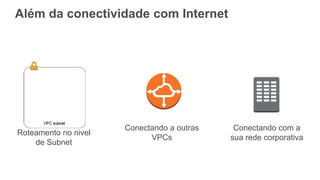
Além da conectividade com Internet
Roteamento no nivel
de Subnet
Conectando com a
sua rede corporativa
Conectando a outras
VPCs
Roteamento no nível de subnets
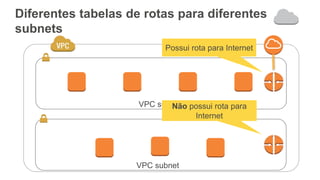
Diferentes tabelas de rotas para diferentes
subnets
VPC subnet
VPC subnet
Possui rota para Internet
Não possui rota para
Internet
Conectando à outras VPC:
VPC Peering
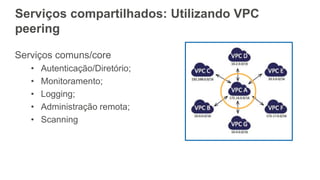
Serviços compartilhados: Utilizando VPC
peering
Serviços comuns/core
• Autenticação/Diretório;
• Monitoramento;
• Logging;
• Administração remota;
• Scanning
Conectando sua rede:
Virtual Private Network &
Direct Connect
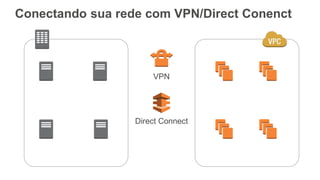
Conectando sua rede com VPN/Direct Conenct
VPN
Direct Connect
AWS VPN
• Rotas estáticas ou dinâmicas (BGP);
• Conexões iniciadas pelo Customer Gateway (definição
do appliance do cliente);
• IPSec Security Associations em modo de túnel;
• Sempre é disponibilizado 2 Ips para conexão (HA);
• Conectividade feita pela Internet;
• Baixo custo de serviço;
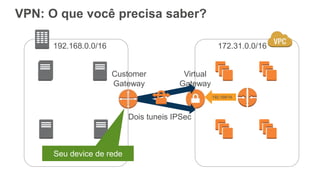
VPN: O que você precisa saber?
Customer
Gateway
Virtual
Gateway
Dois tuneis IPSec
192.168.0.0/16 172.31.0.0/16
192.168/16
Seu device de rede
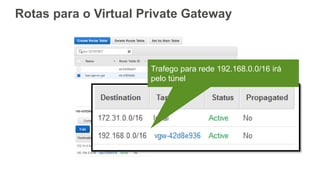
Rotas para o Virtual Private Gateway
Trafego para rede 192.168.0.0/16 irá
pelo túnel
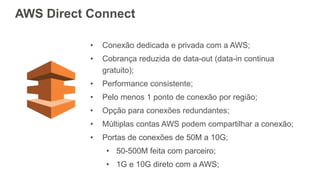
• Conexão dedicada e privada com a AWS;
• Cobrança reduzida de data-out (data-in continua
gratuito);
• Performance consistente;
• Pelo menos 1 ponto de conexão por região;
• Opção para conexões redundantes;
• Múltiplas contas AWS podem compartilhar a conexão;
• Portas de conexões de 50M a 10G;
• 50-500M feita com parceiro;
• 1G e 10G direto com a AWS;
AWS Direct Connect
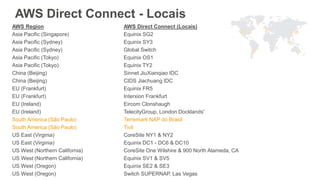
AWS Direct Connect - Locais
AWS Region AWS Direct Connect (Locais)
Asia Pacific (Singapore) Equinix SG2
Asia Pacific (Sydney) Equinix SY3
Asia Pacific (Sydney) Global Switch
Asia Pacific (Tokyo) Equinix OS1
Asia Pacific (Tokyo) Equinix TY2
China (Beijing) Sinnet JiuXianqiao IDC
China (Beijing) CIDS Jiachuang IDC
EU (Frankfurt) Equinix FR5
EU (Frankfurt) Interxion Frankfurt
EU (Ireland) Eircom Clonshaugh
EU (Ireland) TelecityGroup, London Docklands'
South America (São Paulo) Terremark NAP do Brasil
South America (São Paulo) Tivit
US East (Virginia) CoreSite NY1 & NY2
US East (Virginia) Equinix DC1 - DC6 & DC10
US West (Northern California) CoreSite One Wilshire & 900 North Alameda, CA
US West (Northern California) Equinix SV1 & SV5
US West (Oregon) Equinix SE2 & SE3
US West (Oregon) Switch SUPERNAP, Las Vegas
VPN vs DirectConnect
• Ambos permitem conexão segura entre sua
rede e VPC;
• VPN é um par de túnel IPSec que trafegará
pela Internet;
• DirectConnect é conexão dedicada e
latência controlada;
• Para workloads de alta disponibilidade:
Utilizar ambos (failover);
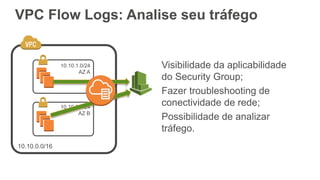
VPC Flow Logs: Analise seu tráfego
Visibilidade da aplicabilidade
do Security Group;
Fazer troubleshooting de
conectividade de rede;
Possibilidade de analizar
tráfego.
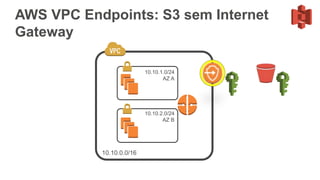
AWS VPC Endpoints: S3 sem Internet
Gateway
O Desafio
Criar novo ambiente de desenvolvimento
com gestão simplificada, flexível e
consumido sob demanda.
Focar na eficiência do consumo de
recursos e automatização do backend.
Respeitar a política de segurança e
aproveitar serviços integrados ao
ambiente interno da TV.
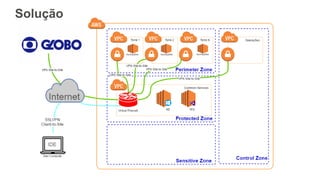
Solução
Recapitulando
Recapitulando
• VPC;
• Subnets Públicas vs Subnets Privadas;
• Tabelas de Rota;
• VPC VPN vs Direct Connect;
• Endpoints na rede privada;
Obrigado!

Criando e conectando seu datacenter virtual

  • 1.
    © 2016, AmazonWeb Services, Inc. or its Affiliates. All rights reserved. Hugo Rozestraten, Solutions Architect Belo Horizonte Outubro, 2016 Criando e conectando seu data center virual
  • 2.
    O que éesperado nessa sessão? • Conceitos de VPC; • Setup básico de VPC; • Conectividade com ambiente on-premises; • Monitoramento do tráfego VPC; • Caso prático de utilização;
  • 3.
    E então, oque é VPC? • VPC – Virtual Private Cloud; • Isolamento lógico de rede; • Permite a segregação de redes (Público e Privada); • Serviço de escopo de região; • Permite a escolha do seu proprio range de Ips; • Provê conexão com infraestrutura on-premises;
  • 4.
  • 5.
  • 6.
    Criando VPC: Passoa Passo Escolher o range de IPs Configurar subnets nas Availability Zones Criar rota para Internet (Utilizando Internet Gateway ou NAT) Autorizar tráfego de/para VPC
  • 7.
  • 8.
    Notação CIDR CIDR rangeexample: 172.31.0.0/16 ~ Máscara: 255.255.0.0 172.31.0.0-172.31.255.255
  • 9.
    Escolher os rangespara sua VPC 172.31.0.0/16 Recomendado: RFC1918 Recomendado: /16 (64K endereços)
  • 10.
  • 11.
    Configurar ranges deIP address para sua subnet 172.31.0.0/16 Availability Zone Availability Zone Availability Zone VPC subnet VPC subnet VPC subnet 172.31.0.0/24 172.31.1.0/24 172.31.2.0/24 sa-east-1a sa-east-1b sa-east-1c
  • 12.
  • 14.
  • 15.
    Tabela de Rotasna sua VPC • Possuem regras por onde os pacotes trafegarão; • Na VPC sempre possui tabela de rotas padrão; • … e você pode designar tabelas de rotas diferentes para subnets diferentes.
  • 16.
    Tráfego destinado para VPCficam na VPC. Rotas Internas dentro da VPC
  • 17.
    Internet Gateway (Utilizadopara subnet Públicas) Componente para envio de pacote, se o destino for Internet.
  • 18.
    Tudo que nãotem destino para VPC, é enviado para Internet. Internet Gateway (Utilizado para subnet Públicas)
  • 19.
    Acesso à Internetvia NAT Gateway VPC subnet VPC subnet 0.0.0.0/0 0.0.0.0/0 Public IP NAT Gateway
  • 20.
  • 21.
    Network ACLs =Regras stateless firewall Permitir todo o tráfego de entrada Aplicado no nível de subnet
  • 22.
    Security Groups segueo fluxo da sua aplicação “MyWebServers” Security Group “MyBackends” Security Group Permitir acesso somente “MyWebServers”
  • 23.
    Security Groups =stateful firewall Porta 80 aberta para o mundo
  • 24.
    Security Groups =stateful firewall Porta do App Server aberta somente para frota de Web
  • 25.
  • 27.
  • 28.
    Além da conectividadecom Internet Roteamento no nivel de Subnet Conectando com a sua rede corporativa Conectando a outras VPCs
  • 29.
  • 30.
    Diferentes tabelas derotas para diferentes subnets VPC subnet VPC subnet Possui rota para Internet Não possui rota para Internet
  • 31.
    Conectando à outrasVPC: VPC Peering
  • 32.
    Serviços compartilhados: UtilizandoVPC peering Serviços comuns/core • Autenticação/Diretório; • Monitoramento; • Logging; • Administração remota; • Scanning
  • 33.
    Conectando sua rede: VirtualPrivate Network & Direct Connect
  • 34.
    Conectando sua redecom VPN/Direct Conenct VPN Direct Connect
  • 35.
    AWS VPN • Rotasestáticas ou dinâmicas (BGP); • Conexões iniciadas pelo Customer Gateway (definição do appliance do cliente); • IPSec Security Associations em modo de túnel; • Sempre é disponibilizado 2 Ips para conexão (HA); • Conectividade feita pela Internet; • Baixo custo de serviço;
  • 36.
    VPN: O quevocê precisa saber? Customer Gateway Virtual Gateway Dois tuneis IPSec 192.168.0.0/16 172.31.0.0/16 192.168/16 Seu device de rede
  • 37.
    Rotas para oVirtual Private Gateway Trafego para rede 192.168.0.0/16 irá pelo túnel
  • 38.
    • Conexão dedicadae privada com a AWS; • Cobrança reduzida de data-out (data-in continua gratuito); • Performance consistente; • Pelo menos 1 ponto de conexão por região; • Opção para conexões redundantes; • Múltiplas contas AWS podem compartilhar a conexão; • Portas de conexões de 50M a 10G; • 50-500M feita com parceiro; • 1G e 10G direto com a AWS; AWS Direct Connect
  • 39.
    AWS Direct Connect- Locais AWS Region AWS Direct Connect (Locais) Asia Pacific (Singapore) Equinix SG2 Asia Pacific (Sydney) Equinix SY3 Asia Pacific (Sydney) Global Switch Asia Pacific (Tokyo) Equinix OS1 Asia Pacific (Tokyo) Equinix TY2 China (Beijing) Sinnet JiuXianqiao IDC China (Beijing) CIDS Jiachuang IDC EU (Frankfurt) Equinix FR5 EU (Frankfurt) Interxion Frankfurt EU (Ireland) Eircom Clonshaugh EU (Ireland) TelecityGroup, London Docklands' South America (São Paulo) Terremark NAP do Brasil South America (São Paulo) Tivit US East (Virginia) CoreSite NY1 & NY2 US East (Virginia) Equinix DC1 - DC6 & DC10 US West (Northern California) CoreSite One Wilshire & 900 North Alameda, CA US West (Northern California) Equinix SV1 & SV5 US West (Oregon) Equinix SE2 & SE3 US West (Oregon) Switch SUPERNAP, Las Vegas
  • 40.
    VPN vs DirectConnect •Ambos permitem conexão segura entre sua rede e VPC; • VPN é um par de túnel IPSec que trafegará pela Internet; • DirectConnect é conexão dedicada e latência controlada; • Para workloads de alta disponibilidade: Utilizar ambos (failover);
  • 41.
    VPC Flow Logs:Analise seu tráfego Visibilidade da aplicabilidade do Security Group; Fazer troubleshooting de conectividade de rede; Possibilidade de analizar tráfego.
  • 42.
    AWS VPC Endpoints:S3 sem Internet Gateway
  • 43.
    O Desafio Criar novoambiente de desenvolvimento com gestão simplificada, flexível e consumido sob demanda. Focar na eficiência do consumo de recursos e automatização do backend. Respeitar a política de segurança e aproveitar serviços integrados ao ambiente interno da TV.
  • 44.
  • 45.
  • 46.
    Recapitulando • VPC; • SubnetsPúblicas vs Subnets Privadas; • Tabelas de Rota; • VPC VPN vs Direct Connect; • Endpoints na rede privada;
  • 47.

Notas do Editor

  • #2 Dear presenter, This deck is very animation-heavy. You’ll definitely want a few rehearsals to get your choreography down. In the notes on the slides I have some talking points that may not be obvious from the pictures, but which we definitely want customers to get. Good luck! Becky Talking points: This talk is for a technical audience who is relatively new to networking features in EC2. That includes both those of you who have built and managed data centers (might do a show of hands) and those who do not wish to be focused on your network. VPC is for both of you.
  • #5 … and that is exactly what VPC is. A Virtual Private Cloud is the network for your EC2 instances in the cloud. You get a lot of the control you would get over a non-virtual network that you manage by hand in your own data center. ‘V’ is for ‘virtual’, meaning that --unlike in your data center, where you had to have deep networking expertise in order to have full control over your network -- in a Virtual Private Cloud it’s easy and flexible. And the ‘P’ is for private, meaning that this network is yours; you control: CLICK The range of IP addresses and -- if you want -- even individual IP addresses in your network CLICK You can organize your network into subnetworks, with different routing rules applied to each (even if you are not a routing expert) CLICK You get to decide what kinds of connectivity you get. For example, you can choose to have all, part, or none of your VPC accessible to and from the Internet.
  • #6 Let’s get started. We’re going to set up the simplest VPC possible, which is a VPC with Internet access. For many of you, a VPC like the one we’re about to set up will completely meet your networking needs in EC2 and may be everything you need to know about connectivity in EC2.
  • #7 In brief, what we’re going to do is… Decide what IP addresses to use in our network Decide how we divide our network into subnetworks Make our VPC reachable from the Internet And make sure that the traffic we want reaching our instances -- and only the traffic we want reaching our instances -- reaches our instances.
  • #10 Talking points: We recommend an RFC1918 range because this is what most people expect to see for IP addresses in a private network, which is what you have. We also recommend a /16 address range. It gives you plenty of space for eventual expansion. Unlike almost everything else in your VPC, this choice is fixed for your VPC. And since there are numerous ways to connect your VPC to other networks -- we’ll talk about that later -- you want to avoid conflicting with those ranges.
  • #12 Talking points. Define Availability Zones and explain that this is your tool for building highly available services on EC2. We recommend creating one subnet in each Availability Zone; this will allow you to launch EC2 instances in any of the Availability Zones. We also recommend, unless you have a reason to do otherwise, that you choose a /24 block for each subnet. This gives you space for 251 IP addresses in your subnet. (It’s not 256: In each subnet, we reserve the low four and one high address in the range.) You can always add or delete subnets later. Further, we recommend starting with exactly one of these subnets in each AZ: It gives you plenty of room in your VPC for new subnets, as you need them.
  • #13 Demo 1
  • #14 Demo 1
  • #15 Talking point: Everything interesting that happens with a VPC happens with a route. In this case, packets need to know how to get between your EC2 instances and the Internet.
  • #16 É algo dificil na TI tradicional, mas é bem simples na AWS;
  • #17 Tráfego que acontece dentro da VPC, fica dentro da VPC; Talking point: A brand-new route table contains just this single route. You’ll see that it talks about the address range of your VPC, and it says that those packets should be routed ‘local’ to the VPC. Traffic destined anywhere else goes nowhere. And sometimes this is what you want! But this is not what we want here: We want to be able to get to the Internet.
  • #18 Talking points: Those of you who think about availability might be wondering whether this Internet Gateway is a single point of failure. It isn’t. It’s an abstraction for routing to the Internet that is backed by something highly available.
  • #20 NAT Gateway foi anunciado em Setembro ultimo; NAT Gateway ficará em sua VPC pública; Serviço gerenciado; Let’s talk about this public/private subnet setup. Click The subnet on the right has a route to the Internet and is “public”; the subnet on the left doesn’t. But in some cases, your private-subnet EC2 instances have a need for outbound access to the Internet. Maybe they need to be able to reach a yum repo to update software. Those EC2 instances don’t have public IP addresses, though, so you will need their traffic NATted (spell it out: Network Address Translation) to a public IP address that you have. Click This is a new feature of VPC: As of December, you can now use a NAT Gateway. You can create a NAT Gateway in our console or our API. Click. That thing is a NAT Gateway Click. You’ll need to specify a public IP address -- an Elastic IP address. All your NATted traffic will appear, in the Internet, to be coming from this address. Click. And like everything else that has to do with VPC connectivity, you route your Internet-bound traffic to it. The rest is done for you. Like the Internet Gateway, it’s not a single point of failure. It’s something AWS manages for you in a highly-available way.
  • #21 We now can route traffic to the Internet. But that doesn’t mean you want to exchange traffic with just anywhere. VPC gives you two tools to do this job that -- in a traditional data center -- you’d do by managing firewalls.
  • #22 Talking points: We’ll start with Network ACLs, because it’s the simpler tool. You can configure NACL rules for both inbound and outbound traffic. NACLs are *not* connection-aware. Meaning that if you’re DENYing traffic to/from somewhere, it doesn’t matter if it’s a part of an established connection, it doesn’t reach your instance. These are a pretty blunt tool. I’ll say that these are used by customers less often than Security Groups, which is your other tool…
  • #23 Da um exemplo de Webserver ”virados para internet”… Servidor de aplicação usando porta 2345; Talking points: Security Groups are a more flexible tool than NACLs. A Security Group is what it sounds like -- a group. The members of the group are EC2 instances, which will often share a common purpose. For example, in this picture…
  • #24 Security Groups allow you to attach rules to this group of EC2 instances. They’re closed by default, meaning that unless I allow the traffic, the traffic won’t be let through. Security Groups let you reference CIDR blocks, like MyWebServers, which want to receive traffic from everywhere.
  • #25 They can also reference other Security Groups, like MyBackends. That’s convenient because you don’t need to stay on top of the elastic, changing membership of the MyWebServers Security Group. Another thing to note about Security Groups is that they are connection-aware. While we have Security Groups for both inbound and outbound traffic, if you allow a particular connection to be established outbound, the reply traffic will be authorized. For example, if your egress SG rules allow the MyBackends to initiate connections to, say, a yum repo, the reply traffic does not need to be explicitly authorized in the ingress SG rules.
  • #26 Demo 2
  • #27 Demo 2
  • #28 Segue: We’ve talked about what goes on in an Internet-connected VPC. Let’s talk about some other connectivity options for your VPC.
  • #31 Voltando para o mesmo caso que mostramos anteriormente (Webserver/APP Server); Segregação semelhante a que possui em TI tradicional; Alguma necessidade específica para que serviços dentro de VPC privada (não ficarão expostas); Backend possui dados sensíveis, não pode expor para internet; Talking points: In some cases, your network requirements will call for parts of your VPC to be completely disconnected from the Internet. A common reason for this might be compliance / auditing requirements, that require you to demonstrate that your resources are not routable from the Internet. It’s also something that customers sometimes choose for a belt-and-suspenders approach to security. In our documentation, the subnet with a route to the Internet is called a ‘public subnet,’ and the subnet without such a route is called a ‘private subnet.’ In point of fact, though, there is nothing inherently public about that ‘public subnet’; it is absolutely possible -- and in fact simpler -- to use Internet-connected VPCs with well-designed Security Groups. It’s plenty secure, and many customers choose this simpler option.
  • #33 No overlap; Comunicação privada; Security group Talking points: Mention that VPC Peering is your tool if you are trying to establish private connectivity across different accounts. You might have different accounts to make billing straightforward in your organization.
  • #34 Segue: We just talked about getting between VPCs, either in your own account or across accounts. Now let’s talk about ways to securely and privately connect your VPC to your own network, for example your own data center. You might be doing this as part of migrating to the cloud, or as part of a hybrid deployment.
  • #35 The two technologies for doing this are Virtual Private Network and DirectConnect. I’ll describe each of these, and then when you might choose each.
  • #36 Next, lets consider the requirements to establish a VPN between your customer gateway and the Virtual Private Gateway at AWS. Firstly, connections must be initiated by the customer gateway. This may mean you need to generate some ‘interesting’ traffic such that your device brings the connection up. We utilise a Pre-Shared Key for the IKE Security association and we then require your hardware to support IPSec SA’s in Tunnel mode. In terms of encryption, we currently support AES 128-bit encryption and use of the SHA-1 hashing function. DH Group 2 is used for Perfect Forward Secrecy and we support Dead Peer Detection. Finally, it’s important that your customer gateway supports the option to Fragment IP Packets before encryption – even if the Don’t Fragment (DF) header is set.
  • #37 VPN IPSec, documentado para um série de vendors; Static routes ou BGP; Here’s your data center, and here’s your VPC. Click. In your data center, you will need your own networking device, for example a router. There’s a list of Customer Gateway devices we have tested from several vendors in our documentation, with specific instructions for setting up each. Click On the VPC side, you’ll create a Virtual Gateway, or VGW. It has the word ‘gateway’ in it because, like the other gateways, it’s something you can route packets to in your route table. The VGW is our end of the VPN connection. Click. And, following the instructions for your Customer Gateway, we get two redundant encrypted IPSec tunnels established. These terminate in different Availability Zones on our side. We strongly recommend that you configure both tunnels.
  • #38 This gateway is like any other gateway in your VPC: You route data-center-bound traffic to it.
  • #39 Each AWS Region is associate with at least 1 Direct Connect Location. These locations are large co-lo facilties like Equinix or Coresite with large concentrations of customers. We extend private fiber from our AWS region to the Direct Connect locations associated to the same region. We set up a patch panel in a Meet Me Room and allow what it says on the box – Direct Connections into the Region If you already have a footprint in these locations, its an easy cross connect into Direct Connect. If not, you can work with one of our Telco Partners to establish last mile connectivity. (or your OWN telco) US-EAST-1, US-WEST-1, and EU-WEST-1 all have 2 DX locations Network data out from DX SEA is 0.02 per GB vs 0.12 per GB for US West Internet out (for first 10 TB) Recommend redundant fiber connection – or at least a VPN connection as a backup. DX will always be a preferred route by the VGW as long as its up.
  • #41 Talking point: More data to transfer, use Direct Connect.
  • #42 Lançado mais ou menos há 1 ano; Consegue ver os pacotes que estão sendo bloqueados; Talking point: VPC not only gives you flexible but precise control over the management of your network, it also gives you a level of visibility into what is actually going on in there. Without managing any infrastructure, you can turn on VPC Flow Logs and get aggregated packet and byte counts into any EC2 instances that you want.
  • #43 Another new feature of VPC from last year is VPC Endpoints for S3. S3 is a critical part of many applications in AWS; it’s often where your data lives. A VPC Endpoint is a secure gateway to S3 that allows you to specify Identity and Access Management policy both at the VPC end -- what your VPC can do in S3 -- and at the S3 bucket -- you can, for example, specify that only this VPC can interact with this bucket. And you can turn this on without changing any of your code or workflows with VPC.
  • #44 Dear presenter, This deck is very animation-heavy. You’ll definitely want a few rehearsals to get your choreography down. In the notes on the slides I have some talking points that may not be obvious from the pictures, but which we definitely want customers to get. Good luck! Becky Talking points: This talk is for a technical audience who is relatively new to networking features in EC2. That includes both those of you who have built and managed data centers (might do a show of hands) and those who do not wish to be focused on your network. VPC is for both of you.
  • #45 30 segundos para apresentar a empresa, rapidamente
  • #46 Os 4 (máximo) maiores desafios do projeto, que foram resolvidos pela utilização da nuvem da AWS
  • #47 Diagrama de solução, e explicar a solução, vantagens, etc
  • #48 Segue: Especially if you’re coming from a traditional networking environment, you know that operating DNS servers in your network is no small task. Fortunately, VPC does this for you.
  • #50 Outro: Being able to lock down your S3 access, being able to log traffic flows to your instance, managing DNS, and all the connectivity options we talked about: Whether you come from a deep networking background or not, all of these are your low-maintenance but high-control, high-flexibility, high-visibility for managing the secure virtual data center for your applications in the cloud. Thank you.