Sistemas Distribuídos
Linux Network Fault Tolerance
Frederico Madeira
LPIC­1, LPIC­2, CCNA
fred@madeira.eng.br
www.madeira.eng.br
Bonding
• O termo bonding significa agregação de portas
• Transforma múltiplas interfaces de rede em uma só
• Termos:
✔
Trunking na Sun
✔
Etherchannel na Cisco
✔
Bonding no Linux
✔
NIC Team noWindows
Tipos
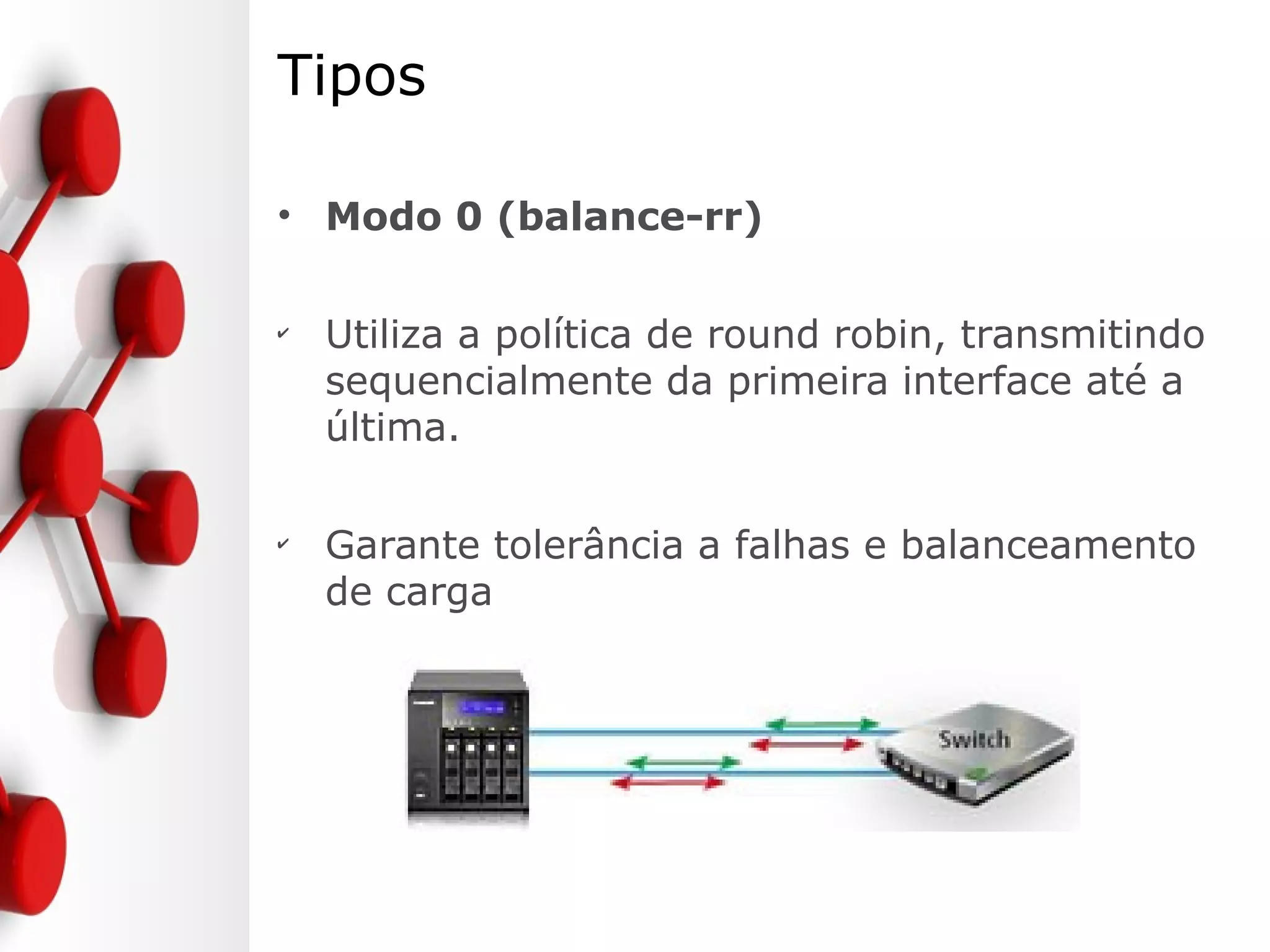
• Modo 0 (balance-rr)
✔
Utiliza a política de round robin, transmitindo
sequencialmente da primeira interface até a
última.
✔
Garante tolerância a falhas e balanceamento
de carga
Tipos
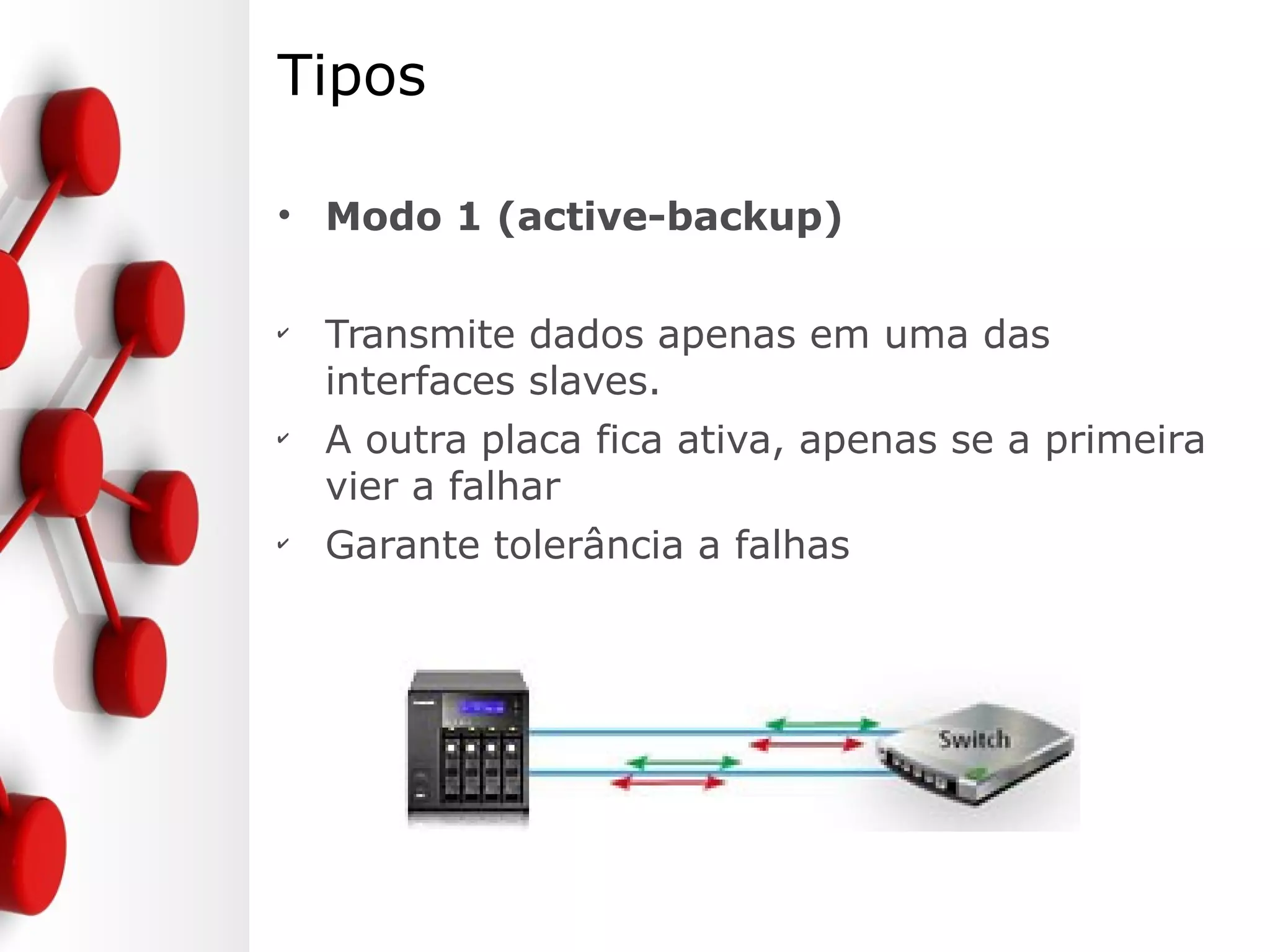
• Modo 1 (active-backup)
✔
Transmite dados apenas em uma das
interfaces slaves.
✔
A outra placa fica ativa, apenas se a primeira
vier a falhar
✔
Garante tolerância a falhas
Tipos
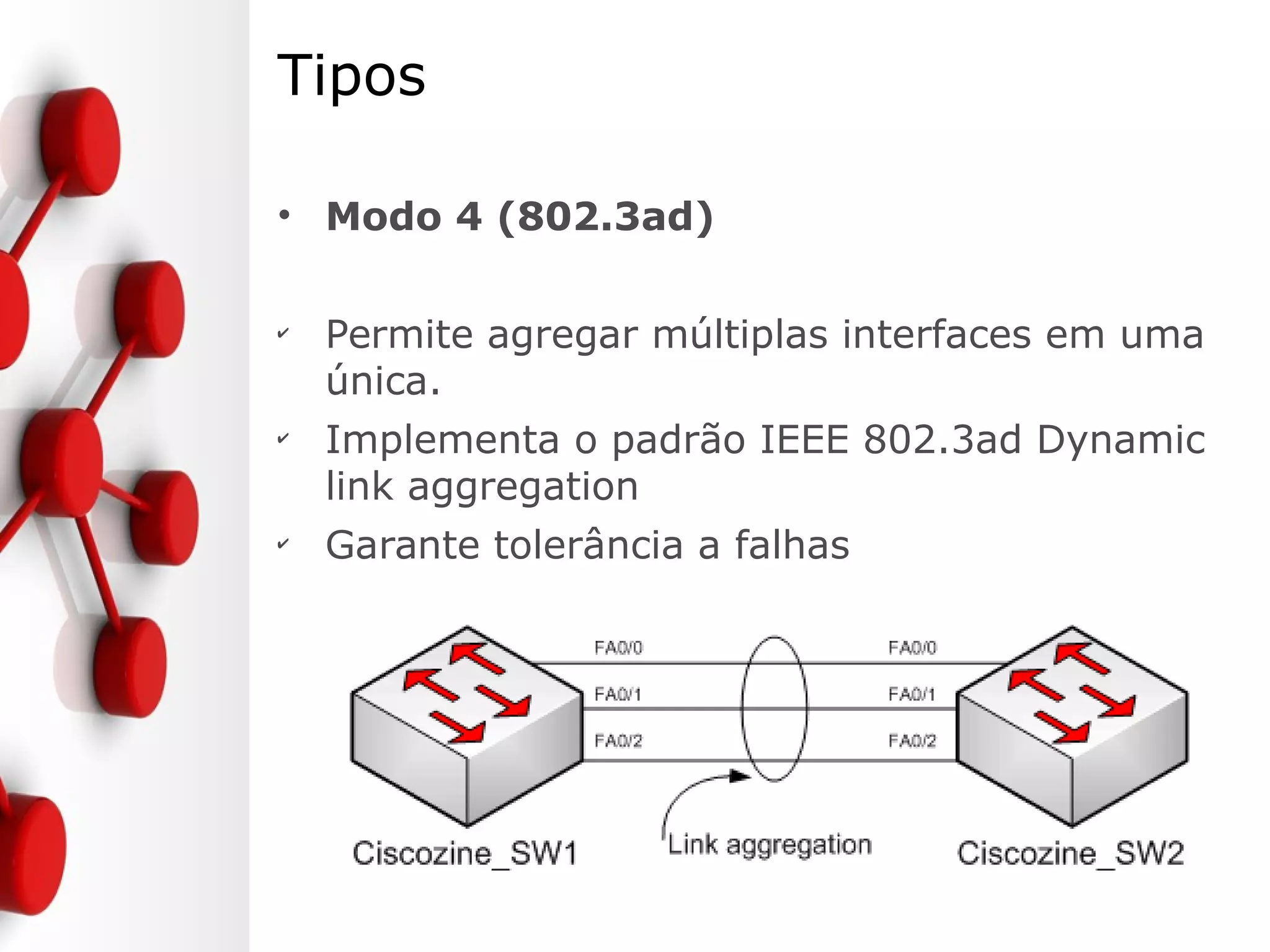
• Modo 4 (802.3ad)
✔
Permite agregar múltiplas interfaces em uma
única.
✔
Implementa o padrão IEEE 802.3ad Dynamic
link aggregation
✔
Garante tolerância a falhas
Configurando
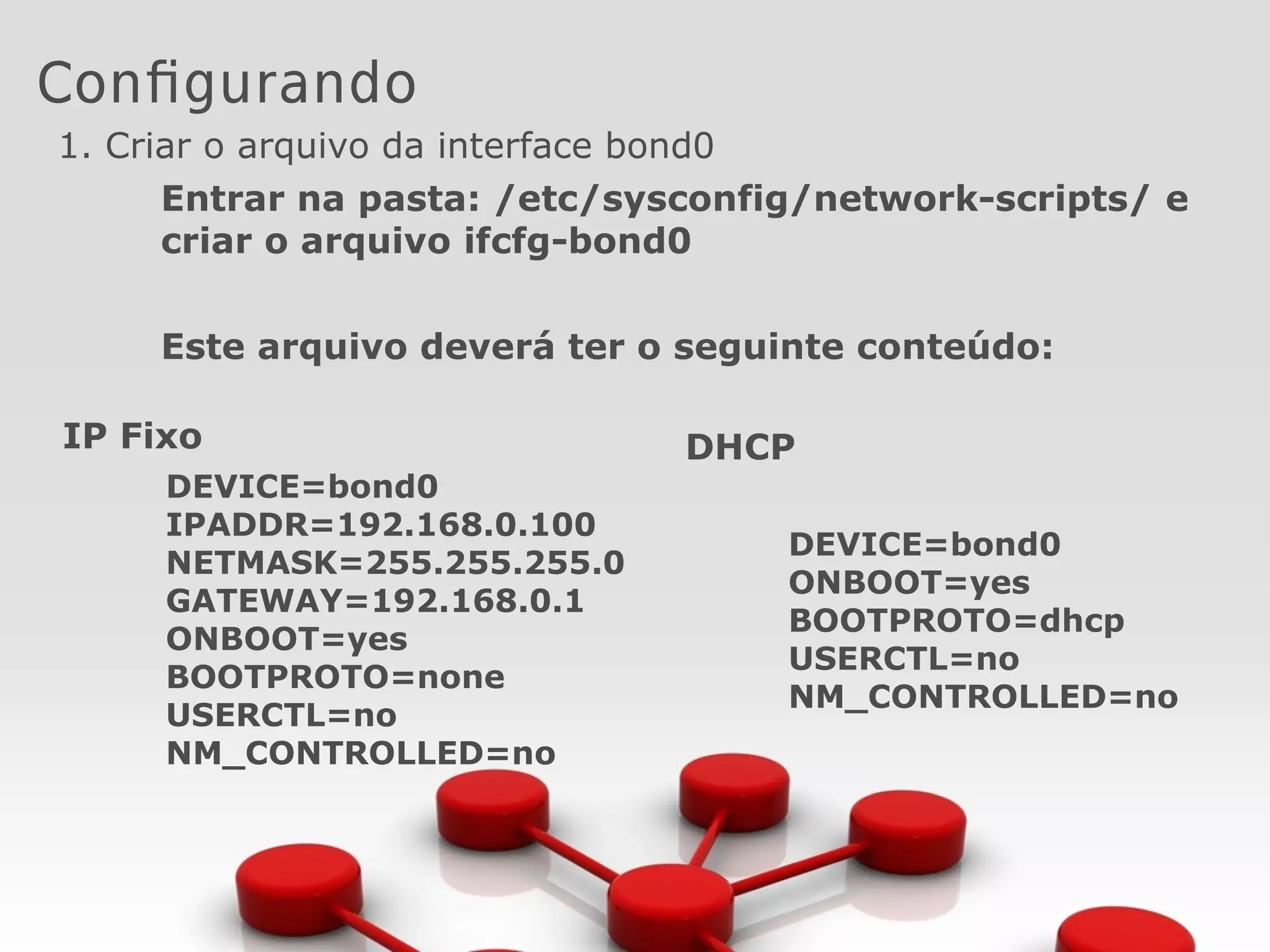
1. Criar o arquivo da interface bond0
Entrar na pasta: /etc/sysconfig/network-scripts/ e
criar o arquivo ifcfg-bond0
Este arquivo deverá ter o seguinte conteúdo:
IP Fixo
DEVICE=bond0
IPADDR=192.168.0.100
NETMASK=255.255.255.0
GATEWAY=192.168.0.1
ONBOOT=yes
BOOTPROTO=none
USERCTL=no
NM_CONTROLLED=no
DHCP
DEVICE=bond0
ONBOOT=yes
BOOTPROTO=dhcp
USERCTL=no
NM_CONTROLLED=no
Configurando as Interfaces Slaves
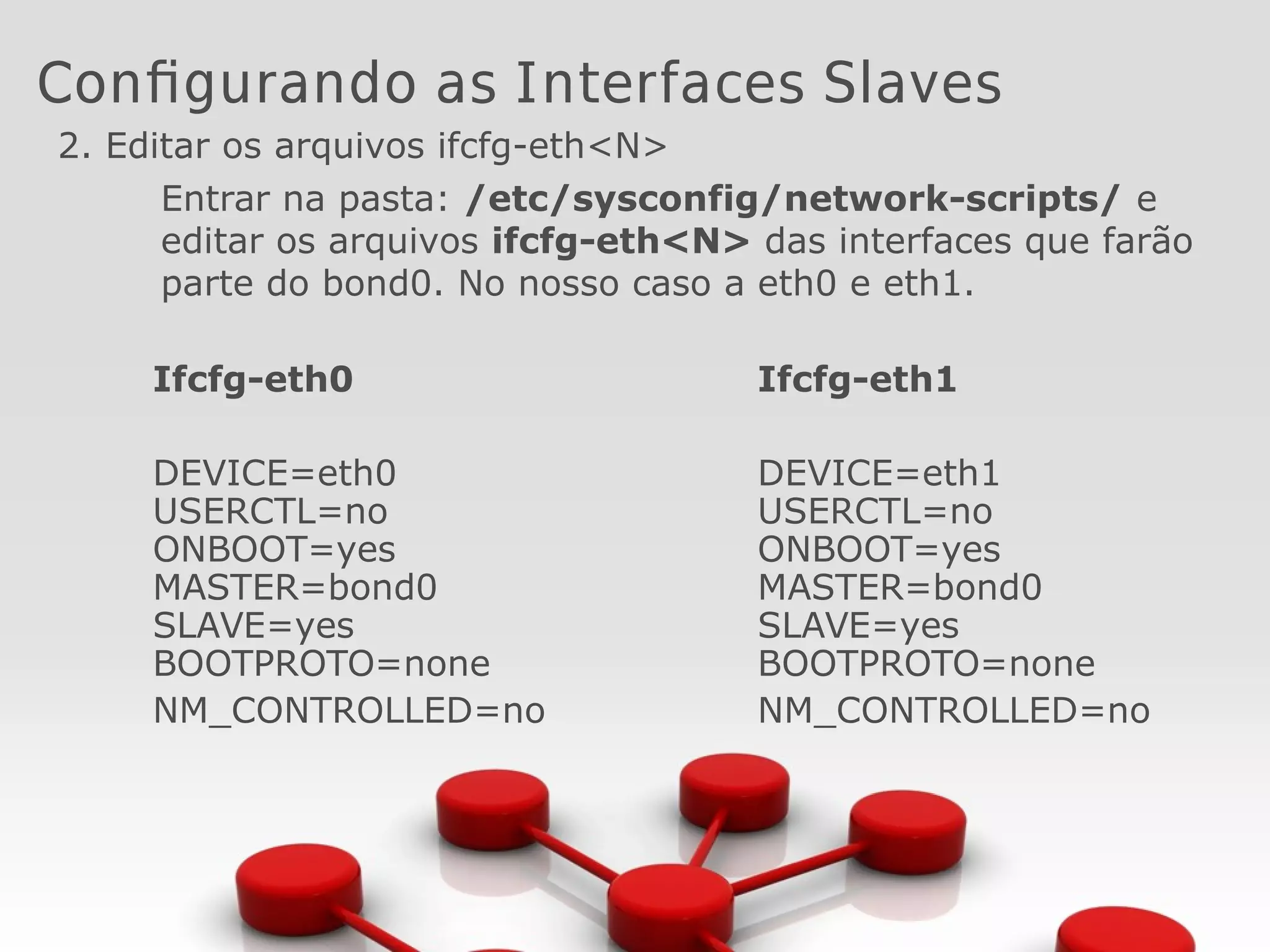
2. Editar os arquivos ifcfg-eth<N>
Entrar na pasta: /etc/sysconfig/network-scripts/ e
editar os arquivos ifcfg-eth<N> das interfaces que farão
parte do bond0. No nosso caso a eth0 e eth1.
Ifcfg-eth0
DEVICE=eth0
USERCTL=no
ONBOOT=yes
MASTER=bond0
SLAVE=yes
BOOTPROTO=none
NM_CONTROLLED=no
Ifcfg-eth1
DEVICE=eth1
USERCTL=no
ONBOOT=yes
MASTER=bond0
SLAVE=yes
BOOTPROTO=none
NM_CONTROLLED=no
Configurando o kernel para carregar a
interface bond0
3. Criar o arquivo bonding.conf na pasta /etc/modprobe.d
Adicionaro seguinte conteúdo:
alias bond0 bonding
options bond0 miimon=80 mode=1
Onde o mode=1 define o modo de operação, que no nosso
caso é o active-backup
Miimon=80 tempo em milisegundos em que o link é
verificado.
Iniciando a interface
4. Reiniciando o serviço de rede:
/etc/init.d/network restart
[root@localhost ~]# ifconfig
bond0 Link encap:Ethernet Endereço de HW 08:00:27:EB:AD:CD
inet end.: 192.168.15.34 Bcast:192.168.15.255 Masc:255.255.255.0
UP BROADCASTRUNNING MASTER MULTICAST MTU:1500 Métrica:1
RX bytes:523226 (510.9 KiB) TX bytes:515258 (503.1 KiB)
eth0 Link encap:Ethernet Endereço de HW 08:00:27:EB:AD:CD
UP BROADCASTRUNNING SLAVE MULTICAST MTU:1500 Métrica:1
RX bytes:268194 (261.9 KiB) TX bytes:264991 (258.7 KiB)
IRQ:10 Endereço de E/S:0xd020
eth1 Link encap:Ethernet Endereço de HW 08:00:27:EB:AD:CD
UP BROADCASTRUNNING SLAVE MULTICAST MTU:1500 Métrica:1
RX bytes:255494 (249.5 KiB) TX bytes:251495 (245.6 KiB)
IRQ:9 Endereço de E/S:0xd240
Verificando o status das interfaces
[root@localhost modprobe.d]# cat /proc/net/bonding/bond0
Ethernet Channel Bonding Driver: v3.5.0 (November 4, 2008)
Bonding Mode: fault-tolerance (active-backup)
Primary Slave: None
Currently Active Slave: eth0
MII Status: up
MII Polling Interval (ms): 80
Up Delay (ms): 0
Down Delay (ms): 0
Slave Interface: eth0
MII Status: up
Link Failure Count: 0
Permanent HW addr: 08:00:27:eb:ad:cd
Slave Interface: eth1
MII Status: up
Link Failure Count: 0
Permanent HW addr: 08:00:27:3d:4f:cf
Gerando uma falha
[root@localhost modprobe.d]# ifdown eth0
[root@localhost modprobe.d]# tail -f /var/log/messages
Jan 22 21:17:14 localhost kernel: bonding: bond0: Removing slave eth0
Jan 22 21:17:14 localhost kernel: bonding: bond0: releasing active
interface eth0
Jan 22 21:17:14 localhost kernel: bonding: bond0: making interface eth1
the new active one.
[root@localhost modprobe.d]# cat /proc/net/bonding/bond0
Ethernet Channel Bonding Driver: v3.5.0 (November 4, 2008)
Bonding Mode: fault-tolerance (active-backup)
Primary Slave: None
Currently Active Slave: eth1
MII Status: up
MII Polling Interval (ms): 80
Up Delay (ms): 0
Down Delay (ms): 0
Slave Interface: eth1
MII Status: up
Link Failure Count: 0
Permanent HW addr: 08:00:27:3d:4f:cf
Sistemas Distribuídos
Network Fault Tolerance - Bonding
Frederico Madeira
LPIC­1, LPIC­2, CCNA
fred@madeira.eng.br
www.madeira.eng.br

Linux Network Fault Tolerance

  • 1.
    Sistemas Distribuídos Linux NetworkFault Tolerance Frederico Madeira LPIC­1, LPIC­2, CCNA fred@madeira.eng.br www.madeira.eng.br
  • 2.
    Bonding • O termobonding significa agregação de portas • Transforma múltiplas interfaces de rede em uma só • Termos: ✔ Trunking na Sun ✔ Etherchannel na Cisco ✔ Bonding no Linux ✔ NIC Team noWindows
  • 3.
    Tipos • Modo 0(balance-rr) ✔ Utiliza a política de round robin, transmitindo sequencialmente da primeira interface até a última. ✔ Garante tolerância a falhas e balanceamento de carga
  • 4.
    Tipos • Modo 1(active-backup) ✔ Transmite dados apenas em uma das interfaces slaves. ✔ A outra placa fica ativa, apenas se a primeira vier a falhar ✔ Garante tolerância a falhas
  • 5.
    Tipos • Modo 4(802.3ad) ✔ Permite agregar múltiplas interfaces em uma única. ✔ Implementa o padrão IEEE 802.3ad Dynamic link aggregation ✔ Garante tolerância a falhas
  • 6.
    Configurando 1. Criar oarquivo da interface bond0 Entrar na pasta: /etc/sysconfig/network-scripts/ e criar o arquivo ifcfg-bond0 Este arquivo deverá ter o seguinte conteúdo: IP Fixo DEVICE=bond0 IPADDR=192.168.0.100 NETMASK=255.255.255.0 GATEWAY=192.168.0.1 ONBOOT=yes BOOTPROTO=none USERCTL=no NM_CONTROLLED=no DHCP DEVICE=bond0 ONBOOT=yes BOOTPROTO=dhcp USERCTL=no NM_CONTROLLED=no
  • 7.
    Configurando as InterfacesSlaves 2. Editar os arquivos ifcfg-eth<N> Entrar na pasta: /etc/sysconfig/network-scripts/ e editar os arquivos ifcfg-eth<N> das interfaces que farão parte do bond0. No nosso caso a eth0 e eth1. Ifcfg-eth0 DEVICE=eth0 USERCTL=no ONBOOT=yes MASTER=bond0 SLAVE=yes BOOTPROTO=none NM_CONTROLLED=no Ifcfg-eth1 DEVICE=eth1 USERCTL=no ONBOOT=yes MASTER=bond0 SLAVE=yes BOOTPROTO=none NM_CONTROLLED=no
  • 8.
    Configurando o kernelpara carregar a interface bond0 3. Criar o arquivo bonding.conf na pasta /etc/modprobe.d Adicionaro seguinte conteúdo: alias bond0 bonding options bond0 miimon=80 mode=1 Onde o mode=1 define o modo de operação, que no nosso caso é o active-backup Miimon=80 tempo em milisegundos em que o link é verificado.
  • 9.
    Iniciando a interface 4.Reiniciando o serviço de rede: /etc/init.d/network restart [root@localhost ~]# ifconfig bond0 Link encap:Ethernet Endereço de HW 08:00:27:EB:AD:CD inet end.: 192.168.15.34 Bcast:192.168.15.255 Masc:255.255.255.0 UP BROADCASTRUNNING MASTER MULTICAST MTU:1500 Métrica:1 RX bytes:523226 (510.9 KiB) TX bytes:515258 (503.1 KiB) eth0 Link encap:Ethernet Endereço de HW 08:00:27:EB:AD:CD UP BROADCASTRUNNING SLAVE MULTICAST MTU:1500 Métrica:1 RX bytes:268194 (261.9 KiB) TX bytes:264991 (258.7 KiB) IRQ:10 Endereço de E/S:0xd020 eth1 Link encap:Ethernet Endereço de HW 08:00:27:EB:AD:CD UP BROADCASTRUNNING SLAVE MULTICAST MTU:1500 Métrica:1 RX bytes:255494 (249.5 KiB) TX bytes:251495 (245.6 KiB) IRQ:9 Endereço de E/S:0xd240
  • 10.
    Verificando o statusdas interfaces [root@localhost modprobe.d]# cat /proc/net/bonding/bond0 Ethernet Channel Bonding Driver: v3.5.0 (November 4, 2008) Bonding Mode: fault-tolerance (active-backup) Primary Slave: None Currently Active Slave: eth0 MII Status: up MII Polling Interval (ms): 80 Up Delay (ms): 0 Down Delay (ms): 0 Slave Interface: eth0 MII Status: up Link Failure Count: 0 Permanent HW addr: 08:00:27:eb:ad:cd Slave Interface: eth1 MII Status: up Link Failure Count: 0 Permanent HW addr: 08:00:27:3d:4f:cf
  • 11.
    Gerando uma falha [root@localhostmodprobe.d]# ifdown eth0 [root@localhost modprobe.d]# tail -f /var/log/messages Jan 22 21:17:14 localhost kernel: bonding: bond0: Removing slave eth0 Jan 22 21:17:14 localhost kernel: bonding: bond0: releasing active interface eth0 Jan 22 21:17:14 localhost kernel: bonding: bond0: making interface eth1 the new active one. [root@localhost modprobe.d]# cat /proc/net/bonding/bond0 Ethernet Channel Bonding Driver: v3.5.0 (November 4, 2008) Bonding Mode: fault-tolerance (active-backup) Primary Slave: None Currently Active Slave: eth1 MII Status: up MII Polling Interval (ms): 80 Up Delay (ms): 0 Down Delay (ms): 0 Slave Interface: eth1 MII Status: up Link Failure Count: 0 Permanent HW addr: 08:00:27:3d:4f:cf
  • 12.
    Sistemas Distribuídos Network FaultTolerance - Bonding Frederico Madeira LPIC­1, LPIC­2, CCNA fred@madeira.eng.br www.madeira.eng.br