CSS (Cascade Style Sheet)

           Carlos J. Costa


CJC 2005
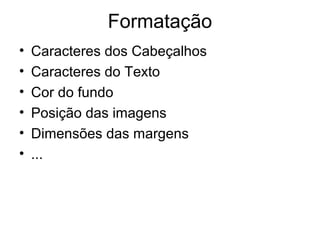
Formatação
•   Caracteres dos Cabeçalhos
•   Caracteres do Texto
•   Cor do fundo
•   Posição das imagens
•   Dimensões das margens
•   ...
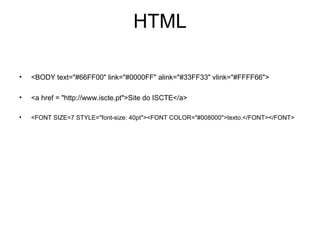
HTML

•   <BODY text="#66FF00" link="#0000FF" alink="#33FF33" vlink="#FFFF66">

•   <a href = "http://www.iscte.pt">Site do ISCTE</a>

•   <FONT SIZE=7 STYLE="font-size: 40pt"><FONT COLOR="#008000">texto.</FONT></FONT>
Formatação
• O que há a fazer quando pretendemos
  alterar todas as formatações de um site?


        obvamente recorrer ao CSS
CSS
• Cascade Style Sheet
• Personalizar formatações
• Definir regras
• Regras podem ser colocadas:
  • No cabeçalho da folha
  • Na linha
  • Num ficheiro separado
• Pode-se colocar as formatações todas no
  mesmo local e alterar essas regras.
Definição de estilo
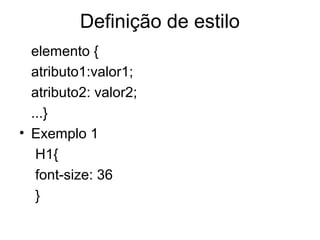
  elemento {
  atributo1:valor1;
  atributo2: valor2;
  ...}
• Exemplo 1
   H1{
   font-size: 36
   }
Definição de estilo
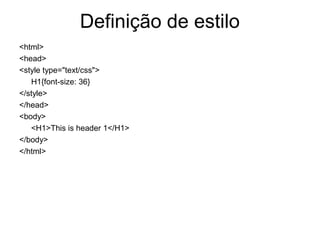
<html>
<head>
<style type="text/css">
   H1{font-size: 36}
</style>
</head>
<body>
   <H1>This is header 1</H1>
</body>
</html>
Definição de estilo
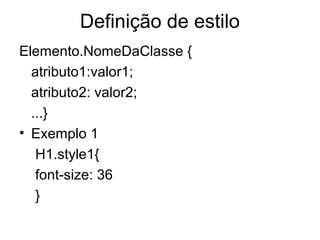
Elemento.NomeDaClasse {
  atributo1:valor1;
  atributo2: valor2;
  ...}
• Exemplo 1
   H1.style1{
   font-size: 36
   }
Definição de estilo
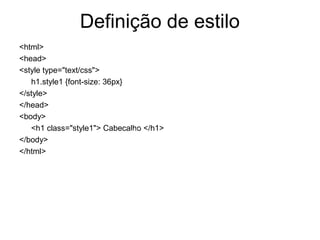
<html>
<head>
<style type="text/css">                Pode ser
   h1.style1 {font-size: 36px}
                                       eliminado
</style>
</head>                                            Caso eliminar o
<body>
                                                   elemento na
   <h1 class="style1"> Cabecalho </h1>
                                                   definição então
</body>
</html>
                                                   a classe pode
                                                   ser utilizado
                                                   para outro
                                                   elementos
Exemplos
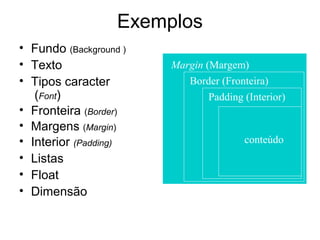
• Fundo (Background )
• Texto                 Margin (Margem)
• Tipos caracter           Border (Fronteira)
   (Font)                       Padding (Interior)
• Fronteira (Border)
• Margens (Margin)
• Interior (Padding)                    conteúdo
• Listas
• Float
• Dimensão
Fundo (Background)
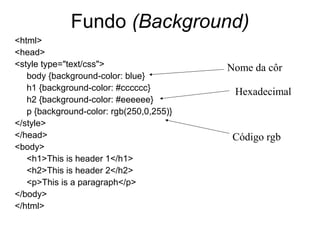
<html>
<head>
<style type="text/css">                   Nome da côr
   body {background-color: blue}
   h1 {background-color: #cccccc}          Hexadecimal
   h2 {background-color: #eeeeee}
   p {background-color: rgb(250,0,255)}
</style>
</head>                                    Código rgb
<body>
   <h1>This is header 1</h1>
   <h2>This is header 2</h2>
   <p>This is a paragraph</p>
</body>
</html>
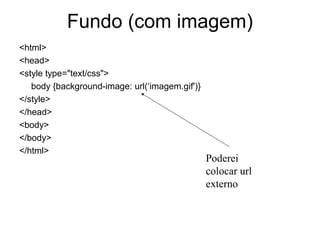
Fundo (com imagem)
<html>
<head>
<style type="text/css">
   body {background-image: url(‘imagem.gif')}
</style>
</head>
<body>
</body>
</html>
                                                Poderei
                                                colocar url
                                                externo
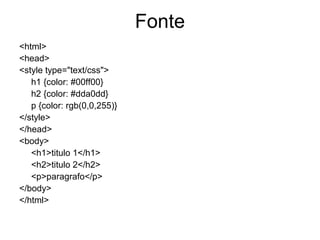
Fonte
<html>
<head>
<style type="text/css">
   h1 {color: #00ff00}
   h2 {color: #dda0dd}
   p {color: rgb(0,0,255)}
</style>
</head>
<body>
   <h1>titulo 1</h1>
   <h2>titulo 2</h2>
   <p>paragrafo</p>
</body>
</html>
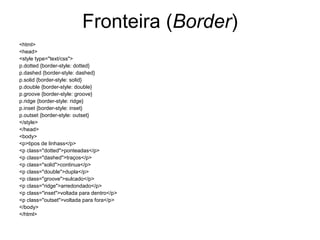
Fronteira (Border)
<html>
<head>
<style type="text/css">
p.dotted {border-style: dotted}
p.dashed {border-style: dashed}
p.solid {border-style: solid}
p.double {border-style: double}
p.groove {border-style: groove}
p.ridge {border-style: ridge}
p.inset {border-style: inset}
p.outset {border-style: outset}
</style>
</head>
<body>
<p>tipos de linhass</p>
<p class="dotted">ponteadas</p>
<p class="dashed">traços</p>
<p class="solid">continua</p>
<p class="double">dupla</p>
<p class="groove">sulcado</p>
<p class="ridge">arredondado</p>
<p class="inset">voltada para dentro</p>
<p class="outset">voltada para fora</p>
</body>
</html>
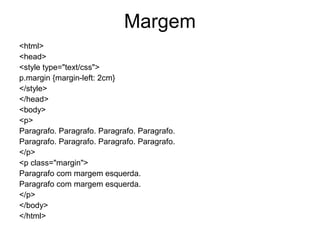
Margem
<html>
<head>
<style type="text/css">
p.margin {margin-left: 2cm}
</style>
</head>
<body>
<p>
Paragrafo. Paragrafo. Paragrafo. Paragrafo.
</p>
<p class="margin">
Paragrafo com margem esquerda.
</p>
</body>
</html>
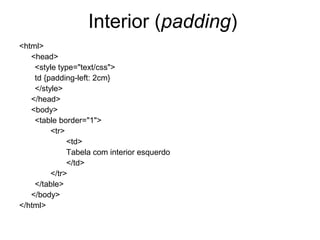
Interior (padding)
<html>
   <head>
    <style type="text/css">
    td {padding-left: 2cm}
    </style>
   </head>
   <body>
    <table border="1">
         <tr>
              <td>
              Tabela com interior esquerdo
              </td>
         </tr>
    </table>
   </body>
</html>
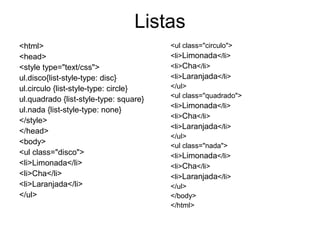
Listas
<html>                                  <ul class="circulo">
<head>                                  <li>Limonada</li>
<style type="text/css">                 <li>Cha</li>
ul.disco{list-style-type: disc}         <li>Laranjada</li>
ul.circulo {list-style-type: circle}    </ul>
                                        <ul class="quadrado">
ul.quadrado {list-style-type: square}
                                        <li>Limonada</li>
ul.nada {list-style-type: none}
                                        <li>Cha</li>
</style>
                                        <li>Laranjada</li>
</head>
                                        </ul>
<body>                                  <ul class="nada">
<ul class="disco">                      <li>Limonada</li>
<li>Limonada</li>                       <li>Cha</li>
<li>Cha</li>                            <li>Laranjada</li>
<li>Laranjada</li>                      </ul>
</ul>                                   </body>
                                        </html>
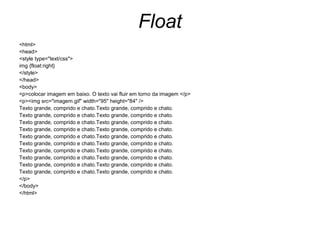
Float
<html>
<head>
<style type="text/css">
img {float:right}
</style>
</head>
<body>
<p>colocar imagem em baixo. O texto vai fluir em torno da imagem </p>
<p><img src="imagem.gif" width="95" height="84" />
Texto grande, comprido e chato.Texto grande, comprido e chato.
</p>
</body>
</html>
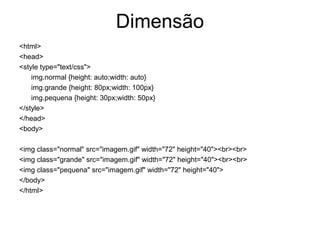
Dimensão
<html>
<head>
<style type="text/css">
    img.normal {height: auto;width: auto}
    img.grande {height: 80px;width: 100px}
    img.pequena {height: 30px;width: 50px}
</style>
</head>
<body>

<img class="normal" src="imagem.gif" width="72" height="40"><br><br>
<img class="grande" src="imagem.gif" width="72" height="40"><br><br>
<img class="pequena" src="imagem.gif" width="72" height="40">
</body>
</html>
Onde se pode então definir o CSS?
 • No cabeçalho da folha (exemplos anteriores)
 • Na linha (in Line)
 • Num ficheiro separado


 • Vejamos então este último...
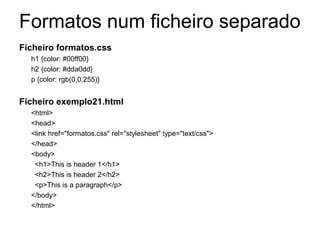
Formatos num ficheiro separado
Ficheiro formatos.css
  h1 {color: #00ff00}
  h2 {color: #dda0dd}
  p {color: rgb(0,0,255)}                            Referência a um
                                                     ficheiro externo
Ficheiro exemplo21.html
  <html>
  <head>
  <link href="formatos.css" rel="stylesheet" type="text/css">
  </head>
  <body>
   <h1>This is header 1</h1>
   <h2>This is header 2</h2>
   <p>This is a paragraph</p>
  </body>
  </html>
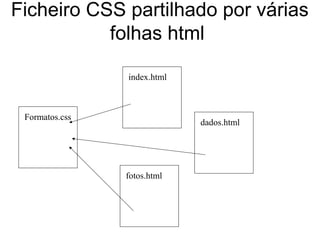
Ficheiro CSS partilhado por várias
           folhas html

                index.html


 Formatos.css
                             dados.html


                fotos.html

03css2005

  • 1.
    CSS (Cascade StyleSheet) Carlos J. Costa CJC 2005
  • 2.
    Formatação • Caracteres dos Cabeçalhos • Caracteres do Texto • Cor do fundo • Posição das imagens • Dimensões das margens • ...
  • 3.
    HTML • <BODY text="#66FF00" link="#0000FF" alink="#33FF33" vlink="#FFFF66"> • <a href = "http://www.iscte.pt">Site do ISCTE</a> • <FONT SIZE=7 STYLE="font-size: 40pt"><FONT COLOR="#008000">texto.</FONT></FONT>
  • 4.
    Formatação • O quehá a fazer quando pretendemos alterar todas as formatações de um site? obvamente recorrer ao CSS
  • 5.
    CSS • Cascade StyleSheet • Personalizar formatações • Definir regras • Regras podem ser colocadas: • No cabeçalho da folha • Na linha • Num ficheiro separado • Pode-se colocar as formatações todas no mesmo local e alterar essas regras.
  • 6.
    Definição de estilo elemento { atributo1:valor1; atributo2: valor2; ...} • Exemplo 1 H1{ font-size: 36 }
  • 7.
    Definição de estilo <html> <head> <styletype="text/css"> H1{font-size: 36} </style> </head> <body> <H1>This is header 1</H1> </body> </html>
  • 8.
    Definição de estilo Elemento.NomeDaClasse{ atributo1:valor1; atributo2: valor2; ...} • Exemplo 1 H1.style1{ font-size: 36 }
  • 9.
    Definição de estilo <html> <head> <styletype="text/css"> Pode ser h1.style1 {font-size: 36px} eliminado </style> </head> Caso eliminar o <body> elemento na <h1 class="style1"> Cabecalho </h1> definição então </body> </html> a classe pode ser utilizado para outro elementos
  • 10.
    Exemplos • Fundo (Background) • Texto Margin (Margem) • Tipos caracter Border (Fronteira) (Font) Padding (Interior) • Fronteira (Border) • Margens (Margin) • Interior (Padding) conteúdo • Listas • Float • Dimensão
  • 11.
    Fundo (Background) <html> <head> <style type="text/css"> Nome da côr body {background-color: blue} h1 {background-color: #cccccc} Hexadecimal h2 {background-color: #eeeeee} p {background-color: rgb(250,0,255)} </style> </head> Código rgb <body> <h1>This is header 1</h1> <h2>This is header 2</h2> <p>This is a paragraph</p> </body> </html>
  • 12.
    Fundo (com imagem) <html> <head> <styletype="text/css"> body {background-image: url(‘imagem.gif')} </style> </head> <body> </body> </html> Poderei colocar url externo
  • 13.
    Fonte <html> <head> <style type="text/css"> h1 {color: #00ff00} h2 {color: #dda0dd} p {color: rgb(0,0,255)} </style> </head> <body> <h1>titulo 1</h1> <h2>titulo 2</h2> <p>paragrafo</p> </body> </html>
  • 14.
    Fronteira (Border) <html> <head> <style type="text/css"> p.dotted{border-style: dotted} p.dashed {border-style: dashed} p.solid {border-style: solid} p.double {border-style: double} p.groove {border-style: groove} p.ridge {border-style: ridge} p.inset {border-style: inset} p.outset {border-style: outset} </style> </head> <body> <p>tipos de linhass</p> <p class="dotted">ponteadas</p> <p class="dashed">traços</p> <p class="solid">continua</p> <p class="double">dupla</p> <p class="groove">sulcado</p> <p class="ridge">arredondado</p> <p class="inset">voltada para dentro</p> <p class="outset">voltada para fora</p> </body> </html>
  • 15.
    Margem <html> <head> <style type="text/css"> p.margin {margin-left:2cm} </style> </head> <body> <p> Paragrafo. Paragrafo. Paragrafo. Paragrafo. Paragrafo. Paragrafo. Paragrafo. Paragrafo. </p> <p class="margin"> Paragrafo com margem esquerda. Paragrafo com margem esquerda. </p> </body> </html>
  • 16.
    Interior (padding) <html> <head> <style type="text/css"> td {padding-left: 2cm} </style> </head> <body> <table border="1"> <tr> <td> Tabela com interior esquerdo </td> </tr> </table> </body> </html>
  • 17.
    Listas <html> <ul class="circulo"> <head> <li>Limonada</li> <style type="text/css"> <li>Cha</li> ul.disco{list-style-type: disc} <li>Laranjada</li> ul.circulo {list-style-type: circle} </ul> <ul class="quadrado"> ul.quadrado {list-style-type: square} <li>Limonada</li> ul.nada {list-style-type: none} <li>Cha</li> </style> <li>Laranjada</li> </head> </ul> <body> <ul class="nada"> <ul class="disco"> <li>Limonada</li> <li>Limonada</li> <li>Cha</li> <li>Cha</li> <li>Laranjada</li> <li>Laranjada</li> </ul> </ul> </body> </html>
  • 18.
    Float <html> <head> <style type="text/css"> img {float:right} </style> </head> <body> <p>colocarimagem em baixo. O texto vai fluir em torno da imagem </p> <p><img src="imagem.gif" width="95" height="84" /> Texto grande, comprido e chato.Texto grande, comprido e chato. Texto grande, comprido e chato.Texto grande, comprido e chato. Texto grande, comprido e chato.Texto grande, comprido e chato. Texto grande, comprido e chato.Texto grande, comprido e chato. Texto grande, comprido e chato.Texto grande, comprido e chato. Texto grande, comprido e chato.Texto grande, comprido e chato. Texto grande, comprido e chato.Texto grande, comprido e chato. Texto grande, comprido e chato.Texto grande, comprido e chato. Texto grande, comprido e chato.Texto grande, comprido e chato. Texto grande, comprido e chato.Texto grande, comprido e chato. </p> </body> </html>
  • 19.
    Dimensão <html> <head> <style type="text/css"> img.normal {height: auto;width: auto} img.grande {height: 80px;width: 100px} img.pequena {height: 30px;width: 50px} </style> </head> <body> <img class="normal" src="imagem.gif" width="72" height="40"><br><br> <img class="grande" src="imagem.gif" width="72" height="40"><br><br> <img class="pequena" src="imagem.gif" width="72" height="40"> </body> </html>
  • 20.
    Onde se podeentão definir o CSS? • No cabeçalho da folha (exemplos anteriores) • Na linha (in Line) • Num ficheiro separado • Vejamos então este último...
  • 21.
    Formatos num ficheiroseparado Ficheiro formatos.css h1 {color: #00ff00} h2 {color: #dda0dd} p {color: rgb(0,0,255)} Referência a um ficheiro externo Ficheiro exemplo21.html <html> <head> <link href="formatos.css" rel="stylesheet" type="text/css"> </head> <body> <h1>This is header 1</h1> <h2>This is header 2</h2> <p>This is a paragraph</p> </body> </html>
  • 22.
    Ficheiro CSS partilhadopor várias folhas html index.html Formatos.css dados.html fotos.html