VDI
Virtual Desktop Infrastructure


            Amador Pahim
            Analista de Suporte, UCS
Agenda
· Contexto
· VDI
· Mercado
· Projeto OSDVT
· Demo
Contexto
Virtualização
    Você ainda usa dual boot?


●   Fexibilidade
●   Produtividade
●   Melhor aproveitamento dos recursos
    ...

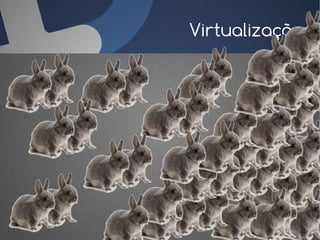
    Cuidado!
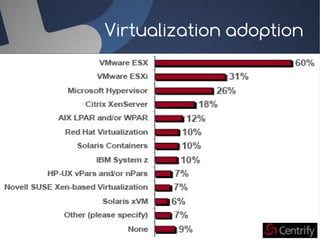
Virtualização
Virtualization adoption
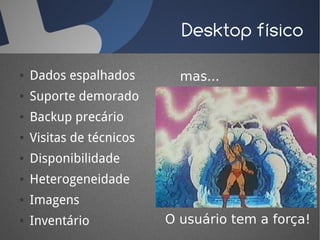
Desktop físico

●   Dados espalhados        mas...
●   Suporte demorado
●   Backup precário
●   Visitas de técnicos
●   Disponibilidade
●   Heterogeneidade
●   Imagens
●   Inventário            O usuário tem a força!
VDI
O que é VDI?
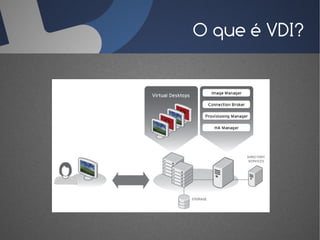
       Uso da infraestrutura de virtualização de
  servidores/datacenter para instalar desktops
virtuais e fornecer acesso remoto aos usuários,
        reproduzindo a experiência de uso local.
O que é VDI?
Por quê VDI?
●   Vantagens em relação ao modelo tradicional:
    ●   Compliance (armazenamento, inventário,
        eliminação de informações, ...)
    ●   Dados em segurança (storage, backup...)
    ●   Entrega ágil de desktops
    ●   Multiplos desktops
    ●   Mobilidade
Por quê VDI?
●   Além disso, vantagens em relação ao serviço
    de multiplos terminais:
    ●   Desktops completos para os usuários
    ●   Aplicações não precisam ser adaptadas
    ●   Usuários isolados
    ●   Novas aplicações podem ser entregues com novo
        S.O.
Mercado
Previsões
   According to Gartner, Worldwide VDI revenue
will grow from $1.5 billion in 2009 - less than 1% of
 the worldwide professional PC market - to $65.7
  billion in 2013 - more than 40% of the worldwide
                           professional PC market.
Survey

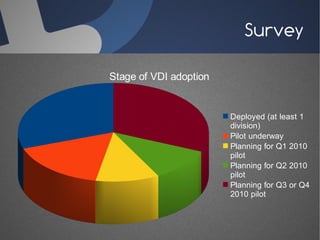
Stage of VDI adoption


                        Deployed (at least 1
                        division)
                        Pilot underway
                        Planning for Q1 2010
                        pilot
                        Planning for Q2 2010
                        pilot
                        Planning for Q3 or Q4
                        2010 pilot
Survey

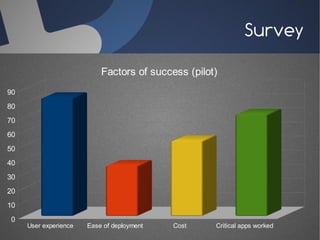
                           Factors of success (pilot)
90
80
70
60
50
40
30
20
10
0
     User experience   Ease of deployment   Cost    Critical apps worked
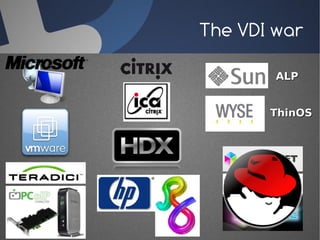
The VDI war

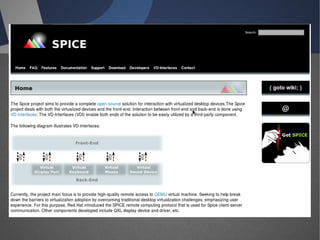
        ALP


       ThinOS
Simple
  Protocol for
 Independent
   Computing
Environments
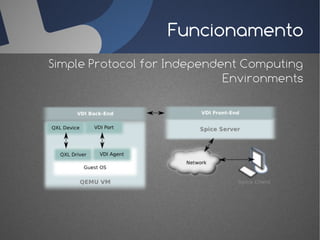
Funcionamento
Simple Protocol for Independent Computing
                             Environments
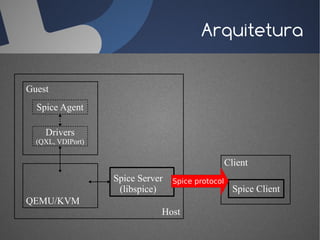
Arquitetura

Guest
  Spice Agent

    Drivers
  (QXL, VDIPort)

                                                   Client
                   Spice Server   Spice protocol
                    (libspice)                       Spice Client
QEMU/KVM
                              Host
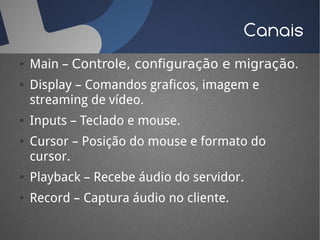
Canais
●   Main – Controle, configuração e migração.
●   Display – Comandos graficos, imagem e
    streaming de vídeo.
●   Inputs – Teclado e mouse.
●   Cursor – Posição do mouse e formato do
    cursor.
●   Playback – Recebe áudio do servidor.
●   Record – Captura áudio no cliente.
Features
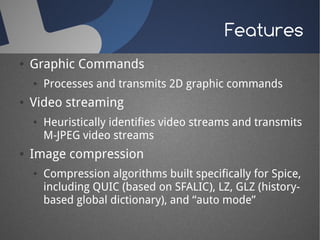
●   Graphic Commands
    ●   Processes and transmits 2D graphic commands
●   Video streaming
    ●   Heuristically identifies video streams and transmits
        M-JPEG video streams
●   Image compression
    ●   Compression algorithms built specifically for Spice,
        including QUIC (based on SFALIC), LZ, GLZ (history-
        based global dictionary), and “auto mode”
Features
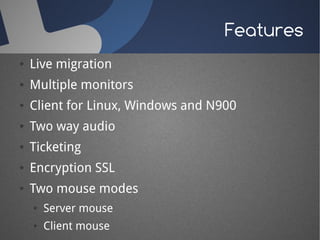
●   Live migration
●   Multiple monitors
●   Client for Linux, Windows and N900
●   Two way audio
●   Ticketing
●   Encryption SSL
●   Two mouse modes
    ●   Server mouse
    ●   Client mouse
Future features
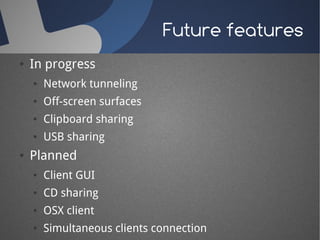
●   In progress
    ●   Network tunneling
    ●   Off-screen surfaces
    ●   Clipboard sharing
    ●   USB sharing
●   Planned
    ●   Client GUI
    ●   CD sharing
    ●   OSX client
    ●   Simultaneous clients connection
Suporte...
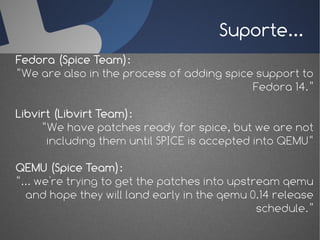
Fedora (Spice Team):
“We are also in the process of adding spice support to
                                           Fedora 14.”

Libvirt (Libvirt Team):
     “We have patches ready for spice, but we are not
      including them until SPICE is accepted into QEMU“

QEMU (Spice Team):
“... we're trying to get the patches into upstream qemu
  and hope they will land early in the qemu 0.14 release
                                               schedule.”
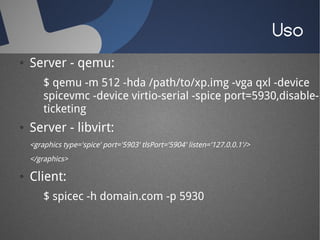
Uso
●   Server - qemu:
        $ qemu -m 512 -hda /path/to/xp.img -vga qxl -device
        spicevmc -device virtio-serial -spice port=5930,disable-
        ticketing
●   Server - libvirt:
    <graphics type='spice' port='5903' tlsPort='5904' listen='127.0.0.1'/>
    </graphics>

●   Client:
        $ spicec -h domain.com -p 5930
Projeto
OSDVT
 Open Source
      Desktop
 Virtualization
   Technology
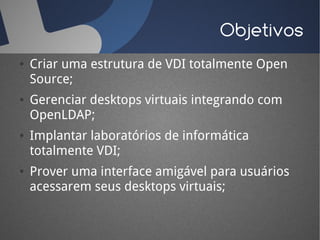
Objetivos
●   Criar uma estrutura de VDI totalmente Open
    Source;
●   Gerenciar desktops virtuais integrando com
    OpenLDAP;
●   Implantar laboratórios de informática
    totalmente VDI;
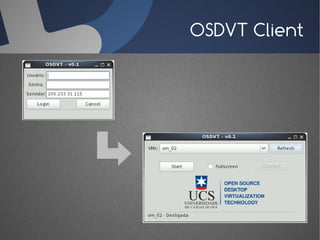
●   Prover uma interface amigável para usuários
    acessarem seus desktops virtuais;
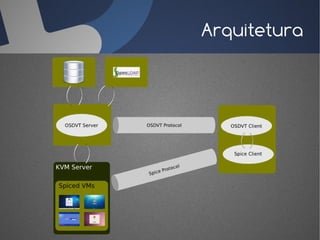
Arquitetura
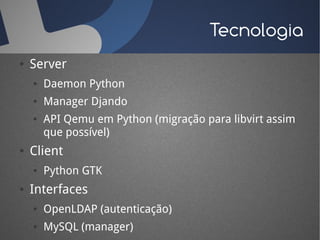
Tecnologia
●   Server
    ●   Daemon Python
    ●   Manager Djando
    ●   API Qemu em Python (migração para libvirt assim
        que possível)
●   Client
    ●   Python GTK
●   Interfaces
    ●   OpenLDAP (autenticação)
    ●   MySQL (manager)
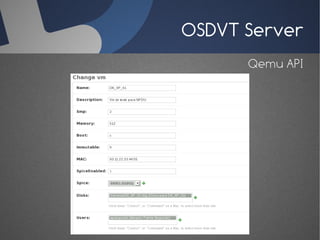
OSDVT Server
                                                osdvt-server.conf
[Main]                                [SSL]
# Port to listen client connections   # Version - SSLv1, SSLv2, SSLv23 or TLSv1
Port = 6970                           Version = SSLv23
# Root directory of daemon files      # Public cert file (full path)
MainDir = /usr/local/osdvt/server     CertFile = /etc/openssl/cert.pem
                                      # Private cert file (full path)
[Database]                            KeyFile = /etc/openssl/private/key.pem
# Type – MySQL, Oracle or Postgres
Type = MySQL                          [LDAP]
# Database server                     # Enable SSL (LDAPS) - True or False
Host = localhost                      SSL = True
# Database name                       # LDAP host
Name = vdesktop                       Host = ldap.com.br
# Table name                          #CA cert file (full path)
Table = vms                           CACert = /etc/openssl/cacert.pem
# Database user                       # Bae DN seach to authenticate users
User = osdvtuser                      BaseDN = ou=people,dc=foo,dc=bar
# Database password                   # Search filter
Password = osdvtpass                  Filter = uid
OSDVT Server
      Qemu API
OSDVT Client
Demo
Perguntas?


 www.ucs.br/projeto/osdvt
     amador@pahim.org
          www.pahim.org
         “... It's always more fun
         To share with everyone
                   If you've got one
Here is something you can learn
                 You can still share
          Just by taking turns ...”

VDI e Projeto OSDVT

  • 1.
    VDI Virtual Desktop Infrastructure Amador Pahim Analista de Suporte, UCS
  • 2.
    Agenda · Contexto · VDI ·Mercado · Projeto OSDVT · Demo
  • 3.
  • 4.
    Virtualização Você ainda usa dual boot? ● Fexibilidade ● Produtividade ● Melhor aproveitamento dos recursos ... Cuidado!
  • 5.
  • 8.
  • 9.
    Desktop físico ● Dados espalhados mas... ● Suporte demorado ● Backup precário ● Visitas de técnicos ● Disponibilidade ● Heterogeneidade ● Imagens ● Inventário O usuário tem a força!
  • 10.
  • 11.
    O que éVDI? Uso da infraestrutura de virtualização de servidores/datacenter para instalar desktops virtuais e fornecer acesso remoto aos usuários, reproduzindo a experiência de uso local.
  • 12.
  • 13.
    Por quê VDI? ● Vantagens em relação ao modelo tradicional: ● Compliance (armazenamento, inventário, eliminação de informações, ...) ● Dados em segurança (storage, backup...) ● Entrega ágil de desktops ● Multiplos desktops ● Mobilidade
  • 14.
    Por quê VDI? ● Além disso, vantagens em relação ao serviço de multiplos terminais: ● Desktops completos para os usuários ● Aplicações não precisam ser adaptadas ● Usuários isolados ● Novas aplicações podem ser entregues com novo S.O.
  • 15.
  • 16.
    Previsões According to Gartner, Worldwide VDI revenue will grow from $1.5 billion in 2009 - less than 1% of the worldwide professional PC market - to $65.7 billion in 2013 - more than 40% of the worldwide professional PC market.
  • 17.
    Survey Stage of VDIadoption Deployed (at least 1 division) Pilot underway Planning for Q1 2010 pilot Planning for Q2 2010 pilot Planning for Q3 or Q4 2010 pilot
  • 18.
    Survey Factors of success (pilot) 90 80 70 60 50 40 30 20 10 0 User experience Ease of deployment Cost Critical apps worked
  • 19.
    The VDI war ALP ThinOS
  • 26.
    Simple Protocolfor Independent Computing Environments
  • 27.
    Funcionamento Simple Protocol forIndependent Computing Environments
  • 28.
    Arquitetura Guest SpiceAgent Drivers (QXL, VDIPort) Client Spice Server Spice protocol (libspice) Spice Client QEMU/KVM Host
  • 29.
    Canais ● Main – Controle, configuração e migração. ● Display – Comandos graficos, imagem e streaming de vídeo. ● Inputs – Teclado e mouse. ● Cursor – Posição do mouse e formato do cursor. ● Playback – Recebe áudio do servidor. ● Record – Captura áudio no cliente.
  • 30.
    Features ● Graphic Commands ● Processes and transmits 2D graphic commands ● Video streaming ● Heuristically identifies video streams and transmits M-JPEG video streams ● Image compression ● Compression algorithms built specifically for Spice, including QUIC (based on SFALIC), LZ, GLZ (history- based global dictionary), and “auto mode”
  • 31.
    Features ● Live migration ● Multiple monitors ● Client for Linux, Windows and N900 ● Two way audio ● Ticketing ● Encryption SSL ● Two mouse modes ● Server mouse ● Client mouse
  • 32.
    Future features ● In progress ● Network tunneling ● Off-screen surfaces ● Clipboard sharing ● USB sharing ● Planned ● Client GUI ● CD sharing ● OSX client ● Simultaneous clients connection
  • 33.
    Suporte... Fedora (Spice Team): “Weare also in the process of adding spice support to Fedora 14.” Libvirt (Libvirt Team): “We have patches ready for spice, but we are not including them until SPICE is accepted into QEMU“ QEMU (Spice Team): “... we're trying to get the patches into upstream qemu and hope they will land early in the qemu 0.14 release schedule.”
  • 34.
    Uso ● Server - qemu: $ qemu -m 512 -hda /path/to/xp.img -vga qxl -device spicevmc -device virtio-serial -spice port=5930,disable- ticketing ● Server - libvirt: <graphics type='spice' port='5903' tlsPort='5904' listen='127.0.0.1'/> </graphics> ● Client: $ spicec -h domain.com -p 5930
  • 35.
    Projeto OSDVT Open Source Desktop Virtualization Technology
  • 36.
    Objetivos ● Criar uma estrutura de VDI totalmente Open Source; ● Gerenciar desktops virtuais integrando com OpenLDAP; ● Implantar laboratórios de informática totalmente VDI; ● Prover uma interface amigável para usuários acessarem seus desktops virtuais;
  • 37.
  • 38.
    Tecnologia ● Server ● Daemon Python ● Manager Djando ● API Qemu em Python (migração para libvirt assim que possível) ● Client ● Python GTK ● Interfaces ● OpenLDAP (autenticação) ● MySQL (manager)
  • 39.
    OSDVT Server osdvt-server.conf [Main] [SSL] # Port to listen client connections # Version - SSLv1, SSLv2, SSLv23 or TLSv1 Port = 6970 Version = SSLv23 # Root directory of daemon files # Public cert file (full path) MainDir = /usr/local/osdvt/server CertFile = /etc/openssl/cert.pem # Private cert file (full path) [Database] KeyFile = /etc/openssl/private/key.pem # Type – MySQL, Oracle or Postgres Type = MySQL [LDAP] # Database server # Enable SSL (LDAPS) - True or False Host = localhost SSL = True # Database name # LDAP host Name = vdesktop Host = ldap.com.br # Table name #CA cert file (full path) Table = vms CACert = /etc/openssl/cacert.pem # Database user # Bae DN seach to authenticate users User = osdvtuser BaseDN = ou=people,dc=foo,dc=bar # Database password # Search filter Password = osdvtpass Filter = uid
  • 40.
    OSDVT Server Qemu API
  • 41.
  • 42.
  • 43.
    Perguntas? www.ucs.br/projeto/osdvt amador@pahim.org www.pahim.org “... It's always more fun To share with everyone If you've got one Here is something you can learn You can still share Just by taking turns ...”