CURSO DE PROGRAMAÇÃO  DE  ROBÔS MÓVEIS USP - ICMC – LRM: Laboratório de Robótica Móvel Profs. Denis Wolf, Eduardo Simões, Fernando Osório  Alunos PG - Alberto Hata, Gustavo Pessin, Patrick Shinzato, Maurício Dias, Leandro Couto, Leandro Fernandes PUC-RS – GSE: Grupo de Sistemas Embarcados Profs. Fabiano Hessel, Eduardo Bezerra, César Marcon Aluno - Luiz Eduardo Giampaoli GAPH – Profs. Ney Calazans, Fernando Moraes Programação de Robôs Móveis   São Carlos/SP e Porto Alegre/RS  Setembro, 2009
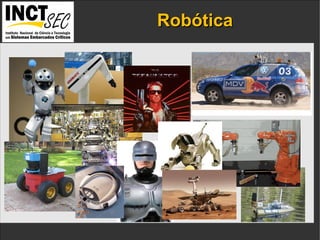
Robótica IP addresses  and the  port numbers  of the components.
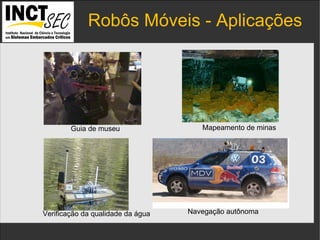
Robôs Móveis - Aplicações IP addresses  and the  port numbers  of the components. Guia de museu Mapeamento de minas Navegação autônoma Verificação da qualidade da água
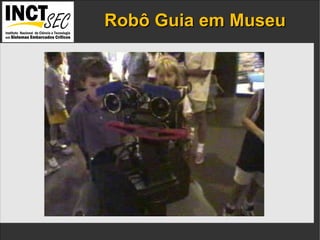
Robô Guia em Museu IP addresses  and the  port numbers  of the components.
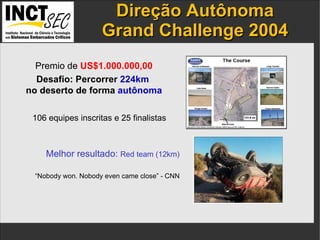
Direção  Autônoma Grand Challenge 2004 IP addresses  and the  port numbers  of the components. 106 equipes inscritas e 25 finalistas Premio de  US$1.000.000,00 Desafio: Percorrer  224km   no deserto de forma  autônoma Melhor resultado:  Red team (12km) “ Nobody won. Nobody even came close” - CNN
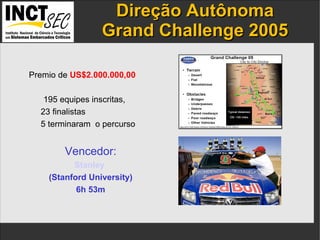
Direção  Autônoma Grand Challenge 2005 IP addresses  and the  port numbers  of the components. Premio de  US$2.000.000,00 195 equipes inscritas,  23 finalistas  5 terminaram  o percurso Vencedor: Stanley   (Stanford University) 6h 53m
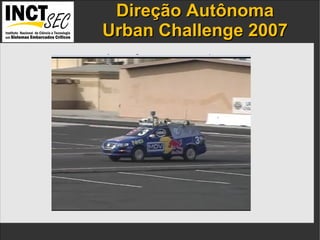
Direção  Autônoma Urban Challenge 2007 IP addresses  and the  port numbers  of the components.
Direção  Autônoma Urban Challenge 2007 IP addresses  and the  port numbers  of the components. “ none of the winning teams had taken any demerits for  traffic violations, and that the winners had all been selected  based on their finishing times “ “ Tartan's vehicle averaged about 14 miles per hour  throughout  the course, which covered about 55 miles.  Stanford averaged out 13 miles per hour, and Virginia Tech  averaged a bit less than that “
Direção  Autônoma Urban Challenge 2007 IP addresses  and the  port numbers  of the components.
Robô Móvel  Modelo Básico IP addresses  and the  port numbers  of the components.
Robô Móvel  Sensores e Atuadores IP addresses  and the  port numbers  of the components. Sensores internos : observam o estado do robô (odometria, GPS, giroscópios).  Sensores externos : observam o estado do ambiente (câmeras,  sonares, lasers). Atuadores : alteram o estado do robô e do ambiente (rodas, pernas, garras). Odômetro (encoder) Sonares Laser Câmera GPS
Controle e Simulação IP addresses  and the  port numbers  of the components. Player  Sistema para controle de robôs móveis Suporta diversos tipos de robôs e sensores Stage Simulador de robôs móveis e sensores Ambientes bidimensionais Compatível com Player Gazebo Simulador de alta fidelidade Ambientes em 3 dimensões Compatível com Player
Características do Player IP addresses  and the  port numbers  of the components. Software livre  Modelo Cliente/Servidor Desenvolvido para sistemas Linux/Unix Comunicação baseada em sockets Clientes em: C, C++, Java, Python etc Interface de alto nível para acesso ao hardware Suporta grande quatidade de plataformas robóticas e sensores comerciais
Interface com o Hardware IP addresses  and the  port numbers  of the components. Camera Laser Sonar Odometria Motores Programa  do usuário Aquisição  de dados  dos sensores Comandos  para os  motores PCI USB Serial … Serial Canbus … Planejamento Deslocamento desejado
Interface com o Hardware IP addresses  and the  port numbers  of the components. Player Camera Laser Sonar Odometria Motores Programa  do usuário Aquisição de dados dos sensores Comandos para o motor PCI USB Serial … Planejamento Deslocamento desejado
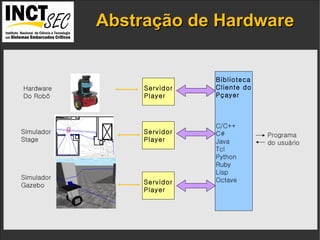
Abstração de Hardware IP addresses  and the  port numbers  of the components. Programa do usuário Servidor Player Biblioteca Cliente do Pçayer C/C++ C# Java Tcl Python Ruby Lisp Octave Hardware Do Robô Simulador Stage Simulador Gazebo Servidor Player Servidor Player
Modelo Cliente/Servidor IP addresses  and the  port numbers  of the components. Clientes podem se conectar a múltiplos servidores Servidores aceitam conexão de múltiplos clientes Diferentes programas/processos/threads podem processar  dados de diferentes sensores do mesmo servidor. Operação remota
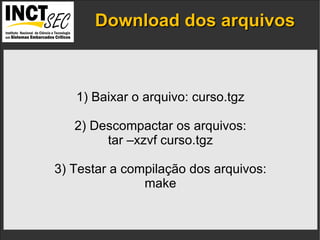
Download dos arquivos IP addresses  and the  port numbers  of the components. 1) Baixar o arquivo: curso.tgz 2) Descompactar os arquivos: tar –xzvf curso.tgz 3) Testar a compilação dos arquivos: make
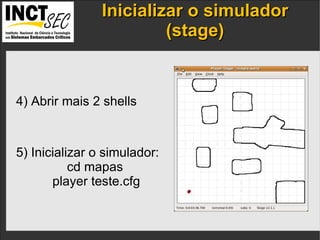
Inicializar o simulador (stage) IP addresses  and the  port numbers  of the components. 4) Abrir mais 2 shells 5) Inicializar o simulador: cd mapas player teste.cfg
Testar o Controle do Robô IP addresses  and the  port numbers  of the components. 5) Testar o controle do robô:    (no 3o shell) playerv 6) Conectar no position: Devices -> position2d:0  ->  subscribe ->  command
Testar o Controle do Robô IP addresses  and the  port numbers  of the components. 7) Conectar ao sonar: Devices -> sonar:0 -> subscribe
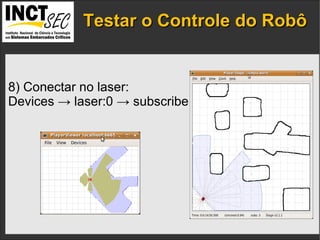
Testar o Controle do Robô IP addresses  and the  port numbers  of the components. 8) Conectar no laser: Devices -> laser:0 -> subscribe
Testar o Controle do Robô IP addresses  and the  port numbers  of the components. 9) Conectar no robô real: playerv -h <ip do robô real>
Inct Icmc Usp Player

  • 1.
    CURSO DE PROGRAMAÇÃO DE ROBÔS MÓVEIS USP - ICMC – LRM: Laboratório de Robótica Móvel Profs. Denis Wolf, Eduardo Simões, Fernando Osório Alunos PG - Alberto Hata, Gustavo Pessin, Patrick Shinzato, Maurício Dias, Leandro Couto, Leandro Fernandes PUC-RS – GSE: Grupo de Sistemas Embarcados Profs. Fabiano Hessel, Eduardo Bezerra, César Marcon Aluno - Luiz Eduardo Giampaoli GAPH – Profs. Ney Calazans, Fernando Moraes Programação de Robôs Móveis São Carlos/SP e Porto Alegre/RS Setembro, 2009
  • 2.
    Robótica IP addresses and the port numbers of the components.
  • 3.
    Robôs Móveis -Aplicações IP addresses and the port numbers of the components. Guia de museu Mapeamento de minas Navegação autônoma Verificação da qualidade da água
  • 4.
    Robô Guia emMuseu IP addresses and the port numbers of the components.
  • 5.
    Direção AutônomaGrand Challenge 2004 IP addresses and the port numbers of the components. 106 equipes inscritas e 25 finalistas Premio de US$1.000.000,00 Desafio: Percorrer 224km no deserto de forma autônoma Melhor resultado: Red team (12km) “ Nobody won. Nobody even came close” - CNN
  • 6.
    Direção AutônomaGrand Challenge 2005 IP addresses and the port numbers of the components. Premio de US$2.000.000,00 195 equipes inscritas, 23 finalistas 5 terminaram o percurso Vencedor: Stanley (Stanford University) 6h 53m
  • 7.
    Direção AutônomaUrban Challenge 2007 IP addresses and the port numbers of the components.
  • 8.
    Direção AutônomaUrban Challenge 2007 IP addresses and the port numbers of the components. “ none of the winning teams had taken any demerits for traffic violations, and that the winners had all been selected based on their finishing times “ “ Tartan's vehicle averaged about 14 miles per hour throughout the course, which covered about 55 miles. Stanford averaged out 13 miles per hour, and Virginia Tech averaged a bit less than that “
  • 9.
    Direção AutônomaUrban Challenge 2007 IP addresses and the port numbers of the components.
  • 10.
    Robô Móvel Modelo Básico IP addresses and the port numbers of the components.
  • 11.
    Robô Móvel Sensores e Atuadores IP addresses and the port numbers of the components. Sensores internos : observam o estado do robô (odometria, GPS, giroscópios). Sensores externos : observam o estado do ambiente (câmeras, sonares, lasers). Atuadores : alteram o estado do robô e do ambiente (rodas, pernas, garras). Odômetro (encoder) Sonares Laser Câmera GPS
  • 12.
    Controle e SimulaçãoIP addresses and the port numbers of the components. Player Sistema para controle de robôs móveis Suporta diversos tipos de robôs e sensores Stage Simulador de robôs móveis e sensores Ambientes bidimensionais Compatível com Player Gazebo Simulador de alta fidelidade Ambientes em 3 dimensões Compatível com Player
  • 13.
    Características do PlayerIP addresses and the port numbers of the components. Software livre Modelo Cliente/Servidor Desenvolvido para sistemas Linux/Unix Comunicação baseada em sockets Clientes em: C, C++, Java, Python etc Interface de alto nível para acesso ao hardware Suporta grande quatidade de plataformas robóticas e sensores comerciais
  • 14.
    Interface com oHardware IP addresses and the port numbers of the components. Camera Laser Sonar Odometria Motores Programa do usuário Aquisição de dados dos sensores Comandos para os motores PCI USB Serial … Serial Canbus … Planejamento Deslocamento desejado
  • 15.
    Interface com oHardware IP addresses and the port numbers of the components. Player Camera Laser Sonar Odometria Motores Programa do usuário Aquisição de dados dos sensores Comandos para o motor PCI USB Serial … Planejamento Deslocamento desejado
  • 16.
    Abstração de HardwareIP addresses and the port numbers of the components. Programa do usuário Servidor Player Biblioteca Cliente do Pçayer C/C++ C# Java Tcl Python Ruby Lisp Octave Hardware Do Robô Simulador Stage Simulador Gazebo Servidor Player Servidor Player
  • 17.
    Modelo Cliente/Servidor IPaddresses and the port numbers of the components. Clientes podem se conectar a múltiplos servidores Servidores aceitam conexão de múltiplos clientes Diferentes programas/processos/threads podem processar dados de diferentes sensores do mesmo servidor. Operação remota
  • 18.
    Download dos arquivosIP addresses and the port numbers of the components. 1) Baixar o arquivo: curso.tgz 2) Descompactar os arquivos: tar –xzvf curso.tgz 3) Testar a compilação dos arquivos: make
  • 19.
    Inicializar o simulador(stage) IP addresses and the port numbers of the components. 4) Abrir mais 2 shells 5) Inicializar o simulador: cd mapas player teste.cfg
  • 20.
    Testar o Controledo Robô IP addresses and the port numbers of the components. 5) Testar o controle do robô: (no 3o shell) playerv 6) Conectar no position: Devices -> position2d:0 -> subscribe -> command
  • 21.
    Testar o Controledo Robô IP addresses and the port numbers of the components. 7) Conectar ao sonar: Devices -> sonar:0 -> subscribe
  • 22.
    Testar o Controledo Robô IP addresses and the port numbers of the components. 8) Conectar no laser: Devices -> laser:0 -> subscribe
  • 23.
    Testar o Controledo Robô IP addresses and the port numbers of the components. 9) Conectar no robô real: playerv -h <ip do robô real>