São Paulo
Rodando containers Docker na
AWS
Rafael Felix Correa
Consultant, AWS Professional Services
Agenda
Introdução ao Docker
Formas de rodar containers Docker na AWS
Caso de sucesso – MercadoLibre
Perguntas
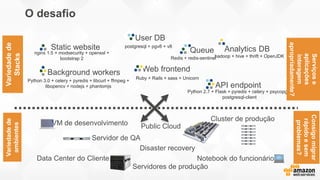
Static website
Web frontend
User DB
Queue Analytics DB
Background workers
API endpoint
nginx 1.5 + modsecurity + openssl +
bootstrap 2
postgresql + pgv8 + v8
hadoop + hive + thrift + OpenJDK
Ruby + Rails + sass + Unicorn
Redis + redis-sentinel
Python 3.0 + celery + pyredis + libcurl + ffmpeg +
libopencv + nodejs + phantomjs
Python 2.7 + Flask + pyredis + celery + psycopg +
postgresql-client
VM de desenvolvimento
Servidor de QA
Public Cloud
Disaster recovery
Notebook do funcionário
Servidores de produção
O desafio
Variedadede
Stacks
Variedadede
ambientes
Cluster de produção
Data Center do Cliente
Serviçose
aplicações
interagem
apropriadamente?
Consigomigrar
rápidoesem
problemas?
A matriz do inferno
Static website
Web frontend
Background workers
User DB
Analytics DB
Queue
VM de
desenvolvim
ento
Servidor de
QA
Servidor
único de
Prod
Cluster
interno
Public Cloud
Notebook do
funcionário
Servidores
do cliente
? ? ? ? ? ? ?
? ? ? ? ? ? ?
? ? ? ? ? ? ?
? ? ? ? ? ? ?
? ? ? ? ? ? ?
? ? ? ? ? ? ?
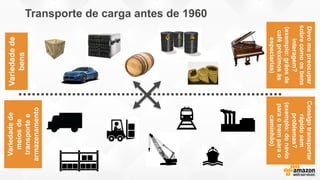
Variedadede
bens
Variedadede
meiosde
transportee
armazenamento
Devomepreocupar
sobrecomoosbens
interagem?
(exemplo:grãosde
cafépróximosàs
especiarias)
Consigotransportar
rápidosem
problemas?
(exemplo:donavio
paraotremparao
caminhão)
Transporte de carga antes de 1960
? ? ? ? ? ? ?
? ? ? ? ? ? ?
? ? ? ? ? ? ?
? ? ? ? ? ? ?
? ? ? ? ? ? ?
? ? ? ? ? ? ?
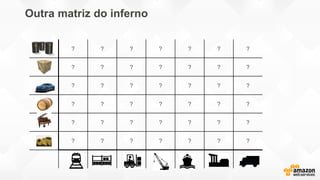
Outra matriz do inferno
Variedadede
bens
Variedadedemeios
detransportee
armazenamento
Devomepreocuparsobre
comoosbensinteragem?
(exemplo:grãosdecafé
próximosàespeciarias)
Consigotransportar
rápidoesem
problemas?(exemplo:
donavioparaotrem
paraocaminhão)
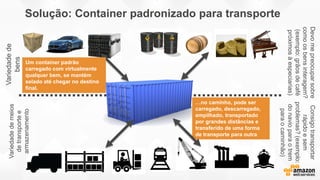
Solução: Container padronizado para transporte
…no caminho, pode ser
carregado, descarregado,
empilhado, transportado
por grandes distâncias e
transferido de uma forma
de transporte para outra
Um container padrão
carregado com virtualmente
qualquer bem, se mantém
selado até chegar no destino
final.
Static website Web frontendUser DB Queue Analytics DB
VM de
desenvolvimen
Servidor de QA Public Cloud
Notebook
do
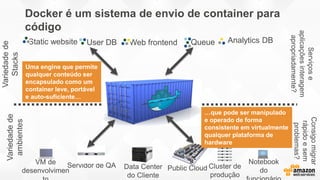
Docker é um sistema de envio de container para
código
Variedadede
Stacks
Variedadede
ambientes
Cluster de
produção
Data Center
do Cliente
Serviçose
aplicaçõesinteragem
apropriadamente?
Consigomigrar
rápidoesem
problemas?
…que pode ser manipulado
e operado de forma
consistente em virtualmente
qualquer plataforma de
hardware
Uma engine que permite
qualquer conteúdo ser
encapsulado como um
container leve, portável
e auto-suficiente…
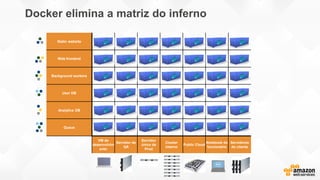
Static website
Web frontend
Background workers
User DB
Analytics DB
Queue
VM de
desenvolvim
ento
Servidor de
QA
Servidor
único de
Prod
Cluster
interno
Public Cloud
Notebook do
funcionário
Servidores
do cliente
Docker elimina a matriz do inferno
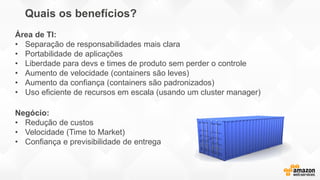
Quais os benefícios?
Negócio:
• Redução de custos
• Velocidade (Time to Market)
• Confiança e previsibilidade de entrega
Área de TI:
• Separação de responsabilidades mais clara
• Portabilidade de aplicações
• Liberdade para devs e times de produto sem perder o controle
• Aumento de velocidade (containers são leves)
• Aumento da confiança (containers são padronizados)
• Uso eficiente de recursos em escala (usando um cluster manager)
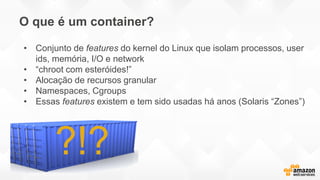
O que é um container?
?!?
• Conjunto de features do kernel do Linux que isolam processos, user
ids, memória, I/O e network
• “chroot com esteróides!”
• Alocação de recursos granular
• Namespaces, Cgroups
• Essas features existem e tem sido usadas há anos (Solaris “Zones”)
App
A
Hypervisor
Host OS
Server
Guest
OS
Bins/
Libs
App
A’
Guest
OS
Bins/
Libs
App
B
Guest
OS
AppA’
Docker
Host OS
Server
Bins/Libs
AppA
Bins/Libs
AppB
AppB’
AppB’
AppB’
VM
Container
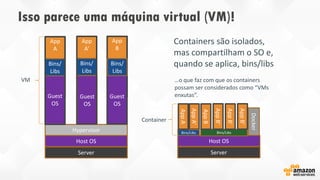
Containers são isolados,
mas compartilham o SO e,
quando se aplica, bins/libs
Guest
OS
Guest
OS
…o que faz com que os containers
possam ser considerados como “VMs
enxutas”.
Bins/
Libs
Isso parece uma máquina virtual (VM)!
Sobre Docker
• Docker é uma plataforma completa para se construir e
rodar containers
• Foi disponibilizado como open source em Março de
2013 pela dotCloud (atualmente Docker, Inc.)
• Inclui um CLI, ferramentas para criação de imagens de
containers (Dockerfiles), e um repositório para hospedar
containers
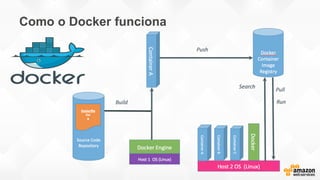
Como o Docker funciona
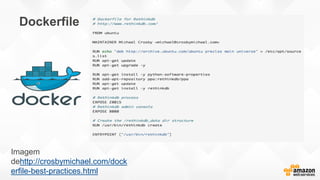
Dockerfile
Imagem
dehttp://crosbymichael.com/dock
erfile-best-practices.html
Containers na AWS
• AWS é um complemento natural ao uso de containers
por sua vasta gama de serviços escaláveis de
infraestrutura, onde seus containers podem rodar.
• AWS Elastic Beanstalk, AWS OpsWorks, e Amazon EC2
Container Service provém suporte integrado ao Docker.
• Oportunidade para usar containers em Dev, Test, e
Produção.
AWS Elastic Beanstalk
• AWS Elastic Beanstalk é uma camada de gerenciamento para serviços
AWS como Amazon EC2, Amazon RDS, e Elastic Load Balancing
• Remove o requisito de lançar manualmente os recursos AWS necessários
para rodar sua aplicação
• Você faz upload da sua aplicação enquanto o Elastic Beanstalk cuida dos
detalhes de provisionar capacidade, balancamento de carga, escalabilidade
e monitoramento da saúde da aplicação
• Suporte a aplicações Docker multi-container (em conjunto com Amazon
EC2 Container Service)
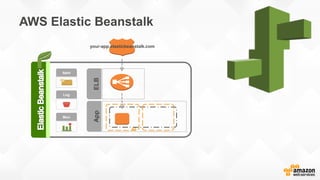
AWS Elastic Beanstalk
AppELB
AZ
your-app.elasticbeanstalk.com
Alert
Log
Mon
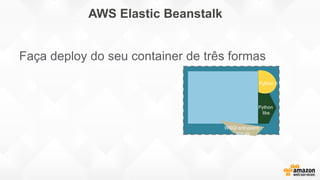
AWS Elastic Beanstalk
App.zip
Python 3
WSGI entrypoint:
app.py
Python
libs
Faça deploy do seu container de três formas
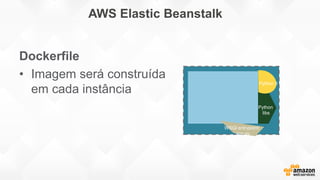
AWS Elastic Beanstalk
App.zip
Python 3
WSGI entrypoint:
app.py
Python
libs
Dockerfile
• Imagem será construída
em cada instância
AWS Elastic Beanstalk
App.zip
Python 3
WSGI entrypoint:
app.py
Python
libs
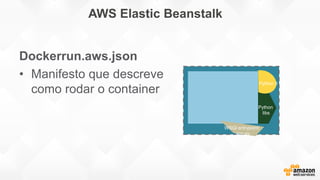
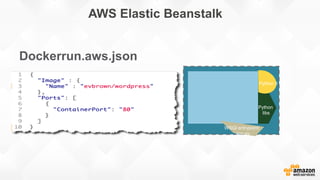
Dockerrun.aws.json
• Manifesto que descreve
como rodar o container
AWS Elastic Beanstalk
App.zip
Python 3
WSGI entrypoint:
app.py
Python
libs
Dockerrun.aws.json
AWS Elastic Beanstalk
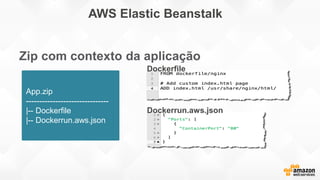
Zip com contexto da aplicação
App.zip
-------------------------------
|-- Dockerfile
|-- Dockerrun.aws.json
Dockerfile
Dockerrun.aws.json
OpsWorks
• Criado para funcionar com o OpsCode Chef, que permite deploy e
gerenciamento de aplicações diversas
• Permite a definição de stacks para configurar a infraestrutura em
AWS usando “receitas” Chef
• Uma “stack” pode conter um conjunto de recursos que servem a um
propósito único, como uma aplicação web
• As “receitas” Chef utilizadas no AWS OpsWorks podem instalar o
Docker nas instâncias e referenciar um Dockerfile para configurar o
container apropriadamente
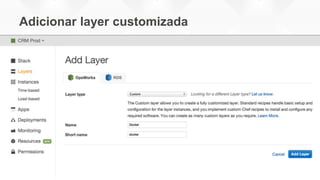
Adicionar layer customizada
• Criado para funcionar com o OpsCode Chef, que permite deploy e
gerenciamento de aplicações diversas
• Permite a definição de stacks para configurar a infraestrutura em
AWS usando “receitas” Chef
• Uma “stack” pode conter um conjunto de recursos que servem a um
propósito único, como uma aplicação web
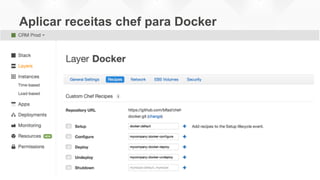
• As “receitas” Chef utilizadas no AWS OpsWorks podem instalar o
Docker nas instâncias e referenciar um Dockerfile para configurar o
container apropriadamente
Aplicar receitas chef para Docker
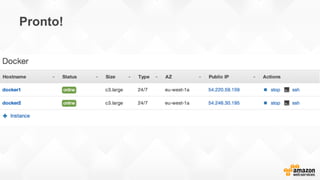
Pronto!
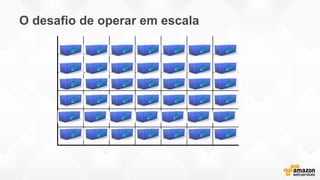
O desafio de operar em escala
Introduzindo o EC2 Container Service
EC2 Container Service
• Compatível com Docker
• Gerenciamento de Cluster facilitado
• Alta performance
• Eficiência de uso de recursos
• Extensível
• Seguro
ECS: Conceitos-chave
• Cluster
• AMIs “Container-Enabled”
• Agente ECS
• Gerenciador do cluster (Cluster Manager)
• Agendador de container (Container Scheduler)
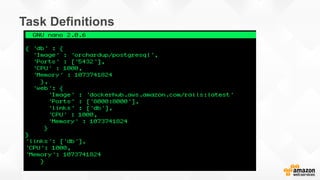
• Definições de Tarefas (Tasks/Task)
Task Definitions
Aplicações distribuídas
• Containers habilitam arquiteturas de micro-serviços
• Permite mapeamento de função por container
• Aderente aos conceitos de baixo acoplamento (loose
coupling), elasticidade, escalabilidade e outros
princípios de aplicações distribuídas
• Permite deployments, provisionamento e atualizações
rápidas
Customer Case – MercadoLibre
MercadoLibre in AWS
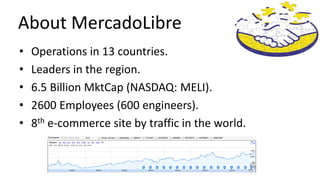
About MercadoLibre
• Operations in 13 countries.
• Leaders in the region.
• 6.5 Billion MktCap (NASDAQ: MELI).
• 2600 Employees (600 engineers).
• 8th e-commerce site by traffic in the world.
About Me
• Darío Simonassi
– Architecture Sr. Manager
– MercadoLibre.Com
– @ldsimonassi
About Me: Lately
• Darío Simonassi
– Architecture Sr. Manager
– MercadoLibre.Com
– @ldsimonassi
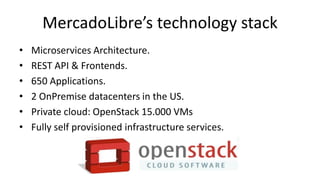
MercadoLibre’s technology stack
• Microservices Architecture.
• REST API & Frontends.
• 650 Applications.
• 2 OnPremise datacenters in the US.
• Private cloud: OpenStack 15.000 VMs
• Fully self provisioned infrastructure services.
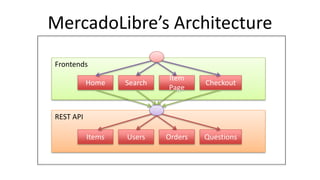
Frontends
REST API
MercadoLibre’s Architecture
Items Users Orders Questions
Home Search
Item
Page
Checkout
MercadoLibre’s engineering teams
• Small teams.
• Full control & Ownership:
– Product decisions
– Development.
– QA (Automated).
– Deployment.
– Alerts & Production management.
Current technology stack
opportunities
• Great for:
– Empowerment.
– Flexibility.
• Opportunities:
– Complex.
– Lot of tools.
– Lot of knowledge required.
– Policies are difficult to enforce.
Fury
• Simplification
• Automation
• Unified platform
– Infrastructure provisioning
– Continuous integration.
– Configuration management.
– Dev & Tests environments.
– Real time metrics & logs.
– Alerting.
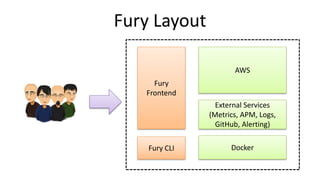
Fury Layout
Fury
Frontend
Fury CLI
AWS
Docker
External Services
(Metrics, APM, Logs,
GitHub, Alerting)
Operations
• Code
• Code, run, play & execute tests locally.
• Deploy
• CI, Fast & Safe code shipping.
• Monitoring & Alerting
• Know when something is going wrong.
• Understand what is going wrong.
• Notify the correct person.
• Follow up.
• Troubleshooting
• Take action to solve a problem.
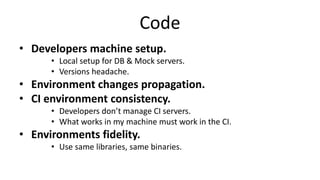
Code
• Developers machine setup.
• Local setup for DB & Mock servers.
• Versions headache.
• Environment changes propagation.
• CI environment consistency.
• Developers don’t manage CI servers.
• What works in my machine must work in the CI.
• Environments fidelity.
• Use same libraries, same binaries.
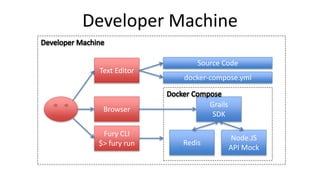
Grails
SDK
Redis
Node.JS
API Mock
Browser
Fury CLI
$> fury run
Developer Machine
Text Editor
docker-compose.yml
Source Code
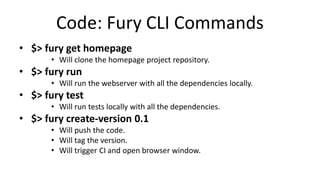
Code: Fury CLI Commands
• $> fury get homepage
• Will clone the homepage project repository.
• $> fury run
• Will run the webserver with all the dependencies locally.
• $> fury test
• Will run tests locally with all the dependencies.
• $> fury create-version 0.1
• Will push the code.
• Will tag the version.
• Will trigger CI and open browser window.
Deploy
• Risk of downtime
– Smooth transitions between versions.
– Real time metrics.
– Fast rollback.
• Reliability & Fidelity
– New Infrastructure vs Update scripts.
• Hardware usage efficiency
– Autoscaling.
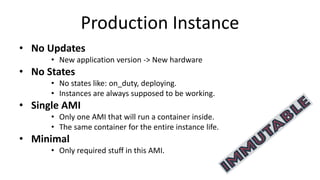
Production Instance
• No Updates
• New application version -> New hardware
• No States
• No states like: on_duty, deploying.
• Instances are always supposed to be working.
• Single AMI
• Only one AMI that will run a container inside.
• The same container for the entire instance life.
• Minimal
• Only required stuff in this AMI.
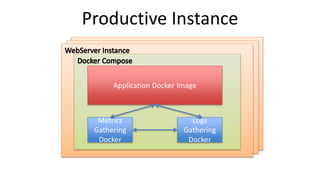
Application Docker Image
Metrics
Gathering
Docker
Logs
Gathering
Docker
Productive Instance
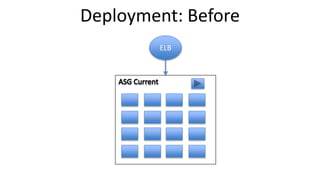
ELB
Deployment: Before
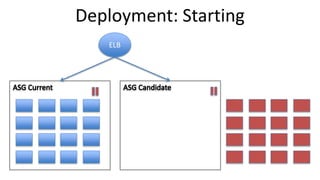
ELB
Deployment: Starting
ELB
Deployment: In progress 0%
ELB
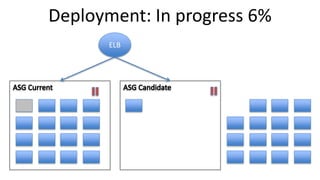
Deployment: In progress 6%
ELB
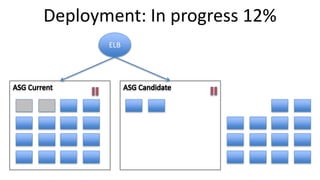
Deployment: In progress 12%
ELB
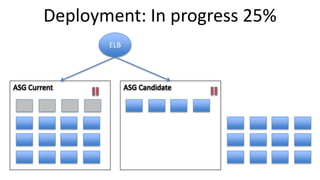
Deployment: In progress 25%
ELB
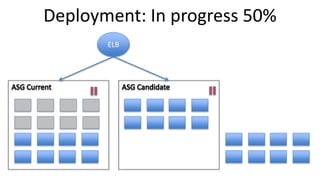
Deployment: In progress 50%
ELB
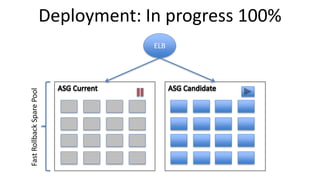
Deployment: In progress 100%
FastRollbackSparePool
ELB
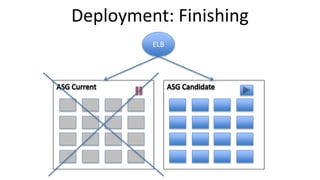
Deployment: Finishing
ELB
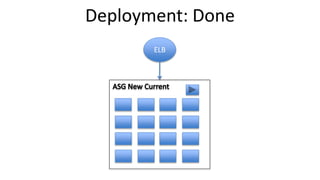
Deployment: Done
Monitoring & Alerting
• Alerting:
– To know fast and reliably when something is going wrong:
• No false alarms.
• Instance health no longer suitable.
• Notify the right persons & follow up.
• Diagnostics:
– To be able to understand what is going wrong.
• Metrics
– Multidimensional.
– Real-Time.
• Logs.
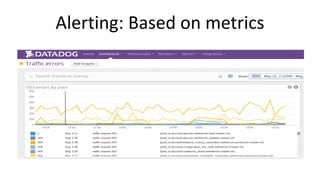
Alerting: Based on metrics
• HTTP:
– Errors.
– Response time.
• Infrastructure:
– How many machines stopped working unexpectedly during
the last hour?
• Business:
– Is the application doing what it should?
– Compare vs yesterday / last week.
Alerting: Based on metrics
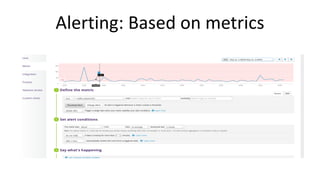
Alerting: No false alarms
• Reasonable thresholds.
– Undesirable but expected situations shouldn’t be an alert.
– You won’t improve your application SLA on Saturday 3AM.
• Different thresholds for different periods.
– Alert on > 25% errors in the last minute.
– Alert on > 5% errors in the last hour.
– Alert on > 0.2% errors in the last day.
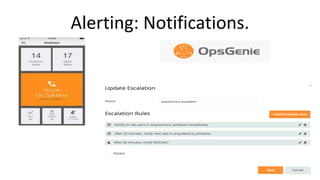
Alerting: Notifications.
• Teams manage the duty schedule.
• Escalation & Backup is necessary.
• Automatic Alerts follow up.
• Flexibility & Mobile.
– “I’m going to watch a movie, can someone get my
duties for the next three hours?”
Alerting: Notifications.
Diagnostics: Metrics
• Real Time.
– You’ll be changing things and you’ll need feedback.
• Multidimensional
– Tagged metrics will really make the difference when trying
to identify the failure.
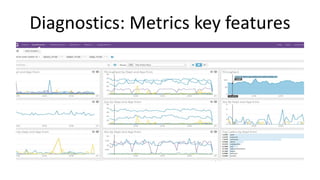
Diagnostics: Metrics key features
Diagnostics: Logs
• Useful logs
– Events.
– Unusual errors.
– Avoid traces.
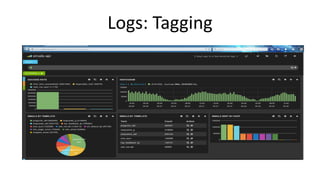
• Tagged
– Good tagging will allow you to make sense of the logged
data.
Logs: Tagging
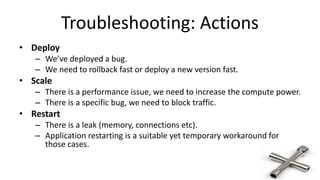
Troubleshooting: Actions
• Deploy
– We’ve deployed a bug.
– We need to rollback fast or deploy a new version fast.
• Scale
– There is a performance issue, we need to increase the compute power.
– There is a specific bug, we need to block traffic.
• Restart
– There is a leak (memory, connections etc).
– Application restarting is a suitable yet temporary workaround for
those cases.
Fury: Key AWS Services
• Networking & Availability:
– SDN (Network Isolation/Segmentation)
– Multi AZ
– Direct Connect (OnPremise DC Interop).
• Deploy:
– ELB, ASG, CloudWatch.
• Cache:
– ElasticCache, DynamoDB.
• Resources Orchestration:
– CloudFormation (For external resources too).
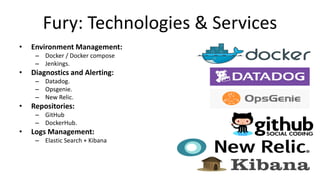
Fury: Technologies & Services
• Environment Management:
– Docker / Docker compose
– Jenkings.
• Diagnostics and Alerting:
– Datadog.
– Opsgenie.
– New Relic.
• Repositories:
– GitHub
– DockerHub.
• Logs Management:
– Elastic Search + Kibana
Referências
Docker:
http://www.docker.io/
http://pt.slideshare.net/dotCloud/docker-intro-november
OpsCode Chef:
https://www.chef.io/chef/
https://github.com/bflad/chef-docker
Amazon Web Services
http://aws.amazon.com/ecs/
http://aws.amazon.com/elasticbeanstalk/
http://aws.amazon.com/opsworks/
http://aws.amazon.com/ec2/
http://aws.amazon.com/cloudformation/
Perguntas?
Obrigado!

5. rodando containers docker na aws

  • 1.
  • 2.
    Rodando containers Dockerna AWS Rafael Felix Correa Consultant, AWS Professional Services
  • 3.
    Agenda Introdução ao Docker Formasde rodar containers Docker na AWS Caso de sucesso – MercadoLibre Perguntas
  • 4.
    Static website Web frontend UserDB Queue Analytics DB Background workers API endpoint nginx 1.5 + modsecurity + openssl + bootstrap 2 postgresql + pgv8 + v8 hadoop + hive + thrift + OpenJDK Ruby + Rails + sass + Unicorn Redis + redis-sentinel Python 3.0 + celery + pyredis + libcurl + ffmpeg + libopencv + nodejs + phantomjs Python 2.7 + Flask + pyredis + celery + psycopg + postgresql-client VM de desenvolvimento Servidor de QA Public Cloud Disaster recovery Notebook do funcionário Servidores de produção O desafio Variedadede Stacks Variedadede ambientes Cluster de produção Data Center do Cliente Serviçose aplicações interagem apropriadamente? Consigomigrar rápidoesem problemas?
  • 5.
    A matriz doinferno Static website Web frontend Background workers User DB Analytics DB Queue VM de desenvolvim ento Servidor de QA Servidor único de Prod Cluster interno Public Cloud Notebook do funcionário Servidores do cliente ? ? ? ? ? ? ? ? ? ? ? ? ? ? ? ? ? ? ? ? ? ? ? ? ? ? ? ? ? ? ? ? ? ? ? ? ? ? ? ? ? ?
  • 6.
  • 7.
    ? ? ?? ? ? ? ? ? ? ? ? ? ? ? ? ? ? ? ? ? ? ? ? ? ? ? ? ? ? ? ? ? ? ? ? ? ? ? ? ? ? Outra matriz do inferno
  • 8.
    Variedadede bens Variedadedemeios detransportee armazenamento Devomepreocuparsobre comoosbensinteragem? (exemplo:grãosdecafé próximosàespeciarias) Consigotransportar rápidoesem problemas?(exemplo: donavioparaotrem paraocaminhão) Solução: Container padronizadopara transporte …no caminho, pode ser carregado, descarregado, empilhado, transportado por grandes distâncias e transferido de uma forma de transporte para outra Um container padrão carregado com virtualmente qualquer bem, se mantém selado até chegar no destino final.
  • 9.
    Static website WebfrontendUser DB Queue Analytics DB VM de desenvolvimen Servidor de QA Public Cloud Notebook do Docker é um sistema de envio de container para código Variedadede Stacks Variedadede ambientes Cluster de produção Data Center do Cliente Serviçose aplicaçõesinteragem apropriadamente? Consigomigrar rápidoesem problemas? …que pode ser manipulado e operado de forma consistente em virtualmente qualquer plataforma de hardware Uma engine que permite qualquer conteúdo ser encapsulado como um container leve, portável e auto-suficiente…
  • 10.
    Static website Web frontend Backgroundworkers User DB Analytics DB Queue VM de desenvolvim ento Servidor de QA Servidor único de Prod Cluster interno Public Cloud Notebook do funcionário Servidores do cliente Docker elimina a matriz do inferno
  • 11.
    Quais os benefícios? Negócio: •Redução de custos • Velocidade (Time to Market) • Confiança e previsibilidade de entrega Área de TI: • Separação de responsabilidades mais clara • Portabilidade de aplicações • Liberdade para devs e times de produto sem perder o controle • Aumento de velocidade (containers são leves) • Aumento da confiança (containers são padronizados) • Uso eficiente de recursos em escala (usando um cluster manager)
  • 12.
    O que éum container? ?!? • Conjunto de features do kernel do Linux que isolam processos, user ids, memória, I/O e network • “chroot com esteróides!” • Alocação de recursos granular • Namespaces, Cgroups • Essas features existem e tem sido usadas há anos (Solaris “Zones”)
  • 13.
    App A Hypervisor Host OS Server Guest OS Bins/ Libs App A’ Guest OS Bins/ Libs App B Guest OS AppA’ Docker Host OS Server Bins/Libs AppA Bins/Libs AppB AppB’ AppB’ AppB’ VM Container Containerssão isolados, mas compartilham o SO e, quando se aplica, bins/libs Guest OS Guest OS …o que faz com que os containers possam ser considerados como “VMs enxutas”. Bins/ Libs Isso parece uma máquina virtual (VM)!
  • 14.
    Sobre Docker • Dockeré uma plataforma completa para se construir e rodar containers • Foi disponibilizado como open source em Março de 2013 pela dotCloud (atualmente Docker, Inc.) • Inclui um CLI, ferramentas para criação de imagens de containers (Dockerfiles), e um repositório para hospedar containers
  • 15.
    Como o Dockerfunciona
  • 16.
  • 17.
    Containers na AWS •AWS é um complemento natural ao uso de containers por sua vasta gama de serviços escaláveis de infraestrutura, onde seus containers podem rodar. • AWS Elastic Beanstalk, AWS OpsWorks, e Amazon EC2 Container Service provém suporte integrado ao Docker. • Oportunidade para usar containers em Dev, Test, e Produção.
  • 18.
    AWS Elastic Beanstalk •AWS Elastic Beanstalk é uma camada de gerenciamento para serviços AWS como Amazon EC2, Amazon RDS, e Elastic Load Balancing • Remove o requisito de lançar manualmente os recursos AWS necessários para rodar sua aplicação • Você faz upload da sua aplicação enquanto o Elastic Beanstalk cuida dos detalhes de provisionar capacidade, balancamento de carga, escalabilidade e monitoramento da saúde da aplicação • Suporte a aplicações Docker multi-container (em conjunto com Amazon EC2 Container Service)
  • 19.
  • 20.
    AWS Elastic Beanstalk App.zip Python3 WSGI entrypoint: app.py Python libs Faça deploy do seu container de três formas
  • 21.
    AWS Elastic Beanstalk App.zip Python3 WSGI entrypoint: app.py Python libs Dockerfile • Imagem será construída em cada instância
  • 22.
    AWS Elastic Beanstalk App.zip Python3 WSGI entrypoint: app.py Python libs Dockerrun.aws.json • Manifesto que descreve como rodar o container
  • 23.
    AWS Elastic Beanstalk App.zip Python3 WSGI entrypoint: app.py Python libs Dockerrun.aws.json
  • 24.
    AWS Elastic Beanstalk Zipcom contexto da aplicação App.zip ------------------------------- |-- Dockerfile |-- Dockerrun.aws.json Dockerfile Dockerrun.aws.json
  • 25.
    OpsWorks • Criado parafuncionar com o OpsCode Chef, que permite deploy e gerenciamento de aplicações diversas • Permite a definição de stacks para configurar a infraestrutura em AWS usando “receitas” Chef • Uma “stack” pode conter um conjunto de recursos que servem a um propósito único, como uma aplicação web • As “receitas” Chef utilizadas no AWS OpsWorks podem instalar o Docker nas instâncias e referenciar um Dockerfile para configurar o container apropriadamente
  • 26.
    Adicionar layer customizada •Criado para funcionar com o OpsCode Chef, que permite deploy e gerenciamento de aplicações diversas • Permite a definição de stacks para configurar a infraestrutura em AWS usando “receitas” Chef • Uma “stack” pode conter um conjunto de recursos que servem a um propósito único, como uma aplicação web • As “receitas” Chef utilizadas no AWS OpsWorks podem instalar o Docker nas instâncias e referenciar um Dockerfile para configurar o container apropriadamente
  • 27.
  • 28.
  • 29.
    O desafio deoperar em escala
  • 30.
    Introduzindo o EC2Container Service
  • 31.
    EC2 Container Service •Compatível com Docker • Gerenciamento de Cluster facilitado • Alta performance • Eficiência de uso de recursos • Extensível • Seguro
  • 32.
    ECS: Conceitos-chave • Cluster •AMIs “Container-Enabled” • Agente ECS • Gerenciador do cluster (Cluster Manager) • Agendador de container (Container Scheduler) • Definições de Tarefas (Tasks/Task)
  • 33.
  • 34.
    Aplicações distribuídas • Containershabilitam arquiteturas de micro-serviços • Permite mapeamento de função por container • Aderente aos conceitos de baixo acoplamento (loose coupling), elasticidade, escalabilidade e outros princípios de aplicações distribuídas • Permite deployments, provisionamento e atualizações rápidas
  • 35.
    Customer Case –MercadoLibre
  • 36.
  • 37.
    About MercadoLibre • Operationsin 13 countries. • Leaders in the region. • 6.5 Billion MktCap (NASDAQ: MELI). • 2600 Employees (600 engineers). • 8th e-commerce site by traffic in the world.
  • 38.
    About Me • DaríoSimonassi – Architecture Sr. Manager – MercadoLibre.Com – @ldsimonassi
  • 39.
    About Me: Lately •Darío Simonassi – Architecture Sr. Manager – MercadoLibre.Com – @ldsimonassi
  • 40.
    MercadoLibre’s technology stack •Microservices Architecture. • REST API & Frontends. • 650 Applications. • 2 OnPremise datacenters in the US. • Private cloud: OpenStack 15.000 VMs • Fully self provisioned infrastructure services.
  • 41.
    Frontends REST API MercadoLibre’s Architecture ItemsUsers Orders Questions Home Search Item Page Checkout
  • 42.
    MercadoLibre’s engineering teams •Small teams. • Full control & Ownership: – Product decisions – Development. – QA (Automated). – Deployment. – Alerts & Production management.
  • 43.
    Current technology stack opportunities •Great for: – Empowerment. – Flexibility. • Opportunities: – Complex. – Lot of tools. – Lot of knowledge required. – Policies are difficult to enforce.
  • 44.
    Fury • Simplification • Automation •Unified platform – Infrastructure provisioning – Continuous integration. – Configuration management. – Dev & Tests environments. – Real time metrics & logs. – Alerting.
  • 45.
    Fury Layout Fury Frontend Fury CLI AWS Docker ExternalServices (Metrics, APM, Logs, GitHub, Alerting)
  • 46.
    Operations • Code • Code,run, play & execute tests locally. • Deploy • CI, Fast & Safe code shipping. • Monitoring & Alerting • Know when something is going wrong. • Understand what is going wrong. • Notify the correct person. • Follow up. • Troubleshooting • Take action to solve a problem.
  • 47.
    Code • Developers machinesetup. • Local setup for DB & Mock servers. • Versions headache. • Environment changes propagation. • CI environment consistency. • Developers don’t manage CI servers. • What works in my machine must work in the CI. • Environments fidelity. • Use same libraries, same binaries.
  • 48.
    Grails SDK Redis Node.JS API Mock Browser Fury CLI $>fury run Developer Machine Text Editor docker-compose.yml Source Code
  • 49.
    Code: Fury CLICommands • $> fury get homepage • Will clone the homepage project repository. • $> fury run • Will run the webserver with all the dependencies locally. • $> fury test • Will run tests locally with all the dependencies. • $> fury create-version 0.1 • Will push the code. • Will tag the version. • Will trigger CI and open browser window.
  • 50.
    Deploy • Risk ofdowntime – Smooth transitions between versions. – Real time metrics. – Fast rollback. • Reliability & Fidelity – New Infrastructure vs Update scripts. • Hardware usage efficiency – Autoscaling.
  • 51.
    Production Instance • NoUpdates • New application version -> New hardware • No States • No states like: on_duty, deploying. • Instances are always supposed to be working. • Single AMI • Only one AMI that will run a container inside. • The same container for the entire instance life. • Minimal • Only required stuff in this AMI.
  • 52.
  • 53.
  • 54.
  • 55.
  • 56.
  • 57.
  • 58.
  • 59.
  • 60.
    ELB Deployment: In progress100% FastRollbackSparePool
  • 61.
  • 62.
  • 63.
    Monitoring & Alerting •Alerting: – To know fast and reliably when something is going wrong: • No false alarms. • Instance health no longer suitable. • Notify the right persons & follow up. • Diagnostics: – To be able to understand what is going wrong. • Metrics – Multidimensional. – Real-Time. • Logs.
  • 64.
    Alerting: Based onmetrics • HTTP: – Errors. – Response time. • Infrastructure: – How many machines stopped working unexpectedly during the last hour? • Business: – Is the application doing what it should? – Compare vs yesterday / last week.
  • 65.
  • 66.
  • 67.
    Alerting: No falsealarms • Reasonable thresholds. – Undesirable but expected situations shouldn’t be an alert. – You won’t improve your application SLA on Saturday 3AM. • Different thresholds for different periods. – Alert on > 25% errors in the last minute. – Alert on > 5% errors in the last hour. – Alert on > 0.2% errors in the last day.
  • 68.
    Alerting: Notifications. • Teamsmanage the duty schedule. • Escalation & Backup is necessary. • Automatic Alerts follow up. • Flexibility & Mobile. – “I’m going to watch a movie, can someone get my duties for the next three hours?”
  • 69.
  • 70.
    Diagnostics: Metrics • RealTime. – You’ll be changing things and you’ll need feedback. • Multidimensional – Tagged metrics will really make the difference when trying to identify the failure.
  • 71.
  • 72.
    Diagnostics: Logs • Usefullogs – Events. – Unusual errors. – Avoid traces. • Tagged – Good tagging will allow you to make sense of the logged data.
  • 73.
  • 74.
    Troubleshooting: Actions • Deploy –We’ve deployed a bug. – We need to rollback fast or deploy a new version fast. • Scale – There is a performance issue, we need to increase the compute power. – There is a specific bug, we need to block traffic. • Restart – There is a leak (memory, connections etc). – Application restarting is a suitable yet temporary workaround for those cases.
  • 75.
    Fury: Key AWSServices • Networking & Availability: – SDN (Network Isolation/Segmentation) – Multi AZ – Direct Connect (OnPremise DC Interop). • Deploy: – ELB, ASG, CloudWatch. • Cache: – ElasticCache, DynamoDB. • Resources Orchestration: – CloudFormation (For external resources too).
  • 76.
    Fury: Technologies &Services • Environment Management: – Docker / Docker compose – Jenkings. • Diagnostics and Alerting: – Datadog. – Opsgenie. – New Relic. • Repositories: – GitHub – DockerHub. • Logs Management: – Elastic Search + Kibana
  • 77.
    Referências Docker: http://www.docker.io/ http://pt.slideshare.net/dotCloud/docker-intro-november OpsCode Chef: https://www.chef.io/chef/ https://github.com/bflad/chef-docker Amazon WebServices http://aws.amazon.com/ecs/ http://aws.amazon.com/elasticbeanstalk/ http://aws.amazon.com/opsworks/ http://aws.amazon.com/ec2/ http://aws.amazon.com/cloudformation/
  • 78.
  • 79.