Strings e I/ O

Grupo de estudo para SCJP
Strings e I/ O
• Tópicos abordados
  – String, StringBuilder, and StringBuffer
    •   The String Class
    •   Important Facts About Strings and Memory
    •   Important Methods in the String Class
    •   The StringBuffer and StringBuilder Classes
    •   Important Methods in the StringBuffer and
        StringBuilder Classes
  – File Navigation and I/ O
    • The java.io.Console Class
Strings
• Strings são objetos imutáveis
• Cada caractere em uma string é 16- bit
  Unicode
• Como strings são objetos, é possível criar
  uma instância:
  – utilizando new:
    String s = new String();
    String s = new String("abcdef");
  – de outras maneiras:
    String s = "abcdef";
Strings: Métodos e
           referências
• Métodos e referências
Strings: Métodos e
           referências
• Métodos e referências
Strings: Métodos e
           referências
• Métodos e referências
Strings: Métodos e
            referências
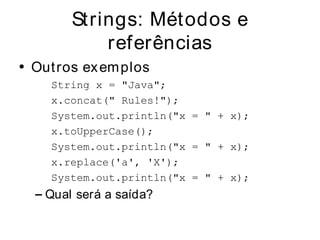
• Out ros ex em plos
    String x = "Java";
    x.concat(" Rules!");
    System.out.println("x = " + x);
    x.toUpperCase();
    System.out.println("x = " + x);
    x.replace('a', 'X');
    System.out.println("x = " + x);
  – Qual será a saída?
Strings: Métodos e
            referências
• Out ros ex em plos
    String x = "Java";
    x.concat(" Rules!");
    System.out.println("x = " + x);
    x.toUpperCase();
    System.out.println("x = " + x);
    x.replace('a', 'X');
    System.out.println("x = " + x);
  – Qual será a saída? x = Java
Strings: Métodos e
            referências
• Out ro ex em plo
     String x = "Java";
     x = x.concat(" Rules!");
     System.out.println("x = " + x);
  – E agora?
Strings: Métodos e
            referências
• Out ro ex em plo
     String x = "Java";
     x = x.concat(" Rules!");
     System.out.println("x = " + x);
  – E agora? x = Java Rules!
Strings: Métodos e
            referências
• Possível ex emplo do teste
  String s1 = "spring ";
  String s2 = s1 + "summer ";
  s1.concat("fall ");
  s2.concat(s1);
  s1 += "winter ";
  System.out.println(s1 + " " + s2);
• Possíveis questionamentos:
  – Qual a saída? Quantos objetos foram criados?
    Quantos estão perdidos?
Strings: Fatos importantes sobre
            memória
• Área especial na m em ória: St ring
  constant pool
• Referências iguais, objetos iguais
• Para evitar problem as com a
  im utabilidade, a classe String é
  definida com o final
Strings: Fatos importantes sobre
            memória
• Qual a diferença na m em ória entre os
  dois m étodos a seguir?
    String s = "abc";
    String s = new String("abc");
Strings: Fatos importantes sobre
            memória
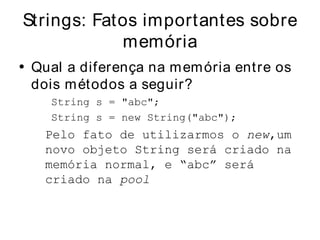
• Qual a diferença na m em ória entre os
  dois m étodos a seguir?
    String s = "abc";
    String s = new String("abc");
   Pelo fato de utilizarmos o new,um
   novo objeto String será criado na
   memória normal, e “abc” será
   criado na pool
Strings: Métodos im portantes
•   Mét odos important es da classe St ring
    ■ charAt() Returns the character located at the specified index
    ■ concat() Appends one String to the end of another ( "+ " also
      works)
    ■ equalsIgnoreCase() Determines the equality of two Strings,
      ignoring case
    ■ length() Returns the number of characters in a String
    ■ replace() Replaces occurrences of a character with a new character
    ■ substring() Returns a part of a String
    ■ toLowerCase() Returns a String with uppercase characters
      converted
    ■ toString() Returns the value of a String
    ■ toUpperCase() Returns a String with lowercase characters
      converted
    ■ trim() Removes whitespace from the ends of a String
Strings: Erros com uns
• Erros com uns
  – O atributo length
    • Ex emplo:
       String x = "test";
       System.out.println( x.length );
       ou
       String[] x = new String[3];
       System.out.println( x.length() );
    • Qual desses códigos funcionará?
Strings: StringBuffer e
            StringBuilder
• StringBuffer x StringBuilder
  – As duas apresentam a mesma API
  – StringBuilder não apresenta métodos
    sincronizados
  – A Sun recomenda StringBuilder pela sua
    velocidade
Strings: StringBuffer e
             StringBuilder
• Ex em plo inicial
  StringBuffer sb = new StringBuffer("abc");
  sb.append("def");
  System.out.println("sb = " + sb);
  sb = new StringBuilder("abc");
  sb.append("def").reverse().insert(3, "---");
  System.out.println( sb );
  – Qual será a saída?
Strings: StringBuffer e
             StringBuilder
• Ex em plo inicial
  StringBuffer sb = new StringBuffer("abc");
  sb.append("def");
  System.out.println("sb = " + sb);
  sb = new StringBuilder("abc");
  sb.append("def").reverse().insert(3, "---");
  System.out.println( sb );
  – Qual será a saída?
     sb = abcdef
     fed---cba
Strings: StringBuffer e
               StringBuilder
• Métodos importantes
  –   public   synchronized StringBuffer append(String s)
  –   public   StringBuilder delete(int start, int end)
  –   public   StringBuilder insert(int offset, String s)
  –   public   synchronized StringBuffer reverse( )
  –   public   synchronized StringBuffer toString( )
I/ O
• Navegação entre arquivos
• Leitura de arquivos
I/ O
• Navegação entre arquivos
• Leitura de arquivos
I/ O
I/ O
•   Exemplo Geral
          import java.io.*;
          class Writer2 {
             public static void main(String [] args) {
                       char[] in = new char[50];
                       int size = 0;
                       try {
                                     File file = new File("fileWrite2.txt");
                                     FileWriter fw = new FileWriter(file);
                                     fw.write("howdy nfolks n");
                                     fw.flush();
                                     fw.close();
                                       FileReader fr = new FileReader(file);
                                       size = fr.read(in);
                                       System.out.print(size + " ");
                                       for(char c : in)
                                       System.out.print(c);
                                       fr.close();
                       } catch(IOEx ception e) { }
                }
          }
     –   Qual será a saída?
I/ O
•   Exemplo Geral
          import java.io.*;
          class Writer2 {
             public static void main(String [] args) {
                     char[] in = new char[50];
                     int size = 0;
                     try {
                               File file = new File("fileWrite2.txt");
                               FileWriter fw = new FileWriter(file);
                               fw.write("howdynfolksn");
                               fw.flush();
                               fw.close();
                                 FileReader fr = new FileReader(file);
                                 size = fr.read(in);
                                 System.out.print(size + " ");
                                 for(char c : in)
                                 System.out.print(c);
                                 fr.close();
                     } catch(IOException e) { }
                }
          }
     –   Qual será a saída?      12 howdy
                                 folks
I/ O
• Ex em plo com diretório
       File myDir = new File("mydir");
       myDir.mkdir();
       File myFile = new File(myDir,"myFile.txt");
       myFile.createNewFile();
       PrintWriter pw = new PrintWriter(myFile);
       pw.println("new stuff");
       pw.flush();
       pw.close();
I/ O
• Ex em plo com diretório
    File myDir = new File("mydir");
    File myFile = new File(myDir,"myFile.txt");
    myFile.createNewFile();
    O que ocorrerá?
I/ O
• Ex em plo com diretório
    File myDir = new File("mydir");
    File myFile = new File(myDir,"myFile.txt");
    myFile.createNewFile();
    O que ocorrerá?
    java.io.IOException: No such file or directory
I/ O
• Ex emplo com outros métodos
        File delDir = new File("deldir");
        delDir.mkdir();
        File delFile1 = new File(delDir, "delFile1.txt");
        delFile1.createNewFile();
        File delFile2 = new File(
        delDir, "delFile2.txt");
        delFile2.createNewFile();
        delFile1.delete();
        System.out.println("delDir is "+ delDir.delete());
        File newName = new File(delDir, "newName.txt");
        delFile2.renameTo(newName); // rename file
        File newDir = new File("newDir");
        delDir.renameTo(newDir);

        Saída:
          delDir is false
I/ O: Console Class
• Classe para tratar o console
• Sem pre invoca System .console()
• Métodos im portantes:
  – readLine();
  – readPassword();
I/ O: Console Class
•   Exemplo
        import java.io.Console;
        public class NewConsole {
              public static void main(String[] args) {
                   Console c = System.console();
                   char[] pw;
                   pw = c.readPassword("%s", "pw: ");
                   for(char ch: pw)
                   c.format("%c ", ch);
                   c.format("n");
                   MyUtility mu = new MyUtility();
                   while(true) {
                      String name = c.readLine("%s", "input?: ");
                      c.format("output: %s n", mu.doStuff(name));
                   }
              }
        }

        class MyUtility {
              String doStuff(String arg1) {
                 return "result is " + arg1;
              }
        }

String e IO

  • 1.
    Strings e I/O Grupo de estudo para SCJP
  • 2.
    Strings e I/O • Tópicos abordados – String, StringBuilder, and StringBuffer • The String Class • Important Facts About Strings and Memory • Important Methods in the String Class • The StringBuffer and StringBuilder Classes • Important Methods in the StringBuffer and StringBuilder Classes – File Navigation and I/ O • The java.io.Console Class
  • 3.
    Strings • Strings sãoobjetos imutáveis • Cada caractere em uma string é 16- bit Unicode • Como strings são objetos, é possível criar uma instância: – utilizando new: String s = new String(); String s = new String("abcdef"); – de outras maneiras: String s = "abcdef";
  • 4.
    Strings: Métodos e referências • Métodos e referências
  • 5.
    Strings: Métodos e referências • Métodos e referências
  • 6.
    Strings: Métodos e referências • Métodos e referências
  • 7.
    Strings: Métodos e referências • Out ros ex em plos String x = "Java"; x.concat(" Rules!"); System.out.println("x = " + x); x.toUpperCase(); System.out.println("x = " + x); x.replace('a', 'X'); System.out.println("x = " + x); – Qual será a saída?
  • 8.
    Strings: Métodos e referências • Out ros ex em plos String x = "Java"; x.concat(" Rules!"); System.out.println("x = " + x); x.toUpperCase(); System.out.println("x = " + x); x.replace('a', 'X'); System.out.println("x = " + x); – Qual será a saída? x = Java
  • 9.
    Strings: Métodos e referências • Out ro ex em plo String x = "Java"; x = x.concat(" Rules!"); System.out.println("x = " + x); – E agora?
  • 10.
    Strings: Métodos e referências • Out ro ex em plo String x = "Java"; x = x.concat(" Rules!"); System.out.println("x = " + x); – E agora? x = Java Rules!
  • 11.
    Strings: Métodos e referências • Possível ex emplo do teste String s1 = "spring "; String s2 = s1 + "summer "; s1.concat("fall "); s2.concat(s1); s1 += "winter "; System.out.println(s1 + " " + s2); • Possíveis questionamentos: – Qual a saída? Quantos objetos foram criados? Quantos estão perdidos?
  • 12.
    Strings: Fatos importantessobre memória • Área especial na m em ória: St ring constant pool • Referências iguais, objetos iguais • Para evitar problem as com a im utabilidade, a classe String é definida com o final
  • 13.
    Strings: Fatos importantessobre memória • Qual a diferença na m em ória entre os dois m étodos a seguir? String s = "abc"; String s = new String("abc");
  • 14.
    Strings: Fatos importantessobre memória • Qual a diferença na m em ória entre os dois m étodos a seguir? String s = "abc"; String s = new String("abc"); Pelo fato de utilizarmos o new,um novo objeto String será criado na memória normal, e “abc” será criado na pool
  • 15.
    Strings: Métodos importantes • Mét odos important es da classe St ring ■ charAt() Returns the character located at the specified index ■ concat() Appends one String to the end of another ( "+ " also works) ■ equalsIgnoreCase() Determines the equality of two Strings, ignoring case ■ length() Returns the number of characters in a String ■ replace() Replaces occurrences of a character with a new character ■ substring() Returns a part of a String ■ toLowerCase() Returns a String with uppercase characters converted ■ toString() Returns the value of a String ■ toUpperCase() Returns a String with lowercase characters converted ■ trim() Removes whitespace from the ends of a String
  • 16.
    Strings: Erros comuns • Erros com uns – O atributo length • Ex emplo: String x = "test"; System.out.println( x.length ); ou String[] x = new String[3]; System.out.println( x.length() ); • Qual desses códigos funcionará?
  • 17.
    Strings: StringBuffer e StringBuilder • StringBuffer x StringBuilder – As duas apresentam a mesma API – StringBuilder não apresenta métodos sincronizados – A Sun recomenda StringBuilder pela sua velocidade
  • 18.
    Strings: StringBuffer e StringBuilder • Ex em plo inicial StringBuffer sb = new StringBuffer("abc"); sb.append("def"); System.out.println("sb = " + sb); sb = new StringBuilder("abc"); sb.append("def").reverse().insert(3, "---"); System.out.println( sb ); – Qual será a saída?
  • 19.
    Strings: StringBuffer e StringBuilder • Ex em plo inicial StringBuffer sb = new StringBuffer("abc"); sb.append("def"); System.out.println("sb = " + sb); sb = new StringBuilder("abc"); sb.append("def").reverse().insert(3, "---"); System.out.println( sb ); – Qual será a saída? sb = abcdef fed---cba
  • 20.
    Strings: StringBuffer e StringBuilder • Métodos importantes – public synchronized StringBuffer append(String s) – public StringBuilder delete(int start, int end) – public StringBuilder insert(int offset, String s) – public synchronized StringBuffer reverse( ) – public synchronized StringBuffer toString( )
  • 21.
    I/ O • Navegaçãoentre arquivos • Leitura de arquivos
  • 22.
    I/ O • Navegaçãoentre arquivos • Leitura de arquivos
  • 23.
  • 24.
    I/ O • Exemplo Geral import java.io.*; class Writer2 { public static void main(String [] args) { char[] in = new char[50]; int size = 0; try { File file = new File("fileWrite2.txt"); FileWriter fw = new FileWriter(file); fw.write("howdy nfolks n"); fw.flush(); fw.close(); FileReader fr = new FileReader(file); size = fr.read(in); System.out.print(size + " "); for(char c : in) System.out.print(c); fr.close(); } catch(IOEx ception e) { } } } – Qual será a saída?
  • 25.
    I/ O • Exemplo Geral import java.io.*; class Writer2 { public static void main(String [] args) { char[] in = new char[50]; int size = 0; try { File file = new File("fileWrite2.txt"); FileWriter fw = new FileWriter(file); fw.write("howdynfolksn"); fw.flush(); fw.close(); FileReader fr = new FileReader(file); size = fr.read(in); System.out.print(size + " "); for(char c : in) System.out.print(c); fr.close(); } catch(IOException e) { } } } – Qual será a saída? 12 howdy folks
  • 26.
    I/ O • Exem plo com diretório File myDir = new File("mydir"); myDir.mkdir(); File myFile = new File(myDir,"myFile.txt"); myFile.createNewFile(); PrintWriter pw = new PrintWriter(myFile); pw.println("new stuff"); pw.flush(); pw.close();
  • 27.
    I/ O • Exem plo com diretório File myDir = new File("mydir"); File myFile = new File(myDir,"myFile.txt"); myFile.createNewFile(); O que ocorrerá?
  • 28.
    I/ O • Exem plo com diretório File myDir = new File("mydir"); File myFile = new File(myDir,"myFile.txt"); myFile.createNewFile(); O que ocorrerá? java.io.IOException: No such file or directory
  • 29.
    I/ O • Exemplo com outros métodos File delDir = new File("deldir"); delDir.mkdir(); File delFile1 = new File(delDir, "delFile1.txt"); delFile1.createNewFile(); File delFile2 = new File( delDir, "delFile2.txt"); delFile2.createNewFile(); delFile1.delete(); System.out.println("delDir is "+ delDir.delete()); File newName = new File(delDir, "newName.txt"); delFile2.renameTo(newName); // rename file File newDir = new File("newDir"); delDir.renameTo(newDir); Saída: delDir is false
  • 30.
    I/ O: ConsoleClass • Classe para tratar o console • Sem pre invoca System .console() • Métodos im portantes: – readLine(); – readPassword();
  • 31.
    I/ O: ConsoleClass • Exemplo import java.io.Console; public class NewConsole { public static void main(String[] args) { Console c = System.console(); char[] pw; pw = c.readPassword("%s", "pw: "); for(char ch: pw) c.format("%c ", ch); c.format("n"); MyUtility mu = new MyUtility(); while(true) { String name = c.readLine("%s", "input?: "); c.format("output: %s n", mu.doStuff(name)); } } } class MyUtility { String doStuff(String arg1) { return "result is " + arg1; } }