Threads

Elenilson Vieira
Grupo de Estudos da UFPB para a SCJP
elenilson.vieira.filho@gmail.com
O que é Thread?
O que é Thread?
   Linha de Execução

   Um processo A tem duas Thread
       Um processo A tem duas linhas de execução
Entendam como
   um fio no
    processo
Criação de Threads
   Posso extender a classe Thread

   Posso implementar a Interface Runnable
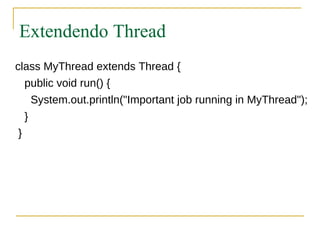
Extendendo Thread
class MyThread extends Thread {
   public void run() {
     System.out.println("Important job running in MyThread");
   }
 }
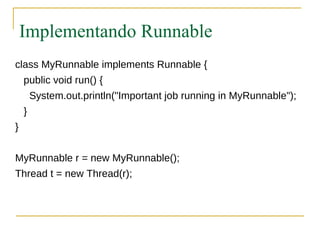
Implementando Runnable
class MyRunnable implements Runnable {
    public void run() {
        System.out.println("Important job running in MyRunnable");
    }
}


MyRunnable r = new MyRunnable();
Thread t = new Thread(r);
Basta então criar uma instância de
             Thread?
NÃO!!!
Criação de Threads
   Uma instância da classe Thread é apenas
    uma instância como qualquer outra

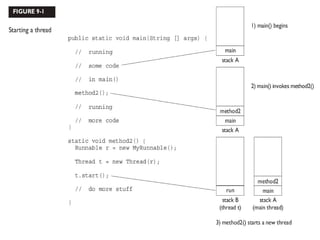
   Thread é uma linha de execução
       Precisa ser startada


   Método start()
Em Threads
   A classe Thread possui vários métodos

   Para o exame precisamos entender
       start()
       yield()
       sleep()
       run()
Onde escrevo o código?

  public void run() {
    // your job code goes here
  }
Runnable ou Thread?
Runnable ou Thread?
   Qual o melhor?

   Por quê?
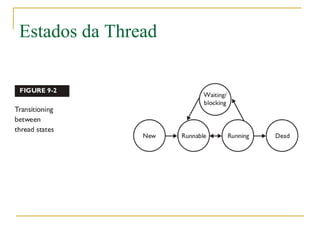
Estados da Thread
Estados da Thread
Estado Novo
   Objecto é criado
    mas o start não
    é chamado
Runnable
   Thread está apta a ser executada
Running
   Thread está
    “trabalhando”
Bloqueada

   Thread não é
    elegível para      Chamou o método
    execução               wait()
                           yield()
                           sleep()
Morta
Como identifico
as Threads?
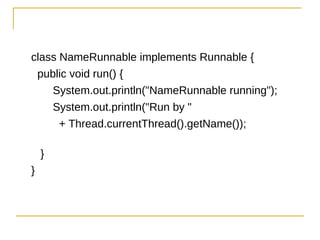
class NameRunnable implements Runnable {
 public void run() {
    System.out.println("NameRunnable running");
    System.out.println("Run by "
      + Thread.currentThread().getName());

    }
}
public class NameThread {
    public static void main (String [] args) {
        NameRunnable nr = new NameRunnable();
        Thread t = new Thread(nr);
        t.setName("Fred");
        t.start();
    }
}
Running this code produces the following, extra special,
output:
% java NameThread
NameRunnable running
Run by Fred
public class NameThread {
   public static void main (String [] args) {
     NameRunnable nr = new NameRunnable();
     Thread t = new Thread(nr);
     // t.setName("Fred");
     t.start();
   }
 }
Running the preceding code now gives us
 % java NameThread
 NameRunnable running
 Run by Thread-0
public class NameThreadTwo {
  public static void main (String [] args) {
    System.out.println("thread is "
     + Thread.currentThread().getName());
  }
}

which prints out
 % java NameThreadTwo
 thread is main
Múltiplas Threads
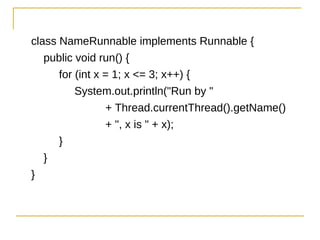
class NameRunnable implements Runnable {
   public void run() {
      for (int x = 1; x <= 3; x++) {
          System.out.println("Run by "
                 + Thread.currentThread().getName()
                 + ", x is " + x);
      }
   }
}
public class ManyNames {
    public static void main(String [] args) {
        // Make one Runnable
        NameRunnable nr = new NameRunnable();
        Thread one = new Thread(nr);
        Thread two = new Thread(nr);
        Thread three = new Thread(nr);
        one.setName("Fred");
        two.setName("Lucy");
        three.setName("Ricky");
        one.start();
        two.start();
        three.start();
    }
}
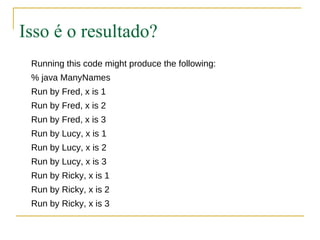
Isso é o resultado?
 Running this code might produce the following:
 % java ManyNames
 Run by Fred, x is 1
 Run by Fred, x is 2
 Run by Fred, x is 3
 Run by Lucy, x is 1
 Run by Lucy, x is 2
 Run by Lucy, x is 3
 Run by Ricky, x is 1
 Run by Ricky, x is 2
 Run by Ricky, x is 3
Nem Sempre!
Nem Sempre!
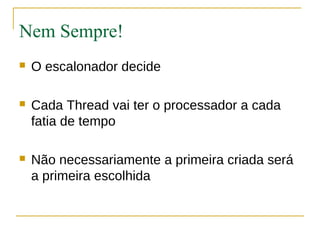
   O escalonador decide

   Cada Thread vai ter o processador a cada
    fatia de tempo

   Não necessariamente a primeira criada será
    a primeira escolhida
Qualquer uma no estado
RUNNABLE pode ser escolhida!
Podemos parar a execução sem ter
         que matá-la?
Podemos parar a execução sem ter
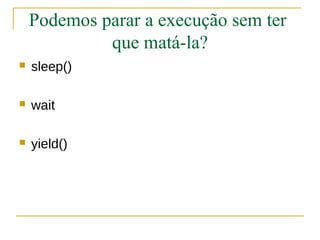
             que matá-la?
   sleep()

   wait

   yield()
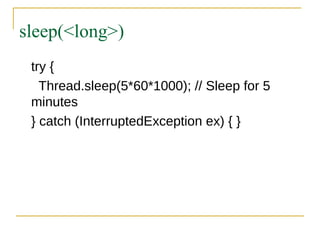
sleep(<long>)
 try {
   Thread.sleep(5*60*1000); // Sleep for 5
 minutes
 } catch (InterruptedException ex) { }
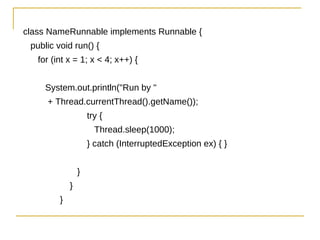
class NameRunnable implements Runnable {
 public void run() {
   for (int x = 1; x < 4; x++) {


     System.out.println("Run by "
     + Thread.currentThread().getName());
                     try {
                       Thread.sleep(1000);
                     } catch (InterruptedException ex) { }


                 }
             }
         }
public class ManyNames {
        public static void main (String [] args) {
         // Make one Runnable
         NameRunnable nr = new NameRunnable();
         Thread one = new Thread(nr);
         one.setName("Fred");


         Thread two = new Thread(nr);
         two.setName("Lucy");


         Thread three = new Thread(nr);
         three.setName("Ricky");
         one.start();
         two.start();
         three.start();
    }
}
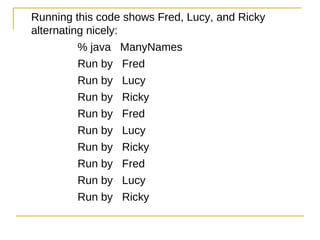
Running this code shows Fred, Lucy, and Ricky
alternating nicely:
          % java ManyNames
          Run by Fred
          Run by Lucy
          Run by Ricky
          Run by Fred
          Run by Lucy
          Run by Ricky
          Run by Fred
          Run by Lucy
          Run by Ricky
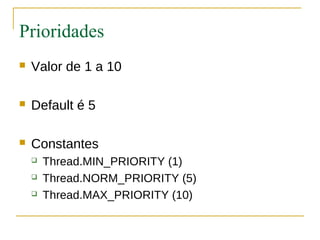
Prioridades
Prioridades
   Valor de 1 a 10

   Default é 5

   Constantes
       Thread.MIN_PRIORITY (1)
       Thread.NORM_PRIORITY (5)
       Thread.MAX_PRIORITY (10)
Método yield()
   Uma determinada thread pode ceder o
    restante de sua fatia de tempo com o
    processador para outra thread
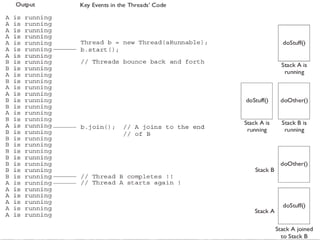
Método join()
   Indica para uma Thread A que ela deve parar

   Thread A apenas continua quando a Thread
    B acabar
Como assim?
Sincronização
Slides do Professor Gledson Elias
Classes Thread-Safe
   Dados acessados sáo sincronizados
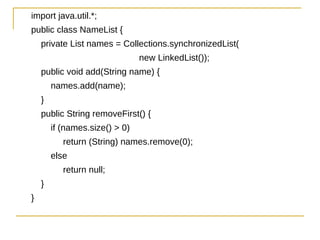
import java.util.*;
public class NameList {
    private List names = Collections.synchronizedList(
                                new LinkedList());
    public void add(String name) {
        names.add(name);
    }
    public String removeFirst() {
        if (names.size() > 0)
           return (String) names.remove(0);
        else
           return null;
    }
}
public static void main(String[] args) {
    final NameList nl = new NameList();
    nl.add("Ozymandias");
    class NameDropper extends Thread {
        public void run() {
            String name = nl.removeFirst();
            System.out.println(name);
        }
    }
    Thread t1 = new NameDropper();
    Thread t2 = new NameDropper();
    t1.start();
    t2.start();
}
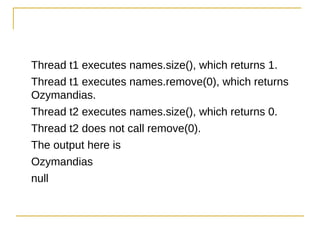
Como temos os dados
  sincronizados...
Thread t1 executes names.size(), which returns 1.
Thread t1 executes names.remove(0), which returns
Ozymandias.
Thread t2 executes names.size(), which returns 0.
Thread t2 does not call remove(0).
The output here is
Ozymandias
null
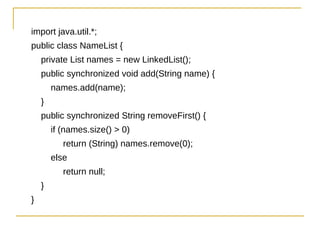
import java.util.*;
public class NameList {
    private List names = new LinkedList();
    public synchronized void add(String name) {
        names.add(name);
    }
    public synchronized String removeFirst() {
        if (names.size() > 0)
           return (String) names.remove(0);
        else
           return null;
    }
}
Podemos sincronizar
   o objeto todo?
1. class ThreadA {
2.      public static void main(String [] args) {
3.          ThreadB b = new ThreadB();
4.          b.start();
5.
6.          synchronized(b) {
7.              try {
8.               System.out.println("Waiting for b to complete...");
9.               b.wait();
10.             } catch (InterruptedException e) {}
11.             System.out.println("Total is: " + b.total);
12.         }
13.     }
14. }
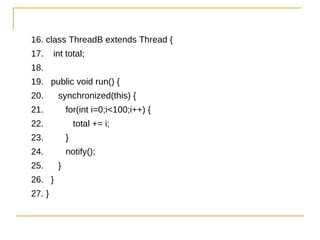
16. class ThreadB extends Thread {
17.     int total;
18.
19. public void run() {
20.      synchronized(this) {
21.          for(int i=0;i<100;i++) {
22.              total += i;
23.          }
24.          notify();
25.      }
26. }
27. }
wait() e
notify()
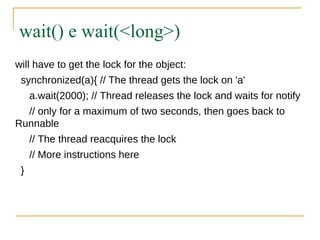
wait() e wait(<long>)
will have to get the lock for the object:
 synchronized(a){ // The thread gets the lock on 'a'
     a.wait(2000); // Thread releases the lock and waits for notify
  // only for a maximum of two seconds, then goes back to
Runnable
     // The thread reacquires the lock
     // More instructions here
 }
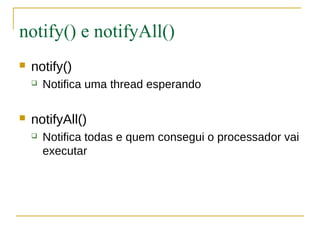
notify() e notifyAll()
   notify()
       Notifica uma thread esperando

   notifyAll()
       Notifica todas e quem consegui o processador vai
        executar
Threads

Threads

  • 1.
    Threads Elenilson Vieira Grupo deEstudos da UFPB para a SCJP elenilson.vieira.filho@gmail.com
  • 2.
    O que éThread?
  • 3.
    O que éThread?  Linha de Execução  Um processo A tem duas Thread  Um processo A tem duas linhas de execução
  • 4.
    Entendam como um fio no processo
  • 5.
    Criação de Threads  Posso extender a classe Thread  Posso implementar a Interface Runnable
  • 6.
    Extendendo Thread class MyThreadextends Thread { public void run() { System.out.println("Important job running in MyThread"); } }
  • 7.
    Implementando Runnable class MyRunnableimplements Runnable { public void run() { System.out.println("Important job running in MyRunnable"); } } MyRunnable r = new MyRunnable(); Thread t = new Thread(r);
  • 8.
    Basta então criaruma instância de Thread?
  • 9.
  • 10.
    Criação de Threads  Uma instância da classe Thread é apenas uma instância como qualquer outra  Thread é uma linha de execução  Precisa ser startada  Método start()
  • 12.
    Em Threads  A classe Thread possui vários métodos  Para o exame precisamos entender  start()  yield()  sleep()  run()
  • 13.
  • 14.
    Onde escrevo ocódigo? public void run() { // your job code goes here }
  • 15.
  • 16.
    Runnable ou Thread?  Qual o melhor?  Por quê?
  • 17.
  • 18.
  • 19.
    Estado Novo  Objecto é criado mas o start não é chamado
  • 20.
    Runnable  Thread está apta a ser executada
  • 21.
    Running  Thread está “trabalhando”
  • 22.
    Bloqueada  Thread não é elegível para  Chamou o método execução  wait()  yield()  sleep()
  • 23.
  • 24.
  • 25.
    class NameRunnable implementsRunnable { public void run() { System.out.println("NameRunnable running"); System.out.println("Run by " + Thread.currentThread().getName()); } }
  • 26.
    public class NameThread{ public static void main (String [] args) { NameRunnable nr = new NameRunnable(); Thread t = new Thread(nr); t.setName("Fred"); t.start(); } } Running this code produces the following, extra special, output: % java NameThread NameRunnable running Run by Fred
  • 27.
    public class NameThread{ public static void main (String [] args) { NameRunnable nr = new NameRunnable(); Thread t = new Thread(nr); // t.setName("Fred"); t.start(); } } Running the preceding code now gives us % java NameThread NameRunnable running Run by Thread-0
  • 28.
    public class NameThreadTwo{ public static void main (String [] args) { System.out.println("thread is " + Thread.currentThread().getName()); } } which prints out % java NameThreadTwo thread is main
  • 29.
  • 30.
    class NameRunnable implementsRunnable { public void run() { for (int x = 1; x <= 3; x++) { System.out.println("Run by " + Thread.currentThread().getName() + ", x is " + x); } } }
  • 31.
    public class ManyNames{ public static void main(String [] args) { // Make one Runnable NameRunnable nr = new NameRunnable(); Thread one = new Thread(nr); Thread two = new Thread(nr); Thread three = new Thread(nr); one.setName("Fred"); two.setName("Lucy"); three.setName("Ricky"); one.start(); two.start(); three.start(); } }
  • 32.
    Isso é oresultado? Running this code might produce the following: % java ManyNames Run by Fred, x is 1 Run by Fred, x is 2 Run by Fred, x is 3 Run by Lucy, x is 1 Run by Lucy, x is 2 Run by Lucy, x is 3 Run by Ricky, x is 1 Run by Ricky, x is 2 Run by Ricky, x is 3
  • 33.
  • 34.
    Nem Sempre!  O escalonador decide  Cada Thread vai ter o processador a cada fatia de tempo  Não necessariamente a primeira criada será a primeira escolhida
  • 35.
    Qualquer uma noestado RUNNABLE pode ser escolhida!
  • 36.
    Podemos parar aexecução sem ter que matá-la?
  • 38.
    Podemos parar aexecução sem ter que matá-la?  sleep()  wait  yield()
  • 39.
    sleep(<long>) try { Thread.sleep(5*60*1000); // Sleep for 5 minutes } catch (InterruptedException ex) { }
  • 40.
    class NameRunnable implementsRunnable { public void run() { for (int x = 1; x < 4; x++) { System.out.println("Run by " + Thread.currentThread().getName()); try { Thread.sleep(1000); } catch (InterruptedException ex) { } } } }
  • 41.
    public class ManyNames{ public static void main (String [] args) { // Make one Runnable NameRunnable nr = new NameRunnable(); Thread one = new Thread(nr); one.setName("Fred"); Thread two = new Thread(nr); two.setName("Lucy"); Thread three = new Thread(nr); three.setName("Ricky"); one.start(); two.start(); three.start(); } }
  • 42.
    Running this codeshows Fred, Lucy, and Ricky alternating nicely: % java ManyNames Run by Fred Run by Lucy Run by Ricky Run by Fred Run by Lucy Run by Ricky Run by Fred Run by Lucy Run by Ricky
  • 43.
  • 44.
    Prioridades  Valor de 1 a 10  Default é 5  Constantes  Thread.MIN_PRIORITY (1)  Thread.NORM_PRIORITY (5)  Thread.MAX_PRIORITY (10)
  • 45.
    Método yield()  Uma determinada thread pode ceder o restante de sua fatia de tempo com o processador para outra thread
  • 46.
    Método join()  Indica para uma Thread A que ela deve parar  Thread A apenas continua quando a Thread B acabar
  • 47.
  • 49.
  • 50.
    Slides do ProfessorGledson Elias
  • 51.
    Classes Thread-Safe  Dados acessados sáo sincronizados
  • 52.
    import java.util.*; public classNameList { private List names = Collections.synchronizedList( new LinkedList()); public void add(String name) { names.add(name); } public String removeFirst() { if (names.size() > 0) return (String) names.remove(0); else return null; } }
  • 53.
    public static voidmain(String[] args) { final NameList nl = new NameList(); nl.add("Ozymandias"); class NameDropper extends Thread { public void run() { String name = nl.removeFirst(); System.out.println(name); } } Thread t1 = new NameDropper(); Thread t2 = new NameDropper(); t1.start(); t2.start(); }
  • 54.
    Como temos osdados sincronizados...
  • 55.
    Thread t1 executesnames.size(), which returns 1. Thread t1 executes names.remove(0), which returns Ozymandias. Thread t2 executes names.size(), which returns 0. Thread t2 does not call remove(0). The output here is Ozymandias null
  • 57.
    import java.util.*; public classNameList { private List names = new LinkedList(); public synchronized void add(String name) { names.add(name); } public synchronized String removeFirst() { if (names.size() > 0) return (String) names.remove(0); else return null; } }
  • 58.
    Podemos sincronizar o objeto todo?
  • 60.
    1. class ThreadA{ 2. public static void main(String [] args) { 3. ThreadB b = new ThreadB(); 4. b.start(); 5. 6. synchronized(b) { 7. try { 8. System.out.println("Waiting for b to complete..."); 9. b.wait(); 10. } catch (InterruptedException e) {} 11. System.out.println("Total is: " + b.total); 12. } 13. } 14. }
  • 61.
    16. class ThreadBextends Thread { 17. int total; 18. 19. public void run() { 20. synchronized(this) { 21. for(int i=0;i<100;i++) { 22. total += i; 23. } 24. notify(); 25. } 26. } 27. }
  • 62.
  • 63.
    wait() e wait(<long>) willhave to get the lock for the object: synchronized(a){ // The thread gets the lock on 'a' a.wait(2000); // Thread releases the lock and waits for notify // only for a maximum of two seconds, then goes back to Runnable // The thread reacquires the lock // More instructions here }
  • 64.
    notify() e notifyAll()  notify()  Notifica uma thread esperando  notifyAll()  Notifica todas e quem consegui o processador vai executar