Lightning Talk
Using Python to Automate Repetitive Tasks
André Ericson
Novembro/2011, Pug-Pe
Using Python to Automate
Repetitive Tasks
Roteiro


    • Por que py?
    • Case of Study 1
         • Motivação
         • Objetivos
         • Ferramentas
    • Case of Study 2
         • Motivação
         • Objetivos
         • Resultados
         • Ferramentas
    • Code
    • Bonus
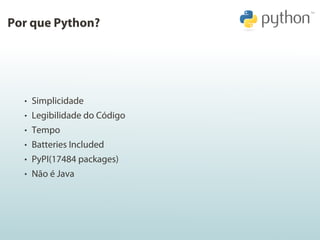
Por que Python?


  • Simplicidade
  • Legibilidade do Código
  • Tempo
  • Batteries Included
  • PyPI(17484 packages)
Por que Python?


  • Simplicidade
  • Legibilidade do Código
  • Tempo
  • Batteries Included
  • PyPI(17484 packages)
  • Não é Java
Case of Study: Unicap_br
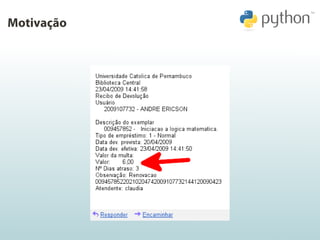
Motivação
Unicap-br
Objetivos


    • Fazer o login no site da católica
    • Receber dados dos livros emprestados
    • Renovar livros
    • Checar sucesso da renovação
    • Renovar automaticamente com frequência Crontab
Unicap-br
Objetivos


    • Fazer o login no site da católica
    • Receber dados dos livros emprestados
    • Renovar livros
    • Checar sucesso da renovação
    • Renovar automaticamente com frequência Crontab
Unicap-br
Objetivos


    • Fazer o login no site da católica
    • Receber dados dos livros emprestados
    • Renovar livros
    • Checar sucesso da renovação
    • Renovar automaticamente com frequência Crontab
Unicap-br
Objetivos


    • Fazer o login no site da católica
    • Receber dados dos livros emprestados
    • Renovar livros
    • Checar sucesso da renovação
    • Renovar automaticamente com frequência Crontab
Unicap-br
Objetivos


    • Fazer o login no site da católica
    • Receber dados dos livros emprestados
    • Renovar livros
    • Checar sucesso da renovação
    • Renovar automaticamente com frequência Crontab
Unicap-br
Ferramentas


    • BeautifulSoup: HTML/XML parser designed for quick turnaround
     projects like screen-scraping
    • Mechanize: Stateful programmatic web browsing in Python
Unicap-br
Ferramentas


    • BeautifulSoup: HTML/XML parser designed for quick turnaround
     projects like screen-scraping
    • Mechanize: Stateful programmatic web browsing in Python
Case of Study: CheckSubs
Motivação
Objetivo


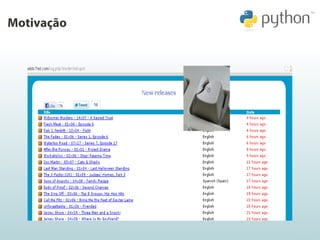
  • Checar legendas novas para determinadas séries de TV
  • Notificar quando uma nova legenda estiver disponível.
Objetivo


  • Checar legendas novas para determinadas séries de TV
  • Notificar quando uma nova legenda estiver disponível.
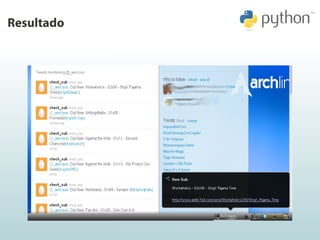
Resultado
Ferramentas


  • Python-twitter: A Python wrapper around the Twitter API
  • bitlyapi: A very thin wrapper for the bit.ly API
  • pynotify: Python bindings for libnotify(Desktop Notification Library)
  • feedparser: Parse Atom and RSS feeds in Python
Ferramentas


  • Python-twitter: A Python wrapper around the Twitter API
  • bitlyapi: A very thin wrapper for the bit.ly API
  • pynotify: Python bindings for libnotify(Desktop Notification Library)
  • feedparser: Parse Atom and RSS feeds in Python
Ferramentas


  • Python-twitter: A Python wrapper around the Twitter API
  • bitlyapi: A very thin wrapper for the bit.ly API
  • pynotify: Python bindings for libnotify(Desktop Notification Library)
  • feedparser: Parse Atom and RSS feeds in Python
Ferramentas


  • Python-twitter: A Python wrapper around the Twitter API
  • bitlyapi: A very thin wrapper for the bit.ly API
  • pynotify: Python bindings for libnotify(Desktop Notification Library)
  • feedparser: Parse Atom and RSS feeds in Python
Talk is cheap.
Show me the Code.
BeautifulSoup


  <tr class=’rel2’>
      <td nowrap><input type=’checkbox’
        name=’check_2’ value=’99236167@#1’>
      </td>
      <td nowrap>99236167</td>                soup = BeautifulSoup(request)
      <td nowrap>                             books = soup.findAll(’tr’, attrs={’class’:
           Introducao a administracao:                                re.compile(’rel.*’)})
           edicao compacta.</td>              return [Book(book) for book in books]
      <td nowrap>&nbsp;</td>                  ############################################
      <td nowrap>Livros</td>                  class Book(object):
      <td nowrap>25/10/2011</td>                  def __init__(self, soup_tag):
      <td nowrap>09/11/2011</td>                      tds = soup_tag.findAll(’td’)
      <td nowrap>&nbsp;</td>                          self.check = str(tds[0].find(’input’)
      <td nowrap>&nbsp;</td>                                                      [’name’])
      <td nowrap>Normal</td>                          self.title = tds[2].string.strip()
      <td nowrap>Biblioteca Central</td>
      <td nowrap>0</td>
      <td nowrap>15</td>
  </tr>
Mechanize


                                                browser = mechanize.Browser()
                                                cj = cookielib.LWPCookieJar()
  <form ... name="form1" ... >                  browser.set_cookiejar(cj)
      <input type="text" name="login">          browser.open(LOGIN_PAGE)
      <input type=’password’ name=’password’>   browser.select_form(name=’form1’)
  </form>                                       browser.form[’login’] = login
                                                browser.form[’password’] = password
                                                r = browser.submit()
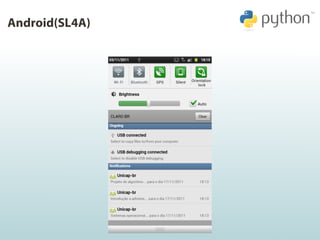
Android(SL4A)
Android(SL4A)
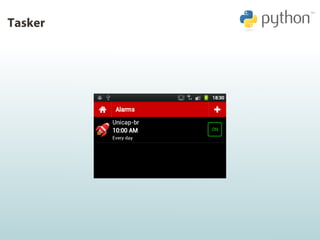
Tasker
Dúvidas?


                     André Ericson
           http://www.github.com/aericson
                de.ericson@gmail.com
                      @_aericson

Automatizando tarefas com Python

  • 1.
    Lightning Talk Using Pythonto Automate Repetitive Tasks André Ericson Novembro/2011, Pug-Pe
  • 2.
    Using Python toAutomate Repetitive Tasks Roteiro • Por que py? • Case of Study 1 • Motivação • Objetivos • Ferramentas • Case of Study 2 • Motivação • Objetivos • Resultados • Ferramentas • Code • Bonus
  • 3.
    Por que Python? • Simplicidade • Legibilidade do Código • Tempo • Batteries Included • PyPI(17484 packages)
  • 4.
    Por que Python? • Simplicidade • Legibilidade do Código • Tempo • Batteries Included • PyPI(17484 packages) • Não é Java
  • 5.
    Case of Study:Unicap_br
  • 6.
  • 7.
    Unicap-br Objetivos • Fazer o login no site da católica • Receber dados dos livros emprestados • Renovar livros • Checar sucesso da renovação • Renovar automaticamente com frequência Crontab
  • 8.
    Unicap-br Objetivos • Fazer o login no site da católica • Receber dados dos livros emprestados • Renovar livros • Checar sucesso da renovação • Renovar automaticamente com frequência Crontab
  • 9.
    Unicap-br Objetivos • Fazer o login no site da católica • Receber dados dos livros emprestados • Renovar livros • Checar sucesso da renovação • Renovar automaticamente com frequência Crontab
  • 10.
    Unicap-br Objetivos • Fazer o login no site da católica • Receber dados dos livros emprestados • Renovar livros • Checar sucesso da renovação • Renovar automaticamente com frequência Crontab
  • 11.
    Unicap-br Objetivos • Fazer o login no site da católica • Receber dados dos livros emprestados • Renovar livros • Checar sucesso da renovação • Renovar automaticamente com frequência Crontab
  • 12.
    Unicap-br Ferramentas • BeautifulSoup: HTML/XML parser designed for quick turnaround projects like screen-scraping • Mechanize: Stateful programmatic web browsing in Python
  • 13.
    Unicap-br Ferramentas • BeautifulSoup: HTML/XML parser designed for quick turnaround projects like screen-scraping • Mechanize: Stateful programmatic web browsing in Python
  • 14.
    Case of Study:CheckSubs
  • 15.
  • 16.
    Objetivo •Checar legendas novas para determinadas séries de TV • Notificar quando uma nova legenda estiver disponível.
  • 17.
    Objetivo •Checar legendas novas para determinadas séries de TV • Notificar quando uma nova legenda estiver disponível.
  • 18.
  • 19.
    Ferramentas •Python-twitter: A Python wrapper around the Twitter API • bitlyapi: A very thin wrapper for the bit.ly API • pynotify: Python bindings for libnotify(Desktop Notification Library) • feedparser: Parse Atom and RSS feeds in Python
  • 20.
    Ferramentas •Python-twitter: A Python wrapper around the Twitter API • bitlyapi: A very thin wrapper for the bit.ly API • pynotify: Python bindings for libnotify(Desktop Notification Library) • feedparser: Parse Atom and RSS feeds in Python
  • 21.
    Ferramentas •Python-twitter: A Python wrapper around the Twitter API • bitlyapi: A very thin wrapper for the bit.ly API • pynotify: Python bindings for libnotify(Desktop Notification Library) • feedparser: Parse Atom and RSS feeds in Python
  • 22.
    Ferramentas •Python-twitter: A Python wrapper around the Twitter API • bitlyapi: A very thin wrapper for the bit.ly API • pynotify: Python bindings for libnotify(Desktop Notification Library) • feedparser: Parse Atom and RSS feeds in Python
  • 23.
    Talk is cheap. Showme the Code.
  • 24.
    BeautifulSoup <trclass=’rel2’> <td nowrap><input type=’checkbox’ name=’check_2’ value=’99236167@#1’> </td> <td nowrap>99236167</td> soup = BeautifulSoup(request) <td nowrap> books = soup.findAll(’tr’, attrs={’class’: Introducao a administracao: re.compile(’rel.*’)}) edicao compacta.</td> return [Book(book) for book in books] <td nowrap>&nbsp;</td> ############################################ <td nowrap>Livros</td> class Book(object): <td nowrap>25/10/2011</td> def __init__(self, soup_tag): <td nowrap>09/11/2011</td> tds = soup_tag.findAll(’td’) <td nowrap>&nbsp;</td> self.check = str(tds[0].find(’input’) <td nowrap>&nbsp;</td> [’name’]) <td nowrap>Normal</td> self.title = tds[2].string.strip() <td nowrap>Biblioteca Central</td> <td nowrap>0</td> <td nowrap>15</td> </tr>
  • 25.
    Mechanize browser = mechanize.Browser() cj = cookielib.LWPCookieJar() <form ... name="form1" ... > browser.set_cookiejar(cj) <input type="text" name="login"> browser.open(LOGIN_PAGE) <input type=’password’ name=’password’> browser.select_form(name=’form1’) </form> browser.form[’login’] = login browser.form[’password’] = password r = browser.submit()
  • 26.
  • 27.
  • 28.
  • 29.
    Dúvidas? André Ericson http://www.github.com/aericson de.ericson@gmail.com @_aericson