Ricardo Striquer Soares programabrasil.blogspot.com
Suporta FTP, FTPS, HTTP, HTTPS, SCP, SFTP, TFTP, TELNET, DICT, FILE, LDAP. SSL certificates, HTTP POST, HTTP PUT, FTP uploading, HTTP form based upload, proxies, cookies, user+password authentication (Basic, Digest, NTLM, Negotiate, kerberos...), file transfer resume, proxy tunneling and a busload of other O que é cURL?
Quem utiliza?
Outros parecidos Libwww || WinInet || Jakarta Commons HttpClient  http://curl.haxx.se/libcurl/competitors.html  http://curl.haxx.se/docs/comparison-table.html
Como funciona? Aplicativo Servidor aplicativo Servidor de imagens GET / [URL] HTTP/1.1 HTTP/1.x 200 OK Ambiente Cliente / Servidor (Browser) GET / [URL] HTTP/1.1 HTTP/1.x 200 OK
Mas e a cURL??? Aplicativo Servidor hospedeiro Script rodando no servidor Browser rodando no cliente Ambiente Cliente / Servidor (cURL) Ambiente Cliente / Servidor (Browser) GET / [URL] HTTP/1.1 HTTP/1.x 200 OK GET / [URL] HTTP/1.1 HTTP/1.x 200 OK
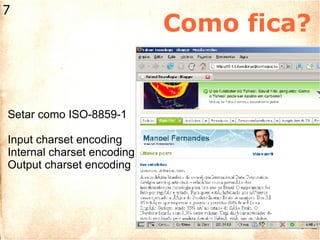
Como fica? Setar como ISO-8859-1 Input charset encoding Internal charset encoding Output charset encoding
Show me the code! Primeiro Exemplo Código captado no site php.net na URL http://br.php.net/curl Desenvolvido por Ojas Ojasvi em 25/Set/2007 contendo um simples exemplo de como simular um acesso ao site utilizando-se de um browser e ambiente fake
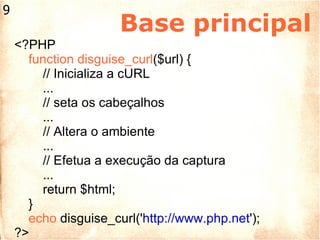
Base principal <?PHP function disguise_curl ($url) { // Inicializa a cURL ... // seta os cabeçalhos ... // Altera o ambiente ... // Efetua a execução da captura ... return $html; } echo  disguise_curl(' http://www.php.net '); ?>
Ambiente do cliente // Inicializa a cURL $curl = curl_init(); // seta os cabeçalhos $header[0] = &quot;Accept: text/xml,application/xml,”; $header[0] .= “application/xhtml+xml,text/html;”; $header[0] .= “q=0.9,text/plain;q=0.8,image/png,”; $header[0] .= */*;q=0.5&quot;; $header[] = &quot;Cache-Control: max-age=0&quot;; $header[] = &quot;Connection: keep-alive&quot;; $header[] = &quot;Keep-Alive: 300&quot;; $header[] = &quot;Accept-Charset: ISO-8859-1,utf-8;q=0.7,*;q=0.7&quot;; $header[] = &quot;Accept-Language: en-us,en;q=0.5&quot;; $header[] = &quot;Pragma: &quot;;
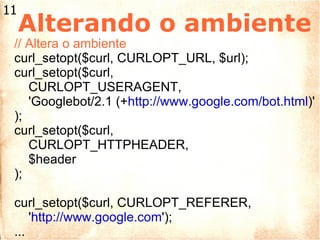
Alterando o ambiente // Altera o ambiente curl_setopt($curl, CURLOPT_URL, $url); curl_setopt($curl, CURLOPT_USERAGENT,  'Googlebot/2.1 (+ http://www.google.com/bot.html )' ); curl_setopt($curl,  CURLOPT_HTTPHEADER,  $header ); curl_setopt($curl, CURLOPT_REFERER,  ' http://www.google.com '); ...
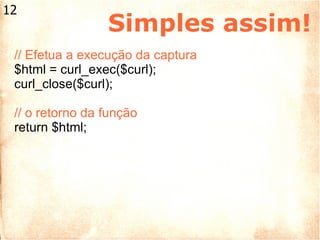
Simples assim! // Efetua a execução da captura $html = curl_exec($curl); curl_close($curl); // o retorno da função return $html;
Só isto! Recomendo a classe cURL disponível no site phpclasses.org para estudos http://www.phpclasses.org/browse/package/1988.html   Exemplo de como baixar imagens buscadas pelo Google que utiliza a classe acima http://www.phpclasses.org/browse/package/2311.html
Fim !!! URLs úteis phpclasses.org www.phpclasses.org  Site oficial do cURL curl.haxx.se Meu Blog programabrasil.blogspot.com Agradecimentos cURL Team Ojas Ojasvi phpClasses.org

A Biblioteca cURL

  • 1.
    Ricardo Striquer Soaresprogramabrasil.blogspot.com
  • 2.
    Suporta FTP, FTPS,HTTP, HTTPS, SCP, SFTP, TFTP, TELNET, DICT, FILE, LDAP. SSL certificates, HTTP POST, HTTP PUT, FTP uploading, HTTP form based upload, proxies, cookies, user+password authentication (Basic, Digest, NTLM, Negotiate, kerberos...), file transfer resume, proxy tunneling and a busload of other O que é cURL?
  • 3.
  • 4.
    Outros parecidos Libwww|| WinInet || Jakarta Commons HttpClient http://curl.haxx.se/libcurl/competitors.html http://curl.haxx.se/docs/comparison-table.html
  • 5.
    Como funciona? AplicativoServidor aplicativo Servidor de imagens GET / [URL] HTTP/1.1 HTTP/1.x 200 OK Ambiente Cliente / Servidor (Browser) GET / [URL] HTTP/1.1 HTTP/1.x 200 OK
  • 6.
    Mas e acURL??? Aplicativo Servidor hospedeiro Script rodando no servidor Browser rodando no cliente Ambiente Cliente / Servidor (cURL) Ambiente Cliente / Servidor (Browser) GET / [URL] HTTP/1.1 HTTP/1.x 200 OK GET / [URL] HTTP/1.1 HTTP/1.x 200 OK
  • 7.
    Como fica? Setarcomo ISO-8859-1 Input charset encoding Internal charset encoding Output charset encoding
  • 8.
    Show me thecode! Primeiro Exemplo Código captado no site php.net na URL http://br.php.net/curl Desenvolvido por Ojas Ojasvi em 25/Set/2007 contendo um simples exemplo de como simular um acesso ao site utilizando-se de um browser e ambiente fake
  • 9.
    Base principal <?PHPfunction disguise_curl ($url) { // Inicializa a cURL ... // seta os cabeçalhos ... // Altera o ambiente ... // Efetua a execução da captura ... return $html; } echo disguise_curl(' http://www.php.net '); ?>
  • 10.
    Ambiente do cliente// Inicializa a cURL $curl = curl_init(); // seta os cabeçalhos $header[0] = &quot;Accept: text/xml,application/xml,”; $header[0] .= “application/xhtml+xml,text/html;”; $header[0] .= “q=0.9,text/plain;q=0.8,image/png,”; $header[0] .= */*;q=0.5&quot;; $header[] = &quot;Cache-Control: max-age=0&quot;; $header[] = &quot;Connection: keep-alive&quot;; $header[] = &quot;Keep-Alive: 300&quot;; $header[] = &quot;Accept-Charset: ISO-8859-1,utf-8;q=0.7,*;q=0.7&quot;; $header[] = &quot;Accept-Language: en-us,en;q=0.5&quot;; $header[] = &quot;Pragma: &quot;;
  • 11.
    Alterando o ambiente// Altera o ambiente curl_setopt($curl, CURLOPT_URL, $url); curl_setopt($curl, CURLOPT_USERAGENT, 'Googlebot/2.1 (+ http://www.google.com/bot.html )' ); curl_setopt($curl, CURLOPT_HTTPHEADER, $header ); curl_setopt($curl, CURLOPT_REFERER, ' http://www.google.com '); ...
  • 12.
    Simples assim! //Efetua a execução da captura $html = curl_exec($curl); curl_close($curl); // o retorno da função return $html;
  • 13.
    Só isto! Recomendoa classe cURL disponível no site phpclasses.org para estudos http://www.phpclasses.org/browse/package/1988.html Exemplo de como baixar imagens buscadas pelo Google que utiliza a classe acima http://www.phpclasses.org/browse/package/2311.html
  • 14.
    Fim !!! URLsúteis phpclasses.org www.phpclasses.org Site oficial do cURL curl.haxx.se Meu Blog programabrasil.blogspot.com Agradecimentos cURL Team Ojas Ojasvi phpClasses.org

Notas do Editor

  • #2 Se apresentar Fazer agradecimentos Explicar sobre o objetivo do speech