Red Hat JBoss Fuse:
conceitos básicos para
desenvolvedores
Rafael T. C. Soares
Arquiteto de Soluções, Red Hat
<rsoares@redhat.com>
Janeiro, 2015
6 ADD NAME (View > Master > Slide master)
Já uso Apache Camel em minha aplicação!
● Camel é um Framework de Integração, não um ESB.
● Implementa os principais EIPs
● Oferece mecanismos para:
● Validação
● Enriquecimento (tratamento)
● Transformação
● Rotamento
de mensagens
7 ADD NAME (View > Master > Slide master)
Por que JBoss Fuse?
● Quando seu projeto de integração se torna complexo...
● Onde implantar minhas integrações?
● Como escalar e garantir alta disponibilidade?
● Como versionar e atualizar minha aplicação?
8 ADD NAME (View > Master > Slide master)
Por que JBoss Fuse
● Quando seu projeto de integração se torna complexo...
● Preciso de um meio para realizar debug e o trace de
mensagens em minhas integrações...
● Preciso implementar comunicação assíncrona por meio
de mensageria...
● etc
9 ADD NAME (View > Master > Slide master)
Por que JBoss Fuse
● Quando seu projeto de integração se torna complexo...
● Preciso de suporte para implantação em larga escala...
● Como atualizar a aplicação sem afetar o ambiente
inteiro?
● Quero implantar minha integração em um container
leve e flexivel!
10
Red Hat JBoss Fuse
Red Hat JBoss Fuse
Container: arquitetura
11
Red Hat JBoss Fuse
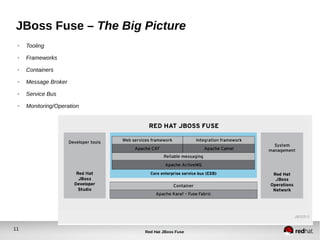
JBoss Fuse – The Big Picture
● Tooling
● Frameworks
● Containers
● Message Broker
● Service Bus
● Monitoring/Operation
12
Red Hat JBoss Fuse
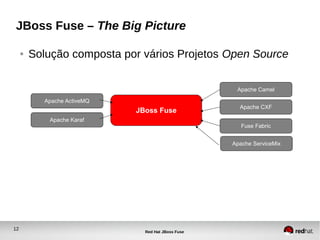
JBoss Fuse – The Big Picture
● Solução composta por vários Projetos Open Source
JBoss Fuse
Apache CXF
Fuse Fabric
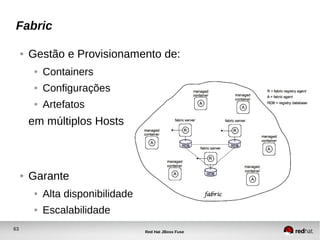
Apache Camel
Apache ServiceMix
Apache ActiveMQ
Apache Karaf
13
Red Hat JBoss Fuse
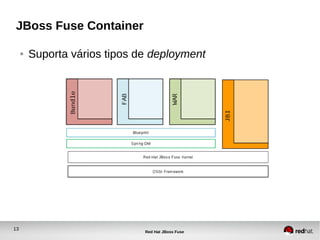
JBoss Fuse Container
● Suporta vários tipos de deployment
14
Red Hat JBoss Fuse
Modelo de Desenvolvimento
15 ADD NAME (View > Master > Slide master)
Modelo de Desenvolvimento
● Linguagem de programação
● JavaSE 1.6
● Várias linguages dinâmicas como DSL
● Scala
● JS
● Groovy
● Injeção de Dependência – DI
● Spring
● Blueprint (OSGI)
● Construção e gestão de dependências
● Apache Maven
16 ADD NAME (View > Master > Slide master)
Ambiente
● JavaSE 1.6 ou >
● Apache Maven 3
● Red Hat JBoss Fuse IDE
● ECLIPSE plugin
● JBoss Developer Studio (JBDS)
17 ADD NAME (View > Master > Slide master)
Modelo de Desenvolvimento
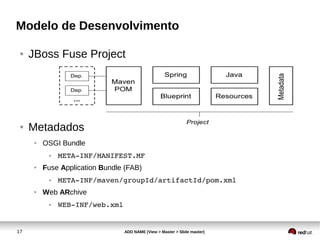
● JBoss Fuse Project
● Metadados
● OSGI Bundle
● META­INF/MANIFEST.MF
● Fuse Application Bundle (FAB)
● META­INF/maven/groupId/artifactId/pom.xml
● Web ARchive
● WEB­INF/web.xml
18 ADD NAME (View > Master > Slide master)
Maven: conceitos
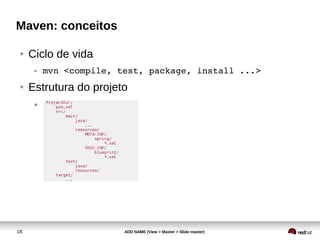
● Ciclo de vida
● mvn <compile, test, package, install ...>
● Estrutura do projeto
●
19 ADD NAME (View > Master > Slide master)
Maven: conceitos
● Resources/Descriptors
● Spring
● ProjectDir/src/main/resources/META­INF/spring/
● Blueprint XML
● ProjectDir/src/main/resources/OSGI­
INF/blueprint/
● Packaging
● Fuse Application Bundle (Fuse JAR)
● Bundle (OSGI JAR)
● WAR (Web Archive)
20 ADD NAME (View > Master > Slide master)
Maven: conceitos
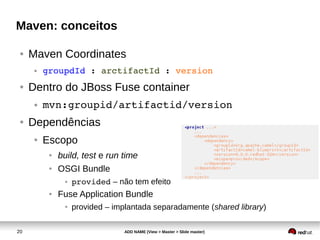
● Maven Coordinates
● groupdId : arctifactId : version
● Dentro do JBoss Fuse container
● mvn:groupid/artifactid/version
● Dependências
● Escopo
● build, test e run time
● OSGI Bundle
● provided – não tem efeito
● Fuse Application Bundle
● provided – implantada separadamente (shared library)
21 ADD NAME (View > Master > Slide master)
Maven: conceitos
● Repositórios
● Local Repository
● /home/<user>/.m2/repository
● Remote Repository
● Online
● Maven Central
● Fuse Source Maven Repo
● JBoss Maven Central
● etc
● System Repository (acessado apenas pelo Fuse em runtime)
● $FUSE_HOME/system
22 ADD NAME (View > Master > Slide master)
Maven: conceitos
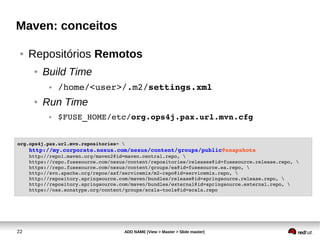
● Repositórios Remotos
● Build Time
● /home/<user>/.m2/settings.xml
● Run Time
● $FUSE_HOME/etc/org.ops4j.pax.url.mvn.cfg
org.ops4j.pax.url.mvn.repositories= 
    http://my.corporate.nexus.com/nexus/content/groups/public@snapshots
    http://repo1.maven.org/maven2@id=maven.central.repo, 
    https://repo.fusesource.com/nexus/content/repositories/releases@id=fusesource.release.repo, 
    https://repo.fusesource.com/nexus/content/groups/ea@id=fusesource.ea.repo, 
    http://svn.apache.org/repos/asf/servicemix/m2­repo@id=servicemix.repo, 
    http://repository.springsource.com/maven/bundles/release@id=springsource.release.repo, 
    http://repository.springsource.com/maven/bundles/external@id=springsource.external.repo, 
    https://oss.sonatype.org/content/groups/scala­tools@id=scala.repo
23 ADD NAME (View > Master > Slide master)
Injeção de Dependência
● Frameworks Suportados
● Spring XML
● Blueprint XML
● OSGI Spec (osgi.org)
● Similiar ao Spring.
● Antigo Spring DM (implementação da spec OSGI).
● Mais leve
● Resolve dependências automaticamente em runtime
24 ADD NAME (View > Master > Slide master)
Injeção de Dependência
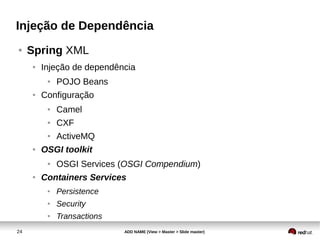
● Spring XML
● Injeção de dependência
● POJO Beans
● Configuração
● Camel
● CXF
● ActiveMQ
● OSGI toolkit
● OSGI Services (OSGI Compendium)
● Containers Services
● Persistence
● Security
● Transactions
25 ADD NAME (View > Master > Slide master)
Injeção de Dependência
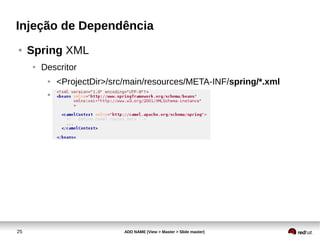
● Spring XML
● Descritor
● <ProjectDir>/src/main/resources/META-INF/spring/*.xml
●
26 ADD NAME (View > Master > Slide master)
Injeção de Dependência
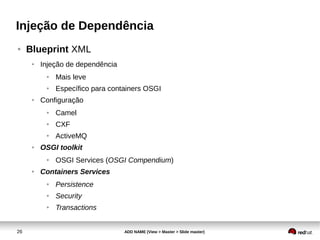
● Blueprint XML
● Injeção de dependência
● Mais leve
● Específico para containers OSGI
● Configuração
● Camel
● CXF
● ActiveMQ
● OSGI toolkit
● OSGI Services (OSGI Compendium)
● Containers Services
● Persistence
● Security
● Transactions
27 ADD NAME (View > Master > Slide master)
Injeção de Dependência
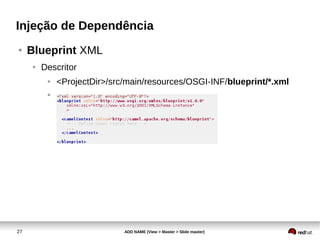
● Blueprint XML
● Descritor
● <ProjectDir>/src/main/resources/OSGI-INF/blueprint/*.xml
●
28
Red Hat JBoss Fuse
Apache CXF Web Service
Demo: WS Code First Approach
29
Red Hat JBoss Fuse
Maven
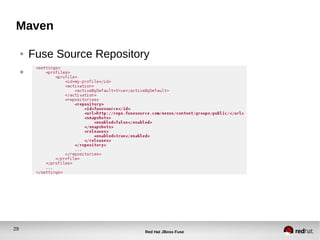
● Fuse Source Repository
●
30
Red Hat JBoss Fuse
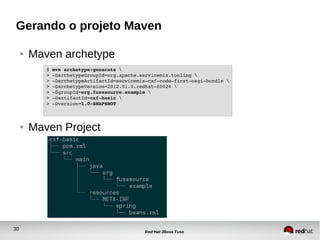
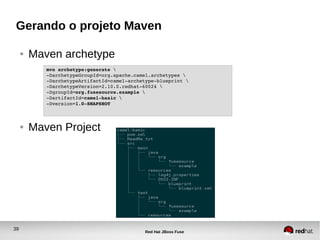
Gerando o projeto Maven
● Maven archetype
● Maven Project
$ mvn archetype:generate 
> ­DarchetypeGroupId=org.apache.servicemix.tooling 
> ­DarchetypeArtifactId=servicemix­cxf­code­first­osgi­bundle 
> ­DarchetypeVersion=2012.01.0.redhat­60024 
> ­DgroupId=org.fusesource.example 
> ­DartifactId=cxf­basic 
> ­Dversion=1.0­SNAPSHOT
31
Red Hat JBoss Fuse
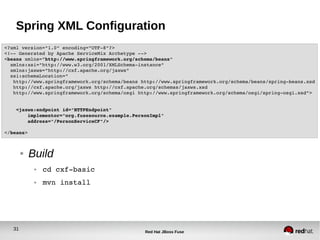
Spring XML Configuration
● Build
● cd cxf­basic
● mvn install
<?xml version="1.0" encoding="UTF­8"?>
<!­­ Generated by Apache ServiceMix Archetype ­­>
<beans xmlns="http://www.springframework.org/schema/beans"
  xmlns:xsi="http://www.w3.org/2001/XMLSchema­instance"
  xmlns:jaxws="http://cxf.apache.org/jaxws"
  xsi:schemaLocation="
   http://www.springframework.org/schema/beans http://www.springframework.org/schema/beans/spring­beans.xsd
   http://cxf.apache.org/jaxws http://cxf.apache.org/schemas/jaxws.xsd
   http://www.springframework.org/schema/osgi http://www.springframework.org/schema/osgi/spring­osgi.xsd">
    <jaxws:endpoint id="HTTPEndpoint"
        implementor="org.fusesource.example.PersonImpl"
        address="/PersonServiceCF"/>
</beans>
32
Red Hat JBoss Fuse
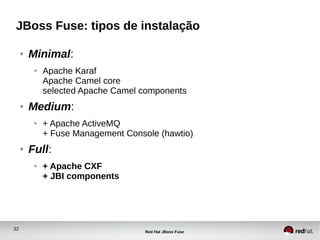
JBoss Fuse: tipos de instalação
● Minimal:
● Apache Karaf
Apache Camel core
selected Apache Camel components
● Medium:
● + Apache ActiveMQ
+ Fuse Management Console (hawtio)
● Full:
● + Apache CXF
+ JBI components
33
Red Hat JBoss Fuse
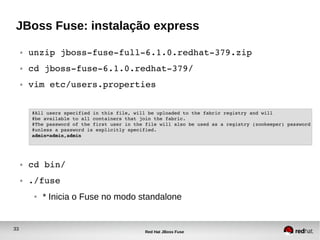
JBoss Fuse: instalação express
● unzip jboss­fuse­full­6.1.0.redhat­379.zip
● cd jboss­fuse­6.1.0.redhat­379/
● vim etc/users.properties
● cd bin/
● ./fuse
● * Inicia o Fuse no modo standalone
#All users specified in this file, will be uploaded to the fabric registry and will
#be available to all containers that join the fabric.
#The password of the first user in the file will also be used as a registry (zookeeper) password
#unless a password is explicitly specified.
admin=admin,admin
34
Red Hat JBoss Fuse
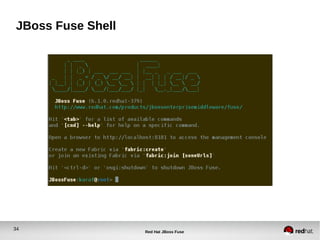
JBoss Fuse Shell
35
Red Hat JBoss Fuse
Deploy do WS
JBossFuse:karaf@root> install 
mvn:org.fusesource.example/cxf­basic/1.0­SNAPSHOT
Bundle ID: 251
JBossFuse:karaf@root> start 251
JBossFuse:karaf@root> list
[ 251] [Active     ] [            ] [Started] [   60] Apache ServiceMix :: CXF 
Code First OSGi Bundle (1.0.0.SNAPSHOT)
● obs: por padrão o Fuse acessa o repositório local do Maven
(~/.m2/repository) para baixar um artefato. Caso necessário é possível
configurar um repositório remoto no arquivo de configuração:
$FUSE_HOME/etc/org.ops4j.pax.url.mvn.cfg  através da
propriedade org.ops4j.pax.url.mvn.repositories
36
Red Hat JBoss Fuse
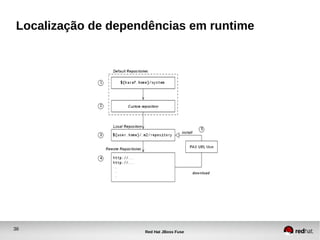
Localização de dependências em runtime
37
Red Hat JBoss Fuse
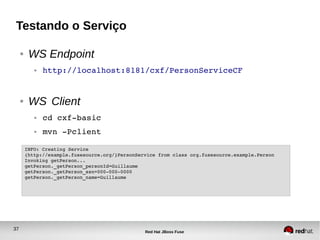
Testando o Serviço
● WS Endpoint
● http://localhost:8181/cxf/PersonServiceCF
● WS Client
● cd cxf­basic
● mvn ­Pclient
INFO: Creating Service 
{http://example.fusesource.org/}PersonService from class org.fusesource.example.Person
Invoking getPerson...
getPerson._getPerson_personId=Guillaume
getPerson._getPerson_ssn=000­000­0000
getPerson._getPerson_name=Guillaume
38
Red Hat JBoss Fuse
Camel Route Demo: Http Bridge
39
Red Hat JBoss Fuse
Gerando o projeto Maven
● Maven archetype
● Maven Project
mvn archetype:generate 
­DarchetypeGroupId=org.apache.camel.archetypes 
­DarchetypeArtifactId=camel­archetype­blueprint 
­DarchetypeVersion=2.10.0.redhat­60024 
­DgroupId=org.fusesource.example 
­DartifactId=camel­basic 
­Dversion=1.0­SNAPSHOT 
40
Red Hat JBoss Fuse
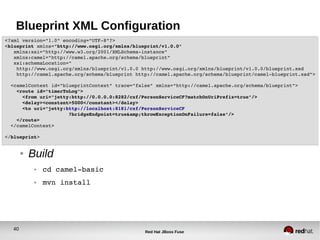
Blueprint XML Configuration
● Build
● cd camel­basic
● mvn install
<?xml version="1.0" encoding="UTF­8"?>
<blueprint xmlns="http://www.osgi.org/xmlns/blueprint/v1.0.0"
   xmlns:xsi="http://www.w3.org/2001/XMLSchema­instance"
   xmlns:camel="http://camel.apache.org/schema/blueprint"
   xsi:schemaLocation="
    http://www.osgi.org/xmlns/blueprint/v1.0.0 http://www.osgi.org/xmlns/blueprint/v1.0.0/blueprint.xsd
    http://camel.apache.org/schema/blueprint http://camel.apache.org/schema/blueprint/camel­blueprint.xsd">
  <camelContext id="blueprintContext" trace="false" xmlns="http://camel.apache.org/schema/blueprint">
    <route id="timerToLog">
      <from uri="jetty:http://0.0.0.0:8282/cxf/PersonServiceCF?matchOnUriPrefix=true"/>
      <delay><constant>5000</constant></delay>
      <to uri="jetty:http://localhost:8181/cxf/PersonServiceCF
                      ?bridgeEndpoint=true&amp;throwExceptionOnFailure=false"/>
    </route>
  </camelContext>
</blueprint>
41
Red Hat JBoss Fuse
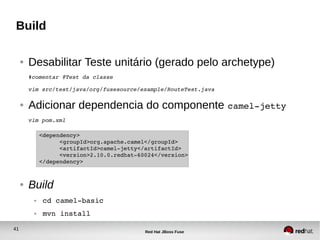
Build
● Desabilitar Teste unitário (gerado pelo archetype)
#comentar @Test da classe
vim src/test/java/org/fusesource/example/RouteTest.java
● Adicionar dependencia do componente camel­jetty
vim pom.xml
● Build
● cd camel­basic
● mvn install
<dependency>
      <groupId>org.apache.camel</groupId>
      <artifactId>camel­jetty</artifactId>
      <version>2.10.0.redhat­60024</version>
</dependency>
42
Red Hat JBoss Fuse
Deploy do WS
JBossFuse:karaf@root> install 
mvn:org.fusesource.example/camel­basic/1.0­SNAPSHOT
Bundle ID: 252
JBossFuse:karaf@root> start 252
JBossFuse:karaf@root> list
[ 252] [Active     ] [            ] [Started] [   60] A Camel Blueprint Route 
(1.0.0.SNAPSHOT) (1.0.0.SNAPSHOT)
43
Red Hat JBoss Fuse
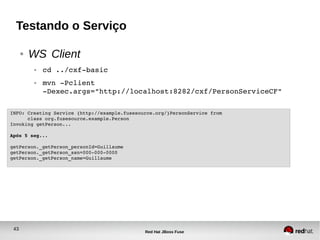
Testando o Serviço
● WS Client
● cd ../cxf­basic
● mvn ­Pclient 
­Dexec.args="http://localhost:8282/cxf/PersonServiceCF"
INFO: Creating Service {http://example.fusesource.org/}PersonService from 
      class org.fusesource.example.Person
Invoking getPerson...
Após 5 seg...
getPerson._getPerson_personId=Guillaume
getPerson._getPerson_ssn=000­000­0000
getPerson._getPerson_name=Guillaume
44
Red Hat JBoss Fuse
Agrupando projetos com
Maven
45
Red Hat JBoss Fuse
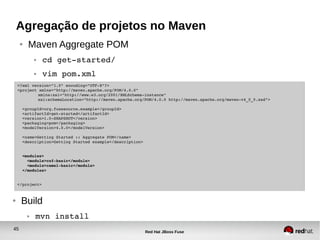
Agregação de projetos no Maven
● Maven Aggregate POM
● cd get­started/
● vim pom.xml
<?xml version="1.0" encoding="UTF­8"?>
<project xmlns="http://maven.apache.org/POM/4.0.0" 
xmlns:xsi="http://www.w3.org/2001/XMLSchema­instance" 
xsi:schemaLocation="http://maven.apache.org/POM/4.0.0 http://maven.apache.org/maven­v4_0_0.xsd">
  
  <groupId>org.fusesource.example</groupId>
  <artifactId>get­started</artifactId>
  <version>1.0­SNAPSHOT</version>
  <packaging>pom</packaging>
  <modelVersion>4.0.0</modelVersion>
  <name>Getting Started :: Aggregate POM</name>
  <description>Getting Started example</description>
  
  <modules>
    <module>cxf­basic</module>
    <module>camel­basic</module>
  </modules>
  
</project>
● Build
● mvn install
46
Red Hat JBoss Fuse
Definindo uma Feature para a
Aplicação: Apache Karaf Feature
47
Red Hat JBoss Fuse
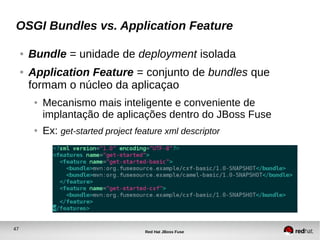
OSGI Bundles vs. Application Feature
● Bundle = unidade de deployment isolada
● Application Feature = conjunto de bundles que
formam o núcleo da aplicaçao
● Mecanismo mais inteligente e conveniente de
implantação de aplicações dentro do JBoss Fuse
● Ex: get-started project feature xml descriptor
48
Red Hat JBoss Fuse
OSGI Bundles vs. Application Feature
● Como compor uma Feature?
● Depende das dependências de sua aplicação
● Depende dos bundles e features disponíveis (pré-
implantadas) no container
JBossFuse:karaf@root> features:list
...
[installed  ] [2.12.0.redhat­610379   ] camel                     
[installed  ] [2.12.0.redhat­610379   ] camel­core                
[installed  ] [2.12.0.redhat­610379   ] camel­spring              
[installed  ] [2.12.0.redhat­610379   ] camel­blueprint  
49
Red Hat JBoss Fuse
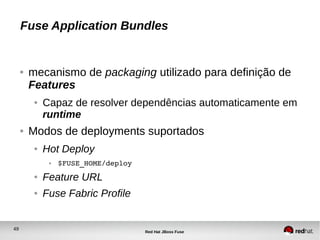
Fuse Application Bundles
● mecanismo de packaging utilizado para definição de
Features
● Capaz de resolver dependências automaticamente em
runtime
● Modos de deployments suportados
● Hot Deploy
● $FUSE_HOME/deploy
● Feature URL
● Fuse Fabric Profile
50
Red Hat JBoss Fuse
Criando um repositório de
Features customizado
51
Red Hat JBoss Fuse
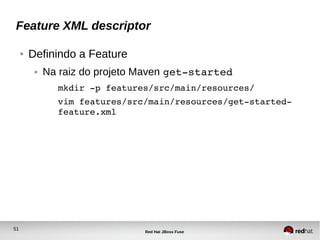
Feature XML descriptor
● Definindo a Feature
● Na raiz do projeto Maven get­started
mkdir ­p features/src/main/resources/
vim features/src/main/resources/get­started­
feature.xml
52
Red Hat JBoss Fuse
Empacotando a Feature
● Feature Packaging
● Na raiz do projeto Maven get­started
● vim features/pom.xml
53
Red Hat JBoss Fuse
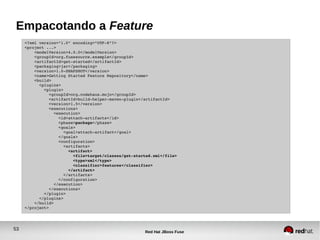
Empacotando a Feature
<?xml version="1.0" encoding="UTF­8"?>
<project ...>
    <modelVersion>4.0.0</modelVersion>
    <groupId>org.fusesource.example</groupId> 
    <artifactId>get­started</artifactId>
    <packaging>jar</packaging>
    <version>1.0­SNAPSHOT</version>
    <name>Getting Started Feature Repository</name>
    <build>
      <plugins>
        <plugin>
          <groupId>org.codehaus.mojo</groupId>
          <artifactId>build­helper­maven­plugin</artifactId>
          <version>1.5</version>
          <executions>
            <execution>
              <id>attach­artifacts</id>
              <phase>package</phase>
              <goals>
                <goal>attach­artifact</goal>
              </goals>
              <configuration>
                <artifacts>
                  <artifact>
                    <file>target/classes/get­started.xml</file>
                    <type>xml</type>
                    <classifier>features</classifier>
                  </artifact>
                </artifacts>
              </configuration>
            </execution>
          </executions>
        </plugin>
      </plugins>
    </build>
</project>
54
Red Hat JBoss Fuse
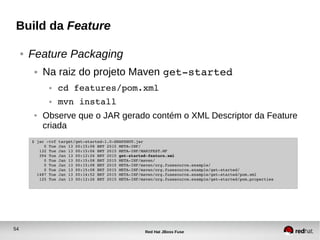
Build da Feature
● Feature Packaging
● Na raiz do projeto Maven get­started
● cd features/pom.xml
● mvn install
● Observe que o JAR gerado contém o XML Descriptor da Feature
criada
$ jar ­tvf target/get­started­1.0­SNAPSHOT.jar
     0 Tue Jan 13 00:15:08 BRT 2015 META­INF/
   132 Tue Jan 13 00:15:06 BRT 2015 META­INF/MANIFEST.MF
   394 Tue Jan 13 00:12:26 BRT 2015 get­started­feature.xml
     0 Tue Jan 13 00:15:08 BRT 2015 META­INF/maven/
     0 Tue Jan 13 00:15:08 BRT 2015 META­INF/maven/org.fusesource.example/
     0 Tue Jan 13 00:15:08 BRT 2015 META­INF/maven/org.fusesource.example/get­started/
  1487 Tue Jan 13 00:14:52 BRT 2015 META­INF/maven/org.fusesource.example/get­started/pom.xml
   125 Tue Jan 13 00:12:26 BRT 2015 META­INF/maven/org.fusesource.example/get­started/pom.properties
55
Red Hat JBoss Fuse
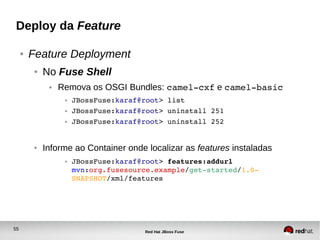
Deploy da Feature
● Feature Deployment
● No Fuse Shell
● Remova os OSGI Bundles: camel­cxf e camel­basic
● JBossFuse:karaf@root> list
● JBossFuse:karaf@root> uninstall 251
● JBossFuse:karaf@root> uninstall 252
● Informe ao Container onde localizar as features instaladas
● JBossFuse:karaf@root> features:addurl 
mvn:org.fusesource.example/get­started/1.0­
SNAPSHOT/xml/features
56
Red Hat JBoss Fuse
Deploy da Feature
● No Fuse Shell
● Confira se a Feature get­started­basic foi carregada no Container
JBossFuse:karaf@root> features:list | grep get­started
[uninstalled] [0.0.0] get­started­basic get­started
● Instale a Feature
JBossFuse:karaf@root> features:install get­started­basic
JBossFuse:karaf@root> features:list | grep get­started
[installed] [0.0.0] get­started­basic get­started
57
Red Hat JBoss Fuse
OSGI Config Service: configurando a
aplicação em runtime
58
Red Hat JBoss Fuse
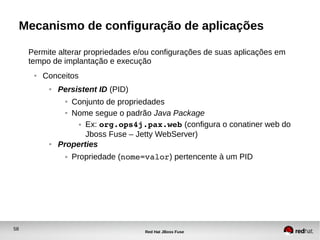
Mecanismo de configuração de aplicações
Permite alterar propriedades e/ou configurações de suas aplicações em
tempo de implantação e execução
● Conceitos
● Persistent ID (PID)
● Conjunto de propriedades
● Nome segue o padrão Java Package
● Ex: org.ops4j.pax.web (configura o conatiner web do
Jboss Fuse – Jetty WebServer)
● Properties
● Propriedade (nome=valor) pertencente à um PID
59
Red Hat JBoss Fuse
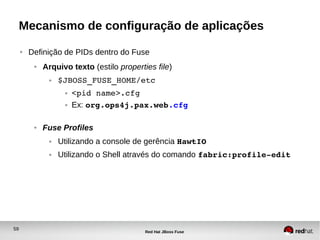
Mecanismo de configuração de aplicações
● Definição de PIDs dentro do Fuse
● Arquivo texto (estilo properties file)
● $JBOSS_FUSE_HOME/etc
● <pid name>.cfg
● Ex: org.ops4j.pax.web.cfg
● Fuse Profiles
● Utilizando a console de gerência HawtIO
● Utilizando o Shell através do comando fabric:profile­edit
60
Red Hat JBoss Fuse
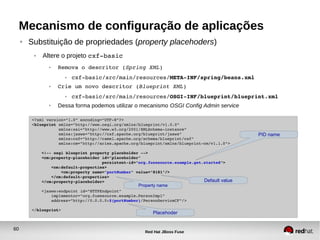
Mecanismo de configuração de aplicações
● Substituição de propriedades (property placehoders)
● Altere o projeto cxf­basic
● Remova o descritor (Spring XML)
● cxf­basic/src/main/resources/META­INF/spring/beans.xml
● Crie um novo descritor (Blueprint XML)
● cxf­basic/src/main/resources/OSGI­INF/blueprint/blueprint.xml
● Dessa forma podemos utilizar o mecanismo OSGI Config Admin service
<?xml version="1.0" encoding="UTF­8"?>
<blueprint xmlns="http://www.osgi.org/xmlns/blueprint/v1.0.0"
           xmlns:xsi="http://www.w3.org/2001/XMLSchema­instance"
           xmlns:jaxws="http://cxf.apache.org/blueprint/jaxws"
           xmlns:cxf="http://camel.apache.org/schema/blueprint/cxf"
           xmlns:cm="http://aries.apache.org/blueprint/xmlns/blueprint­cm/v1.1.0">
    <!­­ osgi blueprint property placeholder ­­>
    <cm:property­placeholder id="placeholder"
                             persistent­id="org.fusesource.example.get.started">
        <cm:default­properties>
            <cm:property name="portNumber" value="8181"/>
        </cm:default­properties>
    </cm:property­placeholder>
    <jaxws:endpoint id="HTTPEndpoint"
        implementor="org.fusesource.example.PersonImpl"
        address="http://0.0.0.0:${portNumber}/PersonServiceCF"/>
</blueprint>
PID name
Default value
Property name
Placehoder
61
Red Hat JBoss Fuse
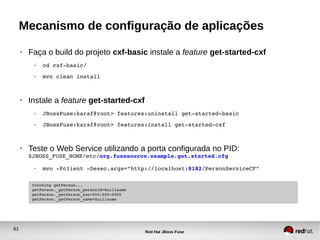
Mecanismo de configuração de aplicações
● Faça o build do projeto cxf-basic instale a feature get-started-cxf
● cd cxf­basic/
● mvn clean install
● Instale a feature get-started-cxf
● JBossFuse:karaf@root> features:uninstall get­started­basic
● JBossFuse:karaf@root> features:install get­started­cxf
● Teste o Web Service utilizando a porta configurada no PID:
$JBOSS_FUSE_HOME/etc/org.fusesource.example.get.started.cfg
● mvn ­Pclient ­Dexec.args="http://localhost:8182/PersonServiceCF"
Invoking getPerson...
getPerson._getPerson_personId=Guillaume
getPerson._getPerson_ssn=000­000­0000
getPerson._getPerson_name=Guillaume
62
Red Hat JBoss Fuse
Fuse Fabric: escalando sua aplicação
63
Red Hat JBoss Fuse
Fabric
● Gestão e Provisionamento de:
● Containers
● Configurações
● Artefatos
em múltiplos Hosts
● Garante
● Alta disponibilidade
● Escalabilidade
64
Red Hat JBoss Fuse
Fabric: composição
● Fabric Registry Service
● “Banco de Dados compartilhado”
● mantém informações sobre o estado do Fabric
● Info sobre provisionamento e gestão da topologia de
containers
● Fabric
● Conjunto de containers que compartilham um registro comum
● Fabric Ensemble
● Grupo de Fabric Servers:
● Para manter a alta disponibilidade, utiliza sempre um número
impar (1, 3, 5, etc) de Servers
65
Red Hat JBoss Fuse
Fabric: composição
● Fabric Server
● Mantém o Registry Service
● Fabric Container (Fuse Instance)
● Runtime da aplicação
● Tipos
● Root container
● Child container
● Profile
● Unidade de implantação
● Composto por: features, bundles e configurações (properties)
66
Red Hat JBoss Fuse
Divider SlideCriando um Fabric
67
Red Hat JBoss Fuse
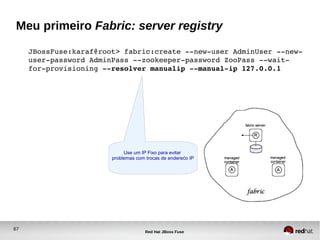
Meu primeiro Fabric: server registry
JBossFuse:karaf@root> fabric:create ­­new­user AdminUser ­­new­
user­password AdminPass ­­zookeeper­password ZooPass ­­wait­
for­provisioning ­­resolver manualip ­­manual­ip 127.0.0.1
Use um IP Fixo para evitar
problemas com trocas de enderećo IP
68
Red Hat JBoss Fuse
Meu primeiro Fabric: containers
JBossFuse:karaf@root> fabric:container­create­child root child 2
The following containers have been created successfully:
Container: child1.
Container: child2.
JBossFuse:karaf@root> fabric:container­list
[id]                         [version] [connected] [profiles]                              [provision status]
Root*                        1.0       true        fabric, fabric­ensemble­0000­1, jboss­fuse­full    success
child1                       1.0       true        default                                            success
child2                       1.0       true        default                                            success
69
Red Hat JBoss Fuse
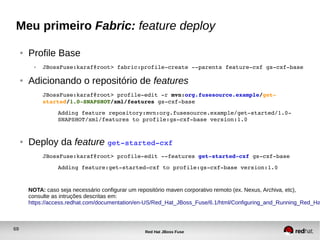
Meu primeiro Fabric: feature deploy
● Profile Base
● JBossFuse:karaf@root> fabric:profile­create ­­parents feature­cxf gs­cxf­base
● Adicionando o repositório de features
JBossFuse:karaf@root> profile­edit ­r mvn:org.fusesource.example/get­
started/1.0­SNAPSHOT/xml/features gs­cxf­base
Adding feature repository:mvn:org.fusesource.example/get­started/1.0­
SNAPSHOT/xml/features to profile:gs­cxf­base version:1.0
● Deploy da feature get­started­cxf
JBossFuse:karaf@root> profile­edit ­­features get­started­cxf gs­cxf­base
Adding feature:get­started­cxf to profile:gs­cxf­base version:1.0
NOTA: caso seja necessário configurar um repositório maven corporativo remoto (ex. Nexus, Archiva, etc),
consulte as intruções descritas em:
https://access.redhat.com/documentation/en-US/Red_Hat_JBoss_Fuse/6.1/html/Configuring_and_Running_Red_Ha
70
Red Hat JBoss Fuse
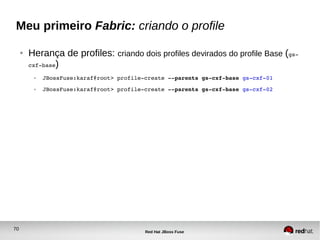
Meu primeiro Fabric: criando o profile
● Herança de profiles: criando dois profiles devirados do profile Base (gs­
cxf­base)
● JBossFuse:karaf@root> profile­create ­­parents gs­cxf­base gs­cxf­01
● JBossFuse:karaf@root> profile­create ­­parents gs­cxf­base gs­cxf­02
71
Red Hat JBoss Fuse
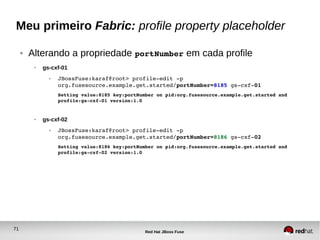
Meu primeiro Fabric: profile property placeholder
● Alterando a propriedade portNumber em cada profile
● gs-cxf-01
● JBossFuse:karaf@root> profile­edit ­p 
org.fusesource.example.get.started/portNumber=8185 gs­cxf­01
Setting value:8185 key:portNumber on pid:org.fusesource.example.get.started and 
profile:gs­cxf­01 version:1.0
● gs-cxf-02
● JBossFuse:karaf@root> profile­edit ­p 
org.fusesource.example.get.started/portNumber=8186 gs­cxf­02
Setting value:8186 key:portNumber on pid:org.fusesource.example.get.started and 
profile:gs­cxf­02 version:1.0
72
Red Hat JBoss Fuse
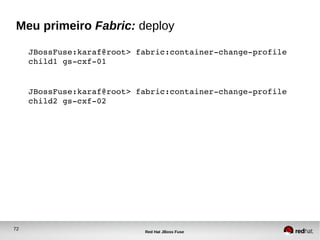
Meu primeiro Fabric: deploy
JBossFuse:karaf@root> fabric:container­change­profile 
child1 gs­cxf­01
JBossFuse:karaf@root> fabric:container­change­profile 
child2 gs­cxf­02
73
Red Hat JBoss Fuse
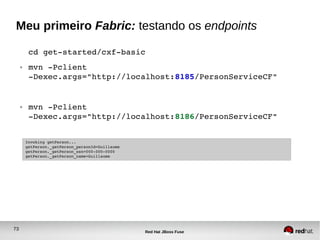
Meu primeiro Fabric: testando os endpoints
cd get­started/cxf­basic
● mvn ­Pclient 
­Dexec.args="http://localhost:8185/PersonServiceCF"
● mvn ­Pclient 
­Dexec.args="http://localhost:8186/PersonServiceCF"
Invoking getPerson...
getPerson._getPerson_personId=Guillaume
getPerson._getPerson_ssn=000­000­0000
getPerson._getPerson_name=Guillaume
74
Red Hat JBoss Fuse
Divider SlideDúvidas?

Introdução ao JBoss Fuse 6.x: criação e implantação de um serviço CXF

  • 1.
    Red Hat JBossFuse: conceitos básicos para desenvolvedores Rafael T. C. Soares Arquiteto de Soluções, Red Hat <rsoares@redhat.com> Janeiro, 2015
  • 2.
    6 ADD NAME(View > Master > Slide master) Já uso Apache Camel em minha aplicação! ● Camel é um Framework de Integração, não um ESB. ● Implementa os principais EIPs ● Oferece mecanismos para: ● Validação ● Enriquecimento (tratamento) ● Transformação ● Rotamento de mensagens
  • 3.
    7 ADD NAME(View > Master > Slide master) Por que JBoss Fuse? ● Quando seu projeto de integração se torna complexo... ● Onde implantar minhas integrações? ● Como escalar e garantir alta disponibilidade? ● Como versionar e atualizar minha aplicação?
  • 4.
    8 ADD NAME(View > Master > Slide master) Por que JBoss Fuse ● Quando seu projeto de integração se torna complexo... ● Preciso de um meio para realizar debug e o trace de mensagens em minhas integrações... ● Preciso implementar comunicação assíncrona por meio de mensageria... ● etc
  • 5.
    9 ADD NAME(View > Master > Slide master) Por que JBoss Fuse ● Quando seu projeto de integração se torna complexo... ● Preciso de suporte para implantação em larga escala... ● Como atualizar a aplicação sem afetar o ambiente inteiro? ● Quero implantar minha integração em um container leve e flexivel!
  • 6.
    10 Red Hat JBossFuse Red Hat JBoss Fuse Container: arquitetura
  • 7.
    11 Red Hat JBossFuse JBoss Fuse – The Big Picture ● Tooling ● Frameworks ● Containers ● Message Broker ● Service Bus ● Monitoring/Operation
  • 8.
    12 Red Hat JBossFuse JBoss Fuse – The Big Picture ● Solução composta por vários Projetos Open Source JBoss Fuse Apache CXF Fuse Fabric Apache Camel Apache ServiceMix Apache ActiveMQ Apache Karaf
  • 9.
    13 Red Hat JBossFuse JBoss Fuse Container ● Suporta vários tipos de deployment
  • 10.
    14 Red Hat JBossFuse Modelo de Desenvolvimento
  • 11.
    15 ADD NAME(View > Master > Slide master) Modelo de Desenvolvimento ● Linguagem de programação ● JavaSE 1.6 ● Várias linguages dinâmicas como DSL ● Scala ● JS ● Groovy ● Injeção de Dependência – DI ● Spring ● Blueprint (OSGI) ● Construção e gestão de dependências ● Apache Maven
  • 12.
    16 ADD NAME(View > Master > Slide master) Ambiente ● JavaSE 1.6 ou > ● Apache Maven 3 ● Red Hat JBoss Fuse IDE ● ECLIPSE plugin ● JBoss Developer Studio (JBDS)
  • 13.
    17 ADD NAME(View > Master > Slide master) Modelo de Desenvolvimento ● JBoss Fuse Project ● Metadados ● OSGI Bundle ● META­INF/MANIFEST.MF ● Fuse Application Bundle (FAB) ● META­INF/maven/groupId/artifactId/pom.xml ● Web ARchive ● WEB­INF/web.xml
  • 14.
    18 ADD NAME(View > Master > Slide master) Maven: conceitos ● Ciclo de vida ● mvn <compile, test, package, install ...> ● Estrutura do projeto ●
  • 15.
    19 ADD NAME(View > Master > Slide master) Maven: conceitos ● Resources/Descriptors ● Spring ● ProjectDir/src/main/resources/META­INF/spring/ ● Blueprint XML ● ProjectDir/src/main/resources/OSGI­ INF/blueprint/ ● Packaging ● Fuse Application Bundle (Fuse JAR) ● Bundle (OSGI JAR) ● WAR (Web Archive)
  • 16.
    20 ADD NAME(View > Master > Slide master) Maven: conceitos ● Maven Coordinates ● groupdId : arctifactId : version ● Dentro do JBoss Fuse container ● mvn:groupid/artifactid/version ● Dependências ● Escopo ● build, test e run time ● OSGI Bundle ● provided – não tem efeito ● Fuse Application Bundle ● provided – implantada separadamente (shared library)
  • 17.
    21 ADD NAME(View > Master > Slide master) Maven: conceitos ● Repositórios ● Local Repository ● /home/<user>/.m2/repository ● Remote Repository ● Online ● Maven Central ● Fuse Source Maven Repo ● JBoss Maven Central ● etc ● System Repository (acessado apenas pelo Fuse em runtime) ● $FUSE_HOME/system
  • 18.
    22 ADD NAME(View > Master > Slide master) Maven: conceitos ● Repositórios Remotos ● Build Time ● /home/<user>/.m2/settings.xml ● Run Time ● $FUSE_HOME/etc/org.ops4j.pax.url.mvn.cfg org.ops4j.pax.url.mvn.repositories=      http://my.corporate.nexus.com/nexus/content/groups/public@snapshots     http://repo1.maven.org/maven2@id=maven.central.repo,      https://repo.fusesource.com/nexus/content/repositories/releases@id=fusesource.release.repo,      https://repo.fusesource.com/nexus/content/groups/ea@id=fusesource.ea.repo,      http://svn.apache.org/repos/asf/servicemix/m2­repo@id=servicemix.repo,      http://repository.springsource.com/maven/bundles/release@id=springsource.release.repo,      http://repository.springsource.com/maven/bundles/external@id=springsource.external.repo,      https://oss.sonatype.org/content/groups/scala­tools@id=scala.repo
  • 19.
    23 ADD NAME(View > Master > Slide master) Injeção de Dependência ● Frameworks Suportados ● Spring XML ● Blueprint XML ● OSGI Spec (osgi.org) ● Similiar ao Spring. ● Antigo Spring DM (implementação da spec OSGI). ● Mais leve ● Resolve dependências automaticamente em runtime
  • 20.
    24 ADD NAME(View > Master > Slide master) Injeção de Dependência ● Spring XML ● Injeção de dependência ● POJO Beans ● Configuração ● Camel ● CXF ● ActiveMQ ● OSGI toolkit ● OSGI Services (OSGI Compendium) ● Containers Services ● Persistence ● Security ● Transactions
  • 21.
    25 ADD NAME(View > Master > Slide master) Injeção de Dependência ● Spring XML ● Descritor ● <ProjectDir>/src/main/resources/META-INF/spring/*.xml ●
  • 22.
    26 ADD NAME(View > Master > Slide master) Injeção de Dependência ● Blueprint XML ● Injeção de dependência ● Mais leve ● Específico para containers OSGI ● Configuração ● Camel ● CXF ● ActiveMQ ● OSGI toolkit ● OSGI Services (OSGI Compendium) ● Containers Services ● Persistence ● Security ● Transactions
  • 23.
    27 ADD NAME(View > Master > Slide master) Injeção de Dependência ● Blueprint XML ● Descritor ● <ProjectDir>/src/main/resources/OSGI-INF/blueprint/*.xml ●
  • 24.
    28 Red Hat JBossFuse Apache CXF Web Service Demo: WS Code First Approach
  • 25.
    29 Red Hat JBossFuse Maven ● Fuse Source Repository ●
  • 26.
    30 Red Hat JBossFuse Gerando o projeto Maven ● Maven archetype ● Maven Project $ mvn archetype:generate  > ­DarchetypeGroupId=org.apache.servicemix.tooling  > ­DarchetypeArtifactId=servicemix­cxf­code­first­osgi­bundle  > ­DarchetypeVersion=2012.01.0.redhat­60024  > ­DgroupId=org.fusesource.example  > ­DartifactId=cxf­basic  > ­Dversion=1.0­SNAPSHOT
  • 27.
    31 Red Hat JBossFuse Spring XML Configuration ● Build ● cd cxf­basic ● mvn install <?xml version="1.0" encoding="UTF­8"?> <!­­ Generated by Apache ServiceMix Archetype ­­> <beans xmlns="http://www.springframework.org/schema/beans"   xmlns:xsi="http://www.w3.org/2001/XMLSchema­instance"   xmlns:jaxws="http://cxf.apache.org/jaxws"   xsi:schemaLocation="    http://www.springframework.org/schema/beans http://www.springframework.org/schema/beans/spring­beans.xsd    http://cxf.apache.org/jaxws http://cxf.apache.org/schemas/jaxws.xsd    http://www.springframework.org/schema/osgi http://www.springframework.org/schema/osgi/spring­osgi.xsd">     <jaxws:endpoint id="HTTPEndpoint"         implementor="org.fusesource.example.PersonImpl"         address="/PersonServiceCF"/> </beans>
  • 28.
    32 Red Hat JBossFuse JBoss Fuse: tipos de instalação ● Minimal: ● Apache Karaf Apache Camel core selected Apache Camel components ● Medium: ● + Apache ActiveMQ + Fuse Management Console (hawtio) ● Full: ● + Apache CXF + JBI components
  • 29.
    33 Red Hat JBossFuse JBoss Fuse: instalação express ● unzip jboss­fuse­full­6.1.0.redhat­379.zip ● cd jboss­fuse­6.1.0.redhat­379/ ● vim etc/users.properties ● cd bin/ ● ./fuse ● * Inicia o Fuse no modo standalone #All users specified in this file, will be uploaded to the fabric registry and will #be available to all containers that join the fabric. #The password of the first user in the file will also be used as a registry (zookeeper) password #unless a password is explicitly specified. admin=admin,admin
  • 30.
    34 Red Hat JBossFuse JBoss Fuse Shell
  • 31.
    35 Red Hat JBossFuse Deploy do WS JBossFuse:karaf@root> install  mvn:org.fusesource.example/cxf­basic/1.0­SNAPSHOT Bundle ID: 251 JBossFuse:karaf@root> start 251 JBossFuse:karaf@root> list [ 251] [Active     ] [            ] [Started] [   60] Apache ServiceMix :: CXF  Code First OSGi Bundle (1.0.0.SNAPSHOT) ● obs: por padrão o Fuse acessa o repositório local do Maven (~/.m2/repository) para baixar um artefato. Caso necessário é possível configurar um repositório remoto no arquivo de configuração: $FUSE_HOME/etc/org.ops4j.pax.url.mvn.cfg  através da propriedade org.ops4j.pax.url.mvn.repositories
  • 32.
    36 Red Hat JBossFuse Localização de dependências em runtime
  • 33.
    37 Red Hat JBossFuse Testando o Serviço ● WS Endpoint ● http://localhost:8181/cxf/PersonServiceCF ● WS Client ● cd cxf­basic ● mvn ­Pclient INFO: Creating Service  {http://example.fusesource.org/}PersonService from class org.fusesource.example.Person Invoking getPerson... getPerson._getPerson_personId=Guillaume getPerson._getPerson_ssn=000­000­0000 getPerson._getPerson_name=Guillaume
  • 34.
    38 Red Hat JBossFuse Camel Route Demo: Http Bridge
  • 35.
    39 Red Hat JBossFuse Gerando o projeto Maven ● Maven archetype ● Maven Project mvn archetype:generate  ­DarchetypeGroupId=org.apache.camel.archetypes  ­DarchetypeArtifactId=camel­archetype­blueprint  ­DarchetypeVersion=2.10.0.redhat­60024  ­DgroupId=org.fusesource.example  ­DartifactId=camel­basic  ­Dversion=1.0­SNAPSHOT 
  • 36.
    40 Red Hat JBossFuse Blueprint XML Configuration ● Build ● cd camel­basic ● mvn install <?xml version="1.0" encoding="UTF­8"?> <blueprint xmlns="http://www.osgi.org/xmlns/blueprint/v1.0.0"    xmlns:xsi="http://www.w3.org/2001/XMLSchema­instance"    xmlns:camel="http://camel.apache.org/schema/blueprint"    xsi:schemaLocation="     http://www.osgi.org/xmlns/blueprint/v1.0.0 http://www.osgi.org/xmlns/blueprint/v1.0.0/blueprint.xsd     http://camel.apache.org/schema/blueprint http://camel.apache.org/schema/blueprint/camel­blueprint.xsd">   <camelContext id="blueprintContext" trace="false" xmlns="http://camel.apache.org/schema/blueprint">     <route id="timerToLog">       <from uri="jetty:http://0.0.0.0:8282/cxf/PersonServiceCF?matchOnUriPrefix=true"/>       <delay><constant>5000</constant></delay>       <to uri="jetty:http://localhost:8181/cxf/PersonServiceCF                       ?bridgeEndpoint=true&amp;throwExceptionOnFailure=false"/>     </route>   </camelContext> </blueprint>
  • 37.
    41 Red Hat JBossFuse Build ● Desabilitar Teste unitário (gerado pelo archetype) #comentar @Test da classe vim src/test/java/org/fusesource/example/RouteTest.java ● Adicionar dependencia do componente camel­jetty vim pom.xml ● Build ● cd camel­basic ● mvn install <dependency>       <groupId>org.apache.camel</groupId>       <artifactId>camel­jetty</artifactId>       <version>2.10.0.redhat­60024</version> </dependency>
  • 38.
    42 Red Hat JBossFuse Deploy do WS JBossFuse:karaf@root> install  mvn:org.fusesource.example/camel­basic/1.0­SNAPSHOT Bundle ID: 252 JBossFuse:karaf@root> start 252 JBossFuse:karaf@root> list [ 252] [Active     ] [            ] [Started] [   60] A Camel Blueprint Route  (1.0.0.SNAPSHOT) (1.0.0.SNAPSHOT)
  • 39.
    43 Red Hat JBossFuse Testando o Serviço ● WS Client ● cd ../cxf­basic ● mvn ­Pclient  ­Dexec.args="http://localhost:8282/cxf/PersonServiceCF" INFO: Creating Service {http://example.fusesource.org/}PersonService from        class org.fusesource.example.Person Invoking getPerson... Após 5 seg... getPerson._getPerson_personId=Guillaume getPerson._getPerson_ssn=000­000­0000 getPerson._getPerson_name=Guillaume
  • 40.
    44 Red Hat JBossFuse Agrupando projetos com Maven
  • 41.
    45 Red Hat JBossFuse Agregação de projetos no Maven ● Maven Aggregate POM ● cd get­started/ ● vim pom.xml <?xml version="1.0" encoding="UTF­8"?> <project xmlns="http://maven.apache.org/POM/4.0.0"  xmlns:xsi="http://www.w3.org/2001/XMLSchema­instance"  xsi:schemaLocation="http://maven.apache.org/POM/4.0.0 http://maven.apache.org/maven­v4_0_0.xsd">      <groupId>org.fusesource.example</groupId>   <artifactId>get­started</artifactId>   <version>1.0­SNAPSHOT</version>   <packaging>pom</packaging>   <modelVersion>4.0.0</modelVersion>   <name>Getting Started :: Aggregate POM</name>   <description>Getting Started example</description>      <modules>     <module>cxf­basic</module>     <module>camel­basic</module>   </modules>    </project> ● Build ● mvn install
  • 42.
    46 Red Hat JBossFuse Definindo uma Feature para a Aplicação: Apache Karaf Feature
  • 43.
    47 Red Hat JBossFuse OSGI Bundles vs. Application Feature ● Bundle = unidade de deployment isolada ● Application Feature = conjunto de bundles que formam o núcleo da aplicaçao ● Mecanismo mais inteligente e conveniente de implantação de aplicações dentro do JBoss Fuse ● Ex: get-started project feature xml descriptor
  • 44.
    48 Red Hat JBossFuse OSGI Bundles vs. Application Feature ● Como compor uma Feature? ● Depende das dependências de sua aplicação ● Depende dos bundles e features disponíveis (pré- implantadas) no container JBossFuse:karaf@root> features:list ... [installed  ] [2.12.0.redhat­610379   ] camel                      [installed  ] [2.12.0.redhat­610379   ] camel­core                 [installed  ] [2.12.0.redhat­610379   ] camel­spring               [installed  ] [2.12.0.redhat­610379   ] camel­blueprint  
  • 45.
    49 Red Hat JBossFuse Fuse Application Bundles ● mecanismo de packaging utilizado para definição de Features ● Capaz de resolver dependências automaticamente em runtime ● Modos de deployments suportados ● Hot Deploy ● $FUSE_HOME/deploy ● Feature URL ● Fuse Fabric Profile
  • 46.
    50 Red Hat JBossFuse Criando um repositório de Features customizado
  • 47.
    51 Red Hat JBossFuse Feature XML descriptor ● Definindo a Feature ● Na raiz do projeto Maven get­started mkdir ­p features/src/main/resources/ vim features/src/main/resources/get­started­ feature.xml
  • 48.
    52 Red Hat JBossFuse Empacotando a Feature ● Feature Packaging ● Na raiz do projeto Maven get­started ● vim features/pom.xml
  • 49.
    53 Red Hat JBossFuse Empacotando a Feature <?xml version="1.0" encoding="UTF­8"?> <project ...>     <modelVersion>4.0.0</modelVersion>     <groupId>org.fusesource.example</groupId>      <artifactId>get­started</artifactId>     <packaging>jar</packaging>     <version>1.0­SNAPSHOT</version>     <name>Getting Started Feature Repository</name>     <build>       <plugins>         <plugin>           <groupId>org.codehaus.mojo</groupId>           <artifactId>build­helper­maven­plugin</artifactId>           <version>1.5</version>           <executions>             <execution>               <id>attach­artifacts</id>               <phase>package</phase>               <goals>                 <goal>attach­artifact</goal>               </goals>               <configuration>                 <artifacts>                   <artifact>                     <file>target/classes/get­started.xml</file>                     <type>xml</type>                     <classifier>features</classifier>                   </artifact>                 </artifacts>               </configuration>             </execution>           </executions>         </plugin>       </plugins>     </build> </project>
  • 50.
    54 Red Hat JBossFuse Build da Feature ● Feature Packaging ● Na raiz do projeto Maven get­started ● cd features/pom.xml ● mvn install ● Observe que o JAR gerado contém o XML Descriptor da Feature criada $ jar ­tvf target/get­started­1.0­SNAPSHOT.jar      0 Tue Jan 13 00:15:08 BRT 2015 META­INF/    132 Tue Jan 13 00:15:06 BRT 2015 META­INF/MANIFEST.MF    394 Tue Jan 13 00:12:26 BRT 2015 get­started­feature.xml      0 Tue Jan 13 00:15:08 BRT 2015 META­INF/maven/      0 Tue Jan 13 00:15:08 BRT 2015 META­INF/maven/org.fusesource.example/      0 Tue Jan 13 00:15:08 BRT 2015 META­INF/maven/org.fusesource.example/get­started/   1487 Tue Jan 13 00:14:52 BRT 2015 META­INF/maven/org.fusesource.example/get­started/pom.xml    125 Tue Jan 13 00:12:26 BRT 2015 META­INF/maven/org.fusesource.example/get­started/pom.properties
  • 51.
    55 Red Hat JBossFuse Deploy da Feature ● Feature Deployment ● No Fuse Shell ● Remova os OSGI Bundles: camel­cxf e camel­basic ● JBossFuse:karaf@root> list ● JBossFuse:karaf@root> uninstall 251 ● JBossFuse:karaf@root> uninstall 252 ● Informe ao Container onde localizar as features instaladas ● JBossFuse:karaf@root> features:addurl  mvn:org.fusesource.example/get­started/1.0­ SNAPSHOT/xml/features
  • 52.
    56 Red Hat JBossFuse Deploy da Feature ● No Fuse Shell ● Confira se a Feature get­started­basic foi carregada no Container JBossFuse:karaf@root> features:list | grep get­started [uninstalled] [0.0.0] get­started­basic get­started ● Instale a Feature JBossFuse:karaf@root> features:install get­started­basic JBossFuse:karaf@root> features:list | grep get­started [installed] [0.0.0] get­started­basic get­started
  • 53.
    57 Red Hat JBossFuse OSGI Config Service: configurando a aplicação em runtime
  • 54.
    58 Red Hat JBossFuse Mecanismo de configuração de aplicações Permite alterar propriedades e/ou configurações de suas aplicações em tempo de implantação e execução ● Conceitos ● Persistent ID (PID) ● Conjunto de propriedades ● Nome segue o padrão Java Package ● Ex: org.ops4j.pax.web (configura o conatiner web do Jboss Fuse – Jetty WebServer) ● Properties ● Propriedade (nome=valor) pertencente à um PID
  • 55.
    59 Red Hat JBossFuse Mecanismo de configuração de aplicações ● Definição de PIDs dentro do Fuse ● Arquivo texto (estilo properties file) ● $JBOSS_FUSE_HOME/etc ● <pid name>.cfg ● Ex: org.ops4j.pax.web.cfg ● Fuse Profiles ● Utilizando a console de gerência HawtIO ● Utilizando o Shell através do comando fabric:profile­edit
  • 56.
    60 Red Hat JBossFuse Mecanismo de configuração de aplicações ● Substituição de propriedades (property placehoders) ● Altere o projeto cxf­basic ● Remova o descritor (Spring XML) ● cxf­basic/src/main/resources/META­INF/spring/beans.xml ● Crie um novo descritor (Blueprint XML) ● cxf­basic/src/main/resources/OSGI­INF/blueprint/blueprint.xml ● Dessa forma podemos utilizar o mecanismo OSGI Config Admin service <?xml version="1.0" encoding="UTF­8"?> <blueprint xmlns="http://www.osgi.org/xmlns/blueprint/v1.0.0"            xmlns:xsi="http://www.w3.org/2001/XMLSchema­instance"            xmlns:jaxws="http://cxf.apache.org/blueprint/jaxws"            xmlns:cxf="http://camel.apache.org/schema/blueprint/cxf"            xmlns:cm="http://aries.apache.org/blueprint/xmlns/blueprint­cm/v1.1.0">     <!­­ osgi blueprint property placeholder ­­>     <cm:property­placeholder id="placeholder"                              persistent­id="org.fusesource.example.get.started">         <cm:default­properties>             <cm:property name="portNumber" value="8181"/>         </cm:default­properties>     </cm:property­placeholder>     <jaxws:endpoint id="HTTPEndpoint"         implementor="org.fusesource.example.PersonImpl"         address="http://0.0.0.0:${portNumber}/PersonServiceCF"/> </blueprint> PID name Default value Property name Placehoder
  • 57.
    61 Red Hat JBossFuse Mecanismo de configuração de aplicações ● Faça o build do projeto cxf-basic instale a feature get-started-cxf ● cd cxf­basic/ ● mvn clean install ● Instale a feature get-started-cxf ● JBossFuse:karaf@root> features:uninstall get­started­basic ● JBossFuse:karaf@root> features:install get­started­cxf ● Teste o Web Service utilizando a porta configurada no PID: $JBOSS_FUSE_HOME/etc/org.fusesource.example.get.started.cfg ● mvn ­Pclient ­Dexec.args="http://localhost:8182/PersonServiceCF" Invoking getPerson... getPerson._getPerson_personId=Guillaume getPerson._getPerson_ssn=000­000­0000 getPerson._getPerson_name=Guillaume
  • 58.
    62 Red Hat JBossFuse Fuse Fabric: escalando sua aplicação
  • 59.
    63 Red Hat JBossFuse Fabric ● Gestão e Provisionamento de: ● Containers ● Configurações ● Artefatos em múltiplos Hosts ● Garante ● Alta disponibilidade ● Escalabilidade
  • 60.
    64 Red Hat JBossFuse Fabric: composição ● Fabric Registry Service ● “Banco de Dados compartilhado” ● mantém informações sobre o estado do Fabric ● Info sobre provisionamento e gestão da topologia de containers ● Fabric ● Conjunto de containers que compartilham um registro comum ● Fabric Ensemble ● Grupo de Fabric Servers: ● Para manter a alta disponibilidade, utiliza sempre um número impar (1, 3, 5, etc) de Servers
  • 61.
    65 Red Hat JBossFuse Fabric: composição ● Fabric Server ● Mantém o Registry Service ● Fabric Container (Fuse Instance) ● Runtime da aplicação ● Tipos ● Root container ● Child container ● Profile ● Unidade de implantação ● Composto por: features, bundles e configurações (properties)
  • 62.
    66 Red Hat JBossFuse Divider SlideCriando um Fabric
  • 63.
    67 Red Hat JBossFuse Meu primeiro Fabric: server registry JBossFuse:karaf@root> fabric:create ­­new­user AdminUser ­­new­ user­password AdminPass ­­zookeeper­password ZooPass ­­wait­ for­provisioning ­­resolver manualip ­­manual­ip 127.0.0.1 Use um IP Fixo para evitar problemas com trocas de enderećo IP
  • 64.
    68 Red Hat JBossFuse Meu primeiro Fabric: containers JBossFuse:karaf@root> fabric:container­create­child root child 2 The following containers have been created successfully: Container: child1. Container: child2. JBossFuse:karaf@root> fabric:container­list [id]                         [version] [connected] [profiles]                              [provision status] Root*                        1.0       true        fabric, fabric­ensemble­0000­1, jboss­fuse­full    success child1                       1.0       true        default                                            success child2                       1.0       true        default                                            success
  • 65.
    69 Red Hat JBossFuse Meu primeiro Fabric: feature deploy ● Profile Base ● JBossFuse:karaf@root> fabric:profile­create ­­parents feature­cxf gs­cxf­base ● Adicionando o repositório de features JBossFuse:karaf@root> profile­edit ­r mvn:org.fusesource.example/get­ started/1.0­SNAPSHOT/xml/features gs­cxf­base Adding feature repository:mvn:org.fusesource.example/get­started/1.0­ SNAPSHOT/xml/features to profile:gs­cxf­base version:1.0 ● Deploy da feature get­started­cxf JBossFuse:karaf@root> profile­edit ­­features get­started­cxf gs­cxf­base Adding feature:get­started­cxf to profile:gs­cxf­base version:1.0 NOTA: caso seja necessário configurar um repositório maven corporativo remoto (ex. Nexus, Archiva, etc), consulte as intruções descritas em: https://access.redhat.com/documentation/en-US/Red_Hat_JBoss_Fuse/6.1/html/Configuring_and_Running_Red_Ha
  • 66.
    70 Red Hat JBossFuse Meu primeiro Fabric: criando o profile ● Herança de profiles: criando dois profiles devirados do profile Base (gs­ cxf­base) ● JBossFuse:karaf@root> profile­create ­­parents gs­cxf­base gs­cxf­01 ● JBossFuse:karaf@root> profile­create ­­parents gs­cxf­base gs­cxf­02
  • 67.
    71 Red Hat JBossFuse Meu primeiro Fabric: profile property placeholder ● Alterando a propriedade portNumber em cada profile ● gs-cxf-01 ● JBossFuse:karaf@root> profile­edit ­p  org.fusesource.example.get.started/portNumber=8185 gs­cxf­01 Setting value:8185 key:portNumber on pid:org.fusesource.example.get.started and  profile:gs­cxf­01 version:1.0 ● gs-cxf-02 ● JBossFuse:karaf@root> profile­edit ­p  org.fusesource.example.get.started/portNumber=8186 gs­cxf­02 Setting value:8186 key:portNumber on pid:org.fusesource.example.get.started and  profile:gs­cxf­02 version:1.0
  • 68.
    72 Red Hat JBossFuse Meu primeiro Fabric: deploy JBossFuse:karaf@root> fabric:container­change­profile  child1 gs­cxf­01 JBossFuse:karaf@root> fabric:container­change­profile  child2 gs­cxf­02
  • 69.
    73 Red Hat JBossFuse Meu primeiro Fabric: testando os endpoints cd get­started/cxf­basic ● mvn ­Pclient  ­Dexec.args="http://localhost:8185/PersonServiceCF" ● mvn ­Pclient  ­Dexec.args="http://localhost:8186/PersonServiceCF" Invoking getPerson... getPerson._getPerson_personId=Guillaume getPerson._getPerson_ssn=000­000­0000 getPerson._getPerson_name=Guillaume
  • 70.
    74 Red Hat JBossFuse Divider SlideDúvidas?

Notas do Editor

  • #11 This is the official brand platform statement. Our vision and our business model match up well with what companies want and need now. They want vision, flexibility, and better, faster solutions. This is something Red Hat is uniquely qualified to do, and to help customers do. Our open source model takes advantage of this idea--that’s what open source is about. This platform doesn’t scream open source—but open source is the foundation. This platform explains why open innovation is important and why it helps our customers with that long-term, future-looking vision they want so badly. STOP HERE AND SHOW THE VIDEO
  • #45 This is the official brand platform statement. Our vision and our business model match up well with what companies want and need now. They want vision, flexibility, and better, faster solutions. This is something Red Hat is uniquely qualified to do, and to help customers do. Our open source model takes advantage of this idea--that’s what open source is about. This platform doesn’t scream open source—but open source is the foundation. This platform explains why open innovation is important and why it helps our customers with that long-term, future-looking vision they want so badly. STOP HERE AND SHOW THE VIDEO
  • #47 The insight we gained from our research tells us that the world is changing. Networking. Connecting. Not just socially, and not just locally. Globally. For professional reasons and personal ones. Buying a car. Seeking a job. This is also happening in business. Companies that figure out how to tap into their own networks will be more successful, because they will have access to innovation—to ideas, to improvements. They’ll get to market faster, solve problems faster. They want to look ahead better. Forecast and plan more accurately, and create infrastructures that are more flexible in order to address and triumph over change.
  • #48 OSGI Bundle não é o tipo de implantação mais conveniente para o JBoss Fuse Container Uma aplicação pode consistir em vários Bundles OSGI Agrega múltiplos OSGI Bundles formando uma unidadede implantação
  • #49 OSGI Bundle não é o tipo de implantação mais conveniente para o JBoss Fuse Container Uma aplicação pode consistir em vários Bundles OSGI Agrega múltiplos OSGI Bundles formando uma unidadede implantação
  • #50 OSGI Bundle não é o tipo de implantação mais conveniente para o JBoss Fuse Container Uma aplicação pode consistir em vários Bundles OSGI Agrega múltiplos OSGI Bundles formando uma unidadede implantação
  • #51 These words probably look familiar to you, if you’ve done work with the Red Hat brand before. This is the tone and personality that works with our core culture, and our customers really love this about Red Hat. It sets us apart from many other technology companies. It remains part of our culture and part of our brand platform.
  • #64 É uma camada tecnologica que permite que um grupo de conatiners formem um cluster de alta disponibilidade compartilhando configuraçoẽs comuns e artefatos de software.
  • #65 É uma camada tecnologica que permite que um grupo de conatiners formem um cluster de alta disponibilidade compartilhando configuraçoẽs comuns e artefatos de software.
  • #66 É uma camada tecnologica que permite que um grupo de conatiners formem um cluster de alta disponibilidade compartilhando configuraçoẽs comuns e artefatos de software.
  • #67 This is another expression of our ideal—the core message. It’s the same topic, but written in a way that is more conversational. It’s easier to use as inspiration for marketing material. These are just two of what will be many, many variations and iterations of this messaging. We have a lot of different resources, from a copy and a BU perspective. And that’s important—addressing each customer or potential customer with the message (or portion of the message) that’s appropriate to them.
  • #68 Managing the Fabric Server&amp;apos;s IP address and hostname The IP address and hostname associated with the Fabric Servers in the Fabric ensemble are of critical importance to the fabric. Because these IP addresses and hostnames are used for configuration and service discovery (through the Zookeeper registry), they must not change during the lifetime of the fabric. In some cases (for example, when creating a fabric on a multi-homed host) it is preferable to specify the Fabric Server&amp;apos;s IP address explicitly when you create the fabric. You can manually specify the IP address at the time you create a fabric, by specifying the --resolver and --manual-ip options, as follows: JBossFuse:karaf@root&amp;gt; fabric:create --resolver manualip --manual-ip CustomIPAddress --zookeeper-password admin --wait-for-provisioning Where --resolver manualip sets the local resolver policy to manualip (which means that, for this Fabric Server only, you are specifying the IP address explicitly) and CustomIPAddress is the custom IP address you want to use. For more details about resolver policies, see section &amp;quot;Description&amp;quot; in &amp;quot;Console Reference&amp;quot;section &amp;quot;Description&amp;quot; in &amp;quot;Console Reference&amp;quot; and section &amp;quot;Description&amp;quot; in &amp;quot;Console Reference&amp;quot;section &amp;quot;Description&amp;quot; in &amp;quot;Console Reference&amp;quot;. ⁠Fabric creation process Several things happen when a fabric is created from a standalone container: The container installs the requisite OSGi bundles to become a Fabric Server. The Fabric Server starts a registry service, which listens on IP port 2181 (which makes fabric configuration data available to all of the containers in the fabric). The Fabric Server installs a new JAAS realm (based on the ZooKeeper login module), which overrides the default JAAS realm and stores its user data in the ZooKeeper registry. The new Fabric Ensemble consists of a single Fabric Server (the current container). A default set of profiles is imported from InstallDir/fabric/import (can optionally be overridden). After the standalone container is converted into a Fabric Server, the previously installed OSGi bundles and Karaf features are completely cleared away and replaced by the default Fabric Server configuration. For example, some of the shell command sets that were available in the standalone container are no longer available in the Fabric Server.
  • #75 This is another expression of our ideal—the core message. It’s the same topic, but written in a way that is more conversational. It’s easier to use as inspiration for marketing material. These are just two of what will be many, many variations and iterations of this messaging. We have a lot of different resources, from a copy and a BU perspective. And that’s important—addressing each customer or potential customer with the message (or portion of the message) that’s appropriate to them.