
Server Core na Prática 
Paulo Sant´anna 
Microsoft MVP Windows Expert IT-Pro 
Twitter: @paulo_santanna 
Blog: http://www.paulosantanna.com
“A simplicidade é a sofisticação final” 
Leonardo da Vinci
Vantagens – Server Core 
Uso de menor quantidade de memória 
RAM 
Para instalação do Windows Server nas 
versões 2008, 2008R2, 2012 e 2012 R2, são 
necessários apenas 512 MBs RAM 
Menor quantidade de updates necessários 
Diminui drasticamente a superfície de 
ataques já que não podemos instalar 
Internet Explorer, Navegadores de terceiros, 
Javascript, Flash, alguns readers, etc, e 
convenhamos não precisamos disso em 
determinadas funções que rodam em 
servidores de AD, DNS, DHCP e CAs.
Roles disponíveis em um Server Core 
Serviços de Certificados do Active Directory 
Serviços de Domínio Active Directory 
Servidor DHCP 
Servidor DNS 
Serviços de Arquivo (incluindo o Gerenciador de Recursos 
do Servidor de Arquivos) 
Serviços AD LDS 
Hyper-V 
Serviços de impressão e documentos 
Serviços de Mídia de Fluxo Contínuo 
Servidor Web (incluindo um sub conjunto de ASP.NET) 
Windows Server Update Server 
Servidor de Gerenciamento de Direitos do Active Directory 
Servidor de Roteamento e Acesso Remoto, incluindo as 
seguintes subfunções: 
Agente de Conexão de Serviços de Área de Trabalho 
Remota 
Licenciamento 
Virtualização
Recursos disponíveis em um Server Core 
Microsoft .NET Framework 3.5 
Microsoft .NET Framework 4.5 
Windows PowerShell 
BITS (serviço de transferência inteligente em segundo plano) 
Criptografia de unidade de disco BitLocker 
Desbloqueio pela Rede do BitLocker 
BranchCache 
Ponte de Data Center 
Armazenamento Avançado 
Clustering de failover 
Multipath I/O 
Balanceamento de carga de rede 
Protocolo PNRP 
Quality Windows Audio-Video Experience 
Compactação Diferencial Remota 
Serviços TCP/IP Simples 
RPC sobre Proxy HTTP 
Servidor SMTP 
Serviço SNMP 
Cliente Telnet 
Servidor Telnet 
Cliente TFTP 
Banco de Dados Interno do Windows 
Windows PowerShell Web Access 
Serviço de Ativação de Processos do Windows 
Gerenciamento de Armazenamento Baseado em Padrões do 
Windows 
Extensão IIS WinRM 
Servidor WINS 
Suporte a WoW64
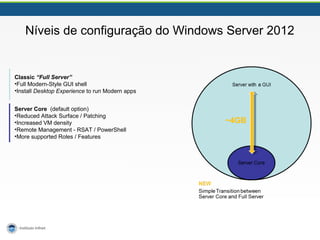
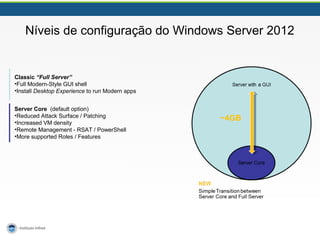
Níveis de configuração do Windows Server 2012 
Classic “Full Server” 
•Full Modern-Style GUI shell 
•Install Desktop Experience to run Modern apps 
Server Core (default option) 
•Reduced Attack Surface / Patching 
•Increased VM density 
•Remote Management - RSAT / PowerShell 
•More supported Roles / Features 
~4GB
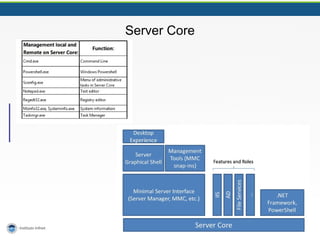
Server Core
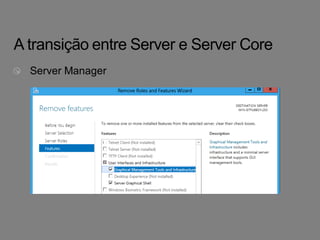
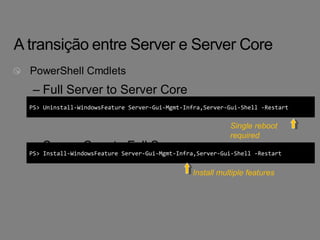
– Full Server to Server Core 
PS> Uninstall-WindowsFeature Server-Gui-Mgmt-Infra,Server-Gui-Shell -Restart 
– Server Core to Full Server 
Single reboot 
required 
PS> Install-WindowsFeature Server-Gui-Mgmt-Infra,Server-Gui-Shell -Restart 
Install multiple features
"Tudo deve ser feito tão simples quanto possível, mas 
não mais simples." 
Albert Einstein
Níveis de configuração do Windows Server 2012 
Classic “Full Server” 
•Full Modern-Style GUI shell 
•Install Desktop Experience to run Modern apps 
Server Core (default option) 
•Reduced Attack Surface / Patching 
•Increased VM density 
•Remote Management - RSAT / PowerShell 
•More supported Roles / Features 
~4GB
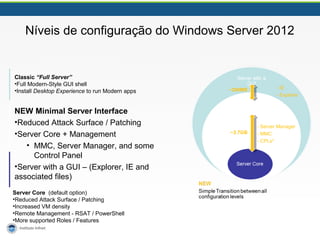
Níveis de configuração do Windows Server 2012 
Classic “Full Server” 
•Full Modern-Style GUI shell 
•Install Desktop Experience to run Modern apps 
NEW Minimal Server Interface 
•Reduced Attack Surface / Patching 
•Server Core + Management 
• MMC, Server Manager, and some 
Control Panel 
•Server with a GUI – (Explorer, IE and 
associated files) 
Server Core (default option) 
•Reduced Attack Surface / Patching 
•Increased VM density 
•Remote Management - RSAT / PowerShell 
•More supported Roles / Features 
~300MB - IE 
~3.7GB 
- Explorer 
- Server Manager 
- MMC 
- CPLs*
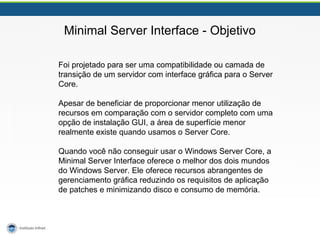
Minimal Server Interface - Objetivo 
Foi projetado para ser uma compatibilidade ou camada de 
transição de um servidor com interface gráfica para o Server 
Core. 
Apesar de beneficiar de proporcionar menor utilização de 
recursos em comparação com o servidor completo com uma 
opção de instalação GUI, a área de superfície menor 
realmente existe quando usamos o Server Core. 
Quando você não conseguir usar o Windows Server Core, a 
Minimal Server Interface oferece o melhor dos dois mundos 
do Windows Server. Ele oferece recursos abrangentes de 
gerenciamento gráfica reduzindo os requisitos de aplicação 
de patches e minimizando disco e consumo de memória.
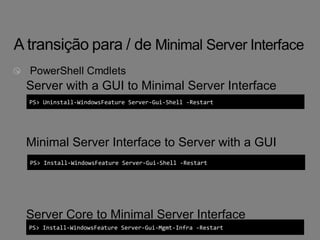
Server with a GUI to Minimal Server Interface 
PS> Uninstall-WindowsFeature Server-Gui-Shell -Restart 
Minimal Server Interface to Server with a GUI 
PS> Install-WindowsFeature Server-Gui-Shell -Restart 
Server Core to Minimal Server Interface 
PS> Install-WindowsFeature Server-Gui-Mgmt-Infra -Restart
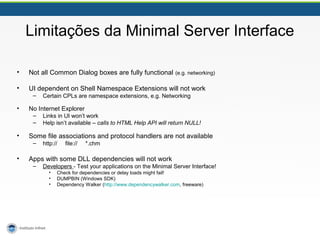
Limitações da Minimal Server Interface 
• Not all Common Dialog boxes are fully functional (e.g. networking) 
• UI dependent on Shell Namespace Extensions will not work 
– Certain CPLs are namespace extensions, e.g. Networking 
• No Internet Explorer 
– Links in UI won’t work 
– Help isn’t available – calls to HTML Help API will return NULL! 
• Some file associations and protocol handlers are not available 
– http:// file:// *.chm 
• Apps with some DLL dependencies will not work 
– Developers - Test your applications on the Minimal Server Interface! 
• Check for dependencies or delay loads might fail! 
• DUMPBIN (Windows SDK) 
• Dependency Walker (http://www.dependencywalker.com, freeware)
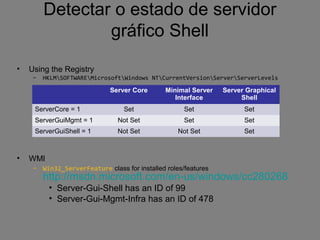
Detectar o estado de servidor 
gráfico Shell 
• Using the Registry 
– HKLMSOFTWAREMicrosoftWindows NTCurrentVersionServerServerLevels 
• WMI 
Server Core Minimal Server 
Interface 
– Win32_ServerFeature class for installed roles/features 
http://msdn.microsoft.com/en-us/windows/cc280268 
• Server-Gui-Shell has an ID of 99 
• Server-Gui-Mgmt-Infra has an ID of 478 
Server Graphical 
Shell 
ServerCore = 1 Set Set Set 
ServerGuiMgmt = 1 Not Set Set Set 
ServerGuiShell = 1 Not Set Not Set Set
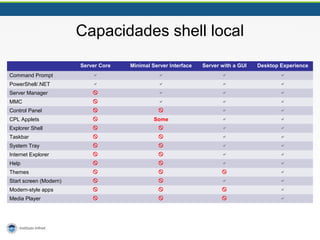
Capacidades shell local 
Server Core Minimal Server Interface Server with a GUI Desktop Experience 
Command Prompt     
PowerShell/.NET     
Server Manager     
MMC     
Control Panel     
CPL Applets  Some   
Explorer Shell     
Taskbar     
System Tray     
Internet Explorer     
Help     
Themes     
Start screen (Modern)     
Modern-style apps     
Media Player    
Recursos 
Server Core 
TechNet Library – Configure and Manage Server Core Installations 
http://technet.microsoft.com/en-us/library/jj574091.aspx 
Detecting State - Win32_ServerFeature class 
http://msdn.microsoft.com/en-us/windows/cc280268 
Features on Demand 
TechNet Library - Configure Features on Demand in Windows Server 
http://technet.microsoft.com/en-us/library/jj127275 
Blog- Using Features on Demand with Updated Systems and Patched Images 
http://blogs.technet.com/b/server_core/archive/2012/11/05/using-features-on-demand-with-updated-systems-and-patched-images.aspx 
TechNet Library - .NET 3.5 and Features on Demand 
http://technet.microsoft.com/en-us/library/hh831809#BKMK_FoD 
Server Manager 
Blog – Server Manager Overview 
http://blogs.technet.com/b/servermanager/archive/2012/06/27/server-manager-power-of-many-simplicity-of-one.aspx 
TechNet Library – Server Manager Troubleshooting (3 part series) 
http://social.technet.microsoft.com/wiki/contents/articles/13443.windows-server-2012-server-manager-troubleshooting-guide-part-i-overview. 
aspx 
Blog – Customize Tools Menu 
http://blogs.technet.com/b/servermanager/archive/2012/07/09/customize-tools-menu-in-server-manager.aspx
21 
Q & A
Infnet Infra Day II - Server Core na prática

Infnet Infra Day II - Server Core na prática

  • 1.
    Server Core naPrática Paulo Sant´anna Microsoft MVP Windows Expert IT-Pro Twitter: @paulo_santanna Blog: http://www.paulosantanna.com
  • 2.
    “A simplicidade éa sofisticação final” Leonardo da Vinci
  • 4.
    Vantagens – ServerCore Uso de menor quantidade de memória RAM Para instalação do Windows Server nas versões 2008, 2008R2, 2012 e 2012 R2, são necessários apenas 512 MBs RAM Menor quantidade de updates necessários Diminui drasticamente a superfície de ataques já que não podemos instalar Internet Explorer, Navegadores de terceiros, Javascript, Flash, alguns readers, etc, e convenhamos não precisamos disso em determinadas funções que rodam em servidores de AD, DNS, DHCP e CAs.
  • 5.
    Roles disponíveis emum Server Core Serviços de Certificados do Active Directory Serviços de Domínio Active Directory Servidor DHCP Servidor DNS Serviços de Arquivo (incluindo o Gerenciador de Recursos do Servidor de Arquivos) Serviços AD LDS Hyper-V Serviços de impressão e documentos Serviços de Mídia de Fluxo Contínuo Servidor Web (incluindo um sub conjunto de ASP.NET) Windows Server Update Server Servidor de Gerenciamento de Direitos do Active Directory Servidor de Roteamento e Acesso Remoto, incluindo as seguintes subfunções: Agente de Conexão de Serviços de Área de Trabalho Remota Licenciamento Virtualização
  • 6.
    Recursos disponíveis emum Server Core Microsoft .NET Framework 3.5 Microsoft .NET Framework 4.5 Windows PowerShell BITS (serviço de transferência inteligente em segundo plano) Criptografia de unidade de disco BitLocker Desbloqueio pela Rede do BitLocker BranchCache Ponte de Data Center Armazenamento Avançado Clustering de failover Multipath I/O Balanceamento de carga de rede Protocolo PNRP Quality Windows Audio-Video Experience Compactação Diferencial Remota Serviços TCP/IP Simples RPC sobre Proxy HTTP Servidor SMTP Serviço SNMP Cliente Telnet Servidor Telnet Cliente TFTP Banco de Dados Interno do Windows Windows PowerShell Web Access Serviço de Ativação de Processos do Windows Gerenciamento de Armazenamento Baseado em Padrões do Windows Extensão IIS WinRM Servidor WINS Suporte a WoW64
  • 7.
    Níveis de configuraçãodo Windows Server 2012 Classic “Full Server” •Full Modern-Style GUI shell •Install Desktop Experience to run Modern apps Server Core (default option) •Reduced Attack Surface / Patching •Increased VM density •Remote Management - RSAT / PowerShell •More supported Roles / Features ~4GB
  • 8.
  • 10.
    – Full Serverto Server Core PS> Uninstall-WindowsFeature Server-Gui-Mgmt-Infra,Server-Gui-Shell -Restart – Server Core to Full Server Single reboot required PS> Install-WindowsFeature Server-Gui-Mgmt-Infra,Server-Gui-Shell -Restart Install multiple features
  • 11.
    "Tudo deve serfeito tão simples quanto possível, mas não mais simples." Albert Einstein
  • 12.
    Níveis de configuraçãodo Windows Server 2012 Classic “Full Server” •Full Modern-Style GUI shell •Install Desktop Experience to run Modern apps Server Core (default option) •Reduced Attack Surface / Patching •Increased VM density •Remote Management - RSAT / PowerShell •More supported Roles / Features ~4GB
  • 13.
    Níveis de configuraçãodo Windows Server 2012 Classic “Full Server” •Full Modern-Style GUI shell •Install Desktop Experience to run Modern apps NEW Minimal Server Interface •Reduced Attack Surface / Patching •Server Core + Management • MMC, Server Manager, and some Control Panel •Server with a GUI – (Explorer, IE and associated files) Server Core (default option) •Reduced Attack Surface / Patching •Increased VM density •Remote Management - RSAT / PowerShell •More supported Roles / Features ~300MB - IE ~3.7GB - Explorer - Server Manager - MMC - CPLs*
  • 14.
    Minimal Server Interface- Objetivo Foi projetado para ser uma compatibilidade ou camada de transição de um servidor com interface gráfica para o Server Core. Apesar de beneficiar de proporcionar menor utilização de recursos em comparação com o servidor completo com uma opção de instalação GUI, a área de superfície menor realmente existe quando usamos o Server Core. Quando você não conseguir usar o Windows Server Core, a Minimal Server Interface oferece o melhor dos dois mundos do Windows Server. Ele oferece recursos abrangentes de gerenciamento gráfica reduzindo os requisitos de aplicação de patches e minimizando disco e consumo de memória.
  • 15.
    Server with aGUI to Minimal Server Interface PS> Uninstall-WindowsFeature Server-Gui-Shell -Restart Minimal Server Interface to Server with a GUI PS> Install-WindowsFeature Server-Gui-Shell -Restart Server Core to Minimal Server Interface PS> Install-WindowsFeature Server-Gui-Mgmt-Infra -Restart
  • 16.
    Limitações da MinimalServer Interface • Not all Common Dialog boxes are fully functional (e.g. networking) • UI dependent on Shell Namespace Extensions will not work – Certain CPLs are namespace extensions, e.g. Networking • No Internet Explorer – Links in UI won’t work – Help isn’t available – calls to HTML Help API will return NULL! • Some file associations and protocol handlers are not available – http:// file:// *.chm • Apps with some DLL dependencies will not work – Developers - Test your applications on the Minimal Server Interface! • Check for dependencies or delay loads might fail! • DUMPBIN (Windows SDK) • Dependency Walker (http://www.dependencywalker.com, freeware)
  • 17.
    Detectar o estadode servidor gráfico Shell • Using the Registry – HKLMSOFTWAREMicrosoftWindows NTCurrentVersionServerServerLevels • WMI Server Core Minimal Server Interface – Win32_ServerFeature class for installed roles/features http://msdn.microsoft.com/en-us/windows/cc280268 • Server-Gui-Shell has an ID of 99 • Server-Gui-Mgmt-Infra has an ID of 478 Server Graphical Shell ServerCore = 1 Set Set Set ServerGuiMgmt = 1 Not Set Set Set ServerGuiShell = 1 Not Set Not Set Set
  • 18.
    Capacidades shell local Server Core Minimal Server Interface Server with a GUI Desktop Experience Command Prompt     PowerShell/.NET     Server Manager     MMC     Control Panel     CPL Applets  Some   Explorer Shell     Taskbar     System Tray     Internet Explorer     Help     Themes     Start screen (Modern)     Modern-style apps     Media Player    
  • 20.
    Recursos Server Core TechNet Library – Configure and Manage Server Core Installations http://technet.microsoft.com/en-us/library/jj574091.aspx Detecting State - Win32_ServerFeature class http://msdn.microsoft.com/en-us/windows/cc280268 Features on Demand TechNet Library - Configure Features on Demand in Windows Server http://technet.microsoft.com/en-us/library/jj127275 Blog- Using Features on Demand with Updated Systems and Patched Images http://blogs.technet.com/b/server_core/archive/2012/11/05/using-features-on-demand-with-updated-systems-and-patched-images.aspx TechNet Library - .NET 3.5 and Features on Demand http://technet.microsoft.com/en-us/library/hh831809#BKMK_FoD Server Manager Blog – Server Manager Overview http://blogs.technet.com/b/servermanager/archive/2012/06/27/server-manager-power-of-many-simplicity-of-one.aspx TechNet Library – Server Manager Troubleshooting (3 part series) http://social.technet.microsoft.com/wiki/contents/articles/13443.windows-server-2012-server-manager-troubleshooting-guide-part-i-overview. aspx Blog – Customize Tools Menu http://blogs.technet.com/b/servermanager/archive/2012/07/09/customize-tools-menu-in-server-manager.aspx
  • 21.

Notas do Editor

  • #22 At this point, do you have any questions?