TCHELINUX 2007


             Mercurial


      Douglas Schilling Landgraf
      <dougsland@tchelinux.org>

              Fábio Olivé
         <olive@tchelinux.org>


Universidade Federal do Rio Grande do Sul
  Porto Alegre, 1 de Dezembro de 2007
O que é Mercurial ?

   Mercurial
        Sistema para controle de versões distribuído


   Autor inicial:
        Matt Mackall


   Homepage:
        http://selenic.com/mercurial


   Licença:
        GPL v2
Mercurial infos


   Mercurial ou hg ?

   Desenvolvido em:
       Python e C


   Plataformas suportadas:
       Linux, *BSD, Mac OS, Solaris, Windows
Centralizado x Descentralizado


   Desenvolvedores não precisam estar “online”


   Repositórios são clonados por qualquer pessoa


   Crash no servidor de controle de versão e agora ?


   Sem restriçoes de permissão para alterações
Instalação – versão > 0.9.4
   Debian/Ubuntu/Kubuntu:
       shell$> sudo apt-get install mercurial -y


   Instalação Unix:
       http://www.selenic.com/mercurial/wiki/index.cgi/UnixInstall


   Instalação Windows:
       http://www.selenic.com/mercurial/wiki/index.cgi/WindowsInstall


   Binários:
       http://mercurial.berkwood.com/
Conceitos

   Repositório
       Onde o mercurial armazena os arquivos


   Changeset
       Identificador do commit

   Tip
       Última alteração

   Branch / Merge
Baixando um projeto (DEMO)


   shell$> hg clone http://hg.host.com/projeto
.hg/hgrc


   Arquivo de configuração do Mercurial
       Nome do autor
       Email
       etc..
Alterando... (DEMO)

shell$> vi arquivo.c


O arquivo foi alterado ?
shell$> hg status arquivo.c


ARQUIVO ERRADO tem como voltar ?
shell$> hg revert arquivo.c
shell$> hg status arquivo.c
Arquivo .orig ?
Rollback (DEMO)


shell$> vi arquivo.c
shell$> hg commit


Voltar alteração...
shell$> hg rollback
Removendo um arquivo (DEMO)


shell$> hg remove arquivo.c
shell$> hg commit


E para adicionar arquivos e diretórios ?
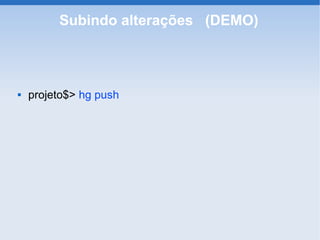
Subindo alterações (DEMO)


   projeto$> hg push
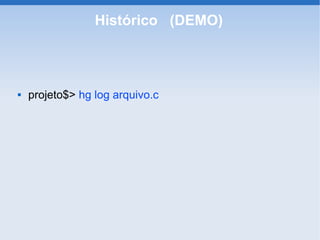
Histórico (DEMO)


   projeto$> hg log arquivo.c
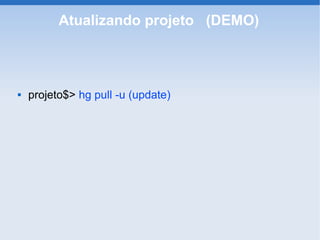
Atualizando projeto (DEMO)


   projeto$> hg pull -u (update)
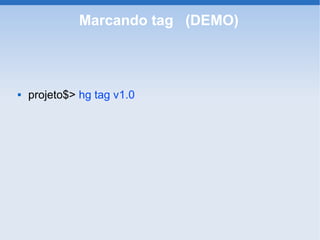
Marcando tag (DEMO)


   projeto$> hg tag v1.0
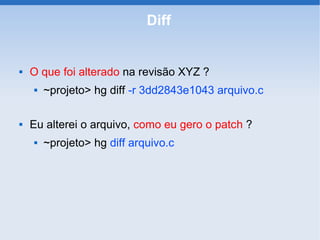
Diff


   O que foi alterado na revisão XYZ ?
       ~projeto> hg diff -r 3dd2843e1043 arquivo.c

   Eu alterei o arquivo, como eu gero o patch ?
       ~projeto> hg diff arquivo.c
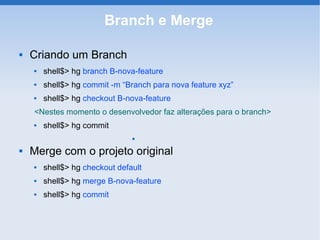
Branch e Merge

   Criando um Branch
       shell$> hg branch B-nova-feature
       shell$> hg commit -m “Branch para nova feature xyz”
       shell$> hg checkout B-nova-feature
    <Nestes momento o desenvolvedor faz alterações para o branch>
       shell$> hg commit
                                


   Merge com o projeto original
       shell$> hg checkout default
       shell$> hg merge B-nova-feature
       shell$> hg commit
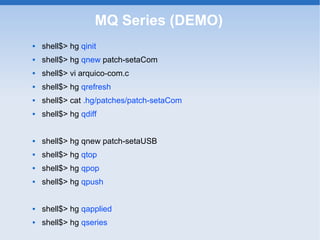
MQ Series (DEMO)
   shell$> hg qinit
   shell$> hg qnew patch-setaCom
   shell$> vi arquico-com.c
   shell$> hg qrefresh
   shell$> cat .hg/patches/patch-setaCom
   shell$> hg qdiff


   shell$> hg qnew patch-setaUSB
   shell$> hg qtop
   shell$> hg qpop
   shell$> hg qpush


   shell$> hg qapplied
   shell$> hg qseries
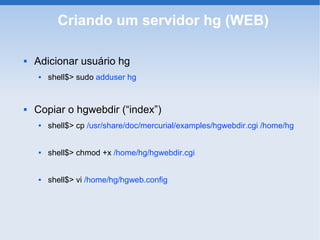
Criando um servidor hg (WEB)

   Adicionar usuário hg
       shell$> sudo adduser hg


   Copiar o hgwebdir (“index”)
       shell$> cp /usr/share/doc/mercurial/examples/hgwebdir.cgi /home/hg


       shell$> chmod +x /home/hg/hgwebdir.cgi


       shell$> vi /home/hg/hgweb.config
Criando um servidor hg (WEB)
                hgweb.config
[collections]
/home/hg = /home/hg


[web]
style = gitweb
allow_archive = bz2 gz zip
contact = Douglas Landgraf, dougsland@tchelinux.org
push_ssl = false
description = Repositorio
allow_push = dougsland
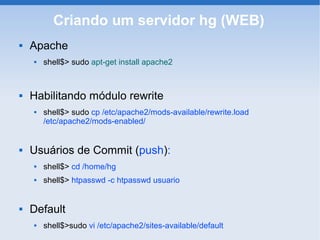
Criando um servidor hg (WEB)
   Apache
       shell$> sudo apt-get install apache2


   Habilitando módulo rewrite
       shell$> sudo cp /etc/apache2/mods-available/rewrite.load
        /etc/apache2/mods-enabled/


   Usuários de Commit (push):
       shell$> cd /home/hg
       shell$> htpasswd -c htpasswd usuario


   Default
       shell$>sudo vi /etc/apache2/sites-available/default
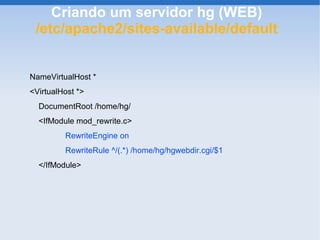
Criando um servidor hg (WEB)
 /etc/apache2/sites-available/default


NameVirtualHost *
<VirtualHost *>
  DocumentRoot /home/hg/
  <IfModule mod_rewrite.c>
         RewriteEngine on
         RewriteRule ^/(.*) /home/hg/hgwebdir.cgi/$1
  </IfModule>
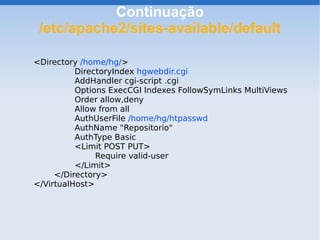
Continuação
 /etc/apache2/sites-available/default

<Directory /home/hg/>
          DirectoryIndex hgwebdir.cgi
          AddHandler cgi-script .cgi
          Options ExecCGI Indexes FollowSymLinks MultiViews
          Order allow,deny
          Allow from all
          AuthUserFile /home/hg/htpasswd
          AuthName "Repositorio"
          AuthType Basic
          <Limit POST PUT>
               Require valid-user
          </Limit>
     </Directory>
</VirtualHost>
Criando um servidor hg (WEB)
   Criando o projeto no repositório:
    shell$> cp projeto /home/hg/
    shell$> cd projeto


    ~hg/projeto$> hg init
    ~hg/projeto$> hg add
    ~hg/projeto$> hg commit
    ~hg/projeto$> vi .hg/hgrc


    [web]
    contact = Douglas Landgraf <dougsland@gmail.com>
    description = Projeto test
    push_ssl = false
    allow_push = dougsland, douglas
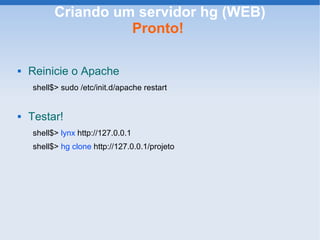
Criando um servidor hg (WEB)
                    Pronto!

   Reinicie o Apache
    shell$> sudo /etc/init.d/apache restart


   Testar!
    shell$> lynx http://127.0.0.1
    shell$> hg clone http://127.0.0.1/projeto
Migrando projetos
        From: (Subversion/CVS) To: hg

   hgsvn
       http://cheeseshop.python.org/pypi/hgsvn


   Tailor
       http://progetti.arstecnica.it/tailor
Exemplo de projetos que utilizam
                  Mercurial
   LinuxTV
       hg clone http://linuxtv.org/hg/v4l-dvb


   OpenSolaris
       hg clone e ssh://anon@hg.opensolaris.org/hg/onnv/onnv-gate


   Xen
       hg clone http://xenbits.xensource.com/linux-2.6.18-xen.hg


   OpenJDK
       hg clone http://hg.openjdk.java.net/jdk7/MASTER
Existe interface gráfica?

   HgkExtension
       shell$> hg view


   gtools (status, log e commit)
       http://www.robotbattle.com/gtools/


   Mercurial eclipse plugin
       http://www.vectrace.com/mercurialeclipse/


   GUIClients disponíveis (página oficial):
       http://www.selenic.com/mercurial/wiki/index.cgi/GUIClients
Guia de utilização


   Disponível em:
       http://www.ivy.fr/mercurial/ref/v1.0/
TCHELINUX 2007


Dúvidas e Sugestões?

  Douglas Schilling Landgraf
  <dougsland@tchelinux.org>

         Fábio Olivé
    <olive@tchelinux.org>

Mercurial - Douglas Schilling Landgraf e Fábio Olivé

  • 1.
    TCHELINUX 2007 Mercurial Douglas Schilling Landgraf <dougsland@tchelinux.org> Fábio Olivé <olive@tchelinux.org> Universidade Federal do Rio Grande do Sul Porto Alegre, 1 de Dezembro de 2007
  • 2.
    O que éMercurial ?  Mercurial  Sistema para controle de versões distribuído  Autor inicial:  Matt Mackall  Homepage:  http://selenic.com/mercurial  Licença:  GPL v2
  • 3.
    Mercurial infos  Mercurial ou hg ?  Desenvolvido em:  Python e C  Plataformas suportadas:  Linux, *BSD, Mac OS, Solaris, Windows
  • 4.
    Centralizado x Descentralizado  Desenvolvedores não precisam estar “online”  Repositórios são clonados por qualquer pessoa  Crash no servidor de controle de versão e agora ?  Sem restriçoes de permissão para alterações
  • 5.
    Instalação – versão> 0.9.4  Debian/Ubuntu/Kubuntu:  shell$> sudo apt-get install mercurial -y  Instalação Unix:  http://www.selenic.com/mercurial/wiki/index.cgi/UnixInstall  Instalação Windows:  http://www.selenic.com/mercurial/wiki/index.cgi/WindowsInstall  Binários:  http://mercurial.berkwood.com/
  • 6.
    Conceitos  Repositório  Onde o mercurial armazena os arquivos  Changeset  Identificador do commit  Tip  Última alteração  Branch / Merge
  • 7.
    Baixando um projeto(DEMO)  shell$> hg clone http://hg.host.com/projeto
  • 8.
    .hg/hgrc  Arquivo de configuração do Mercurial  Nome do autor  Email  etc..
  • 9.
    Alterando... (DEMO) shell$> viarquivo.c O arquivo foi alterado ? shell$> hg status arquivo.c ARQUIVO ERRADO tem como voltar ? shell$> hg revert arquivo.c shell$> hg status arquivo.c Arquivo .orig ?
  • 10.
    Rollback (DEMO) shell$> viarquivo.c shell$> hg commit Voltar alteração... shell$> hg rollback
  • 11.
    Removendo um arquivo(DEMO) shell$> hg remove arquivo.c shell$> hg commit E para adicionar arquivos e diretórios ?
  • 12.
  • 13.
    Histórico (DEMO)  projeto$> hg log arquivo.c
  • 14.
    Atualizando projeto (DEMO)  projeto$> hg pull -u (update)
  • 15.
    Marcando tag (DEMO)  projeto$> hg tag v1.0
  • 16.
    Diff  O que foi alterado na revisão XYZ ?  ~projeto> hg diff -r 3dd2843e1043 arquivo.c  Eu alterei o arquivo, como eu gero o patch ?  ~projeto> hg diff arquivo.c
  • 17.
    Branch e Merge  Criando um Branch  shell$> hg branch B-nova-feature  shell$> hg commit -m “Branch para nova feature xyz”  shell$> hg checkout B-nova-feature <Nestes momento o desenvolvedor faz alterações para o branch>  shell$> hg commit   Merge com o projeto original  shell$> hg checkout default  shell$> hg merge B-nova-feature  shell$> hg commit
  • 18.
    MQ Series (DEMO)  shell$> hg qinit  shell$> hg qnew patch-setaCom  shell$> vi arquico-com.c  shell$> hg qrefresh  shell$> cat .hg/patches/patch-setaCom  shell$> hg qdiff  shell$> hg qnew patch-setaUSB  shell$> hg qtop  shell$> hg qpop  shell$> hg qpush  shell$> hg qapplied  shell$> hg qseries
  • 19.
    Criando um servidorhg (WEB)  Adicionar usuário hg  shell$> sudo adduser hg  Copiar o hgwebdir (“index”)  shell$> cp /usr/share/doc/mercurial/examples/hgwebdir.cgi /home/hg  shell$> chmod +x /home/hg/hgwebdir.cgi  shell$> vi /home/hg/hgweb.config
  • 20.
    Criando um servidorhg (WEB) hgweb.config [collections] /home/hg = /home/hg [web] style = gitweb allow_archive = bz2 gz zip contact = Douglas Landgraf, dougsland@tchelinux.org push_ssl = false description = Repositorio allow_push = dougsland
  • 21.
    Criando um servidorhg (WEB)  Apache  shell$> sudo apt-get install apache2  Habilitando módulo rewrite  shell$> sudo cp /etc/apache2/mods-available/rewrite.load /etc/apache2/mods-enabled/  Usuários de Commit (push):  shell$> cd /home/hg  shell$> htpasswd -c htpasswd usuario  Default  shell$>sudo vi /etc/apache2/sites-available/default
  • 22.
    Criando um servidorhg (WEB) /etc/apache2/sites-available/default NameVirtualHost * <VirtualHost *> DocumentRoot /home/hg/ <IfModule mod_rewrite.c> RewriteEngine on RewriteRule ^/(.*) /home/hg/hgwebdir.cgi/$1 </IfModule>
  • 23.
    Continuação /etc/apache2/sites-available/default <Directory /home/hg/> DirectoryIndex hgwebdir.cgi AddHandler cgi-script .cgi Options ExecCGI Indexes FollowSymLinks MultiViews Order allow,deny Allow from all AuthUserFile /home/hg/htpasswd AuthName "Repositorio" AuthType Basic <Limit POST PUT> Require valid-user </Limit> </Directory> </VirtualHost>
  • 24.
    Criando um servidorhg (WEB)  Criando o projeto no repositório: shell$> cp projeto /home/hg/ shell$> cd projeto ~hg/projeto$> hg init ~hg/projeto$> hg add ~hg/projeto$> hg commit ~hg/projeto$> vi .hg/hgrc [web] contact = Douglas Landgraf <dougsland@gmail.com> description = Projeto test push_ssl = false allow_push = dougsland, douglas
  • 25.
    Criando um servidorhg (WEB) Pronto!  Reinicie o Apache shell$> sudo /etc/init.d/apache restart  Testar! shell$> lynx http://127.0.0.1 shell$> hg clone http://127.0.0.1/projeto
  • 26.
    Migrando projetos From: (Subversion/CVS) To: hg  hgsvn  http://cheeseshop.python.org/pypi/hgsvn  Tailor  http://progetti.arstecnica.it/tailor
  • 27.
    Exemplo de projetosque utilizam Mercurial  LinuxTV  hg clone http://linuxtv.org/hg/v4l-dvb  OpenSolaris  hg clone e ssh://anon@hg.opensolaris.org/hg/onnv/onnv-gate  Xen  hg clone http://xenbits.xensource.com/linux-2.6.18-xen.hg  OpenJDK  hg clone http://hg.openjdk.java.net/jdk7/MASTER
  • 28.
    Existe interface gráfica?  HgkExtension  shell$> hg view  gtools (status, log e commit)  http://www.robotbattle.com/gtools/  Mercurial eclipse plugin  http://www.vectrace.com/mercurialeclipse/  GUIClients disponíveis (página oficial):  http://www.selenic.com/mercurial/wiki/index.cgi/GUIClients
  • 29.
    Guia de utilização  Disponível em:  http://www.ivy.fr/mercurial/ref/v1.0/
  • 30.
    TCHELINUX 2007 Dúvidas eSugestões? Douglas Schilling Landgraf <dougsland@tchelinux.org> Fábio Olivé <olive@tchelinux.org>