
Curso Superior de Tecnologia em Design Gráfico


DWEB - Design para
Web

                                       10                         jQuery


    “Todo aquele que ultrapassa a doutrina de Cristo e nela não permanece não tem Deus; o que permanece
    na doutrina, esse tem tanto o Pai como o Filho.” 2 João 1:9


1   Capítulo 10 - jQuery                                           Tuesday, 15 de May de 12
DWEB – Design para Web / Carlos José


                                              Contato


                                    Carlos José

                           carlosjose.unibratec@gmail.com
                                  www.carlosjose.net
                               twitter.com/carlosjoser2n


2   Capítulo 10 - jQuery                          Tuesday, 15 de May de 12
DWEB – Design para Web / Carlos José


                           Objetivo da Aula


n Apresentar   a
    versatilidade da
    biblioteca jQuery.


3   Capítulo 10 - jQuery        Tuesday, 15 de May de 12
DWEB – Design para Web / Carlos José


                           Agenda

n O que é jQuery?
n Para que serve?
n Utilização jQuery
n Padrões web e jQuery
n Como instalar jQuery?
n Seletores
n Exercícios

4   Capítulo 10 - jQuery   Tuesday, 15 de May de 12
DWEB – Design para Web / Carlos José


                                   jQuery

n  O   que é jQuery?
    î É   uma biblioteca JavaScript criada por John
        Resig e disponibilizada de forma livre mediante
        licença GPL (GNU General Public Licence) para
        uso pessoal e comercial.

n  Para     que serve?
    î É  destinada a adicionar interatividade e
        dinamismo aos documentos web melhorando a
        usabilidade e acessibilidade enriquecendo a
        experiência do usuário.

5    Capítulo 10 - jQuery          Tuesday, 15 de May de 12
DWEB – Design para Web / Carlos José


                                 jQuery

n  Utilize       jQuery para:
    î Adicionar efeitos visuais e animações;
    î Acessar e manipular o DOM (Document Object
       Model);
    î Buscar informações no servidor sem a
       necessidade de recarregar à página;
    î Prover interatividade;
    î Alterar conteúdo;
    î Modificar a apresentação e estilização;
    î Simplificar tarefas específicas do JavaScript;

6    Capítulo 10 - jQuery        Tuesday, 15 de May de 12
DWEB – Design para Web / Carlos José


                                      jQuery

n  Padrões            web e jQuery
    î Esta biblioteca esta em total conformidade com
       os padrões web;
    î Compatível com qualquer sistema operacional;
    î Compatível com todos os navegadores inclusive
       o Internet Explorer;
    î Suporte total as CSS3


7    Capítulo 10 - jQuery             Tuesday, 15 de May de 12
DWEB – Design para Web / Carlos José


                                      jQuery

n  Características         da biblioteca jQuery
    î Utilizaseletores CSS para localizar elementos
       componentes da estrutura de marcação HTML;
    î Possui arquitetura compatível com instalação de
       plug-ins e extensões em geral;
    î É indiferente às inconsistências de renderização
       dos navegadores;
    î É extensível, pois admite a criação e inserção de
       novas funcionalidades na biblioteca existente.


8    Capítulo 10 - jQuery             Tuesday, 15 de May de 12
DWEB – Design para Web / Carlos José


                                     jQuery

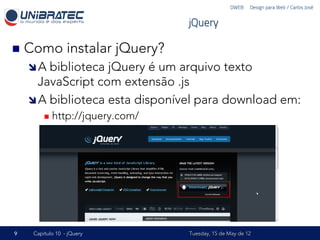
n  Como          instalar jQuery?
    î A biblioteca jQuery é um arquivo texto
       JavaScript com extensão .js
    î A biblioteca esta disponível para download em:
         n  http://jquery.com/


9    Capítulo 10 - jQuery            Tuesday, 15 de May de 12
DWEB – Design para Web / Carlos José


                                                      jQuery

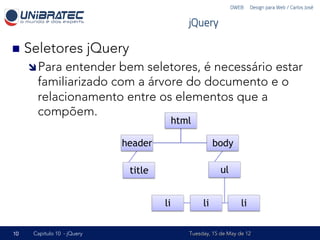
n  Seletores                jQuery
     î Paraentender bem seletores, é necessário estar
       familiarizado com a árvore do documento e o
       relacionamento entre os elementos que a
       compõem.
                                                   html

                                 header                         body

                                      title                       ul


                                              li           li              li

10    Capítulo 10 - jQuery                            Tuesday, 15 de May de 12
DWEB – Design para Web / Carlos José


                                                    jQuery

n    Seletores CSS 1 - 3
      î  *:   qualquer elemento.
           n    $('p.comment-meta *'); // get all elements inside
                 p.comment-meta
      î  E:     pega qualquer elemento com o nome E.
           n    $('div'); // get all div tags
      î  E:nth-child(n):
                      em um elemento E, pega o
         elemento n de seu pai.
           n    $('li:nth-child(2)'); // get <li>Item 2</li>
      î  E:first-child:
                     em um elemento E, pega o primeiro
         filho de seu pai.
           n    $('li:first-child'); // get <li>Item 1</li>
      î  E:empty:            um elemento E que não possui filhos.
           n    $('div:empty'); // get <div id="empty-div"></div>

11     Capítulo 10 - jQuery                         Tuesday, 15 de May de 12
DWEB – Design para Web / Carlos José


                                                        jQuery
n    Seletores CSS 1 - 3
      î  E:enabled:          um elemento E que está ativo.
              n    $('input:enabled'); // get <input type="button" value="Click me!" /
                    >
      î  E:disabled:         um elemento E que está inativo.
              n    $('input:disabled'); // get <input type="button"
                    disabled="disabled" value="Disabled button" />
      î  E:checked:um elemento E (radio ou checkbox) que está
         selecionado.
              n    $('input:checked'); // get <input type="checkbox"
                    checked="checked" />
      î  E:selected:         um elemento E (option) que está selecionado.
              n    $('option:selected'); // get <option value="3">Option 3</option>
      î  E    F: um elemento E que tenha um filho F.
              n    $('p strong'); // get <strong>Sample:</strong>


12     Capítulo 10 - jQuery                             Tuesday, 15 de May de 12
DWEB – Design para Web / Carlos José


                                                    jQuery

n    Seletores CSS 1 - 3
      î  E   > F: um elemento F dentro de E.
           n    $('p > em'); // get <em>Inside a paragraph</em> but not
                 <span><em>Inside a span</em></span>
      î  E
          + F: elemento F imediatamente precedido por um
        elemento E.
           n    $('h1 + p'); // get <p>This is just a dummy text.</p>
      î  E   ~ F: elementos F precedido por um elemento E.
           n    $('h1 ~ ul'); // get <ul id="list" class="list-class">
      î  E,F,G:      elementos E, F e G.
           n    $('h1,ul'); // get <h1> and <ul>
      î  E[attr]:     elementos E que possuam o atributo attr.
           n    $(':checkbox[checked]'); // get <input type="checkbox"
                 id="checkbox" />

13     Capítulo 10 - jQuery                         Tuesday, 15 de May de 12
DWEB – Design para Web / Carlos José


                                                jQuery

n    Seletores CSS 1 - 3
      î  E[attr^=value]:elementos E que possuam um
        atributo attr cujo valor inicie-se por value.
           n    $('[id^=empty]'); // get <div id="empty-div"></div>
      î  E[attr$=value]:
                        elementos E que possuam um
        atributo attr cujo valor termine com value.
           n    $('[id$=div]'); // get <div id="empty-div"></div>
      î  E[attr*=value]:
                        elementos E que possuam um
        atributo attr cujo valor contenha value.
           n    $('dd[class*=o]'); // get <dd class="color"> and <dd
                 class="word">
      î  E[attr=value]:
                       elementos cujo atributo attr tenham
        valor igual a value.
           n    $('dd[class=word]'); // get <dd class="word">


14     Capítulo 10 - jQuery                     Tuesday, 15 de May de 12
DWEB – Design para Web / Carlos José


                                                         jQuery

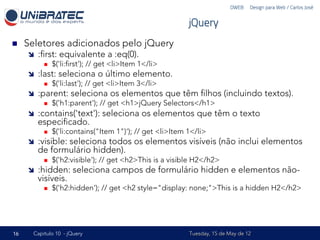
n    Seletores adicionados pelo jQuery
      î  :even:todos os elementos de índice par. Os índices se
         iniciam em zero.
           n    $('option:even'); // get <option value="1"> and <option
                 value="3">
      î  :odd: todos os elementos de índice ímpar.
            n  $('option:odd'); // get <option value="2">

      î  :eq(N) e :nth(N): seleciona o elemento de índice N.
            n  $('option:eq(0)'); // get <option value="1">
            n  $('option:nth(1)'; // get <option value="2">

      î  :gt(N): seleciona os elementos cujo índice sejam maior
         que N.
           n    $('li:gt(1)'); // get <li>Item 3</li>
      î  :lt(N):
              seleciona os elementos cujo índice seja menores
         que N.
           n    $('li:lt(1)'); // get <li>Item 1</li>

15     Capítulo 10 - jQuery                              Tuesday, 15 de May de 12
DWEB – Design para Web / Carlos José


                                                               jQuery
n    Seletores adicionados pelo jQuery
      î    :first: equivalente a :eq(0).
             n    $('li:first'); // get <li>Item 1</li>
      î    :last: seleciona o último elemento.
             n    $('li:last'); // get <li>Item 3</li>
      î    :parent: seleciona os elementos que têm filhos (incluindo textos).
             n    $('h1:parent'); // get <h1>jQuery Selectors</h1>
      î    :contains('text'): seleciona os elementos que têm o texto
            especificado.
             n    $('li:contains("Item 1")'); // get <li>Item 1</li>
      î    :visible: seleciona todos os elementos visíveis (não inclui elementos
            de formulário hidden).
             n    $('h2:visible'); // get <h2>This is a visible H2</h2>
      î    :hidden: seleciona campos de formulário hidden e elementos não-
            visíveis.
             n    $('h2:hidden'); // get <h2 style="display: none;">This is a hidden H2</h2>


16      Capítulo 10 - jQuery                                   Tuesday, 15 de May de 12
DWEB – Design para Web / Carlos José


                                                           jQuery

n    Formulários
      î  O
          jQuery fornece alguns atalhos para se trabalhar com
        campos de formulário, evitando que você tenha que usar
        um seletor de atributo input[type=radio], por exemplo.
           n    Veja como é simples:
                  î    :input: seleciona qualquer tipo de campo de formulário (input, button,
                        textarea, select).
                  î    :text: seleciona campos com type="text".
                  î    :password: seleciona campos com type="password".
                  î    :radio: seleciona campos com type="radio".
                  î    :checkbox: seleciona campos com type="checkbox".
                  î    :file: seleciona campos com type="file".
                  î    :submit: seleciona campos com type="submit".
                  î    :image: seleciona campos com type="image".
                  î    :reset: seleciona campos com type="reset".
                  î    :button: seleciona campos com type="button" ou <button></button>.


17     Capítulo 10 - jQuery                                Tuesday, 15 de May de 12
DWEB – Design para Web / Carlos José


                                      jQuery: exe01jq.html
 <!DOCTYPE html>
 <html xmlns="http://www.w3.org/1999/xhtml" lang="pt-br" xml:lang="pt-br">
 <head>
   <meta charset="utf-8" />
   <title>Exe01jq</title>
   <style type="text/css" media="all">
      h1{color:#FC0}
   </style>
 <script type="text/javascript" src="js/jquery-1.7.1.min.js"></script>
 <script type="text/javascript">
  $(document).ready(function(){
    $("#btn1").click(function(){
       $(".cor").css("color","#ff0000");
    });
  });
 </script>
 </head>
 <body>
  <h1 class="cor">Muda cor</h1>
  <button type="button" id="btn1">Vermelha</button>
 </body>
 </html>


18   Capítulo 10 - jQuery                      Tuesday, 15 de May de 12
DWEB – Design para Web / Carlos José


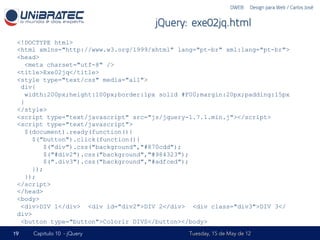
                                      jQuery: exe02jq.html
 <!DOCTYPE html>
 <html xmlns="http://www.w3.org/1999/xhtml" lang="pt-br" xml:lang="pt-br">
 <head>
    <meta charset="utf-8" />
 <title>Exe02jq</title>
 <style type="text/css" media="all">
  div{
    width:200px;height:100px;border:1px solid #F00;margin:20px;padding:15px
  }
 </style>
 <script type="text/javascript" src="js/jquery-1.7.1.min.j"></script>
 <script type="text/javascript">
    $(document).ready(function(){
      $("button").click(function(){
          $("div").css("background","#870cdd");
          $("#div2").css("background","#984323");
          $(".div3").css("background","#adfced");
      });
    });
 </script>
 </head>
 <body>
  <div>DIV 1</div> <div id="div2">DIV 2</div> <div class="div3">DIV 3</
 div>
  <button type="button">Colorir DIVS</button></body>
 </html>
19   Capítulo 10 - jQuery                      Tuesday, 15 de May de 12
DWEB – Design para Web / Carlos José


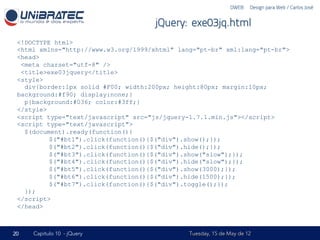
                                      jQuery: exe03jq.html
 <!DOCTYPE html>
 <html xmlns="http://www.w3.org/1999/xhtml" lang="pt-br" xml:lang="pt-br">
 <head>
  <meta charset="utf-8" />
  <title>exe03jquery</title>
 <style>
   div{border:1px solid #F00; width:200px; height:80px; margin:10px;
 background:#f90; display:none;}
   p{background:#036; color:#3ff;}
 </style>
 <script type="text/javascript" src="js/jquery-1.7.1.min.js"></script>
 <script type="text/javascript">
   $(document).ready(function(){
          $("#bt1").click(function(){$("div").show();});
          $("#bt2").click(function(){$("div").hide();});
          $("#bt3").click(function(){$("div").show("slow");});
          $("#bt4").click(function(){$("div").hide("slow");});
          $("#bt5").click(function(){$("div").show(3000);});
          $("#bt6").click(function(){$("div").hide(1500);});
          $("#bt7").click(function(){$("div").toggle();});
   });
 </script>
 </head>


20   Capítulo 10 - jQuery                      Tuesday, 15 de May de 12
DWEB – Design para Web / Carlos José


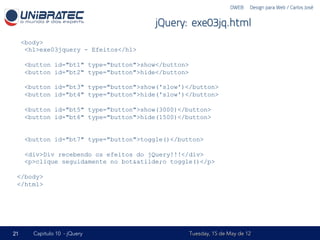
                                         jQuery: exe03jq.html
     <body>
      <h1>exe03jquery - Efeitos</h1>

      <button id="bt1" type="button">show</button>
      <button id="bt2" type="button">hide</button>

      <button id="bt3" type="button">show('slow')</button>
      <button id="bt4" type="button">hide('slow')</button>

      <button id="bt5" type="button">show(3000)</button>
      <button id="bt6" type="button">hide(1500)</button>


      <button id="bt7" type="button">toggle()</button>

      <div>Div recebendo os efeitos do jQuery!!!</div>
      <p>clique seguidamente no bot&atilde;o toggle()</p>

 </body>
 </html>


21      Capítulo 10 - jQuery                         Tuesday, 15 de May de 12
DWEB – Design para Web / Carlos José


                                            jQuery: exe04jq.html
 <!DOCTYPE html>
 <html xmlns="http://www.w3.org/1999/xhtml" lang="pt-br" xml:lang="pt-br">
 <head>
  <meta charset="utf-8" />
  <title>exe04jquery</title>
 <style>
   div{border:1px solid #F00; width:200px; height:80px; margin:10px; background:#f90;}
 </style>
 <script type="text/javascript" src="js/jquery-1.7.1.min.js"></script>
 <script type="text/javascript">
   $(document).ready(function(){
           $("#bt1").click(function(){
             $("div").animate({
                     width:"linear",
                     height:"toggle",
             },"slow");
           });
   });
 </script>
 </head>
 <body>
   <h1>exe04jquery – Efeitos com animate()</h1>

   <button id="bt1" type="button">animate</button>
   <div>Div recebendo os efeitos do jQuery!!!</div>
 </body>
 </html>


22    Capítulo 10 - jQuery                            Tuesday, 15 de May de 12
DWEB – Design para Web / Carlos José


                                                  jQuery: exe05jq.html
 <!DOCTYPE html>
 <html xmlns="http://www.w3.org/1999/xhtml" lang="pt-br" xml:lang="pt-br">
 <head>
  <meta charset="utf-8" />
  <title>exe05jquery</title>
 <style>
   div{border:1px solid #F00; width:200px; height:80px; margin:10px;}
 </style>
 <script type="text/javascript" src="js/jquery-1.6.1.min.js"></script>
 <script type="text/javascript">
   $(document).ready(function(){
            $("#btcor").click(function(){
              $("div").css("background","#870ccd");
              $("#div2").css("background","#984323");
              $(".div3").css("background","#acfced");
            });
            $(function(){
              $("#div2").hover(function(){
                        $(this).css("background","#ffcc99");
                        },function(){
                                   $(this).css("background","#984323")
                                   }
              );
            });
   });
 </script>
 </head>
 <body>
   <h1>exe05jquery</h1>
   <div>div 1</div><div id="div2">div 2</div><div class="div3">div 3</div>
   <button id="btcor" type="button">Colorir div's</button>
 </body>
 </html>


23    Capítulo 10 - jQuery                                    Tuesday, 15 de May de 12
DWEB – Design para Web / Carlos José


                                 Plugins de terceiros com jQuery

n    Exemplos:
      î  http://www.jfontsize.com/demo/
      î  http://www.steamdev.com/imgr/
      î  http://www.huddletogether.com/projects/lightbox2/
      î  http://fancybox.net/
      î  http://snook.ca/technical/jquery-bg/
      î  http://maxb.net/scripts/jbgallery/
      î  http://www.myjqueryplugins.com/jScrollbar
      î  http://www.myjqueryplugins.com/BackToTop
      î  http://nivo.dev7studios.com/
      î  http://slidesjs.com/


24     Capítulo 10 - jQuery                  Tuesday, 15 de May de 12
DWEB – Design para Web / Carlos José


                            Perguntas


                            ?
25   Capítulo 10 - jQuery       Tuesday, 15 de May de 12
DWEB – Design para Web / Carlos José


                            Considerações Finais


                                                                     Obrigado!

26   Capítulo 10 - jQuery          Tuesday, 15 de May de 12

Unb 2012.1 - dweb - 10 - j query

  • 1.
    Curso Superior deTecnologia em Design Gráfico DWEB - Design para Web 10 jQuery “Todo aquele que ultrapassa a doutrina de Cristo e nela não permanece não tem Deus; o que permanece na doutrina, esse tem tanto o Pai como o Filho.” 2 João 1:9 1 Capítulo 10 - jQuery Tuesday, 15 de May de 12
  • 2.
    DWEB – Designpara Web / Carlos José Contato Carlos José carlosjose.unibratec@gmail.com www.carlosjose.net twitter.com/carlosjoser2n 2 Capítulo 10 - jQuery Tuesday, 15 de May de 12
  • 3.
    DWEB – Designpara Web / Carlos José Objetivo da Aula n Apresentar a versatilidade da biblioteca jQuery. 3 Capítulo 10 - jQuery Tuesday, 15 de May de 12
  • 4.
    DWEB – Designpara Web / Carlos José Agenda n O que é jQuery? n Para que serve? n Utilização jQuery n Padrões web e jQuery n Como instalar jQuery? n Seletores n Exercícios 4 Capítulo 10 - jQuery Tuesday, 15 de May de 12
  • 5.
    DWEB – Designpara Web / Carlos José jQuery n  O que é jQuery? î É uma biblioteca JavaScript criada por John Resig e disponibilizada de forma livre mediante licença GPL (GNU General Public Licence) para uso pessoal e comercial. n  Para que serve? î É destinada a adicionar interatividade e dinamismo aos documentos web melhorando a usabilidade e acessibilidade enriquecendo a experiência do usuário. 5 Capítulo 10 - jQuery Tuesday, 15 de May de 12
  • 6.
    DWEB – Designpara Web / Carlos José jQuery n  Utilize jQuery para: î Adicionar efeitos visuais e animações; î Acessar e manipular o DOM (Document Object Model); î Buscar informações no servidor sem a necessidade de recarregar à página; î Prover interatividade; î Alterar conteúdo; î Modificar a apresentação e estilização; î Simplificar tarefas específicas do JavaScript; 6 Capítulo 10 - jQuery Tuesday, 15 de May de 12
  • 7.
    DWEB – Designpara Web / Carlos José jQuery n  Padrões web e jQuery î Esta biblioteca esta em total conformidade com os padrões web; î Compatível com qualquer sistema operacional; î Compatível com todos os navegadores inclusive o Internet Explorer; î Suporte total as CSS3 7 Capítulo 10 - jQuery Tuesday, 15 de May de 12
  • 8.
    DWEB – Designpara Web / Carlos José jQuery n  Características da biblioteca jQuery î Utilizaseletores CSS para localizar elementos componentes da estrutura de marcação HTML; î Possui arquitetura compatível com instalação de plug-ins e extensões em geral; î É indiferente às inconsistências de renderização dos navegadores; î É extensível, pois admite a criação e inserção de novas funcionalidades na biblioteca existente. 8 Capítulo 10 - jQuery Tuesday, 15 de May de 12
  • 9.
    DWEB – Designpara Web / Carlos José jQuery n  Como instalar jQuery? î A biblioteca jQuery é um arquivo texto JavaScript com extensão .js î A biblioteca esta disponível para download em: n  http://jquery.com/ 9 Capítulo 10 - jQuery Tuesday, 15 de May de 12
  • 10.
    DWEB – Designpara Web / Carlos José jQuery n  Seletores jQuery î Paraentender bem seletores, é necessário estar familiarizado com a árvore do documento e o relacionamento entre os elementos que a compõem. html header body title ul li li li 10 Capítulo 10 - jQuery Tuesday, 15 de May de 12
  • 11.
    DWEB – Designpara Web / Carlos José jQuery n  Seletores CSS 1 - 3 î  *: qualquer elemento. n  $('p.comment-meta *'); // get all elements inside p.comment-meta î  E: pega qualquer elemento com o nome E. n  $('div'); // get all div tags î  E:nth-child(n): em um elemento E, pega o elemento n de seu pai. n  $('li:nth-child(2)'); // get <li>Item 2</li> î  E:first-child: em um elemento E, pega o primeiro filho de seu pai. n  $('li:first-child'); // get <li>Item 1</li> î  E:empty: um elemento E que não possui filhos. n  $('div:empty'); // get <div id="empty-div"></div> 11 Capítulo 10 - jQuery Tuesday, 15 de May de 12
  • 12.
    DWEB – Designpara Web / Carlos José jQuery n  Seletores CSS 1 - 3 î  E:enabled: um elemento E que está ativo. n  $('input:enabled'); // get <input type="button" value="Click me!" / > î  E:disabled: um elemento E que está inativo. n  $('input:disabled'); // get <input type="button" disabled="disabled" value="Disabled button" /> î  E:checked:um elemento E (radio ou checkbox) que está selecionado. n  $('input:checked'); // get <input type="checkbox" checked="checked" /> î  E:selected: um elemento E (option) que está selecionado. n  $('option:selected'); // get <option value="3">Option 3</option> î  E F: um elemento E que tenha um filho F. n  $('p strong'); // get <strong>Sample:</strong> 12 Capítulo 10 - jQuery Tuesday, 15 de May de 12
  • 13.
    DWEB – Designpara Web / Carlos José jQuery n  Seletores CSS 1 - 3 î  E > F: um elemento F dentro de E. n  $('p > em'); // get <em>Inside a paragraph</em> but not <span><em>Inside a span</em></span> î  E + F: elemento F imediatamente precedido por um elemento E. n  $('h1 + p'); // get <p>This is just a dummy text.</p> î  E ~ F: elementos F precedido por um elemento E. n  $('h1 ~ ul'); // get <ul id="list" class="list-class"> î  E,F,G: elementos E, F e G. n  $('h1,ul'); // get <h1> and <ul> î  E[attr]: elementos E que possuam o atributo attr. n  $(':checkbox[checked]'); // get <input type="checkbox" id="checkbox" /> 13 Capítulo 10 - jQuery Tuesday, 15 de May de 12
  • 14.
    DWEB – Designpara Web / Carlos José jQuery n  Seletores CSS 1 - 3 î  E[attr^=value]:elementos E que possuam um atributo attr cujo valor inicie-se por value. n  $('[id^=empty]'); // get <div id="empty-div"></div> î  E[attr$=value]: elementos E que possuam um atributo attr cujo valor termine com value. n  $('[id$=div]'); // get <div id="empty-div"></div> î  E[attr*=value]: elementos E que possuam um atributo attr cujo valor contenha value. n  $('dd[class*=o]'); // get <dd class="color"> and <dd class="word"> î  E[attr=value]: elementos cujo atributo attr tenham valor igual a value. n  $('dd[class=word]'); // get <dd class="word"> 14 Capítulo 10 - jQuery Tuesday, 15 de May de 12
  • 15.
    DWEB – Designpara Web / Carlos José jQuery n  Seletores adicionados pelo jQuery î  :even:todos os elementos de índice par. Os índices se iniciam em zero. n  $('option:even'); // get <option value="1"> and <option value="3"> î  :odd: todos os elementos de índice ímpar. n  $('option:odd'); // get <option value="2"> î  :eq(N) e :nth(N): seleciona o elemento de índice N. n  $('option:eq(0)'); // get <option value="1"> n  $('option:nth(1)'; // get <option value="2"> î  :gt(N): seleciona os elementos cujo índice sejam maior que N. n  $('li:gt(1)'); // get <li>Item 3</li> î  :lt(N): seleciona os elementos cujo índice seja menores que N. n  $('li:lt(1)'); // get <li>Item 1</li> 15 Capítulo 10 - jQuery Tuesday, 15 de May de 12
  • 16.
    DWEB – Designpara Web / Carlos José jQuery n  Seletores adicionados pelo jQuery î  :first: equivalente a :eq(0). n  $('li:first'); // get <li>Item 1</li> î  :last: seleciona o último elemento. n  $('li:last'); // get <li>Item 3</li> î  :parent: seleciona os elementos que têm filhos (incluindo textos). n  $('h1:parent'); // get <h1>jQuery Selectors</h1> î  :contains('text'): seleciona os elementos que têm o texto especificado. n  $('li:contains("Item 1")'); // get <li>Item 1</li> î  :visible: seleciona todos os elementos visíveis (não inclui elementos de formulário hidden). n  $('h2:visible'); // get <h2>This is a visible H2</h2> î  :hidden: seleciona campos de formulário hidden e elementos não- visíveis. n  $('h2:hidden'); // get <h2 style="display: none;">This is a hidden H2</h2> 16 Capítulo 10 - jQuery Tuesday, 15 de May de 12
  • 17.
    DWEB – Designpara Web / Carlos José jQuery n  Formulários î  O jQuery fornece alguns atalhos para se trabalhar com campos de formulário, evitando que você tenha que usar um seletor de atributo input[type=radio], por exemplo. n  Veja como é simples: î  :input: seleciona qualquer tipo de campo de formulário (input, button, textarea, select). î  :text: seleciona campos com type="text". î  :password: seleciona campos com type="password". î  :radio: seleciona campos com type="radio". î  :checkbox: seleciona campos com type="checkbox". î  :file: seleciona campos com type="file". î  :submit: seleciona campos com type="submit". î  :image: seleciona campos com type="image". î  :reset: seleciona campos com type="reset". î  :button: seleciona campos com type="button" ou <button></button>. 17 Capítulo 10 - jQuery Tuesday, 15 de May de 12
  • 18.
    DWEB – Designpara Web / Carlos José jQuery: exe01jq.html <!DOCTYPE html> <html xmlns="http://www.w3.org/1999/xhtml" lang="pt-br" xml:lang="pt-br"> <head> <meta charset="utf-8" /> <title>Exe01jq</title> <style type="text/css" media="all"> h1{color:#FC0} </style> <script type="text/javascript" src="js/jquery-1.7.1.min.js"></script> <script type="text/javascript"> $(document).ready(function(){ $("#btn1").click(function(){ $(".cor").css("color","#ff0000"); }); }); </script> </head> <body> <h1 class="cor">Muda cor</h1> <button type="button" id="btn1">Vermelha</button> </body> </html> 18 Capítulo 10 - jQuery Tuesday, 15 de May de 12
  • 19.
    DWEB – Designpara Web / Carlos José jQuery: exe02jq.html <!DOCTYPE html> <html xmlns="http://www.w3.org/1999/xhtml" lang="pt-br" xml:lang="pt-br"> <head> <meta charset="utf-8" /> <title>Exe02jq</title> <style type="text/css" media="all"> div{ width:200px;height:100px;border:1px solid #F00;margin:20px;padding:15px } </style> <script type="text/javascript" src="js/jquery-1.7.1.min.j"></script> <script type="text/javascript"> $(document).ready(function(){ $("button").click(function(){ $("div").css("background","#870cdd"); $("#div2").css("background","#984323"); $(".div3").css("background","#adfced"); }); }); </script> </head> <body> <div>DIV 1</div> <div id="div2">DIV 2</div> <div class="div3">DIV 3</ div> <button type="button">Colorir DIVS</button></body> </html> 19 Capítulo 10 - jQuery Tuesday, 15 de May de 12
  • 20.
    DWEB – Designpara Web / Carlos José jQuery: exe03jq.html <!DOCTYPE html> <html xmlns="http://www.w3.org/1999/xhtml" lang="pt-br" xml:lang="pt-br"> <head> <meta charset="utf-8" /> <title>exe03jquery</title> <style> div{border:1px solid #F00; width:200px; height:80px; margin:10px; background:#f90; display:none;} p{background:#036; color:#3ff;} </style> <script type="text/javascript" src="js/jquery-1.7.1.min.js"></script> <script type="text/javascript"> $(document).ready(function(){ $("#bt1").click(function(){$("div").show();}); $("#bt2").click(function(){$("div").hide();}); $("#bt3").click(function(){$("div").show("slow");}); $("#bt4").click(function(){$("div").hide("slow");}); $("#bt5").click(function(){$("div").show(3000);}); $("#bt6").click(function(){$("div").hide(1500);}); $("#bt7").click(function(){$("div").toggle();}); }); </script> </head> 20 Capítulo 10 - jQuery Tuesday, 15 de May de 12
  • 21.
    DWEB – Designpara Web / Carlos José jQuery: exe03jq.html <body> <h1>exe03jquery - Efeitos</h1> <button id="bt1" type="button">show</button> <button id="bt2" type="button">hide</button> <button id="bt3" type="button">show('slow')</button> <button id="bt4" type="button">hide('slow')</button> <button id="bt5" type="button">show(3000)</button> <button id="bt6" type="button">hide(1500)</button> <button id="bt7" type="button">toggle()</button> <div>Div recebendo os efeitos do jQuery!!!</div> <p>clique seguidamente no bot&atilde;o toggle()</p> </body> </html> 21 Capítulo 10 - jQuery Tuesday, 15 de May de 12
  • 22.
    DWEB – Designpara Web / Carlos José jQuery: exe04jq.html <!DOCTYPE html> <html xmlns="http://www.w3.org/1999/xhtml" lang="pt-br" xml:lang="pt-br"> <head> <meta charset="utf-8" /> <title>exe04jquery</title> <style> div{border:1px solid #F00; width:200px; height:80px; margin:10px; background:#f90;} </style> <script type="text/javascript" src="js/jquery-1.7.1.min.js"></script> <script type="text/javascript"> $(document).ready(function(){ $("#bt1").click(function(){ $("div").animate({ width:"linear", height:"toggle", },"slow"); }); }); </script> </head> <body> <h1>exe04jquery – Efeitos com animate()</h1> <button id="bt1" type="button">animate</button> <div>Div recebendo os efeitos do jQuery!!!</div> </body> </html> 22 Capítulo 10 - jQuery Tuesday, 15 de May de 12
  • 23.
    DWEB – Designpara Web / Carlos José jQuery: exe05jq.html <!DOCTYPE html> <html xmlns="http://www.w3.org/1999/xhtml" lang="pt-br" xml:lang="pt-br"> <head> <meta charset="utf-8" /> <title>exe05jquery</title> <style> div{border:1px solid #F00; width:200px; height:80px; margin:10px;} </style> <script type="text/javascript" src="js/jquery-1.6.1.min.js"></script> <script type="text/javascript"> $(document).ready(function(){ $("#btcor").click(function(){ $("div").css("background","#870ccd"); $("#div2").css("background","#984323"); $(".div3").css("background","#acfced"); }); $(function(){ $("#div2").hover(function(){ $(this).css("background","#ffcc99"); },function(){ $(this).css("background","#984323") } ); }); }); </script> </head> <body> <h1>exe05jquery</h1> <div>div 1</div><div id="div2">div 2</div><div class="div3">div 3</div> <button id="btcor" type="button">Colorir div's</button> </body> </html> 23 Capítulo 10 - jQuery Tuesday, 15 de May de 12
  • 24.
    DWEB – Designpara Web / Carlos José Plugins de terceiros com jQuery n  Exemplos: î  http://www.jfontsize.com/demo/ î  http://www.steamdev.com/imgr/ î  http://www.huddletogether.com/projects/lightbox2/ î  http://fancybox.net/ î  http://snook.ca/technical/jquery-bg/ î  http://maxb.net/scripts/jbgallery/ î  http://www.myjqueryplugins.com/jScrollbar î  http://www.myjqueryplugins.com/BackToTop î  http://nivo.dev7studios.com/ î  http://slidesjs.com/ 24 Capítulo 10 - jQuery Tuesday, 15 de May de 12
  • 25.
    DWEB – Designpara Web / Carlos José Perguntas ? 25 Capítulo 10 - jQuery Tuesday, 15 de May de 12
  • 26.
    DWEB – Designpara Web / Carlos José Considerações Finais Obrigado! 26 Capítulo 10 - jQuery Tuesday, 15 de May de 12