Community Launch 2010Customizando o SharePoint 2010Marcel MedinaSharePoint DeveloperMicrosoft TrainerWagner AmorimSharePoint SpecialistDone ITThiago SilvaSharePoint DeveloperDone IT
AgendaApresentaçãoObjetivoSharePoint 2010Workflows no SharePoint 2010Desenvolvimento no SharePoint 2010Customizando a UIPerguntas & Respostas
ApresentaçãoWagner AmorimDone ITwww.canalsharepoint.com.brwaamorim.spaces.live.comMCPD Web DeveloperMCTS (Windows SharePoint Services 3.0, Microsoft Office SharePoint Server 2007 - configuração e desenvolvimento); Líder da Comunidade Canal Sharepoint com vários artigos publicados nos sites www.linhadecodigo.com.br e www.canalsharepoint.com.brTem atuado fortemente nos fóruns Microsoft TechNet e MSDN voltados para a tecnologia SharePoint.
ApresentaçãoMarcel MedinaSharePoint Developer @ Practiv (NZ)http://sharepoint4developers.spaces.live.comhttp://sharepoint4developersnz.spaces.live.comhttp://www.canalsharepoint.com.br/marcelmedinaTem atuadoativamentenacomunidade SharePoint com a publicação de artigos e comomoderador no CanalSharePoint.Possui as seguintesCertificações Microsoft:MCT (2008 / 2009 / 2010)MCPD (Enterprise Application Developer);MCTS (Windows SharePoint Services 3.0 Application Development); MCTS (.Net Framework 2.0 Distributed Applications);MCTS (.Net Framework 2.0 Web Applications);MCTS (.Net Framework 2.0 Windows Applications);MCSD (For Microsoft .NET);MCAD (For Microsoft .NET);MCDBA (Microsoft SQL Server 2000).
ApresentaçãoThiago SilvaDone IThttp://www.canalsharepoint.com.br/thiagosilvahttp://thiagottss.spaces.live.com/blog/Twitter: thiagottssMCTS (Windows SharePoint Services 3.0, Microsoft Office SharePoint Server 2007 - configuração e desenvolvimento); Participação ativa nos foruns da Microsoft sobre SharePointTem atuado diretamente na elaboração de artigos e na evangelização do SharePoint com conteúdos para a Comunidade Técnica junto com o Canal SharePoint.
ObjetivoCom o lançamento do SharePoint 2010 que representa um grande ganho e evolução para o produto, o objetivo desse WebCast é explorar como podemos customizar o SharePoint 2010 de forma prática.
Community Launch 2010Customizando o SharePoint 2010SharePoint 2010
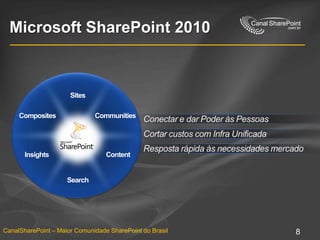
Microsoft SharePoint 2010SitesConectar e darPoderàsPessoasCommunitiesCompositesCortarcustos com Infra UnificadaContentInsightsRespostarápidaàsnecessidadesmercadoSearch
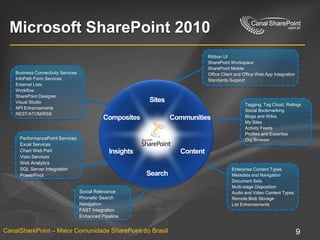
Microsoft SharePoint 2010Ribbon UISharePoint WorkspaceSharePoint MobileOffice Client and Office Web App IntegrationStandards SupportBusiness Connectivity ServicesInfoPath Form ServicesExternal ListsWorkflowSharePoint DesignerVisual StudioAPI EnhancementsREST/ATOM/RSSTagging, Tag Cloud, RatingsSocial BookmarkingBlogs and WikisMy SitesActivity FeedsProfiles and ExpertiseOrg BrowserSitesCommunitiesCompositesPerformancePoint ServicesExcel ServicesChart Web PartVisio ServicesWeb AnalyticsSQL Server IntegrationPowerPivotContentInsightsEnterprise Content TypesMetadata and NavigationDocument SetsMulti-stage DispositionAudio and Video Content TypesRemote Blob StorageList EnhancementsSearchSocial RelevancePhonetic SearchNavigationFAST IntegrationEnhanced Pipeline
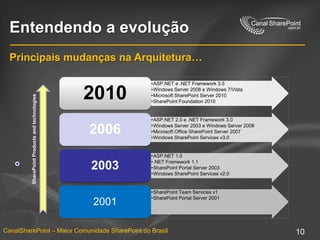
Entendendo a evoluçãoPrincipaismudançasnaArquitetura…
Community Launch 2010Customizando o SharePoint 2010Workflows no SharePoint 2010
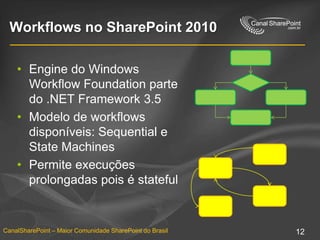
Workflows no SharePoint 2010Engine do Windows Workflow Foundation parte do .NET Framework 3.5Modelo de workflows disponíveis: Sequential e State MachinesPermiteexecuçõesprolongadaspois é stateful
Novidades no SharePoint 2010Perspectiva do usuárioNovos targets paraexecução de workflows (itens, document sets, web site)Visualização do Visio dos passos dos workflowsPerspectiva de um power-user (SPD)Novo designer para a criação de workflowsFacilidadenacustomização de workflows OOTB.Perspectiva do desenvolvedorIntegração Visual Studio x SharePoint quefacilita o deployNovoseventos do workflow (starting, started, postponed, completed)Serviçoparatroca de dados externos
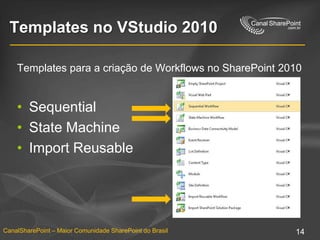
Templates no VStudio 2010Templates para a criação de Workflows no SharePoint 2010SequentialState MachineImport Reusable
Criando Workflowsno Visual Studio 2010
Importando Reusable WorkflowsConversão do pacote WSP em um projeto de WorkflowPermite a extensão de workflows criadospelo SPDArmazenamento do Workflow emprojetosvinculadosao Source ControlPermite a adição do projeto de workflow a outrassoluçõesWizard guia o desenvolvedornaimportação do Workflow
Criando Reusable Workflows(Visio / SPD / VStudio)
Community Launch 2010Customizando o SharePoint 2010Desenvolvimentono SharePoint 2010
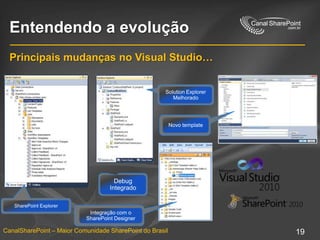
Entendendo a evoluçãoPrincipaismudanças no Visual Studio…Debug IntegradoSolution Explorer MelhoradoSharePoint ExplorerNovo templateIntegração com o SharePoint Designer
WebParts no SharePoint 2010ASP.NET WebParts
System.Web.UI.WebControls.WebParts.WebPart
Modelomaiscomum de Desenvolvimento
2 tipos de WebPartssuportados
Standard WebPart
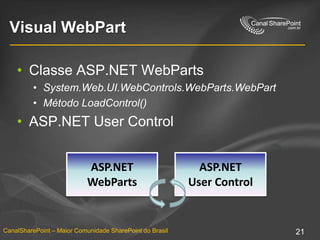
Visual WebPart
Package e Deploy aprimoradospelo Visual Studio 2010Visual WebPartClasse ASP.NET WebParts
System.Web.UI.WebControls.WebParts.WebPart
MétodoLoadControl()
ASP.NET User ControlASP.NET WebPartsASP.NET User Control
WebParts no SharePoint 2010Desenvolvendo minha primeira WebPart.

Customizando o SharePoint 2010

Notas do Editor

  • #2 Today we're going to cover one small part of what you need to know to be a SharePoint developer. The whole series, the rest of the nine Web casts that will be coming in the following weeks, will cover other aspects of the SharePoint world, and things that you should know to be able to develop in SharePoint. What we're going to talk about today is the Web Parts infrastructure in SharePoint, how it relates to the Web part infrastructure in ASP.NET 2.0. We'll build a Web part very quickly and easily. It will take about two minutes. We'll deploy that Web part. We'll talk about security in Web Parts, what's good access security, what does that mean, how does that impact the solutions you're going to build. We'll talk a little bit about how you can expose Web part properties, how you can get configuration information into your Web part. We'll talk about connecting Web Parts to one another so that you can take smaller Web Parts and connect them into more meaningful solutions. And we'll talk about user controls and how they fit into the Web part framework.
  • #8 Today we're going to cover one small part of what you need to know to be a SharePoint developer. The whole series, the rest of the nine Web casts that will be coming in the following weeks, will cover other aspects of the SharePoint world, and things that you should know to be able to develop in SharePoint. What we're going to talk about today is the Web Parts infrastructure in SharePoint, how it relates to the Web part infrastructure in ASP.NET 2.0. We'll build a Web part very quickly and easily. It will take about two minutes. We'll deploy that Web part. We'll talk about security in Web Parts, what's good access security, what does that mean, how does that impact the solutions you're going to build. We'll talk a little bit about how you can expose Web part properties, how you can get configuration information into your Web part. We'll talk about connecting Web Parts to one another so that you can take smaller Web Parts and connect them into more meaningful solutions. And we'll talk about user controls and how they fit into the Web part framework.
  • #12 Today we're going to cover one small part of what you need to know to be a SharePoint developer. The whole series, the rest of the nine Web casts that will be coming in the following weeks, will cover other aspects of the SharePoint world, and things that you should know to be able to develop in SharePoint. What we're going to talk about today is the Web Parts infrastructure in SharePoint, how it relates to the Web part infrastructure in ASP.NET 2.0. We'll build a Web part very quickly and easily. It will take about two minutes. We'll deploy that Web part. We'll talk about security in Web Parts, what's good access security, what does that mean, how does that impact the solutions you're going to build. We'll talk a little bit about how you can expose Web part properties, how you can get configuration information into your Web part. We'll talk about connecting Web Parts to one another so that you can take smaller Web Parts and connect them into more meaningful solutions. And we'll talk about user controls and how they fit into the Web part framework.
  • #19 Today we're going to cover one small part of what you need to know to be a SharePoint developer. The whole series, the rest of the nine Web casts that will be coming in the following weeks, will cover other aspects of the SharePoint world, and things that you should know to be able to develop in SharePoint. What we're going to talk about today is the Web Parts infrastructure in SharePoint, how it relates to the Web part infrastructure in ASP.NET 2.0. We'll build a Web part very quickly and easily. It will take about two minutes. We'll deploy that Web part. We'll talk about security in Web Parts, what's good access security, what does that mean, how does that impact the solutions you're going to build. We'll talk a little bit about how you can expose Web part properties, how you can get configuration information into your Web part. We'll talk about connecting Web Parts to one another so that you can take smaller Web Parts and connect them into more meaningful solutions. And we'll talk about user controls and how they fit into the Web part framework.
  • #26 Today we're going to cover one small part of what you need to know to be a SharePoint developer. The whole series, the rest of the nine Web casts that will be coming in the following weeks, will cover other aspects of the SharePoint world, and things that you should know to be able to develop in SharePoint. What we're going to talk about today is the Web Parts infrastructure in SharePoint, how it relates to the Web part infrastructure in ASP.NET 2.0. We'll build a Web part very quickly and easily. It will take about two minutes. We'll deploy that Web part. We'll talk about security in Web Parts, what's good access security, what does that mean, how does that impact the solutions you're going to build. We'll talk a little bit about how you can expose Web part properties, how you can get configuration information into your Web part. We'll talk about connecting Web Parts to one another so that you can take smaller Web Parts and connect them into more meaningful solutions. And we'll talk about user controls and how they fit into the Web part framework.
  • #27 Today we're going to cover one small part of what you need to know to be a SharePoint developer. The whole series, the rest of the nine Web casts that will be coming in the following weeks, will cover other aspects of the SharePoint world, and things that you should know to be able to develop in SharePoint. What we're going to talk about today is the Web Parts infrastructure in SharePoint, how it relates to the Web part infrastructure in ASP.NET 2.0. We'll build a Web part very quickly and easily. It will take about two minutes. We'll deploy that Web part. We'll talk about security in Web Parts, what's good access security, what does that mean, how does that impact the solutions you're going to build. We'll talk a little bit about how you can expose Web part properties, how you can get configuration information into your Web part. We'll talk about connecting Web Parts to one another so that you can take smaller Web Parts and connect them into more meaningful solutions. And we'll talk about user controls and how they fit into the Web part framework.