Globalcode – Open4education
Trilha - .NET
REST na plataforma Microsoft com ASP.NET Web API
Waldyr Felix
MVP, MCPD, MCP e Arquiteto de Software
http://waldyrfelix.net
@WaldyrFelix
Globalcode – Open4education
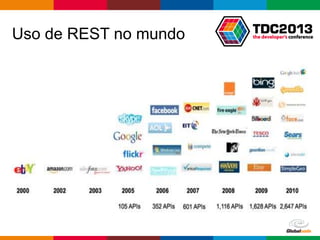
Uso de REST no mundo
Globalcode – Open4education
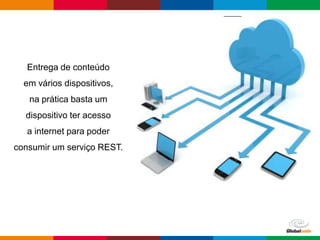
Entrega de conteúdo
em vários dispositivos,
na prática basta um
dispositivo ter acesso
a internet para poder
consumir um serviço REST.
Globalcode – Open4education
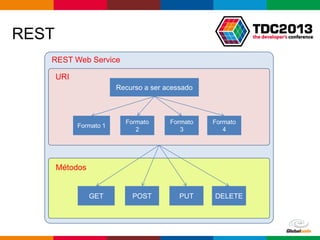
REST
Recurso a ser acessado
Formato 1
Formato
2
Formato
3
Formato
4
REST Web Service
URI
Métodos
GET POST PUT DELETE
Globalcode – Open4education
Porque ASP.NET Web API
Precisamos entregar conteúdo para múltiplos dispositivos
A web está cada vez mais baseada no browser e menos no
server
É mais fácil escalar usando REST
Abraça o HTTP, não precisamos de novos protocolos
Mesmo modelo de programação do ASP.NET MVC
Compatível com os frameworks de Single Page Application
Globalcode – Open4education
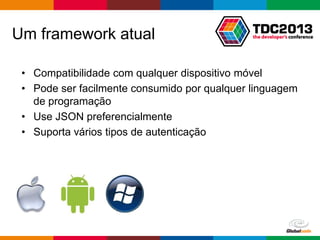
Um framework atual
• Compatibilidade com qualquer dispositivo móvel
• Pode ser facilmente consumido por qualquer linguagem
de programação
• Use JSON preferencialmente
• Suporta vários tipos de autenticação
Globalcode – Open4education
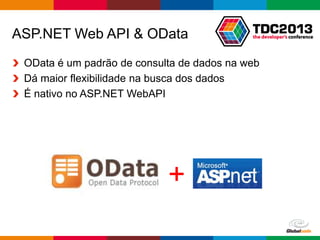
ASP.NET Web API & OData
OData é um padrão de consulta de dados na web
Dá maior flexibilidade na busca dos dados
É nativo no ASP.NET WebAPI
+
Globalcode – Open4education
Demo, demo, demo, demo…
Globalcode – Open4education
Exemplo em C#
using (var client = new HttpClient())
{
var strings = await client.GetAsync("/api/values");
var strResult = await strings.Content.ReadAsStringAsync();
var serializer = new JavaScriptSerializer();
var result = serializer.Deserialize<string[]>(strResult);
foreach (var s in result)
{
Console.WriteLine(s);
}
}
Globalcode – Open4education
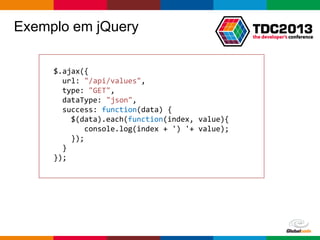
Exemplo em jQuery
$.ajax({
url: "/api/values",
type: "GET",
dataType: "json",
success: function(data) {
$(data).each(function(index, value){
console.log(index + ') '+ value);
});
}
});
Globalcode – Open4education
Segurança no Web API
HTTP Basic Authentication
HTTP Digest Authentication
Forms/Windows Authentication
OAuth
Globalcode – Open4education
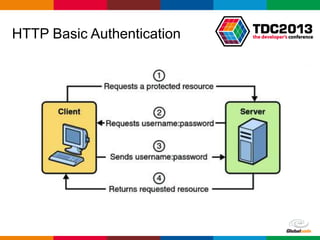
HTTP Basic Authentication
Globalcode – Open4education
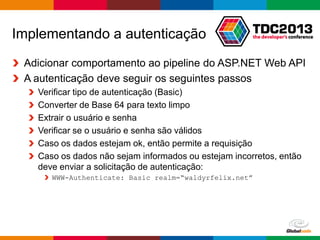
Implementando a autenticação
Adicionar comportamento ao pipeline do ASP.NET Web API
A autenticação deve seguir os seguintes passos
Verificar tipo de autenticação (Basic)
Converter de Base 64 para texto limpo
Extrair o usuário e senha
Verificar se o usuário e senha são válidos
Caso os dados estejam ok, então permite a requisição
Caso os dados não sejam informados ou estejam incorretos, então
deve enviar a solicitação de autenticação:
WWW-Authenticate: Basic realm=“waldyrfelix.net”
Globalcode – Open4education
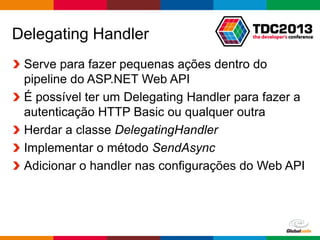
Delegating Handler
Serve para fazer pequenas ações dentro do
pipeline do ASP.NET Web API
É possível ter um Delegating Handler para fazer a
autenticação HTTP Basic ou qualquer outra
Herdar a classe DelegatingHandler
Implementar o método SendAsync
Adicionar o handler nas configurações do Web API
Globalcode – Open4education
Demo, demo, demo, demo…
https://gist.github.com/waldyrfelix/5988001
Globalcode – Open4education
Exemplo em C#
using (var client = new HttpClient())
{
client.DefaultRequestHeaders
.Add("Authorization", "Basic d2FsZHlyOjEyMw==");
var strings = await client.GetAsync("/api/values");
var strResult = await strings.Content.ReadAsStringAsync();
var serializer = new JavaScriptSerializer();
var result = serializer.Deserialize<string[]>(strResult);
foreach (var s in result)
{
Console.WriteLine(s);
}
}
https://gist.github.com/waldyrfelix/3983405
Globalcode – Open4education
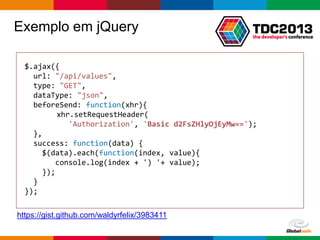
Exemplo em jQuery
$.ajax({
url: "/api/values",
type: "GET",
dataType: "json",
beforeSend: function(xhr){
xhr.setRequestHeader(
'Authorization', 'Basic d2FsZHlyOjEyMw==');
},
success: function(data) {
$(data).each(function(index, value){
console.log(index + ') '+ value);
});
}
});
https://gist.github.com/waldyrfelix/3983411
Globalcode – Open4education
Dúvidas?

Trilha .NET - REST na plataforma Microsoft com ASP.NET Web API

  • 1.
    Globalcode – Open4education Trilha- .NET REST na plataforma Microsoft com ASP.NET Web API Waldyr Felix MVP, MCPD, MCP e Arquiteto de Software http://waldyrfelix.net @WaldyrFelix
  • 2.
  • 3.
    Globalcode – Open4education Entregade conteúdo em vários dispositivos, na prática basta um dispositivo ter acesso a internet para poder consumir um serviço REST.
  • 4.
    Globalcode – Open4education REST Recursoa ser acessado Formato 1 Formato 2 Formato 3 Formato 4 REST Web Service URI Métodos GET POST PUT DELETE
  • 5.
    Globalcode – Open4education PorqueASP.NET Web API Precisamos entregar conteúdo para múltiplos dispositivos A web está cada vez mais baseada no browser e menos no server É mais fácil escalar usando REST Abraça o HTTP, não precisamos de novos protocolos Mesmo modelo de programação do ASP.NET MVC Compatível com os frameworks de Single Page Application
  • 6.
    Globalcode – Open4education Umframework atual • Compatibilidade com qualquer dispositivo móvel • Pode ser facilmente consumido por qualquer linguagem de programação • Use JSON preferencialmente • Suporta vários tipos de autenticação
  • 7.
    Globalcode – Open4education ASP.NETWeb API & OData OData é um padrão de consulta de dados na web Dá maior flexibilidade na busca dos dados É nativo no ASP.NET WebAPI +
  • 8.
  • 9.
    Globalcode – Open4education Exemploem C# using (var client = new HttpClient()) { var strings = await client.GetAsync("/api/values"); var strResult = await strings.Content.ReadAsStringAsync(); var serializer = new JavaScriptSerializer(); var result = serializer.Deserialize<string[]>(strResult); foreach (var s in result) { Console.WriteLine(s); } }
  • 10.
    Globalcode – Open4education Exemploem jQuery $.ajax({ url: "/api/values", type: "GET", dataType: "json", success: function(data) { $(data).each(function(index, value){ console.log(index + ') '+ value); }); } });
  • 11.
    Globalcode – Open4education Segurançano Web API HTTP Basic Authentication HTTP Digest Authentication Forms/Windows Authentication OAuth
  • 12.
  • 13.
    Globalcode – Open4education Implementandoa autenticação Adicionar comportamento ao pipeline do ASP.NET Web API A autenticação deve seguir os seguintes passos Verificar tipo de autenticação (Basic) Converter de Base 64 para texto limpo Extrair o usuário e senha Verificar se o usuário e senha são válidos Caso os dados estejam ok, então permite a requisição Caso os dados não sejam informados ou estejam incorretos, então deve enviar a solicitação de autenticação: WWW-Authenticate: Basic realm=“waldyrfelix.net”
  • 14.
    Globalcode – Open4education DelegatingHandler Serve para fazer pequenas ações dentro do pipeline do ASP.NET Web API É possível ter um Delegating Handler para fazer a autenticação HTTP Basic ou qualquer outra Herdar a classe DelegatingHandler Implementar o método SendAsync Adicionar o handler nas configurações do Web API
  • 15.
    Globalcode – Open4education Demo,demo, demo, demo… https://gist.github.com/waldyrfelix/5988001
  • 16.
    Globalcode – Open4education Exemploem C# using (var client = new HttpClient()) { client.DefaultRequestHeaders .Add("Authorization", "Basic d2FsZHlyOjEyMw=="); var strings = await client.GetAsync("/api/values"); var strResult = await strings.Content.ReadAsStringAsync(); var serializer = new JavaScriptSerializer(); var result = serializer.Deserialize<string[]>(strResult); foreach (var s in result) { Console.WriteLine(s); } } https://gist.github.com/waldyrfelix/3983405
  • 17.
    Globalcode – Open4education Exemploem jQuery $.ajax({ url: "/api/values", type: "GET", dataType: "json", beforeSend: function(xhr){ xhr.setRequestHeader( 'Authorization', 'Basic d2FsZHlyOjEyMw=='); }, success: function(data) { $(data).each(function(index, value){ console.log(index + ') '+ value); }); } }); https://gist.github.com/waldyrfelix/3983411
  • 18.