essencialaprenda a criar gráficos e animações eficientes para a Web
helderdarocha helder@argonavis.com.br
Julho/2015
Programa
• Uma introdução abrangente a SVG
• Como criar e como usar com HTML5 e CSS
• Elementos gráficos
• Grupos e elementos estruturais
• Sistema de coordenadas
• Filtros, máscaras, gradientes e transformadas 2D
• SVG DOM + CSS + JavaScript
• Animações declarativas
• Alternativas e bibliotecas
• SVG 2
Quem sou eu? Who am I? Кто я?
Helder da Rocha
argonavis.com.br
Tecnologia * Ciência * Arte
HTML & tecnologias Web desde 1995
Autor de cursos e livros sobre

Java, XML e tecnologias Web
helderdarocha.com.br
O que é SVG
• Scalable Vector Graphics
• Gráficos
• Linhas, polígonos, figuras, texto, filtros, máscaras, efeitos
• Escaláveis
• Zoom eficiente e rápido: amplia e reduz sem perder
qualidade
• Vetoriais
• Armazena as informações gráficas para desenhar a
imagem (em vez de mapa de pixels).
• Tamanho em bytes depende da complexidade gráfica
• É XML! Objetos DOM são manipuláveis por CSS e scripts
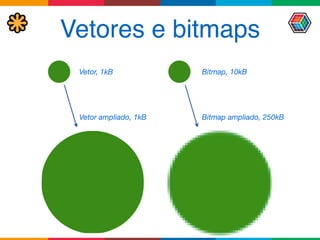
Vetores e bitmaps
Bitmap, 10kB
Bitmap ampliado, 250kB
Vetor, 1kB
Vetor ampliado, 1kB
Origens
• Criado em 1998 (W3C, Adobe, Microsoft)
• Influências
• VML da Microsoft (com HP, Autodesk e Macromedia)
• PGML, da Adobe (com IBM, Netscape e Sun)
• CSS e HTML (W3C)
• Versão atual 1.1
• Suporte razoável na maior parte dos browsers (ótimo
em Chrome, Safari e Opera)
Plataformas
• SVG Full
• SVG 1.0 e SVG 1.1
• Formato SVGZ (SVG comprimido com ZIP)
• SVG Mobile
• SVG 1.2 Tiny (SVGT) e SVG Basic (SVGB)
• A 3GPP adotou SVG Tiny como padrão de mídia vetorial
• Em desenvolvimento
• SVG 2.0 (antes chamado de SVG 1.2)
• SVG Print (Canon, HP, Adobe e Corel) – impressão
Como criar um SVG
• Elemento raiz
• <svg>
• Namespace
• http://www.w3.org/2000/svg
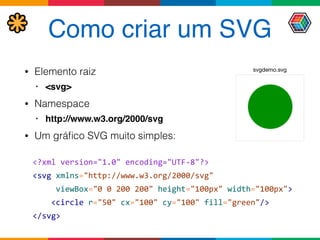
• Um gráfico SVG muito simples:
<?xml	
  version="1.0"	
  encoding="UTF-­‐8"?>

<svg	
  xmlns="http://www.w3.org/2000/svg"	


  viewBox="0	
  0	
  200	
  200"	
  height="100px"	
  width="100px">


  <circle	
  r="50"	
  cx="100"	
  cy="100"	
  fill="green"/>	
  

</svg>
svgdemo.svg
Como exibir
• Abra em um browser, em desktop ou mobile
Opera
Chrome
Safari
Firefox
Internet	
  Explorer
circle.svg
Como usar em HTML5 (1)
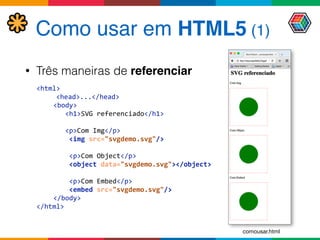
• Três maneiras de referenciar
<html>	


  <head>...</head>	
  
<body>


  <h1>SVG	
  referenciado</h1>	


  <p>Com	
  Img</p>


  <img	
  src="svgdemo.svg"/>	


  <p>Com	
  Object</p>


  <object	
  data="svgdemo.svg"></object>	


  <p>Com	
  Embed</p>


  <embed	
  src="svgdemo.svg"/>

</body>	
  
</html>
comousar.html
Como usar em HTML5 (2)
<html>	


  <head>	


  <style>	


  svg	
  {	
  border:	
  red	
  dashed	
  1px;	


  height:	
  200px;	
  width:	
  200px;	


  }	


  circle	
  {fill:	
  red}	


  </style>	


  </head>	


  <body>	


  <h1>SVG	
  embutido</h1>	


  <svg	
  viewBox="0	
  0	
  200	
  200">	


  <circle	
  r="50"	
  cx="100"	
  cy="100"	
  fill="green"	
  />	


  </svg>	


  </body>	
  
</html>
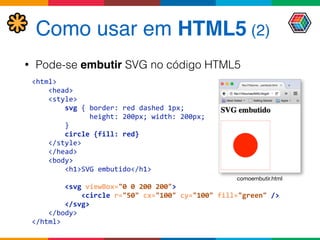
• Pode-se embutir SVG no código HTML5
comoembutir.html
Como usar em CSS
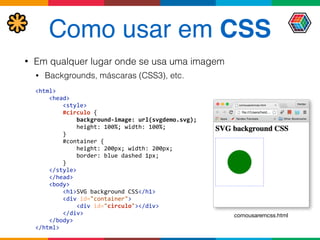
• Em qualquer lugar onde se usa uma imagem
• Backgrounds, máscaras (CSS3), etc.
<html>


  <head>


  <style>


  #circulo	
  {


  background-­‐image:	
  url(svgdemo.svg);


  height:	
  100%;	
  width:	
  100%;


  }


  #container	
  {


  height:	
  200px;	
  width:	
  200px;


  border:	
  blue	
  dashed	
  1px;


  }


  </style>


  </head>


  <body>


  <h1>SVG	
  background	
  CSS</h1>


  <div	
  id="container">


  <div	
  id="circulo"></div>


  </div>


  </body>

</html>
comousaremcss.html
Como usar em CSS3
• Máscaras (CSS3)
<html>


  <head>


  <style>	


  #paraiba	
  {


  -­‐webkit-­‐mask-­‐image:	
  url(svgdemo.svg);


  -­‐webkit-­‐mask-­‐origin:	
  padding;


  -­‐webkit-­‐mask-­‐position:	
  180px	
  220px;


  -­‐webkit-­‐transform:	
  scale(2.8);


  }


  </style>


  </head>


  <body>


  <h1>Mascaras	
  SVG	
  e	
  CSS3</h1>


  <img	
  src="imagens/paraiba2005.jpg"	
  id="paraiba">


  </body>

</html>	
  
css3_mascara.html
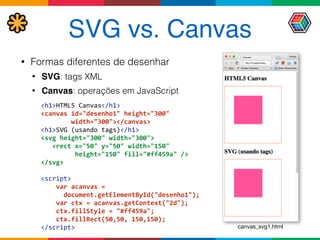
SVG vs. Canvas
• Formas diferentes de desenhar
• SVG: tags XML
• Canvas: operações em JavaScript


<h1>HTML5	
  Canvas</h1>

<canvas	
  id="desenho1"	
  height="300"	


  width="300"></canvas>

<h1>SVG	
  (usando	
  tags)</h1>

<svg	
  height="300"	
  width="300">


  <rect	
  x="50"	
  y="50"	
  width="150"	


  height="150"	
  fill="#ff459a"	
  />

</svg>


<script>


  var	
  acanvas	
  =	


  document.getElementById("desenho1");


  var	
  ctx	
  =	
  acanvas.getContext("2d");


  ctx.fillStyle	
  =	
  "#ff459a";


  ctx.fillRect(50,50,	
  150,150);

</script> canvas_svg1.html
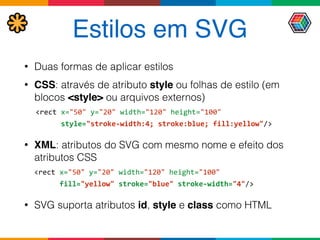
Estilos em SVG
• Duas formas de aplicar estilos
• CSS: através de atributo style ou folhas de estilo (em
blocos <style> ou arquivos externos)
<rect	
  x="50"	
  y="20"	
  width="120"	
  height="100"	


  style="stroke-­‐width:4;	
  stroke:blue;	
  fill:yellow"/>	
  
• XML: atributos do SVG com mesmo nome e efeito dos
atributos CSS
	
  <rect	
  x="50"	
  y="20"	
  width="120"	
  height="100"	


  fill="yellow"	
  stroke="blue"	
  stroke-­‐width="4"/>	
  
• SVG suporta atributos id, style e class como HTML
CSS externo
• Com SVG embutido, HTML e SVG podem
compartilhar as mesmas folhas de estilo CSS
• Sem HTML (ou com SVG referenciado), CSS deve 

estar embutido ou vinculado ao próprio SVG
<?xml-­‐stylesheet	
  type="text/css"	


  href="estilo.css"?>	
  
<svg	
  xmlns="..."	
  >	


  <circle	
  class="t1"	
  ...>	
  
</svg>
<svg	
  xmlns="..."	
  >	


  <style>


  .t1	
  {fill:	
  green;}


  </style>	


  <circle	
  class="t1"	
  ...>	
  
</svg>
<html>	


  <style>.t1	
  {fill:	
  green;}</style>	


  <svg>	


  <circle	
  class="t1"	
  ...>	


  </svg>	
  
</html>
<html>	


  <link	
  rel="stylesheet"	


  href="estilo.css"/>	


  <svg>	


  <circle	
  class="t1"	
  ...>	


  </svg>	
  
</html>
.t1	
  {


  fill:	
  green;

}
estilo.css
arquivo.svg
arquivo.html
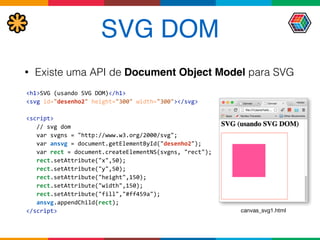
SVG DOM
• Existe uma API de Document Object Model para SVG
<h1>SVG	
  (usando	
  SVG	
  DOM)</h1>

<svg	
  id="desenho2"	
  height="300"	
  width="300"></svg>


<script>


  //	
  svg	
  dom


  var	
  svgns	
  =	
  "http://www.w3.org/2000/svg";


  var	
  ansvg	
  =	
  document.getElementById("desenho2");


  var	
  rect	
  =	
  document.createElementNS(svgns,	
  "rect");


  rect.setAttribute("x",50);


  rect.setAttribute("y",50);


  rect.setAttribute("height",150);


  rect.setAttribute("width",150);


  rect.setAttribute("fill","#ff459a");


  ansvg.appendChild(rect);

</script> canvas_svg1.html
Fallback
• Suporte nos browsers não é o ideal
• Há workarounds para maior parte dos problemas
• Pode-se usar scripts e PNG quando não houver solução
• APIs como span.svg, raphaël e d3.js
• Fallback JavaScript/PNG para browsers que não
suportam imagens SVG:
<img	
  src="svgdemo.svg"	


  onerror="this.src='circle.png'"/>
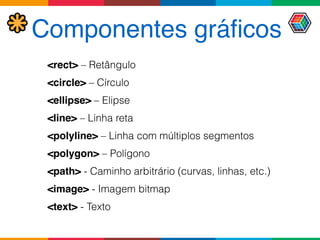
Componentes gráficos
<rect> – Retângulo
<circle> – Círculo
<ellipse> – Elipse
<line> – Linha reta
<polyline> – Linha com múltiplos segmentos
<polygon> – Polígono
<path> - Caminho arbitrário (curvas, linhas, etc.)
<image> - Imagem bitmap
<text> - Texto
Pintura
• Dois atributos para pintar componentes
• preenchimento (fill)
• contorno, ou traço (stroke) - desenhado pelo centro da
borda do objeto
• Três tipos de "tinta"
• cores sólidas (sRGB) - mesma especificação do CSS.
Ex: red, lightblue, #a09, #AA0099, rgb(128,64,32)
• gradientes
• texturas (patterns)
Preenchimento
• Use fill (atributo ou CSS) para cor de preenchimento
• <rect	
  ...	
  fill="rgb(255,255,0%)"	
  />	
  
• <rect	
  ...	
  style="fill:	
  rgb(100%,100%,0%)"	
  />	
  
• Use fill-opacity para o componente alfa
(transparência)
• Varia de 0 (transparente) a 1 (opaco).
<svg	
  xmlns="http://www.w3.org/2000/svg">


  <circle	
  r="50"	
  cx="100"	
  cy="100"	
  fill="green"/>	


  <circle	
  r="50"	
  cx="125"	
  cy="125"	
  fill="#008000"	


  fill-­‐opacity="0.5"/>	


  <circle	
  r="50"	
  cx="150"	
  cy="150"	
  fill="#080"	


  fill-­‐opacity="0.2"/>	
  

</svg>
fill.svg
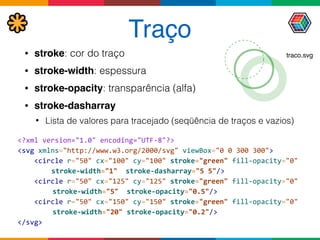
Traço
• stroke: cor do traço
• stroke-width: espessura
• stroke-opacity: transparência (alfa)
• stroke-dasharray
• Lista de valores para tracejado (seqüência de traços e vazios)
<?xml	
  version="1.0"	
  encoding="UTF-­‐8"?>

<svg	
  xmlns="http://www.w3.org/2000/svg"	
  viewBox="0	
  0	
  300	
  300">


  <circle	
  r="50"	
  cx="100"	
  cy="100"	
  stroke="green"	
  fill-­‐opacity="0"	


   stroke-­‐width="1"	
  	
  stroke-­‐dasharray="5	
  5"/>	


  <circle	
  r="50"	
  cx="125"	
  cy="125"	
  stroke="green"	
  fill-­‐opacity="0"	


  stroke-­‐width="5"	
  	
  stroke-­‐opacity="0.5"/>	


  <circle	
  r="50"	
  cx="150"	
  cy="150"	
  stroke="green"	
  fill-­‐opacity="0"	


  stroke-­‐width="20"	
  stroke-­‐opacity="0.2"/>	
  

</svg>
traco.svg
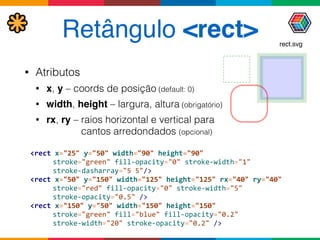
Retângulo <rect>
• Atributos
• x, y – coords de posição (default: 0)
• width, height – largura, altura (obrigatório)
• rx, ry – raios horizontal e vertical para 

cantos arredondados (opcional)
<rect	
  x="25"	
  y="50"	
  width="90"	
  height="90"	


   stroke="green"	
  fill-­‐opacity="0"	
  stroke-­‐width="1"	


   stroke-­‐dasharray="5	
  5"/>	
  	
  
<rect	
  x="50"	
  y="150"	
  width="125"	
  height="125"	
  rx="40"	
  ry="40"	


   stroke="red"	
  fill-­‐opacity="0"	
  stroke-­‐width="5"	


   stroke-­‐opacity="0.5"	
  />	
  

<rect	
  x="150"	
  y="50"	
  width="150"	
  height="150"	


   stroke="green"	
  fill="blue"	
  fill-­‐opacity="0.2"	


   stroke-­‐width="20"	
  stroke-­‐opacity="0.2"	
  />
rect.svg
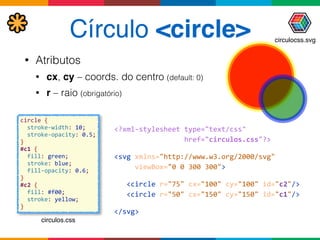
Círculo <circle>
• Atributos
• cx, cy – coords. do centro (default: 0)
• r – raio (obrigatório)
<?xml-­‐stylesheet	
  type="text/css"	


  href="circulos.css"?>	
  
<svg	
  xmlns="http://www.w3.org/2000/svg"	


  viewBox="0	
  0	
  300	
  300">	


  <circle	
  r="75"	
  cx="100"	
  cy="100"	
  id="c2"/>	


  <circle	
  r="50"	
  cx="150"	
  cy="150"	
  id="c1"/>	
  
</svg>
circle	
  {


  stroke-­‐width:	
  10;	


  stroke-­‐opacity:	
  0.5;

}

#c1	
  {


  fill:	
  green;


  stroke:	
  blue;


  fill-­‐opacity:	
  0.6;

}

#c2	
  {


  fill:	
  #f00;


  stroke:	
  yellow;

}
circulos.css
circulocss.svg
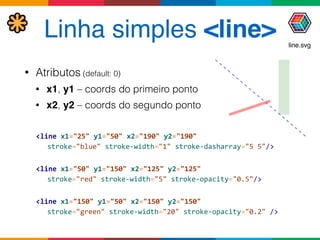
Linha simples <line>
• Atributos (default: 0)
• x1, y1 – coords do primeiro ponto
• x2, y2 – coords do segundo ponto
<line	
  x1="25"	
  y1="50"	
  x2="190"	
  y2="190"	


   stroke="blue"	
  stroke-­‐width="1"	
  stroke-­‐dasharray="5	
  5"/>	


<line	
  x1="50"	
  y1="150"	
  x2="125"	
  y2="125"	


   stroke="red"	
  stroke-­‐width="5"	
  stroke-­‐opacity="0.5"/>	


<line	
  x1="150"	
  y1="50"	
  x2="150"	
  y2="150"	


   stroke="green"	
  stroke-­‐width="20"	
  stroke-­‐opacity="0.2"	
  />	
  
line.svg
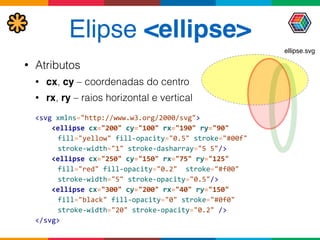
Elipse <ellipse>
• Atributos
• cx, cy – coordenadas do centro
• rx, ry – raios horizontal e vertical
<svg	
  xmlns="http://www.w3.org/2000/svg">


  <ellipse	
  cx="200"	
  cy="100"	
  rx="190"	
  ry="90"	


   fill="yellow"	
  fill-­‐opacity="0.5"	
  stroke="#00f"	


   stroke-­‐width="1"	
  stroke-­‐dasharray="5	
  5"/>	


  <ellipse	
  cx="250"	
  cy="150"	
  rx="75"	
  ry="125"	


   fill="red"	
  fill-­‐opacity="0.2"	
  	
  stroke="#f00"	


   stroke-­‐width="5"	
  stroke-­‐opacity="0.5"/>	


  <ellipse	
  cx="300"	
  cy="200"	
  rx="40"	
  ry="150"	


   fill="black"	
  fill-­‐opacity="0"	
  stroke="#0f0"	


   stroke-­‐width="20"	
  stroke-­‐opacity="0.2"	
  />	
  

</svg>
ellipse.svg
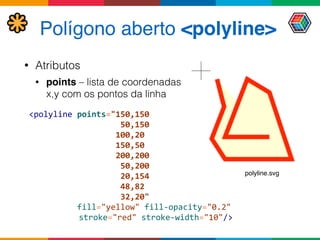
Polígono aberto <polyline>
• Atributos
• points – lista de coordenadas
x,y com os pontos da linha
<polyline	
  points="150,150	


  50,150	


  100,20	


  150,50	


  200,200	


  50,200	


  20,154	


  48,82	


  32,20"	


  fill="yellow"	
  fill-­‐opacity="0.2"	


  stroke="red"	
  stroke-­‐width="10"/>	
  
polyline.svg
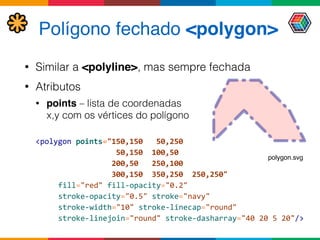
Polígono fechado <polygon>
• Similar a <polyline>, mas sempre fechada
• Atributos
• points – lista de coordenadas 

x,y com os vértices do polígono
<polygon	
  points="150,150	
  	
  	
  50,250	


  50,150	
  	
  100,50	


  200,50	
  	
  	
  250,100	


  300,150	
  	
  350,250	
  	
  250,250"	


   fill="red"	
  fill-­‐opacity="0.2"	


   stroke-­‐opacity="0.5"	
  stroke="navy"	


   stroke-­‐width="10"	
  stroke-­‐linecap="round"	


   stroke-­‐linejoin="round"	
  stroke-­‐dasharray="40	
  20	
  5	
  20"/>	
  
polygon.svg
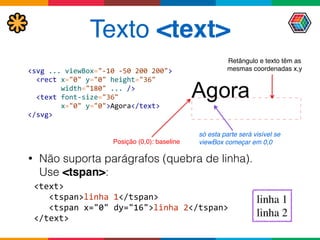
Texto <text>
• Não suporta parágrafos (quebra de linha). 

Use <tspan>:
<text>


  <tspan>linha	
  1</tspan>


  <tspan	
  x="0"	
  dy="16">linha	
  2</tspan>

</text>
<svg	
  ...	
  viewBox="-­‐10	
  -­‐50	
  200	
  200">


  <rect	
  x="0"	
  y="0"	
  height="36"	


  width="180"	
  ...	
  />


  <text	
  font-­‐size="36"	


  x="0"	
  y="0">Agora</text>

</svg>
Posição (0,0): baseline
só esta parte será visível se
viewBox começar em 0,0
Retângulo e texto têm as
mesmas coordenadas x,y
linha 1
linha 2
Imagens <image>
• Insere imagem PNG ou JPEG em um SVG
• A imagem pode ser usada em clipping, máscaras,
preenchimento, padrões
• O namespace xlink não é necessário se o SVG estiver
embutido em HTML
<svg	
  width="4in"	
  height="4in"	
  version="1.1"


  xmlns="http://www.w3.org/2000/svg"	


  xmlns:xlink="http://www.w3.org/1999/xlink">


  <image	
  x="200"	
  y="200"	


  width="100px"	
  height="100px"


  xlink:href="pluto.png">


  <title>Imagem	
  de	
  Plutão</title>


  </image>

</svg>
Imagem de Plutão
Vínculos e IDs
• Objetos referenciáveis têm atributo id
• Podem ser referenciados 'por 

objetos locais ou remotos
• Referência pode ser direta 

via atributos XLink xlink:href


  <use	
  xlink:href="#obj1"	
  />	


  <use	
  xlink:href="http://w.com/outro.svg#obj1"	
  />	
  
• Ou indireta, através da função url(), 

em atributos SVG


  <rect	
  fill="url(#grad)"	
  />	


  <rect	
  fill="url(http://w.com/outro.svg#grad)"	
  />
<circle	


  id="obj1"	
  .../>	
  
<gradient	


  id="grad"	
  .../>
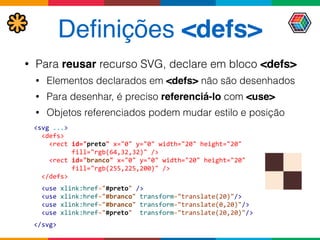
Definições <defs>
• Para reusar recurso SVG, declare em bloco <defs>
• Elementos declarados em <defs> não são desenhados
• Para desenhar, é preciso referenciá-lo com <use>
• Objetos referenciados podem mudar estilo e posição
<svg	
  ...>


  <defs>


  <rect	
  id="preto"	
  x="0"	
  y="0"	
  width="20"	
  height="20"


  fill="rgb(64,32,32)"	
  />


  <rect	
  id="branco"	
  x="0"	
  y="0"	
  width="20"	
  height="20"	


  fill="rgb(255,225,200)"	
  />


  </defs>


  <use	
  xlink:href="#preto"	
  />


  <use	
  xlink:href="#branco"	
  transform="translate(20)"/>


  <use	
  xlink:href="#branco"	
  transform="translate(0,20)"/>


  <use	
  xlink:href="#preto"	
  	
  transform="translate(20,20)"/>


</svg>
Grupos <g>
• Representa conjunto de objetos como um só
• Elementos do grupo herdam estilos e atributos comuns
• Pode conter outros grupos
<svg	
  ...>


  <defs>	


  ...


  <g	
  id="quatroCasas"	
  transform="translate(10,10)">


  <use	
  xlink:href="#preto"	
  />


  <use	
  xlink:href="#branco"	
  transform="translate(20)"/>


  <use	
  xlink:href="#branco"	
  transform="translate(0,20)"/>


  <use	
  xlink:href="#preto"	
  	
  transform="translate(20,20)"/>


  </g>


  </defs>	


  <use	
  xlink:href="#quatroCasas"	
  />

</svg>
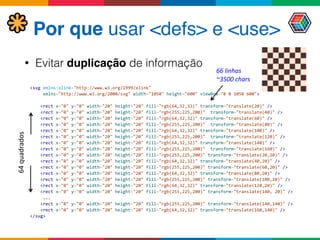
Por que usar <defs> e <use>
• Evitar duplicação de informação
<svg	
  xmlns:xlink="http://www.w3.org/1999/xlink"	


  xmlns="http://www.w3.org/2000/svg"	
  width="1050"	
  height="600"	
  viewBox="0	
  0	
  1050	
  600">


  <rect	
  x="0"	
  y="0"	
  width="20"	
  height="20"	
  fill="rgb(64,32,32)"	
  transform="translate(20)"	
  />


  <rect	
  x="0"	
  y="0"	
  width="20"	
  height="20"	
  fill="rgb(255,225,200)"	
  	
  transform="translate(40)"	
  />


  <rect	
  x="0"	
  y="0"	
  width="20"	
  height="20"	
  fill="rgb(64,32,32)"	
  transform="translate(60)"	
  />


  <rect	
  x="0"	
  y="0"	
  width="20"	
  height="20"	
  fill="rgb(255,225,200)"	
  	
  transform="translate(80)"	
  />


  <rect	
  x="0"	
  y="0"	
  width="20"	
  height="20"	
  fill="rgb(64,32,32)"	
  transform="translate(100)"	
  />


  <rect	
  x="0"	
  y="0"	
  width="20"	
  height="20"	
  fill="rgb(255,225,200)"	
  	
  transform="translate(120)"	
  />


  <rect	
  x="0"	
  y="0"	
  width="20"	
  height="20"	
  fill="rgb(64,32,32)"	
  transform="translate(140)"	
  />


  <rect	
  x="0"	
  y="0"	
  width="20"	
  height="20"	
  fill="rgb(255,225,200)"	
  	
  transform="translate(160)"	
  />


  <rect	
  x="0"	
  y="0"	
  width="20"	
  height="20"	
  fill="rgb(255,225,200)"	
  transform="translate(20,20)"	
  />


  <rect	
  x="0"	
  y="0"	
  width="20"	
  height="20"	
  fill="rgb(64,32,32)"	
  transform="translate(40,20)"	
  />


  <rect	
  x="0"	
  y="0"	
  width="20"	
  height="20"	
  fill="rgb(255,225,200)"	
  transform="translate(60,20)"	
  />


  <rect	
  x="0"	
  y="0"	
  width="20"	
  height="20"	
  fill="rgb(64,32,32)"	
  transform="translate(80,20)"	
  />


  <rect	
  x="0"	
  y="0"	
  width="20"	
  height="20"	
  fill="rgb(255,225,200)"	
  transform="translate(100,20)"	
  />


  <rect	
  x="0"	
  y="0"	
  width="20"	
  height="20"	
  fill="rgb(64,32,32)"	
  transform="translate(120,20)"	
  />


  <rect	
  x="0"	
  y="0"	
  width="20"	
  height="20"	
  fill="rgb(255,225,200)"	
  transform="translate(140,	
  20)"	
  />


  ...


  <rect	
  x="0"	
  y="0"	
  width="20"	
  height="20"	
  fill="rgb(255,225,200)"	
  transform="translate(140,140)"	
  />


  <rect	
  x="0"	
  y="0"	
  width="20"	
  height="20"	
  fill="rgb(64,32,32)"	
  transform="translate(160,140)"	
  />

</svg>
64	
  quadrados
66	
  linhas	
  
~3500	
  chars
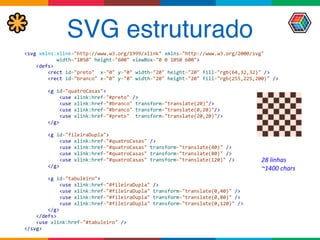
SVG estruturado
<svg	
  xmlns:xlink="http://www.w3.org/1999/xlink"	
  xmlns="http://www.w3.org/2000/svg"	


  width="1050"	
  height="600"	
  viewBox="0	
  0	
  1050	
  600">


  <defs>


  <rect	
  id="preto"	
  	
  x="0"	
  y="0"	
  width="20"	
  height="20"	
  fill="rgb(64,32,32)"	
  />


  <rect	
  id="branco"	
  x="0"	
  y="0"	
  width="20"	
  height="20"	
  fill="rgb(255,225,200)"	
  />


  <g	
  id="quatroCasas">


  <use	
  xlink:href="#preto"	
  />


  <use	
  xlink:href="#branco"	
  transform="translate(20)"/>


  <use	
  xlink:href="#branco"	
  transform="translate(0,20)"/>


  <use	
  xlink:href="#preto"	
  	
  transform="translate(20,20)"/>


  </g>


  <g	
  id="fileiraDupla">


  <use	
  xlink:href="#quatroCasas"	
  />


  <use	
  xlink:href="#quatroCasas"	
  transform="translate(40)"	
  />


  <use	
  xlink:href="#quatroCasas"	
  transform="translate(80)"	
  />


  <use	
  xlink:href="#quatroCasas"	
  transform="translate(120)"	
  />


  </g>


  <g	
  id="tabuleiro">


  <use	
  xlink:href="#fileiraDupla"	
  />


  <use	
  xlink:href="#fileiraDupla"	
  transform="translate(0,40)"	
  />


  <use	
  xlink:href="#fileiraDupla"	
  transform="translate(0,80)"	
  />


  <use	
  xlink:href="#fileiraDupla"	
  transform="translate(0,120)"	
  />


  </g>


  </defs>


  <use	
  xlink:href="#tabuleiro"	
  />

</svg>
28	
  linhas	
  
~1400	
  chars
Caminhos
• Seqüências de comandos (letras) + coordenadas
• Ex: M 50,50 L 120,120 z
• Comando afeta coordenadas seguintes (até novo comando)
• Maiúsculas = coords absolutas / Minúsculas = relativas
• Quatro tipos de movimentos
• M: move até um ponto sem desenhar
• L, H, V: desenha linha reta até um ponto
• C, S, Q, T, A (curve to): desenha curva a um ponto; pode ser
• Bézier cúbica com dois pontos tangenciais (C, c, S, s)
• Bézier quadrática com um ponto tangencial (Q, q, T, t)
• Arco elíptico ou circular (A, a)
• Z: fecha a figura
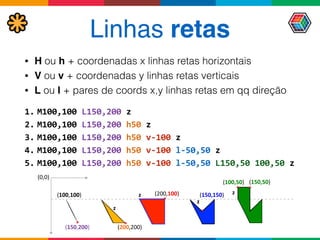
Linhas retas
• H ou h + coordenadas x linhas retas horizontais
• V ou v + coordenadas y linhas retas verticais
• L ou l + pares de coords x,y linhas retas em qq direção
1. M100,100	
  L150,200	
  z	
  
2. M100,100	
  L150,200	
  h50	
  z	
  
3. M100,100	
  L150,200	
  h50	
  v-­‐100	
  z	
  
4. M100,100	
  L150,200	
  h50	
  v-­‐100	
  l-­‐50,50	
  z	
  
5. M100,100	
  L150,200	
  h50	
  v-­‐100	
  l-­‐50,50	
  L150,50	
  100,50	
  z
(0,0)
(100,100)
(150,200) (200,200)
(200,100) (150,150)
(150,50)(100,50)
z
z
z
z
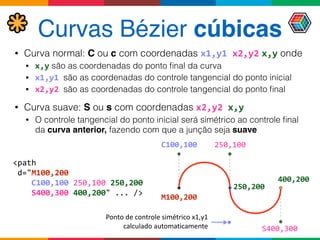
Curvas Bézier cúbicas
• Curva normal: C ou c com coordenadas x1,y1	
  x2,y2 x,y onde
• x,y são as coordenadas do ponto final da curva
• x1,y1	
  são as coordenadas do controle tangencial do ponto inicial
• x2,y2	
  são as coordenadas do controle tangencial do ponto final
• Curva suave: S ou s com coordenadas x2,y2 x,y
• O controle tangencial do ponto inicial será simétrico ao controle final
da curva anterior, fazendo com que a junção seja suave
<path	


  d="M100,200	


  C100,100	
  250,100	
  250,200	


  S400,300	
  400,200"	
  ...	
  />
M100,200
C100,100 250,100
250,200
400,200
S400,300
Ponto	
  de	
  controle	
  simétrico	
  x1,y1	
  
calculado	
  automaticamente
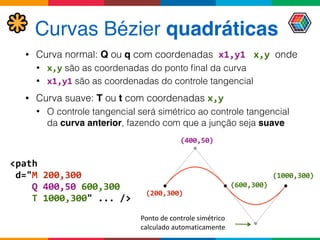
Curvas Bézier quadráticas
• Curva normal: Q ou q com coordenadas	
  x1,y1	
   x,y	
  onde
• x,y são as coordenadas do ponto final da curva
• x1,y1 são as coordenadas do controle tangencial
• Curva suave: T ou t com coordenadas x,y
• O controle tangencial será simétrico ao controle tangencial
da curva anterior, fazendo com que a junção seja suave
<path	


  d="M	
  200,300	


  Q	
  400,50	
  600,300	


  T	
  1000,300"	
  ...	
  />
(200,300)
(400,50)
(600,300)
(1000,300)
Ponto	
  de	
  controle	
  simétrico	
  
calculado	
  automaticamente
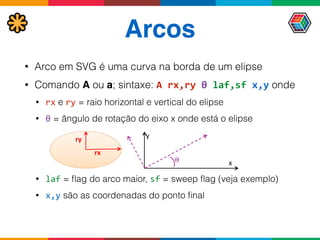
Arcos
• Arco em SVG é uma curva na borda de um elipse
• Comando A ou a; sintaxe: A	
  rx,ry	
  θ	
  laf,sf	
  x,y onde
• rx e ry = raio horizontal e vertical do elipse
• θ = ângulo de rotação do eixo x onde está o elipse
• laf = flag do arco maior, sf = sweep flag (veja exemplo)
• x,y são as coordenadas do ponto final
ry
rx
θ	
   x
y
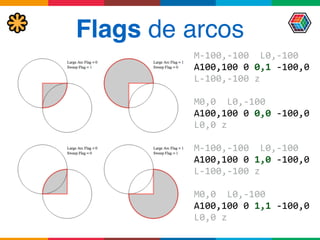
Flags de arcos
M-­‐100,-­‐100	
  	
  L0,-­‐100	
  

A100,100	
  0	
  0,1	
  -­‐100,0	
  

L-­‐100,-­‐100	
  z	
  
M0,0	
  	
  L0,-­‐100	
  

A100,100	
  0	
  0,0	
  -­‐100,0	
  

L0,0	
  z	
  
M-­‐100,-­‐100	
  	
  L0,-­‐100	
  

A100,100	
  0	
  1,0	
  -­‐100,0	
  

L-­‐100,-­‐100	
  z	
  
M0,0	
  	
  L0,-­‐100	
  

A100,100	
  0	
  1,1	
  -­‐100,0	
  

L0,0	
  z
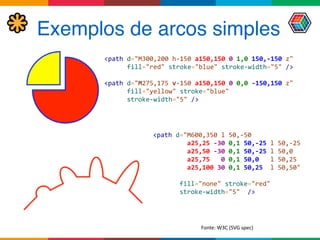
Exemplos de arcos simples
<path	
  d="M300,200	
  h-­‐150	
  a150,150	
  0	
  1,0	
  150,-­‐150	
  z"


  fill="red"	
  stroke="blue"	
  stroke-­‐width="5"	
  />	


<path	
  d="M275,175	
  v-­‐150	
  a150,150	
  0	
  0,0	
  -­‐150,150	
  z"


  fill="yellow"	
  stroke="blue"	


  stroke-­‐width="5"	
  />
<path	
  d="M600,350	
  l	
  50,-­‐50	


  a25,25	
  -­‐30	
  0,1	
  50,-­‐25	
  l	
  50,-­‐25	


  a25,50	
  -­‐30	
  0,1	
  50,-­‐25	
  l	
  50,0	


  a25,75	
  	
  	
  0	
  0,1	
  50,0	
  	
  	
  l	
  50,25	


  a25,100	
  30	
  0,1	
  50,25	
  	
  l	
  50,50"	


  fill="none"	
  stroke="red"	


  stroke-­‐width="5"	
  	
  />
Fonte:	
  W3C	
  (SVG	
  spec)
<defs>


  <path	
  d="M100,200	


  C100,100	
  250,100	
  250,200


  S100,300	
  100,200"	


  id="circulo"	
  stroke="red"	


  stroke-­‐width="1"	


  fill-­‐opacity="0">


  </path>

</defs>	
  
...

<use	
  xlink:href="#circulo"	
  stroke-­‐dasharray="5	
  5"	
  />

<text	
  font-­‐size="15"	
  x="100"	
  dy="-­‐10"	
  id="texto"	


  font-­‐family="monospace">


  <textPath	
  xlink:href="#circulo">	
  
	
   palavras	
  que	
  giram	
  confundem	
  as	
  letras	


  </textPath>

</text>
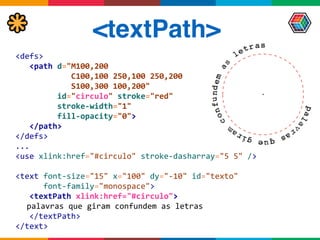
<textPath>
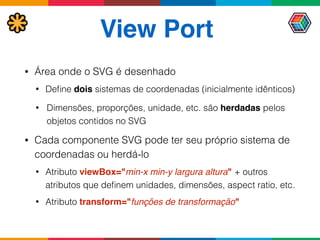
View Port
• Área onde o SVG é desenhado
• Define dois sistemas de coordenadas (inicialmente idênticos)
• Dimensões, proporções, unidade, etc. são herdadas pelos
objetos contidos no SVG
• Cada componente SVG pode ter seu próprio sistema de
coordenadas ou herdá-lo
• Atributo viewBox="min-x min-y largura altura" + outros
atributos que definem unidades, dimensões, aspect ratio, etc.
• Atributo transform="funções de transformação"
Atributo transform
• Altera sistema de coordenadas relativa
• matrix(a11,a12,a13,a21,a22,a23)	
  – matriz de transformações


• translate(tx)	
  ou	
  translate(tx,	
  ty) – deslocamento da origem

• scale(sx)	
  ou	
  scale(sx,	
  sy)	
  – redimensionamento	
  
• rotate(θ)	
  ou	
  rotate(θ,	
  cx,	
  cy)	
  – giro de θ graus sobre origem ou cx,cy	
  
• skewX(θ)	
  e	
  skewY(θ)	
  –	
  cisalhamento de θ graus
<g	
  transform="translate(-­‐10,-­‐20)">


  <g	
  transform="scale(2)">


  <g	
  transform="rotate(45)">


  <g	
  transform="translate(5,10)">


  <!-­‐-­‐	
  elementos	
  -­‐-­‐>


  </g>


  </g>


  </g>

</g>
<g	
  transform="translate(-­‐10,-­‐20)	


  scale(2)	


  rotate(45)	


  translate(5,10)">


  <!-­‐-­‐	
  elementos	
  -­‐-­‐>

</g>
Fonte:	
  W3C	
  (especificação	
  SVG)
[ ]
a11	
  a12	
  a13

a21	
  a22	
  a23

0	
  	
  	
  0	
  	
  	
  1
Transformações equivalentes
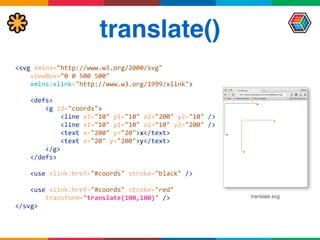
translate()
<svg	
  xmlns="http://www.w3.org/2000/svg"


  viewBox="0	
  0	
  500	
  500"


  xmlns:xlink="http://www.w3.org/1999/xlink">	


  <defs>


  <g	
  id="coords">


  <line	
  x1="10"	
  y1="10"	
  x2="200"	
  y2="10"	
  />


  <line	
  x1="10"	
  y1="10"	
  x2="10"	
  y2="200"	
  />


  <text	
  x="200"	
  y="20">x</text>


  <text	
  x="20"	
  y="200">y</text>


  </g>


  </defs>


  <use	
  xlink:href="#coords"	
  stroke="black"	
  />


  <use	
  xlink:href="#coords"	
  stroke="red"


  transform="translate(100,100)"	
  />

</svg>	
  
translate.svg
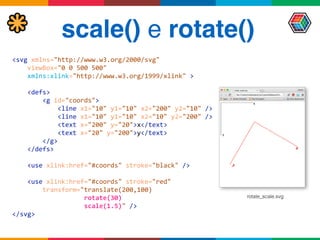
scale() e rotate()
rotate_scale.svg
<svg	
  xmlns="http://www.w3.org/2000/svg"


  viewBox="0	
  0	
  500	
  500"


  xmlns:xlink="http://www.w3.org/1999/xlink"	
  >


  <defs>


  <g	
  id="coords">


  <line	
  x1="10"	
  y1="10"	
  x2="200"	
  y2="10"	
  />


  <line	
  x1="10"	
  y1="10"	
  x2="10"	
  y2="200"	
  />


  <text	
  x="200"	
  y="20">x</text>


  <text	
  x="20"	
  y="200">y</text>


  </g>


  </defs>


  <use	
  xlink:href="#coords"	
  stroke="black"	
  />


  <use	
  xlink:href="#coords"	
  stroke="red"


  transform="translate(200,100)	


  rotate(30)	


  scale(1.5)"	
  />

</svg>	
  
skew()
Distorção	
  de	
  	
  
cisalhamento	
  (graus)
<svg	
  xmlns="http://www.w3.org/2000/svg"


  viewBox="0	
  0	
  500	
  500"


  xmlns:xlink="http://www.w3.org/1999/xlink"	
  >	


  <defs>


  <g	
  id="coords">


  <line	
  x1="10"	
  y1="10"	
  x2="200"	
  y2="10"	
  />


  <line	
  x1="10"	
  y1="10"	
  x2="10"	
  	
  y2="200"	
  />


  <text	
  x="200"	
  y="20">x</text>


  <text	
  x="20"	
  	
  y="200">y</text>


  </g>


  </defs>


  <use	
  xlink:href="#coords"	
  stroke="black"	
  />


  <use	
  xlink:href="#coords"	
  stroke="red"


  transform="translate	
  (100,100)	
  skewX(50)"	
  />

</svg>	
  
skew.svg
Gradientes
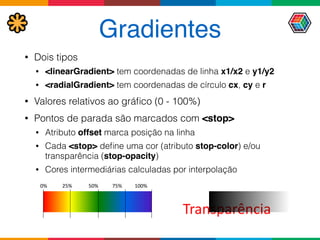
• Dois tipos
• <linearGradient> tem coordenadas de linha x1/x2 e y1/y2
• <radialGradient> tem coordenadas de círculo cx, cy e r
• Valores relativos ao gráfico (0 - 100%)
• Pontos de parada são marcados com <stop>
• Atributo offset marca posição na linha
• Cada <stop> define uma cor (atributo stop-color) e/ou
transparência (stop-opacity)
• Cores intermediárias calculadas por interpolação
Transparência
0%	


  25%	


  50%	


  75%	


  100%	


Gradiente linear
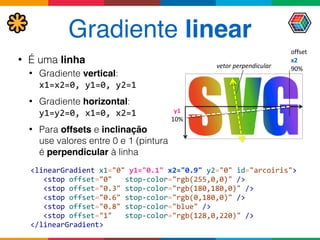
• É uma linha
• Gradiente vertical:

x1=x2=0,	
  y1=0,	
  y2=1
• Gradiente horizontal:

y1=y2=0,	
  x1=0,	
  x2=1
• Para offsets e inclinação 

use valores entre 0 e 1 (pintura
é perpendicular à linha
<linearGradient	
  x1="0"	
  y1="0.1"	
  x2="0.9"	
  y2="0"	
  id="arcoiris">


  <stop	
  offset="0"	
  	
  	
  stop-­‐color="rgb(255,0,0)"	
  />


  <stop	
  offset="0.3"	
  stop-­‐color="rgb(180,180,0)"	
  />


  <stop	
  offset="0.6"	
  stop-­‐color="rgb(0,180,0)"	
  />


  <stop	
  offset="0.8"	
  stop-­‐color="blue"	
  />


  <stop	
  offset="1"	
  	
  	
  stop-­‐color="rgb(128,0,220)"	
  />

</linearGradient>
offset	
  
x2	
  
90%
y1	


10%
vetor	
  perpendicular
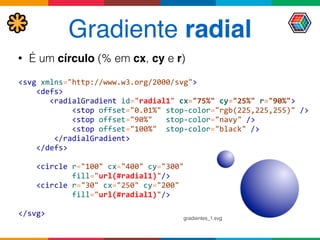
Gradiente radial
<svg	
  xmlns="http://www.w3.org/2000/svg">


  <defs>


  <radialGradient	
  id="radial1"	
  cx="75%"	
  cy="25%"	
  r="90%">


  <stop	
  offset="0.01%"	
  stop-­‐color="rgb(225,225,255)"	
  />


  <stop	
  offset="90%"	
  	
  	
  stop-­‐color="navy"	
  />


  <stop	
  offset="100%"	
  	
  stop-­‐color="black"	
  />


  </radialGradient>


  </defs>


  <circle	
  r="100"	
  cx="400"	
  cy="300"	


  fill="url(#radial1)"/>


  <circle	
  r="30"	
  cx="250"	
  cy="200"	


  fill="url(#radial1)"/>


</svg>
• É um círculo (% em cx, cy e r)
gradientes_1.svg
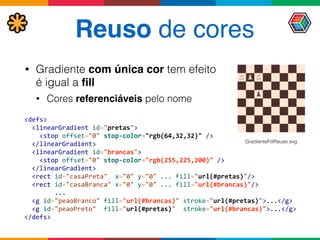
Reuso de cores
• Gradiente com única cor tem efeito
é igual a fill
• Cores referenciáveis pelo nome
<defs>


  <linearGradient	
  id="pretas">


  <stop	
  offset="0"	
  stop-­‐color="rgb(64,32,32)"	
  />


  </linearGradient>


  <linearGradient	
  id="brancas">


  <stop	
  offset="0"	
  stop-­‐color="rgb(255,225,200)"	
  />


  </linearGradient>


  <rect	
  id="casaPreta"	
  	
  x="0"	
  y="0"	
  ...	
  fill="url(#pretas)"/>


  <rect	
  id="casaBranca"	
  x="0"	
  y="0"	
  ...	
  fill="url(#brancas)"/>	


  ...


  <g	
  id="peaoBranco"	
  fill="url(#brancas)"	
  stroke="url(#pretas)">...</g>


  <g	
  id="peaoPreto"	
  	
  fill="url(#pretas)"	
  	
  stroke="url(#brancas)">...</g>

</defs>
GradienteFillReuse.svg
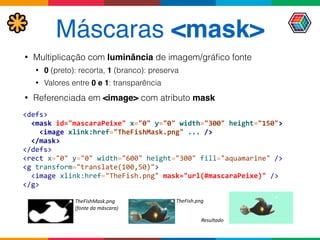
Máscaras <mask>
• Multiplicação com luminância de imagem/gráfico fonte
• 0 (preto): recorta, 1 (branco): preserva
• Valores entre 0 e 1: transparência
• Referenciada em <image> com atributo mask
<defs>


  <mask	
  id="mascaraPeixe"	
  x="0"	
  y="0"	
  width="300"	
  height="150">


  <image	
  xlink:href="TheFishMask.png"	
  ...	
  />


  </mask>

</defs>

<rect	
  x="0"	
  y="0"	
  width="600"	
  height="300"	
  fill="aquamarine"	
  />

<g	
  transform="translate(100,50)">


  <image	
  xlink:href="TheFish.png"	
  mask="url(#mascaraPeixe)"	
  />

</g>
TheFishMask.png	
  
(fonte	
  da	
  máscara)
TheFish.png
Resultado
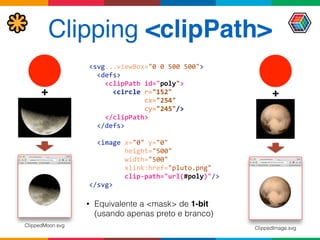
Clipping <clipPath>
<svg...viewBox="0	
  0	
  500	
  500">


  <defs>


  <clipPath	
  id="poly">


  <circle	
  r="152"	


  cx="254"	


  cy="245"/>


  </clipPath>


  </defs>


  <image	
  x="0"	
  y="0"	


  height="500"	


  width="500"	


  xlink:href="pluto.png"	


  clip-­‐path="url(#poly)"/>

</svg>
• Equivalente a <mask> de 1-bit
(usando apenas preto e branco)
++
ClippedImage.svg
ClippedMoon.svg
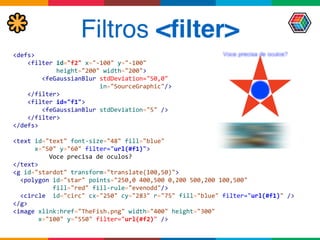
Filtros <filter>
<defs>	


  <filter	
  id="f2"	
  x="-­‐100"	
  y="-­‐100"	


  height="200"	
  width="200">


  <feGaussianBlur	
  stdDeviation="50,0"	


  in="SourceGraphic"/>


  </filter>


  <filter	
  id="f1">


  <feGaussianBlur	
  stdDeviation="5"	
  />


  </filter>

</defs>	


<text	
  id="text"	
  font-­‐size="48"	
  fill="blue"	


  x="50"	
  y="60"	
  filter="url(#f1)">	


  Voce	
  precisa	
  de	
  oculos?	
  
</text>

<g	
  id="stardot"	
  transform="translate(100,50)">	


  <polygon	
  id="star"	
  points="250,0	
  400,500	
  0,200	
  500,200	
  100,500"	


  fill="red"	
  fill-­‐rule="evenodd"/>


  <circle	
  	
  id="circ"	
  cx="250"	
  cy="283"	
  r="75"	
  fill="blue"	
  filter="url(#f1)"	
  />

</g>

<image	
  xlink:href="TheFish.png"	
  width="400"	
  height="300"	


  x="100"	
  y="550"	
  filter="url(#f2)"	
  />
SVG com JavaScript
<svg	
  width="100%"	
  height="100%"	
  xmlns="http://www.w3.org/2000/svg">


  <script	
  type="text/ecmascript">


  <![CDATA[


  function	
  acende(evt)	
  {	


  evt.target.setAttribute("opacity",	
  "1.0");	


  }	


  function	
  apaga(evt)	
  {	


  evt.target.setAttribute("opacity",	
  "0.4");	


  }


  ]]>	


  </script>	


  <g>	


  <rect	
  x="10"	
  	
  y="100"	
  width="45"	
  height="45"	
  fill="red"	
  opacity="0.4"	


  onmouseover="acende(evt);"	
  onmouseout="apaga(evt);"/>	


  <rect	
  x="65"	
  y="100"	
  width="45"	
  height="45"	
  fill="blue"	
  opacity="0.4"	


  onmouseover="acende(evt);"	
  onmouseout="apaga(evt);"/>	
  

...	


  </g>	


</svg>
DOM 2.0 + namespaces
• Necessário para acessar elementos e atributos que
usam namespaces (ex: xlink)
• Em vez de getAttribute, getElement, etc.
• Use getAttributeNS, getElementNS, etc.
var	
  svgNS	
  =	
  "http://www.w3.org/2000/svg";

var	
  xlinkNS	
  =	
  "http://www.w3.org/1999/xlink";	


var	
  circle	
  =	
  document.createElementNS(svgNS,"circle");

circle.setAttributeNS(null,"cx",500);

circle.setAttributeNS(null,"cy",500);

circle.setAttributeNS(xlinkNS,	
  "href",	
  "http://www.a/com");
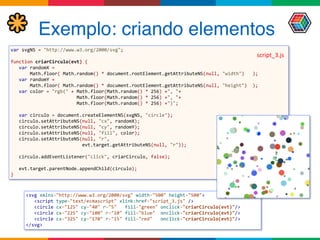
Exemplo: criando elementos
var	
  svgNS	
  =	
  "http://www.w3.org/2000/svg";


function	
  criarCirculo(evt)	
  {


  var	
  randomX	
  =	


  Math.floor(	
  Math.random()	
  *	
  document.rootElement.getAttributeNS(null,	
  "width")	
  	
  	
  );


  var	
  randomY	
  =	


  Math.floor(	
  Math.random()	
  *	
  document.rootElement.getAttributeNS(null,	
  "height")	
  	
  );


  var	
  color	
  =	
  "rgb("	
  +	
  Math.floor(Math.random()	
  *	
  256)	
  +",	
  "+	


  Math.floor(Math.random()	
  *	
  256)	
  +",	
  "+	


  Math.floor(Math.random()	
  *	
  256)	
  +")";


  var	
  circulo	
  =	
  document.createElementNS(svgNS,	
  "circle");


  circulo.setAttributeNS(null,	
  "cx",	
  randomX);


  circulo.setAttributeNS(null,	
  "cy",	
  randomY);


  circulo.setAttributeNS(null,	
  "fill",	
  color);


  circulo.setAttributeNS(null,	
  "r",	


  evt.target.getAttributeNS(null,	
  "r"));


  circulo.addEventListener("click",	
  criarCirculo,	
  false);


  evt.target.parentNode.appendChild(circulo);

}
<svg	
  xmlns="http://www.w3.org/2000/svg"	
  width="500"	
  height="500">


  <script	
  type="text/ecmascript"	
  xlink:href="script_3.js"	
  />


  <circle	
  cx="125"	
  cy="40"	
  r="5"	
  	
  	
  fill="green"	
  onclick="criarCirculo(evt)"/>


  <circle	
  cx="225"	
  cy="100"	
  r="10"	
  fill="blue"	
  	
  onclick="criarCirculo(evt)"/>


  <circle	
  cx="325"	
  cy="170"	
  r="15"	
  fill="red"	
  	
  	
  onclick="criarCirculo(evt)"/>

</svg>
script_3.js
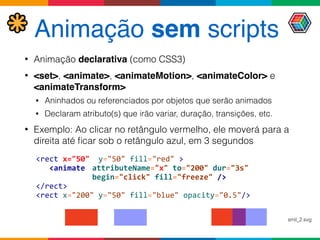
Animação sem scripts
• Animação declarativa (como CSS3)
• <set>, <animate>, <animateMotion>, <animateColor> e
<animateTransform>
• Aninhados ou referenciados por objetos que serão animados
• Declaram atributo(s) que irão variar, duração, transições, etc.
• Exemplo: Ao clicar no retângulo vermelho, ele moverá para a
direita até ficar sob o retângulo azul, em 3 segundos
<rect	
  x="50"	
  	
  y="50"	
  fill="red"	
  >	


  <animate	
   attributeName="x"	
  to="200"	
  dur="3s"	


   begin="click"	
  fill="freeze"	
  />	
  
</rect>	
  
<rect	
  x="200"	
  y="50"	
  fill="blue"	
  opacity="0.5"/>
smil_2.svg
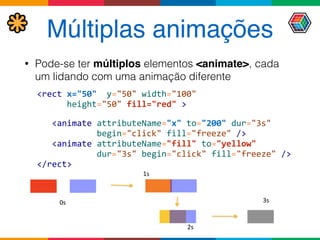
Múltiplas animações
• Pode-se ter múltiplos elementos <animate>, cada
um lidando com uma animação diferente
0s
1s
2s
3s
<rect	
  x="50"	
  	
  y="50"	
  width="100"	


  height="50"	
  fill="red"	
  >


  <animate	
  attributeName="x"	
  to="200"	
  dur="3s"	


  begin="click"	
  fill="freeze"	
  />	


  <animate	
  attributeName="fill"	
  to="yellow"	


  dur="3s"	
  begin="click"	
  fill="freeze"	
  />	
  
</rect>
Values
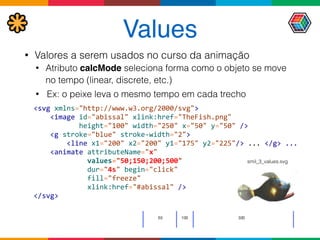
• Valores a serem usados no curso da animação
• Atributo calcMode seleciona forma como o objeto se move
no tempo (linear, discrete, etc.)
• Ex: o peixe leva o mesmo tempo em cada trecho
<svg	
  xmlns="http://www.w3.org/2000/svg">


  <image	
  id="abissal"	
  xlink:href="TheFish.png"	


  height="100"	
  width="250"	
  x="50"	
  y="50"	
  />


  <g	
  stroke="blue"	
  stroke-­‐width="2">


  <line	
  x1="200"	
  x2="200"	
  y1="175"	
  y2="225"/>	
  ...	
  </g>	
  ...


  <animate	
  attributeName="x"	


  values="50;150;200;500"	


  dur="4s"	
  begin="click"	


  fill="freeze"	


  xlink:href="#abissal"	
  />

</svg>
smil_3_values.svg
Values + keyTimes
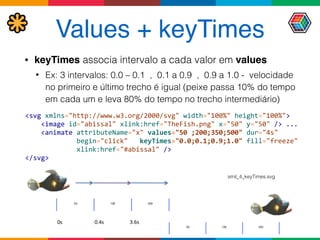
• keyTimes associa intervalo a cada valor em values
• Ex: 3 intervalos: 0.0 – 0.1 , 0.1 a 0.9 , 0.9 a 1.0 - velocidade
no primeiro e último trecho é igual (peixe passa 10% do tempo
em cada um e leva 80% do tempo no trecho intermediário)
0s 0.4s 3.6s
<svg	
  xmlns="http://www.w3.org/2000/svg"	
  width="100%"	
  height="100%">


  <image	
  id="abissal"	
  xlink:href="TheFish.png"	
  x="50"	
  y="50"	
  />	
  ...


  <animate	
  attributeName="x"	
  values="50	
  ;200;350;500"	
  dur="4s"	


  begin="click"	
  	
  	
  keyTimes="0.0;0.1;0.9;1.0"	
  fill="freeze"	


  xlink:href="#abissal"	
  />

</svg>
smil_4_keyTimes.svg
keySplines
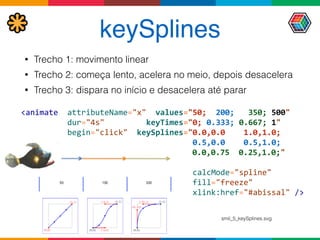
• Trecho 1: movimento linear
• Trecho 2: começa lento, acelera no meio, depois desacelera
• Trecho 3: dispara no início e desacelera até parar
	
  <animate	
  	
  attributeName="x"	
  	
  values="50;	
  	
  200;	
  	
  	
  350;	
  500"	


  dur="4s"	


  keyTimes="0;	
  0.333;	
  0.667;	
  1"	


  begin="click"	
  	
  keySplines="0.0,0.0	


  1.0,1.0;	


  0.5,0.0	


  0.5,1.0;	


  0.0,0.75	
  	
  0.25,1.0;"


  calcMode="spline"


  fill="freeze"	


  xlink:href="#abissal"	
  />
smil_5_keySplines.svg
<animateMotion>
• Objeto se move por um caminho (path) que pode
ser descrito de três formas
• xlink:href="#path" (referência para um <path> )
• Elemento filho <mpath xlink:href="#path" />
• Atributo path: mesma sintaxe do atributo d do
elemento <path>
• Atributo keyPoints
• Cada valor keyTimes pode ser associado a um ponto
do caminho (valores entre 0 e 1 - % da distância
percorrida)
Exemplo: <animateMotion>
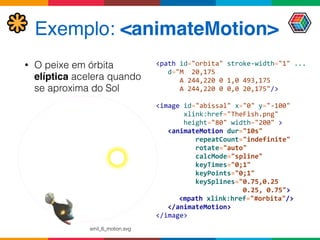
• O peixe em órbita
elíptica acelera quando
se aproxima do Sol
<path	
  id="orbita"	
  stroke-­‐width="1"	
  ...


  d="M	
  	
  20,175	


  A	
  244,220	
  0	
  1,0	
  493,175	


  A	
  244,220	
  0	
  0,0	
  20,175"/>


<image	
  id="abissal"	
  x="0"	
  y="-­‐100"	


  xlink:href="TheFish.png"	


  height="80"	
  width="200"	
  >


  <animateMotion	
  dur="10s"	


  repeatCount="indefinite"	


  rotate="auto"	


  calcMode="spline"


  keyTimes="0;1"	


  keyPoints="0;1"


  keySplines="0.75,0.25	


  0.25,	
  0.75">


  <mpath	
  xlink:href="#orbita"/>


  </animateMotion>

</image>
smil_6_motion.svg
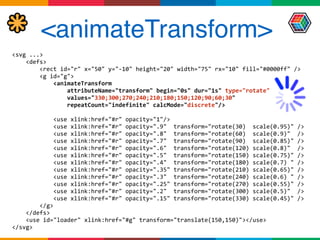
<animateTransform>
<svg	
  ...>	


  <defs>	


  <rect	
  id="r"	
  x="50"	
  y="-­‐10"	
  height="20"	
  width="75"	
  rx="10"	
  fill="#0000ff"	
  />	


  <g	
  id="g">	


  <animateTransform	


  attributeName="transform"	
  begin="0s"	
  dur="1s"	
  type="rotate"	


  values="330;300;270;240;210;180;150;120;90;60;30"	


  repeatCount="indefinite"	
  calcMode="discrete"/>	


  <use	
  xlink:href="#r"	
  opacity="1"/>	


  <use	
  xlink:href="#r"	
  opacity=".9"	
  	
  transform="rotate(30)	
  	
  scale(0.95)"	
  />	


  <use	
  xlink:href="#r"	
  opacity=".8"	
  	
  transform="rotate(60)	
  	
  scale(0.9)"	
  	
  />	


  <use	
  xlink:href="#r"	
  opacity=".7"	
  	
  transform="rotate(90)	
  	
  scale(0.85)"	
  />	


  <use	
  xlink:href="#r"	
  opacity=".6"	
  	
  transform="rotate(120)	
  scale(0.8)"	
  	
  />	


  <use	
  xlink:href="#r"	
  opacity=".5"	
  	
  transform="rotate(150)	
  scale(0.75)"	
  />	


  <use	
  xlink:href="#r"	
  opacity=".4"	
  	
  transform="rotate(180)	
  scale(0.7)	
  "	
  />	


  <use	
  xlink:href="#r"	
  opacity=".35"	
  transform="rotate(210)	
  scale(0.65)"	
  />	


  <use	
  xlink:href="#r"	
  opacity=".3"	
  	
  transform="rotate(240)	
  scale(0.6)	
  "	
  />	


  <use	
  xlink:href="#r"	
  opacity=".25"	
  transform="rotate(270)	
  scale(0.55)"	
  />	


  <use	
  xlink:href="#r"	
  opacity=".2"	
  	
  transform="rotate(300)	
  scale(0.5)"	
  	
  />	


  <use	
  xlink:href="#r"	
  opacity=".15"	
  transform="rotate(330)	
  scale(0.45)"	
  />	


  </g>	


  </defs>	


  <use	
  id="loader"	
  xlink:href="#g"	
  transform="translate(150,150)"></use>	
  
</svg>
Bibliotecas
http://d3js.org/http://snapsvg.io/
APIs JavaScript que vão além do SVG
Alternativas
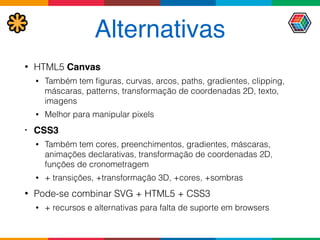
• HTML5 Canvas
• Também tem figuras, curvas, arcos, paths, gradientes, clipping,
máscaras, patterns, transformação de coordenadas 2D, texto,
imagens
• Melhor para manipular pixels
• CSS3
• Também tem cores, preenchimentos, gradientes, máscaras,
animações declarativas, transformação de coordenadas 2D,
funções de cronometragem
• + transições, +transformação 3D, +cores, +sombras
• Pode-se combinar SVG + HTML5 + CSS3
• + recursos e alternativas para falta de suporte em browsers
SVG 2
• Working draft!
• Muito mais integração com CSS e HTML5!
• Compositing & blending
• CSS3 Transforms
• CSS Masking Level 1
• Filter Effects 1.0 (+CSS)
• Paint servers (+CSS gradients em SVG)
• <star>
• Interoperabilidade com HTML5 Canvas
• Novos objetos em SVG DOM
Conclusões
• Esta apresentação explorou de maneira
abrangente os principais recursos do SVG 1.1
• Apesar da duplicação de funcionalidades com
HTML5 Canvas e CSS3, usar SVG traz vantagens
para aplicações gráficas e interativas na Web
• Problemas de compatibilidade podem ser
minimizados com bibliotecas
• SVG 2 irá trazer mais interoperabilidade com CSS3
e HTML5 Canvas
Referências
• Este material é baseado em um Tutorial SVG disponível em
• http://www.argonavis.com.br/download/download_xml-svg.html
• Especificações
• SVG 1.1 Second Edition. www.w3.org/TR/SVG/ August 2011
• SVG 2 Working Draft. http://www.w3.org/TR/SVG2/ July 2015
• SMIL 3 www.w3.org/TR/SMIL/ December 2008
• CSS 2 http://www.w3.org/TR/2008/REC-CSS2-20080411/ April 2008
• DOM 3 http://www.w3.org/TR/2004/REC-DOM-Level-3-Core-20040407/ April 2004
• Livros sobre SVG
• Kurt Cagle. SVG Programming: the graphical Web. Apress. 2002.
• Frost, Goesser, Hirtzler. Learn SVG: The Web Graphics Standard. http://www.learnsvg.com/
• Mike Dewar. Getting Started with D3. O'Reilly. 2012.
• J. David Eisenberg, Amelia Bellamy-Royds. SVG Essentials 2nd. Edition. O'Reilly. 2014.
• J. Frost, D. Dailey, D. Strazzullo, Building Web Applications with SVG. MS Press. 2012.
• Produtos
• d3.js http://d3js.org/ Biblioteca JavaScript para dados e gráficos (gera SVG)
• snap.js http://snapsvg.io/ Biblioteca JavaScript para SVG
obrigado!
helder@argonavis.com.br
https://github.com/argonavisbr/SVGExamples
http://www.argonavis.com.br/download/tdc_2015_svg.html
Palestra
Código-fonte

SVG Essencial

  • 1.
    essencialaprenda a criargráficos e animações eficientes para a Web helderdarocha helder@argonavis.com.br Julho/2015
  • 2.
    Programa • Uma introduçãoabrangente a SVG • Como criar e como usar com HTML5 e CSS • Elementos gráficos • Grupos e elementos estruturais • Sistema de coordenadas • Filtros, máscaras, gradientes e transformadas 2D • SVG DOM + CSS + JavaScript • Animações declarativas • Alternativas e bibliotecas • SVG 2
  • 3.
    Quem sou eu?Who am I? Кто я? Helder da Rocha argonavis.com.br Tecnologia * Ciência * Arte HTML & tecnologias Web desde 1995 Autor de cursos e livros sobre
 Java, XML e tecnologias Web helderdarocha.com.br
  • 4.
    O que éSVG • Scalable Vector Graphics • Gráficos • Linhas, polígonos, figuras, texto, filtros, máscaras, efeitos • Escaláveis • Zoom eficiente e rápido: amplia e reduz sem perder qualidade • Vetoriais • Armazena as informações gráficas para desenhar a imagem (em vez de mapa de pixels). • Tamanho em bytes depende da complexidade gráfica • É XML! Objetos DOM são manipuláveis por CSS e scripts
  • 5.
    Vetores e bitmaps Bitmap,10kB Bitmap ampliado, 250kB Vetor, 1kB Vetor ampliado, 1kB
  • 6.
    Origens • Criado em1998 (W3C, Adobe, Microsoft) • Influências • VML da Microsoft (com HP, Autodesk e Macromedia) • PGML, da Adobe (com IBM, Netscape e Sun) • CSS e HTML (W3C) • Versão atual 1.1 • Suporte razoável na maior parte dos browsers (ótimo em Chrome, Safari e Opera)
  • 7.
    Plataformas • SVG Full •SVG 1.0 e SVG 1.1 • Formato SVGZ (SVG comprimido com ZIP) • SVG Mobile • SVG 1.2 Tiny (SVGT) e SVG Basic (SVGB) • A 3GPP adotou SVG Tiny como padrão de mídia vetorial • Em desenvolvimento • SVG 2.0 (antes chamado de SVG 1.2) • SVG Print (Canon, HP, Adobe e Corel) – impressão
  • 8.
    Como criar umSVG • Elemento raiz • <svg> • Namespace • http://www.w3.org/2000/svg • Um gráfico SVG muito simples: <?xml  version="1.0"  encoding="UTF-­‐8"?>
 <svg  xmlns="http://www.w3.org/2000/svg"  
          viewBox="0  0  200  200"  height="100px"  width="100px">
        <circle  r="50"  cx="100"  cy="100"  fill="green"/>  
 </svg> svgdemo.svg
  • 9.
    Como exibir • Abraem um browser, em desktop ou mobile Opera Chrome Safari Firefox Internet  Explorer circle.svg
  • 10.
    Como usar emHTML5 (1) • Três maneiras de referenciar <html>            <head>...</head>   <body>
      <h1>SVG  referenciado</h1>   
      <p>Com  Img</p>
        <img  src="svgdemo.svg"/>   
        <p>Com  Object</p>
        <object  data="svgdemo.svg"></object>   
        <p>Com  Embed</p>
        <embed  src="svgdemo.svg"/>
 </body>   </html> comousar.html
  • 11.
    Como usar emHTML5 (2) <html>          <head>          <style>                  svg  {  border:  red  dashed  1px;                              height:  200px;  width:  200px;                  }                  circle  {fill:  red}          </style>          </head>          <body>                  <h1>SVG  embutido</h1>                                    <svg  viewBox="0  0  200  200">                          <circle  r="50"  cx="100"  cy="100"  fill="green"  />                  </svg>          </body>   </html> • Pode-se embutir SVG no código HTML5 comoembutir.html
  • 12.
    Como usar emCSS • Em qualquer lugar onde se usa uma imagem • Backgrounds, máscaras (CSS3), etc. <html>
        <head>
                <style>
                #circulo  {
                        background-­‐image:  url(svgdemo.svg);
                        height:  100%;  width:  100%;
                }
                #container  {
                        height:  200px;  width:  200px;
                        border:  blue  dashed  1px;
                }
        </style>
        </head>
        <body>
                <h1>SVG  background  CSS</h1>
                <div  id="container">
                        <div  id="circulo"></div>
                </div>
        </body>
 </html> comousaremcss.html
  • 13.
    Como usar emCSS3 • Máscaras (CSS3) <html>
      <head>
            <style>  
                  #paraiba  {
                        -­‐webkit-­‐mask-­‐image:  url(svgdemo.svg);
                        -­‐webkit-­‐mask-­‐origin:  padding;
                        -­‐webkit-­‐mask-­‐position:  180px  220px;
                        -­‐webkit-­‐transform:  scale(2.8);
                    }
              </style>
      </head>
      <body>
            <h1>Mascaras  SVG  e  CSS3</h1>
            <img  src="imagens/paraiba2005.jpg"  id="paraiba">
      </body>
 </html>   css3_mascara.html
  • 14.
    SVG vs. Canvas •Formas diferentes de desenhar • SVG: tags XML • Canvas: operações em JavaScript 
 <h1>HTML5  Canvas</h1>
 <canvas  id="desenho1"  height="300"  
                width="300"></canvas>
 <h1>SVG  (usando  tags)</h1>
 <svg  height="300"  width="300">
      <rect  x="50"  y="50"  width="150"  
                  height="150"  fill="#ff459a"  />
 </svg>
 
 <script>
        var  acanvas  =  
            document.getElementById("desenho1");
        var  ctx  =  acanvas.getContext("2d");
        ctx.fillStyle  =  "#ff459a";
        ctx.fillRect(50,50,  150,150);
 </script> canvas_svg1.html
  • 15.
    Estilos em SVG •Duas formas de aplicar estilos • CSS: através de atributo style ou folhas de estilo (em blocos <style> ou arquivos externos) <rect  x="50"  y="20"  width="120"  height="100"        
            style="stroke-­‐width:4;  stroke:blue;  fill:yellow"/>   • XML: atributos do SVG com mesmo nome e efeito dos atributos CSS  <rect  x="50"  y="20"  width="120"  height="100"  
              fill="yellow"  stroke="blue"  stroke-­‐width="4"/>   • SVG suporta atributos id, style e class como HTML
  • 16.
    CSS externo • ComSVG embutido, HTML e SVG podem compartilhar as mesmas folhas de estilo CSS • Sem HTML (ou com SVG referenciado), CSS deve 
 estar embutido ou vinculado ao próprio SVG <?xml-­‐stylesheet  type="text/css"  
                                  href="estilo.css"?>   <svg  xmlns="..."  >          <circle  class="t1"  ...>   </svg> <svg  xmlns="..."  >        <style>
            .t1  {fill:  green;}
      </style>        <circle  class="t1"  ...>   </svg> <html>      <style>.t1  {fill:  green;}</style>      <svg>          <circle  class="t1"  ...>      </svg>   </html> <html>      <link  rel="stylesheet"  
                href="estilo.css"/>      <svg>              <circle  class="t1"  ...>      </svg>   </html> .t1  {
    fill:  green;
 } estilo.css arquivo.svg arquivo.html
  • 17.
    SVG DOM • Existeuma API de Document Object Model para SVG <h1>SVG  (usando  SVG  DOM)</h1>
 <svg  id="desenho2"  height="300"  width="300"></svg>
 
 <script>
      //  svg  dom
      var  svgns  =  "http://www.w3.org/2000/svg";
      var  ansvg  =  document.getElementById("desenho2");
      var  rect  =  document.createElementNS(svgns,  "rect");
      rect.setAttribute("x",50);
      rect.setAttribute("y",50);
      rect.setAttribute("height",150);
      rect.setAttribute("width",150);
      rect.setAttribute("fill","#ff459a");
      ansvg.appendChild(rect);
 </script> canvas_svg1.html
  • 18.
    Fallback • Suporte nosbrowsers não é o ideal • Há workarounds para maior parte dos problemas • Pode-se usar scripts e PNG quando não houver solução • APIs como span.svg, raphaël e d3.js • Fallback JavaScript/PNG para browsers que não suportam imagens SVG: <img  src="svgdemo.svg"  
          onerror="this.src='circle.png'"/>
  • 19.
    Componentes gráficos <rect> –Retângulo <circle> – Círculo <ellipse> – Elipse <line> – Linha reta <polyline> – Linha com múltiplos segmentos <polygon> – Polígono <path> - Caminho arbitrário (curvas, linhas, etc.) <image> - Imagem bitmap <text> - Texto
  • 20.
    Pintura • Dois atributospara pintar componentes • preenchimento (fill) • contorno, ou traço (stroke) - desenhado pelo centro da borda do objeto • Três tipos de "tinta" • cores sólidas (sRGB) - mesma especificação do CSS. Ex: red, lightblue, #a09, #AA0099, rgb(128,64,32) • gradientes • texturas (patterns)
  • 21.
    Preenchimento • Use fill(atributo ou CSS) para cor de preenchimento • <rect  ...  fill="rgb(255,255,0%)"  />   • <rect  ...  style="fill:  rgb(100%,100%,0%)"  />   • Use fill-opacity para o componente alfa (transparência) • Varia de 0 (transparente) a 1 (opaco). <svg  xmlns="http://www.w3.org/2000/svg">
        <circle  r="50"  cx="100"  cy="100"  fill="green"/>  
        <circle  r="50"  cx="125"  cy="125"  fill="#008000"  
                                                                          fill-­‐opacity="0.5"/>  
        <circle  r="50"  cx="150"  cy="150"  fill="#080"  
                                                                          fill-­‐opacity="0.2"/>  
 </svg> fill.svg
  • 22.
    Traço • stroke: cordo traço • stroke-width: espessura • stroke-opacity: transparência (alfa) • stroke-dasharray • Lista de valores para tracejado (seqüência de traços e vazios) <?xml  version="1.0"  encoding="UTF-­‐8"?>
 <svg  xmlns="http://www.w3.org/2000/svg"  viewBox="0  0  300  300">
        <circle  r="50"  cx="100"  cy="100"  stroke="green"  fill-­‐opacity="0"  
           stroke-­‐width="1"    stroke-­‐dasharray="5  5"/>  
        <circle  r="50"  cx="125"  cy="125"  stroke="green"  fill-­‐opacity="0"  
          stroke-­‐width="5"    stroke-­‐opacity="0.5"/>  
        <circle  r="50"  cx="150"  cy="150"  stroke="green"  fill-­‐opacity="0"  
          stroke-­‐width="20"  stroke-­‐opacity="0.2"/>  
 </svg> traco.svg
  • 23.
    Retângulo <rect> • Atributos •x, y – coords de posição (default: 0) • width, height – largura, altura (obrigatório) • rx, ry – raios horizontal e vertical para 
 cantos arredondados (opcional) <rect  x="25"  y="50"  width="90"  height="90"         stroke="green"  fill-­‐opacity="0"  stroke-­‐width="1"         stroke-­‐dasharray="5  5"/>     <rect  x="50"  y="150"  width="125"  height="125"  rx="40"  ry="40"       stroke="red"  fill-­‐opacity="0"  stroke-­‐width="5"         stroke-­‐opacity="0.5"  />  
 <rect  x="150"  y="50"  width="150"  height="150"         stroke="green"  fill="blue"  fill-­‐opacity="0.2"         stroke-­‐width="20"  stroke-­‐opacity="0.2"  /> rect.svg
  • 24.
    Círculo <circle> • Atributos •cx, cy – coords. do centro (default: 0) • r – raio (obrigatório) <?xml-­‐stylesheet  type="text/css"  
                                  href="circulos.css"?>   <svg  xmlns="http://www.w3.org/2000/svg"            viewBox="0  0  300  300">        <circle  r="75"  cx="100"  cy="100"  id="c2"/>        <circle  r="50"  cx="150"  cy="150"  id="c1"/>   </svg> circle  {
    stroke-­‐width:  10;  
    stroke-­‐opacity:  0.5;
 }
 #c1  {
    fill:  green;
    stroke:  blue;
    fill-­‐opacity:  0.6;
 }
 #c2  {
    fill:  #f00;
    stroke:  yellow;
 } circulos.css circulocss.svg
  • 25.
    Linha simples <line> •Atributos (default: 0) • x1, y1 – coords do primeiro ponto • x2, y2 – coords do segundo ponto <line  x1="25"  y1="50"  x2="190"  y2="190"  
   stroke="blue"  stroke-­‐width="1"  stroke-­‐dasharray="5  5"/>     
 <line  x1="50"  y1="150"  x2="125"  y2="125"  
   stroke="red"  stroke-­‐width="5"  stroke-­‐opacity="0.5"/>    
 <line  x1="150"  y1="50"  x2="150"  y2="150"  
   stroke="green"  stroke-­‐width="20"  stroke-­‐opacity="0.2"  />   line.svg
  • 26.
    Elipse <ellipse> • Atributos •cx, cy – coordenadas do centro • rx, ry – raios horizontal e vertical <svg  xmlns="http://www.w3.org/2000/svg">
        <ellipse  cx="200"  cy="100"  rx="190"  ry="90"  
     fill="yellow"  fill-­‐opacity="0.5"  stroke="#00f"  
     stroke-­‐width="1"  stroke-­‐dasharray="5  5"/>  
        <ellipse  cx="250"  cy="150"  rx="75"  ry="125"  
     fill="red"  fill-­‐opacity="0.2"    stroke="#f00"  
     stroke-­‐width="5"  stroke-­‐opacity="0.5"/>  
        <ellipse  cx="300"  cy="200"  rx="40"  ry="150"  
     fill="black"  fill-­‐opacity="0"  stroke="#0f0"  
     stroke-­‐width="20"  stroke-­‐opacity="0.2"  />  
 </svg> ellipse.svg
  • 27.
    Polígono aberto <polyline> •Atributos • points – lista de coordenadas x,y com os pontos da linha <polyline  points="150,150                                          50,150                                        100,20                                        150,50                                        200,200                                          50,200                                          20,154                                          48,82                                          32,20"  
                    fill="yellow"  fill-­‐opacity="0.2"                stroke="red"  stroke-­‐width="10"/>   polyline.svg
  • 28.
    Polígono fechado <polygon> •Similar a <polyline>, mas sempre fechada • Atributos • points – lista de coordenadas 
 x,y com os vértices do polígono <polygon  points="150,150      50,250                                      50,150    100,50  
                                  200,50      250,100                                    300,150    350,250    250,250"  
     fill="red"  fill-­‐opacity="0.2"    
     stroke-­‐opacity="0.5"  stroke="navy"  
     stroke-­‐width="10"  stroke-­‐linecap="round"  
     stroke-­‐linejoin="round"  stroke-­‐dasharray="40  20  5  20"/>   polygon.svg
  • 29.
    Texto <text> • Nãosuporta parágrafos (quebra de linha). 
 Use <tspan>: <text>
      <tspan>linha  1</tspan>
      <tspan  x="0"  dy="16">linha  2</tspan>
 </text> <svg  ...  viewBox="-­‐10  -­‐50  200  200">
    <rect  x="0"  y="0"  height="36"                    width="180"  ...  />
    <text  font-­‐size="36"                  x="0"  y="0">Agora</text>
 </svg> Posição (0,0): baseline só esta parte será visível se viewBox começar em 0,0 Retângulo e texto têm as mesmas coordenadas x,y linha 1 linha 2
  • 30.
    Imagens <image> • Insereimagem PNG ou JPEG em um SVG • A imagem pode ser usada em clipping, máscaras, preenchimento, padrões • O namespace xlink não é necessário se o SVG estiver embutido em HTML <svg  width="4in"  height="4in"  version="1.1"
    xmlns="http://www.w3.org/2000/svg"  
    xmlns:xlink="http://www.w3.org/1999/xlink">
 
    <image  x="200"  y="200"  
                  width="100px"  height="100px"
                  xlink:href="pluto.png">
        <title>Imagem  de  Plutão</title>
    </image>
 </svg> Imagem de Plutão
  • 31.
    Vínculos e IDs •Objetos referenciáveis têm atributo id • Podem ser referenciados 'por 
 objetos locais ou remotos • Referência pode ser direta 
 via atributos XLink xlink:href      <use  xlink:href="#obj1"  />        <use  xlink:href="http://w.com/outro.svg#obj1"  />   • Ou indireta, através da função url(), 
 em atributos SVG      <rect  fill="url(#grad)"  />        <rect  fill="url(http://w.com/outro.svg#grad)"  /> <circle  
        id="obj1"  .../>   <gradient  
        id="grad"  .../>
  • 32.
    Definições <defs> • Parareusar recurso SVG, declare em bloco <defs> • Elementos declarados em <defs> não são desenhados • Para desenhar, é preciso referenciá-lo com <use> • Objetos referenciados podem mudar estilo e posição <svg  ...>
    <defs>
        <rect  id="preto"  x="0"  y="0"  width="20"  height="20"
                    fill="rgb(64,32,32)"  />
        <rect  id="branco"  x="0"  y="0"  width="20"  height="20"  
                    fill="rgb(255,225,200)"  />
    </defs>
 
    <use  xlink:href="#preto"  />
    <use  xlink:href="#branco"  transform="translate(20)"/>
    <use  xlink:href="#branco"  transform="translate(0,20)"/>
    <use  xlink:href="#preto"    transform="translate(20,20)"/>
 
 </svg>
  • 33.
    Grupos <g> • Representaconjunto de objetos como um só • Elementos do grupo herdam estilos e atributos comuns • Pode conter outros grupos <svg  ...>
    <defs>          ...
        <g  id="quatroCasas"  transform="translate(10,10)">
            <use  xlink:href="#preto"  />
            <use  xlink:href="#branco"  transform="translate(20)"/>
            <use  xlink:href="#branco"  transform="translate(0,20)"/>
            <use  xlink:href="#preto"    transform="translate(20,20)"/>
        </g>
    </defs>      <use  xlink:href="#quatroCasas"  />
 </svg>
  • 34.
    Por que usar<defs> e <use> • Evitar duplicação de informação <svg  xmlns:xlink="http://www.w3.org/1999/xlink"  
          xmlns="http://www.w3.org/2000/svg"  width="1050"  height="600"  viewBox="0  0  1050  600">
 
        <rect  x="0"  y="0"  width="20"  height="20"  fill="rgb(64,32,32)"  transform="translate(20)"  />
        <rect  x="0"  y="0"  width="20"  height="20"  fill="rgb(255,225,200)"    transform="translate(40)"  />
        <rect  x="0"  y="0"  width="20"  height="20"  fill="rgb(64,32,32)"  transform="translate(60)"  />
        <rect  x="0"  y="0"  width="20"  height="20"  fill="rgb(255,225,200)"    transform="translate(80)"  />
        <rect  x="0"  y="0"  width="20"  height="20"  fill="rgb(64,32,32)"  transform="translate(100)"  />
        <rect  x="0"  y="0"  width="20"  height="20"  fill="rgb(255,225,200)"    transform="translate(120)"  />
        <rect  x="0"  y="0"  width="20"  height="20"  fill="rgb(64,32,32)"  transform="translate(140)"  />
        <rect  x="0"  y="0"  width="20"  height="20"  fill="rgb(255,225,200)"    transform="translate(160)"  />
        <rect  x="0"  y="0"  width="20"  height="20"  fill="rgb(255,225,200)"  transform="translate(20,20)"  />
        <rect  x="0"  y="0"  width="20"  height="20"  fill="rgb(64,32,32)"  transform="translate(40,20)"  />
        <rect  x="0"  y="0"  width="20"  height="20"  fill="rgb(255,225,200)"  transform="translate(60,20)"  />
        <rect  x="0"  y="0"  width="20"  height="20"  fill="rgb(64,32,32)"  transform="translate(80,20)"  />
        <rect  x="0"  y="0"  width="20"  height="20"  fill="rgb(255,225,200)"  transform="translate(100,20)"  />
        <rect  x="0"  y="0"  width="20"  height="20"  fill="rgb(64,32,32)"  transform="translate(120,20)"  />
        <rect  x="0"  y="0"  width="20"  height="20"  fill="rgb(255,225,200)"  transform="translate(140,  20)"  />
          ...
        <rect  x="0"  y="0"  width="20"  height="20"  fill="rgb(255,225,200)"  transform="translate(140,140)"  />
        <rect  x="0"  y="0"  width="20"  height="20"  fill="rgb(64,32,32)"  transform="translate(160,140)"  />
 </svg> 64  quadrados 66  linhas   ~3500  chars
  • 35.
    SVG estruturado <svg  xmlns:xlink="http://www.w3.org/1999/xlink"  xmlns="http://www.w3.org/2000/svg"                          width="1050"  height="600"  viewBox="0  0  1050  600">
        <defs>
                <rect  id="preto"    x="0"  y="0"  width="20"  height="20"  fill="rgb(64,32,32)"  />
                <rect  id="branco"  x="0"  y="0"  width="20"  height="20"  fill="rgb(255,225,200)"  />
                
                <g  id="quatroCasas">
                        <use  xlink:href="#preto"  />
                        <use  xlink:href="#branco"  transform="translate(20)"/>
                        <use  xlink:href="#branco"  transform="translate(0,20)"/>
                        <use  xlink:href="#preto"    transform="translate(20,20)"/>
                </g>
                
                <g  id="fileiraDupla">
                        <use  xlink:href="#quatroCasas"  />
                        <use  xlink:href="#quatroCasas"  transform="translate(40)"  />
                        <use  xlink:href="#quatroCasas"  transform="translate(80)"  />
                        <use  xlink:href="#quatroCasas"  transform="translate(120)"  />
                </g>
                
                <g  id="tabuleiro">
                        <use  xlink:href="#fileiraDupla"  />
                        <use  xlink:href="#fileiraDupla"  transform="translate(0,40)"  />
                        <use  xlink:href="#fileiraDupla"  transform="translate(0,80)"  />
                        <use  xlink:href="#fileiraDupla"  transform="translate(0,120)"  />
                </g>
        </defs>
        <use  xlink:href="#tabuleiro"  />
 </svg> 28  linhas   ~1400  chars
  • 36.
    Caminhos • Seqüências decomandos (letras) + coordenadas • Ex: M 50,50 L 120,120 z • Comando afeta coordenadas seguintes (até novo comando) • Maiúsculas = coords absolutas / Minúsculas = relativas • Quatro tipos de movimentos • M: move até um ponto sem desenhar • L, H, V: desenha linha reta até um ponto • C, S, Q, T, A (curve to): desenha curva a um ponto; pode ser • Bézier cúbica com dois pontos tangenciais (C, c, S, s) • Bézier quadrática com um ponto tangencial (Q, q, T, t) • Arco elíptico ou circular (A, a) • Z: fecha a figura
  • 37.
    Linhas retas • Hou h + coordenadas x linhas retas horizontais • V ou v + coordenadas y linhas retas verticais • L ou l + pares de coords x,y linhas retas em qq direção 1. M100,100  L150,200  z   2. M100,100  L150,200  h50  z   3. M100,100  L150,200  h50  v-­‐100  z   4. M100,100  L150,200  h50  v-­‐100  l-­‐50,50  z   5. M100,100  L150,200  h50  v-­‐100  l-­‐50,50  L150,50  100,50  z (0,0) (100,100) (150,200) (200,200) (200,100) (150,150) (150,50)(100,50) z z z z
  • 38.
    Curvas Bézier cúbicas •Curva normal: C ou c com coordenadas x1,y1  x2,y2 x,y onde • x,y são as coordenadas do ponto final da curva • x1,y1  são as coordenadas do controle tangencial do ponto inicial • x2,y2  são as coordenadas do controle tangencial do ponto final • Curva suave: S ou s com coordenadas x2,y2 x,y • O controle tangencial do ponto inicial será simétrico ao controle final da curva anterior, fazendo com que a junção seja suave <path  
  d="M100,200            C100,100  250,100  250,200            S400,300  400,200"  ...  /> M100,200 C100,100 250,100 250,200 400,200 S400,300 Ponto  de  controle  simétrico  x1,y1   calculado  automaticamente
  • 39.
    Curvas Bézier quadráticas •Curva normal: Q ou q com coordenadas  x1,y1   x,y  onde • x,y são as coordenadas do ponto final da curva • x1,y1 são as coordenadas do controle tangencial • Curva suave: T ou t com coordenadas x,y • O controle tangencial será simétrico ao controle tangencial da curva anterior, fazendo com que a junção seja suave <path  
  d="M  200,300            Q  400,50  600,300            T  1000,300"  ...  /> (200,300) (400,50) (600,300) (1000,300) Ponto  de  controle  simétrico   calculado  automaticamente
  • 40.
    Arcos • Arco emSVG é uma curva na borda de um elipse • Comando A ou a; sintaxe: A  rx,ry  θ  laf,sf  x,y onde • rx e ry = raio horizontal e vertical do elipse • θ = ângulo de rotação do eixo x onde está o elipse • laf = flag do arco maior, sf = sweep flag (veja exemplo) • x,y são as coordenadas do ponto final ry rx θ   x y
  • 41.
    Flags de arcos M-­‐100,-­‐100    L0,-­‐100  
 A100,100  0  0,1  -­‐100,0  
 L-­‐100,-­‐100  z   M0,0    L0,-­‐100  
 A100,100  0  0,0  -­‐100,0  
 L0,0  z   M-­‐100,-­‐100    L0,-­‐100  
 A100,100  0  1,0  -­‐100,0  
 L-­‐100,-­‐100  z   M0,0    L0,-­‐100  
 A100,100  0  1,1  -­‐100,0  
 L0,0  z
  • 42.
    Exemplos de arcossimples <path  d="M300,200  h-­‐150  a150,150  0  1,0  150,-­‐150  z"
            fill="red"  stroke="blue"  stroke-­‐width="5"  />   
 <path  d="M275,175  v-­‐150  a150,150  0  0,0  -­‐150,150  z"
            fill="yellow"  stroke="blue"  
            stroke-­‐width="5"  /> <path  d="M600,350  l  50,-­‐50  
                  a25,25  -­‐30  0,1  50,-­‐25  l  50,-­‐25  
                  a25,50  -­‐30  0,1  50,-­‐25  l  50,0  
                  a25,75      0  0,1  50,0      l  50,25  
                  a25,100  30  0,1  50,25    l  50,50"   
              fill="none"  stroke="red"                  stroke-­‐width="5"    /> Fonte:  W3C  (SVG  spec)
  • 43.
    <defs>
      <path  d="M100,200  
                        C100,100  250,100  250,200
                        S100,300  100,200"  
                  id="circulo"  stroke="red"                      stroke-­‐width="1"                      fill-­‐opacity="0">
      </path>
 </defs>   ...
 <use  xlink:href="#circulo"  stroke-­‐dasharray="5  5"  />
 <text  font-­‐size="15"  x="100"  dy="-­‐10"  id="texto"                font-­‐family="monospace">
      <textPath  xlink:href="#circulo">     palavras  que  giram  confundem  as  letras        </textPath>
 </text> <textPath>
  • 44.
    View Port • Áreaonde o SVG é desenhado • Define dois sistemas de coordenadas (inicialmente idênticos) • Dimensões, proporções, unidade, etc. são herdadas pelos objetos contidos no SVG • Cada componente SVG pode ter seu próprio sistema de coordenadas ou herdá-lo • Atributo viewBox="min-x min-y largura altura" + outros atributos que definem unidades, dimensões, aspect ratio, etc. • Atributo transform="funções de transformação"
  • 45.
    Atributo transform • Alterasistema de coordenadas relativa • matrix(a11,a12,a13,a21,a22,a23)  – matriz de transformações
 
 • translate(tx)  ou  translate(tx,  ty) – deslocamento da origem • scale(sx)  ou  scale(sx,  sy)  – redimensionamento   • rotate(θ)  ou  rotate(θ,  cx,  cy)  – giro de θ graus sobre origem ou cx,cy   • skewX(θ)  e  skewY(θ)  –  cisalhamento de θ graus <g  transform="translate(-­‐10,-­‐20)">
    <g  transform="scale(2)">
        <g  transform="rotate(45)">
            <g  transform="translate(5,10)">
                <!-­‐-­‐  elementos  -­‐-­‐>
            </g>
        </g>
    </g>
 </g> <g  transform="translate(-­‐10,-­‐20)                                scale(2)                                rotate(45)                                        translate(5,10)">
        <!-­‐-­‐  elementos  -­‐-­‐>
 </g> Fonte:  W3C  (especificação  SVG) [ ] a11  a12  a13
 a21  a22  a23
 0      0      1 Transformações equivalentes
  • 46.
    translate() <svg  xmlns="http://www.w3.org/2000/svg"
        viewBox="0  0  500  500"
        xmlns:xlink="http://www.w3.org/1999/xlink">   
        <defs>
                <g  id="coords">
                        <line  x1="10"  y1="10"  x2="200"  y2="10"  />
                        <line  x1="10"  y1="10"  x2="10"  y2="200"  />
                        <text  x="200"  y="20">x</text>
                        <text  x="20"  y="200">y</text>
                </g>
        </defs>
        
        <use  xlink:href="#coords"  stroke="black"  />
        
        <use  xlink:href="#coords"  stroke="red"
                transform="translate(100,100)"  />
 </svg>   translate.svg
  • 47.
    scale() e rotate() rotate_scale.svg <svg  xmlns="http://www.w3.org/2000/svg"
        viewBox="0  0  500  500"
        xmlns:xlink="http://www.w3.org/1999/xlink"  >
        
        <defs>
                <g  id="coords">
                        <line  x1="10"  y1="10"  x2="200"  y2="10"  />
                        <line  x1="10"  y1="10"  x2="10"  y2="200"  />
                        <text  x="200"  y="20">x</text>
                        <text  x="20"  y="200">y</text>
                </g>
        </defs>
        
        <use  xlink:href="#coords"  stroke="black"  />
        
        <use  xlink:href="#coords"  stroke="red"
                transform="translate(200,100)                                          rotate(30)                                          scale(1.5)"  />
 </svg>  
  • 48.
    skew() Distorção  de     cisalhamento  (graus) <svg  xmlns="http://www.w3.org/2000/svg"
        viewBox="0  0  500  500"
        xmlns:xlink="http://www.w3.org/1999/xlink"  >   
        <defs>
                <g  id="coords">
                        <line  x1="10"  y1="10"  x2="200"  y2="10"  />
                        <line  x1="10"  y1="10"  x2="10"    y2="200"  />
                        <text  x="200"  y="20">x</text>
                        <text  x="20"    y="200">y</text>
                </g>
        </defs>
        
        <use  xlink:href="#coords"  stroke="black"  />
        
        <use  xlink:href="#coords"  stroke="red"
                transform="translate  (100,100)  skewX(50)"  />
 </svg>   skew.svg
  • 49.
    Gradientes • Dois tipos •<linearGradient> tem coordenadas de linha x1/x2 e y1/y2 • <radialGradient> tem coordenadas de círculo cx, cy e r • Valores relativos ao gráfico (0 - 100%) • Pontos de parada são marcados com <stop> • Atributo offset marca posição na linha • Cada <stop> define uma cor (atributo stop-color) e/ou transparência (stop-opacity) • Cores intermediárias calculadas por interpolação Transparência 0%                        25%                          50%                      75%                    100%          
  • 50.
    Gradiente linear • Éuma linha • Gradiente vertical:
 x1=x2=0,  y1=0,  y2=1 • Gradiente horizontal:
 y1=y2=0,  x1=0,  x2=1 • Para offsets e inclinação 
 use valores entre 0 e 1 (pintura é perpendicular à linha <linearGradient  x1="0"  y1="0.1"  x2="0.9"  y2="0"  id="arcoiris">
      <stop  offset="0"      stop-­‐color="rgb(255,0,0)"  />
      <stop  offset="0.3"  stop-­‐color="rgb(180,180,0)"  />
      <stop  offset="0.6"  stop-­‐color="rgb(0,180,0)"  />
      <stop  offset="0.8"  stop-­‐color="blue"  />
      <stop  offset="1"      stop-­‐color="rgb(128,0,220)"  />
 </linearGradient> offset   x2   90% y1       10% vetor  perpendicular
  • 51.
    Gradiente radial <svg  xmlns="http://www.w3.org/2000/svg">
        <defs>
              <radialGradient  id="radial1"  cx="75%"  cy="25%"  r="90%">
                        <stop  offset="0.01%"  stop-­‐color="rgb(225,225,255)"  />
                        <stop  offset="90%"      stop-­‐color="navy"  />
                        <stop  offset="100%"    stop-­‐color="black"  />
                </radialGradient>
        </defs>
        
        <circle  r="100"  cx="400"  cy="300"                            fill="url(#radial1)"/>
        <circle  r="30"  cx="250"  cy="200"                            fill="url(#radial1)"/>
      
 </svg> • É um círculo (% em cx, cy e r) gradientes_1.svg
  • 52.
    Reuso de cores •Gradiente com única cor tem efeito é igual a fill • Cores referenciáveis pelo nome <defs>
    <linearGradient  id="pretas">
        <stop  offset="0"  stop-­‐color="rgb(64,32,32)"  />
    </linearGradient>
    <linearGradient  id="brancas">
        <stop  offset="0"  stop-­‐color="rgb(255,225,200)"  />
    </linearGradient>
    <rect  id="casaPreta"    x="0"  y="0"  ...  fill="url(#pretas)"/>
    <rect  id="casaBranca"  x="0"  y="0"  ...  fill="url(#brancas)"/>                  ...
    <g  id="peaoBranco"  fill="url(#brancas)"  stroke="url(#pretas)">...</g>
    <g  id="peaoPreto"    fill="url(#pretas)"    stroke="url(#brancas)">...</g>
 </defs> GradienteFillReuse.svg
  • 53.
    Máscaras <mask> • Multiplicaçãocom luminância de imagem/gráfico fonte • 0 (preto): recorta, 1 (branco): preserva • Valores entre 0 e 1: transparência • Referenciada em <image> com atributo mask <defs>
    <mask  id="mascaraPeixe"  x="0"  y="0"  width="300"  height="150">
        <image  xlink:href="TheFishMask.png"  ...  />
    </mask>
 </defs>
 <rect  x="0"  y="0"  width="600"  height="300"  fill="aquamarine"  />
 <g  transform="translate(100,50)">
    <image  xlink:href="TheFish.png"  mask="url(#mascaraPeixe)"  />
 </g> TheFishMask.png   (fonte  da  máscara) TheFish.png Resultado
  • 54.
    Clipping <clipPath> <svg...viewBox="0  0  500  500">
    <defs>
        <clipPath  id="poly">
            <circle  r="152"  
                            cx="254"  
                            cy="245"/>
        </clipPath>
    </defs>
    <image  x="0"  y="0"      
                  height="500"  
                  width="500"  
                  xlink:href="pluto.png"  
                  clip-­‐path="url(#poly)"/>
 </svg> • Equivalente a <mask> de 1-bit (usando apenas preto e branco) ++ ClippedImage.svg ClippedMoon.svg
  • 55.
    Filtros <filter> <defs>          <filter  id="f2"  x="-­‐100"  y="-­‐100"                            height="200"  width="200">
                <feGaussianBlur  stdDeviation="50,0"                                                    in="SourceGraphic"/>
        </filter>
        <filter  id="f1">
                <feGaussianBlur  stdDeviation="5"  />
        </filter>
 </defs>   
 <text  id="text"  font-­‐size="48"  fill="blue"                x="50"  y="60"  filter="url(#f1)">                      Voce  precisa  de  oculos?   </text>
 <g  id="stardot"  transform="translate(100,50)">      <polygon  id="star"  points="250,0  400,500  0,200  500,200  100,500"                          fill="red"  fill-­‐rule="evenodd"/>
    <circle    id="circ"  cx="250"  cy="283"  r="75"  fill="blue"  filter="url(#f1)"  />
 </g>
 <image  xlink:href="TheFish.png"  width="400"  height="300"                  x="100"  y="550"  filter="url(#f2)"  />
  • 56.
    SVG com JavaScript <svg  width="100%"  height="100%"  xmlns="http://www.w3.org/2000/svg">
    <script  type="text/ecmascript">
    <![CDATA[
        function  acende(evt)  {  
              evt.target.setAttribute("opacity",  "1.0");  
        }  
        function  apaga(evt)  {  
              evt.target.setAttribute("opacity",  "0.4");  
        }
    ]]>  
    </script>  
        <g>  
            <rect  x="10"    y="100"  width="45"  height="45"  fill="red"  opacity="0.4"              onmouseover="acende(evt);"  onmouseout="apaga(evt);"/>  
            <rect  x="65"  y="100"  width="45"  height="45"  fill="blue"  opacity="0.4"              onmouseover="acende(evt);"  onmouseout="apaga(evt);"/>  
 ...  
        </g>    
 </svg>
  • 57.
    DOM 2.0 +namespaces • Necessário para acessar elementos e atributos que usam namespaces (ex: xlink) • Em vez de getAttribute, getElement, etc. • Use getAttributeNS, getElementNS, etc. var  svgNS  =  "http://www.w3.org/2000/svg";
 var  xlinkNS  =  "http://www.w3.org/1999/xlink";   
 var  circle  =  document.createElementNS(svgNS,"circle");
 circle.setAttributeNS(null,"cx",500);
 circle.setAttributeNS(null,"cy",500);
 circle.setAttributeNS(xlinkNS,  "href",  "http://www.a/com");
  • 58.
    Exemplo: criando elementos var  svgNS  =  "http://www.w3.org/2000/svg";
 
 function  criarCirculo(evt)  {
      var  randomX  =  
              Math.floor(  Math.random()  *  document.rootElement.getAttributeNS(null,  "width")      );
      var  randomY  =  
              Math.floor(  Math.random()  *  document.rootElement.getAttributeNS(null,  "height")    );
      var  color  =  "rgb("  +  Math.floor(Math.random()  *  256)  +",  "+  
                                                Math.floor(Math.random()  *  256)  +",  "+  
                                                Math.floor(Math.random()  *  256)  +")";
 
      var  circulo  =  document.createElementNS(svgNS,  "circle");
      circulo.setAttributeNS(null,  "cx",  randomX);
      circulo.setAttributeNS(null,  "cy",  randomY);
      circulo.setAttributeNS(null,  "fill",  color);
      circulo.setAttributeNS(null,  "r",                                                        evt.target.getAttributeNS(null,  "r"));
      
      circulo.addEventListener("click",  criarCirculo,  false);
      
      evt.target.parentNode.appendChild(circulo);
 } <svg  xmlns="http://www.w3.org/2000/svg"  width="500"  height="500">
      <script  type="text/ecmascript"  xlink:href="script_3.js"  />
      <circle  cx="125"  cy="40"  r="5"      fill="green"  onclick="criarCirculo(evt)"/>
      <circle  cx="225"  cy="100"  r="10"  fill="blue"    onclick="criarCirculo(evt)"/>
      <circle  cx="325"  cy="170"  r="15"  fill="red"      onclick="criarCirculo(evt)"/>
 </svg> script_3.js
  • 59.
    Animação sem scripts •Animação declarativa (como CSS3) • <set>, <animate>, <animateMotion>, <animateColor> e <animateTransform> • Aninhados ou referenciados por objetos que serão animados • Declaram atributo(s) que irão variar, duração, transições, etc. • Exemplo: Ao clicar no retângulo vermelho, ele moverá para a direita até ficar sob o retângulo azul, em 3 segundos <rect  x="50"    y="50"  fill="red"  >        <animate   attributeName="x"  to="200"  dur="3s"                             begin="click"  fill="freeze"  />   </rect>   <rect  x="200"  y="50"  fill="blue"  opacity="0.5"/> smil_2.svg
  • 60.
    Múltiplas animações • Pode-seter múltiplos elementos <animate>, cada um lidando com uma animação diferente 0s 1s 2s 3s <rect  x="50"    y="50"  width="100"                height="50"  fill="red"  >
      <animate  attributeName="x"  to="200"  dur="3s"                            begin="click"  fill="freeze"  />                      <animate  attributeName="fill"  to="yellow"                            dur="3s"  begin="click"  fill="freeze"  />   </rect>
  • 61.
    Values • Valores aserem usados no curso da animação • Atributo calcMode seleciona forma como o objeto se move no tempo (linear, discrete, etc.) • Ex: o peixe leva o mesmo tempo em cada trecho <svg  xmlns="http://www.w3.org/2000/svg">
        <image  id="abissal"  xlink:href="TheFish.png"  
                      height="100"  width="250"  x="50"  y="50"  />
        <g  stroke="blue"  stroke-­‐width="2">
                <line  x1="200"  x2="200"  y1="175"  y2="225"/>  ...  </g>  ...
        <animate  attributeName="x"                              values="50;150;200;500"                              dur="4s"  begin="click"                              fill="freeze"                              xlink:href="#abissal"  />
 </svg> smil_3_values.svg
  • 62.
    Values + keyTimes •keyTimes associa intervalo a cada valor em values • Ex: 3 intervalos: 0.0 – 0.1 , 0.1 a 0.9 , 0.9 a 1.0 - velocidade no primeiro e último trecho é igual (peixe passa 10% do tempo em cada um e leva 80% do tempo no trecho intermediário) 0s 0.4s 3.6s <svg  xmlns="http://www.w3.org/2000/svg"  width="100%"  height="100%">
        <image  id="abissal"  xlink:href="TheFish.png"  x="50"  y="50"  />  ...
        <animate  attributeName="x"  values="50  ;200;350;500"  dur="4s"                                begin="click"      keyTimes="0.0;0.1;0.9;1.0"  fill="freeze"                              xlink:href="#abissal"  />
 </svg> smil_4_keyTimes.svg
  • 63.
    keySplines • Trecho 1:movimento linear • Trecho 2: começa lento, acelera no meio, depois desacelera • Trecho 3: dispara no início e desacelera até parar  <animate    attributeName="x"    values="50;    200;      350;  500"  
                      dur="4s"                  keyTimes="0;  0.333;  0.667;  1"  
                      begin="click"    keySplines="0.0,0.0        1.0,1.0;  
                                                                            0.5,0.0        0.5,1.0;  
                                                            0.0,0.75    0.25,1.0;"
                                                                                                                                          calcMode="spline"
                                                                            fill="freeze"                                                                                xlink:href="#abissal"  /> smil_5_keySplines.svg
  • 64.
    <animateMotion> • Objeto semove por um caminho (path) que pode ser descrito de três formas • xlink:href="#path" (referência para um <path> ) • Elemento filho <mpath xlink:href="#path" /> • Atributo path: mesma sintaxe do atributo d do elemento <path> • Atributo keyPoints • Cada valor keyTimes pode ser associado a um ponto do caminho (valores entre 0 e 1 - % da distância percorrida)
  • 65.
    Exemplo: <animateMotion> • Opeixe em órbita elíptica acelera quando se aproxima do Sol <path  id="orbita"  stroke-­‐width="1"  ...
      d="M    20,175                                                                  A  244,220  0  1,0  493,175                                      A  244,220  0  0,0  20,175"/>
 
 <image  id="abissal"  x="0"  y="-­‐100"                  xlink:href="TheFish.png"                  height="80"  width="200"  >
      <animateMotion  dur="10s"                            repeatCount="indefinite"                        rotate="auto"                                              calcMode="spline"
                    keyTimes="0;1"                        keyPoints="0;1"
                    keySplines="0.75,0.25                                                    0.25,  0.75">
        <mpath  xlink:href="#orbita"/>
      </animateMotion>
 </image> smil_6_motion.svg
  • 66.
    <animateTransform> <svg  ...>          <defs>                  <rect  id="r"  x="50"  y="-­‐10"  height="20"  width="75"  rx="10"  fill="#0000ff"  />                  <g  id="g">                          <animateTransform                                  attributeName="transform"  begin="0s"  dur="1s"  type="rotate"                                  values="330;300;270;240;210;180;150;120;90;60;30"                                  repeatCount="indefinite"  calcMode="discrete"/>                                                    <use  xlink:href="#r"  opacity="1"/>                          <use  xlink:href="#r"  opacity=".9"    transform="rotate(30)    scale(0.95)"  />                          <use  xlink:href="#r"  opacity=".8"    transform="rotate(60)    scale(0.9)"    />                          <use  xlink:href="#r"  opacity=".7"    transform="rotate(90)    scale(0.85)"  />                          <use  xlink:href="#r"  opacity=".6"    transform="rotate(120)  scale(0.8)"    />                          <use  xlink:href="#r"  opacity=".5"    transform="rotate(150)  scale(0.75)"  />                          <use  xlink:href="#r"  opacity=".4"    transform="rotate(180)  scale(0.7)  "  />                          <use  xlink:href="#r"  opacity=".35"  transform="rotate(210)  scale(0.65)"  />                          <use  xlink:href="#r"  opacity=".3"    transform="rotate(240)  scale(0.6)  "  />                          <use  xlink:href="#r"  opacity=".25"  transform="rotate(270)  scale(0.55)"  />                          <use  xlink:href="#r"  opacity=".2"    transform="rotate(300)  scale(0.5)"    />                          <use  xlink:href="#r"  opacity=".15"  transform="rotate(330)  scale(0.45)"  />                  </g>          </defs>          <use  id="loader"  xlink:href="#g"  transform="translate(150,150)"></use>   </svg>
  • 67.
  • 68.
    Alternativas • HTML5 Canvas •Também tem figuras, curvas, arcos, paths, gradientes, clipping, máscaras, patterns, transformação de coordenadas 2D, texto, imagens • Melhor para manipular pixels • CSS3 • Também tem cores, preenchimentos, gradientes, máscaras, animações declarativas, transformação de coordenadas 2D, funções de cronometragem • + transições, +transformação 3D, +cores, +sombras • Pode-se combinar SVG + HTML5 + CSS3 • + recursos e alternativas para falta de suporte em browsers
  • 69.
    SVG 2 • Workingdraft! • Muito mais integração com CSS e HTML5! • Compositing & blending • CSS3 Transforms • CSS Masking Level 1 • Filter Effects 1.0 (+CSS) • Paint servers (+CSS gradients em SVG) • <star> • Interoperabilidade com HTML5 Canvas • Novos objetos em SVG DOM
  • 70.
    Conclusões • Esta apresentaçãoexplorou de maneira abrangente os principais recursos do SVG 1.1 • Apesar da duplicação de funcionalidades com HTML5 Canvas e CSS3, usar SVG traz vantagens para aplicações gráficas e interativas na Web • Problemas de compatibilidade podem ser minimizados com bibliotecas • SVG 2 irá trazer mais interoperabilidade com CSS3 e HTML5 Canvas
  • 71.
    Referências • Este materialé baseado em um Tutorial SVG disponível em • http://www.argonavis.com.br/download/download_xml-svg.html • Especificações • SVG 1.1 Second Edition. www.w3.org/TR/SVG/ August 2011 • SVG 2 Working Draft. http://www.w3.org/TR/SVG2/ July 2015 • SMIL 3 www.w3.org/TR/SMIL/ December 2008 • CSS 2 http://www.w3.org/TR/2008/REC-CSS2-20080411/ April 2008 • DOM 3 http://www.w3.org/TR/2004/REC-DOM-Level-3-Core-20040407/ April 2004 • Livros sobre SVG • Kurt Cagle. SVG Programming: the graphical Web. Apress. 2002. • Frost, Goesser, Hirtzler. Learn SVG: The Web Graphics Standard. http://www.learnsvg.com/ • Mike Dewar. Getting Started with D3. O'Reilly. 2012. • J. David Eisenberg, Amelia Bellamy-Royds. SVG Essentials 2nd. Edition. O'Reilly. 2014. • J. Frost, D. Dailey, D. Strazzullo, Building Web Applications with SVG. MS Press. 2012. • Produtos • d3.js http://d3js.org/ Biblioteca JavaScript para dados e gráficos (gera SVG) • snap.js http://snapsvg.io/ Biblioteca JavaScript para SVG
  • 72.