Gerenciamento de
dependências em Python
@patrickporto
Patrick Porto
● Pythonista há 6 anos
● Graduando em Ciência da
Computação
● Engenheiro de Software
Sênior na Stone
Pagamentos
Como instalar uma
dependência no
Python?
Instalação de dependência no Python
pip install django
Como instalar várias
dependências no
Python?
Instalação de várias dependências
$ pip install django
$ pip install gunicorn
$ pip install pytest
[...]
Requirements.txt
Anatomia de um requirements.txt
django >= 1.11
gunicorn ~= 19.4.5
pytest
Como posso
separar as minha
dependências por
ambiente?
Estrutura de Projeto (two scoops)
● requirements/base.txt
● requirements/local.txt
● requirements/production.txt
● requirements/test.txt
● requirements.txt
Como posso ter
diferentes
dependência para
vários projetos?
Virtualenv
Criação de virtualenv
$ virtualenv env
$ envScriptsactivate
$ (env) pip install -r requirements.txt
Problema #1
Como obter as
versões exatas das
dependências do
projeto?
Problema #2
Como posso ter
uma lista das
dependências em
alto nível?
Pipenv
Instalação do Pipenv
pip install pipenv
Instalação de dependência pelo Pipenv
pipenv install django
Instalação de dependência pelo Pipenv
Creating a virtualenv for this project…
Installing setuptools, pip, wheel...done.
Virtualenv location: ~.virtualenvs<NOME_DA_SUA_VIRTUALENV>
Creating a Pipfile for this project…
Installing django…
Adding django to Pipfile's [packages]…
PS: You have excellent taste!
Locking [dev-packages] dependencies…
Locking [packages] dependencies…
Updated Pipfile.lock (2f8679)!
Instalação de dependência pelo Pipenv
pipenv install pytest --dev
Executação de comandos pela virtualenv
pipenv run django-admin startproject meusite
Ativação da virtualenv
pipenv shell
Pipfile
Estrutura de um projeto com pipenv
● Pipfile - dependências de alto nível
● Pipfile.lock - dependências com suas versões exatas
Anatomia de um Pipfile
[[source]]
url = "https://pypi.python.org/simple"
verify_ssl = true
[dev-packages]
pytest = "*"
[packages]
django = "*"
[requires]
python_version = "3.4"
Anatomia de um Pipfile
[[source]]
url = "https://pypi.python.org/simple"
verify_ssl = true
[dev-packages]
pytest = "*"
[packages]
django = "*"
[requires]
python_version = "3.4"
Anatomia de um Pipfile
[[source]]
url = "https://pypi.python.org/simple"
verify_ssl = true
[dev-packages]
pytest = "*"
[packages]
django = "*"
[requires]
python_version = "3.4"
$ pipenv install pytest --dev
Anatomia de um Pipfile
[[source]]
url = "https://pypi.python.org/simple"
verify_ssl = true
[dev-packages]
pytest = "*"
[packages]
django = "*"
[requires]
python_version = "3.4"
$ pipenv install django
Anatomia de um Pipfile
[[source]]
url = "https://pypi.python.org/simple"
verify_ssl = true
[dev-packages]
pytest = "*"
[packages]
django = ">1.10"
[requires]
python_version = "3.4"
PEP 440
PEP 440
django ~= 1.10 Versão compatível
django == 1.10 Versão correspondente
django != 1.10 Versão diferente
django <= 1.10 Versão igual ou inferior
django >= 1.10 Versão superior ou igual
django < 1.10 Versão inferior
django > 1.10 Versão superior
Anatomia de um Pipfile
[[source]]
url = "https://pypi.python.org/simple"
verify_ssl = true
[dev-packages]
pytest = "*"
[packages]
django = ">1.10"
[requires]
python_version = "3.4"
PEP 508
PEP 508
python_version = “3.6” Versão do python
platform_python_implementation = “CPython” Implementação do python
platform_system = “Linux” Sistema operacional
platform_machine = “x86_64” Arquitetura do processador
pipenv (avançado)
Versionamento do Python
pipenv install
Versionamento do Python
$ pipenv install
Warning: Python 3.6 was not found on your system…
Would you like us to install latest CPython 3.6 with pyenv? [Y/n]: y
Installing CPython 3.6.2 with pyenv (this may take a few minutes)…
...
Making Python installation global…
Creating a virtualenv for this project…
Using ~/.pyenv/shims/python3 to create virtualenv…
...
No package provided, installing all dependencies.
...
Installing dependencies from Pipfile.lock…
================================ 5/5 — 00:00:03
To activate this project's virtualenv, run the following:
$ pipenv shell
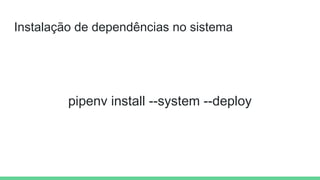
Instalação de dependências no sistema
pipenv install --system --deploy
Detecção de vulnerabilidades
pipenv check
Detecção de vulnerabilidades
$ pipenv check
Checking PEP 508 requirements…
Passed!
Checking installed package safety…
33075: django >=1.10,<1.10.3 resolved (1.10.1 installed)!
Django before 1.8.x before 1.8.16, 1.9.x before 1.9.11, and 1.10.x before 1.10.3, when
settings.DEBUG is True, allow remote attackers to conduct DNS rebinding attacks by
leveraging failure to validate the HTTP Host header against settings.ALLOWED_HOSTS.
33076: django >=1.10,<1.10.3 resolved (1.10.1 installed)!
Django 1.8.x before 1.8.16, 1.9.x before 1.9.11, and 1.10.x before 1.10.3 use a hardcoded
password for a temporary database user created when running tests with an Oracle database,
which makes it easier for remote attackers to obtain access to the database server by
leveraging failure to manually specify a password in the database settings TEST dictionary.
Verificação de Code Style
pipenv check --style app.py
Verificação de Code Style
$ pipenv check --style app.py
app.py:1:1: F401 'requests' imported but unused
app.py:1:16: W292 no newline at end of file
Abrir uma dependência no seu editor
pipenv open django
Visualização de dependências aninhadas
pipenv graph
Visualização de dependências aninhadas
$ pipenv graph
Django==1.11.6
- pytz [required: Any, installed: 2017.2]
requests==2.18.4
- certifi [required: >=2017.4.17, installed: 2017.7.27.1]
- chardet [required: <3.1.0,>=3.0.2, installed: 3.0.4]
- idna [required: >=2.5,<2.7, installed: 2.6]
- urllib3 [required: <1.23,>=1.21.1, installed: 1.22]
Geração de requirements.txt
pipenv lock -r > requirements.txt
Dúvidas?
Referências
● https://www.kennethreitz.org/essays/a-better-pip-workflow
● https://medium.com/@patrickporto/introdução-ao-pipenv-49aa9685dfe4
● https://github.com/pypa/pipfile
● https://github.com/kennethreitz/pipenv
● https://docs.pipenv.org
Obrigado!
Medium: @PatrickPorto
Twitter: @patrickporto
Telegram: @patrickporto
Email: patrick.s.porto@gmail.com

Gerenciamento de dependências em python

  • 1.
  • 2.
    Patrick Porto ● Pythonistahá 6 anos ● Graduando em Ciência da Computação ● Engenheiro de Software Sênior na Stone Pagamentos
  • 3.
  • 4.
    Instalação de dependênciano Python pip install django
  • 5.
  • 6.
    Instalação de váriasdependências $ pip install django $ pip install gunicorn $ pip install pytest [...]
  • 7.
  • 8.
    Anatomia de umrequirements.txt django >= 1.11 gunicorn ~= 19.4.5 pytest
  • 9.
    Como posso separar asminha dependências por ambiente?
  • 10.
    Estrutura de Projeto(two scoops) ● requirements/base.txt ● requirements/local.txt ● requirements/production.txt ● requirements/test.txt ● requirements.txt
  • 11.
  • 12.
  • 13.
    Criação de virtualenv $virtualenv env $ envScriptsactivate $ (env) pip install -r requirements.txt
  • 14.
    Problema #1 Como obteras versões exatas das dependências do projeto?
  • 15.
    Problema #2 Como possoter uma lista das dependências em alto nível?
  • 16.
  • 17.
  • 18.
    Instalação de dependênciapelo Pipenv pipenv install django
  • 19.
    Instalação de dependênciapelo Pipenv Creating a virtualenv for this project… Installing setuptools, pip, wheel...done. Virtualenv location: ~.virtualenvs<NOME_DA_SUA_VIRTUALENV> Creating a Pipfile for this project… Installing django… Adding django to Pipfile's [packages]… PS: You have excellent taste! Locking [dev-packages] dependencies… Locking [packages] dependencies… Updated Pipfile.lock (2f8679)!
  • 20.
    Instalação de dependênciapelo Pipenv pipenv install pytest --dev
  • 21.
    Executação de comandospela virtualenv pipenv run django-admin startproject meusite
  • 22.
  • 23.
  • 24.
    Estrutura de umprojeto com pipenv ● Pipfile - dependências de alto nível ● Pipfile.lock - dependências com suas versões exatas
  • 25.
    Anatomia de umPipfile [[source]] url = "https://pypi.python.org/simple" verify_ssl = true [dev-packages] pytest = "*" [packages] django = "*" [requires] python_version = "3.4"
  • 26.
    Anatomia de umPipfile [[source]] url = "https://pypi.python.org/simple" verify_ssl = true [dev-packages] pytest = "*" [packages] django = "*" [requires] python_version = "3.4"
  • 27.
    Anatomia de umPipfile [[source]] url = "https://pypi.python.org/simple" verify_ssl = true [dev-packages] pytest = "*" [packages] django = "*" [requires] python_version = "3.4" $ pipenv install pytest --dev
  • 28.
    Anatomia de umPipfile [[source]] url = "https://pypi.python.org/simple" verify_ssl = true [dev-packages] pytest = "*" [packages] django = "*" [requires] python_version = "3.4" $ pipenv install django
  • 29.
    Anatomia de umPipfile [[source]] url = "https://pypi.python.org/simple" verify_ssl = true [dev-packages] pytest = "*" [packages] django = ">1.10" [requires] python_version = "3.4" PEP 440
  • 30.
    PEP 440 django ~=1.10 Versão compatível django == 1.10 Versão correspondente django != 1.10 Versão diferente django <= 1.10 Versão igual ou inferior django >= 1.10 Versão superior ou igual django < 1.10 Versão inferior django > 1.10 Versão superior
  • 31.
    Anatomia de umPipfile [[source]] url = "https://pypi.python.org/simple" verify_ssl = true [dev-packages] pytest = "*" [packages] django = ">1.10" [requires] python_version = "3.4" PEP 508
  • 32.
    PEP 508 python_version =“3.6” Versão do python platform_python_implementation = “CPython” Implementação do python platform_system = “Linux” Sistema operacional platform_machine = “x86_64” Arquitetura do processador
  • 33.
  • 34.
  • 35.
    Versionamento do Python $pipenv install Warning: Python 3.6 was not found on your system… Would you like us to install latest CPython 3.6 with pyenv? [Y/n]: y Installing CPython 3.6.2 with pyenv (this may take a few minutes)… ... Making Python installation global… Creating a virtualenv for this project… Using ~/.pyenv/shims/python3 to create virtualenv… ... No package provided, installing all dependencies. ... Installing dependencies from Pipfile.lock… ================================ 5/5 — 00:00:03 To activate this project's virtualenv, run the following: $ pipenv shell
  • 36.
    Instalação de dependênciasno sistema pipenv install --system --deploy
  • 37.
  • 38.
    Detecção de vulnerabilidades $pipenv check Checking PEP 508 requirements… Passed! Checking installed package safety… 33075: django >=1.10,<1.10.3 resolved (1.10.1 installed)! Django before 1.8.x before 1.8.16, 1.9.x before 1.9.11, and 1.10.x before 1.10.3, when settings.DEBUG is True, allow remote attackers to conduct DNS rebinding attacks by leveraging failure to validate the HTTP Host header against settings.ALLOWED_HOSTS. 33076: django >=1.10,<1.10.3 resolved (1.10.1 installed)! Django 1.8.x before 1.8.16, 1.9.x before 1.9.11, and 1.10.x before 1.10.3 use a hardcoded password for a temporary database user created when running tests with an Oracle database, which makes it easier for remote attackers to obtain access to the database server by leveraging failure to manually specify a password in the database settings TEST dictionary.
  • 39.
    Verificação de CodeStyle pipenv check --style app.py
  • 40.
    Verificação de CodeStyle $ pipenv check --style app.py app.py:1:1: F401 'requests' imported but unused app.py:1:16: W292 no newline at end of file
  • 41.
    Abrir uma dependênciano seu editor pipenv open django
  • 42.
    Visualização de dependênciasaninhadas pipenv graph
  • 43.
    Visualização de dependênciasaninhadas $ pipenv graph Django==1.11.6 - pytz [required: Any, installed: 2017.2] requests==2.18.4 - certifi [required: >=2017.4.17, installed: 2017.7.27.1] - chardet [required: <3.1.0,>=3.0.2, installed: 3.0.4] - idna [required: >=2.5,<2.7, installed: 2.6] - urllib3 [required: <1.23,>=1.21.1, installed: 1.22]
  • 44.
    Geração de requirements.txt pipenvlock -r > requirements.txt
  • 45.
  • 46.
    Referências ● https://www.kennethreitz.org/essays/a-better-pip-workflow ● https://medium.com/@patrickporto/introdução-ao-pipenv-49aa9685dfe4 ●https://github.com/pypa/pipfile ● https://github.com/kennethreitz/pipenv ● https://docs.pipenv.org
  • 47.
    Obrigado! Medium: @PatrickPorto Twitter: @patrickporto Telegram:@patrickporto Email: patrick.s.porto@gmail.com