



Rhomobile – Ruby no Mobile
Quem sou?


                  Rodrigo Martins
            rodrigo@rrmartins.com
                     @rr_martins
               www.rrmartins.com
Quem sou?   Antes
            → PHP
            → Java
            → Clipper
            → Zim

                          Rodrigo Martins
                  rodrigo@rrmartins.com
                              @rr_martins
                        www.rrmartins.com
Quem sou?   Antes        Hoje, e Feliz!
            → PHP        → Ruby
            → Java       → Python
            → Clipper
            → Zim

                          Rodrigo Martins
                  rodrigo@rrmartins.com
                              @rr_martins
                        www.rrmartins.com
Qual o futuro?
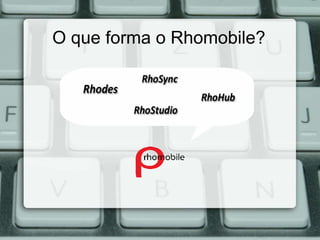
O que forma o Rhomobile?
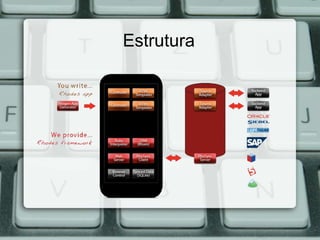
Estrutura
Rhodes
   O que é?
    É um framework open-source, permite aos
    desenvolvedores criar aplicações nativas para telefones
    móveis com a portabilidade de tecnologias web tais como
    XHTML, CSS, JavaScript e do poder do Ruby
   Instalação:
         $ gem install rhodes
         $ rhodes-setup
Rhodes
   Generando aplicação:
$ rhodes app ror http://localhost:3000/application
rhodes app <name_application> <path_server>
   rhoconfig.txt ->
syncserver = 'http://localhost:3000/application'
Rhodes
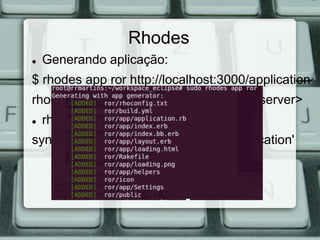
   Generando aplicação:
$ rhodes app ror http://localhost:3000/application
rhodes app <name_application> <path_server>
   rhoconfig.txt ->
syncserver = 'http://localhost:3000/application'
Rhodes
   index.erb.html
Este é o arquivo de início, desta forma
  <nome_aplicacao>/app/. A partir de agora todo o
  código é um pouco semelhante a escrever um
  RubyOnRails aplicação.
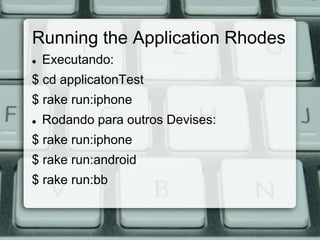
Running the Application Rhodes
   Executando:
$ cd applicatonTest
$ rake run:iphone
   Rodando para outros Devises:
$ rake run:iphone
$ rake run:android
$ rake run:bb
rake tasks

$ rake -T
Rhodes Generando Models
$ cd application
$ rhodes model pessoa nome, idade, sobrenome, sexo, cpf
Generating with model generator:
  [ADDED] app/Pessoa/index.erb
  [ADDED] app/Pessoa/edit.erb
  [ADDED] app/Pessoa/new.erb
  [ADDED] app/Pessoa/show.erb
  [ADDED] app/Pessoa/index.bb.erb
  [ADDED] app/Pessoa/edit.bb.erb
  [ADDED] app/Pessoa/new.bb.erb
  [ADDED] app/Pessoa/show.bb.erb
  [ADDED] app/Pessoa/pessoa_controller.rb
  [ADDED] app/Pessoa/pessoa.rb
  [ADDED] app/test/pessoa_spec.rb
Views Rhodes edition
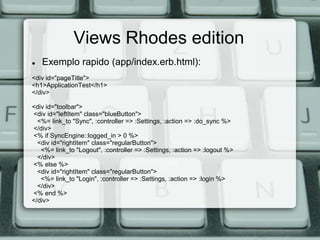
   Exemplo rapido (app/index.erb.html):
<div id="pageTitle">
<h1>ApplicationTest</h1>
</div>

<div id="toolbar">
<div id="leftItem" class="blueButton">
  <%= link_to "Sync", :controller => :Settings, :action => :do_sync %>
</div>
<% if SyncEngine::logged_in > 0 %>
  <div id="rightItem" class="regularButton">
   <%= link_to "Logout", :controller => :Settings, :action => :logout %>
  </div>
<% else %>
  <div id="rightItem" class="regularButton">
   <%= link_to "Login", :controller => :Settings, :action => :login %>
  </div>
<% end %>
</div>
Views Rhodes edition
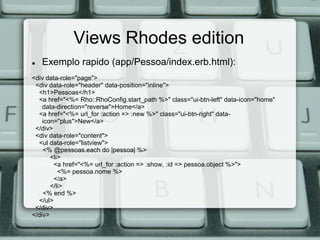
   Exemplo rapido (app/Pessoa/index.erb.html):
<div data-role="page">
 <div data-role="header" data-position="inline">
  <h1>Pessoas</h1>
  <a href="<%= Rho::RhoConfig.start_path %>" class="ui-btn-left" data-icon="home"
    data-direction="reverse">Home</a>
  <a href="<%= url_for :action => :new %>" class="ui-btn-right" data-
    icon="plus">New</a>
 </div>
 <div data-role="content">
  <ul data-role="listview">
    <% @pessoas.each do |pessoa| %>
       <li>
        <a href="<%= url_for :action => :show, :id => pessoa.object %>">
          <%= pessoa.nome %>
        </a>
       </li>
    <% end %>
  </ul>
 </div>
</div>
Views Rhodes edition
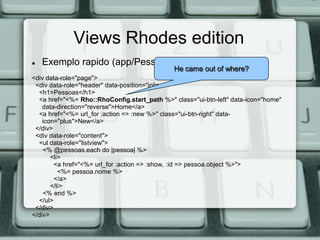
   Exemplo rapido (app/Pessoa/index.erb.html):
                                              He came out of where?
<div data-role="page">
 <div data-role="header" data-position="inline">
  <h1>Pessoas</h1>
  <a href="<%= Rho::RhoConfig.start_path %>" class="ui-btn-left" data-icon="home"
    data-direction="reverse">Home</a>
  <a href="<%= url_for :action => :new %>" class="ui-btn-right" data-
    icon="plus">New</a>
 </div>
 <div data-role="content">
  <ul data-role="listview">
    <% @pessoas.each do |pessoa| %>
       <li>
        <a href="<%= url_for :action => :show, :id => pessoa.object %>">
          <%= pessoa.nome %>
        </a>
       </li>
    <% end %>
  </ul>
 </div>
</div>
Views Rhodes edition
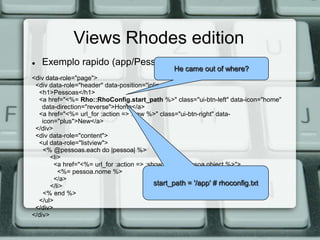
   Exemplo rapido (app/Pessoa/index.erb.html):
                                              He came out of where?
<div data-role="page">
 <div data-role="header" data-position="inline">
  <h1>Pessoas</h1>
  <a href="<%= Rho::RhoConfig.start_path %>" class="ui-btn-left" data-icon="home"
    data-direction="reverse">Home</a>
  <a href="<%= url_for :action => :new %>" class="ui-btn-right" data-
    icon="plus">New</a>
 </div>
 <div data-role="content">
  <ul data-role="listview">
    <% @pessoas.each do |pessoa| %>
       <li>
        <a href="<%= url_for :action => :show, :id => pessoa.object %>">
          <%= pessoa.nome %>
        </a>
       </li>                               start_path = '/app' # rhoconfig.txt
    <% end %>
  </ul>
 </div>
</div>
RhoSync
   O que é?
Um framework de sincronização é uma
 estrutura composta por um componente de
 cliente no dispositivo e um componente de
 servidor que roda em qualquer servidor
 que podem executar o Ruby.
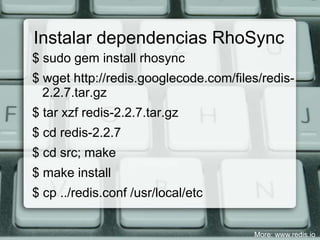
Instalar dependencias RhoSync
$ sudo gem install rhosync
$ wget http://redis.googlecode.com/files/redis-
  2.2.7.tar.gz
$ tar xzf redis-2.2.7.tar.gz
$ cd redis-2.2.7
$ cd src; make
$ make install
$ cp ../redis.conf /usr/local/etc


                                       More: www.redis.io
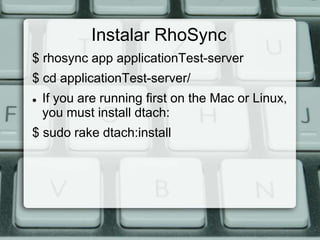
Instalar RhoSync
$ rhosync app applicationTest-server
$ cd applicationTest-server/
   If you are running first on the Mac or Linux,
    you must install dtach:
$ sudo rake dtach:install
Rodando a aplicação RhoSync

$ rake redis:start
$ rake rhosync:start


If all went well you should see:
[12:30:15 PM 2011-07-22] Rhosync Server
  v2.1.0 started...
Definindo Adapters RhoSync
Ligar a um serviço de back-end com
  RhoSync requer que você escreva uma
  pequena quantidade de código Ruby para a
  consulta, criar, atualizar e excluir as
  operações de seu backend empresa
  particular.
Definindo Adapters RhoSync
$ cd /applicationTest
$ rhosync source pessoa
---
Generating with source generator:
  [ADDED] sources/pessoa.rb
  [ADDED] spec/sources/pessoa_spec.rb
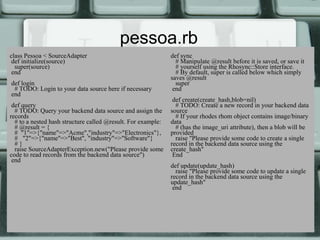
pessoa.rb
class Pessoa < SourceAdapter                                  def sync
 def initialize(source)                                         # Manipulate @result before it is saved, or save it
  super(source)                                                 # yourself using the Rhosync::Store interface.
 end                                                            # By default, super is called below which simply
                                                              saves @result
def login                                                       super
 # TODO: Login to your data source here if necessary           end
end
                                                               def create(create_hash,blob=nil)
 def query                                                      # TODO: Create a new record in your backend data
  # TODO: Query your backend data source and assign the       source
records                                                         # If your rhodes rhom object contains image/binary
  # to a nested hash structure called @result. For example:   data
  # @result = {                                                 # (has the image_uri attribute), then a blob will be
  # "1"=>{"name"=>"Acme","industry"=>"Electronics"},          provided
  # "2"=>{"name"=>"Best", "industry"=>"Software"}               raise "Please provide some code to create a single
  #}                                                          record in the backend data source using the
  raise SourceAdapterException.new("Please provide some       create_hash"
code to read records from the backend data source")            End
 end
                                                              def update(update_hash)
                                                                raise "Please provide some code to update a single
                                                              record in the backend data source using the
                                                              update_hash"
                                                               end
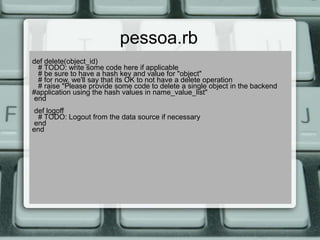
pessoa.rb
def delete(object_id)
 # TODO: write some code here if applicable
 # be sure to have a hash key and value for "object"
 # for now, we'll say that its OK to not have a delete operation
 # raise "Please provide some code to delete a single object in the backend
#application using the hash values in name_value_list"
end
def logoff
 # TODO: Logout from the data source if necessary
end
end
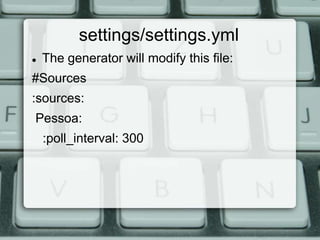
settings/settings.yml
   The generator will modify this file:
#Sources
:sources:
Pessoa:
    :poll_interval: 300
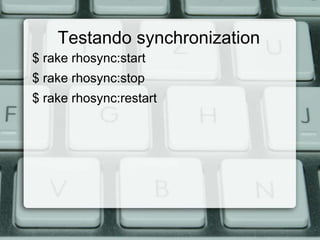
Testando synchronization
$ rake rhosync:start
$ rake rhosync:stop
$ rake rhosync:restart
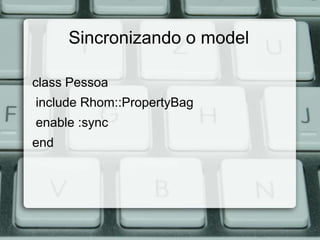
Sincronizando o model

class Pessoa
include Rhom::PropertyBag
enable :sync
end
Creando Objetos com RhoSync
def create(create_hash, blob=nil)
    result = RestClient.post(@base, :pessoa => create_hash)
    location = "#{result.headers[:location]}.json"
    new_record = RestClient.get(location).body
    JSON.parse(new_record)["pessoa"]["id"].to_s
end
  --------
create_hash :
{
     “name” => “Lucas”,
     “idade” => “21”
}
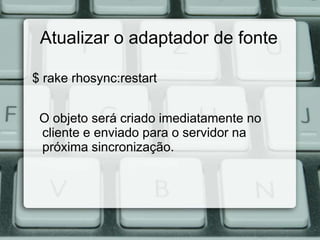
Atualizar o adaptador de fonte

$ rake rhosync:restart


 O objeto será criado imediatamente no
 cliente e enviado para o servidor na
 próxima sincronização.
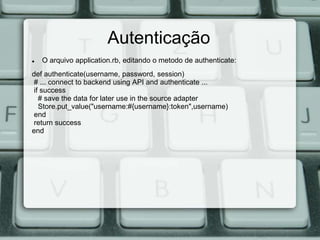
Autenticação
   O arquivo application.rb, editando o metodo de authenticate:
def authenticate(username, password, session)
# ... connect to backend using API and authenticate ...
if success
  # save the data for later use in the source adapter
  Store.put_value("username:#{username}:token",username)
end
return success
end
Source
http://docs.rhomobile.com/


http://rhomobile.com/


http://groups.google.com/group/rhomobile
Doubt? :D
Contact


            Rodrigo Martins
     rodrigo@rrmartins.com
                @rr_martins
          www.rrmartins.com

Desenvolvimento Mobile com Ruby

  • 1.
  • 2.
    Quem sou? Rodrigo Martins rodrigo@rrmartins.com @rr_martins www.rrmartins.com
  • 3.
    Quem sou? Antes → PHP → Java → Clipper → Zim Rodrigo Martins rodrigo@rrmartins.com @rr_martins www.rrmartins.com
  • 4.
    Quem sou? Antes Hoje, e Feliz! → PHP → Ruby → Java → Python → Clipper → Zim Rodrigo Martins rodrigo@rrmartins.com @rr_martins www.rrmartins.com
  • 5.
  • 6.
    O que formao Rhomobile?
  • 7.
  • 8.
    Rhodes  O que é? É um framework open-source, permite aos desenvolvedores criar aplicações nativas para telefones móveis com a portabilidade de tecnologias web tais como XHTML, CSS, JavaScript e do poder do Ruby  Instalação: $ gem install rhodes $ rhodes-setup
  • 9.
    Rhodes  Generando aplicação: $ rhodes app ror http://localhost:3000/application rhodes app <name_application> <path_server>  rhoconfig.txt -> syncserver = 'http://localhost:3000/application'
  • 10.
    Rhodes  Generando aplicação: $ rhodes app ror http://localhost:3000/application rhodes app <name_application> <path_server>  rhoconfig.txt -> syncserver = 'http://localhost:3000/application'
  • 11.
    Rhodes  index.erb.html Este é o arquivo de início, desta forma <nome_aplicacao>/app/. A partir de agora todo o código é um pouco semelhante a escrever um RubyOnRails aplicação.
  • 12.
    Running the ApplicationRhodes  Executando: $ cd applicatonTest $ rake run:iphone  Rodando para outros Devises: $ rake run:iphone $ rake run:android $ rake run:bb
  • 13.
  • 14.
    Rhodes Generando Models $cd application $ rhodes model pessoa nome, idade, sobrenome, sexo, cpf Generating with model generator: [ADDED] app/Pessoa/index.erb [ADDED] app/Pessoa/edit.erb [ADDED] app/Pessoa/new.erb [ADDED] app/Pessoa/show.erb [ADDED] app/Pessoa/index.bb.erb [ADDED] app/Pessoa/edit.bb.erb [ADDED] app/Pessoa/new.bb.erb [ADDED] app/Pessoa/show.bb.erb [ADDED] app/Pessoa/pessoa_controller.rb [ADDED] app/Pessoa/pessoa.rb [ADDED] app/test/pessoa_spec.rb
  • 15.
    Views Rhodes edition  Exemplo rapido (app/index.erb.html): <div id="pageTitle"> <h1>ApplicationTest</h1> </div> <div id="toolbar"> <div id="leftItem" class="blueButton"> <%= link_to "Sync", :controller => :Settings, :action => :do_sync %> </div> <% if SyncEngine::logged_in > 0 %> <div id="rightItem" class="regularButton"> <%= link_to "Logout", :controller => :Settings, :action => :logout %> </div> <% else %> <div id="rightItem" class="regularButton"> <%= link_to "Login", :controller => :Settings, :action => :login %> </div> <% end %> </div>
  • 16.
    Views Rhodes edition  Exemplo rapido (app/Pessoa/index.erb.html): <div data-role="page"> <div data-role="header" data-position="inline"> <h1>Pessoas</h1> <a href="<%= Rho::RhoConfig.start_path %>" class="ui-btn-left" data-icon="home" data-direction="reverse">Home</a> <a href="<%= url_for :action => :new %>" class="ui-btn-right" data- icon="plus">New</a> </div> <div data-role="content"> <ul data-role="listview"> <% @pessoas.each do |pessoa| %> <li> <a href="<%= url_for :action => :show, :id => pessoa.object %>"> <%= pessoa.nome %> </a> </li> <% end %> </ul> </div> </div>
  • 17.
    Views Rhodes edition  Exemplo rapido (app/Pessoa/index.erb.html): He came out of where? <div data-role="page"> <div data-role="header" data-position="inline"> <h1>Pessoas</h1> <a href="<%= Rho::RhoConfig.start_path %>" class="ui-btn-left" data-icon="home" data-direction="reverse">Home</a> <a href="<%= url_for :action => :new %>" class="ui-btn-right" data- icon="plus">New</a> </div> <div data-role="content"> <ul data-role="listview"> <% @pessoas.each do |pessoa| %> <li> <a href="<%= url_for :action => :show, :id => pessoa.object %>"> <%= pessoa.nome %> </a> </li> <% end %> </ul> </div> </div>
  • 18.
    Views Rhodes edition  Exemplo rapido (app/Pessoa/index.erb.html): He came out of where? <div data-role="page"> <div data-role="header" data-position="inline"> <h1>Pessoas</h1> <a href="<%= Rho::RhoConfig.start_path %>" class="ui-btn-left" data-icon="home" data-direction="reverse">Home</a> <a href="<%= url_for :action => :new %>" class="ui-btn-right" data- icon="plus">New</a> </div> <div data-role="content"> <ul data-role="listview"> <% @pessoas.each do |pessoa| %> <li> <a href="<%= url_for :action => :show, :id => pessoa.object %>"> <%= pessoa.nome %> </a> </li> start_path = '/app' # rhoconfig.txt <% end %> </ul> </div> </div>
  • 19.
    RhoSync  O que é? Um framework de sincronização é uma estrutura composta por um componente de cliente no dispositivo e um componente de servidor que roda em qualquer servidor que podem executar o Ruby.
  • 20.
    Instalar dependencias RhoSync $sudo gem install rhosync $ wget http://redis.googlecode.com/files/redis- 2.2.7.tar.gz $ tar xzf redis-2.2.7.tar.gz $ cd redis-2.2.7 $ cd src; make $ make install $ cp ../redis.conf /usr/local/etc More: www.redis.io
  • 21.
    Instalar RhoSync $ rhosyncapp applicationTest-server $ cd applicationTest-server/  If you are running first on the Mac or Linux, you must install dtach: $ sudo rake dtach:install
  • 22.
    Rodando a aplicaçãoRhoSync $ rake redis:start $ rake rhosync:start If all went well you should see: [12:30:15 PM 2011-07-22] Rhosync Server v2.1.0 started...
  • 23.
    Definindo Adapters RhoSync Ligara um serviço de back-end com RhoSync requer que você escreva uma pequena quantidade de código Ruby para a consulta, criar, atualizar e excluir as operações de seu backend empresa particular.
  • 24.
    Definindo Adapters RhoSync $cd /applicationTest $ rhosync source pessoa --- Generating with source generator: [ADDED] sources/pessoa.rb [ADDED] spec/sources/pessoa_spec.rb
  • 25.
    pessoa.rb class Pessoa <SourceAdapter def sync def initialize(source) # Manipulate @result before it is saved, or save it super(source) # yourself using the Rhosync::Store interface. end # By default, super is called below which simply saves @result def login super # TODO: Login to your data source here if necessary end end def create(create_hash,blob=nil) def query # TODO: Create a new record in your backend data # TODO: Query your backend data source and assign the source records # If your rhodes rhom object contains image/binary # to a nested hash structure called @result. For example: data # @result = { # (has the image_uri attribute), then a blob will be # "1"=>{"name"=>"Acme","industry"=>"Electronics"}, provided # "2"=>{"name"=>"Best", "industry"=>"Software"} raise "Please provide some code to create a single #} record in the backend data source using the raise SourceAdapterException.new("Please provide some create_hash" code to read records from the backend data source") End end def update(update_hash) raise "Please provide some code to update a single record in the backend data source using the update_hash" end
  • 26.
    pessoa.rb def delete(object_id) #TODO: write some code here if applicable # be sure to have a hash key and value for "object" # for now, we'll say that its OK to not have a delete operation # raise "Please provide some code to delete a single object in the backend #application using the hash values in name_value_list" end def logoff # TODO: Logout from the data source if necessary end end
  • 27.
    settings/settings.yml  The generator will modify this file: #Sources :sources: Pessoa: :poll_interval: 300
  • 28.
    Testando synchronization $ rakerhosync:start $ rake rhosync:stop $ rake rhosync:restart
  • 29.
    Sincronizando o model classPessoa include Rhom::PropertyBag enable :sync end
  • 30.
    Creando Objetos comRhoSync def create(create_hash, blob=nil) result = RestClient.post(@base, :pessoa => create_hash) location = "#{result.headers[:location]}.json" new_record = RestClient.get(location).body JSON.parse(new_record)["pessoa"]["id"].to_s end  -------- create_hash : { “name” => “Lucas”, “idade” => “21” }
  • 31.
    Atualizar o adaptadorde fonte $ rake rhosync:restart O objeto será criado imediatamente no cliente e enviado para o servidor na próxima sincronização.
  • 32.
    Autenticação  O arquivo application.rb, editando o metodo de authenticate: def authenticate(username, password, session) # ... connect to backend using API and authenticate ... if success # save the data for later use in the source adapter Store.put_value("username:#{username}:token",username) end return success end
  • 33.
  • 34.
  • 35.
    Contact Rodrigo Martins rodrigo@rrmartins.com @rr_martins www.rrmartins.com