React? Já ouvi falar
Temas abordados
1. Problemas atuais da web
2. Onde a web está
3. Futuro?
4. Como o desenvolvimento é hoje
5. React
6. Flux
Cezar Luiz
Programador Front-End
JavaScript <3
Trabalha na Snowman Labs
23 anos
Web nos dias
de hoje
Muita demanda
de informação
Muita gente conectada
performance !important
Tempo de
resposta
deve ser cada
vez menor
Onde a web
está presente
Falando sobre
front-end
Muito do que se faz hoje
MVC
Mineração de DOM - getElementById, etc
Adiciona classe, retira classe
Problemas de compatibilidade
Dificuldade em escalar e aceitar
grande quantidade de dados
Problemas com MVC
“MVC got really
complicated
really quickly”
!
Virtual DOM
React abstracts away the DOM from
you, giving a simpler programming
model and better performance. React
can also render on the server using
Node, and it can power native apps
using React Native.
Data Flow
React implements one-way reactive
data flow which reduces boilerplate
and is easier to reason about than
traditional data binding.
!framework
Por que não
pensar mais na
sua aplicação, na lógica,
do que ficar se preocupando
com o “DOM”?
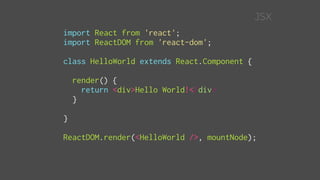
import React from 'react';
import ReactDOM from 'react-dom';
class HelloWorld extends React.Component {
render() {
return <div>Hello World!</div>
}
}
ReactDOM.render(<HelloWorld />, mountNode);
JSX
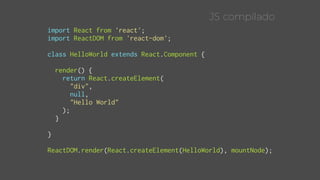
import React from 'react';
import ReactDOM from 'react-dom';
class HelloWorld extends React.Component {
render() {
return React.createElement(
"div",
null,
"Hello World"
);
}
}
ReactDOM.render(React.createElement(HelloWorld), mountNode);
JS compilado
state e PROPS
Onde gerenciamos os dados
da nossa aplicação
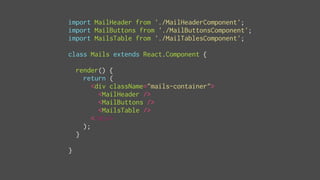
import MailHeader from './MailHeaderComponent';
import MailButtons from './MailButtonsComponent';
import MailsTable from './MailTablesComponent';
class Mails extends React.Component {
render() {
return (
<div className="mails-container">
<MailHeader />
<MailButtons />
<MailsTable />
</div>
);
}
}
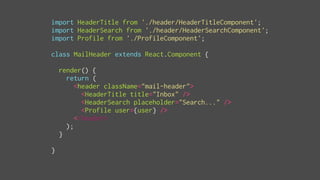
import HeaderTitle from './header/HeaderTitleComponent';
import HeaderSearch from './header/HeaderSearchComponent';
import Profile from './ProfileComponent';
class MailHeader extends React.Component {
render() {
return (
<header className="mail-header">
<HeaderTitle title="Inbox" />
<HeaderSearch placeholder="Search..." />
<Profile user={user} />
</header>
);
}
}
import MailRow from './MailRowComponent';
class MailTable extends React.Component {
constructor(props) {
super(props);
this.state = {
loading: false,
mails: []
};
}
componentDidMount() {
this.setState({ loading: true });
$.ajax({
url: `${host}/mails`
})
.done((response) => {
this.setState({
mails: response.results
});
})
.complete(() => {
this.setState({ loading: false });
});
}
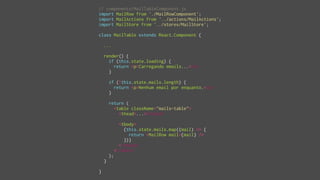
render() {
if (this.state.loading) {
return <p>Carregando emails...</p>
}
if (!this.state.mails.length) {
return <p>Nenhum email por enquanto.</p>
}
return (
<table className="mails-table">
<thead>...</thead>
<tbody>
{this.state.mails.map((mail) => {
return <MailRow mail={mail} />
})}
</tbody>
</table>
);
}
}
import MailRow from './MailRowComponent';
import $ from 'jquery';
class MailTable extends React.Component {
constructor(props) {
super(props);
this.state = {
loading: false,
mails: []
};
}
...
}
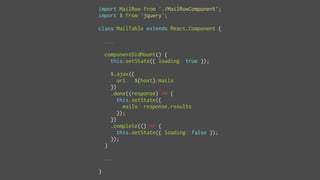
import MailRow from './MailRowComponent';
import $ from 'jquery';
class MailTable extends React.Component {
...
componentDidMount() {
this.setState({ loading: true });
$.ajax({
url: `${host}/mails`
})
.done((response) => {
this.setState({
mails: response.results
});
})
.complete(() => {
this.setState({ loading: false });
});
}
...
}
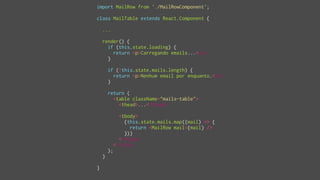
import MailRow from './MailRowComponent';
class MailTable extends React.Component {
...
render() {
if (this.state.loading) {
return <p>Carregando emails...</p>
}
if (!this.state.mails.length) {
return <p>Nenhum email por enquanto.</p>
}
return (
<table className="mails-table">
<thead>...</thead>
<tbody>
{this.state.mails.map((mail) => {
return <MailRow mail={mail} />
})}
</tbody>
</table>
);
}
}
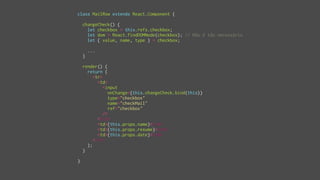
class MailRow extends React.Component {
changeCheck() {
let checkbox = this.refs.checkbox;
let dom = React.findDOMNode(checkbox); // Não é tão necessário
let { value, name, type } = checkbox;
...
}
render() {
return (
<tr>
<td>
<input
onChange={this.changeCheck.bind(this)}
type="checkbox"
name="checkMail"
ref="checkbox"
/>
</td>
<td>{this.props.name}</td>
<td>{this.props.resume}</td>
<td>{this.props.date}</td>
</tr>
);
}
}
c o m p o n e n t i z a ç ã o
ciclo
de vida
3 partes principais
Mounting - Um componente irá ser inserido no DOM.
Updating - Um componente está a ser re-renderizado
para determinar se o DOM deverá ser atualizado. (Virtual DOM)
Unmounting - Um componente está sendo removido do DOM.
Além disso, o React fornece métodos de ciclos de vida para
você interceptar esse processo. Métodos do tipo “will”.
Mounting - 3 métodos
getInitialState - Chamado antes de um componente ser
montado. Componentes que usam state devem implementar
isso para retornar dados iniciais.
componentWillMount - Chamado imediatamente antes
de ocorrer a montagem.
componentDidMount - Chamado imediatamente depois
de ocorrer a montagem. Se precisar alterar o DOM, deve vir aqui.
Updating - 4 métodos
componentWillReceiveProps(object nextProps) - Chamado
quando um componente recebe novas propriedades.
shouldComponentUpdate(object nextProps, object nextState)
Deve retornar um boolean se o componente deverá ser
atualizado ou não.
componentWillUpdate(object nextProps, object nextState)
Chamado imediatamente antes de uma atualização acontecer.
Não pode chamar this.setState aqui.
componentDidUpdate(object prevProps, object prevState)
Chamado imediatamente depois da atualização acontecer.
Unmounting - 1 método
componentWillUnmount - Chamado imediatamente antes
de um componente ser desmontado e destruído. Limpezas
devem ser feitas aqui.
state props refs render
ciclos de vida
componentização
JSX e JS compilado
UI complexas
event system (onClick onChange...)
ajax
isso é React
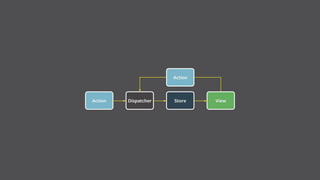
E o tal do flux?
!framework
Arquitetura
de aplicação
para construir
interfaces
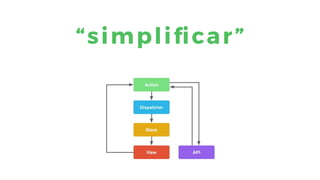
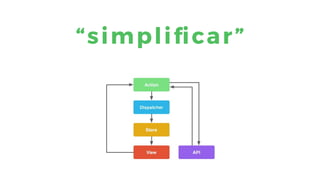
“simplificar”
exemplos
com altjs
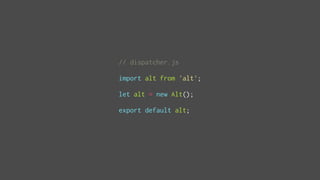
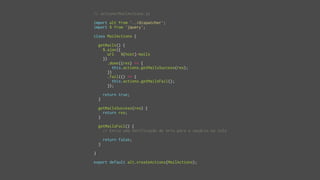
// dispatcher.js
import alt from 'alt';
let alt = new Alt();
export default alt;
// actions/MailActions.js
import alt from '../dispatcher';
import $ from 'jquery';
class MailActions {
getMails() {
$.ajax({
url: `${host}/mails`
})
.done((res) => {
this.actions.getMailsSuccess(res);
})
.fail(() => {
this.actions.getMailsFail();
});
return true;
}
getMailsSuccess(res) {
return res;
}
getMailsFail() {
// Envia uma notificação de erro para o usuário na tela
return false;
}
}
export default alt.createActions(MailActions);
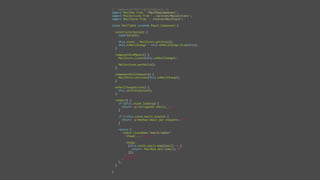
// stores/MailStore.js
import alt from '../dispatcher';
import MailActions from '../actions/MailActions';
class MailStore {
constructor() {
this.state = {
loading: false,
error: false,
mails: []
};
this.bindActions(MailActions);
}
onGetMails() {
this.setState({
loading: true,
error: false
});
}
onGetMailsSuccess(response) {
this.setState({
loading: false,
mails: response.result
});
}
onGetMailsFail(err) {
this.setState({
loading: false,
error: err,
mails: []
});
}
}
export default alt.createStore(MailStore, 'MailStore');
// components/MailTableComponent.js
import MailRow from './MailRowComponent';
import MailActions from '../actions/MailActions';
import MailStore from '../stores/MailStore';
class MailTable extends React.Component {
constructor(props) {
super(props);
this.state = MailStore.getState();
this.onMailChange = this.onMailChange.bind(this);
}
componentDidMount() {
MailStore.listen(this.onMailChange);
MailActions.getMails();
}
componentWillUnmount() {
MailStore.unlisten(this.onMailChange);
}
onMailChange(state) {
this.setState(state);
}
render() {
if (this.state.loading) {
return <p>Carregando emails...</p>
}
if (!this.state.mails.length) {
return <p>Nenhum email por enquanto.</p>
}
return (
<table className="mails-table">
<thead>...</thead>
<tbody>
{this.state.mails.map((mail) => {
return <MailRow mail={mail} />
})}
</tbody>
</table>
);
}
}
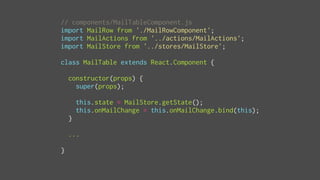
// components/MailTableComponent.js
import MailRow from './MailRowComponent';
import MailActions from '../actions/MailActions';
import MailStore from '../stores/MailStore';
class MailTable extends React.Component {
constructor(props) {
super(props);
this.state = MailStore.getState();
this.onMailChange = this.onMailChange.bind(this);
}
...
}
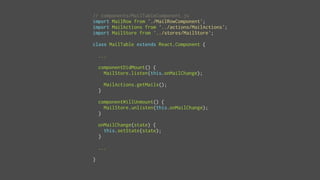
// components/MailTableComponent.js
import MailRow from './MailRowComponent';
import MailActions from '../actions/MailActions';
import MailStore from '../stores/MailStore';
class MailTable extends React.Component {
...
componentDidMount() {
MailStore.listen(this.onMailChange);
MailActions.getMails();
}
componentWillUnmount() {
MailStore.unlisten(this.onMailChange);
}
onMailChange(state) {
this.setState(state);
}
...
}
// components/MailTableComponent.js
import MailRow from './MailRowComponent';
import MailActions from '../actions/MailActions';
import MailStore from '../stores/MailStore';
class MailTable extends React.Component {
...
render() {
if (this.state.loading) {
return <p>Carregando emails...</p>
}
if (!this.state.mails.length) {
return <p>Nenhum email por enquanto.</p>
}
return (
<table className="mails-table">
<thead>...</thead>
<tbody>
{this.state.mails.map((mail) => {
return <MailRow mail={mail} />
})}
</tbody>
</table>
);
}
}
“simplificar”
O que ele pode fazer por nós
alta escalabilidade
fácil manutenção
isomorfismo
native apps com react-native
programação reativa
Quem já usa
airbnb netflix yahoo asana
atlassian coursera bbc deezer
dropbox facebook instagram
imdb imgur marvelapp
periscope reddit salesforce
uber whatsapp globoplay
(brinks)
Obrigado!
{
github: “CezarLuiz0”,
twitter: “cezar_luiz”,
email: “cezarluiz.c@gmail.com”
}

React + Flux (Alt)

  • 1.
  • 2.
    Temas abordados 1. Problemasatuais da web 2. Onde a web está 3. Futuro? 4. Como o desenvolvimento é hoje 5. React 6. Flux
  • 3.
    Cezar Luiz Programador Front-End JavaScript<3 Trabalha na Snowman Labs 23 anos
  • 4.
  • 7.
  • 8.
  • 9.
  • 10.
  • 11.
  • 16.
  • 17.
    Muito do quese faz hoje MVC Mineração de DOM - getElementById, etc Adiciona classe, retira classe Problemas de compatibilidade Dificuldade em escalar e aceitar grande quantidade de dados
  • 18.
  • 19.
  • 23.
  • 24.
    Virtual DOM React abstractsaway the DOM from you, giving a simpler programming model and better performance. React can also render on the server using Node, and it can power native apps using React Native.
  • 25.
    Data Flow React implementsone-way reactive data flow which reduces boilerplate and is easier to reason about than traditional data binding.
  • 26.
  • 28.
    Por que não pensarmais na sua aplicação, na lógica, do que ficar se preocupando com o “DOM”?
  • 29.
    import React from'react'; import ReactDOM from 'react-dom'; class HelloWorld extends React.Component { render() { return <div>Hello World!</div> } } ReactDOM.render(<HelloWorld />, mountNode); JSX
  • 31.
    import React from'react'; import ReactDOM from 'react-dom'; class HelloWorld extends React.Component { render() { return React.createElement( "div", null, "Hello World" ); } } ReactDOM.render(React.createElement(HelloWorld), mountNode); JS compilado
  • 32.
    state e PROPS Ondegerenciamos os dados da nossa aplicação
  • 34.
    import MailHeader from'./MailHeaderComponent'; import MailButtons from './MailButtonsComponent'; import MailsTable from './MailTablesComponent'; class Mails extends React.Component { render() { return ( <div className="mails-container"> <MailHeader /> <MailButtons /> <MailsTable /> </div> ); } }
  • 35.
    import HeaderTitle from'./header/HeaderTitleComponent'; import HeaderSearch from './header/HeaderSearchComponent'; import Profile from './ProfileComponent'; class MailHeader extends React.Component { render() { return ( <header className="mail-header"> <HeaderTitle title="Inbox" /> <HeaderSearch placeholder="Search..." /> <Profile user={user} /> </header> ); } }
  • 36.
    import MailRow from'./MailRowComponent'; class MailTable extends React.Component { constructor(props) { super(props); this.state = { loading: false, mails: [] }; } componentDidMount() { this.setState({ loading: true }); $.ajax({ url: `${host}/mails` }) .done((response) => { this.setState({ mails: response.results }); }) .complete(() => { this.setState({ loading: false }); }); } render() { if (this.state.loading) { return <p>Carregando emails...</p> } if (!this.state.mails.length) { return <p>Nenhum email por enquanto.</p> } return ( <table className="mails-table"> <thead>...</thead> <tbody> {this.state.mails.map((mail) => { return <MailRow mail={mail} /> })} </tbody> </table> ); } }
  • 38.
    import MailRow from'./MailRowComponent'; import $ from 'jquery'; class MailTable extends React.Component { constructor(props) { super(props); this.state = { loading: false, mails: [] }; } ... }
  • 39.
    import MailRow from'./MailRowComponent'; import $ from 'jquery'; class MailTable extends React.Component { ... componentDidMount() { this.setState({ loading: true }); $.ajax({ url: `${host}/mails` }) .done((response) => { this.setState({ mails: response.results }); }) .complete(() => { this.setState({ loading: false }); }); } ... }
  • 40.
    import MailRow from'./MailRowComponent'; class MailTable extends React.Component { ... render() { if (this.state.loading) { return <p>Carregando emails...</p> } if (!this.state.mails.length) { return <p>Nenhum email por enquanto.</p> } return ( <table className="mails-table"> <thead>...</thead> <tbody> {this.state.mails.map((mail) => { return <MailRow mail={mail} /> })} </tbody> </table> ); } }
  • 41.
    class MailRow extendsReact.Component { changeCheck() { let checkbox = this.refs.checkbox; let dom = React.findDOMNode(checkbox); // Não é tão necessário let { value, name, type } = checkbox; ... } render() { return ( <tr> <td> <input onChange={this.changeCheck.bind(this)} type="checkbox" name="checkMail" ref="checkbox" /> </td> <td>{this.props.name}</td> <td>{this.props.resume}</td> <td>{this.props.date}</td> </tr> ); } }
  • 42.
    c o mp o n e n t i z a ç ã o
  • 43.
  • 44.
    3 partes principais Mounting- Um componente irá ser inserido no DOM. Updating - Um componente está a ser re-renderizado para determinar se o DOM deverá ser atualizado. (Virtual DOM) Unmounting - Um componente está sendo removido do DOM. Além disso, o React fornece métodos de ciclos de vida para você interceptar esse processo. Métodos do tipo “will”.
  • 45.
    Mounting - 3métodos getInitialState - Chamado antes de um componente ser montado. Componentes que usam state devem implementar isso para retornar dados iniciais. componentWillMount - Chamado imediatamente antes de ocorrer a montagem. componentDidMount - Chamado imediatamente depois de ocorrer a montagem. Se precisar alterar o DOM, deve vir aqui.
  • 46.
    Updating - 4métodos componentWillReceiveProps(object nextProps) - Chamado quando um componente recebe novas propriedades. shouldComponentUpdate(object nextProps, object nextState) Deve retornar um boolean se o componente deverá ser atualizado ou não. componentWillUpdate(object nextProps, object nextState) Chamado imediatamente antes de uma atualização acontecer. Não pode chamar this.setState aqui. componentDidUpdate(object prevProps, object prevState) Chamado imediatamente depois da atualização acontecer.
  • 47.
    Unmounting - 1método componentWillUnmount - Chamado imediatamente antes de um componente ser desmontado e destruído. Limpezas devem ser feitas aqui.
  • 48.
    state props refsrender ciclos de vida componentização JSX e JS compilado UI complexas event system (onClick onChange...) ajax isso é React
  • 49.
    E o taldo flux?
  • 50.
  • 51.
  • 53.
  • 54.
  • 55.
    // dispatcher.js import altfrom 'alt'; let alt = new Alt(); export default alt;
  • 56.
    // actions/MailActions.js import altfrom '../dispatcher'; import $ from 'jquery'; class MailActions { getMails() { $.ajax({ url: `${host}/mails` }) .done((res) => { this.actions.getMailsSuccess(res); }) .fail(() => { this.actions.getMailsFail(); }); return true; } getMailsSuccess(res) { return res; } getMailsFail() { // Envia uma notificação de erro para o usuário na tela return false; } } export default alt.createActions(MailActions);
  • 57.
    // stores/MailStore.js import altfrom '../dispatcher'; import MailActions from '../actions/MailActions'; class MailStore { constructor() { this.state = { loading: false, error: false, mails: [] }; this.bindActions(MailActions); } onGetMails() { this.setState({ loading: true, error: false }); } onGetMailsSuccess(response) { this.setState({ loading: false, mails: response.result }); } onGetMailsFail(err) { this.setState({ loading: false, error: err, mails: [] }); } } export default alt.createStore(MailStore, 'MailStore');
  • 58.
    // components/MailTableComponent.js import MailRowfrom './MailRowComponent'; import MailActions from '../actions/MailActions'; import MailStore from '../stores/MailStore'; class MailTable extends React.Component { constructor(props) { super(props); this.state = MailStore.getState(); this.onMailChange = this.onMailChange.bind(this); } componentDidMount() { MailStore.listen(this.onMailChange); MailActions.getMails(); } componentWillUnmount() { MailStore.unlisten(this.onMailChange); } onMailChange(state) { this.setState(state); } render() { if (this.state.loading) { return <p>Carregando emails...</p> } if (!this.state.mails.length) { return <p>Nenhum email por enquanto.</p> } return ( <table className="mails-table"> <thead>...</thead> <tbody> {this.state.mails.map((mail) => { return <MailRow mail={mail} /> })} </tbody> </table> ); } }
  • 60.
    // components/MailTableComponent.js import MailRowfrom './MailRowComponent'; import MailActions from '../actions/MailActions'; import MailStore from '../stores/MailStore'; class MailTable extends React.Component { constructor(props) { super(props); this.state = MailStore.getState(); this.onMailChange = this.onMailChange.bind(this); } ... }
  • 61.
    // components/MailTableComponent.js import MailRowfrom './MailRowComponent'; import MailActions from '../actions/MailActions'; import MailStore from '../stores/MailStore'; class MailTable extends React.Component { ... componentDidMount() { MailStore.listen(this.onMailChange); MailActions.getMails(); } componentWillUnmount() { MailStore.unlisten(this.onMailChange); } onMailChange(state) { this.setState(state); } ... }
  • 62.
    // components/MailTableComponent.js import MailRowfrom './MailRowComponent'; import MailActions from '../actions/MailActions'; import MailStore from '../stores/MailStore'; class MailTable extends React.Component { ... render() { if (this.state.loading) { return <p>Carregando emails...</p> } if (!this.state.mails.length) { return <p>Nenhum email por enquanto.</p> } return ( <table className="mails-table"> <thead>...</thead> <tbody> {this.state.mails.map((mail) => { return <MailRow mail={mail} /> })} </tbody> </table> ); } }
  • 63.
  • 64.
    O que elepode fazer por nós alta escalabilidade fácil manutenção isomorfismo native apps com react-native programação reativa
  • 65.
    Quem já usa airbnbnetflix yahoo asana atlassian coursera bbc deezer dropbox facebook instagram imdb imgur marvelapp periscope reddit salesforce uber whatsapp globoplay
  • 67.
  • 68.