REACTREACT
COMPARTILHANDO ESTADO ENTRECOMPARTILHANDO ESTADO ENTRE
COMPONENTESCOMPONENTES
Jefferson Mariano de Souza
REVISÃO RÁPIDA SOBRE REACTREVISÃO RÁPIDA SOBRE REACT
O QUE É REACT?O QUE É REACT?
PARA QUE SERVE?PARA QUE SERVE?
Renderizar componentes
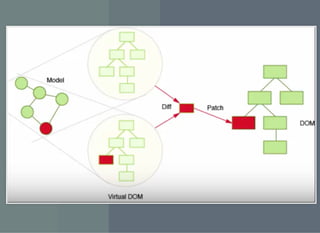
COMO ELE FUNCIONA?COMO ELE FUNCIONA?
PRINCIPAIS CONCEITOSPRINCIPAIS CONCEITOS
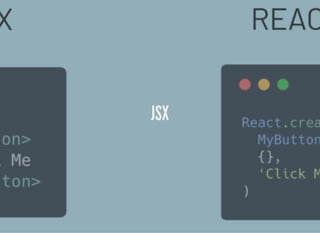
JSXJSX
OBJETIVO: RENDERIZAR O CÓDIGOOBJETIVO: RENDERIZAR O CÓDIGO
<div>
<h1>Contacts</h1>
<ul>
<li><a href="mailto:test1@test.com">test1@test.com</a></li>
<li><a href="mailto:test2@test.com">test2@test.com</a></li>
</ul>
</div>
COM JSXCOM JSX
return (
<div>
<h1>Contacts</h1>
<ul>
<li><a href="mailto:test1@test.com">test1@test.com</a></li>
<li><a href="mailto:test2@test.com">test2@test.com</a></li>
</ul>
</div>
);
COM JSXCOM JSX
return (
<div>
<h1>Contacts</h1>
<ul>
<li><a href="mailto:test1@test.com">test1@test.com</a></li>
<li><a href="mailto:test2@test.com">test2@test.com</a></li>
</ul>
</div>
);
COM JSXCOM JSX
return (
<div>
<h1>Contacts</h1>
<ul>
<li><a href="mailto:test1@test.com">test1@test.com</a></li>
<li><a href="mailto:test2@test.com">test2@test.com</a></li>
</ul>
</div>
);
SEM JSXSEM JSX
return React.createElement('div', {},
React.createElement('h1', {}, 'Contacts'),
React.createElement('ul', {},
React.createElement('li', {},
React.createElement('a', {href: 'mailto:test1@test.com'}, '
),
React.createElement('li', {},
React.createElement('a', {href: 'mailto:test2@test.com'}, '
)
)
);
SEM JSXSEM JSX
return React.createElement('div', {},
React.createElement('h1', {}, 'Contacts'),
React.createElement('ul', {},
React.createElement('li', {},
React.createElement('a', {href: 'mailto:test1@test.com'}, '
),
React.createElement('li', {},
React.createElement('a', {href: 'mailto:test2@test.com'}, '
)
)
);
SEM JSXSEM JSX
return React.createElement('div', {},
React.createElement('h1', {}, 'Contacts'),
React.createElement('ul', {},
React.createElement('li', {},
React.createElement('a', {href: 'mailto:test1@test.com'}, '
),
React.createElement('li', {},
React.createElement('a', {href: 'mailto:test2@test.com'}, '
)
)
);
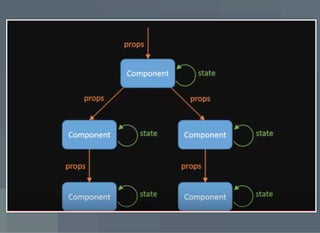
PROPRIEDADESPROPRIEDADES
Dados externos
Imutáveis
ESTADOESTADO
Dados armazenados pelo componente
Pode ser mutável, gerenciado pelo componente
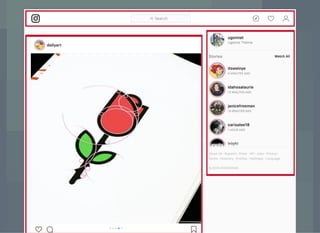
EXEMPLOS DE COMPONENTESEXEMPLOS DE COMPONENTES
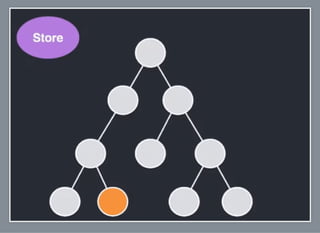
ESTADO COMPARTILHADOESTADO COMPARTILHADO
Partes da aplicação se comunicam
Dado precisa ser sincronizado entre componentes
COMO RESOLVER ESTE PROBLEMA?COMO RESOLVER ESTE PROBLEMA?
Como coordenar as ações para executarem em um
uxo?
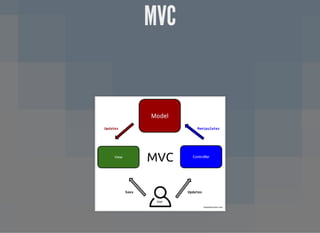
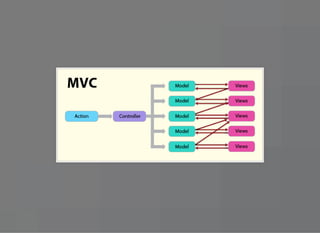
MVCMVC
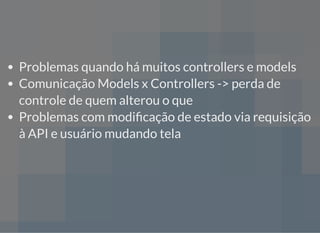
Problemas quando há muitos controllers e models
Comunicação Models x Controllers -> perda de
controle de quem alterou o que
Problemas quando há muitos controllers e models
Comunicação Models x Controllers -> perda de
controle de quem alterou o que
Problemas com modi cação de estado via requisição
à API e usuário mudando tela
Problemas quando há muitos controllers e models
Comunicação Models x Controllers -> perda de
controle de quem alterou o que
Problemas com modi cação de estado via requisição
à API e usuário mudando tela
Não há uma fonte única de dados da aplicação em
determinadas situações
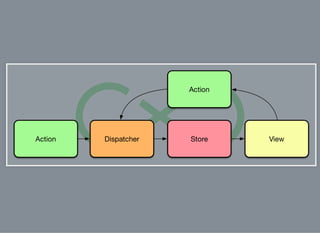
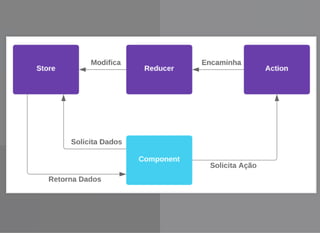
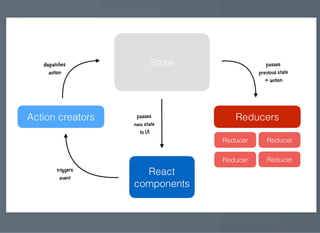
FLUXFLUX
FLUXFLUX
Arquitetura
FLUXFLUX
Arquitetura
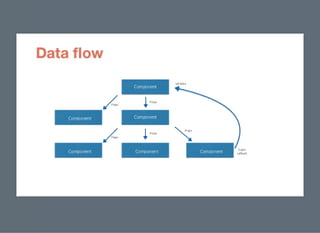
De ne um uxo único de dados
PARA QUE SERVE?PARA QUE SERVE?
Gerenciar os dados da aplicação
entrada de dados do usuario
dados de uma api
ações do usuário
Controlar como a aplicação deve se comportar com
base na mudança destes dados
QUANDO DEVO USAR?QUANDO DEVO USAR?
Compartilhar estado entre componentes
Centralizar as regras de negócio da aplicação
Agir com efeitos colaterais
IMPLEMENTAÇÕES DE FLUXIMPLEMENTAÇÕES DE FLUX
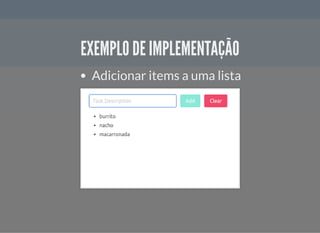
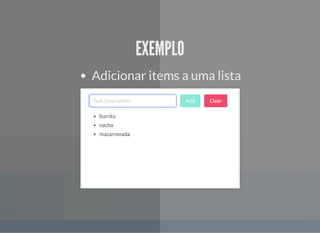
EXEMPLO DE IMPLEMENTAÇÃOEXEMPLO DE IMPLEMENTAÇÃO
Adicionar items a uma lista
SEM USAR LIBSSEM USAR LIBS
VANTAGENSVANTAGENS
Aprendizado
DESVANTAGENSDESVANTAGENS
Código repetitivo
Refazer algo que já existe
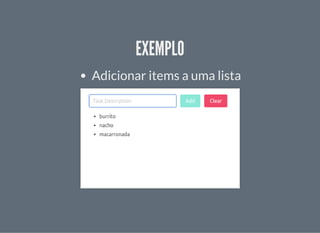
EXEMPLOEXEMPLO
Adicionar items a uma lista
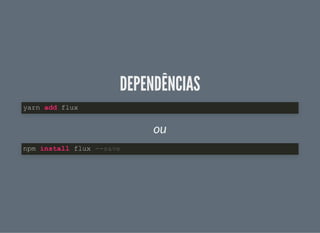
DEPENDÊNCIASDEPENDÊNCIAS
ou
yarn add flux
npm install flux --save
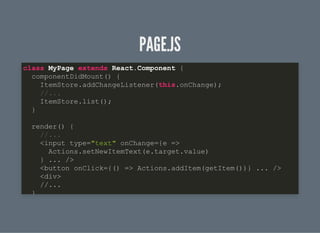
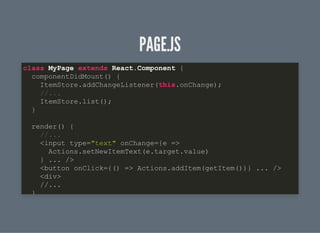
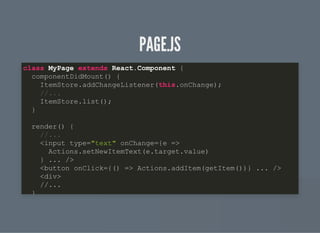
PAGE.JSPAGE.JS
class MyPage extends React.Component {
componentDidMount() {
ItemStore.addChangeListener(this.onChange);
//...
ItemStore.list();
}
render() {
//...
<input type="text" onChange={e =>
Actions.setNewItemText(e.target.value)
} ... />
<button onClick={() => Actions.addItem(getItem())} ... />
<div>
//...
}
PAGE.JSPAGE.JS
class MyPage extends React.Component {
componentDidMount() {
ItemStore.addChangeListener(this.onChange);
//...
ItemStore.list();
}
render() {
//...
<input type="text" onChange={e =>
Actions.setNewItemText(e.target.value)
} ... />
<button onClick={() => Actions.addItem(getItem())} ... />
<div>
//...
}
PAGE.JSPAGE.JS
class MyPage extends React.Component {
componentDidMount() {
ItemStore.addChangeListener(this.onChange);
//...
ItemStore.list();
}
render() {
//...
<input type="text" onChange={e =>
Actions.setNewItemText(e.target.value)
} ... />
<button onClick={() => Actions.addItem(getItem())} ... />
<div>
//...
}
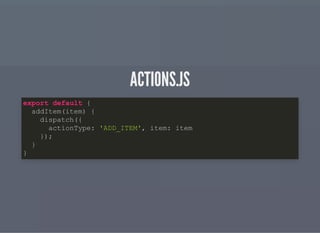
ACTIONS.JSACTIONS.JS
export default {
addItem(item) {
dispatch({
actionType: 'ADD_ITEM', item: item
});
}
}
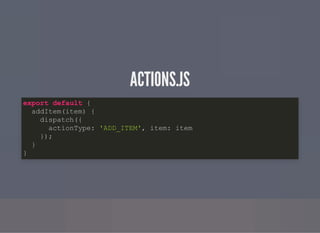
ACTIONS.JSACTIONS.JS
export default {
addItem(item) {
dispatch({
actionType: 'ADD_ITEM', item: item
});
}
}
ITEMSTORE.JSITEMSTORE.JS
let items = [];
const ItemStore = Object.assign({}, EventEmitter.prototype, {
//outros métodos
dispatcherIndex: register( function( action ){
switch(action.actionType){
case 'ADD_ITEM':
items.push(action.item)
ItemStore.emitChange();
break;
//...
}
})
ITEMSTORE.JSITEMSTORE.JS
let items = [];
const ItemStore = Object.assign({}, EventEmitter.prototype, {
//outros métodos
dispatcherIndex: register( function( action ){
switch(action.actionType){
case 'ADD_ITEM':
items.push(action.item)
ItemStore.emitChange();
break;
//...
}
})
ITEMSTORE.JSITEMSTORE.JS
let items = [];
const ItemStore = Object.assign({}, EventEmitter.prototype, {
//outros métodos
dispatcherIndex: register( function( action ){
switch(action.actionType){
case 'ADD_ITEM':
items.push(action.item)
ItemStore.emitChange();
break;
//...
}
})
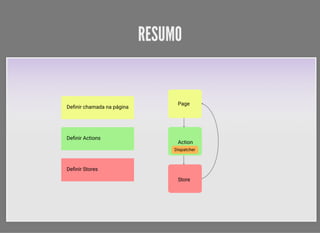
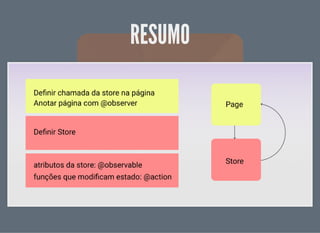
RESUMORESUMO
REDUXREDUX
REDUXREDUX
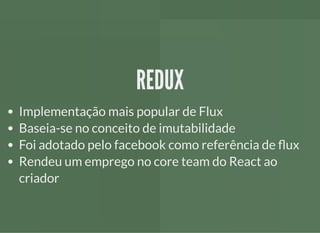
Implementação mais popular de Flux
REDUXREDUX
Implementação mais popular de Flux
Baseia-se no conceito de imutabilidade
REDUXREDUX
Implementação mais popular de Flux
Baseia-se no conceito de imutabilidade
Foi adotado pelo facebook como referência de ux
REDUXREDUX
Implementação mais popular de Flux
Baseia-se no conceito de imutabilidade
Foi adotado pelo facebook como referência de ux
Rendeu um emprego no core team do React ao
criador
REDUX - CARACTERÍSTICASREDUX - CARACTERÍSTICAS
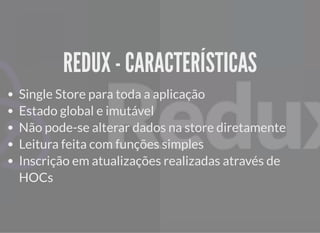
Single Store para toda a aplicação
REDUX - CARACTERÍSTICASREDUX - CARACTERÍSTICAS
Single Store para toda a aplicação
Estado global e imutável
REDUX - CARACTERÍSTICASREDUX - CARACTERÍSTICAS
Single Store para toda a aplicação
Estado global e imutável
Não pode-se alterar dados na store diretamente
REDUX - CARACTERÍSTICASREDUX - CARACTERÍSTICAS
Single Store para toda a aplicação
Estado global e imutável
Não pode-se alterar dados na store diretamente
Leitura feita com funções simples
REDUX - CARACTERÍSTICASREDUX - CARACTERÍSTICAS
Single Store para toda a aplicação
Estado global e imutável
Não pode-se alterar dados na store diretamente
Leitura feita com funções simples
Inscrição em atualizações realizadas através de
HOCs
REDUX - CARACTERÍSTICASREDUX - CARACTERÍSTICAS
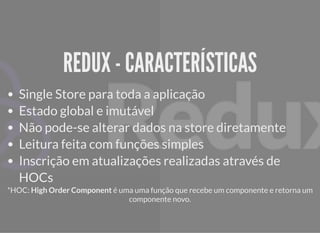
Single Store para toda a aplicação
Estado global e imutável
Não pode-se alterar dados na store diretamente
Leitura feita com funções simples
Inscrição em atualizações realizadas através de
HOCs
*HOC: High Order Component é uma uma função que recebe um componente e retorna um
componente novo.
EXEMPLOEXEMPLO
Adicionar items a uma lista
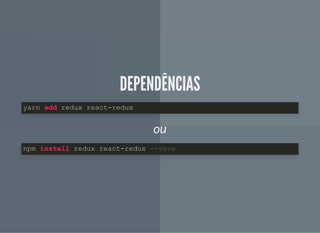
DEPENDÊNCIASDEPENDÊNCIAS
ou
yarn add redux react-redux
npm install redux react-redux --save
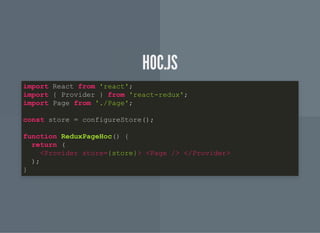
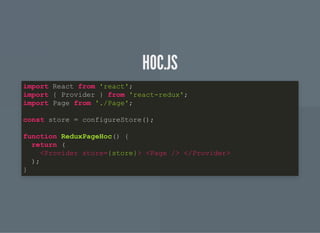
HOC.JSHOC.JS
import React from 'react';
import { Provider } from 'react-redux';
import Page from './Page';
const store = configureStore();
function ReduxPageHoc() {
return (
<Provider store={store}> <Page /> </Provider>
);
}
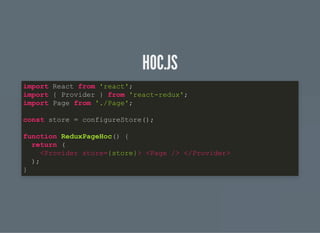
HOC.JSHOC.JS
import React from 'react';
import { Provider } from 'react-redux';
import Page from './Page';
const store = configureStore();
function ReduxPageHoc() {
return (
<Provider store={store}> <Page /> </Provider>
);
}
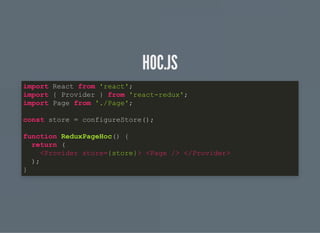
HOC.JSHOC.JS
import React from 'react';
import { Provider } from 'react-redux';
import Page from './Page';
const store = configureStore();
function ReduxPageHoc() {
return (
<Provider store={store}> <Page /> </Provider>
);
}
HOC.JSHOC.JS
import React from 'react';
import { Provider } from 'react-redux';
import Page from './Page';
const store = configureStore();
function ReduxPageHoc() {
return (
<Provider store={store}> <Page /> </Provider>
);
}
STORE.JSSTORE.JS
import { createStore, applyMiddleware } from 'redux';
import Reducers from './Reducers';
let middleware = [];
const configureStore = initialState => {
return createStore(Reducers, applyMiddleware(...middleware));
};
export default configureStore;
STORE.JSSTORE.JS
import { createStore, applyMiddleware } from 'redux';
import Reducers from './Reducers';
let middleware = [];
const configureStore = initialState => {
return createStore(Reducers, applyMiddleware(...middleware));
};
export default configureStore;
STORE.JSSTORE.JS
import { createStore, applyMiddleware } from 'redux';
import Reducers from './Reducers';
let middleware = [];
const configureStore = initialState => {
return createStore(Reducers, applyMiddleware(...middleware));
};
export default configureStore;
STORE.JSSTORE.JS
import { createStore, applyMiddleware } from 'redux';
import Reducers from './Reducers';
let middleware = [];
const configureStore = initialState => {
return createStore(Reducers, applyMiddleware(...middleware));
};
export default configureStore;
REDUCER.JSREDUCER.JS
const INITIAL_STATE = {
items: [],
currentText: '',
};
export function reducer(state = INITIAL_STATE, action) {
switch (action.type) {
case 'ADD_ITEM':
return {
...state,
items: [...state.items, state.currentText],
currentText: '',
};
case 'CLEAR_ITEMS':
return {
state,
REDUCER.JSREDUCER.JS
const INITIAL_STATE = {
items: [],
currentText: '',
};
export function reducer(state = INITIAL_STATE, action) {
switch (action.type) {
case 'ADD_ITEM':
return {
...state,
items: [...state.items, state.currentText],
currentText: '',
};
case 'CLEAR_ITEMS':
return {
state,
REDUCER.JSREDUCER.JS
const INITIAL_STATE = {
items: [],
currentText: '',
};
export function reducer(state = INITIAL_STATE, action) {
switch (action.type) {
case 'ADD_ITEM':
return {
...state,
items: [...state.items, state.currentText],
currentText: '',
};
case 'CLEAR_ITEMS':
return {
state,
REDUCER.JSREDUCER.JS
const INITIAL_STATE = {
items: [],
currentText: '',
};
export function reducer(state = INITIAL_STATE, action) {
switch (action.type) {
case 'ADD_ITEM':
return {
...state,
items: [...state.items, state.currentText],
currentText: '',
};
case 'CLEAR_ITEMS':
return {
state,
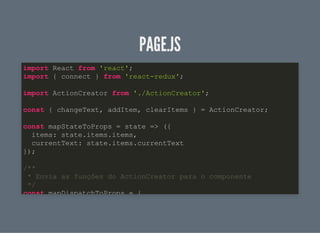
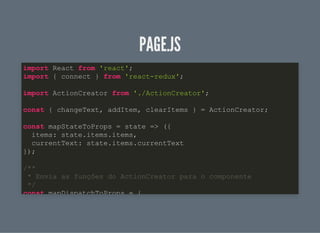
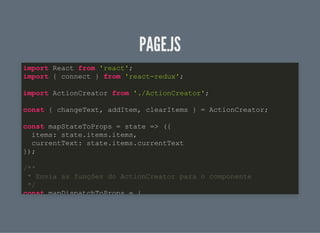
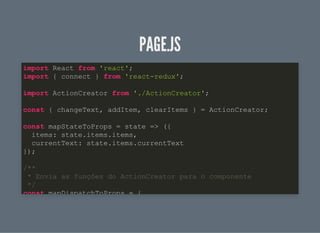
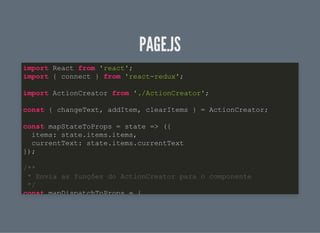
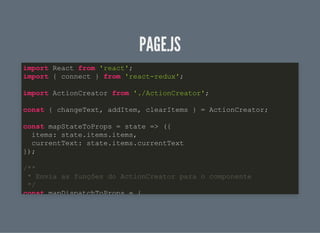
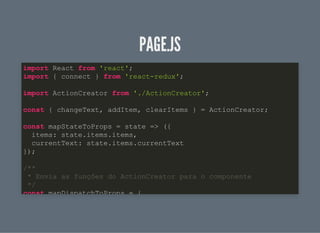
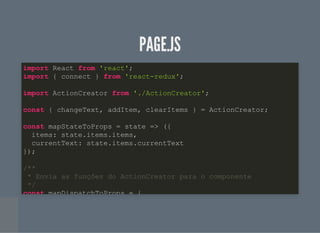
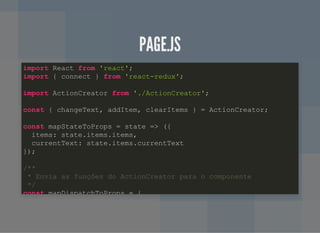
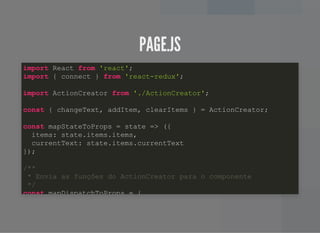
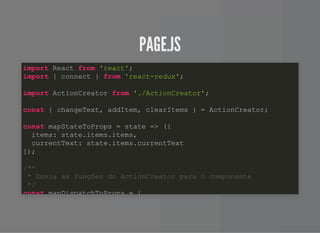
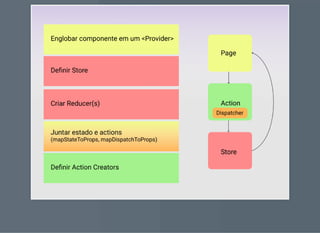
PAGE.JSPAGE.JS
import React from 'react';
import { connect } from 'react-redux';
import ActionCreator from './ActionCreator';
const { changeText, addItem, clearItems } = ActionCreator;
const mapStateToProps = state => ({
items: state.items.items,
currentText: state.items.currentText
});
/**
* Envia as funções do ActionCreator para o componente
*/
const mapDispatchToProps = {
PAGE.JSPAGE.JS
import React from 'react';
import { connect } from 'react-redux';
import ActionCreator from './ActionCreator';
const { changeText, addItem, clearItems } = ActionCreator;
const mapStateToProps = state => ({
items: state.items.items,
currentText: state.items.currentText
});
/**
* Envia as funções do ActionCreator para o componente
*/
const mapDispatchToProps = {
PAGE.JSPAGE.JS
import React from 'react';
import { connect } from 'react-redux';
import ActionCreator from './ActionCreator';
const { changeText, addItem, clearItems } = ActionCreator;
const mapStateToProps = state => ({
items: state.items.items,
currentText: state.items.currentText
});
/**
* Envia as funções do ActionCreator para o componente
*/
const mapDispatchToProps = {
PAGE.JSPAGE.JS
import React from 'react';
import { connect } from 'react-redux';
import ActionCreator from './ActionCreator';
const { changeText, addItem, clearItems } = ActionCreator;
const mapStateToProps = state => ({
items: state.items.items,
currentText: state.items.currentText
});
/**
* Envia as funções do ActionCreator para o componente
*/
const mapDispatchToProps = {
PAGE.JSPAGE.JS
import React from 'react';
import { connect } from 'react-redux';
import ActionCreator from './ActionCreator';
const { changeText, addItem, clearItems } = ActionCreator;
const mapStateToProps = state => ({
items: state.items.items,
currentText: state.items.currentText
});
/**
* Envia as funções do ActionCreator para o componente
*/
const mapDispatchToProps = {
PAGE.JSPAGE.JS
import React from 'react';
import { connect } from 'react-redux';
import ActionCreator from './ActionCreator';
const { changeText, addItem, clearItems } = ActionCreator;
const mapStateToProps = state => ({
items: state.items.items,
currentText: state.items.currentText
});
/**
* Envia as funções do ActionCreator para o componente
*/
const mapDispatchToProps = {
PAGE.JSPAGE.JS
import React from 'react';
import { connect } from 'react-redux';
import ActionCreator from './ActionCreator';
const { changeText, addItem, clearItems } = ActionCreator;
const mapStateToProps = state => ({
items: state.items.items,
currentText: state.items.currentText
});
/**
* Envia as funções do ActionCreator para o componente
*/
const mapDispatchToProps = {
PAGE.JSPAGE.JS
import React from 'react';
import { connect } from 'react-redux';
import ActionCreator from './ActionCreator';
const { changeText, addItem, clearItems } = ActionCreator;
const mapStateToProps = state => ({
items: state.items.items,
currentText: state.items.currentText
});
/**
* Envia as funções do ActionCreator para o componente
*/
const mapDispatchToProps = {
PAGE.JSPAGE.JS
import React from 'react';
import { connect } from 'react-redux';
import ActionCreator from './ActionCreator';
const { changeText, addItem, clearItems } = ActionCreator;
const mapStateToProps = state => ({
items: state.items.items,
currentText: state.items.currentText
});
/**
* Envia as funções do ActionCreator para o componente
*/
const mapDispatchToProps = {
PAGE.JSPAGE.JS
import React from 'react';
import { connect } from 'react-redux';
import ActionCreator from './ActionCreator';
const { changeText, addItem, clearItems } = ActionCreator;
const mapStateToProps = state => ({
items: state.items.items,
currentText: state.items.currentText
});
/**
* Envia as funções do ActionCreator para o componente
*/
const mapDispatchToProps = {
PAGE.JSPAGE.JS
import React from 'react';
import { connect } from 'react-redux';
import ActionCreator from './ActionCreator';
const { changeText, addItem, clearItems } = ActionCreator;
const mapStateToProps = state => ({
items: state.items.items,
currentText: state.items.currentText
});
/**
* Envia as funções do ActionCreator para o componente
*/
const mapDispatchToProps = {
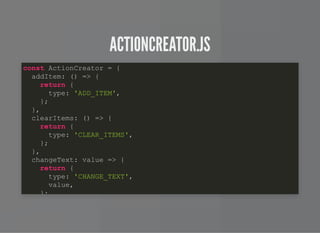
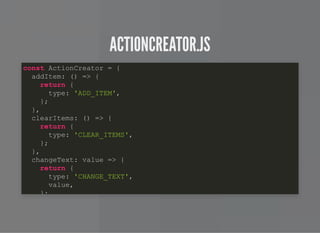
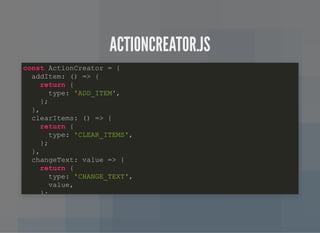
ACTIONCREATOR.JSACTIONCREATOR.JS
const ActionCreator = {
addItem: () => {
return {
type: 'ADD_ITEM',
};
},
clearItems: () => {
return {
type: 'CLEAR_ITEMS',
};
},
changeText: value => {
return {
type: 'CHANGE_TEXT',
value,
};
ACTIONCREATOR.JSACTIONCREATOR.JS
const ActionCreator = {
addItem: () => {
return {
type: 'ADD_ITEM',
};
},
clearItems: () => {
return {
type: 'CLEAR_ITEMS',
};
},
changeText: value => {
return {
type: 'CHANGE_TEXT',
value,
};
ACTIONCREATOR.JSACTIONCREATOR.JS
const ActionCreator = {
addItem: () => {
return {
type: 'ADD_ITEM',
};
},
clearItems: () => {
return {
type: 'CLEAR_ITEMS',
};
},
changeText: value => {
return {
type: 'CHANGE_TEXT',
value,
};
RESUMORESUMO
MOBXMOBX
MOBXMOBX
biblioteca de gerenciamento de estado
MOBXMOBX
biblioteca de gerenciamento de estado
forma de trabalho parecida com orientação a objetos
MOBXMOBX
biblioteca de gerenciamento de estado
forma de trabalho parecida com orientação a objetos
abstrai a complexidade de Dispatch e Notify das
implementações ux
MOBXMOBX
biblioteca de gerenciamento de estado
forma de trabalho parecida com orientação a objetos
abstrai a complexidade de Dispatch e Notify das
implementações ux
permite múltiplas stores
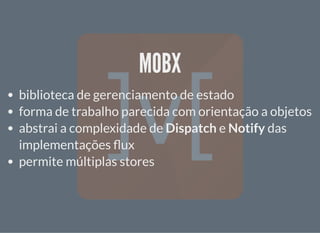
MOBXMOBX
biblioteca de gerenciamento de estado
forma de trabalho parecida com orientação a objetos
abstrai a complexidade de Dispatch e Notify das
implementações ux
permite múltiplas stores
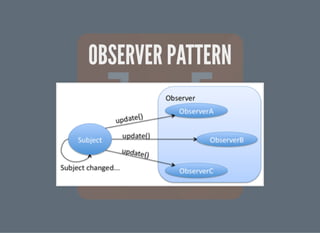
seu uso se baseia no design pattern Observer
OBSERVER PATTERNOBSERVER PATTERN
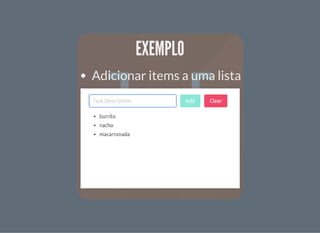
EXEMPLOEXEMPLO
Adicionar items a uma lista
DEPENDÊNCIASDEPENDÊNCIAS
ou
yarn add mobx mobx-react
npm install mobx mobx-react --save
.BABELRC.BABELRC
{
"presets": ["@babel/preset-env", "@babel/preset-react"],
"plugins": [
["@babel/plugin-proposal-decorators", { "legacy": true }],
["@babel/plugin-proposal-class-properties", { "loose": true }
]
}
.BABELRC.BABELRC
{
"presets": ["@babel/preset-env", "@babel/preset-react"],
"plugins": [
["@babel/plugin-proposal-decorators", { "legacy": true }],
["@babel/plugin-proposal-class-properties", { "loose": true }
]
}
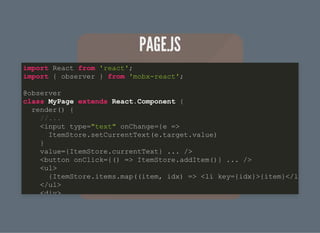
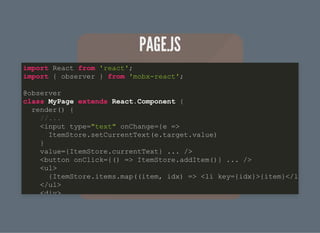
PAGE.JSPAGE.JS
import React from 'react';
import { observer } from 'mobx-react';
@observer
class MyPage extends React.Component {
render() {
//...
<input type="text" onChange={e =>
ItemStore.setCurrentText(e.target.value)
}
value={ItemStore.currentText} ... />
<button onClick={() => ItemStore.addItem()} ... />
<ul>
{ItemStore.items.map((item, idx) => <li key={idx}>{item}</l
</ul>
<div>
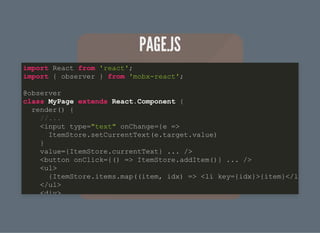
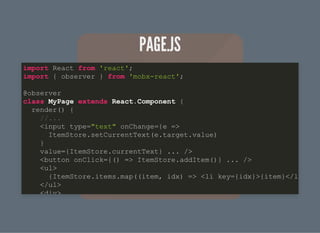
PAGE.JSPAGE.JS
import React from 'react';
import { observer } from 'mobx-react';
@observer
class MyPage extends React.Component {
render() {
//...
<input type="text" onChange={e =>
ItemStore.setCurrentText(e.target.value)
}
value={ItemStore.currentText} ... />
<button onClick={() => ItemStore.addItem()} ... />
<ul>
{ItemStore.items.map((item, idx) => <li key={idx}>{item}</l
</ul>
<div>
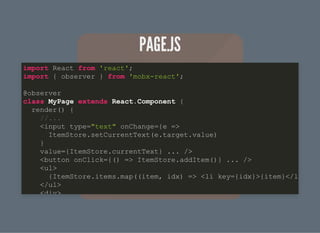
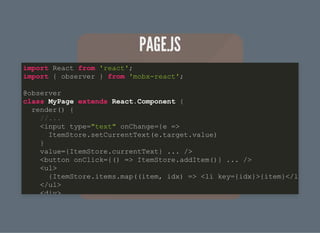
PAGE.JSPAGE.JS
import React from 'react';
import { observer } from 'mobx-react';
@observer
class MyPage extends React.Component {
render() {
//...
<input type="text" onChange={e =>
ItemStore.setCurrentText(e.target.value)
}
value={ItemStore.currentText} ... />
<button onClick={() => ItemStore.addItem()} ... />
<ul>
{ItemStore.items.map((item, idx) => <li key={idx}>{item}</l
</ul>
<div>
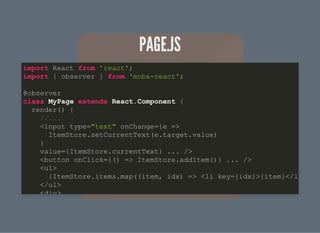
PAGE.JSPAGE.JS
import React from 'react';
import { observer } from 'mobx-react';
@observer
class MyPage extends React.Component {
render() {
//...
<input type="text" onChange={e =>
ItemStore.setCurrentText(e.target.value)
}
value={ItemStore.currentText} ... />
<button onClick={() => ItemStore.addItem()} ... />
<ul>
{ItemStore.items.map((item, idx) => <li key={idx}>{item}</l
</ul>
<div>
PAGE.JSPAGE.JS
import React from 'react';
import { observer } from 'mobx-react';
@observer
class MyPage extends React.Component {
render() {
//...
<input type="text" onChange={e =>
ItemStore.setCurrentText(e.target.value)
}
value={ItemStore.currentText} ... />
<button onClick={() => ItemStore.addItem()} ... />
<ul>
{ItemStore.items.map((item, idx) => <li key={idx}>{item}</l
</ul>
<div>
PAGE.JSPAGE.JS
import React from 'react';
import { observer } from 'mobx-react';
@observer
class MyPage extends React.Component {
render() {
//...
<input type="text" onChange={e =>
ItemStore.setCurrentText(e.target.value)
}
value={ItemStore.currentText} ... />
<button onClick={() => ItemStore.addItem()} ... />
<ul>
{ItemStore.items.map((item, idx) => <li key={idx}>{item}</l
</ul>
<div>
PAGE.JSPAGE.JS
import React from 'react';
import { observer } from 'mobx-react';
@observer
class MyPage extends React.Component {
render() {
//...
<input type="text" onChange={e =>
ItemStore.setCurrentText(e.target.value)
}
value={ItemStore.currentText} ... />
<button onClick={() => ItemStore.addItem()} ... />
<ul>
{ItemStore.items.map((item, idx) => <li key={idx}>{item}</l
</ul>
<div>
ITEMSTORE.JSITEMSTORE.JS
class ItemStore {
@observable
items = [];
@observable
currentText = '';
@action
setCurrentText(text) {
this.currentText = text;
}
@action
addItem() {
this.items.push({ text: this.currentText });
this setCurrentText('');
ITEMSTORE.JSITEMSTORE.JS
class ItemStore {
@observable
items = [];
@observable
currentText = '';
@action
setCurrentText(text) {
this.currentText = text;
}
@action
addItem() {
this.items.push({ text: this.currentText });
this setCurrentText('');
ITEMSTORE.JSITEMSTORE.JS
class ItemStore {
@observable
items = [];
@observable
currentText = '';
@action
setCurrentText(text) {
this.currentText = text;
}
@action
addItem() {
this.items.push({ text: this.currentText });
this setCurrentText('');
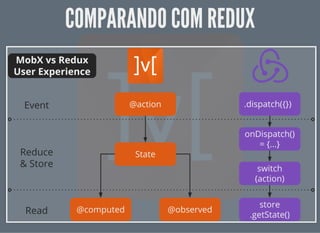
COMPARANDO COM REDUXCOMPARANDO COM REDUX
RESUMORESUMO
CONCLUSÃOCONCLUSÃO
CONCLUSÃOCONCLUSÃO
Por que usar ux?
CONCLUSÃOCONCLUSÃO
Por que usar ux?
Gerenciar informações da aplicação
entrada de dados do usuário
consumir dados de uma api
ações do usuário
CONCLUSÃOCONCLUSÃO
Quando usar ux?
CONCLUSÃOCONCLUSÃO
Quando usar ux?
compartilhar estado entre componentes
centralizar as regras de negócio da aplicação
informações transitam entre componentes
agir com efeitos colaterais
THE ENDTHE END
Apresentação disponível em:
Implementação exemplo:
Implementação rodando:
http://studiojms.github.io/react- ux-presentation
https://github.com/studiojms/react- ux
https://studiojms.github.io/react- ux/

React - Compartilhando estado entre componentes

  • 1.
    REACTREACT COMPARTILHANDO ESTADO ENTRECOMPARTILHANDOESTADO ENTRE COMPONENTESCOMPONENTES Jefferson Mariano de Souza
  • 2.
    REVISÃO RÁPIDA SOBREREACTREVISÃO RÁPIDA SOBRE REACT O QUE É REACT?O QUE É REACT?
  • 4.
  • 5.
    PARA QUE SERVE?PARAQUE SERVE? Renderizar componentes
  • 6.
  • 8.
  • 10.
  • 11.
    OBJETIVO: RENDERIZAR OCÓDIGOOBJETIVO: RENDERIZAR O CÓDIGO <div> <h1>Contacts</h1> <ul> <li><a href="mailto:test1@test.com">test1@test.com</a></li> <li><a href="mailto:test2@test.com">test2@test.com</a></li> </ul> </div>
  • 12.
    COM JSXCOM JSX return( <div> <h1>Contacts</h1> <ul> <li><a href="mailto:test1@test.com">test1@test.com</a></li> <li><a href="mailto:test2@test.com">test2@test.com</a></li> </ul> </div> );
  • 13.
    COM JSXCOM JSX return( <div> <h1>Contacts</h1> <ul> <li><a href="mailto:test1@test.com">test1@test.com</a></li> <li><a href="mailto:test2@test.com">test2@test.com</a></li> </ul> </div> );
  • 14.
    COM JSXCOM JSX return( <div> <h1>Contacts</h1> <ul> <li><a href="mailto:test1@test.com">test1@test.com</a></li> <li><a href="mailto:test2@test.com">test2@test.com</a></li> </ul> </div> );
  • 15.
    SEM JSXSEM JSX returnReact.createElement('div', {}, React.createElement('h1', {}, 'Contacts'), React.createElement('ul', {}, React.createElement('li', {}, React.createElement('a', {href: 'mailto:test1@test.com'}, ' ), React.createElement('li', {}, React.createElement('a', {href: 'mailto:test2@test.com'}, ' ) ) );
  • 16.
    SEM JSXSEM JSX returnReact.createElement('div', {}, React.createElement('h1', {}, 'Contacts'), React.createElement('ul', {}, React.createElement('li', {}, React.createElement('a', {href: 'mailto:test1@test.com'}, ' ), React.createElement('li', {}, React.createElement('a', {href: 'mailto:test2@test.com'}, ' ) ) );
  • 17.
    SEM JSXSEM JSX returnReact.createElement('div', {}, React.createElement('h1', {}, 'Contacts'), React.createElement('ul', {}, React.createElement('li', {}, React.createElement('a', {href: 'mailto:test1@test.com'}, ' ), React.createElement('li', {}, React.createElement('a', {href: 'mailto:test2@test.com'}, ' ) ) );
  • 18.
  • 19.
    ESTADOESTADO Dados armazenados pelocomponente Pode ser mutável, gerenciado pelo componente
  • 22.
  • 27.
  • 31.
    Partes da aplicaçãose comunicam Dado precisa ser sincronizado entre componentes
  • 32.
    COMO RESOLVER ESTEPROBLEMA?COMO RESOLVER ESTE PROBLEMA? Como coordenar as ações para executarem em um uxo?
  • 33.
  • 36.
    Problemas quando hámuitos controllers e models
  • 37.
    Problemas quando hámuitos controllers e models Comunicação Models x Controllers -> perda de controle de quem alterou o que
  • 38.
    Problemas quando hámuitos controllers e models Comunicação Models x Controllers -> perda de controle de quem alterou o que Problemas com modi cação de estado via requisição à API e usuário mudando tela
  • 39.
    Problemas quando hámuitos controllers e models Comunicação Models x Controllers -> perda de controle de quem alterou o que Problemas com modi cação de estado via requisição à API e usuário mudando tela Não há uma fonte única de dados da aplicação em determinadas situações
  • 40.
  • 41.
  • 42.
    FLUXFLUX Arquitetura De ne umuxo único de dados
  • 43.
    PARA QUE SERVE?PARAQUE SERVE? Gerenciar os dados da aplicação entrada de dados do usuario dados de uma api ações do usuário Controlar como a aplicação deve se comportar com base na mudança destes dados
  • 44.
    QUANDO DEVO USAR?QUANDODEVO USAR? Compartilhar estado entre componentes Centralizar as regras de negócio da aplicação Agir com efeitos colaterais
  • 47.
  • 48.
    EXEMPLO DE IMPLEMENTAÇÃOEXEMPLODE IMPLEMENTAÇÃO Adicionar items a uma lista
  • 49.
  • 51.
  • 52.
  • 53.
  • 54.
  • 55.
    PAGE.JSPAGE.JS class MyPage extendsReact.Component { componentDidMount() { ItemStore.addChangeListener(this.onChange); //... ItemStore.list(); } render() { //... <input type="text" onChange={e => Actions.setNewItemText(e.target.value) } ... /> <button onClick={() => Actions.addItem(getItem())} ... /> <div> //... }
  • 56.
    PAGE.JSPAGE.JS class MyPage extendsReact.Component { componentDidMount() { ItemStore.addChangeListener(this.onChange); //... ItemStore.list(); } render() { //... <input type="text" onChange={e => Actions.setNewItemText(e.target.value) } ... /> <button onClick={() => Actions.addItem(getItem())} ... /> <div> //... }
  • 57.
    PAGE.JSPAGE.JS class MyPage extendsReact.Component { componentDidMount() { ItemStore.addChangeListener(this.onChange); //... ItemStore.list(); } render() { //... <input type="text" onChange={e => Actions.setNewItemText(e.target.value) } ... /> <button onClick={() => Actions.addItem(getItem())} ... /> <div> //... }
  • 58.
    ACTIONS.JSACTIONS.JS export default { addItem(item){ dispatch({ actionType: 'ADD_ITEM', item: item }); } }
  • 59.
    ACTIONS.JSACTIONS.JS export default { addItem(item){ dispatch({ actionType: 'ADD_ITEM', item: item }); } }
  • 60.
    ITEMSTORE.JSITEMSTORE.JS let items =[]; const ItemStore = Object.assign({}, EventEmitter.prototype, { //outros métodos dispatcherIndex: register( function( action ){ switch(action.actionType){ case 'ADD_ITEM': items.push(action.item) ItemStore.emitChange(); break; //... } })
  • 61.
    ITEMSTORE.JSITEMSTORE.JS let items =[]; const ItemStore = Object.assign({}, EventEmitter.prototype, { //outros métodos dispatcherIndex: register( function( action ){ switch(action.actionType){ case 'ADD_ITEM': items.push(action.item) ItemStore.emitChange(); break; //... } })
  • 62.
    ITEMSTORE.JSITEMSTORE.JS let items =[]; const ItemStore = Object.assign({}, EventEmitter.prototype, { //outros métodos dispatcherIndex: register( function( action ){ switch(action.actionType){ case 'ADD_ITEM': items.push(action.item) ItemStore.emitChange(); break; //... } })
  • 63.
  • 64.
  • 65.
  • 66.
    REDUXREDUX Implementação mais popularde Flux Baseia-se no conceito de imutabilidade
  • 67.
    REDUXREDUX Implementação mais popularde Flux Baseia-se no conceito de imutabilidade Foi adotado pelo facebook como referência de ux
  • 68.
    REDUXREDUX Implementação mais popularde Flux Baseia-se no conceito de imutabilidade Foi adotado pelo facebook como referência de ux Rendeu um emprego no core team do React ao criador
  • 69.
  • 70.
    REDUX - CARACTERÍSTICASREDUX- CARACTERÍSTICAS Single Store para toda a aplicação
  • 71.
    REDUX - CARACTERÍSTICASREDUX- CARACTERÍSTICAS Single Store para toda a aplicação Estado global e imutável
  • 72.
    REDUX - CARACTERÍSTICASREDUX- CARACTERÍSTICAS Single Store para toda a aplicação Estado global e imutável Não pode-se alterar dados na store diretamente
  • 73.
    REDUX - CARACTERÍSTICASREDUX- CARACTERÍSTICAS Single Store para toda a aplicação Estado global e imutável Não pode-se alterar dados na store diretamente Leitura feita com funções simples
  • 74.
    REDUX - CARACTERÍSTICASREDUX- CARACTERÍSTICAS Single Store para toda a aplicação Estado global e imutável Não pode-se alterar dados na store diretamente Leitura feita com funções simples Inscrição em atualizações realizadas através de HOCs
  • 75.
    REDUX - CARACTERÍSTICASREDUX- CARACTERÍSTICAS Single Store para toda a aplicação Estado global e imutável Não pode-se alterar dados na store diretamente Leitura feita com funções simples Inscrição em atualizações realizadas através de HOCs *HOC: High Order Component é uma uma função que recebe um componente e retorna um componente novo.
  • 79.
  • 80.
    DEPENDÊNCIASDEPENDÊNCIAS ou yarn add reduxreact-redux npm install redux react-redux --save
  • 81.
    HOC.JSHOC.JS import React from'react'; import { Provider } from 'react-redux'; import Page from './Page'; const store = configureStore(); function ReduxPageHoc() { return ( <Provider store={store}> <Page /> </Provider> ); }
  • 82.
    HOC.JSHOC.JS import React from'react'; import { Provider } from 'react-redux'; import Page from './Page'; const store = configureStore(); function ReduxPageHoc() { return ( <Provider store={store}> <Page /> </Provider> ); }
  • 83.
    HOC.JSHOC.JS import React from'react'; import { Provider } from 'react-redux'; import Page from './Page'; const store = configureStore(); function ReduxPageHoc() { return ( <Provider store={store}> <Page /> </Provider> ); }
  • 84.
    HOC.JSHOC.JS import React from'react'; import { Provider } from 'react-redux'; import Page from './Page'; const store = configureStore(); function ReduxPageHoc() { return ( <Provider store={store}> <Page /> </Provider> ); }
  • 85.
    STORE.JSSTORE.JS import { createStore,applyMiddleware } from 'redux'; import Reducers from './Reducers'; let middleware = []; const configureStore = initialState => { return createStore(Reducers, applyMiddleware(...middleware)); }; export default configureStore;
  • 86.
    STORE.JSSTORE.JS import { createStore,applyMiddleware } from 'redux'; import Reducers from './Reducers'; let middleware = []; const configureStore = initialState => { return createStore(Reducers, applyMiddleware(...middleware)); }; export default configureStore;
  • 87.
    STORE.JSSTORE.JS import { createStore,applyMiddleware } from 'redux'; import Reducers from './Reducers'; let middleware = []; const configureStore = initialState => { return createStore(Reducers, applyMiddleware(...middleware)); }; export default configureStore;
  • 88.
    STORE.JSSTORE.JS import { createStore,applyMiddleware } from 'redux'; import Reducers from './Reducers'; let middleware = []; const configureStore = initialState => { return createStore(Reducers, applyMiddleware(...middleware)); }; export default configureStore;
  • 89.
    REDUCER.JSREDUCER.JS const INITIAL_STATE ={ items: [], currentText: '', }; export function reducer(state = INITIAL_STATE, action) { switch (action.type) { case 'ADD_ITEM': return { ...state, items: [...state.items, state.currentText], currentText: '', }; case 'CLEAR_ITEMS': return { state,
  • 90.
    REDUCER.JSREDUCER.JS const INITIAL_STATE ={ items: [], currentText: '', }; export function reducer(state = INITIAL_STATE, action) { switch (action.type) { case 'ADD_ITEM': return { ...state, items: [...state.items, state.currentText], currentText: '', }; case 'CLEAR_ITEMS': return { state,
  • 91.
    REDUCER.JSREDUCER.JS const INITIAL_STATE ={ items: [], currentText: '', }; export function reducer(state = INITIAL_STATE, action) { switch (action.type) { case 'ADD_ITEM': return { ...state, items: [...state.items, state.currentText], currentText: '', }; case 'CLEAR_ITEMS': return { state,
  • 92.
    REDUCER.JSREDUCER.JS const INITIAL_STATE ={ items: [], currentText: '', }; export function reducer(state = INITIAL_STATE, action) { switch (action.type) { case 'ADD_ITEM': return { ...state, items: [...state.items, state.currentText], currentText: '', }; case 'CLEAR_ITEMS': return { state,
  • 93.
    PAGE.JSPAGE.JS import React from'react'; import { connect } from 'react-redux'; import ActionCreator from './ActionCreator'; const { changeText, addItem, clearItems } = ActionCreator; const mapStateToProps = state => ({ items: state.items.items, currentText: state.items.currentText }); /** * Envia as funções do ActionCreator para o componente */ const mapDispatchToProps = {
  • 94.
    PAGE.JSPAGE.JS import React from'react'; import { connect } from 'react-redux'; import ActionCreator from './ActionCreator'; const { changeText, addItem, clearItems } = ActionCreator; const mapStateToProps = state => ({ items: state.items.items, currentText: state.items.currentText }); /** * Envia as funções do ActionCreator para o componente */ const mapDispatchToProps = {
  • 95.
    PAGE.JSPAGE.JS import React from'react'; import { connect } from 'react-redux'; import ActionCreator from './ActionCreator'; const { changeText, addItem, clearItems } = ActionCreator; const mapStateToProps = state => ({ items: state.items.items, currentText: state.items.currentText }); /** * Envia as funções do ActionCreator para o componente */ const mapDispatchToProps = {
  • 96.
    PAGE.JSPAGE.JS import React from'react'; import { connect } from 'react-redux'; import ActionCreator from './ActionCreator'; const { changeText, addItem, clearItems } = ActionCreator; const mapStateToProps = state => ({ items: state.items.items, currentText: state.items.currentText }); /** * Envia as funções do ActionCreator para o componente */ const mapDispatchToProps = {
  • 97.
    PAGE.JSPAGE.JS import React from'react'; import { connect } from 'react-redux'; import ActionCreator from './ActionCreator'; const { changeText, addItem, clearItems } = ActionCreator; const mapStateToProps = state => ({ items: state.items.items, currentText: state.items.currentText }); /** * Envia as funções do ActionCreator para o componente */ const mapDispatchToProps = {
  • 98.
    PAGE.JSPAGE.JS import React from'react'; import { connect } from 'react-redux'; import ActionCreator from './ActionCreator'; const { changeText, addItem, clearItems } = ActionCreator; const mapStateToProps = state => ({ items: state.items.items, currentText: state.items.currentText }); /** * Envia as funções do ActionCreator para o componente */ const mapDispatchToProps = {
  • 99.
    PAGE.JSPAGE.JS import React from'react'; import { connect } from 'react-redux'; import ActionCreator from './ActionCreator'; const { changeText, addItem, clearItems } = ActionCreator; const mapStateToProps = state => ({ items: state.items.items, currentText: state.items.currentText }); /** * Envia as funções do ActionCreator para o componente */ const mapDispatchToProps = {
  • 100.
    PAGE.JSPAGE.JS import React from'react'; import { connect } from 'react-redux'; import ActionCreator from './ActionCreator'; const { changeText, addItem, clearItems } = ActionCreator; const mapStateToProps = state => ({ items: state.items.items, currentText: state.items.currentText }); /** * Envia as funções do ActionCreator para o componente */ const mapDispatchToProps = {
  • 101.
    PAGE.JSPAGE.JS import React from'react'; import { connect } from 'react-redux'; import ActionCreator from './ActionCreator'; const { changeText, addItem, clearItems } = ActionCreator; const mapStateToProps = state => ({ items: state.items.items, currentText: state.items.currentText }); /** * Envia as funções do ActionCreator para o componente */ const mapDispatchToProps = {
  • 102.
    PAGE.JSPAGE.JS import React from'react'; import { connect } from 'react-redux'; import ActionCreator from './ActionCreator'; const { changeText, addItem, clearItems } = ActionCreator; const mapStateToProps = state => ({ items: state.items.items, currentText: state.items.currentText }); /** * Envia as funções do ActionCreator para o componente */ const mapDispatchToProps = {
  • 103.
    PAGE.JSPAGE.JS import React from'react'; import { connect } from 'react-redux'; import ActionCreator from './ActionCreator'; const { changeText, addItem, clearItems } = ActionCreator; const mapStateToProps = state => ({ items: state.items.items, currentText: state.items.currentText }); /** * Envia as funções do ActionCreator para o componente */ const mapDispatchToProps = {
  • 104.
    ACTIONCREATOR.JSACTIONCREATOR.JS const ActionCreator ={ addItem: () => { return { type: 'ADD_ITEM', }; }, clearItems: () => { return { type: 'CLEAR_ITEMS', }; }, changeText: value => { return { type: 'CHANGE_TEXT', value, };
  • 105.
    ACTIONCREATOR.JSACTIONCREATOR.JS const ActionCreator ={ addItem: () => { return { type: 'ADD_ITEM', }; }, clearItems: () => { return { type: 'CLEAR_ITEMS', }; }, changeText: value => { return { type: 'CHANGE_TEXT', value, };
  • 106.
    ACTIONCREATOR.JSACTIONCREATOR.JS const ActionCreator ={ addItem: () => { return { type: 'ADD_ITEM', }; }, clearItems: () => { return { type: 'CLEAR_ITEMS', }; }, changeText: value => { return { type: 'CHANGE_TEXT', value, };
  • 107.
  • 110.
  • 111.
  • 112.
    MOBXMOBX biblioteca de gerenciamentode estado forma de trabalho parecida com orientação a objetos
  • 113.
    MOBXMOBX biblioteca de gerenciamentode estado forma de trabalho parecida com orientação a objetos abstrai a complexidade de Dispatch e Notify das implementações ux
  • 114.
    MOBXMOBX biblioteca de gerenciamentode estado forma de trabalho parecida com orientação a objetos abstrai a complexidade de Dispatch e Notify das implementações ux permite múltiplas stores
  • 115.
    MOBXMOBX biblioteca de gerenciamentode estado forma de trabalho parecida com orientação a objetos abstrai a complexidade de Dispatch e Notify das implementações ux permite múltiplas stores seu uso se baseia no design pattern Observer
  • 116.
  • 117.
  • 118.
    DEPENDÊNCIASDEPENDÊNCIAS ou yarn add mobxmobx-react npm install mobx mobx-react --save
  • 119.
    .BABELRC.BABELRC { "presets": ["@babel/preset-env", "@babel/preset-react"], "plugins":[ ["@babel/plugin-proposal-decorators", { "legacy": true }], ["@babel/plugin-proposal-class-properties", { "loose": true } ] }
  • 120.
    .BABELRC.BABELRC { "presets": ["@babel/preset-env", "@babel/preset-react"], "plugins":[ ["@babel/plugin-proposal-decorators", { "legacy": true }], ["@babel/plugin-proposal-class-properties", { "loose": true } ] }
  • 121.
    PAGE.JSPAGE.JS import React from'react'; import { observer } from 'mobx-react'; @observer class MyPage extends React.Component { render() { //... <input type="text" onChange={e => ItemStore.setCurrentText(e.target.value) } value={ItemStore.currentText} ... /> <button onClick={() => ItemStore.addItem()} ... /> <ul> {ItemStore.items.map((item, idx) => <li key={idx}>{item}</l </ul> <div>
  • 122.
    PAGE.JSPAGE.JS import React from'react'; import { observer } from 'mobx-react'; @observer class MyPage extends React.Component { render() { //... <input type="text" onChange={e => ItemStore.setCurrentText(e.target.value) } value={ItemStore.currentText} ... /> <button onClick={() => ItemStore.addItem()} ... /> <ul> {ItemStore.items.map((item, idx) => <li key={idx}>{item}</l </ul> <div>
  • 123.
    PAGE.JSPAGE.JS import React from'react'; import { observer } from 'mobx-react'; @observer class MyPage extends React.Component { render() { //... <input type="text" onChange={e => ItemStore.setCurrentText(e.target.value) } value={ItemStore.currentText} ... /> <button onClick={() => ItemStore.addItem()} ... /> <ul> {ItemStore.items.map((item, idx) => <li key={idx}>{item}</l </ul> <div>
  • 124.
    PAGE.JSPAGE.JS import React from'react'; import { observer } from 'mobx-react'; @observer class MyPage extends React.Component { render() { //... <input type="text" onChange={e => ItemStore.setCurrentText(e.target.value) } value={ItemStore.currentText} ... /> <button onClick={() => ItemStore.addItem()} ... /> <ul> {ItemStore.items.map((item, idx) => <li key={idx}>{item}</l </ul> <div>
  • 125.
    PAGE.JSPAGE.JS import React from'react'; import { observer } from 'mobx-react'; @observer class MyPage extends React.Component { render() { //... <input type="text" onChange={e => ItemStore.setCurrentText(e.target.value) } value={ItemStore.currentText} ... /> <button onClick={() => ItemStore.addItem()} ... /> <ul> {ItemStore.items.map((item, idx) => <li key={idx}>{item}</l </ul> <div>
  • 126.
    PAGE.JSPAGE.JS import React from'react'; import { observer } from 'mobx-react'; @observer class MyPage extends React.Component { render() { //... <input type="text" onChange={e => ItemStore.setCurrentText(e.target.value) } value={ItemStore.currentText} ... /> <button onClick={() => ItemStore.addItem()} ... /> <ul> {ItemStore.items.map((item, idx) => <li key={idx}>{item}</l </ul> <div>
  • 127.
    PAGE.JSPAGE.JS import React from'react'; import { observer } from 'mobx-react'; @observer class MyPage extends React.Component { render() { //... <input type="text" onChange={e => ItemStore.setCurrentText(e.target.value) } value={ItemStore.currentText} ... /> <button onClick={() => ItemStore.addItem()} ... /> <ul> {ItemStore.items.map((item, idx) => <li key={idx}>{item}</l </ul> <div>
  • 128.
    ITEMSTORE.JSITEMSTORE.JS class ItemStore { @observable items= []; @observable currentText = ''; @action setCurrentText(text) { this.currentText = text; } @action addItem() { this.items.push({ text: this.currentText }); this setCurrentText('');
  • 129.
    ITEMSTORE.JSITEMSTORE.JS class ItemStore { @observable items= []; @observable currentText = ''; @action setCurrentText(text) { this.currentText = text; } @action addItem() { this.items.push({ text: this.currentText }); this setCurrentText('');
  • 130.
    ITEMSTORE.JSITEMSTORE.JS class ItemStore { @observable items= []; @observable currentText = ''; @action setCurrentText(text) { this.currentText = text; } @action addItem() { this.items.push({ text: this.currentText }); this setCurrentText('');
  • 131.
  • 132.
  • 133.
  • 134.
  • 135.
    CONCLUSÃOCONCLUSÃO Por que usarux? Gerenciar informações da aplicação entrada de dados do usuário consumir dados de uma api ações do usuário
  • 136.
  • 137.
    CONCLUSÃOCONCLUSÃO Quando usar ux? compartilharestado entre componentes centralizar as regras de negócio da aplicação informações transitam entre componentes agir com efeitos colaterais
  • 138.
    THE ENDTHE END Apresentaçãodisponível em: Implementação exemplo: Implementação rodando: http://studiojms.github.io/react- ux-presentation https://github.com/studiojms/react- ux https://studiojms.github.io/react- ux/