Google’s Python Class
GDG Feira de Santana
Bem vindo!
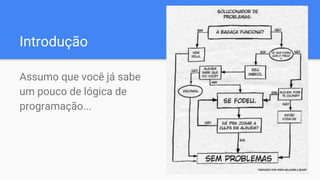
Introdução
Assumo que você já sabe
um pouco de lógica de
programação...
Downloads
● www.python.org
● http://winpython.github.io/
Material de apoio
https://github.com/gdgfsa/python3-exercises
Hello World
python hello.py
Vamos dar uma olhada...
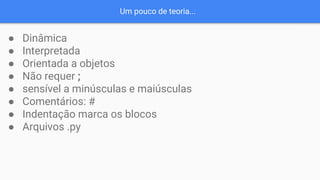
Um pouco de teoria...
● Dinâmica
● Interpretada
● Orientada a objetos
● Não requer ;
● sensível a minúsculas e maiúsculas
● Comentários: #
● Indentação marca os blocos
● Arquivos .py
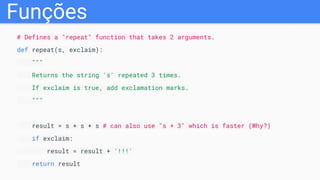
Funções
# Defines a "repeat" function that takes 2 arguments.
def repeat(s, exclaim):
"""
Returns the string 's' repeated 3 times.
If exclaim is true, add exclamation marks.
"""
result = s + s + s # can also use "s * 3" which is faster (Why?)
if exclaim:
result = result + '!!!'
return result
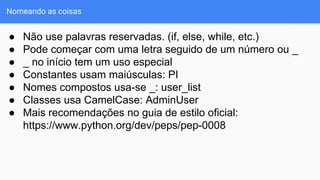
Nomeando as coisas
● Não use palavras reservadas. (if, else, while, etc.)
● Pode começar com uma letra seguido de um número ou _
● _ no início tem um uso especial
● Constantes usam maiúsculas: PI
● Nomes compostos usa-se _: user_list
● Classes usa CamelCase: AdminUser
● Mais recomendações no guia de estilo oficial:
https://www.python.org/dev/peps/pep-0008
Help!
● docs.python.org
● StackOverflow.com
● Quora.com
● help()
● dir()
String
s = 'hi'
print(s[1]) ## i
print(len(s)) ## 2
print( s + ' there') ## hi there
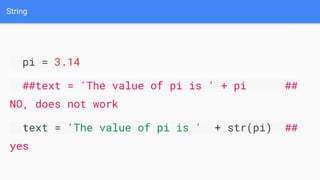
String
pi = 3.14
##text = 'The value of pi is ' + pi ##
NO, does not work
text = 'The value of pi is ' + str(pi) ##
yes
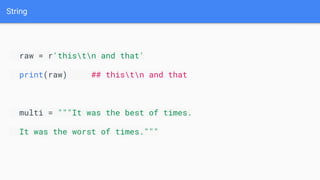
String
raw = r'thistn and that'
print(raw) ## thistn and that
multi = """It was the best of times.
It was the worst of times."""
String
● s.lower(), s.upper(): todas minúsculas, todas maiúsculas
● s.strip(): remove espaços do início e final da string
● s.isalpha()/s.isdigit()/s.isspace()...: faz diversos testes na string
● s.startswith('other'), s.endswith('other'): começa com, termina com
● s.find('other'): procura a primeira ocorrência da string ou expressão
regular
● s.replace('old', 'new'): retorna uma nova string com a substituição de
todas as ocorrências de old por new.
● s.split('delim'): retorna uma lista de substrings separadas por um
delimitador
● s.join(list): recebe uma lista e retorna uma string juntando todos os
elementos
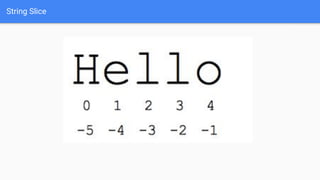
String Slice
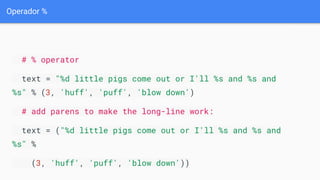
Operador %
# % operator
text = "%d little pigs come out or I'll %s and %s and
%s" % (3, 'huff', 'puff', 'blow down')
# add parens to make the long-line work:
text = ("%d little pigs come out or I'll %s and %s and
%s" %
(3, 'huff', 'puff', 'blow down'))
Listas
colors = ['red', 'blue', 'green']
print(colors[0]) ## red
print( colors[2]) ## green
print( len(colors)) ## 3
Listas
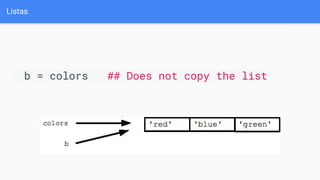
b = colors ## Does not copy the list
Listas
squares = [1, 4, 9, 16]
sum = 0
for num in squares:
sum += num
print( sum ) ## 30
Listas
list = ['larry', 'curly', 'moe']
if 'curly' in list:
print('yay')
Listas
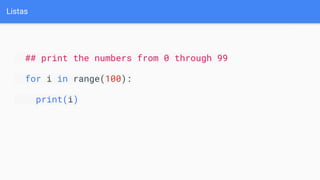
## print the numbers from 0 through 99
for i in range(100):
print(i)
Listas
## Access every 3rd element in a list
i = 0
while i < len(a):
print(a[i])
i = i + 3
Listas
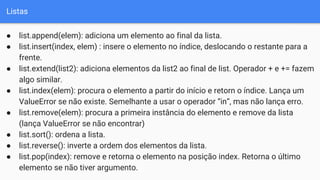
● list.append(elem): adiciona um elemento ao final da lista.
● list.insert(index, elem) : insere o elemento no índice, deslocando o restante para a
frente.
● list.extend(list2): adiciona elementos da list2 ao final de list. Operador + e += fazem
algo similar.
● list.index(elem): procura o elemento a partir do início e retorn o índice. Lança um
ValueError se não existe. Semelhante a usar o operador “in”, mas não lança erro.
● list.remove(elem): procura a primeira instância do elemento e remove da lista
(lança ValueError se não encontrar)
● list.sort(): ordena a lista.
● list.reverse(): inverte a ordem dos elementos da lista.
● list.pop(index): remove e retorna o elemento na posição index. Retorna o último
elemento se não tiver argumento.
Listas
list = ['larry', 'curly', 'moe']
list.append('shemp') ## append elem at end
list.insert(0, 'xxx') ## insert elem at index 0
list.extend(['yyy', 'zzz']) ## add list of elems at end
print(list) ## ['xxx', 'larry', 'curly', 'moe', 'shemp', 'yyy', 'zzz']
print(list.index('curly')) ## 2
list.remove('curly') ## search and remove that element
list.pop(1) ## removes and returns 'larry'
print(list) ## ['xxx', 'moe', 'shemp', 'yyy', 'zzz']
Listas
list = ['a', 'b', 'c', 'd']
print(list[1:-1]) ## ['b', 'c']
list[0:2] = 'z' ## replace ['a', 'b'] with ['z']
print(list) ## ['z', 'c', 'd']
Tuplas
tuple = (1, 2, 'hi')
print(len(tuple)) ## 3
print(tuple[2]) ## hi
tuple[2] = 'bye' ## NO, tuples cannot be changed
tuple = (1, 2, 'bye') ## this works
tuple = ('hi',) ## size-1 tuple
(x, y, z) = (42, 13, "hike")
print(z) ## hike
(err_string, err_code) = Foo() ## Foo() returns a length-2 tuple
List Comprehensions
nums = [1, 2, 3, 4]
squares = [ n * n for n in nums ] ## [1, 4, 9, 16]
strs = ['hello', 'and', 'goodbye']
shouting = [ s.upper() + '!!!' for s in strs ]
## ['HELLO!!!', 'AND!!!', 'GOODBYE!!!']
Dicionários
Dicionários
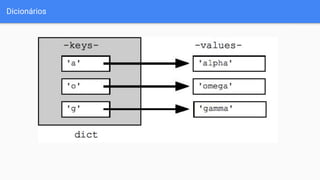
dict = {}
dict['a'] = 'alpha'
dict['g'] = 'gamma'
dict['o'] = 'omega'
print(dict) ## {'a': 'alpha', 'o': 'omega', 'g': 'gamma'}
Dicionários
print(dict['a']) ## Simple lookup, returns 'alpha'
dict['a'] = 6 ## Put new key/value into dict
'a' in dict ## True
## print(dict['z']) ## Throws KeyError
if 'z' in dict: print(dict['z']) ## Avoid KeyError
print(dict.get('z')) ## None (instead of KeyError)
Dicionários
## By default, iterating over a dict iterates over its keys.
## Note that the keys are in a random order.
for key in dict: print(key)
## prints a g o
## Exactly the same as above
for key in dict.keys(): print(key)
## Get the .keys() list:
print(dict.keys()) ## ['a', 'o', 'g']
Dicionários
## Likewise, there's a .values() list of values
print(dict.values()) ## ['alpha', 'omega', 'gamma']
## Common case -- loop over the keys in sorted order,
## accessing each key/value
for key in sorted(dict.keys()):
print(key, dict[key])
Dicionários
## .items() is the dict expressed as (key, value) tuples
print(dict.items()) ## [('a', 'alpha'), ('o', 'omega'),
('g', 'gamma')]
## This loop syntax accesses the whole dict by looping
## over the .items() tuple list, accessing one (key, value)
## pair on each iteration.
for k, v in dict.items(): print(k, '>', v)
## a > alpha o > omega g > gamma
hash = {}
hash['word'] = 'garfield'
hash['count'] = 42
s = 'I want %(count)d copies of %(word)s' % hash # %d for
int, %s for string
# 'I want 42 copies of garfield'
var = 6
del var # var no more!
list = ['a', 'b', 'c', 'd']
del list[0] ## Delete first element
del list[-2:] ## Delete last two elements
print(list) ## ['b']
dict = {'a':1, 'b':2, 'c':3}
del dict['b'] ## Delete 'b' entry
print(dict) ## {'a':1, 'c':3}
Arquivos
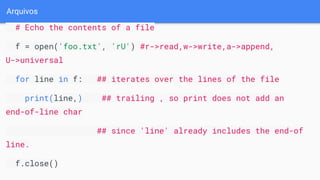
# Echo the contents of a file
f = open('foo.txt', 'rU') #r->read,w->write,a->append,
U->universal
for line in f: ## iterates over the lines of the file
print(line,) ## trailing , so print does not add an
end-of-line char
## since 'line' already includes the end-of
line.
f.close()
Arquivos
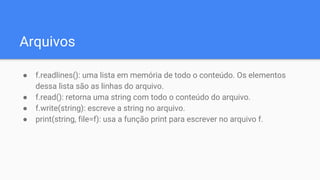
● f.readlines(): uma lista em memória de todo o conteúdo. Os elementos
dessa lista são as linhas do arquivo.
● f.read(): retorna uma string com todo o conteúdo do arquivo.
● f.write(string): escreve a string no arquivo.
● print(string, file=f): usa a função print para escrever no arquivo f.
Arquivos Unicode
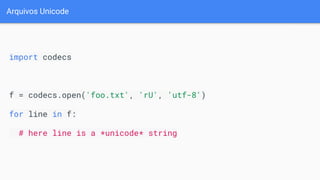
import codecs
f = codecs.open('foo.txt', 'rU', 'utf-8')
for line in f:
# here line is a *unicode* string
Mantenha contato!
Meetup: https://www.meetup.com/pt-BR/gdgfsa/
Facebook: https://www.facebook.com/fsagdg/
Material completo (em inglês):
https://developers.google.com/edu/python

Python Class

  • 1.
  • 2.
  • 3.
    Introdução Assumo que vocêjá sabe um pouco de lógica de programação...
  • 4.
  • 5.
  • 6.
  • 7.
    Vamos dar umaolhada...
  • 8.
    Um pouco deteoria... ● Dinâmica ● Interpretada ● Orientada a objetos ● Não requer ; ● sensível a minúsculas e maiúsculas ● Comentários: # ● Indentação marca os blocos ● Arquivos .py
  • 9.
    Funções # Defines a"repeat" function that takes 2 arguments. def repeat(s, exclaim): """ Returns the string 's' repeated 3 times. If exclaim is true, add exclamation marks. """ result = s + s + s # can also use "s * 3" which is faster (Why?) if exclaim: result = result + '!!!' return result
  • 10.
    Nomeando as coisas ●Não use palavras reservadas. (if, else, while, etc.) ● Pode começar com uma letra seguido de um número ou _ ● _ no início tem um uso especial ● Constantes usam maiúsculas: PI ● Nomes compostos usa-se _: user_list ● Classes usa CamelCase: AdminUser ● Mais recomendações no guia de estilo oficial: https://www.python.org/dev/peps/pep-0008
  • 11.
  • 12.
    String s = 'hi' print(s[1])## i print(len(s)) ## 2 print( s + ' there') ## hi there
  • 13.
    String pi = 3.14 ##text= 'The value of pi is ' + pi ## NO, does not work text = 'The value of pi is ' + str(pi) ## yes
  • 14.
    String raw = r'thistnand that' print(raw) ## thistn and that multi = """It was the best of times. It was the worst of times."""
  • 15.
    String ● s.lower(), s.upper():todas minúsculas, todas maiúsculas ● s.strip(): remove espaços do início e final da string ● s.isalpha()/s.isdigit()/s.isspace()...: faz diversos testes na string ● s.startswith('other'), s.endswith('other'): começa com, termina com ● s.find('other'): procura a primeira ocorrência da string ou expressão regular ● s.replace('old', 'new'): retorna uma nova string com a substituição de todas as ocorrências de old por new. ● s.split('delim'): retorna uma lista de substrings separadas por um delimitador ● s.join(list): recebe uma lista e retorna uma string juntando todos os elementos
  • 16.
  • 17.
    Operador % # %operator text = "%d little pigs come out or I'll %s and %s and %s" % (3, 'huff', 'puff', 'blow down') # add parens to make the long-line work: text = ("%d little pigs come out or I'll %s and %s and %s" % (3, 'huff', 'puff', 'blow down'))
  • 18.
    Listas colors = ['red','blue', 'green'] print(colors[0]) ## red print( colors[2]) ## green print( len(colors)) ## 3
  • 19.
    Listas b = colors## Does not copy the list
  • 20.
    Listas squares = [1,4, 9, 16] sum = 0 for num in squares: sum += num print( sum ) ## 30
  • 21.
    Listas list = ['larry','curly', 'moe'] if 'curly' in list: print('yay')
  • 22.
    Listas ## print thenumbers from 0 through 99 for i in range(100): print(i)
  • 23.
    Listas ## Access every3rd element in a list i = 0 while i < len(a): print(a[i]) i = i + 3
  • 24.
    Listas ● list.append(elem): adicionaum elemento ao final da lista. ● list.insert(index, elem) : insere o elemento no índice, deslocando o restante para a frente. ● list.extend(list2): adiciona elementos da list2 ao final de list. Operador + e += fazem algo similar. ● list.index(elem): procura o elemento a partir do início e retorn o índice. Lança um ValueError se não existe. Semelhante a usar o operador “in”, mas não lança erro. ● list.remove(elem): procura a primeira instância do elemento e remove da lista (lança ValueError se não encontrar) ● list.sort(): ordena a lista. ● list.reverse(): inverte a ordem dos elementos da lista. ● list.pop(index): remove e retorna o elemento na posição index. Retorna o último elemento se não tiver argumento.
  • 25.
    Listas list = ['larry','curly', 'moe'] list.append('shemp') ## append elem at end list.insert(0, 'xxx') ## insert elem at index 0 list.extend(['yyy', 'zzz']) ## add list of elems at end print(list) ## ['xxx', 'larry', 'curly', 'moe', 'shemp', 'yyy', 'zzz'] print(list.index('curly')) ## 2 list.remove('curly') ## search and remove that element list.pop(1) ## removes and returns 'larry' print(list) ## ['xxx', 'moe', 'shemp', 'yyy', 'zzz']
  • 26.
    Listas list = ['a','b', 'c', 'd'] print(list[1:-1]) ## ['b', 'c'] list[0:2] = 'z' ## replace ['a', 'b'] with ['z'] print(list) ## ['z', 'c', 'd']
  • 27.
    Tuplas tuple = (1,2, 'hi') print(len(tuple)) ## 3 print(tuple[2]) ## hi tuple[2] = 'bye' ## NO, tuples cannot be changed tuple = (1, 2, 'bye') ## this works tuple = ('hi',) ## size-1 tuple (x, y, z) = (42, 13, "hike") print(z) ## hike (err_string, err_code) = Foo() ## Foo() returns a length-2 tuple
  • 28.
    List Comprehensions nums =[1, 2, 3, 4] squares = [ n * n for n in nums ] ## [1, 4, 9, 16] strs = ['hello', 'and', 'goodbye'] shouting = [ s.upper() + '!!!' for s in strs ] ## ['HELLO!!!', 'AND!!!', 'GOODBYE!!!']
  • 29.
  • 30.
    Dicionários dict = {} dict['a']= 'alpha' dict['g'] = 'gamma' dict['o'] = 'omega' print(dict) ## {'a': 'alpha', 'o': 'omega', 'g': 'gamma'}
  • 31.
    Dicionários print(dict['a']) ## Simplelookup, returns 'alpha' dict['a'] = 6 ## Put new key/value into dict 'a' in dict ## True ## print(dict['z']) ## Throws KeyError if 'z' in dict: print(dict['z']) ## Avoid KeyError print(dict.get('z')) ## None (instead of KeyError)
  • 32.
    Dicionários ## By default,iterating over a dict iterates over its keys. ## Note that the keys are in a random order. for key in dict: print(key) ## prints a g o ## Exactly the same as above for key in dict.keys(): print(key) ## Get the .keys() list: print(dict.keys()) ## ['a', 'o', 'g']
  • 33.
    Dicionários ## Likewise, there'sa .values() list of values print(dict.values()) ## ['alpha', 'omega', 'gamma'] ## Common case -- loop over the keys in sorted order, ## accessing each key/value for key in sorted(dict.keys()): print(key, dict[key])
  • 34.
    Dicionários ## .items() isthe dict expressed as (key, value) tuples print(dict.items()) ## [('a', 'alpha'), ('o', 'omega'), ('g', 'gamma')] ## This loop syntax accesses the whole dict by looping ## over the .items() tuple list, accessing one (key, value) ## pair on each iteration. for k, v in dict.items(): print(k, '>', v) ## a > alpha o > omega g > gamma
  • 35.
    hash = {} hash['word']= 'garfield' hash['count'] = 42 s = 'I want %(count)d copies of %(word)s' % hash # %d for int, %s for string # 'I want 42 copies of garfield'
  • 36.
    var = 6 delvar # var no more! list = ['a', 'b', 'c', 'd'] del list[0] ## Delete first element del list[-2:] ## Delete last two elements print(list) ## ['b'] dict = {'a':1, 'b':2, 'c':3} del dict['b'] ## Delete 'b' entry print(dict) ## {'a':1, 'c':3}
  • 37.
    Arquivos # Echo thecontents of a file f = open('foo.txt', 'rU') #r->read,w->write,a->append, U->universal for line in f: ## iterates over the lines of the file print(line,) ## trailing , so print does not add an end-of-line char ## since 'line' already includes the end-of line. f.close()
  • 38.
    Arquivos ● f.readlines(): umalista em memória de todo o conteúdo. Os elementos dessa lista são as linhas do arquivo. ● f.read(): retorna uma string com todo o conteúdo do arquivo. ● f.write(string): escreve a string no arquivo. ● print(string, file=f): usa a função print para escrever no arquivo f.
  • 39.
    Arquivos Unicode import codecs f= codecs.open('foo.txt', 'rU', 'utf-8') for line in f: # here line is a *unicode* string
  • 40.
    Mantenha contato! Meetup: https://www.meetup.com/pt-BR/gdgfsa/ Facebook:https://www.facebook.com/fsagdg/ Material completo (em inglês): https://developers.google.com/edu/python