UITableView


     1        @dchohfi
Diego Chohfi Turini
             Instutor na Caelum


          Desenvolvedor na MakeYou


@dchohfi


               2                  @dchohfi
EpicLyrics       BusaoSP
             3         @dchohfi
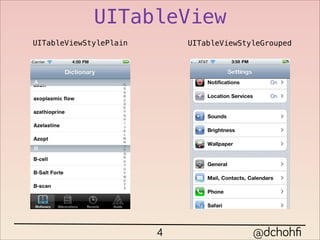
UITableView
UITableViewStylePlain       UITableViewStyleGrouped


                        4                 @dchohfi
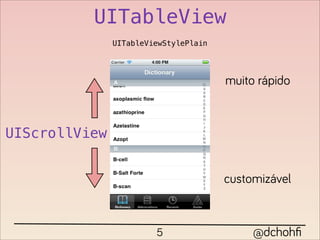
UITableView
               UITableViewStylePlain


                                       muito rápido


UIScrollView


                                       customizável


                        5                   @dchohfi
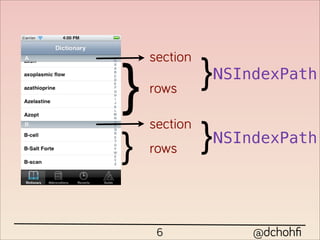
section
              }NSIndexPath
}   rows


              }NSIndexPath
    section
}   rows


     6             @dchohfi
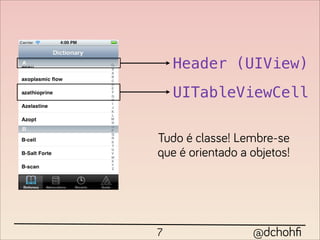
Header (UIView)
    UITableViewCell

Tudo é classe! Lembre-se
que é orientado a objetos!


7                 @dchohfi
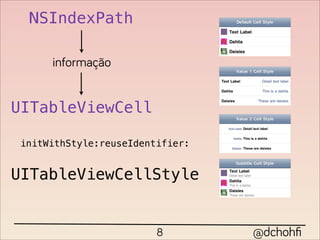
NSIndexPath

     informação


UITableViewCell

initWithStyle:reuseIdentifier:


UITableViewCellStyle


                        8        @dchohfi
UITableView

       <UITableViewDataSource>
@interface DCViewController : UIViewController <UITableViewDataSource>


                                self.tableView.dataSource = self;

                                  9                     @dchohfi
- (NSInteger)numberOfSectionsInTableView:(UITableView *)tableView;

   - (NSInteger)tableView:(UITableView *)tableView
    numberOfRowsInSection:(NSInteger)section;

   - (UITableViewCell *)tableView:(UITableView *)tableView
            cellForRowAtIndexPath:(NSIndexPath *)indexPath;


                                10                   @dchohfi
100 linhas = 100 UITableViewCell
UITableViewCell *cell = [[UITableViewCell alloc] initWithStyle:UITableViewCellStyleSubtitle
                                               reuseIdentifier:@"Cell"];


                                                11                            @dchohfi
dequeueReusableCellWithIdentifier:

UITableViewCell *cell = [tableView dequeueReusableCellWithIdentifier:@"Cell"];
if(!cell){
    cell = [[UITableViewCell alloc] initWithStyle:UITableViewCellStyleSubtitle
                                  reuseIdentifier:@"Cell"];
}


                                      12                       @dchohfi
Ok, mas como sair disso:


           13              @dchohfi
Pra isso:


   14       @dchohfi
15   @dchohfi
Primeiro de tudo: precisamos aprender
       a customizar uma célula


              @interface DCCustomCell : UITableViewCell

              @end


                     16                  @dchohfi
Podemos até criar um XIB pra ela :D
  desenhamos a tela                  temos que LEMBRAR
                                         do identifier


  alteramos a classe ta interface
principal para a nossa customizada


e para acessar os elementos visuais, criamos IBOutlet

                          17                 @dchohfi
e a API evoluiu bastante :D
                                                                                iOS > 5
- (void)registerNib:(UINib *)nib forCellReuseIdentifier:(NSString *)identifier


       rigistramos o novo xib na tabela
    UINib *customNib = [UINib nibWithNibName:@"DCCustomCell"
                                      bundle:[NSBundle mainBundle]];

    [self.tableView registerNib:customNib forCellReuseIdentifier:@"DCCustomCell"];


                                 e podemos remover um if! o/
- (UITableViewCell *)tableView:(UITableView *)tableView cellForRowAtIndexPath:(NSIndexPath *)indexPath
{
   DCCustomCell *cell = (DCCustomCell *)[tableView dequeueReusableCellWithIdentifier:@"DCCustomCell"];


                                                 18                               @dchohfi
19   @dchohfi
Agora precisamos melhorar a performance.

              Primeira regra:
     NUNCA FAÇA DOWNLOAD SÍNCRONO
NSURL *avatarURL = [NSURL URLWithString:user[@"profile_image_url"]];
self.avatar.image = [UIImage imageWithData:[NSData dataWithContentsOfURL:avatarURL]];


a cada download da imagem, tudo trava, inclusive seu
                     usuário..


                                        20                           @dchohfi
open source FTW!
       21      @dchohfi
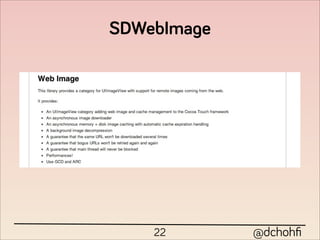
SDWebImage


    22       @dchohfi
Muito simples!
[self.avatar setImageWithURL:[NSURL URLWithString:user[@"profile_image_url"]]];


                                       23                        @dchohfi
Mas, ainda temos problema de performance

             cada subview é desenhada separadamente


  e agora?
                     temos que desenhar tudo de uma
                             vez! sem xib :(


                         24                @dchohfi
Podemos desenhar todos os conteúdos estáticos de uma
                      vez só!

             - (CGSize)drawAtPoint:(CGPoint)point
                          forWidth:(CGFloat)width
 NSString                 withFont:(UIFont *)font
                     lineBreakMode:(NSLineBreakMode)lineBreakMode;


  UIImage             - (void)drawInRect:(CGRect)rect;


                         quando a célula for desenhada

   - (void)drawRect:(CGRect)rect;


                              25                         @dchohfi
Porém sempre que o conteúdo da célula mudar,
              precisamos mandar ela se redesenhar.


                                      setNeedsDisplay


- (void) setTweetData: (NSDictionary *) tweet {
    self.twitterData = tweet;
    NSURL *userAvatarUrl = [NSURL URLWithString:self.twitterData[@"user"][@"profile_image_url"]];
    [self.avatar setImageWithURL:userAvatarUrl];

    [self setNeedsDisplay];
}


                                               26                             @dchohfi
27   @dchohfi
E quando queremos celulas com alturas variaveis?

podemos saber o tamanho de um texto, com uma fonte, de
                   maneira simples:

                   - (CGSize)sizeWithFont:(UIFont *)font
    NSString            constrainedToSize:(CGSize)size;


agora nós temos o controle :D

  - (CGFloat) tableView:(UITableView *)tableView
heightForRowAtIndexPath:(NSIndexPath *)indexPath


                           28                   @dchohfi
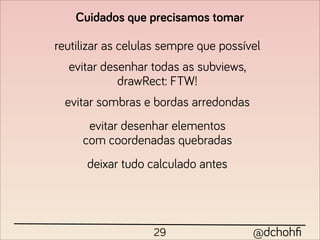
Cuidados que precisamos tomar

reutilizar as celulas sempre que possível
  evitar desenhar todas as subviews,
            drawRect: FTW!
  evitar sombras e bordas arredondas
      evitar desenhar elementos
     com coordenadas quebradas
      deixar tudo calculado antes


                   29                  @dchohfi
CUIDADO MANO!
     30         @dchohfi
10% de desconto nos livros da


    Cupom: MOBILECONF no site

10% de desconto nos cursos da Caelum
            também o/


                31                  @dchohfi
valeu galera :D


       32    @dchohfi

Mobile conf

  • 1.
    UITableView 1 @dchohfi
  • 2.
    Diego Chohfi Turini Instutor na Caelum Desenvolvedor na MakeYou @dchohfi 2 @dchohfi
  • 3.
    EpicLyrics BusaoSP 3 @dchohfi
  • 4.
    UITableView UITableViewStylePlain UITableViewStyleGrouped 4 @dchohfi
  • 5.
    UITableView UITableViewStylePlain muito rápido UIScrollView customizável 5 @dchohfi
  • 6.
    section }NSIndexPath } rows }NSIndexPath section } rows 6 @dchohfi
  • 7.
    Header (UIView) UITableViewCell Tudo é classe! Lembre-se que é orientado a objetos! 7 @dchohfi
  • 8.
    NSIndexPath informação UITableViewCell initWithStyle:reuseIdentifier: UITableViewCellStyle 8 @dchohfi
  • 9.
    UITableView <UITableViewDataSource> @interface DCViewController : UIViewController <UITableViewDataSource> self.tableView.dataSource = self; 9 @dchohfi
  • 10.
    - (NSInteger)numberOfSectionsInTableView:(UITableView *)tableView; - (NSInteger)tableView:(UITableView *)tableView numberOfRowsInSection:(NSInteger)section; - (UITableViewCell *)tableView:(UITableView *)tableView cellForRowAtIndexPath:(NSIndexPath *)indexPath; 10 @dchohfi
  • 11.
    100 linhas =100 UITableViewCell UITableViewCell *cell = [[UITableViewCell alloc] initWithStyle:UITableViewCellStyleSubtitle reuseIdentifier:@"Cell"]; 11 @dchohfi
  • 12.
    dequeueReusableCellWithIdentifier: UITableViewCell *cell =[tableView dequeueReusableCellWithIdentifier:@"Cell"]; if(!cell){ cell = [[UITableViewCell alloc] initWithStyle:UITableViewCellStyleSubtitle reuseIdentifier:@"Cell"]; } 12 @dchohfi
  • 13.
    Ok, mas comosair disso: 13 @dchohfi
  • 14.
    Pra isso: 14 @dchohfi
  • 15.
    15 @dchohfi
  • 16.
    Primeiro de tudo:precisamos aprender a customizar uma célula @interface DCCustomCell : UITableViewCell @end 16 @dchohfi
  • 17.
    Podemos até criarum XIB pra ela :D desenhamos a tela temos que LEMBRAR do identifier alteramos a classe ta interface principal para a nossa customizada e para acessar os elementos visuais, criamos IBOutlet 17 @dchohfi
  • 18.
    e a APIevoluiu bastante :D iOS > 5 - (void)registerNib:(UINib *)nib forCellReuseIdentifier:(NSString *)identifier rigistramos o novo xib na tabela UINib *customNib = [UINib nibWithNibName:@"DCCustomCell" bundle:[NSBundle mainBundle]]; [self.tableView registerNib:customNib forCellReuseIdentifier:@"DCCustomCell"]; e podemos remover um if! o/ - (UITableViewCell *)tableView:(UITableView *)tableView cellForRowAtIndexPath:(NSIndexPath *)indexPath { DCCustomCell *cell = (DCCustomCell *)[tableView dequeueReusableCellWithIdentifier:@"DCCustomCell"]; 18 @dchohfi
  • 19.
    19 @dchohfi
  • 20.
    Agora precisamos melhorara performance. Primeira regra: NUNCA FAÇA DOWNLOAD SÍNCRONO NSURL *avatarURL = [NSURL URLWithString:user[@"profile_image_url"]]; self.avatar.image = [UIImage imageWithData:[NSData dataWithContentsOfURL:avatarURL]]; a cada download da imagem, tudo trava, inclusive seu usuário.. 20 @dchohfi
  • 21.
    open source FTW! 21 @dchohfi
  • 22.
    SDWebImage 22 @dchohfi
  • 23.
    Muito simples! [self.avatar setImageWithURL:[NSURLURLWithString:user[@"profile_image_url"]]]; 23 @dchohfi
  • 24.
    Mas, ainda temosproblema de performance cada subview é desenhada separadamente e agora? temos que desenhar tudo de uma vez! sem xib :( 24 @dchohfi
  • 25.
    Podemos desenhar todosos conteúdos estáticos de uma vez só! - (CGSize)drawAtPoint:(CGPoint)point forWidth:(CGFloat)width NSString withFont:(UIFont *)font lineBreakMode:(NSLineBreakMode)lineBreakMode; UIImage - (void)drawInRect:(CGRect)rect; quando a célula for desenhada - (void)drawRect:(CGRect)rect; 25 @dchohfi
  • 26.
    Porém sempre queo conteúdo da célula mudar, precisamos mandar ela se redesenhar. setNeedsDisplay - (void) setTweetData: (NSDictionary *) tweet { self.twitterData = tweet; NSURL *userAvatarUrl = [NSURL URLWithString:self.twitterData[@"user"][@"profile_image_url"]]; [self.avatar setImageWithURL:userAvatarUrl]; [self setNeedsDisplay]; } 26 @dchohfi
  • 27.
    27 @dchohfi
  • 28.
    E quando queremoscelulas com alturas variaveis? podemos saber o tamanho de um texto, com uma fonte, de maneira simples: - (CGSize)sizeWithFont:(UIFont *)font NSString constrainedToSize:(CGSize)size; agora nós temos o controle :D - (CGFloat) tableView:(UITableView *)tableView heightForRowAtIndexPath:(NSIndexPath *)indexPath 28 @dchohfi
  • 29.
    Cuidados que precisamostomar reutilizar as celulas sempre que possível evitar desenhar todas as subviews, drawRect: FTW! evitar sombras e bordas arredondas evitar desenhar elementos com coordenadas quebradas deixar tudo calculado antes 29 @dchohfi
  • 30.
    CUIDADO MANO! 30 @dchohfi
  • 31.
    10% de descontonos livros da Cupom: MOBILECONF no site 10% de desconto nos cursos da Caelum também o/ 31 @dchohfi
  • 32.
    valeu galera :D 32 @dchohfi