O documento apresenta uma palestra sobre Git e Github. Ele explica o que são Git e Github, como configurar o Git, administrar repositórios e interagir socialmente no Github.
Configurando o Git
●
Gerando chave RSA [1]
$ cd ~/.ssh
$ ls
id_rsa id_rsa.pub know_hosts
$ mkdir key_backup
$ cp id_rsa* key_backup
$ rm id_rsa
42
14.
Configurando o Git
●
Gerando chave RSA [2]
$ ssh-keygen -t rsa seu@email.com
Generating public/private rsa key pair.
Enter file in which to save the key
(~/.ssh/id_rsa): <aperte enter>
Enter passphrase: <aperte enter>
Enter same passphrase again: <aperte enter>
42
15.
Configurando o Git
●
Adicionando chave RSA ao seu Github [1]
~/.ssh $ cat id_rsa.pub
ssh-rsa <MINHA CHAVE>
romulo.machado5@gmail.com
42
16.
Configurando o Git
●
Adicionando chave RSA ao seu Github [2]
No github, vá em Account Settings > SSH Public Keys > Add another public key
42
17.
Configurando o Git
●
Testando se está tudo ok! [1]
$ ssh git@github.com
The authenticity of host 'github.com
(207.97.227.239)' can't be established.
RSA key fingerprint is …
Are you sure you want to continue
connecting (yes/no)? <digite yes>
42
18.
Configurando o Git
●
Testando se está tudo ok! [2]
PTY allocation request failed on channel 0
Hi username! You' sucessfully authenticated,
but Github does not provide shell access.
Connection to github.com closed.
42
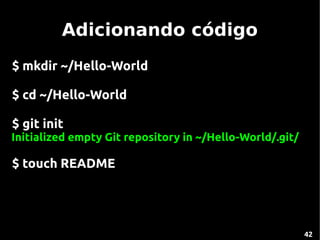
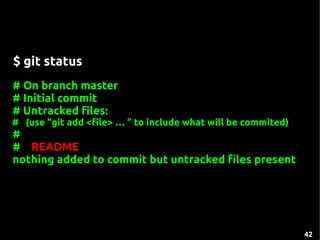
$ git status
#On branch master
# Initial commit
# Untracked files:
# (use “git add <file> … “ to include what will be commited)
#
# README
nothing added to commit but untracked files present
42






![Configurando o Git
●
Gerando chave RSA [1]
$ cd ~/.ssh
$ ls
id_rsa id_rsa.pub know_hosts
$ mkdir key_backup
$ cp id_rsa* key_backup
$ rm id_rsa
42](https://image.slidesharecdn.com/github-presentation-110525084443-phpapp01/85/Github-13-320.jpg)
![Configurando o Git
●
Gerando chave RSA [2]
$ ssh-keygen -t rsa seu@email.com
Generating public/private rsa key pair.
Enter file in which to save the key
(~/.ssh/id_rsa): <aperte enter>
Enter passphrase: <aperte enter>
Enter same passphrase again: <aperte enter>
42](https://image.slidesharecdn.com/github-presentation-110525084443-phpapp01/85/Github-14-320.jpg)
![Configurando o Git
●
Adicionando chave RSA ao seu Github [1]
~/.ssh $ cat id_rsa.pub
ssh-rsa <MINHA CHAVE>
romulo.machado5@gmail.com
42](https://image.slidesharecdn.com/github-presentation-110525084443-phpapp01/85/Github-15-320.jpg)
![Configurando o Git
●
Adicionando chave RSA ao seu Github [2]
No github, vá em Account Settings > SSH Public Keys > Add another public key
42](https://image.slidesharecdn.com/github-presentation-110525084443-phpapp01/85/Github-16-320.jpg)
![Configurando o Git
●
Testando se está tudo ok! [1]
$ ssh git@github.com
The authenticity of host 'github.com
(207.97.227.239)' can't be established.
RSA key fingerprint is …
Are you sure you want to continue
connecting (yes/no)? <digite yes>
42](https://image.slidesharecdn.com/github-presentation-110525084443-phpapp01/85/Github-17-320.jpg)
![Configurando o Git
●
Testando se está tudo ok! [2]
PTY allocation request failed on channel 0
Hi username! You' sucessfully authenticated,
but Github does not provide shell access.
Connection to github.com closed.
42](https://image.slidesharecdn.com/github-presentation-110525084443-phpapp01/85/Github-18-320.jpg)