WEBINAR - APRIL 29
From compliance to opportunity
how EAA reshapes agency strategies
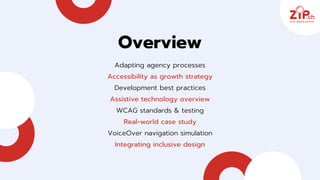
Overview
Adapting agency processes
Accessibility as growth strategy
Development best practices
Assistive technology overview
WCAG standards & testing
Real‑world case study
VoiceOver navigation simulation
Integrating inclusive design
Embedding EAA
compliance into
ZIP.ch workflow 🚀
We have updated our workflows to integrate
accessibility at production stage to ensure compliance
with the European Accessibility Act. Through targeted
training, clear documentation and usability tests, we
deliver inclusive websites that meet both legal
requirements and high user‑experience standards.
ADAPTING
AGENCY
PROCESSES
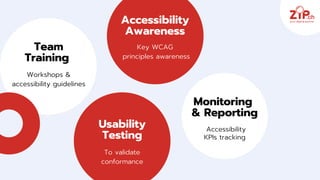
Accessibility
Awareness
Key WCAG
principles awareness
Team
Training
Workshops &
accessibility guidelines
Usability
Testing
To validate
conformance
Monitoring
& Reporting
Accessibility
KPIs tracking
Swiss clients have not yet felt a
strong impact. National regulations
remain unchanged and awareness of
the EAA is still limited among SMBs.
Swiss
awareness
gap🇨🇭
Accessibility as growth strategy
DRIVE ROI, UNLOCK NEW MARKETS AND
STRENGTHEN BRAND LOYALTY
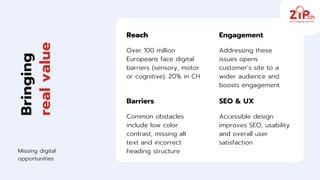
Bringing
real
value
Reach
Over 100 million
Europeans face digital
barriers (sensory, motor
or cognitive). 20% in CH
Barriers
Common obstacles
include low color
contrast, missing alt
text and incorrect
heading structure
Engagement
Addressing these
issues opens
customer’s site to a
wider audience and
boosts engagement
Missing digital
opportunities
SEO & UX
Accessible design
improves SEO, usability
and overall user
satisfaction
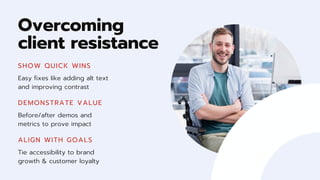
Overcoming
client resistance
SHOW QUICK WINS
Easy fixes like adding alt text
and improving contrast
DEMONSTRATE VALUE
Before/after demos and
metrics to prove impact
ALIGN WITH GOALS
Tie accessibility to brand
growth & customer loyalty
Development best practices
IMPLEMENT FOUNDATIONAL ACCESSIBILITY FEATURES
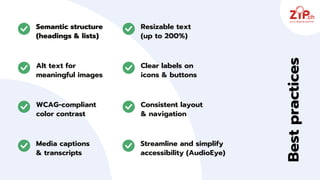
Semantic structure
(headings & lists)
Alt text for
meaningful images
Resizable text
(up to 200%)
Clear labels on
icons & buttons
WCAG‑compliant
color contrast
Consistent layout
& navigation
Best
practices
Media captions
& transcripts
Streamline and simplify
accessibility (AudioEye)
Assistive tools
KEY TECHNOLOGIES ENABLING WEB ACCESS
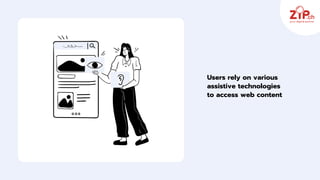
Users rely on various
assistive technologies
to access web content
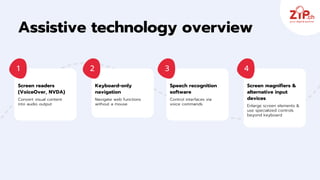
Screen readers
(VoiceOver, NVDA)
Convert visual content
into audio output
Keyboard‑only
navigation
Navigate web functions
without a mouse
Speech recognition
software
Control interfaces via
voice commands
Screen magnifiers &
alternative input
devices
Enlarge screen elements &
use specialized controls
beyond keyboard
1 2 3 4
Assistive technology overview
WCAG standards & testing
DEFINE REQUIREMENTS AND VERIFY CONFORMANCE
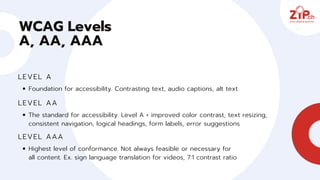
WCAG Levels
A, AA, AAA
LEVEL A
Foundation for accessibility. Contrasting text, audio captions, alt text
LEVEL AA
The standard for accessibility. Level A + improved color contrast, text resizing,
consistent navigation, logical headings, form labels, error suggestions
LEVEL AAA
Highest level of conformance. Not always feasible or necessary for
all content. Ex. sign language translation for videos, 7:1 contrast ratio
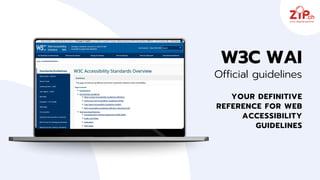
YOUR DEFINITIVE
REFERENCE FOR WEB
ACCESSIBILITY
GUIDELINES
W3C WAI
Official guidelines
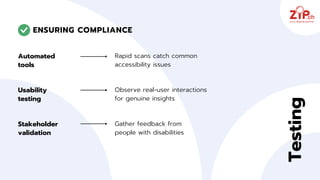
Automated
tools
Usability
testing
Rapid scans catch common
accessibility issues
ENSURING COMPLIANCE
Stakeholder
validation
Testing
Observe real‑user interactions
for genuine insights
Gather feedback from
people with disabilities
Real‑world case study
DEMONSTRATING IMPACT WITH
DUDA CMS AND AUDIOEYE
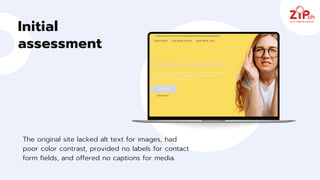
Initial
assessment
The original site lacked alt text for images, had
poor color contrast, provided no labels for contact
form fields, and offered no captions for media.
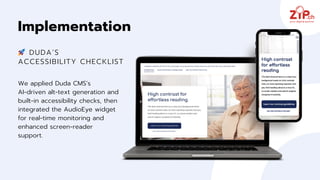
We applied Duda CMS’s
AI‑driven alt‑text generation and
built‑in accessibility checks, then
integrated the AudioEye widget
for real‑time monitoring and
enhanced screen‑reader
support.
Implementation
🚀 DUDA’S
ACCESSIBILITY CHECKLIST
After these upgrades,
WCAG AA compliance
improved significantly,
accessibility errors dropped
by 80%, and user feedback
was very positive, showing
that combining platform
features with third-party
tools drives quick,
measurable results.
Results &
insights
21
Blind user simulation
EXPERIENCE A WEBSITE
THROUGH A SCREEN READER
CONCLUSION
Embed accessibility at
every stage - from concept
to launch - to ensure every
site welcomes all users.
Design for
everyone
22
Thank you
for committing to build a more
inclusive web for everyone
Lausanne
Avenue de la Gare 33
1003 Lausanne
Genève
Rue Pierres-du-Niton 17
1207 Genève
Bern
Uferweg 17
3013 Berne

Get client sites EAA-ready: Accessibility best practices for agencies

  • 1.
    WEBINAR - APRIL29 From compliance to opportunity how EAA reshapes agency strategies
  • 2.
    Overview Adapting agency processes Accessibilityas growth strategy Development best practices Assistive technology overview WCAG standards & testing Real‑world case study VoiceOver navigation simulation Integrating inclusive design
  • 3.
    Embedding EAA compliance into ZIP.chworkflow 🚀 We have updated our workflows to integrate accessibility at production stage to ensure compliance with the European Accessibility Act. Through targeted training, clear documentation and usability tests, we deliver inclusive websites that meet both legal requirements and high user‑experience standards. ADAPTING AGENCY PROCESSES
  • 4.
    Accessibility Awareness Key WCAG principles awareness Team Training Workshops& accessibility guidelines Usability Testing To validate conformance Monitoring & Reporting Accessibility KPIs tracking
  • 5.
    Swiss clients havenot yet felt a strong impact. National regulations remain unchanged and awareness of the EAA is still limited among SMBs. Swiss awareness gap🇨🇭
  • 6.
    Accessibility as growthstrategy DRIVE ROI, UNLOCK NEW MARKETS AND STRENGTHEN BRAND LOYALTY
  • 7.
    Bringing real value Reach Over 100 million Europeansface digital barriers (sensory, motor or cognitive). 20% in CH Barriers Common obstacles include low color contrast, missing alt text and incorrect heading structure Engagement Addressing these issues opens customer’s site to a wider audience and boosts engagement Missing digital opportunities SEO & UX Accessible design improves SEO, usability and overall user satisfaction
  • 8.
    Overcoming client resistance SHOW QUICKWINS Easy fixes like adding alt text and improving contrast DEMONSTRATE VALUE Before/after demos and metrics to prove impact ALIGN WITH GOALS Tie accessibility to brand growth & customer loyalty
  • 9.
    Development best practices IMPLEMENTFOUNDATIONAL ACCESSIBILITY FEATURES
  • 10.
    Semantic structure (headings &lists) Alt text for meaningful images Resizable text (up to 200%) Clear labels on icons & buttons WCAG‑compliant color contrast Consistent layout & navigation Best practices Media captions & transcripts Streamline and simplify accessibility (AudioEye)
  • 11.
  • 12.
    Users rely onvarious assistive technologies to access web content
  • 13.
    Screen readers (VoiceOver, NVDA) Convertvisual content into audio output Keyboard‑only navigation Navigate web functions without a mouse Speech recognition software Control interfaces via voice commands Screen magnifiers & alternative input devices Enlarge screen elements & use specialized controls beyond keyboard 1 2 3 4 Assistive technology overview
  • 14.
    WCAG standards &testing DEFINE REQUIREMENTS AND VERIFY CONFORMANCE
  • 15.
    WCAG Levels A, AA,AAA LEVEL A Foundation for accessibility. Contrasting text, audio captions, alt text LEVEL AA The standard for accessibility. Level A + improved color contrast, text resizing, consistent navigation, logical headings, form labels, error suggestions LEVEL AAA Highest level of conformance. Not always feasible or necessary for all content. Ex. sign language translation for videos, 7:1 contrast ratio
  • 16.
    YOUR DEFINITIVE REFERENCE FORWEB ACCESSIBILITY GUIDELINES W3C WAI Official guidelines
  • 17.
    Automated tools Usability testing Rapid scans catchcommon accessibility issues ENSURING COMPLIANCE Stakeholder validation Testing Observe real‑user interactions for genuine insights Gather feedback from people with disabilities
  • 18.
    Real‑world case study DEMONSTRATINGIMPACT WITH DUDA CMS AND AUDIOEYE
  • 19.
    Initial assessment The original sitelacked alt text for images, had poor color contrast, provided no labels for contact form fields, and offered no captions for media.
  • 20.
    We applied DudaCMS’s AI‑driven alt‑text generation and built‑in accessibility checks, then integrated the AudioEye widget for real‑time monitoring and enhanced screen‑reader support. Implementation 🚀 DUDA’S ACCESSIBILITY CHECKLIST
  • 21.
    After these upgrades, WCAGAA compliance improved significantly, accessibility errors dropped by 80%, and user feedback was very positive, showing that combining platform features with third-party tools drives quick, measurable results. Results & insights
  • 22.
    21 Blind user simulation EXPERIENCEA WEBSITE THROUGH A SCREEN READER
  • 23.
    CONCLUSION Embed accessibility at everystage - from concept to launch - to ensure every site welcomes all users. Design for everyone 22
  • 24.
    Thank you for committingto build a more inclusive web for everyone Lausanne Avenue de la Gare 33 1003 Lausanne Genève Rue Pierres-du-Niton 17 1207 Genève Bern Uferweg 17 3013 Berne