Copyright 2015 Google IncCopyright 2015 Google Inc
Intro to Mobile Backend
Thales Lima
Copyright 2015 Google Inc
Agenda
Google App Engine
Google Cloud Endpoints
Datastore
1
2
3
4 Codelab
Copyright 2015 Google Inc
Aplicativos do Google App Engine são fáceis de
criar, manter e escalar. Deixe o Google gerenciar
os servidores para você.
Images by Connie Zhou
Copyright 2015 Google Inc
App Engine
Images by Connie Zhou
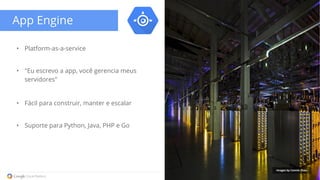
• Platform-as-a-service
• "Eu escrevo a app, você gerencia meus
servidores"
• Fácil para construir, manter e escalar
• Suporte para Python, Java, PHP e Go
Copyright 2015 Google Inc
App Engine
Images by Connie Zhou
• Escalabilidade automática sem
necessidade de configuração
• Foco no código com deploy simples e
servidor local para testes
• Algumas necessidades de adaptação no
código
• Timeouts de 60 segundos para
requisições em instancias frontend
Copyright 2015 Google Inc
Images by Connie Zhou
Cloud Endpoints
• Facilita a criação de API de backend no
App Engine
• Oferece autenticação OAuth
• Fácil para construir, manter e escalar
Copyright 2015 Google Inc
Images by Connie Zhou
Cloud Endpoints
• Possui recursos especiais no Android
Studio
• Fácil de criar os backends e os clients para
o backend via wizards (Android, IOS e JS)
• Necessidades de adaptação do código
• Associado ao Google Cloud Platform
Copyright 2015 Google Inc
User
Images by Connie Zhou
Cloud Datastore
• NoSql Store
• Autoscale and management
Key: joe@ex.com
email: joe@ex.com
followees: [usr2@ex.com,
usr3@ex.com]
followers:
Entities
Kinds
Keys
Properties
"Table"
"Primary key"
"Field"
"Row"
Copyright 2015 Google Inc
Google Cloud Platform
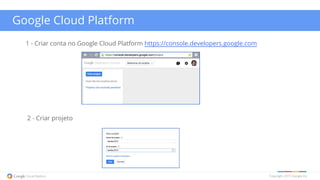
1 - Criar conta no Google Cloud Platform https://console.developers.google.com
2 - Criar projeto
Copyright 2015 Google Inc
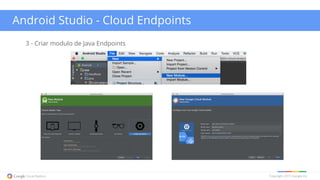
Android Studio - Cloud Endpoints
3 - Criar modulo de Java Endpoints
Copyright 2015 Google Inc
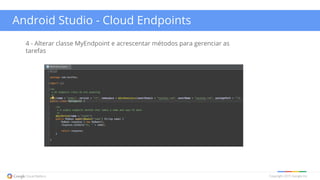
Android Studio - Cloud Endpoints
4 - Alterar classe MyEndpoint e acrescentar métodos para gerenciar as
tarefas
Copyright 2015 Google Inc
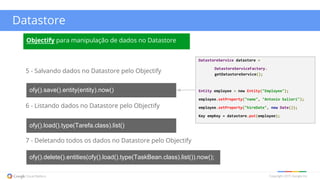
Datastore
5 - Salvando dados no Datastore pelo Objectify
ofy().save().entity(entity).now()
6 - Listando dados no Datastore pelo Objectify
ofy().load().type(Tarefa.class).list()
7 - Deletando todos os dados no Datastore pelo Objectify
ofy().delete().entities(ofy().load().type(TaskBean.class).list()).now();
Objectify para manipulação de dados no Datastore
DatastoreService datastore =
DatastoreServiceFactory.
getDatastoreService();
Entity employee = new Entity("Employee");
employee.setProperty("name", "Antonio Salieri");
employee.setProperty("hireDate", new Date());
Key empKey = datastore.put(employee);
Copyright 2015 Google Inc
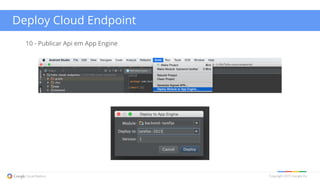
Deploy Cloud Endpoint
10 - Publicar Api em App Engine
Copyright 2015 Google Inc
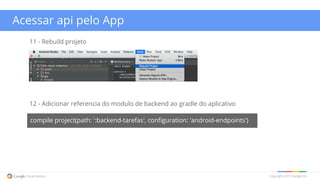
Acessar api pelo App
12 - Adicionar referencia do modulo de backend ao gradle do aplicativo
compile project(path: ':backend-tarefas', configuration: 'android-endpoints')
11 - Rebuild projeto
Copyright 2015 Google Inc
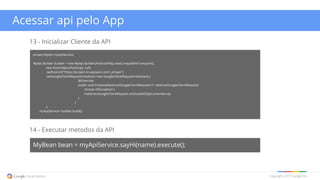
Acessar api pelo App
14 - Executar metodos da API
MyBean bean = myApiService.sayHi(name).execute();
13 - Inicializar Cliente da API
private MyApi myApiService;
MyApi.Builder builder = new MyApi.Builder(AndroidHttp.newCompatibleTransport(),
new AndroidJsonFactory(), null)
.setRootUrl("https://project-id.appspot.com/_ah/api/")
.setGoogleClientRequestInitializer( new GoogleClientRequestInitializer() {
@Override
public void initialize(AbstractGoogleClientRequest<?> abstractGoogleClientRequest)
throws IOException {
//abstractGoogleClientRequest.setDisableGZipContent(true);
}
}
);
myApiService= builder.build();
Copyright 2015 Google Inc
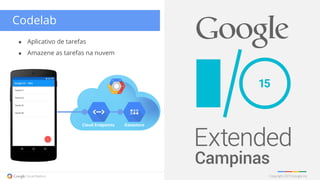
● Aplicativo de tarefas
● Amazene as tarefas na nuvem
Codelab
Cloud Endpoints Datastore
Copyright 2015 Google Inc
Contato
Thales Lima
thalesrml@gmail.com
@thales_
https://github.com/thaleslima
Copyright 2015 Google Inc
cloud.google.com
Images by Connie
Zhou

Backend em aplicações Android - Google I/O 2015

  • 1.
    Copyright 2015 GoogleIncCopyright 2015 Google Inc Intro to Mobile Backend Thales Lima
  • 2.
    Copyright 2015 GoogleInc Agenda Google App Engine Google Cloud Endpoints Datastore 1 2 3 4 Codelab
  • 3.
    Copyright 2015 GoogleInc Aplicativos do Google App Engine são fáceis de criar, manter e escalar. Deixe o Google gerenciar os servidores para você. Images by Connie Zhou
  • 4.
    Copyright 2015 GoogleInc App Engine Images by Connie Zhou • Platform-as-a-service • "Eu escrevo a app, você gerencia meus servidores" • Fácil para construir, manter e escalar • Suporte para Python, Java, PHP e Go
  • 5.
    Copyright 2015 GoogleInc App Engine Images by Connie Zhou • Escalabilidade automática sem necessidade de configuração • Foco no código com deploy simples e servidor local para testes • Algumas necessidades de adaptação no código • Timeouts de 60 segundos para requisições em instancias frontend
  • 6.
    Copyright 2015 GoogleInc Images by Connie Zhou Cloud Endpoints • Facilita a criação de API de backend no App Engine • Oferece autenticação OAuth • Fácil para construir, manter e escalar
  • 7.
    Copyright 2015 GoogleInc Images by Connie Zhou Cloud Endpoints • Possui recursos especiais no Android Studio • Fácil de criar os backends e os clients para o backend via wizards (Android, IOS e JS) • Necessidades de adaptação do código • Associado ao Google Cloud Platform
  • 8.
    Copyright 2015 GoogleInc User Images by Connie Zhou Cloud Datastore • NoSql Store • Autoscale and management Key: joe@ex.com email: joe@ex.com followees: [usr2@ex.com, usr3@ex.com] followers: Entities Kinds Keys Properties "Table" "Primary key" "Field" "Row"
  • 9.
    Copyright 2015 GoogleInc Google Cloud Platform 1 - Criar conta no Google Cloud Platform https://console.developers.google.com 2 - Criar projeto
  • 10.
    Copyright 2015 GoogleInc Android Studio - Cloud Endpoints 3 - Criar modulo de Java Endpoints
  • 11.
    Copyright 2015 GoogleInc Android Studio - Cloud Endpoints 4 - Alterar classe MyEndpoint e acrescentar métodos para gerenciar as tarefas
  • 12.
    Copyright 2015 GoogleInc Datastore 5 - Salvando dados no Datastore pelo Objectify ofy().save().entity(entity).now() 6 - Listando dados no Datastore pelo Objectify ofy().load().type(Tarefa.class).list() 7 - Deletando todos os dados no Datastore pelo Objectify ofy().delete().entities(ofy().load().type(TaskBean.class).list()).now(); Objectify para manipulação de dados no Datastore DatastoreService datastore = DatastoreServiceFactory. getDatastoreService(); Entity employee = new Entity("Employee"); employee.setProperty("name", "Antonio Salieri"); employee.setProperty("hireDate", new Date()); Key empKey = datastore.put(employee);
  • 13.
    Copyright 2015 GoogleInc Deploy Cloud Endpoint 10 - Publicar Api em App Engine
  • 14.
    Copyright 2015 GoogleInc Acessar api pelo App 12 - Adicionar referencia do modulo de backend ao gradle do aplicativo compile project(path: ':backend-tarefas', configuration: 'android-endpoints') 11 - Rebuild projeto
  • 15.
    Copyright 2015 GoogleInc Acessar api pelo App 14 - Executar metodos da API MyBean bean = myApiService.sayHi(name).execute(); 13 - Inicializar Cliente da API private MyApi myApiService; MyApi.Builder builder = new MyApi.Builder(AndroidHttp.newCompatibleTransport(), new AndroidJsonFactory(), null) .setRootUrl("https://project-id.appspot.com/_ah/api/") .setGoogleClientRequestInitializer( new GoogleClientRequestInitializer() { @Override public void initialize(AbstractGoogleClientRequest<?> abstractGoogleClientRequest) throws IOException { //abstractGoogleClientRequest.setDisableGZipContent(true); } } ); myApiService= builder.build();
  • 16.
    Copyright 2015 GoogleInc ● Aplicativo de tarefas ● Amazene as tarefas na nuvem Codelab Cloud Endpoints Datastore
  • 17.
    Copyright 2015 GoogleInc Contato Thales Lima thalesrml@gmail.com @thales_ https://github.com/thaleslima
  • 18.
    Copyright 2015 GoogleInc cloud.google.com Images by Connie Zhou